Yes! You can use AI to fill out Commonwealth of Kentucky Department for Medicaid Services MAP-811 Provider Application
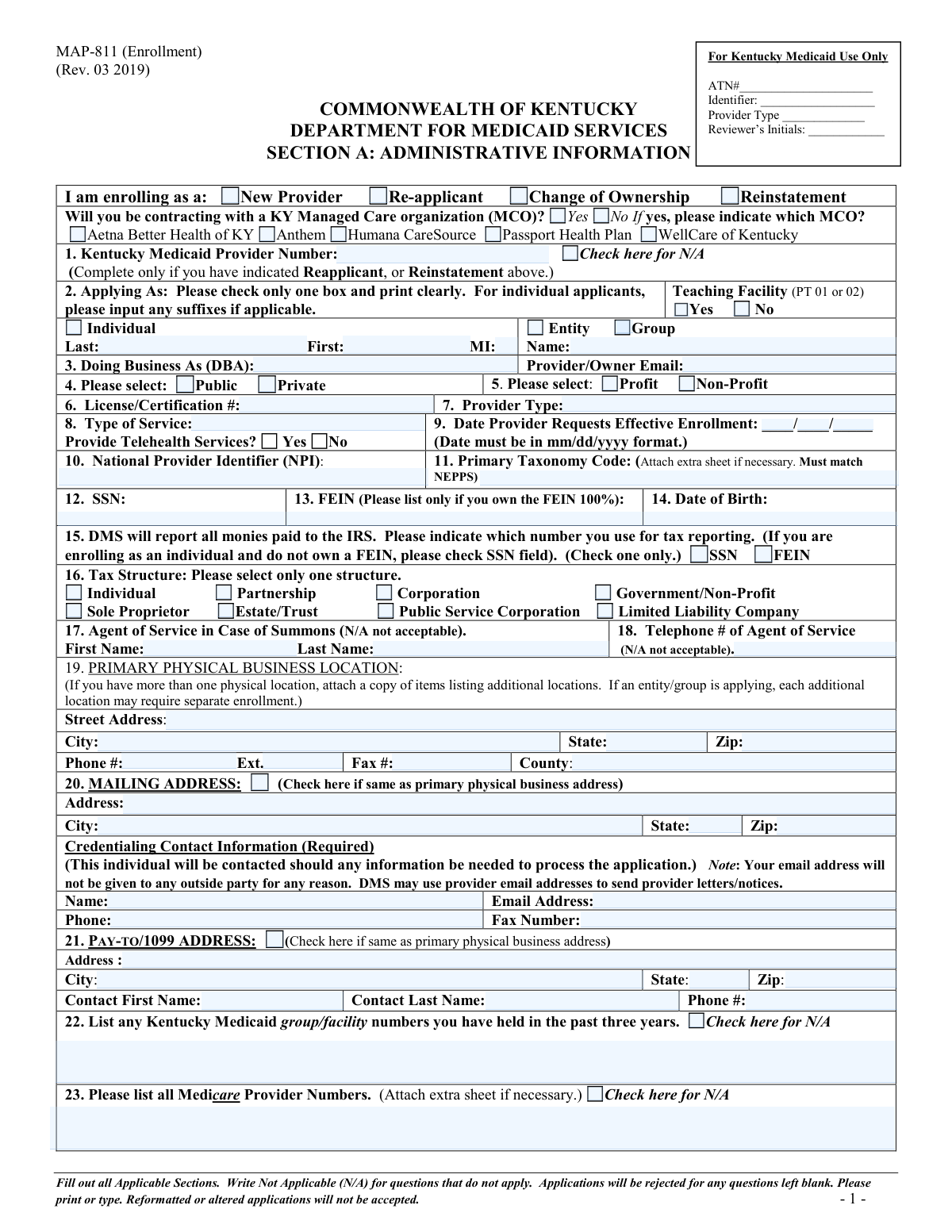
Form MAP-811 is a comprehensive application used by healthcare providers, both individuals and entities, to enroll in the Kentucky Medicaid program to become eligible for reimbursement for services rendered to Medicaid members. It requires detailed disclosure of administrative, ownership, and professional history information. Today, this form can be filled out quickly and accurately using AI-powered services like Instafill.ai, which can also convert non-fillable PDF versions into interactive fillable forms.
MAP-811 is part of the
Medicaid forms category on Instafill.
Our AI automatically handles information lookup, data retrieval, formatting, and form filling.
It takes less than a minute to fill out MAP-811 using our AI form filling.
Securely upload your data. Information is encrypted in transit and deleted immediately after the form is filled out.
Form specifications
| Form name: | Commonwealth of Kentucky Department for Medicaid Services MAP-811 Provider Application |
| Number of pages: | 1 |
| Language: | English |
More forms in Medicaid forms
Instafill Demo: How to fill out PDF forms in seconds with AI
How to Fill Out MAP-811 Online for Free in 2026
Are you looking to fill out a MAP-811 form online quickly and accurately? Instafill.ai offers the #1 AI-powered PDF filling software of 2026, allowing you to complete your MAP-811 form in just 37 seconds or less.
Follow these steps to fill out your MAP-811 form online using Instafill.ai:
- 1 Navigate to a service like Instafill.ai and upload the MAP-811 PDF or select it from their template library.
- 2 Complete Section A: Administrative Information, providing details like provider type, NPI, taxonomy codes, and business addresses.
- 3 Fill out Section B: Disclosure of Ownership and Control Interest, detailing all individuals and entities with ownership stakes as required by federal and state law.
- 4 If enrolling as an individual provider, complete Section C: Attestations by answering all questions regarding your professional licensure, claims history, and legal background.
- 5 Carefully review the Medicaid rules, regulations, and provider agreement sections to understand your responsibilities.
- 6 Gather and attach all required supporting documentation, such as copies of licenses, NPI verification, Social Security card (for individuals), or IRS verification letter (for entities).
- 7 Use the AI tool to review the entire application for completeness and accuracy, ensuring no fields are left blank, before printing, signing, and submitting it as instructed.
Our AI-powered system ensures each field is filled out correctly, reducing errors and saving you time.
Why Choose Instafill.ai for Your Fillable MAP-811 Form?
Speed
Complete your MAP-811 in as little as 37 seconds.
Up-to-Date
Always use the latest 2026 MAP-811 form version.
Cost-effective
No need to hire expensive lawyers.
Accuracy
Our AI performs 10 compliance checks to ensure your form is error-free.
Security
Your personal information is protected with bank-level encryption.
Frequently Asked Questions About Form MAP-811
The MAP-811 form is the Provider Application used by healthcare providers to enroll with Kentucky Medicaid. It is required for new providers, those re-applying, or those reporting a change of ownership to become eligible for reimbursement for services.
Any individual healthcare provider, group practice, or facility that wants to provide services to Kentucky Medicaid members and receive payment must complete this application. This includes new providers, those reapplying after a termination, or those undergoing a change in ownership.
Your application will be rejected if any questions are left blank. If a question is not applicable to your situation, you must write 'N/A' in the field to ensure your application is processed.
You must attach copies of your professional licenses, verification of your NPI and Taxonomy Code from NPPES, and either a copy of your Social Security card (for individuals) or an IRS verification letter (for entities with a FEIN). Additional documents may be required based on your provider type.
No, the form explicitly states that electronic or stamped signatures are not accepted. You must physically sign and date the signature page (page 12) for the application to be valid.
You must complete the MAP-811 application for yourself and also attach a completed MAP-347 form. The MAP-347 is used to link your individual provider enrollment to the group's KY Medicaid provider number for payment purposes.
If you are contracting with a Managed Care Organization (MCO), submit the packet to one MCO. If you are not, mail the application to Kentucky Medicaid, P.O. Box 2110, Frankfort, KY 40602; do not send it directly to the Department for Medicaid Services.
Some provider types are subject to an application fee. You must check the Provider Type Summary on the Kentucky CHFS website to see if a fee applies to you and include a check payable to the KY State Treasurer if required.
For questions regarding your enrollment, you can call a Kentucky Medicaid provider enrollment specialist toll-free at (877) 838-5085. They are available from 8:00 am to 4:30 pm EST, Monday through Friday.
The 'Primary Physical Business Location' is the actual street address where you provide services. The 'Pay-To/1099 Address' is the address where Kentucky Medicaid should send payments and tax-related documents, which may be different from your physical location.
If you have a flat, non-fillable PDF, you can use a service like Instafill.ai to instantly convert it into an interactive, fillable form. This allows you to easily type your information into the fields before printing for submission.
Yes, services like Instafill.ai use AI to help you complete forms like the MAP-811 accurately and save time. The AI can auto-fill your recurring information, reducing manual entry and helping to prevent common errors.
You can use a platform like Instafill.ai to complete the MAP-811 form online. Simply upload the PDF, and the tool will make it fillable, allowing you to type in your answers, save your progress, and download the completed form for printing and mailing.
Compliance MAP-811
Validation Checks by Instafill.ai
1
Ensures All Fields Are Completed
This validation verifies that every single field on the application has been filled out. The form explicitly states that questions not applicable should be completed with 'N/A' and that applications will be rejected for any questions left blank. This check is critical for ensuring the processing agency receives all necessary information to make an enrollment decision without delay. If any field is found to be empty, the submission will be rejected as incomplete.
2
Validates Conditional Kentucky Medicaid Provider Number
This check ensures that if the applicant selects 'Re-applicant' or 'Reinstatement' in the enrollment block, they must provide their existing Kentucky Medicaid Provider Number in Question 1. Conversely, if 'New Provider' is selected, this field should be marked 'N/A'. This logic prevents incomplete applications from returning providers and ensures new providers are not incorrectly linked to old numbers. Failure to comply will result in a validation error and application rejection.
3
Verifies Date Format for Effective Enrollment
This validation confirms that the date entered in Question 9, 'Date Provider Requests Effective Enrollment', is in the required 'mm/dd/yyyy' format. Enforcing a standard date format is crucial for system compatibility and accurate data processing of the provider's requested start date. An invalid format could lead to processing errors or an incorrect effective date, so submissions with improperly formatted dates will be flagged for correction.
4
Validates National Provider Identifier (NPI) Format
This check validates that the National Provider Identifier (NPI) in Question 10 is a 10-digit number and may include a checksum validation (Luhn algorithm). The NPI is a unique, federally mandated identifier essential for all billing and health information exchanges. An invalid NPI would make reimbursement and data tracking impossible, so the application cannot proceed without a validly formatted NPI.
5
Cross-Validates 1099 Tax Reporting Selection
This check performs a logical validation on Question 15, which determines the tax reporting number (SSN or FEIN). It verifies that if the applicant is an 'Individual' (Q2) and does not own a FEIN 100% (Q13 is blank), then 'SSN' must be selected in Q15. This ensures correct tax information is provided to the IRS for 1099 reporting. An inconsistency will trigger an error, requiring the applicant to correct the selection before submission.
6
Enforces Mandatory Agent of Service Information
This validation ensures that Question 17 (Agent of Service Name) and Question 18 (Agent of Service Telephone #) are completed with actual information. The form explicitly states 'N/A not acceptable' for these fields, making them unconditionally mandatory. This information is legally required for serving a summons in case of a lawsuit, and its absence would render the application legally incomplete. Submissions with 'N/A' or blank values in these fields will be rejected.
7
Validates 'Same as Primary Address' Checkbox Logic
This check verifies the logic for the mailing address (Q20) and pay-to/1099 address (Q21). If the 'Check here if same as primary physical business address' box is ticked for either section, the corresponding address fields must be empty or disabled. If the box is not checked, the address fields for that section become mandatory. This prevents redundant data entry and ensures a valid, complete address is provided when necessary, avoiding payment and communication errors.
8
Requires Explanation for 'Yes' Answers in Attestations
This validation applies to Section C (Attestations) for individual providers. It checks if any question is answered 'Yes' and, if so, requires that an explanation or corresponding attachment is provided as instructed. These questions relate to licensure, sanctions, and criminal history, making explanations for affirmative answers critical for credentialing and risk assessment. An application with a 'Yes' answer but no explanation will be considered incomplete and halted for correction.
9
Verifies Signature is Not Electronic or Stamped
This check confirms that the signature on the signature page (page 12) is a physical, wet signature. The instructions explicitly state that 'Electronic or stamped signatures are not accepted.' This is a critical legal requirement to ensure the authenticity and binding nature of the provider's agreement. A digital submission system would need to flag submissions with typed or stamped signatures for rejection.
10
Ensures Mandatory Credentialing Contact Email
This validation confirms that the 'Email Address' field under 'Credentialing Contact Information' (Q20) is not empty and contains a validly formatted email address. The form marks this information as 'Required' because it is the primary channel for communication if more information is needed to process the application. Without a valid email, application processing could be severely delayed or stalled, so submissions lacking this information will be rejected.
11
Validates Ownership Disclosure Logic
This check focuses on Section B, Question 6, regarding ownership interest. It validates that either the 'Check here if no one owns 5% or more' box is checked, or the details of at least one person or entity with 5% or more ownership are provided. The form states 'N/A not acceptable' for this section, making this a mandatory disclosure for transparency and compliance with federal regulations. An application that fails this check will be rejected for incomplete ownership information.
12
Validates Phone Number Formatting
This check ensures that all telephone and fax number fields (e.g., Q18, Q19, Q20, Q25-28) adhere to a standard US phone number format (e.g., 10 digits, possibly with parentheses and hyphens). Consistent formatting is essential for database integrity and ensures that communication channels are recorded correctly. Submissions with improperly formatted phone numbers will be flagged for correction to prevent future contact issues.
13
Conditional Requirement of Section C
This validation ensures that Section C, 'Attestations', is only completed if the applicant is enrolling as an 'Individual Provider' as indicated in Section A, Question 2. The form specifies this section is not for groups or entities. This check prevents unnecessary data collection from entities and ensures individual providers complete this critical section. If an entity fills out Section C or an individual leaves it blank, the application will be flagged for review or rejection.
14
Verifies Attachment of Required Documents
This check verifies that all required attachments mentioned in the checklist are included with the submission. This includes licenses/certifications, NPI/Taxonomy verification from NPPES, a copy of a Social Security card or IRS verification letter, and a MAP-347 form if linking to a group. Missing documentation is a primary cause of processing delays. The system should prompt for these attachments and flag the submission as incomplete if they are not provided.
Common Mistakes in Completing MAP-811
Applicants often overlook fields that don't seem relevant to them and leave them empty. However, the instructions explicitly state that applications will be rejected for any blank questions and that 'N/A' must be used for all non-applicable fields. This strict requirement leads to immediate processing delays and rejections, forcing the applicant to start over. To avoid this, meticulously review every single field on the form and enter 'N/A' if it does not apply to your situation.
The application explicitly prohibits electronic or stamped signatures on the signature page (page 12). Many applicants, accustomed to digital workflows, use a digital signature or a rubber stamp out of convenience, which leads to automatic rejection. The form requires a physical, 'wet ink' signature. To prevent this, print the completed application and physically sign the signature page before submission.
This complex application requires numerous attachments, such as licenses, NPI verification, a copy of a Social Security card or IRS letter, and potentially a MAP-347 form or application fee. Applicants frequently forget one or more of these documents, causing significant delays as the processing agency cannot proceed without a complete packet. Use the checklist on the first page to gather all necessary documents before compiling and submitting the application.
The form has specific rules for using a Social Security Number (SSN) versus a Federal Employer Identification Number (FEIN), particularly in fields 13 and 15. A common error is an individual provider, who is linking to a group, using the group's FEIN when they should be using their own SSN for 1099 tax reporting purposes, or listing a FEIN they do not own 100%. This mistake can lead to processing delays and serious tax reporting complications for both the individual and the group. Carefully read the instructions for each field to ensure you are providing the correct identification number based on your enrollment type and ownership structure.
In Section A, field 3 ('Doing Business As'), individual providers who are linking to a group practice often mistakenly enter their employer's name. The instructions specifically warn against this, as it creates confusion between an individual's enrollment and the group's information. This can lead to incorrect provider directory listings and billing issues. Individual applicants should only enter a registered DBA name they personally own or write 'N/A' if they do not have one.
The instructions provide very specific guidance on where to send the completed packet, which depends on whether the provider is contracting with a Managed Care Organization (MCO). A frequent mistake is sending the application directly to the Department for Medicaid Services (DMS), which the form explicitly warns will delay processing. Applicants must carefully read the submission instructions to determine if the packet should go to a specific MCO or the designated P.O. Box to avoid unnecessary delays.
The application requires three separate addresses: Physical (Section A, Q19), Mailing (Q20), and Pay-to/1099 (Q21). Applicants sometimes fill out only the physical address and fail to check the 'same as' box or complete the other sections, leading to an incomplete application. Furthermore, small details like the 'County' for the physical address are often missed. This can result in returned mail, payment errors, and application rejection. Double-check that all address fields are complete and accurate.
Section C contains numerous attestation questions about licensure, sanctions, and criminal history. The form requires that any 'Yes' response be accompanied by a separate, attached explanation. Applicants often check 'Yes' but forget to include the detailed explanation, rendering the application incomplete and causing it to be rejected. To avoid this, prepare all necessary explanatory documents as you fill out this section and ensure they are included in your final submission packet.
Section B, which details ownership and control interest, is legally dense and a common source of errors. Mistakes include failing to list all individuals or entities with 5% or more ownership, omitting required SSNs or FEINs, or using initials instead of full first names as explicitly forbidden in Question 7. These omissions are considered material and will result in application denial. Applicants should carefully review their business structure and provide complete, accurate information for all relevant parties.
The form is a non-fillable PDF, which can tempt users to re-create it in a word processor for easier typing. However, the instructions clearly state, 'Reformatted or altered applications will not be accepted.' Submitting a version that is not the official PDF format will lead to immediate rejection. To avoid this, the application must be printed and completed by hand or typewriter. AI-powered tools like Instafill.ai can convert non-fillable PDFs into interactive, fillable forms, allowing for clean, typed entries without altering the official format, thus preventing this critical error.
Saved over 80 hours a year
“I was never sure if my IRS forms like W-9 were filled correctly. Now, I can complete the forms accurately without any external help.”
Kevin Martin Green
Your data stays secure with advanced protection from Instafill and our subprocessors




Robust compliance program
Transparent business model
You’re not the product. You always know where your data is and what it is processed for.
ISO 27001, HIPAA, and GDPR
Our subprocesses adhere to multiple compliance standards, including but not limited to ISO 27001, HIPAA, and GDPR.
Security & privacy by design
We consider security and privacy from the initial design phase of any new service or functionality. It’s not an afterthought, it’s built-in, including support for two-factor authentication (2FA) to further protect your account.
Fill out MAP-811 with Instafill.ai
Worried about filling PDFs wrong? Instafill securely fills commonwealth-of-kentucky-department-for-medicaid-services-map-811-provider-application forms, ensuring each field is accurate.
