Yes! You can use AI to fill out Louisiana Medicaid Basic Enrollment Packet for Individuals
The Louisiana Medicaid Basic Enrollment Packet for Individuals is a comprehensive set of documents required for healthcare professionals to enroll as providers with the Louisiana Medical Assistance Program. This packet includes the core PE-50 application, provider agreements, direct deposit authorization, and ownership disclosure forms, which are essential for getting certified and receiving payments for services provided to Medicaid patients. Today, this multi-part form can be filled out quickly and accurately using AI-powered services like Instafill.ai, which can also convert non-fillable PDF versions into interactive fillable forms.
Louisiana Basic Enrollment Packet for Individuals is part of the
EDI enrollment forms, enrollment forms and Medicaid forms categories on Instafill.
Our AI automatically handles information lookup, data retrieval, formatting, and form filling.
It takes less than a minute to fill out Louisiana Basic Enrollment Packet for Individuals using our AI form filling.
Securely upload your data. Information is encrypted in transit and deleted immediately after the form is filled out.
Form specifications
| Form name: | Louisiana Medicaid Basic Enrollment Packet for Individuals |
| Number of pages: | 1 |
| Language: | English |
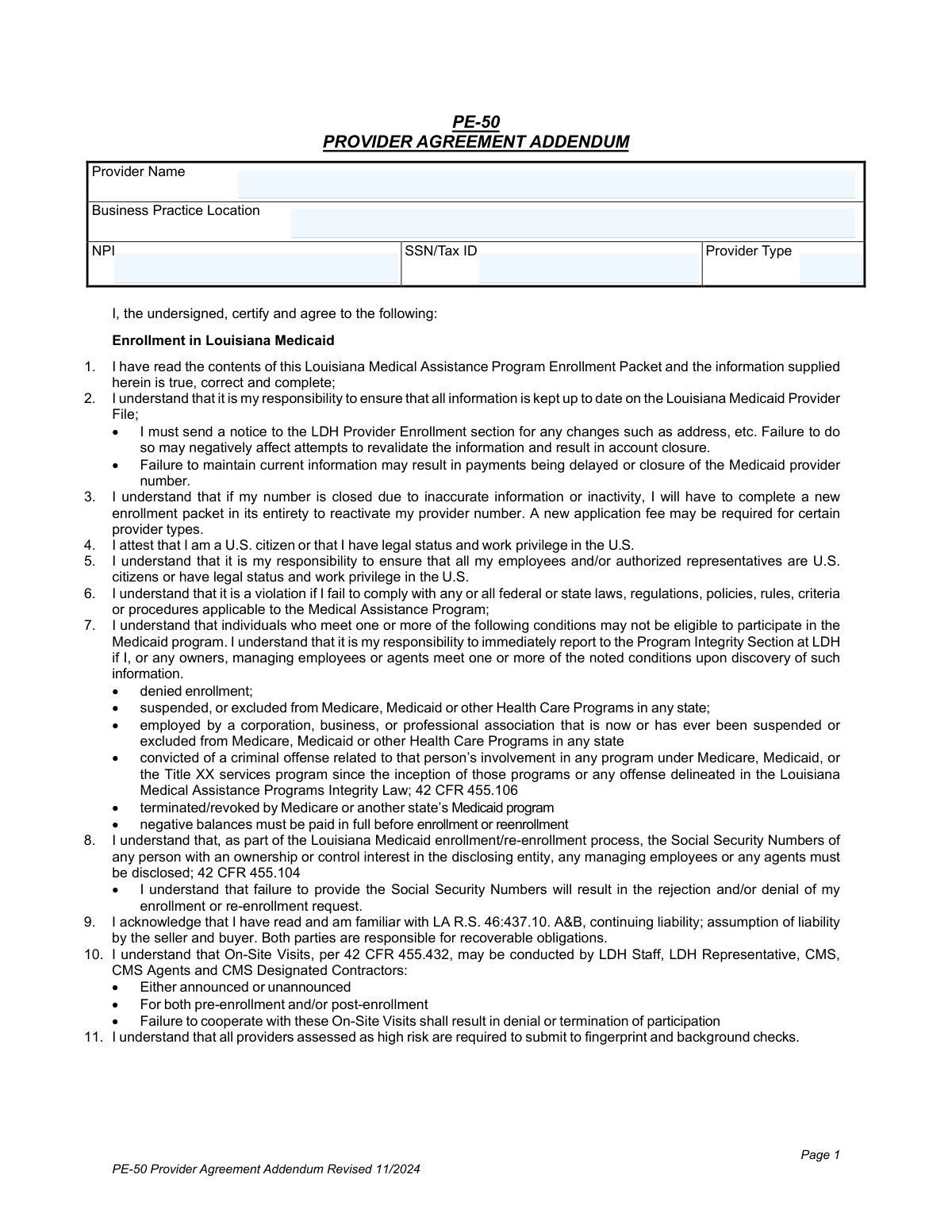
More forms in EDI enrollment forms
Instafill Demo: How to fill out PDF forms in seconds with AI
How to Fill Out Louisiana Basic Enrollment Packet for Individuals Online for Free in 2026
Are you looking to fill out a LOUISIANA BASIC ENROLLMENT PACKET FOR INDIVIDUALS form online quickly and accurately? Instafill.ai offers the #1 AI-powered PDF filling software of 2026, allowing you to complete your LOUISIANA BASIC ENROLLMENT PACKET FOR INDIVIDUALS form in just 37 seconds or less.
Follow these steps to fill out your LOUISIANA BASIC ENROLLMENT PACKET FOR INDIVIDUALS form online using Instafill.ai:
- 1 Navigate to Instafill.ai and upload or select the Louisiana Medicaid Basic Enrollment Packet for Individuals.
- 2 Use the AI assistant to automatically fill in your personal and professional details, such as name, NPI, social security number, and practice location on the PE-50 form.
- 3 Complete the Direct Deposit (EFT) Authorization Agreement with your banking details, ensuring you attach a voided check or bank letter as required.
- 4 Fill out the Ownership Disclosure forms, providing information about any business interests, managing employees, or agents as applicable.
- 5 Review all completed sections, including the PE-50, Provider Agreement Addendum, and EDI contracts, to ensure all information is accurate and complete.
- 6 Electronically sign the documents where possible, or print the completed packet to provide original wet signatures in blue ink as specified in the instructions.
- 7 Download the finalized packet and mail the original, signed documents to the Gainwell Provider Enrollment Unit address provided in the form instructions.
Our AI-powered system ensures each field is filled out correctly, reducing errors and saving you time.
Why Choose Instafill.ai for Your Fillable Louisiana Basic Enrollment Packet for Individuals Form?
Speed
Complete your Louisiana Basic Enrollment Packet for Individuals in as little as 37 seconds.
Up-to-Date
Always use the latest 2026 Louisiana Basic Enrollment Packet for Individuals form version.
Cost-effective
No need to hire expensive lawyers.
Accuracy
Our AI performs 10 compliance checks to ensure your form is error-free.
Security
Your personal information is protected with bank-level encryption.
Frequently Asked Questions About Form Louisiana Basic Enrollment Packet for Individuals
This packet is for individual healthcare professionals, such as physicians, dentists, or therapists, who want to enroll as providers in the Louisiana Medical Assistance Program (Louisiana Medicaid) to serve Medicaid recipients.
You must include the completed forms with original signatures, a copy of your professional license, IRS documentation verifying your Tax ID, and a voided check or bank letter if you are requesting direct deposit (EFT).
Mail all forms with original signatures to Gainwell Provider Enrollment Unit, PO Box 80159, Baton Rouge, LA 70898-0159. If using a courier like UPS or FedEx, you must call (225) 216-6370 to arrange delivery to a physical street address.
A Type 1 NPI is for an individual healthcare provider and is required for this application. A Type 2 NPI is for an organization like a group practice; you must provide it if your payments are made to a business entity to ensure claims process correctly.
Yes, the instructions explicitly state that signatures must be original and in blue ink. Applications with stamped signatures, initials, or signatures in black ink will be rejected and returned for correction.
The packet does not give a specific timeline, but processing begins once all required documents are received. After your enrollment is certified, a notification letter with your new Medicaid provider number will be mailed to you.
Inaccurate or incomplete forms will cause the entire application packet to be returned to the mailing address on file. This will delay your enrollment, so it is crucial to review all instructions and complete every required field.
Yes, if a third party submits claims for you, you must complete the 'EDI Contract for Individuals' and the 'Individual Medicaid Electronic Media Limited Power of Attorney' form. The Power of Attorney form must be notarized.
Federal and state regulations require the disclosure of Social Security Numbers for all enrolling individuals, owners, and managing employees to ensure program integrity. Failure to provide it will result in the rejection of your application.
Complete the 'Louisiana Medicaid Direct Deposit (EFT) Authorization Agreement' form included in the packet. You must provide your financial institution's name, routing number, account number, and attach a voided check or official bank letter.
On the PE-50 form, list your main practice location. You must then list all additional practice locations on the 'Individual Medicaid Ownership Disclosure Information' form in the designated section.
Yes, services like Instafill.ai use AI to accurately auto-fill form fields, which can save you time and help prevent common errors that lead to application rejection and delays.
Simply upload the Louisiana Medicaid enrollment packet PDF to the Instafill.ai platform. The AI will identify the fields, allowing you to enter your information once and have it automatically populated across all necessary forms.
If you have a non-fillable or 'flat' PDF, a service like Instafill.ai can convert it into an interactive, fillable form. This allows you to easily type your information before printing the document for the required original signature.
Compliance Louisiana Basic Enrollment Packet for Individuals
Validation Checks by Instafill.ai
1
Validates Social Security Number (SSN) Format and Requirement
This check ensures the Social Security Number field on the PE-50 and Ownership Disclosure forms is completed and contains a valid 9-digit number. The SSN is required by federal law (42 U.S.C. § 1320a-3) for enrollment and identity verification. If the SSN is missing, invalid, or improperly formatted, the application will be rejected and returned for correction.
2
Verifies Type 1 Individual National Provider Identifier (NPI) Format
This validation confirms that the Type 1 Individual NPI on the PE-50 form is a 10-digit numeric identifier. The NPI is a standard, unique identifier for healthcare providers required by HIPAA for administrative and financial transactions. An application submitted with a missing or incorrectly formatted NPI will be considered incomplete and cannot be processed until corrected.
3
Ensures Provider Type Code is Valid
This check verifies that the 'Provider Type Code' entered in Section A of the PE-50 form is one of the specific codes listed in the form's instructions. Using a valid code is critical for correctly categorizing the provider for billing, reimbursement rates, and program eligibility. An application with an invalid or unlisted provider code will be rejected.
4
Validates Signature and Signature Date Presence
This check ensures that if the 'Signature of Individual Provider' field is signed on the PE-50 form and addendums, the corresponding 'Date of Signature' field is also completed with a valid date. The signature and date legally bind the provider to the terms of the agreement. An application with a missing signature or date is not legally binding and will be returned as incomplete.
5
Conditional Requirement for Other Names
This validation enforces the rule that if the 'Has the enrolling provider used or been known by another name?' box is checked 'Yes' on the PE-50 form, then at least one of the subsequent name fields (e.g., 'Former or Maiden Name') must be filled out. This is crucial for background checks and verifying credentials across different records. Failure to provide the other name after indicating one exists will result in the application being returned for completion.
6
Logical Check for Citizenship and Work Status
This check ensures that if an applicant indicates they are not a U.S. citizen on the PE-50 form, they must then answer the follow-up question regarding their legal status and work privileges. This information is required to verify eligibility to work and participate in the Medicaid program. An incomplete response to this conditional logic will cause the application to be rejected.
7
Verifies Pay-To Name and IRS Documentation Match
This validation confirms that the 'Provider Pay-To-Name' in Section B of the PE-50 form exactly matches the name on the required, pre-printed IRS documentation (e.g., CP 575). This is essential for accurate tax reporting (1099s) and payment processing. A mismatch between the form and the IRS document will lead to application rejection to prevent payment and tax reporting errors.
8
Confirms Attachment of EFT Supporting Documents
This check verifies that if the Direct Deposit (EFT) Authorization Agreement is submitted, a voided check or an official bank letter is also attached. This documentation is required to verify the accuracy of the routing and account numbers, preventing misdirected payments. If the EFT form is present but the supporting document is missing, the EFT setup will fail and the application may be returned.
9
Validates Bank Routing Number on EFT Form
This check ensures the 9-digit 'Financial Institution Routing Number' on the Direct Deposit (EFT) form is a valid ABA routing number. The system should check this against a database of active routing numbers to ensure the financial institution is correctly identified for electronic payments. An invalid routing number will cause all EFT payments to fail and will require the provider to resubmit corrected information.
10
Conditional Requirement for EDI Power of Attorney
This validation ensures that if a provider elects to use a third-party billing agent on the EDI Contract, the 'Individual Medicaid Electronic Media Limited Power of Attorney' form is also completed and notarized. This legal document is required to authorize the third party to submit claims on the provider's behalf. Without this notarized form, the link to the third-party submitter cannot be established.
11
Validates Completeness of Criminal and Disciplinary History Disclosure
This check confirms that for every 'Yes' answer to questions regarding criminal history, sanctions, or disciplinary actions on the Ownership Disclosure form, the required supporting documentation (written statement, legal documents) is attached. Full disclosure is mandatory for program integrity and to screen for excluded individuals. Incomplete disclosures will result in the application being denied pending submission of all required documents.
12
Verifies Disclosure of Managing Employees and Agents
This check ensures that if a provider answers 'Yes' to employing agents or managing employees on the Ownership Disclosure form (Section VII), at least one complete record for an agent/employee is provided. Federal regulations require the disclosure of all managing employees for program integrity. Failure to disclose these individuals will result in a rejected application.
13
Cross-Verifies Requested Effective Date with Professional License
This validation compares the 'Requested Enrollment Effective Date' on the PE-50 form against the dates on the provider's submitted professional license. The license must be valid and active on or before the requested effective date to allow for potential retroactive billing. If the license does not cover the requested date, the enrollment date may be adjusted or the application returned for clarification.
14
Validates NPI Tie Breaker for Duplicate NPI Usage
This check is triggered if the provider's Type 1 NPI is already linked to a different Medicaid provider number in the system. It verifies that the 'NPI Tie Breaker' field on the PE-50 form is populated with a unique, valid value (Taxonomy code or ZIP+4). This is a system requirement to differentiate claims when one NPI is associated with multiple enrollments, and failure to provide a unique tiebreaker will prevent the new enrollment.
Common Mistakes in Completing Louisiana Basic Enrollment Packet for Individuals
The instructions explicitly require original signatures in blue ink, and the individual provider must be the one to sign. Many applicants use black ink, a stamped signature, or have an office manager sign on their behalf, all of which are unacceptable. This mistake leads to immediate rejection of the entire packet, forcing the applicant to reprint, re-sign, and resubmit, causing significant delays. To avoid this, carefully read signature instructions on each form and ensure the correct individual signs with a blue pen.
Form PE-50 requires the 'Provider Pay-To Name' to match the name registered with the IRS exactly, without any abbreviations or punctuation differences. Applicants often use a slightly different name or a DBA, which causes a mismatch with the required IRS documentation (like a CP 575 or 147C). This discrepancy will cause the application to be returned for correction, delaying enrollment and subsequent payments. Always use the precise legal name as it appears on official IRS documents.
The multi-page Ownership Disclosure form is complex, and the instructions state that every field must be completed. Applicants frequently leave fields blank that they deem not applicable, especially in the criminal conviction and additional information sections. An incomplete form, even with a single blank field, will result in the entire packet being rejected. To prevent this, carefully review every page and question, ensuring a 'Yes' or 'No' is checked for all disclosure questions and all other fields are filled.
Section VII of the Ownership Disclosure form requires a separate, complete copy of the section for each managing employee or agent. Providers often misunderstand this and either submit a simple list of names or only fill out the form for one person. This failure to properly disclose all individuals with managerial control leads to a rejected application. It is crucial to photocopy and complete the required pages for every single agent and managing employee to ensure compliance.
Providers who plan to use a third-party billing service or clearinghouse must submit a notarized 'Individual Medicaid Electronic Media Limited Power of Attorney' form. Forgetting to have this specific form notarized is a common oversight that halts the setup for electronic claims submission. This can prevent the provider from billing electronically, severely impacting cash flow once enrollment is complete. Always verify if a notary seal is required and complete that step before mailing the packet.
The Direct Deposit (EFT) Authorization Agreement requires a voided check or an official bank letter to verify account information. Applicants frequently attach a deposit slip instead, which is explicitly not accepted. This error will prevent the setup of direct deposit, leading to payment delays or the issuance of paper checks. To ensure timely electronic payments, attach a voided check from the correct account.
Form PE-50 requires applicants to look up and enter specific numeric codes for their Provider Type and the Parish/County of their practice location. These tables are dense, and manual data entry errors are common, such as selecting the wrong provider specialty or an incorrect parish code. An incorrect code can lead to application rejection or misclassification of the provider. Using an AI-powered form-filling tool like Instafill.ai can help prevent these errors by automatically populating and validating codes based on your information.
Throughout the Ownership Disclosure form, if an applicant answers 'Yes' to questions regarding past criminal convictions, license sanctions, or previous exclusions from healthcare programs, they must provide a written explanation and all official legal documents. A frequent mistake is to check 'Yes' but fail to include the necessary supporting evidence. This omission results in an incomplete application and guaranteed rejection, requiring a full resubmission with the proper documentation.
The instructions mention a complex 'NPI Tie Breaker' (Taxonomy or ZIP+4) system for providers who need to link a single NPI to multiple Medicaid numbers. Applicants often misunderstand when or how to use a tie breaker, or they may enter it incorrectly. This can lead to significant claim processing and payment issues down the line, as claims will not link correctly in the Medicaid system. It is vital to understand this requirement or seek clarification from the Provider Enrollment Unit if you have multiple practice locations or roles.
This entire enrollment packet is provided as a flat PDF, which must be printed and filled out by hand, increasing the risk of illegible handwriting and data entry errors. Manually filling out dozens of pages is time-consuming and prone to mistakes that cause rejections. To avoid this, providers can use a service like Instafill.ai, which can convert any flat PDF into a smart, fillable form, allowing for clean, typed entries and data validation to minimize errors and streamline the submission process.
Saved over 80 hours a year
“I was never sure if my IRS forms like W-9 were filled correctly. Now, I can complete the forms accurately without any external help.”
Kevin Martin Green
Your data stays secure with advanced protection from Instafill and our subprocessors




Robust compliance program
Transparent business model
You’re not the product. You always know where your data is and what it is processed for.
ISO 27001, HIPAA, and GDPR
Our subprocesses adhere to multiple compliance standards, including but not limited to ISO 27001, HIPAA, and GDPR.
Security & privacy by design
We consider security and privacy from the initial design phase of any new service or functionality. It’s not an afterthought, it’s built-in, including support for two-factor authentication (2FA) to further protect your account.
Fill out Louisiana Basic Enrollment Packet for Individuals with Instafill.ai
Worried about filling PDFs wrong? Instafill securely fills louisiana-medicaid-basic-enrollment-packet-for-individuals forms, ensuring each field is accurate.
