Yes! You can use AI to fill out Iowa Medicaid Universal HCBS Waiver Provider Application
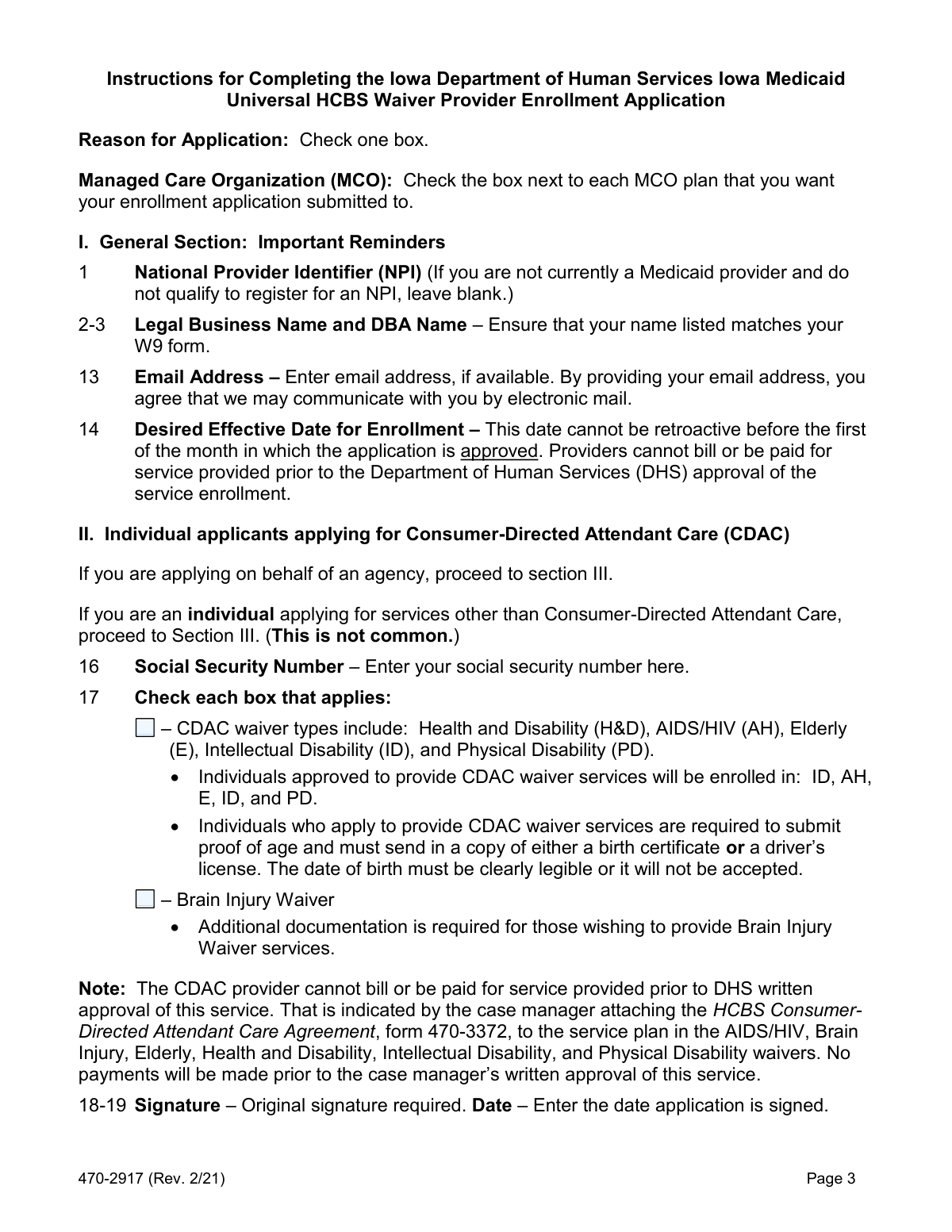
Form 470-2917 is the Iowa Medicaid Universal HCBS Waiver Provider Application, used by individuals and agencies to apply to provide Home and Community-Based Services (HCBS) under Iowa's Medicaid program. This application is essential for enrollment with the Iowa Medicaid Enterprise (IME) and for contracting with Managed Care Organizations (MCOs) to offer services like adult day care, assisted living, and in-home support. Today, this form can be filled out quickly and accurately using AI-powered services like Instafill.ai, which can also convert non-fillable PDF versions into interactive fillable forms.
470-2917 is part of the
Medicaid forms category on Instafill.
Our AI automatically handles information lookup, data retrieval, formatting, and form filling.
It takes less than a minute to fill out 470-2917 using our AI form filling.
Securely upload your data. Information is encrypted in transit and deleted immediately after the form is filled out.
Form specifications
| Form name: | Iowa Medicaid Universal HCBS Waiver Provider Application |
| Number of pages: | 1 |
| Language: | English |
More forms in Medicaid forms
Instafill Demo: How to fill out PDF forms in seconds with AI
How to Fill Out 470-2917 Online for Free in 2026
Are you looking to fill out a 470-2917 form online quickly and accurately? Instafill.ai offers the #1 AI-powered PDF filling software of 2026, allowing you to complete your 470-2917 form in just 37 seconds or less.
Follow these steps to fill out your 470-2917 form online using Instafill.ai:
- 1 Navigate to Instafill.ai and upload or select the Iowa Medicaid Universal HCBS Waiver Provider Application, Form 470-2917.
- 2 Use the AI assistant to automatically populate the General Section with your basic information, such as legal business name, address, NPI, and contact details.
- 3 Indicate the reason for your application (e.g., new enrollee, adding services) and select the Managed Care Organizations (MCOs) you wish to contract with.
- 4 Complete the section relevant to your application: Section II for individual Consumer-Directed Attendant Care (CDAC) providers or Section III for agencies and businesses.
- 5 In the services section, check the boxes for the services you are applying to provide, circle the corresponding waiver types, and gather all required supporting documentation (licenses, certificates, W-9, etc.).
- 6 If you plan to contract with MCOs, complete Section IV with additional credentialing information, including liability insurance details and accreditation status.
- 7 Carefully review all sections for accuracy and completeness, then provide the required original signature and date before submitting the application and all attachments to the Iowa Medicaid Enterprise.
Our AI-powered system ensures each field is filled out correctly, reducing errors and saving you time.
Why Choose Instafill.ai for Your Fillable 470-2917 Form?
Speed
Complete your 470-2917 in as little as 37 seconds.
Up-to-Date
Always use the latest 2026 470-2917 form version.
Cost-effective
No need to hire expensive lawyers.
Accuracy
Our AI performs 10 compliance checks to ensure your form is error-free.
Security
Your personal information is protected with bank-level encryption.
Frequently Asked Questions About Form 470-2917
This form is used by individuals and agencies to apply to become a Home- and Community-Based Services (HCBS) waiver provider with Iowa Medicaid. It is also used by existing providers to add services, reactivate their provider number, or change their Tax ID.
Individuals applying to provide Consumer-Directed Attendant Care (CDAC) and agencies or businesses applying to offer any HCBS waiver services in Iowa must complete this form. It is also for current providers who are adding services or reactivating their enrollment.
Individual CDAC applicants must submit this application (Sections I & II) along with Forms 470-2965, 470-4202, 470-4612, 470-4457, 470-4227, an IRS W-9, and proof of age like a driver's license or birth certificate.
New agencies must submit this application (Sections I & III), Form 470-2965, Form 470-4202, an IRS W-9, and Form 470-5112. If you plan to contract with MCOs, you must also complete Section IV and provide a Certificate of Liability Insurance.
If you are an individual applying for Consumer-Directed Attendant Care (CDAC), complete Sections I and II. If you are an agency or business, complete Sections I and III. Section IV is for those who also wish to credential and contract with the Managed Care Organizations (MCOs).
Mail the completed application and all attachments to the Iowa Medicaid Enterprise (IME) at P.O. Box 36450, Des Moines, IA 50315. You should also submit a copy to the MCOs you wish to contract with, such as Iowa Total Care or Amerigroup, using the contact information provided on the form.
No, the desired effective date cannot be retroactive before the first of the month in which your application is approved. You cannot bill for services provided before your enrollment is officially approved by the Department of Human Services (DHS).
Yes, applicants for the Brain Injury Waiver must submit additional documentation demonstrating training or experience working with individuals with a brain injury. This can include training certificates, a resumé, or a personal statement detailing your experience.
Section IV is for providing additional information needed for credentialing and contracting with Managed Care Organizations (MCOs) like Amerigroup and Iowa Total Care. You only need to complete this section if you intend to contract with them, and you must be fully approved by IME first.
Submitting an incomplete application or missing required documents will delay the approval process. Ensure all required fields are filled (use 'N/A' if not applicable), the form is legibly printed or typed, and all necessary attachments are included.
For questions about the application for Iowa Medicaid Enterprise (IME), call Provider Services at (800) 338-7909, option 2. For questions specific to MCOs, contact Amerigroup or Iowa Total Care using the phone numbers provided on the first page of the form.
Yes, services like Instafill.ai use AI to accurately auto-fill form fields, which can save you time and help reduce errors. This is especially useful for long forms with repetitive information.
You can use a service like Instafill.ai to fill out the form online. Simply upload the PDF, and the platform will make it fillable, allowing you to type your answers directly into the fields and then download the completed document.
If you have a non-fillable or 'flat' PDF, you can use a tool like Instafill.ai to convert it into an interactive, fillable form. This allows you to easily type your information instead of printing and filling it out by hand.
Compliance 470-2917
Validation Checks by Instafill.ai
1
Conditional Requirement for SSN or Tax ID
This check ensures that an applicant provides the correct identification number based on their type. Individual applicants completing Section II must provide a Social Security Number (SSN), while Agencies and Businesses completing Section III must provide a Tax ID Number. The system validates that one and only one of these numbers is present, preventing individuals from submitting a Tax ID and vice-versa. Failure to provide the correct type of ID will halt the application process as it is fundamental for enrollment and payment setup.
2
Desired Effective Date Logical Constraint
Validates the 'Desired Effective Date for Enrollment' in Section I. The date must be in a valid MM/DD/YYYY format and must not be a date prior to the first day of the month in which the application is being submitted for approval. This is critical because the form explicitly states that dates cannot be retroactive before this point, and providers cannot be paid for services before their official enrollment date. An invalid or logically incorrect date will be rejected to prevent billing and compliance issues.
3
Legal Name and W-9 Form Consistency
This validation cross-references the 'Legal Business Name' provided in Section I with the name on the required, attached IRS W-9 form. The names must be an exact match to ensure legal and financial consistency for tax reporting and Medicaid payments. A mismatch can lead to significant delays, rejected payments, and incorrect tax documentation, so the application will be returned for correction if a discrepancy is found.
4
Conditional Explanation for Sanction History
Checks if an explanation is provided when an applicant answers 'Yes' to questions regarding previous sanctions, disciplinary actions, or exclusion from Medicare/Medicaid (Section III, fields 18-20). A 'Yes' answer without a corresponding detailed explanation is considered an incomplete submission. This is a critical risk management check for the Iowa Medicaid Enterprise (IME) to assess provider eligibility and history, and failure to explain will result in the application being returned.
5
Service and Qualifying Standard Selection Logic
For each service an agency applies for in Section III, this check verifies that exactly one corresponding 'standard that qualify you' checkbox is selected. An agency cannot apply for a service without indicating how they qualify, nor can they select multiple qualification standards for a single service. This ensures clarity and that the correct supporting documentation can be requested and reviewed. The form will be considered incomplete if this one-to-one logic is violated.
6
Conditional Attachment Verification for Service Qualifications
This validation is triggered when an applicant selects a qualifying standard in Section III that explicitly requires an attachment (e.g., 'attach a copy of the certificate', 'attach current proof of liability'). The system must confirm that a file has been uploaded and associated with that specific requirement. This is essential to prove the provider meets the state's criteria for offering a service, and missing documentation will cause the application for that service to be rejected pending submission of the required proof.
7
Individual CDAC Applicant Proof of Age Attachment
Verifies that individual applicants applying for Consumer-Directed Attendant Care (CDAC) in Section II have attached a required proof of age document. The form specifies that a copy of a driver's license or birth certificate must be submitted. This is a mandatory completeness check for this applicant pathway, and the application cannot proceed without this documentation.
8
County Service Area Selection Logic
This check validates the county selection in Section I, Field 15. The applicant must select at least one individual county or check the 'ALL' box, but not both. This ensures there is no ambiguity about the provider's intended service area. An application with no counties selected, or with both 'ALL' and individual counties selected, will be flagged as an error to be corrected by the applicant.
9
Applicant Type and Section Completion Verification
Ensures the correct sections of the application are completed based on the applicant's self-identified type. The system checks that individual CDAC applicants have filled out Sections I and II, while agencies/businesses have filled out Sections I and III. This prevents applicants from submitting partially or incorrectly completed forms, which would delay the enrollment process. If the wrong sections are completed, the application will be returned with instructions.
10
MCO Credentialing Liability Insurance Certificate Attachment
For applicants who complete Section IV for MCO credentialing, this check confirms that a copy of the 'Certificate of Liability Insurance' has been attached. The instructions explicitly state this document is required for the MCOs to process credentialing. Failure to attach the certificate will prevent the application from being forwarded to the MCOs for contracting, even if the IME enrollment is approved.
11
Liability Insurance Policy Expiration Date
This validation examines the 'Expiration Date' for each liability insurance policy listed in Section IV, Field 36. The system checks that the date provided is in the future and has not already passed. Submitting an application with expired insurance coverage is grounds for immediate rejection of the credentialing portion of the application, as active coverage is a core requirement for providers.
12
Signature and Date Field Completeness
Validates that the required signature and date fields are completed in the appropriate section (Section II for individuals, Section III/IV for agencies). Since the form requires an original signature, a digital submission system would check for a digital signature or a checked attestation box, along with a populated date field. An unsigned or undated application is not legally binding and will be returned immediately.
13
Medicare/Other State Medicaid Number Requirement
This is a conditional completeness check for fields 21 and 22 in Section III. If an applicant checks 'Yes' to being enrolled in another state's Medicaid program or with Medicare, the corresponding text field to list the state/program or provide the Medicare number must be filled out. This information is vital for cross-referencing provider status and history, and leaving the detail field blank after a 'Yes' response will render the application incomplete.
14
Zip Code Format Validation
This check ensures that the 'Zip Code' field in all address blocks contains a valid format, either 5 numeric digits (XXXXX) or 9 numeric digits with a hyphen (XXXXX-XXXX). Correctly formatted zip codes are essential for mail delivery, service area verification, and data integrity within the provider database. An incorrectly formatted zip code will trigger an error, requiring the user to correct it before submission.
Common Mistakes in Completing 470-2917
The form provides multiple submission addresses for Iowa Medicaid Enterprise (IME) and Managed Care Organizations (MCOs) like Iowa Total Care. Applicants often get confused and send the application to the wrong entity or only one, causing significant processing delays or rejection. To avoid this, carefully read the instructions on pages 1 and 2 to determine exactly where the completed application and its attachments must be sent, as it may require submission to multiple entities.
The application has distinct paths: Sections I and II are for Individual CDAC applicants, while Sections I and III are for Agencies and Businesses. A frequent error is an applicant misidentifying their type and filling out the incorrect sections, which renders the submission incomplete and guarantees rejection. Before starting, confirm whether you are an 'Individual' or 'Agency' and only complete the sections designated for your provider type.
The application requires numerous supporting documents, such as a W-9, proof of age, liability insurance certificates, and specific licenses or accreditations. Forgetting to include even one of these documents is a very common mistake that will halt the approval process entirely. To prevent this, create a checklist based on the requirements listed on page 2 and within Section III for your selected services, and double-check that every document is attached before submission.
Section III is highly detailed, requiring applicants to check a service, check a qualifying standard, and circle all applicable waiver types (e.g., HD, E, BI). Applicants often forget to circle the waiver types or fail to attach the specific proof required for the standard they selected. This results in not being enrolled for the intended services. Carefully review each service you apply for to ensure all steps are complete and the correct supporting documents are included.
The instructions explicitly state to type or print legibly in ink and to not use a pencil. Handwritten applications that are messy or hard to read can lead to data entry errors, incorrect provider details, or outright rejection of the form. Always use ink and print clearly, or use a tool like Instafill.ai, which can convert this non-fillable PDF into a fillable version to ensure all entries are legible and properly formatted.
The form requires an original 'wet' signature in several places, and a photocopied or missing signature will cause the application to be returned. Applicants sometimes overlook a signature field or mistakenly think a digital or copied signature is acceptable. Before mailing, conduct a final review of the entire application, specifically looking for all fields requiring an original signature and date.
The 'Legal Business Name' in Section I must exactly match the name associated with the Tax ID number on the submitted IRS Form W-9. Applicants often enter a DBA ('Doing Business As') name or a slight variation, creating a mismatch that delays enrollment and causes problems with tax reporting and payments. Verify that the legal name on the application is identical to the one on your W-9 form.
Applicants frequently enter a past date in the 'Desired Effective Date' field, hoping to bill for services already provided. The form clearly states this date cannot be retroactive before the first of the month in which the application is approved. This error demonstrates a misunderstanding of the rules and will be disregarded, causing potential confusion about the actual approved start date for billing.
In Section I, checkboxes authorize IME to share the application with Amerigroup and Iowa Total Care. If an applicant intends to work with these MCOs but forgets to check these boxes, their application will not be forwarded, forcing them to initiate the process separately later. This oversight creates extra work and significantly delays the MCO contracting and credentialing timeline.
Throughout Section III, certain qualifying standards require the applicant to enter their existing Medicaid Provider Number (NPI) or Medicare Provider Number. Applicants often overlook these fields, assuming the agency can look up the information. This omission forces the processor to either search for the data or return the application as incomplete, causing unnecessary delays in adding new services.
For MCO credentialing in Section IV, providers must list their liability insurance carrier, effective dates, and coverage amounts, and also attach the Certificate of Liability Insurance. It is common for applicants to leave parts of this section blank or forget to include the certificate. An incomplete insurance section prevents the MCO credentialing process from moving forward, delaying the ability to contract with health plans.
The instructions require applicants to enter 'N/A' in any field that is not applicable, but many people simply leave them blank. Blank fields can be ambiguous, making it unclear if the information was missed or is truly not applicable, which may lead to the form being flagged as incomplete. Using an AI-powered form filling tool like Instafill.ai can help prevent this by automatically validating fields and ensuring the form is completed according to instructions.
Saved over 80 hours a year
“I was never sure if my IRS forms like W-9 were filled correctly. Now, I can complete the forms accurately without any external help.”
Kevin Martin Green
Your data stays secure with advanced protection from Instafill and our subprocessors




Robust compliance program
Transparent business model
You’re not the product. You always know where your data is and what it is processed for.
ISO 27001, HIPAA, and GDPR
Our subprocesses adhere to multiple compliance standards, including but not limited to ISO 27001, HIPAA, and GDPR.
Security & privacy by design
We consider security and privacy from the initial design phase of any new service or functionality. It’s not an afterthought, it’s built-in, including support for two-factor authentication (2FA) to further protect your account.
Fill out 470-2917 with Instafill.ai
Worried about filling PDFs wrong? Instafill securely fills iowa-medicaid-universal-hcbs-waiver-provider-application forms, ensuring each field is accurate.
