Yes! You can use AI to fill out Form ADOPT-050, Adoption Request
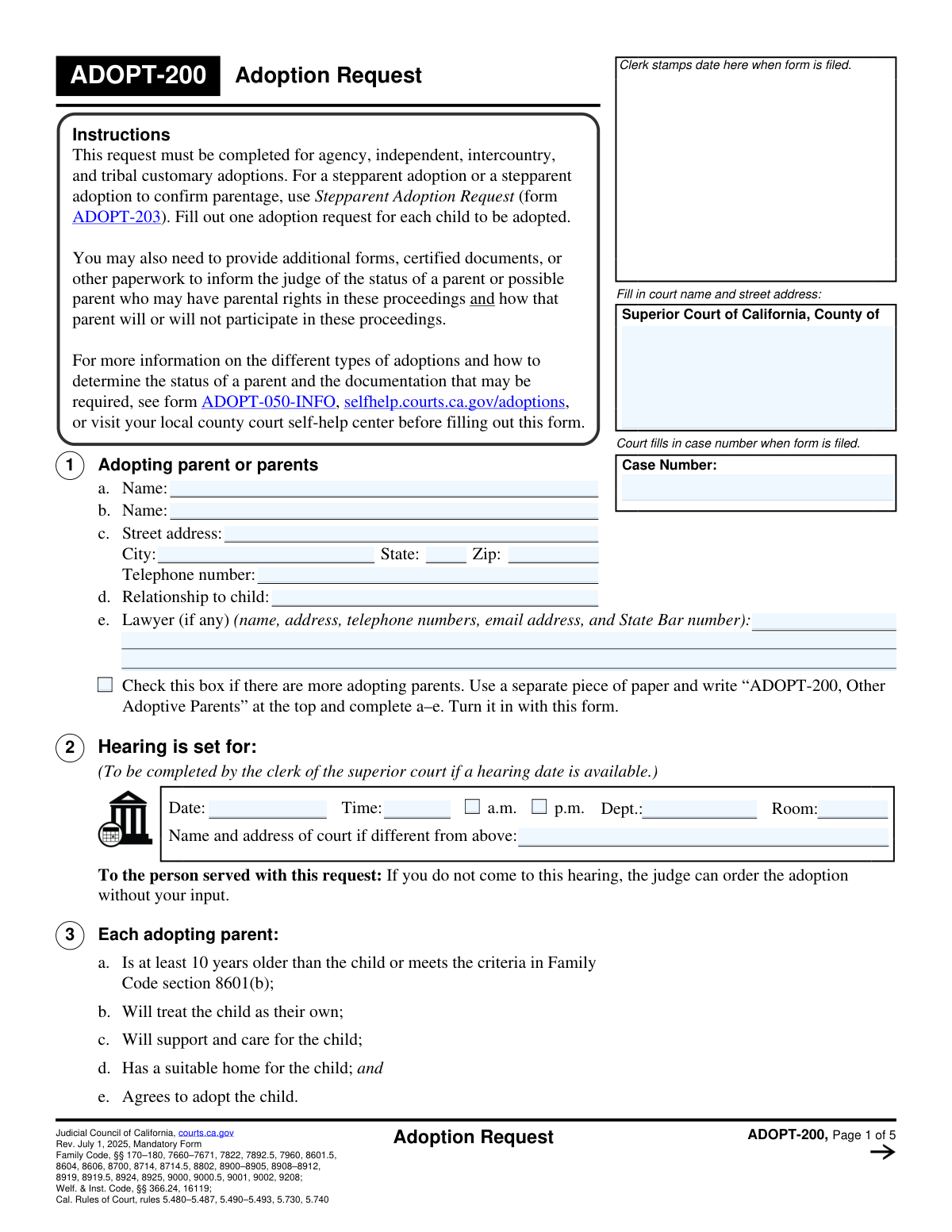
Form ADOPT-050 is the official petition filed with the Superior Court of California to initiate an adoption case. It gathers essential information about the adopting parents, the child, the type of adoption (agency, independent, intercountry), and compliance with legal statutes like the Indian Child Welfare Act (ICWA). Filing this form is the crucial first step in legally establishing a new parent-child relationship. Today, this form can be filled out quickly and accurately using AI-powered services like Instafill.ai, which can also convert non-fillable PDF versions into interactive fillable forms.
ADOPT-050 is part of the
adoption forms category on Instafill.
Our AI automatically handles information lookup, data retrieval, formatting, and form filling.
It takes less than a minute to fill out ADOPT-050 using our AI form filling.
Securely upload your data. Information is encrypted in transit and deleted immediately after the form is filled out.
Form specifications
| Form name: | Form ADOPT-050, Adoption Request |
| Number of fields: | 126 |
| Number of pages: | 5 |
| Language: | English |
More forms in Adoption forms
Instafill Demo: How to fill out PDF forms in seconds with AI
How to Fill Out ADOPT-050 Online for Free in 2026
Are you looking to fill out a ADOPT-050 form online quickly and accurately? Instafill.ai offers the #1 AI-powered PDF filling software of 2026, allowing you to complete your ADOPT-050 form in just 37 seconds or less.
Follow these steps to fill out your ADOPT-050 form online using Instafill.ai:
- 1 Navigate to Instafill.ai and upload or select the ADOPT-050 form to begin.
- 2 Provide the court and case information, including the specific Superior Court of California county where you are filing.
- 3 Enter the personal details for all adopting parents and the child, including names, addresses, and birth information. The AI can pre-fill recurring details to save time.
- 4 Specify the type of adoption (e.g., Agency, Independent, Intercountry) and complete the corresponding sections with AI guidance to ensure you only fill out what's necessary.
- 5 Address all legal declarations, such as those concerning the Indian Child Welfare Act (ICWA), guardianship status, and post-adoption contact agreements, ensuring all required attachments are noted.
- 6 Review the entire completed form. The AI will flag any missing fields or potential inconsistencies to ensure accuracy before submission.
- 7 Date and sign the form, then download the finalized ADOPT-050, ready for filing with the court.
Our AI-powered system ensures each field is filled out correctly, reducing errors and saving you time.
Why Choose Instafill.ai for Your Fillable ADOPT-050 Form?
Speed
Complete your ADOPT-050 in as little as 37 seconds.
Up-to-Date
Always use the latest 2026 ADOPT-050 form version.
Cost-effective
No need to hire expensive lawyers.
Accuracy
Our AI performs 10 compliance checks to ensure your form is error-free.
Security
Your personal information is protected with bank-level encryption.
Frequently Asked Questions About Form ADOPT-050
This form is used to formally ask a California Superior Court to approve the adoption of a child. It initiates the legal process to establish a parent-child relationship between the adopting parents and the child.
The prospective adopting parent or parents must complete and file this form. If you are represented by a lawyer, they can also complete and file it on your behalf.
You must file the form in the Superior Court of a proper California county. This could be the county where an adopting parent lives, where the child lives or was born, or where the adoption agency has an office.
The form covers several adoption types, including Agency, Independent, Relative, Nonrelative, and Intercountry adoptions. You must check the boxes that accurately describe your specific adoption case.
You will need the child's full name before adoption, date and place of birth, current address, and gender. You may also need to provide their proposed new name, juvenile case numbers if they are a dependent of the court, and guardianship information if applicable.
You must state whether you have inquired if the child is an Indian child and attach the required forms, like ICWA-010(A). If you have reason to know the child is an Indian child, you must provide formal notice to the tribe and other parties.
If the child is 12 or older, their consent is generally required for the adoption to proceed. You must indicate on the form whether the child agrees to the adoption.
The form includes a checkbox to indicate if there are more than two adopting parents. If this applies to you, check the box and attach a separate page with the required information for the additional parents.
Yes, this form can be used for an 'Intercountry Re-adoption' to have the adoption recognized in California. You must check the appropriate box and provide the date the child entered the United States.
This is a legally enforceable agreement regarding future contact between the child and their birth family or siblings. You must indicate on the form if such an agreement is attached or will be filed before the hearing.
A Joinder is a legal document filed by the adoption agency to formally join the adoption proceedings. For an agency adoption, you must state whether the Joinder is being filed with your request or will be filed later.
Yes, services like Instafill.ai use AI to help you accurately auto-fill forms like this one. This can save you significant time and help prevent common errors.
To use Instafill.ai, you can upload the form to their platform, which will make it interactive. The AI-powered tools will then help you fill in the fields quickly and accurately before you download the completed document for filing.
If you have a flat, non-fillable PDF, you can use a service like Instafill.ai to convert it into an interactive, fillable form. This allows you to easily type your information directly into the required fields online.
Compliance ADOPT-050
Validation Checks by Instafill.ai
1
Case Number Consistency Across Form
This check verifies that the value entered in the 'Case Number' field is identical everywhere it appears on the form. Maintaining a consistent case number is critical for ensuring all pages of the document are correctly associated with the same legal file at the courthouse. A mismatch could lead to filing errors, delays, or rejection of the entire submission.
2
Future Hearing Date and Valid Time
This validation ensures the 'Hearing Date' is a valid date set in the future, not in the past. It also checks that 'Hearing Time' is a valid time format and that only one of 'a.m.' or 'p.m.' is selected. This prevents scheduling impossible hearings and ensures court clerks have accurate, unambiguous information for the court calendar, avoiding confusion and missed appearances.
3
Child's Consent Requirement for Ages 12+
This check calculates the child's age based on the 'Child's Date of Birth'. If the child is 12 years of age or older, the system verifies that either the 'Yes' or 'No' box for 'Child's Agreement to Adoption' has been checked. California law requires the consent of a child 12 or older for their adoption, so failing to provide this information makes the petition incomplete and legally deficient.
4
Exclusive Adoption Type Selection
This validation ensures that only one primary adoption type is selected from the available options (e.g., Agency, Independent, Intercountry). Selecting multiple conflicting types would create ambiguity about the legal process being followed and the specific requirements that apply. This check guarantees the petition follows a single, clear legal path, preventing procedural rejection.
5
Conditional Court Dependency Information
This check confirms that if the 'Yes' box for 'The child is a dependent of the court' is selected, the 'Juvenile Case Number' and 'Juvenile Case County' fields are both filled out. This information is essential for the court to cross-reference the related dependency case and ensure all legal requirements for adopting a dependent child are met. Missing this information would halt the proceedings until the dependency case can be identified.
6
Venue Justification Check
This validation ensures that at least one of the checkboxes under 'County of Filing Reasons' is selected. This is a critical legal requirement to establish proper venue, proving why the case is being filed in that specific county's court. Without a valid reason for the filing location, the court may lack jurisdiction and could dismiss the case.
7
Chronological Date Validation
This check verifies the logical sequence of key dates, ensuring the 'Child's Date of Birth' occurs before the 'Date of Physical Placement', and both dates occur before the parent's signature date. This maintains the logical and factual integrity of the timeline presented in the petition. An illogical sequence of dates could call the entire petition's accuracy into question and lead to rejection.
8
Primary Adopting Parent Completeness
This validation ensures that 'Adopting Parent Name 1' and their full address ('Street Address', 'City', 'State', 'Zip Code') and 'Telephone Number' are provided. This information is fundamental for identifying the petitioner and is required for all official correspondence and legal notices. An incomplete submission for the primary parent would be rejected outright.
9
Conditional Agency Name Requirement
This check is triggered if the 'Agency' adoption type is selected. It verifies that the corresponding 'Agency Name' field has been filled out. Identifying the specific agency is crucial for the court to verify its license and to contact it for required reports and documentation, making this a mandatory field for this adoption type.
10
Conditional Legal Guardian Information
This validation confirms that if the 'Yes' box for 'Legal Guardian Information' is checked, the 'Guardianship Order Date', 'Guardianship County', and 'Guardianship Case Number' fields are all provided. This information is vital for the court to locate the guardianship file and legally terminate the guardianship as part of the adoption process. Failure to provide these details would prevent the adoption from being finalized.
11
New Name Provision
This check ensures that if the box for 'The child's new name will be' is checked, the 'Child's New Name' text field is not empty. This prevents a situation where the intent to change the name is declared but the new name itself is omitted from the legal request. The court needs the exact proposed name to include it in the final adoption decree.
12
Indian Child Welfare Act (ICWA) Acknowledgment
This validation verifies that at least one of the checkboxes related to the 'Indian Child Welfare Act Inquiry and Notice' has been selected. Federal and state law mandate that an inquiry into the child's potential Native American heritage be conducted and documented in every adoption. Failure to complete this section represents a serious legal deficiency that will prevent the case from moving forward.
13
Mutually Exclusive Gender Selection
This check ensures that for the 'Child's Gender' section, only one option among 'Female', 'Male', or 'Nonbinary' is selected. Selecting more than one option creates ambiguous data that cannot be properly recorded in legal and vital records. This validation enforces data integrity for the child's official records.
14
Conditional Independent Adoption Agreement
This validation is triggered if the 'Independent' adoption type is selected. It verifies that the 'Independent Adoption Placement Agreement Attached' checkbox is marked. This agreement is a cornerstone document for independent adoptions in California, and its absence would render the filing incomplete and subject to immediate rejection.
Common Mistakes in Completing ADOPT-050
Filers often enter an abbreviated court name or an incorrect address, and case numbers are frequently mistyped due to their length. This happens when filers are rushing or are unsure of the precise details. An error in this critical section can lead to the entire filing being rejected or sent to the wrong courthouse, causing significant delays in the adoption process. To avoid this, always verify the full, official name and address of the Superior Court on its website and carefully double-check the case number against official court documents.
The form contains many fields that are conditional upon a checkbox being selected, such as providing a 'Juvenile Case Number' only if the child is a court dependent. A common error is checking 'Yes' but forgetting to provide the required detail, or vice-versa. This creates ambiguity that forces the court to return the form for correction, halting the case. To prevent this, treat checkboxes and their related fields as a single unit, filling in all required information immediately after checking a box. AI-powered tools like Instafill.ai can help by automatically highlighting or requiring these dependent fields.
The ICWA requirements are legally complex and strict, and filers often underestimate their importance. People may skip the section or fail to attach the mandatory forms (ICWA-010(A), ICWA-020), believing it doesn't apply without conducting the required inquiry. Failure to comply with ICWA is a grave error that can lead to the invalidation of the adoption, even years later. Always complete the inquiry, attach the specified forms to document your efforts, and consult a lawyer if there is any reason to believe the child has Native American heritage.
This form references numerous other documents that must be attached, such as the Independent Adoption Placement Agreement, ICWA forms, or a Contact After Adoption Agreement. It is very common for filers to lose track of all the required supplementary paperwork for their specific adoption type. Submitting an incomplete package will lead to an automatic rejection by the court clerk, forcing a complete re-submission and delaying the case. To avoid this, create a checklist of all attachments mentioned in the sections that apply to you and ensure they are all included before filing.
The form requires filers to check a box explaining the legal reason ('venue') for filing in that specific county. Many people overlook this section or are unsure which of the several options applies to their situation, so they leave it blank. If a valid reason for filing in that county is not selected, the court may determine it lacks jurisdiction, causing the case to be rejected or transferred and resulting in major delays. Carefully read each option and select the one that accurately describes your connection to the county.
The 'Case Number' and 'Adopting Parent or Parents' name fields are repeated at the top or bottom of multiple pages for identification purposes. Filers often complete this information meticulously on the first page but forget to carry it over to all subsequent pages. If the pages of the document become separated, the court clerk may be unable to process the filing, leading to its rejection. Before submitting, review every page to ensure these repeating fields are filled out. Using a form-filling tool can prevent this by auto-populating such fields across the document.
The form separates adoption pathways into distinct sections (e.g., Agency, Independent, Intercountry), which can be confusing. A filer might incorrectly categorize their adoption, for example, by checking 'Relative' under the 'Agency' section when it is actually an 'Independent' relative adoption. This error can lead to filling out the wrong sections of the form and attaching incorrect documents, causing significant processing delays. It is crucial to understand the precise legal definition of your adoption type before you begin.
When a hearing has been scheduled, filers may enter the date and time but forget to check the corresponding 'a.m.' or 'p.m.' box, or they may omit the department and room number. This information is sometimes communicated verbally and not written down correctly. Ambiguous or incomplete hearing details can lead to confusion and missed court dates, requiring the hearing to be rescheduled and prolonging the adoption timeline. Always confirm all details from the official court notice and enter them exactly as provided.
After completing a long and complex legal document, it is surprisingly easy to overlook the final step of signing and dating it. An unsigned or undated form is legally invalid and will be immediately rejected by the court clerk, stopping the entire process. This requires the form to be corrected and re-filed from the beginning. To prevent this critical error, perform a final review specifically to check that all required signature and date lines are completed. If the form is a flat PDF, a tool like Instafill.ai can convert it to a fillable version to easily add digital signatures and dates before printing.
When an attorney is involved, filers often provide the name, address, and phone number but forget to include the State Bar number. People may not have this number readily available or may not realize it is a mandatory identifier for court filings. Without the State Bar number, the court clerk cannot easily verify the attorney's credentials, which may lead to the form being returned for correction. Always ask your attorney for their State Bar number and ensure it is entered correctly in the designated field.
Saved over 80 hours a year
“I was never sure if my IRS forms like W-9 were filled correctly. Now, I can complete the forms accurately without any external help.”
Kevin Martin Green
Your data stays secure with advanced protection from Instafill and our subprocessors




Robust compliance program
Transparent business model
You’re not the product. You always know where your data is and what it is processed for.
ISO 27001, HIPAA, and GDPR
Our subprocesses adhere to multiple compliance standards, including but not limited to ISO 27001, HIPAA, and GDPR.
Security & privacy by design
We consider security and privacy from the initial design phase of any new service or functionality. It’s not an afterthought, it’s built-in, including support for two-factor authentication (2FA) to further protect your account.
Fill out ADOPT-050 with Instafill.ai
Worried about filling PDFs wrong? Instafill securely fills form-adopt-050-adoption-request forms, ensuring each field is accurate.
