Yes! You can use AI to fill out Form Mod(PC).2005, Private Company
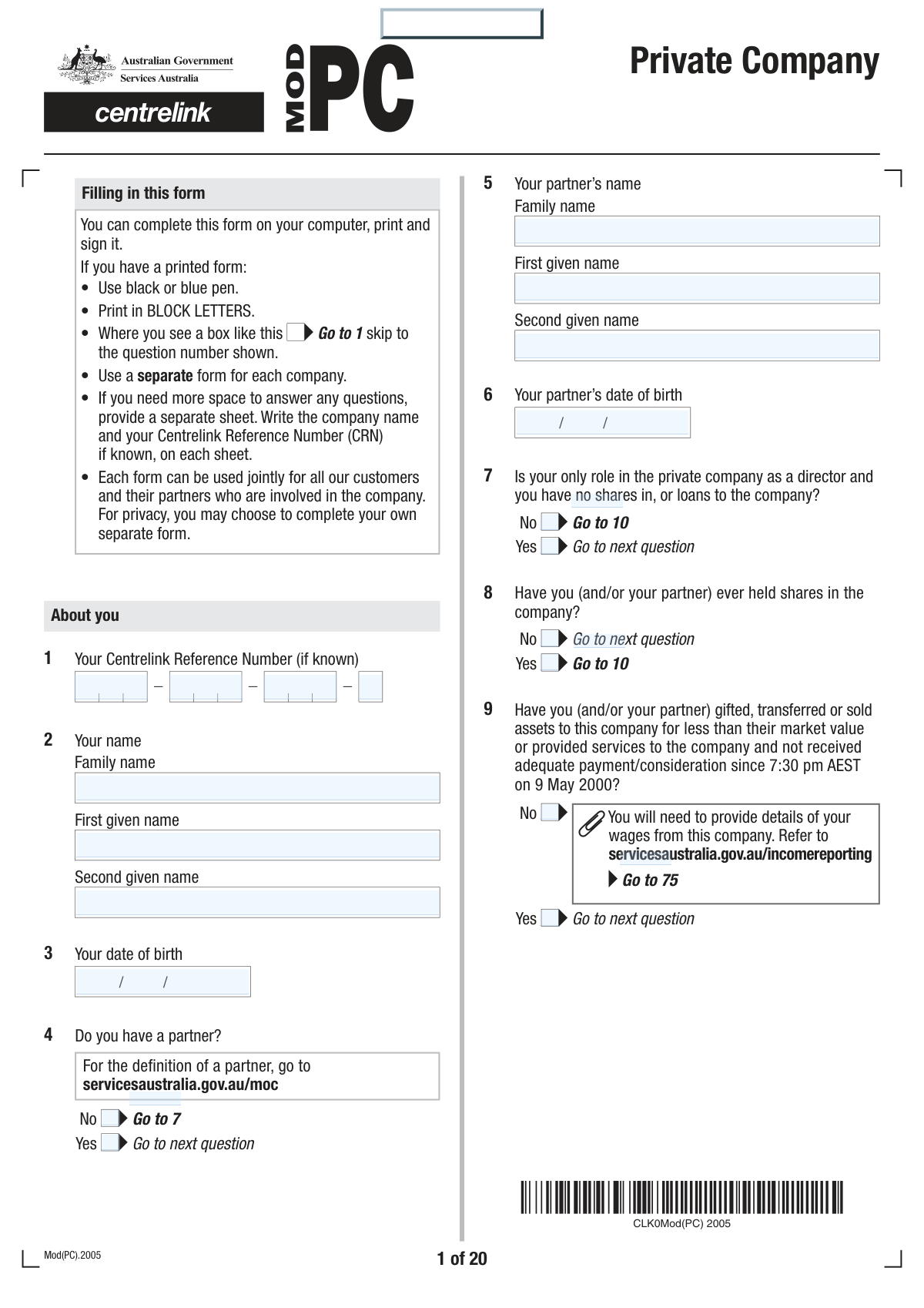
The Australian Government Services Australia Form Mod(PC).2005, also known as the Private Company form, is used to collect detailed information about your and/or your partner's involvement with a private company. This includes shareholdings, directorships, assets, liabilities, and income, which Services Australia uses to accurately assess your social security entitlements. Today, this complex form can be filled out quickly and accurately using AI-powered services like Instafill.ai, which can also convert non-fillable PDF versions into interactive fillable forms.
Mod(PC).2005 is part of the
company forms category on Instafill.
Our AI automatically handles information lookup, data retrieval, formatting, and form filling.
It takes less than a minute to fill out Mod(PC).2005 using our AI form filling.
Securely upload your data. Information is encrypted in transit and deleted immediately after the form is filled out.
Form specifications
| Form name: | Form Mod(PC).2005, Private Company |
| Number of fields: | 678 |
| Number of pages: | 24 |
| Filled form examples: | Form Mod(PC).2005 Examples |
| Language: | English |
More forms in Company forms
Instafill Demo: How to fill out PDF forms in seconds with AI
How to Fill Out Mod(PC).2005 Online for Free in 2026
Are you looking to fill out a MOD(PC).2005 form online quickly and accurately? Instafill.ai offers the #1 AI-powered PDF filling software of 2026, allowing you to complete your MOD(PC).2005 form in just 37 seconds or less.
Follow these steps to fill out your MOD(PC).2005 form online using Instafill.ai:
- 1 Navigate to Instafill.ai and upload or select the Mod(PC).2005 Private Company form to begin.
- 2 Provide your personal details, Centrelink Reference Number (if known), and your partner's information in the initial sections.
- 3 Enter comprehensive information about the private company, including its legal name, ABN/ACN, trading details, and contact information for an accountant or tax agent.
- 4 Fill in the detailed company financials section, covering share structure, all shareholders, assets (including public shares, managed investments, and real estate), and liabilities.
- 5 Disclose any income, benefits, or contributions you, your partner, or associates have received from or made to the company, and complete the specific 'Company real estate details' section if applicable.
- 6 Use the checklist to ensure all required supporting documents are attached, then review the AI-populated form for accuracy before signing and submitting it to Services Australia.
Our AI-powered system ensures each field is filled out correctly, reducing errors and saving you time.
Why Choose Instafill.ai for Your Fillable Mod(PC).2005 Form?
Speed
Complete your Mod(PC).2005 in as little as 37 seconds.
Up-to-Date
Always use the latest 2026 Mod(PC).2005 form version.
Cost-effective
No need to hire expensive lawyers.
Accuracy
Our AI performs 10 compliance checks to ensure your form is error-free.
Security
Your personal information is protected with bank-level encryption.
Frequently Asked Questions About Form Mod(PC).2005
This form is used by Services Australia to assess your share of a private company's income and assets. This information helps determine your eligibility and correct payment rate for social security benefits.
You must complete this form if, in the last 5 years, you or your partner have been involved with a private company, transferred shares, or made gifts involving a company. This applies to companies registered in Australia or overseas.
You must provide the company's latest financial documents, including the Tax Return, Profit and Loss Statement, and Balance Sheet, along with your personal tax returns. A full checklist of required documents is located at question 75 of the form.
No, Services Australia staff cannot help you complete the form due to the specific financial knowledge required. The form suggests you consult the company's tax agent or accountant for assistance.
You can upload the completed form and all supporting documents online through your Centrelink online account. If submitting as part of a new claim, you must return this form at the same time as your main claim form to avoid delays.
You should provide your best estimate of the current market value, which is the price the asset could reasonably be sold for today. The balance sheet often shows historical or depreciated values, which are not what is required.
If you do not return all required documents with your form, your claim may not be accepted or your payments could be delayed or stopped. It is crucial to provide all information listed in the checklist at question 75.
An associate is broadly defined and includes your spouse, parents, children, siblings, business partners, and even professional advisers like your accountant. Refer to the 'Notes' section of the form for a complete definition.
No, you are only required to provide an estimate of the property's current market value. If a professional valuation is needed, Services Australia may arrange one at no cost to you.
Yes, the instructions clearly state that you must use a separate Mod(PC).2005 form for each private company you are required to declare.
If you relinquish control of a private company, you may be considered to have gifted the company's assets. These gifts can be assessed and may affect your social security payments for up to 5 years from the date of the transfer.
Yes, services like Instafill.ai use AI to accurately auto-fill form fields from your saved information, which can save you significant time and help reduce errors on long forms like this one.
You can use a service like Instafill.ai to complete the form digitally. Simply upload the PDF to their platform, and you can easily fill, sign, and download the completed document.
If your PDF is not interactive, you can use a tool like Instafill.ai. It can convert flat, non-fillable PDFs into interactive forms that you can complete on your computer, tablet, or phone.
Compliance Mod(PC).2005
Validation Checks by Instafill.ai
1
Australian Business Identifier Format Validation
This validation ensures that the Australian Business Number (ABN), Australian Company Number (ACN), and Tax File Number (TFN) provided in questions 11 and 33 adhere to their specific structural and checksum rules. Correct identifiers are critical for uniquely and accurately identifying the company and any associated trusts within government systems. Failure to provide a valid identifier will prevent the system from verifying the company's details and will likely result in the form's rejection or a significant processing delay.
2
Conditional Partner Information Requirement
This check verifies that if the user answers 'No' to 'Do you have a partner?' (Question 4), the subsequent fields for the partner's name and date of birth (Questions 5 and 6) are not filled out. This logic prevents the submission of contradictory or irrelevant information, ensuring data integrity. If partner information is provided despite a 'No' answer, the form should be flagged for manual review to clarify the applicant's correct marital status.
3
Company Commencement and Cessation Date Logic
This validation performs two checks on company dates. First, it ensures the 'Date company commenced trading' (Question 16) is not before the 'Date company was incorporated' (Question 16). Second, if the company has ceased trading, it ensures the 'Date did the company cease trading' (Question 18) is not before the trading commencement date. This prevents logically impossible timelines and ensures the company's operational history is recorded accurately for assessment.
4
Trading Status and Cessation Details Logic
This validation enforces the rule that if 'Is the company still trading?' (Question 17) is answered 'No', then the 'Date did the company cease trading' (Question 18) and 'Explain why the company ceased trading' (Question 19) fields must be completed. Conversely, if the answer is 'Yes', these fields should be empty. This ensures that the reasons and date for ceasing trade are captured when necessary, which is vital for assessing the company's current financial status. An incomplete response will halt processing.
5
Age Pension Eligibility for Work Bonus Questions
This validation verifies that questions 22 and 23, related to the Work Bonus and personal exertion, are only answered if the applicant's (or their partner's) date of birth (from Q3/Q6) makes them eligible for the Age Pension, as defined in the table at Q21. This prevents ineligible individuals from providing unnecessary information and ensures the Work Bonus rules are applied correctly. If these questions are filled by an ineligible person, the data should be disregarded and the user notified of the error.
6
Personal Exertion Percentage Validation
This check ensures that for each trading business listed in question 23, the sum of the 'You %' and 'Your partner %' fields does not exceed 100%. It is logically impossible for the combined personal exertion of the applicant and their partner to account for more than 100% of the income from that activity. An entry over 100% is a clear data error and must be corrected for an accurate income assessment.
7
Shareholding Total Consistency Check
This validation cross-references the total number of shares issued for each class as declared in 'Company financials' (Question 25) with the sum of shares of that same class held by all individual shareholders listed in Question 26. The totals must match to ensure a complete and accurate picture of the company's ownership structure. A mismatch indicates a missing shareholder or an incorrect entry, which would prevent a correct assessment of control and attribution.
8
Share Purchase Date and Shareholder Age Consistency
This validation checks that for each shareholder listed in question 26, the 'Date purchased shares' is after their provided 'Date of birth'. A person cannot legally acquire assets or enter into contracts before they are born. This is a fundamental logical consistency check that helps identify and prevent significant data entry errors regarding dates, ensuring the integrity of the ownership records.
9
Contribution Date Threshold Validation
This check ensures that any 'Date of contribution' entered in question 29 is on or after 9 May 2000, as specified in the question's instructions. This date is a critical legal threshold for the 'source test' used in social security assessments. Submitting a date prior to this threshold is irrelevant for the assessment and indicates a user error that requires correction for the form to be processed.
10
Cross-Form Dependency Check
This validation flags when additional forms are required based on user responses. If a user answers 'Yes' to the company being a corporate trustee (Q15) or involved in a private trust (Q33), it confirms a 'Private Trust (Mod PT)' form is needed. Similarly, if 'Yes' is answered for involvement in other private companies (Q32), it confirms another 'Private Company (Mod PC)' form is required. This prevents incomplete submissions by reminding the user of their full reporting obligations.
11
Property Co-ownership Percentage Check
This validation is triggered if 'No' is selected for 100% ownership in question 64. It checks that the sum of ownership percentages listed for other owners in question 65 equals exactly 100%. This ensures a complete and accurate record of property ownership, which is essential for correctly attributing asset values. A total that is not 100% indicates an error or omission that must be resolved.
12
Required Document Checklist Verification
This validation checks that the user has ticked the appropriate boxes in the 'Documents you may need to provide' checklist (Question 75) based on their 'Yes' answers to corresponding questions (e.g., Q28, Q30, Q32, Q42). This serves as a crucial pre-submission check to ensure all necessary supporting evidence is included with the form. An inconsistency between answers and the checklist should trigger a warning that the application may be considered incomplete and its processing delayed.
13
Declaration and Signature Date Presence
This validation ensures that the signature and date fields in the declaration section (Question 77) are completed. The signature confirms the applicant attests to the accuracy of the information, and the date establishes when the declaration was made. A missing signature or date invalidates the declaration, making the form legally incomplete and un-processable.
Common Mistakes in Completing Mod(PC).2005
Applicants often refer to the company's balance sheet and enter the 'Written Down Value' (WDV) for assets like property, plant, and equipment in questions 35 and 48. However, the form explicitly requires an estimate of the 'current market value,' which is the price the asset would fetch if sold today. This error leads to an incorrect assessment of the company's total assets, potentially affecting benefit entitlements. To avoid this, research current market prices for similar assets or provide a reasonable estimate, rather than relying solely on accounting records.
The checklist at question 75 clearly lists mandatory documents like the company's latest Income Tax Return, Profit and Loss Statement, and Balance Sheet. A very common mistake is submitting the form without these attachments, often because they need to be sourced from an accountant. This omission will halt the processing of the application entirely, as the information is essential for assessment. Always gather all required financial statements before submission; if you cannot, you must provide a written explanation.
Questions 24 and 26 require detailed information for every director and shareholder, including their full name, date of birth, and specific shareholdings. People frequently miss listing a shareholder, especially if they are a family member with a minor holding, or fail to correctly detail the different classes of shares. This incomplete data can delay the assessment as it prevents Services Australia from understanding the control and ownership structure. It is crucial to cross-reference the company's official ASIC register and share ledger to ensure every individual and their holdings are accurately reported.
Question 41 asks about any benefits a director or shareholder receives, which includes non-cash benefits. Many people mistakenly believe this only refers to direct payments and fail to declare things like the personal use of a company vehicle, or having personal living expenses paid by the company. These benefits have a value and are assessed as income, so omitting them can lead to incorrect payment calculations and future debt. You must identify any personal expense paid by the company and report its value.
The form requires you to declare if the company is a trustee for a private trust (Q15), holds shares in another private company (Q32), or is involved with a private trust (Q33). A frequent error is to answer 'Yes' but then fail to complete and submit the required separate form (Mod PT for trusts, or another Mod PC for companies). This results in an incomplete picture of the overall financial structure, stopping the assessment until all related forms are provided. If your company has these involvements, ensure you download and complete the additional forms to submit them all at once.
Question 42 asks if the company owns real estate and how many properties it holds. The instructions state that a separate 'Company real estate details' section (pages 14-18) must be completed for each property. A common oversight is to detail only one property or try to combine information for multiple properties into a single section. This leads to an inaccurate asset valuation and requires follow-up. To prevent this, you must photocopy or print the relevant pages and fill them out for each individual property the company owns.
For applicants of Age Pension age, questions 22 and 23 are critical for applying the Work Bonus to self-employment income, but the term 'personal exertion' is often misunderstood. People may incorrectly claim it for passive investment income or fail to claim it for active work like bookkeeping or consulting. This mistake can result in missing out on the Work Bonus, leading to a lower pension payment. You must carefully consider if the income is a direct result of your active work and provide an accurate percentage.
Question 29 asks about any assets, cash, or services contributed to the company for less than their market value since May 2000. People often forget about historical transfers or don't consider providing services for free as a 'contribution,' and leave this section blank. Failing to declare these 'gifts' is a serious error, as it can trigger asset attribution under the 'source test' and lead to incorrect assessments or penalties. You must review the company's history for any such transfers and declare them with their market value at the time of the contribution.
Question 11 asks for the company's ABN, ACN, and TFN. These are distinct numbers, but applicants sometimes enter the same number in multiple fields or leave them blank if they are not immediately available. Using incorrect identifiers can cause significant processing delays as it hinders verification with other government agencies like the ATO and ASIC. To avoid this, locate the correct numbers from the company's tax records or business activity statements. AI-powered tools like Instafill.ai can help validate the format of these numbers to reduce errors.
If a company's situation has changed significantly since the last tax return (e.g., a major downturn in trade), question 28 allows you to report this. However, a common mistake is to describe the change without providing the required evidence, such as an interim Profit and Loss Statement or a current Balance Sheet. Without proof, the assessment will be based on the older, potentially inaccurate financial statements, which may not reflect your current entitlement. If you answer 'Yes' to question 28, you must attach supporting documentation.
Saved over 80 hours a year
“I was never sure if my IRS forms like W-9 were filled correctly. Now, I can complete the forms accurately without any external help.”
Kevin Martin Green
Your data stays secure with advanced protection from Instafill and our subprocessors

Robust compliance program
Transparent business model
You’re not the product. You always know where your data is and what it is processed for.
ISO 27001, HIPAA, and GDPR
Our subprocesses adhere to multiple compliance standards, including but not limited to ISO 27001, HIPAA, and GDPR.
Security & privacy by design
We consider security and privacy from the initial design phase of any new service or functionality. It’s not an afterthought, it’s built-in, including support for two-factor authentication (2FA) to further protect your account.
Fill out Mod(PC).2005 with Instafill.ai
Worried about filling PDFs wrong? Instafill securely fills form-modpc2005-private-company forms, ensuring each field is accurate.



