
Yes! You can use AI to fill out Ohio Form IT K-1, Investor's Share of Ohio Taxable Income and Tax Credits
Don't type 67 fields by hand. Tell our AI about yourself, or upload a document you already have, and it fills every field in seconds. You check it, then download, print or sign.
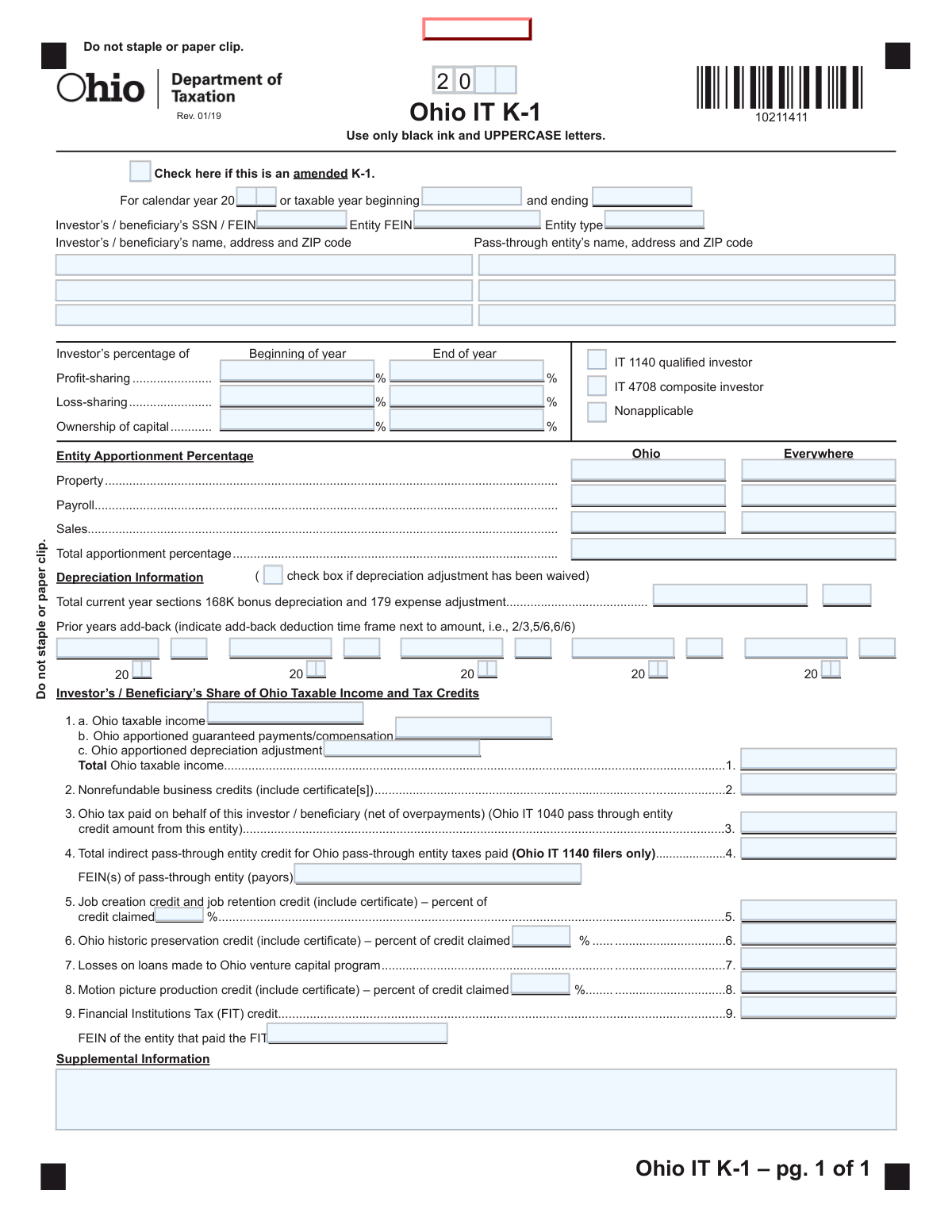
The AI does the filling. You just check it.
No typing into boxes, nothing to install.
What this form asks for
The AI fills all of it, from your answers or your documents.
The AI checks your answers before you download
14 checks built for this form, so a wrong date or a missing answer is caught before anyone else sees it.
This check ensures that the 'Investor’s / beneficiary’s SSN / FEIN' and 'Entity FEIN' fields adhere to the standard 9-digit format (XXX-XX-XXXX for SSN or XX-XXXXXXX for FEIN). It is crucial for correctly identifying the taxpayer and the entity with the tax authorities. A failure would prevent the form from being matched to the correct accounts, leading to processing delays or rejection.
The form provides three options for investor status: 'IT 1140 qualified investor', 'IT 4708 composite investor', and 'Nonapplicable'. This validation confirms that exactly one of these checkboxes is selected. Selecting none or multiple options creates ambiguity about the investor's filing status, which is essential for determining tax obligations, and would result in an error.
This check validates the tax period fields. If 'Calendar year' is filled, the 'taxable year beginning' and 'ending' dates should correspond to January 1st and December 31st of that year. If a fiscal year is used, the beginning and ending dates must define a valid 12-month period. This prevents illogical or conflicting date entries that would make the filing invalid for a specific tax period.
This validation verifies that the value in 'Line 1. Total Ohio taxable income' is the correct sum of the amounts from 'Line 1a. Ohio taxable income', 'Line 1b. Ohio apportioned guaranteed payments/compensation', and 'Line 1c. Ohio apportioned depreciation adjustment'. This is a critical mathematical check to ensure the base income for tax calculation is accurate. A mismatch would lead to incorrect tax assessments and require an amendment.
According to the instructions, the 'Total apportionment percentage' must be a decimal carried to six places. This check enforces that specific format. Proper formatting is essential for the precise calculation of Ohio-sourced income. An incorrectly formatted value could lead to significant miscalculations of tax liability.
This validation ensures that if a monetary value is entered on 'Line 4. Total indirect pass-through entity credit', the corresponding 'FEIN(s) of pass-through entity (payors)' field must also be filled. This is necessary to trace the source of the tax credit being claimed. Failure to provide the FEIN would result in the disallowance of the credit.
And 8 more checks
- Requires Conditional FEIN for FIT Credit (Line 9)
- Validates Ohio vs. Everywhere Apportionment Logic
- Checks for Credit Certificate Reference
- Validates Depreciation Add-Back Fraction Format
- Ensures Percentage Fields are within Range
- Verifies Depreciation Waiver Consistency
- Requires Entity FEIN for Identification
- Validates Completeness of Investor Address
Let AI fill out your Ohio IT K-1
No typing. Every field filled in seconds, checked, ready to sign.
How to Fill Out Ohio IT K-1 Online for Free in 2026
What the AI walks you through.
- Navigate to Instafill.ai and upload or select the Ohio IT K-1 form.
- Provide the investor/beneficiary and pass-through entity information, including names, addresses, and SSN/FEINs.
- Enter the investor's percentage of profit-sharing, loss-sharing, and ownership of capital for the beginning and end of the tax year.
- Input the entity's Ohio apportionment percentages for property, payroll, and sales, along with any depreciation adjustments.
- Detail the investor's share of Ohio taxable income, including apportioned guaranteed payments and depreciation adjustments.
- List the investor's share of any nonrefundable and refundable tax credits, such as the job creation credit or historic preservation credit.
- Review all the information populated by the AI for accuracy, then download or print the completed Ohio IT K-1 form.
Common Mistakes in Completing Ohio IT K-1
The ones the AI is built to catch.
Incorrect Apportionment Percentage Format
Omitting Required Credit Certificate Information
Missing or Incorrect Depreciation Add-Back Fractions
Confusing Percentage vs. Dollar Amount for Refundable Credits
Incorrectly Identifying Investor Status
Forgetting to Include Lower-Tier Entity Data
Missing FEINs for Indirect or FIT Credits
Misunderstanding the Depreciation Waiver for Small Investors
Ignoring Basic Formatting and Submission Instructions
Incorrectly Calculating Total Ohio Taxable Income on Line 1
Frequently Asked Questions About Ohio IT K-1
Is it really free for 7 days?
Can I fill other forms too?
How do I cancel?
How does the AI fill out Ohio IT K-1?
What happens to my information?
How complex is Ohio IT K-1 to fill out?
What is the purpose of the Ohio IT K-1 form?
Who is responsible for filling out the Ohio IT K-1?
Do I file the Ohio IT K-1 with the state?
What is the 'Entity Apportionment Percentage' section for?
What is the depreciation adjustment on the IT K-1?
I own less than 5% of the entity. Does the depreciation add-back apply to me?
What does the amount on Line 3, 'Ohio tax paid on behalf of this investor,' mean?
What should I do if I receive an amended Ohio IT K-1?
How is the Ohio IT K-1 different from the federal Schedule K-1?
Are guaranteed payments included on this form?
Can AI tools help me fill out the Ohio IT K-1?
How can I fill out the Ohio IT K-1 online using Instafill.ai?
My Ohio IT K-1 PDF is not fillable. What can I do?
Get your Ohio IT K-1 filled out by AI
$0 today. Cancel before Nov 4 and you pay nothing.
Other forms like this one
tax forms: W-9, Request for Taxpayer Identification Number and Certification, Form W-2, Wage and Tax Statement, Form 1040-X, Amended U.S. Individual Income Tax Return, Form 130, Taxpayer's Notice to Initiate an Appeal, Form 1040-C, U.S. Departing Alien Income Tax Return, Form 940, Employer’s Annual FUTA Tax Return, Form 720, Quarterly Federal Excise Tax Return, Form 982, Reduction of Tax Attributes, Form 4137, Social Security and Medicare Tax on Unreported Tip Income, Form 911, Request for Taxpayer Advocate Service Assistance, Form 8960, Net Investment Income Tax, Form 8959, Additional Medicare Tax, Form 8919, Uncollected Social Security and Medicare Tax, Form 8801, Credit for Prior Year Minimum Tax, Form 990-T, Exempt Org Business Income Tax Return, Form 945, Annual Return of Withheld Federal Income Tax, Form 5330, Return of Excise Taxes, Form FTB 3514, California Earned Income Tax Credit, Form 100, CA Corp Tax Return, Form 8288, U.S. Withholding Tax Return
income forms: Form SSA-44, Medicare Income-Related Monthly Adjustment Amount - Life-Changing Event, Form 1040-X, Amended U.S. Individual Income Tax Return, Form 1040-C, U.S. Departing Alien Income Tax Return, Form 4137, Social Security and Medicare Tax on Unreported Tip Income, Form 8960, Net Investment Income Tax, Form 1042-S, Foreign Person’s U.S. Income, Form 990-T, Exempt Org Business Income Tax Return, Form 945, Annual Return of Withheld Federal Income Tax, Form 568, LLC Income Return, Form FTB 3514, California Earned Income Tax Credit, Form 1099-INT, Interest Income, Form 1120-S, U.S. Income Tax Return for an S Corporation, Form 1065, U.S. Return of Partnership Income, Form 1040, U.S. Individual Income Tax Return, Form FL-150, Income and Expense Declaration, Form 122A-1, Chapter 7 Statement of Current Monthly Income, Arizona Form 285-I, Individual Income Tax Disclosure/Representation Authorization Form, Form SSA-8000-BK, Application for Supplemental Security Income (SSI), Judicial Council of California Form FL-150, Income and Expense Declaration, Form 1120-S (2025), U.S. Income Tax Return for an S Corporation
income tax forms: Form 1040-X, Amended U.S. Individual Income Tax Return, Form 1040-C, U.S. Departing Alien Income Tax Return, Form 4137, Social Security and Medicare Tax on Unreported Tip Income, Form 8960, Net Investment Income Tax, Form 990-T, Exempt Org Business Income Tax Return, Form 945, Annual Return of Withheld Federal Income Tax, Form FTB 3514, California Earned Income Tax Credit, Form 1120-S, U.S. Income Tax Return for an S Corporation, Form 1040, U.S. Individual Income Tax Return, Arizona Form 285-I, Individual Income Tax Disclosure/Representation Authorization Form, Form 1120-S (2025), U.S. Income Tax Return for an S Corporation, Form 1120 (2025), U.S. Corporation Income Tax Return, 2023 Schedule IL-E/EIC, Illinois Exemption and Earned Income Tax Credit (Illinois Department of Revenue), 2023 Form IL-1040-X, Amended Individual Income Tax Return (Illinois Department of Revenue), Form APL-505, Taxpayer’s Earned Income Tax Credit Protest, Form 1120-H, U.S. Income Tax Return for Homeowners Associations, Form 1040, U.S. Individual Income Tax Return (2025), T2 Corporation Income Tax Return, Form 1040-X, Amended U.S. Individual Income Tax Return, Form TC-40, Utah Individual Income Tax Return
credit forms: Form 5405, Repayment of First-Time Homebuyer Credit, Form 8862, Information To Claim Certain Credits, Form 8880, Credit for Qualified Retirement Savings Contributions, Form 5695, Residential Energy Credits, Form 3468, Investment Credit, Form 8801, Credit for Prior Year Minimum Tax, Form FTB 3514, California Earned Income Tax Credit, Form 8910, Alternative Motor Vehicle Credit, Form 8885, Health Coverage Tax Credit, Form 5884-A, Employee Retention Credit, Form 5884, Work Opportunity Credit, Form 5884-C, Work Opportunity Credit, Form 8994, Employer Credit for Paid Family and Medical Leave, Form 8962, Premium Tax Credit (PTC), Form 8812, Credits for Qualifying Children, Form 104, List of Creditors 20 Largest Unsecured Claims, WestRock Credit Application and Uniform Sales & Use Tax Exemption/Resale Certificate — Multijurisdiction, Personal Financial Statement (REV 06/2018) – Northwest Federal Credit Union, Form G-1450, Authorization for Credit Card Transactions, 2023 Schedule IL-E/EIC, Illinois Exemption and Earned Income Tax Credit (Illinois Department of Revenue)
investor forms: Vanguard Personal Investor – Transfer form, Vanguard Personal Investor – Transfer initiation form – Transfer out, Vanguard Personal Investor authorisation to provide account information form, Vanguard Personal Investor – Authorised representative form, Institutional Investors Organization Resolution Form, Vanguard Personal Investor Withdrawal form, Vanguard Institutional Investor Group Redemption Form, Transamerica Premier Funds Direct Rollover IRA Application (704-TRS Investor Class), Vanguard Account Opening Form for Individual Investors, Vanguard Personal Investor – Unregulated Trust details – Account information update, Merrill Edge® Self‑Directed Business Investor Account (BIA Account) Account Application Booklet and Agreements, AwardChoice Limited Individual Investor Account Form, Merrill Business Investor Account (BIA) and Working Capital Management Account (WCMA) Account Application Booklet and Agreements, Merrill AwardChoice® Individual Investor Account Application Form for U.S. Persons, Pershing NetXInvestor Online Account Set-Up Form, Investor Application and Subscription Agreement for The Wyoming Reserve Opportunity Zone Fund Corporation, Pomona Investment Fund Investor Initial Application (Class A & Class I Shares), AML/CTF Investor Identification Information Form, Application Form: Legal Entities | Qualified Investor Hedge Fund, EDAWN Investor Application
tax credit forms: ETA Form 9061, Work Opportunity Tax Credit Individual Characteristics Form (ICF), Form 8801, Credit for Prior Year Minimum Tax, Form FTB 3514, California Earned Income Tax Credit, Form 8885, Health Coverage Tax Credit, Form 8962, Premium Tax Credit (PTC), WestRock Credit Application and Uniform Sales & Use Tax Exemption/Resale Certificate — Multijurisdiction, 2023 Schedule IL-E/EIC, Illinois Exemption and Earned Income Tax Credit (Illinois Department of Revenue), Form APL-505, Taxpayer’s Earned Income Tax Credit Protest, Form T2201, Disability Tax Credit Certificate, State of Michigan, Form MC 52, Request and Writ for Garnishment (Income Tax Refund/Credit)
Let AI fill out your Ohio IT K-1
Your trial starts once a card is added. You pay nothing before Nov 4.
Our AI already knows this form, all 67 fields of it. Skip the typing: tell it about yourself, or upload what you have, and it fills the whole form in seconds.
- AI fills every field on the form, checkboxes included
- No typing into boxes: answer a few questions, or upload a document you already have, an old copy of this form, a photo of a document
- The AI checks the answers; you review and change anything before you download
- Download the finished PDF, print it, or sign it online
- Encrypted, and never used to train AI
Cancel before Nov 4 and you pay nothing.
A card is needed to start the trial. Cancel in two clicks from your account.
Terms · Privacy