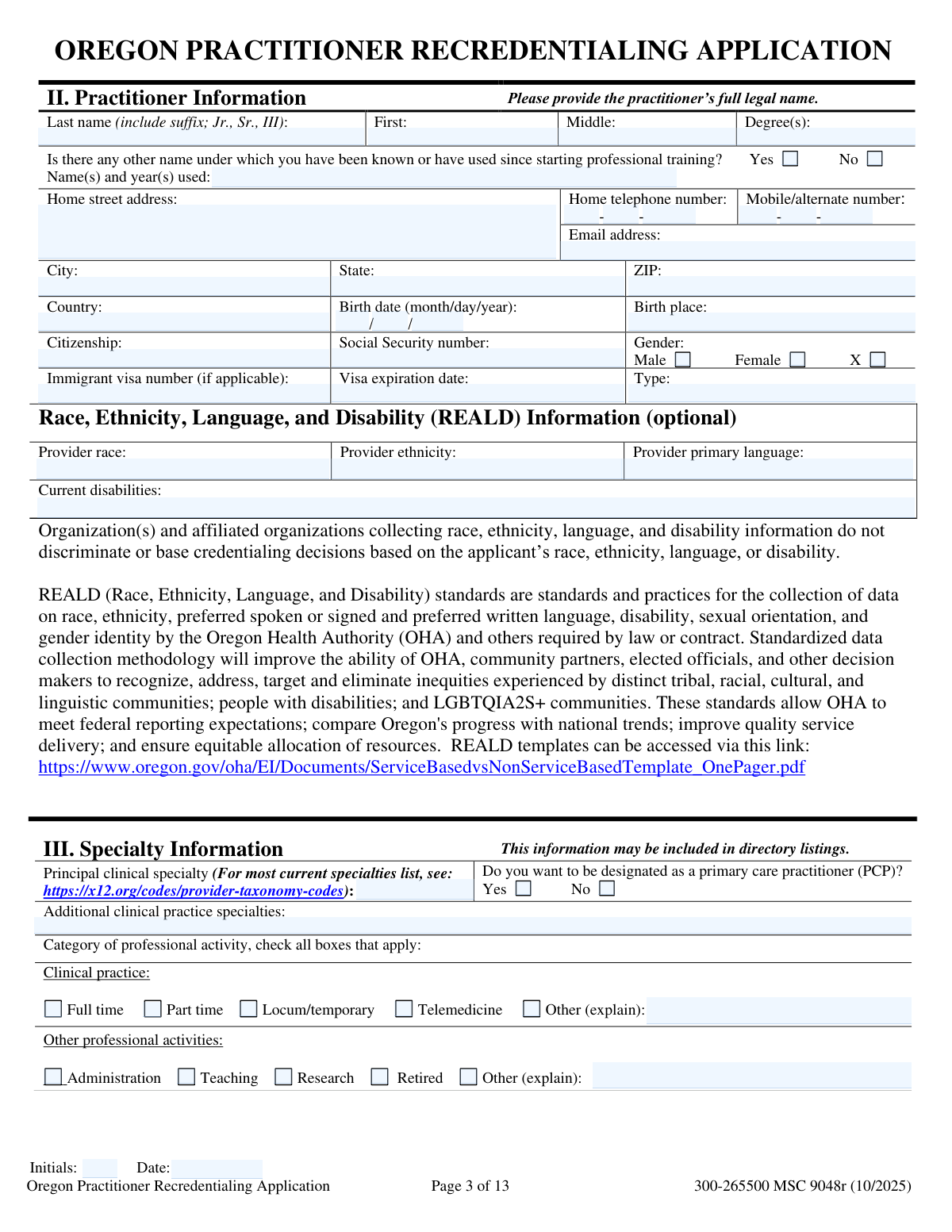
Yes! You can use AI to fill out Oregon Practitioner Credentialing Application
The Oregon Practitioner Credentialing Application is a standardized form used by medical professionals to apply for privileges and participation with healthcare organizations throughout Oregon. It is a crucial document that collects extensive information about a practitioner's education, training, work history, licensure, and any disciplinary actions to ensure they meet the required standards for patient care. Completing this lengthy application is essential for practitioners seeking to work in hospitals or join insurance provider networks. Today, this form can be filled out quickly and accurately using AI-powered services like Instafill.ai, which can also convert non-fillable PDF versions into interactive fillable forms.
Oregon Credentialing Application is part of the
practitioner application forms category on Instafill.
Our AI automatically handles information lookup, data retrieval, formatting, and form filling.
It takes less than a minute to fill out Oregon Credentialing Application using our AI form filling.
Securely upload your data. Information is encrypted in transit and deleted immediately after the form is filled out.
Form specifications
| Form name: | Oregon Practitioner Credentialing Application |
| Number of fields: | 762 |
| Number of pages: | 13 |
| Language: | English |
Instafill Demo: How to fill out PDF forms in seconds with AI
How to Fill Out Oregon Credentialing Application Online for Free in 2026
Are you looking to fill out a OREGON CREDENTIALING APPLICATION form online quickly and accurately? Instafill.ai offers the #1 AI-powered PDF filling software of 2026, allowing you to complete your OREGON CREDENTIALING APPLICATION form in just 37 seconds or less.
Follow these steps to fill out your OREGON CREDENTIALING APPLICATION form online using Instafill.ai:
- 1 Navigate to Instafill.ai and upload or select the Oregon Practitioner Credentialing Application form.
- 2 Use the AI assistant to automatically populate your personal and contact information, including legal name, home address, SSN, and birth details.
- 3 Enter your professional credentials, such as clinical specialties, board certifications, Oregon license, DEA registration, and other provider numbers, following the guided prompts.
- 4 Detail your complete work history, including current and previous employers, hospital affiliations, and provide explanations for any gaps in employment as required.
- 5 Provide information on your current and prior professional liability insurance policies and list the contact details for your professional peer references.
- 6 Carefully complete the attestation section by answering all questions regarding your professional background, legal history, and ability to practice.
- 7 Review all auto-filled and manually entered information for accuracy, then electronically sign and date the attestation and authorization sections to finalize your application.
Our AI-powered system ensures each field is filled out correctly, reducing errors and saving you time.
Why Choose Instafill.ai for Your Fillable Oregon Credentialing Application Form?
Speed
Complete your Oregon Credentialing Application in as little as 37 seconds.
Up-to-Date
Always use the latest 2026 Oregon Credentialing Application form version.
Cost-effective
No need to hire expensive lawyers.
Accuracy
Our AI performs 10 compliance checks to ensure your form is error-free.
Security
Your personal information is protected with bank-level encryption.
Frequently Asked Questions About Form Oregon Credentialing Application
This is a comprehensive practitioner credentialing application. It is designed for medical practitioners (e.g., physicians, nurse practitioners) to apply for or renew credentials with a healthcare organization, health plan, or hospital.
In the 'Other Name Used' section, check 'Yes' and enter any other names you have used since starting professional training, along with the years you used them. This is crucial for verifying your education and work history.
No, this section is marked as optional. You are not required to provide this information to complete the application.
If you do not hold any board certifications, you can simply check the 'Does not apply' box in the 'Board Certification/Recertification' section. If you intend to become certified, you can explain this in the 'Intent for Certification' field.
No, if you only work at a single location, you only need to complete the 'Primary Practice' sections. You can leave the 'Secondary Practice' fields blank.
The form requires you to explain any period of two months or longer within the past three years where you were not practicing or in a training program. Use the 'Gaps Explanation' section to describe your activities during these times.
If you answer 'Yes' to an attestation question, you must provide a complete and detailed explanation on the corresponding supplemental page or an attached sheet. For example, a 'Yes' to question 'M' requires you to fill out the professional liability claim details section.
An 'Occurrence' policy covers incidents that happened during the policy period, no matter when the claim is filed. A 'Claims-Made' policy covers claims only if they are filed while the policy is active.
If you do not have admitting privileges, you must complete the 'Continuity of Care Plan Explanation' section. Here, you will describe your arrangement for a patient to be admitted to a hospital and how their care will be managed.
This is the person at your practice, often an office manager or administrator, who is responsible for handling credentialing paperwork. Providing their information ensures that future requests for information are sent to the correct person.
Yes, services like Instafill.ai use AI to auto-fill form fields accurately and save time. This is especially useful for long and detailed applications like this one, helping to reduce manual data entry and potential errors.
You can upload the PDF form to the Instafill.ai platform. The service will make the form interactive and then use your securely stored profile information to automatically populate the fields, which you can then review, edit, and complete.
If you have a 'flat' or non-fillable PDF, you can use a service like Instafill.ai. It can convert the non-fillable PDF into an interactive, fillable form that you can easily complete on your computer.
Compliance Oregon Credentialing Application
Validation Checks by Instafill.ai
1
Social Security Number (SSN) Format Validation
This check ensures that the 'Social Security Number (SSN)' field is entered in the standard 9-digit format, optionally allowing for hyphens (XXX-XX-XXXX). It verifies that the input contains only numbers and is a valid, non-sequential number. This is critical for identity verification and tax reporting, and failure to provide a valid SSN would halt the credentialing process until corrected.
2
National Provider Identifier (NPI) Format and Checksum
This validation verifies that both the Individual (Type 1) and Group (Type 2) NPI numbers are exactly 10 digits long and conform to the Luhn checksum algorithm. This ensures the NPI is a syntactically valid number, which is essential for billing, claims processing, and identification in healthcare systems. An invalid NPI would lead to claim rejections and administrative delays.
3
Conditional Requirement for 'Other Name' Details
This is a logical check that triggers if the 'Yes' box is checked for 'Other Name Used'. The validation ensures that the 'Other names and years used' text field is not empty. This is important for conducting a thorough background check and verifying credentials under all names the practitioner has used. If the details field is left blank after checking 'Yes', the form submission should be blocked with an error message.
4
Conditional Requirement for Board Certification Details
This validation checks if the 'Does not apply' box for Board Certification is unchecked. If it is unchecked, the system must verify that at least the first board certification entry (Issuing Board Name, Specialty, Certification Date) is completed. This prevents applicants from skipping the section unintentionally. If the 'Does not apply' box is checked, these fields should be disabled or ignored.
5
Employment History Date Chronology
For each entry in the work history (current and previous), this validation ensures that the 'Employment End Year' and 'Employment End Month' are not before the 'Employment Start Year' and 'Employment Start Month'. This maintains the logical integrity of the practitioner's work history timeline. An illogical date sequence would require correction before the application can be processed for gap analysis.
6
Certification Expiration Date Logic
This check validates that for any entered board or other certification, the 'Expiration Date' (Month/Year) is chronologically after the 'Certification Date' (Month/Year). It also flags certifications where the expiration date is in the past. This is crucial for ensuring the practitioner holds current, valid credentials. An expired certification would trigger a review or request for updated information.
7
Conditional Requirement for Malpractice Claim Details
If the user answers 'Yes' to 'Question M: Malpractice Claims/Lawsuits (Last 5 Years)', this validation ensures that the subsequent detailed malpractice claim information section is filled out. This includes fields like 'Incident Date', 'Incident and Clinical Details', and 'Settlement Amount'. Failure to provide this mandatory explanation for a 'Yes' answer would prevent the form from being submitted, as this information is critical for risk assessment.
8
Email Address Format Validation
This check applies to all email address fields on the form (e.g., 'Email Address', 'Recredentialing Contact Email Address'). It verifies that the entered value follows the standard email format (e.g., [email protected]). This is essential for ensuring reliable communication with the practitioner and their contacts. An invalid email format would result in a validation error prompting the user to correct the entry.
9
Phone Number Component Validation
For all phone numbers broken into components (Area Code, Prefix, Line Number), this validation ensures each part is filled and contains the correct number of digits (3, 3, and 4 respectively). It also confirms that all parts are numeric. This prevents incomplete or invalid phone numbers from being entered, which is vital for contact verification. If any part is missing or invalid, the system should flag the specific phone number entry.
10
DEA Registration Number Format and Checksum
This validation verifies that the 'DEA Registration Number' conforms to the standard format (e.g., two letters followed by seven numbers). It also performs a checksum calculation based on the DEA's formula to ensure the number is mathematically valid. This is a critical security and compliance check for any practitioner who will be prescribing controlled substances. An invalid DEA number would be a major red flag and block the application.
11
Continuity of Care Plan Requirement
This is a logical validation that checks if a practitioner has any facility affiliations but has selected 'No' for 'Admitting privileges at this facility' for all of them. If this condition is met, the validation ensures that the 'Continuity of Care Plan Explanation' field is filled out. This is a crucial patient safety and compliance requirement. If the explanation is missing, the application is incomplete and cannot be approved.
12
Work History Gap Identification
This server-side validation analyzes the start and end dates of all listed employment and education entries. It calculates the time between each consecutive entry and flags any gap longer than two months. If such a gap is found and the 'Gaps Explanation' section is either marked as 'Does not apply' or does not cover the identified gap period, the system will prompt the user to provide an explanation. This ensures a complete and verifiable professional history.
13
Conditional Requirement for 'Other' Explanations
This check applies to sections like 'Clinical Practice (Category of Professional Activity)' and 'Other Professional Activities'. If the 'Other (explain)' checkbox is selected, this validation ensures the corresponding explanation text field is not left empty. This prevents ambiguity and ensures the credentialing committee has a complete understanding of the practitioner's activities. A missing explanation would trigger an error message.
14
Tax ID and Associated Name Completeness
This validation ensures that if a 'Primary Federal Tax ID or SSN' is entered, the corresponding 'Name Associated with Tax ID' field must also be filled, and vice versa. This links the business tax identifier directly to the legal entity name for verification with the IRS. Submitting one without the other would create ambiguity and issues with billing and tax reporting, so the form should require both fields to be completed as a pair.
Common Mistakes in Completing Oregon Credentialing Application
Applicants often list their work history but fail to explain any gaps longer than two months, as required by the 'Gaps Explanation' section. This happens due to oversight or difficulty recalling activities during unemployment, travel, or sabbaticals. An unexplained gap is a major red flag for credentialing committees, leading to significant processing delays and requests for additional information. To avoid this, carefully review your timeline for the past three years and explicitly document any period over two months, even if it was for personal reasons.
Practitioners may correctly answer 'Yes' to a sensitive question (e.g., Question M regarding malpractice claims) but fail to provide the mandatory detailed explanation on the corresponding supplemental page. This omission is often due to haste or not having the case details readily available. Answering 'Yes' without a complete explanation immediately halts the application process and can be interpreted as an attempt to conceal information, requiring extensive follow-up. Always gather all relevant documents and be prepared to provide a full, transparent explanation for any 'Yes' answer.
The form distinctly asks for the individual practitioner's NPI and the practice's Group NPI in separate sections. A frequent error is entering the individual NPI in the 'Group NPI Number' field for the practice, or vice-versa. This mistake causes verification failures and can lead to significant billing and claims processing issues down the line. To prevent this, practitioners should verify they are providing the correct Entity Type 1 (Individual) or Entity Type 2 (Group) NPI number as specified for each field.
The form requires the full legal name, including suffixes (Jr., III), and a separate section for any other names used, such as a maiden name. Applicants frequently omit suffixes or forget to list all previously used names, causing a mismatch with licenses, diplomas, and background check records. This discrepancy forces credentialing staff to issue a request for information, delaying the verification process. Ensure your legal name matches your government-issued ID exactly and list all prior names to ensure a smooth verification.
Many sections, like 'Home Address and Contact Information' and 'Primary Practice Phone', break telephone numbers into three separate fields: Area Code, Prefix, and Line Number. A common data entry error is to type the entire 10-digit number into the first field, leaving the other two blank. This formatting error can prevent digital systems from parsing the number correctly and may require manual correction, slowing down the process. AI-powered tools like Instafill.ai can automatically parse and correctly place phone number components into their respective fields.
If a practitioner indicates they do not have admitting privileges at any of their affiliated facilities, they are required to fill out the 'Continuity of Care Plan Explanation'. Many applicants who lack these privileges check 'No' but then forget to provide this crucial explanation. This is a critical omission, as it leaves a gap in how patient care is managed during hospitalization, and the application cannot be approved without this plan. If you do not have admitting privileges, you must be prepared to describe your protocol for transferring care to an admitting physician.
In the 'Board Certification' section, applicants often provide the name of the issuing board and specialty but omit the certification number or, more commonly, the exact expiration date. This may happen if the information is not readily available, but it is essential for primary source verification. Leaving these fields blank or entering 'N/A' when a date exists will result in verification failure and application delays. Before starting, gather all certification documents to ensure you can enter the full, accurate details, including dates.
The 'Professional Liability' section requires detailed information for both current and prior carriers, including policy numbers, coverage types (claims-made vs. occurrence), limits, and effective/retroactive dates. Applicants often struggle to recall or find details for prior policies, leading to incomplete or inaccurate entries. This information is mandatory for assessing risk and coverage history, and its absence will stop the credentialing process until complete records are provided. It is vital to obtain a full insurance history from your carriers or brokers before filling out this section.
The application requires contact details for multiple peer references, which are used to verify clinical competence. A very common issue is providing outdated phone numbers or email addresses for these references, who may have changed practices or retired. This makes it impossible for the credentialing team to contact them, bringing the peer review process to a halt and significantly extending the application timeline. Always confirm the current contact information with your references before listing them on the application.
The form contains numerous sections with conditional logic, such as 'Additional Education' or 'Other State Licenses', where you must first check a 'Does not apply' box if the section is irrelevant. Applicants often ignore the checkbox and leave the entire section blank, or conversely, check 'Does not apply' but then proceed to enter information in the fields. This ambiguity confuses reviewers and automated systems, requiring clarification. To avoid this, carefully read the instructions and either check 'Does not apply' or fill out the section completely, but not both. If the form is a non-fillable PDF, a tool like Instafill.ai can convert it to a smart, fillable version that helps enforce this logic.
Saved over 80 hours a year
“I was never sure if my IRS forms like W-9 were filled correctly. Now, I can complete the forms accurately without any external help.”
Kevin Martin Green
Your data stays secure with advanced protection from Instafill and our subprocessors

Robust compliance program
Transparent business model
You’re not the product. You always know where your data is and what it is processed for.
ISO 27001, HIPAA, and GDPR
Our subprocesses adhere to multiple compliance standards, including but not limited to ISO 27001, HIPAA, and GDPR.
Security & privacy by design
We consider security and privacy from the initial design phase of any new service or functionality. It’s not an afterthought, it’s built-in, including support for two-factor authentication (2FA) to further protect your account.
Fill out Oregon Credentialing Application with Instafill.ai
Worried about filling PDFs wrong? Instafill securely fills oregon-practitioner-credentialing-application-1 forms, ensuring each field is accurate.