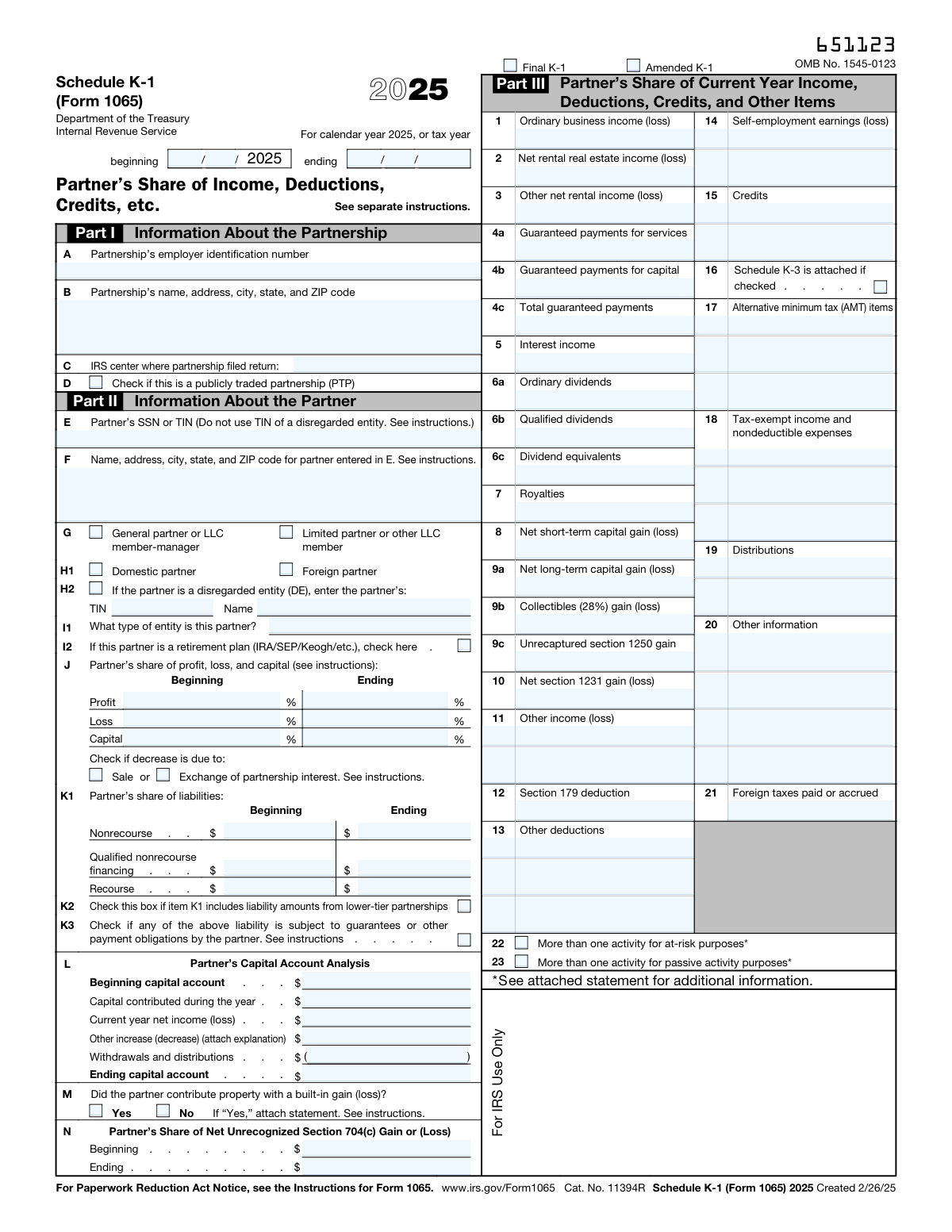
Yes! You can use AI to fill out Schedule K-1 (Form 1065), Partner's Share of Income, Deductions, Credits, etc.

Schedule K-1 (Form 1065) is an Internal Revenue Service (IRS) tax form that partnerships file for each of their partners. It details the partner's individual share of the partnership's income, losses, deductions, and credits, which is essential for the partner to accurately complete their personal tax return. Today, this form can be filled out quickly and accurately using AI-powered services like Instafill.ai, which can also convert non-fillable PDF versions into interactive fillable forms.
Schedule K-1 (Form 1065) is part of the credit forms and income forms categories on Instafill.
Our AI automatically handles information lookup, data retrieval, formatting, and form filling.
It takes less than a minute to fill out Schedule K-1 (Form 1065) using our AI form filling.
Securely upload your data. Information is encrypted in transit and deleted immediately after the form is filled out.

Form specifications

Form name: Schedule K-1 (Form 1065), Partner's Share of Income, Deductions, Credits, etc.
Number of fields: 111
Number of pages: 1
Language: English
main-image

Instafill Demo: How to fill out PDF forms in seconds with AI

How to Fill Out Schedule K-1 (Form 1065) Online for Free in 2026

Are you looking to fill out a SCHEDULE K-1 (FORM 1065) form online quickly and accurately? Instafill.ai offers the #1 AI-powered PDF filling software of 2026, allowing you to complete your SCHEDULE K-1 (FORM 1065) form in just 37 seconds or less.
Follow these steps to fill out your SCHEDULE K-1 (FORM 1065) form online using Instafill.ai:
  1. 1 Navigate to Instafill.ai and upload or select the Schedule K-1 (Form 1065) from the form library.
  2. 2 Use the AI assistant to populate Part I with the partnership's identification details, such as its EIN, name, and address.
  3. 3 Complete Part II by providing the specific partner's information, including their SSN or TIN, name, address, and partner type.
  4. 4 Enter the partner's share of liabilities, capital account analysis, and other financial details in the designated sections.
  5. 5 Fill out Part III by inputting the partner's distributive share of income, deductions, credits, and other items as provided by the partnership.
  6. 6 Carefully review all auto-filled and manually entered data for accuracy, making any necessary adjustments before finalizing the form.
  7. 7 Securely download, print, or share the completed Schedule K-1 for tax filing purposes.

Our AI-powered system ensures each field is filled out correctly, reducing errors and saving you time.

Why Choose Instafill.ai for Your Fillable Schedule K-1 (Form 1065) Form?

Speed

Complete your Schedule K-1 (Form 1065) in as little as 37 seconds.

Up-to-Date

Always use the latest 2026 Schedule K-1 (Form 1065) form version.

Cost-effective

No need to hire expensive lawyers.

Accuracy

Our AI performs 10 compliance checks to ensure your form is error-free.

Security

Your personal information is protected with bank-level encryption.

Frequently Asked Questions About Form Schedule K-1 (Form 1065)

This is a Schedule K-1, which you received because you are a partner in a partnership. It reports your specific share of the partnership's income, losses, deductions, and credits that you will need to report on your personal tax return.

No, you do not file the Schedule K-1 form itself with your tax return. You must use the information provided on it to complete your own tax forms, such as Form 1040 and other relevant schedules.

The 'Final K-1' box is checked if this is the last K-1 you will receive from the partnership, often because you sold your interest. The 'Amended K-1' box indicates this form corrects information on a K-1 you previously received for the same tax year.

Your ownership percentages for profit, loss, and capital are listed in Part II. The form shows your share at both the beginning and the end of the tax year, which is useful if your stake in the partnership changed.

This section summarizes the changes in your investment value within the partnership over the tax year. It shows your beginning balance, adds any capital you contributed and your share of income, and subtracts any withdrawals or losses to arrive at your ending balance.

Guaranteed payments are compensation you received from the partnership for services or the use of capital, paid without regard to the partnership's income. You must report these payments as ordinary income on your tax return.

Your share of recourse liabilities are debts you are personally responsible for repaying. Nonrecourse liabilities are debts for which you are not personally liable beyond the amount of your investment in the partnership.

This indicates the partnership's interests are traded on an established market. PTPs have special tax rules, and losses from a PTP can generally only be used to offset income from that same partnership.

If you received a flat, non-fillable PDF, you can use a service like Instafill.ai. It can convert the document into an interactive, fillable form, making it easy to manage and use the information digitally.

Yes, services like Instafill.ai use AI to accurately auto-fill form fields, which can save you time and help prevent errors. While the tool helps with data entry, you should use the final figures to prepare your official tax return.

To fill out your Schedule K-1 online, simply upload the document to the Instafill.ai platform. The service will identify all the form fields, allowing you to type in your information or have the AI populate it from your saved data profile.

Part III provides a detailed breakdown of your share of the partnership's financial results for the year. This includes various types of income, deductions, credits, self-employment earnings, and other items that you must report on different parts of your tax return.

This means the partner is an entity, like a single-member LLC, that the IRS 'disregards' for tax purposes. The tax items flow through to the entity's owner, whose name and TIN are also provided on the form.

Compliance Schedule K-1 (Form 1065)
Validation Checks by Instafill.ai

1
Validates Tax Year Period Logic
This check ensures that the provided tax year period is logical and valid. It verifies that the 'Ending month/day/year' represents a date that occurs after the 'Beginning month/day' and that the total period does not exceed a reasonable length, typically around 12 months. An invalid period, such as an ending date before the beginning date, would make the entire form's financial data contextually meaningless and would be rejected by tax authorities.
2
Ensures Partnership EIN Format is Correct
This validation confirms that the 'Partnership EIN' is entered in the correct XX-XXXXXXX format as required by the IRS. An improperly formatted EIN can lead to processing delays or rejection of the filing, as the partnership cannot be correctly identified in the IRS systems. If the format is incorrect, the submission should be flagged for manual review or correction.
3
Verifies Partner SSN or TIN Format
This check validates that the 'Partner SSN or TIN' field conforms to a valid Social Security Number (XXX-XX-XXXX) or Taxpayer Identification Number (XX-XXXXXXX) format. This number is critical for associating the K-1 income/loss with the correct partner's tax return. An invalid or missing number will prevent the partner from correctly filing their personal taxes and will cause the submission to fail.
4
Mutually Exclusive K-1 Status Check
This validation ensures that the 'Final K-1' and 'Amended K-1' checkboxes are mutually exclusive, meaning only one or neither can be selected, but not both. A K-1 cannot be both the final version and an amended version simultaneously. Selecting both creates a logical contradiction that makes the form's status ambiguous, requiring the user to clarify the form's intent before processing.
5
Mutually Exclusive Partner Type Check
This check verifies that a partner is not classified as both a 'General partner or LLC member-manager' and a 'Limited partner or other LLC member' at the same time. A partner's legal status within the partnership determines their liability and rights, so these classifications are mutually exclusive. If both are checked, the form is ambiguous and must be corrected to reflect the partner's single, correct legal status.
6
Mutually Exclusive Partner Domicile Check
This validation ensures that the 'Domestic partner' and 'Foreign partner' checkboxes are not selected simultaneously. A partner's tax residency status is a critical piece of information that determines tax withholding and reporting requirements, and a partner can only be one or the other. If both are checked, the system cannot determine the correct tax treatment and must reject the submission for clarification.
7
Conditional Requirement for Disregarded Entity Information
This check ensures that if the 'Disregarded entity (DE)' box is checked, the corresponding 'Disregarded-entity partner TIN' and 'Disregarded-entity partner name' fields are populated. The IRS requires the ultimate owner's information when the direct partner is a DE. Failure to provide this information when the DE box is checked results in an incomplete and non-compliant filing, which should be blocked until the required fields are filled.
8
Partner's Capital Account Reconciliation
This validation performs a mathematical check on the Partner's Capital Account Analysis (Part L). It verifies that the 'Ending capital account' equals the 'Beginning capital account' plus 'Capital contributed', plus 'Current year net income (loss)', plus/minus 'Other increase (decrease)', minus 'Withdrawals and distributions'. An imbalance indicates a data entry error or a miscalculation that must be corrected for the financial reporting to be accurate and auditable.
9
Total Guaranteed Payments Calculation
This check validates that the amount in 'Line 4c — Total guaranteed payments' is the sum of 'Line 4a — Guaranteed payments for services' and 'Line 4b — Guaranteed payments for capital'. This is a simple arithmetic check to ensure data integrity and prevent cascading errors in tax calculations. If the sum is incorrect, the form should be flagged for correction as it indicates a data entry mistake.
10
Qualified vs. Ordinary Dividends Logic
This validation ensures that the amount reported for 'Line 6b — Qualified dividends' is not greater than the amount for 'Line 6a — Ordinary dividends'. Qualified dividends are a subset of ordinary dividends and are taxed at a different rate, so they cannot logically exceed the total ordinary dividend amount. An error here suggests a misunderstanding or data entry mistake that would lead to incorrect tax liability calculations for the partner.
11
Validates Percentage Field Value Range
This check confirms that all percentage fields (e.g., 'Beginning/Ending Profit Percentage', 'Loss Percentage', 'Capital Percentage') contain values between 0 and 100, inclusive. A value outside this range is mathematically impossible for a percentage share. This validation prevents nonsensical data from being processed and ensures the partner's share allocation is reported correctly.
12
Address Completeness Check
This validation verifies that both the 'Partnership name and address' and 'Partner name and mailing address' fields contain essential components like a street, city, state, and ZIP code. A complete and valid address is required by the IRS for official correspondence and proper identification. Incomplete addresses can lead to returned mail and processing delays, so submissions with missing address components should be flagged.
13
Distributions Consistency Between Part L and Part III
This check compares the 'Withdrawals and distributions' amount from the Capital Account Analysis (Part L) with the sum of all distribution amounts reported in Part III, Line 19. These two values should be identical as they represent the same total distributions to the partner. A mismatch indicates a significant data entry or reporting error that makes the form internally inconsistent and unreliable.
14
K-3 Attachment Consistency Check
This validation ensures that if any amount is entered in the 'Line 16 — Schedule K-3 related amount' boxes, the 'Schedule K-3 is attached' checkbox is also checked. The presence of Line 16 amounts implies that a Schedule K-3 is required to provide detailed international tax information. If the box is not checked when amounts are present, the filing is incomplete and must be corrected to include the required attachment.

Common Mistakes in Completing Schedule K-1 (Form 1065)

Using an Incorrect Partner Identification Number (TIN/SSN)

This error often occurs when a partner is a disregarded entity (DE), and the preparer mistakenly enters the DE's EIN in the main 'Partner SSN or TIN' field instead of the owner's SSN or TIN. This causes a mismatch with IRS records, leading to processing delays, tax notices, and potential penalties. To avoid this, always use the TIN of the ultimate taxpayer (the owner of the DE), not the DE itself, in the primary partner identification field.

Incorrectly Calculating the Partner's Capital Account

The ending capital account balance must equal the beginning balance, plus contributions and income, minus withdrawals and losses. Simple arithmetic errors or omitting an item in Part L often cause the final number to be incorrect, which is a major red flag for the IRS. An incorrect capital account can affect the partner's basis calculation and taxability of distributions. AI-powered tools like Instafill.ai can help prevent this by performing automatic calculations and validations.

Misclassifying Partner Status (General vs. Limited)

Incorrectly checking the box for 'General partner' versus 'Limited partner or other LLC member' is a frequent mistake with significant consequences. This status directly impacts whether the partner's share of income is subject to self-employment tax, which can lead to a substantial underpayment or overpayment of tax. Carefully review the partnership agreement to determine the correct legal status before making a selection in Part II.

Confusing 'Final K-1' and 'Amended K-1' Status

Preparers sometimes check the 'Final K-1' box when a partner exits but the partnership continues, or they forget to check 'Amended K-1' when issuing a correction. This confuses IRS record-keeping, potentially causing the partner's account to be improperly closed or corrected information to be ignored. Only check 'Final' for the last K-1 ever to be issued to that partner, and always check 'Amended' for any corrected K-1.

Misreporting Share of Liabilities in Part K

The rules for classifying liabilities as recourse, nonrecourse, or qualified nonrecourse are complex, leading to frequent errors. This mistake directly impacts the partner's tax basis, which determines the deductibility of losses and the tax treatment of distributions. Incorrectly reporting liabilities can result in disallowed losses or unexpected taxable income, so it is critical to categorize them correctly based on the partnership's financial records.

Omitting Required Attachments or Explanations

Several fields, such as 'Other increase (decrease)' in the capital account analysis or items on Line 20 ('Other information'), explicitly require an attached explanation. Filers often enter a value but forget to provide the corresponding statement, leading to an incomplete filing. This can be rejected or trigger an IRS inquiry, delaying processing. Using a tool like Instafill.ai can help by flagging fields that require attachments.

Reporting Inaccurate Self-Employment Earnings on Line 14

This error occurs when the amount on Line 14 does not correctly reflect the partner's share of net earnings from self-employment, often by improperly including portfolio or rental income. This directly affects the partner's self-employment tax liability, leading to incorrect tax payments and potential IRS notices. This figure must be calculated based only on the partnership's trade or business income allocable to general partners or active LLC members.

Failing to Provide Complete Disregarded Entity (DE) Details

When a partner is a disregarded entity, filers may check the 'Disregarded entity (DE)' box but then fail to enter the DE's own name and TIN in the designated adjacent fields. This leaves the IRS with incomplete information about the ownership structure, causing processing delays and compliance checks. To avoid this, ensure that if the DE box is checked, the DE's legal name and TIN are also provided in the specific fields for that purpose.

Confusing Distributions (Line 19) with Guaranteed Payments (Line 4)

People often mix up distributions of cash or property (reported on Line 19) with guaranteed payments for services or capital (reported on Line 4). Guaranteed payments are taxable income to the partner, while distributions are typically a non-taxable return of capital until basis is exhausted. This confusion leads to incorrect income reporting and tax calculations. If the form is a non-fillable PDF, a tool like Instafill.ai can convert it to a fillable version with clearly labeled fields to reduce such errors.

Inconsistent Beginning and Ending Share Percentages

Filers may incorrectly report profit, loss, and capital percentages that are inconsistent with each other or fail to update them when a change occurs mid-year. For example, the ending percentages might not reflect a sale or contribution, or the profit and loss percentages might differ without a clear reason in the partnership agreement. This can lead to an incorrect allocation of income and deductions, triggering an IRS audit. Always verify these percentages against the legal partnership agreement.
Saved over 80 hours a year

“I was never sure if my IRS forms like W-9 were filled correctly. Now, I can complete the forms accurately without any external help.”

Kevin Martin Green

Your data stays secure with advanced protection from Instafill and our subprocessors

Robust compliance program

Transparent business model

You’re not the product. You always know where your data is and what it is processed for.

ISO 27001, HIPAA, and GDPR

Our subprocesses adhere to multiple compliance standards, including but not limited to ISO 27001, HIPAA, and GDPR.

Security & privacy by design

We consider security and privacy from the initial design phase of any new service or functionality. It’s not an afterthought, it’s built-in, including support for two-factor authentication (2FA) to further protect your account.

Fill out Schedule K-1 (Form 1065) with Instafill.ai

Worried about filling PDFs wrong? Instafill securely fills schedule-k-1-form-1065-partners-share-of-income-deductions-credits-etc forms, ensuring each field is accurate.