Yes! You can use AI to fill out Trust Certification
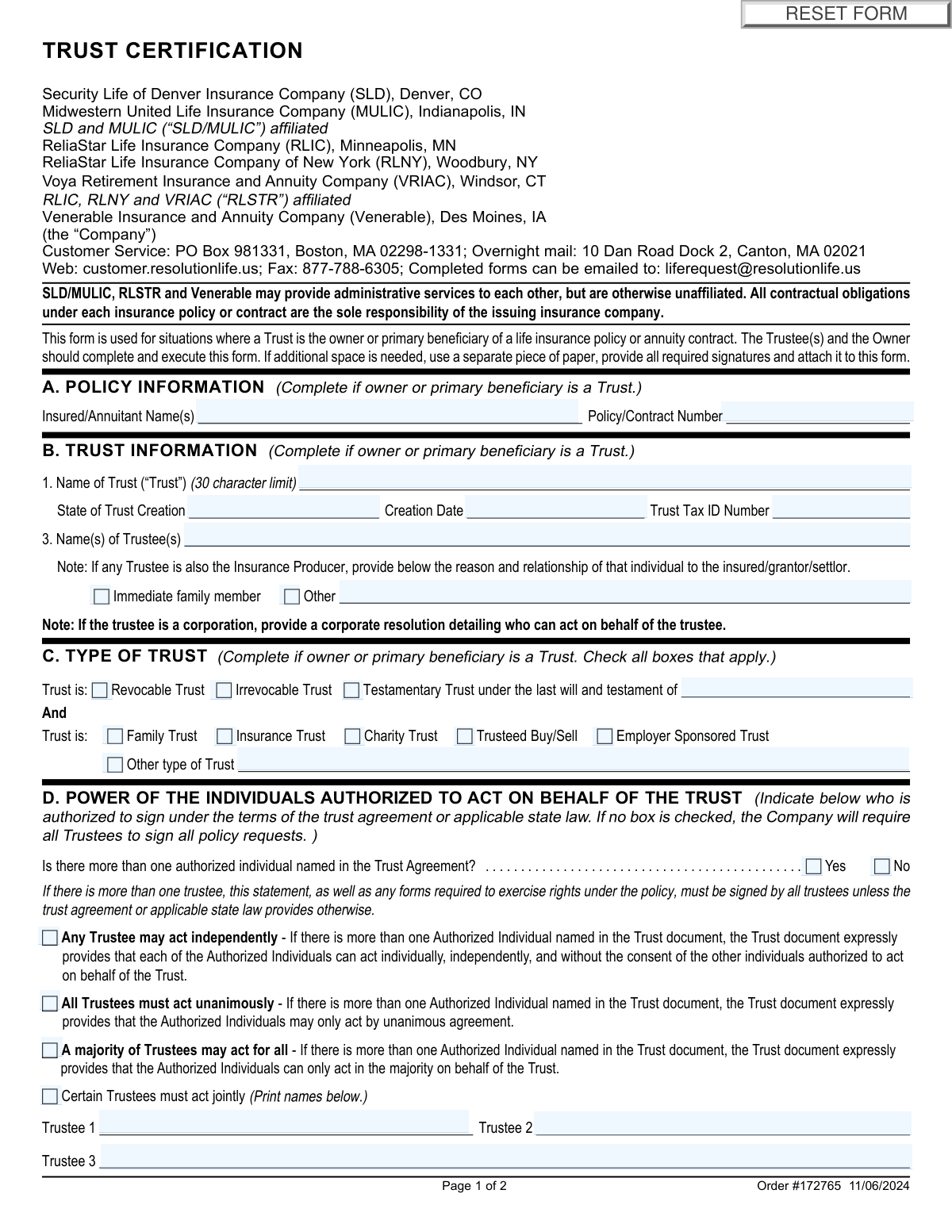
A Trust Certification form is a document required by insurance companies to verify the details and authority of a trust that is an owner or beneficiary of a policy. It confirms the trust's legal standing, identifies the trustees, and outlines their powers to manage the policy, which is crucial for preventing unauthorized transactions. Today, this form can be filled out quickly and accurately using AI-powered services like Instafill.ai, which can also convert non-fillable PDF versions into interactive fillable forms.
Trust Certification is part of the
trust certification forms category on Instafill.
Our AI automatically handles information lookup, data retrieval, formatting, and form filling.
It takes less than a minute to fill out Trust Certification using our AI form filling.
Securely upload your data. Information is encrypted in transit and deleted immediately after the form is filled out.
Form specifications
| Form name: | Trust Certification |
| Number of fields: | 65 |
| Number of pages: | 2 |
| Language: | English |
Instafill Demo: How to fill out PDF forms in seconds with AI
How to Fill Out Trust Certification Online for Free in 2026
Are you looking to fill out a TRUST CERTIFICATION form online quickly and accurately? Instafill.ai offers the #1 AI-powered PDF filling software of 2026, allowing you to complete your TRUST CERTIFICATION form in just 37 seconds or less.
Follow these steps to fill out your TRUST CERTIFICATION form online using Instafill.ai:
- 1 Navigate to Instafill.ai and upload the Trust Certification form or select it from the template library.
- 2 Provide the relevant policy information in Section A, including the insured/annuitant's name and the policy or contract number.
- 3 Enter the trust's information in Section B, such as the trust's legal name, creation date, state of creation, and tax ID number.
- 4 Identify all trustees and specify the type of trust and the signing authority of the trustees in Sections C and D.
- 5 Complete the Look-Through Trust designation in Section E if applicable.
- 6 Carefully review all information auto-populated by the AI, read the certification statements in Section F, and make any necessary corrections.
- 7 Electronically sign the form in Section G. All required trustees must provide their printed name, title, address, and signature to validate the certification.
Our AI-powered system ensures each field is filled out correctly, reducing errors and saving you time.
Why Choose Instafill.ai for Your Fillable Trust Certification Form?
Speed
Complete your Trust Certification in as little as 37 seconds.
Up-to-Date
Always use the latest 2026 Trust Certification form version.
Cost-effective
No need to hire expensive lawyers.
Accuracy
Our AI performs 10 compliance checks to ensure your form is error-free.
Security
Your personal information is protected with bank-level encryption.
Frequently Asked Questions About Form Trust Certification
This form is used to certify the details of a trust when it is the owner or primary beneficiary of a life insurance policy or annuity contract. It provides the insurance company with essential information about the trust and the authority of its trustees.
The form must be completed and signed by all current Trustee(s) of the trust. The policy owner must also sign the form in the designated section.
You will need your policy or contract number, the trust's full legal name, its creation date, and its Tax ID number. You will also need the full names, addresses, and birth dates of all trustees.
Refer to your trust agreement to determine how trustees are authorized to act. Check the appropriate box in Section D to indicate if any trustee can act alone, if all must act unanimously, or if a majority is required for decisions.
The form has space for three trustees. If your trust has more, provide all required information and signatures for the additional trustees on a separate piece of paper and attach it to this form.
In Section B, you must disclose this relationship. Check the box to indicate if the trustee is an immediate family member or select 'Other' and provide a brief explanation of the relationship.
If a corporation serves as the trustee, you must attach a corporate resolution that details which individuals are authorized to act and sign on behalf of the corporation.
A 'look-through trust' is a specific designation under IRS regulations that can affect required minimum distributions for beneficiaries. You should consult with a legal or tax advisor to determine if your trust qualifies for this status.
You can email the completed form to [email protected], fax it to 877-788-6305, or mail it to the customer service address provided on the form. An overnight mail address is also available for expedited delivery.
Processing times can vary depending on the volume of requests. For a status update after submission, you can contact the customer service department using the contact information listed on the form.
Yes, services like Instafill.ai use AI to accurately auto-fill form fields, which can save you time and help prevent errors. This is especially helpful for complex forms with multiple information fields.
You can use a service like Instafill.ai to complete the form online. Simply upload the PDF, and the AI will make the fields interactive, allowing you to type your information directly and then save or print the completed document.
If your PDF is a flat, non-fillable image, you can use a tool like Instafill.ai. It can convert non-fillable PDFs into interactive forms that you can easily complete on your computer, saving you from having to print and fill it out by hand.
Compliance Trust Certification
Validation Checks by Instafill.ai
1
Trust Name Character Limit
This validation ensures that the 'Name of Trust' field in Section B does not exceed the 30-character limit specified on the form. This is important to prevent data truncation in backend systems and ensure the full legal name is stored correctly as per system constraints. If the name exceeds the limit, the submission should be blocked and the user prompted to correct the entry.
2
Valid Trust Creation Date
This check verifies that the 'Creation Date' in Section B is a validly formatted date (e.g., MM/DD/YYYY) and that the date is not in the future. A trust cannot be created on a future date, so this validation ensures logical consistency and data integrity. A failed validation would require the user to correct the date before the form can be processed.
3
Trust Tax ID Number (EIN) Format
This validation confirms that the 'Trust Tax ID Number' is entered in the correct 9-digit format for an Employer Identification Number (EIN), typically XX-XXXXXXX. Correct formatting is crucial for tax reporting and legal identification of the trust entity. An incorrectly formatted number could lead to processing rejections by the company or regulatory bodies, so the form should flag it for immediate correction.
4
Conditional Requirement for Testamentary Trust
This check ensures that the 'decedent name' field is filled out if the 'Testamentary Trust' checkbox is selected in Section C. This maintains logical consistency and guarantees that all necessary information for this specific trust type is collected. If the box is checked and the decedent's name is missing, the form submission should be blocked until the required information is provided.
5
Trustee Authorization Selection for Multiple Trustees
This validation verifies that if the 'Yes' box is checked for 'Is there more than one authorized individual...', one of the subsequent options in Section D (Any, All, Majority, Certain) is selected. This is critical for the company to understand how to legally process future requests from the trustees. If no option is selected, the form is considered incomplete, preventing ambiguity in the trust's operational rules.
6
Joint Trustee Names Requirement
This check validates that if the 'Certain Trustees must act jointly' option is selected in Section D, at least two trustee names are provided in the designated fields. The concept of acting 'jointly' implies more than one person, so this check ensures the instruction is complete and actionable. The form should prevent submission if this condition is selected but the required names are missing.
7
Signature and Printed Name Correspondence
This validation ensures that for each trustee section in Section G, if a signature is provided, the corresponding 'Name (Please print.)' field is also completed. A signature without a clearly printed name is ambiguous and can lead to identification issues and legal challenges. This check is essential for legal clarity and proper record-keeping, and the form should be considered incomplete without both elements.
8
Valid and Logical Signature Date
This check validates that each signature date in Section G is a real date, is not in the future, and is on or after the 'Trust Creation Date'. This prevents data entry errors and ensures the certification is signed after the trust legally exists. An invalid or illogical date would compromise the legal standing of the document, so the user must correct it before submission.
9
Trustee Age and Birth Date Verification
This validation checks that the 'Birth Date' provided for each trustee in Section G is a valid date and that the calculated age is at least 18 years. Trustees must be of legal age to enter into a binding contract and perform their fiduciary duties. The system should flag any date that results in an age less than 18 or is an invalid date, preventing the appointment of an ineligible trustee.
10
Exclusive Selection for Trust Legal Structure
This check validates that only one option among 'Revocable Trust,' 'Irrevocable Trust,' and 'Testamentary Trust' is selected in Section C. A trust cannot simultaneously be both revocable and irrevocable, so this check enforces logical consistency. Allowing multiple selections would create ambiguity about the trust's fundamental legal nature and should be prevented.
11
All Trustees Signature Verification
This validation cross-references the number of trustees listed in Section B with the number of trustee signatures provided in Section G. The form's instructions state that all authorized individuals must sign, so this check ensures compliance with that critical rule. A mismatch would indicate an incomplete or improperly executed form, requiring the user to gather all necessary signatures before submission.
12
Address State and ZIP Code Formatting
This check ensures that for all address blocks in Section G, the 'State' field contains a valid two-letter postal abbreviation and the 'ZIP' field contains a valid 5-digit or 9-digit (ZIP+4) number. This is crucial for ensuring mailability and accurate location data for legal and communication purposes. Incorrect formats would be flagged to the user for correction to prevent returned mail and processing delays.
Common Mistakes in Completing Trust Certification
Section D asks whether trustees can act independently, unanimously, or by majority. Filers often guess or leave this blank because they don't have the trust document handy. This is a critical error, as an incorrect selection can lead to unauthorized transactions, while leaving it blank defaults to requiring all trustees to sign for all future actions, causing significant delays. To avoid this, you must review the trust agreement to determine the correct authority before filling out the form.
The form requires signatures from all authorized individuals in Section G, but who is authorized depends on the selection made in Section D. People frequently misinterpret this and fail to obtain all necessary signatures, especially if unanimity is required. A single missing signature is one of the most common reasons for immediate rejection, forcing the filer to start the process over. Always confirm the signing requirements in Section D before gathering signatures.
Section B specifies a 30-character limit for the trust's name, but official trust names are often much longer. Filers frequently enter the full name, which can get truncated in the system or cause a data entry error. This mismatch between the form and the actual trust document can lead to record-keeping issues and delays in processing. To prevent this, use a legally acceptable abbreviation or contact the financial institution for guidance on how to enter a long trust name.
Section E asks for a highly technical tax classification ('look-through trust') that determines how retirement account assets are handled for beneficiaries. Most filers are unfamiliar with this term and may guess, which can have significant and irreversible tax consequences for the trust's beneficiaries. Never guess on this question; you must consult with a qualified tax advisor or attorney to determine the trust's correct status.
In Section B, the form requires the Trust Tax ID Number, which is an Employer Identification Number (EIN) for the trust entity. Trustees, particularly for family trusts, sometimes mistakenly enter their personal Social Security Number (SSN) instead. This causes tax reporting errors and will result in the form being rejected. Always use the specific EIN that was assigned to the trust by the IRS.
Section G requires the full name, title, birth date, address, and signature for each trustee. It is very common for filers to miss a piece of this information, such as a birth date or ZIP code, for one of the trustees. Any missing data will render the form incomplete and halt processing until a corrected version is submitted. Using a checklist or an AI-powered tool like Instafill.ai can help ensure all required fields are completed for every trustee before submission.
Section G has separate signature lines for the 'Owner' and the 'Trustee(s)'. When the trust is the owner, this creates confusion, and filers often leave the 'Owner Signature' line blank. However, the instructions state that the trustee must sign on behalf of the trust. This omission leads to an incomplete form. The acting trustee should sign in both their designated trustee signature block and the owner signature block, listing 'Trustee' as their title.
In Section B, the form requires a complete list of all current trustees. Filers may accidentally omit a co-trustee or list a successor trustee who is not yet empowered to act. This misrepresents the trust's legal governance and can invalidate the certification, causing the request to be denied until a corrected form is submitted with all proper parties listed.
This form is often provided as a non-fillable PDF, leading people to print it and fill it out by hand. This frequently results in illegible handwriting, which can cause data entry errors, misinterpretation of names or numbers, and ultimately, rejection of the form. To avoid this, use a service like Instafill.ai to convert the flat PDF into a smart, fillable form, ensuring all entries are typed, clear, and legible before printing for signatures.
Saved over 80 hours a year
“I was never sure if my IRS forms like W-9 were filled correctly. Now, I can complete the forms accurately without any external help.”
Kevin Martin Green
Your data stays secure with advanced protection from Instafill and our subprocessors

Robust compliance program
Transparent business model
You’re not the product. You always know where your data is and what it is processed for.
ISO 27001, HIPAA, and GDPR
Our subprocesses adhere to multiple compliance standards, including but not limited to ISO 27001, HIPAA, and GDPR.
Security & privacy by design
We consider security and privacy from the initial design phase of any new service or functionality. It’s not an afterthought, it’s built-in, including support for two-factor authentication (2FA) to further protect your account.
Fill out Trust Certification with Instafill.ai
Worried about filling PDFs wrong? Instafill securely fills trust-certification forms, ensuring each field is accurate.