Yes! You can use AI to fill out Vermont Medicaid EDI Registration
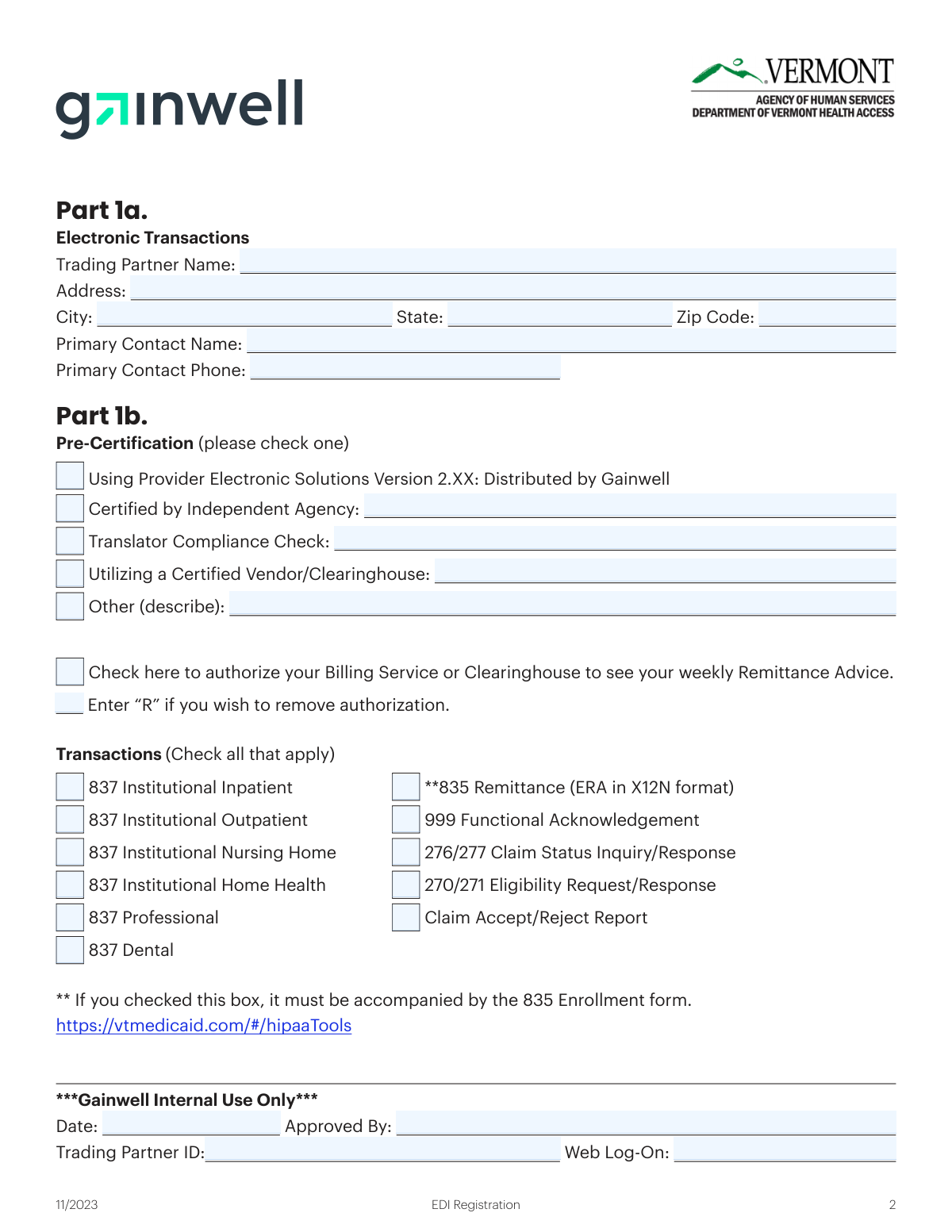
The Vermont Medicaid EDI Registration form is essential for any entity, such as a clearinghouse, billing company, or provider, that needs to exchange electronic data with Vermont Medicaid. It establishes a Trading Partner account for submitting claims (837), checking eligibility (270/271), and receiving remittance advice (835). Completing this registration is a critical step for enabling electronic transactions and streamlining healthcare administration. Today, this form can be filled out quickly and accurately using AI-powered services like Instafill.ai, which can also convert non-fillable PDF versions into interactive fillable forms.
Vermont EDI Registration is part of the
Medicaid forms and registration forms categories on Instafill.
Our AI automatically handles information lookup, data retrieval, formatting, and form filling.
It takes less than a minute to fill out Vermont EDI Registration using our AI form filling.
Securely upload your data. Information is encrypted in transit and deleted immediately after the form is filled out.
Form specifications
| Form name: | Vermont Medicaid EDI Registration |
| Number of pages: | 1 |
| Language: | English |
More forms in Medicaid forms
Instafill Demo: How to fill out PDF forms in seconds with AI
How to Fill Out Vermont EDI Registration Online for Free in 2026
Are you looking to fill out a VERMONT EDI REGISTRATION form online quickly and accurately? Instafill.ai offers the #1 AI-powered PDF filling software of 2026, allowing you to complete your VERMONT EDI REGISTRATION form in just 37 seconds or less.
Follow these steps to fill out your VERMONT EDI REGISTRATION form online using Instafill.ai:
- 1 Navigate to Instafill.ai and upload or select the Vermont Medicaid EDI Registration form.
- 2 Use the AI assistant to fill in Part 1a with the Trading Partner's name, address, and contact information.
- 3 In Part 1b, indicate the pre-certification method and check the boxes for all electronic transactions the Trading Partner will use.
- 4 Proceed to Part 2 and enter the Trading Partner ID (if existing) and list the Medicaid Provider IDs and names you are authorized to represent.
- 5 For each provider listed in Part 2, check the boxes corresponding to the specific transactions they have authorized.
- 6 Review all entered information for accuracy, ensuring provider signatures are obtained where necessary.
- 7 Securely download, print, or submit the completed form as required by Vermont Medicaid.
Our AI-powered system ensures each field is filled out correctly, reducing errors and saving you time.
Why Choose Instafill.ai for Your Fillable Vermont EDI Registration Form?
Speed
Complete your Vermont EDI Registration in as little as 37 seconds.
Up-to-Date
Always use the latest 2026 Vermont EDI Registration form version.
Cost-effective
No need to hire expensive lawyers.
Accuracy
Our AI performs 10 compliance checks to ensure your form is error-free.
Security
Your personal information is protected with bank-level encryption.
Frequently Asked Questions About Form Vermont EDI Registration
This form is used to register as a Trading Partner and associate your account with an active Vermont Medicaid Provider. This enables you to perform electronic transactions like claim submissions, eligibility checks, and receiving remittance advice.
Any entity that uses the Vermont Medicaid Web Portal for electronic transactions must complete this form. This includes clearinghouses, billing companies, providers using third-party software, and large provider organizations with multiple enrollments.
Yes, a completed Trading Partner Agreement must be on file for your registration to be successful. Additionally, if you select the 835 Remittance (ERA) transaction, you must also submit the separate 835 Enrollment form.
If you are establishing a new account, you should leave the 'Trading Partner ID' field blank. An ID will be assigned to you once your registration and Trading Partner Agreement are processed.
In Part 2, list each provider's Medicaid ID and name. Then, for each provider, check the boxes corresponding to the specific electronic transactions you are authorized to process on their behalf.
If you have more providers to list than space allows in Part 2, you should make additional copies of that page. Complete a line for each provider and submit all pages together.
No, providers who wish to submit electronically through a clearinghouse should contact their vendor directly. The clearinghouse will handle the EDI registration process with Vermont Medicaid for you.
To authorize your billing service or clearinghouse to see your weekly Remittance Advice, check the designated box in Part 1b of the form. To remove this authorization, enter 'R' in the same box.
To remove a provider, find their entry in the provider list in Part 2 and check the 'Remove' box at the end of that specific provider's row.
Yes, services like Instafill.ai use AI to accurately auto-fill form fields, which can save you time and help prevent errors. This is particularly useful when entering information for multiple providers.
You can use a service like Instafill.ai to easily complete this form online. Simply upload the PDF to the platform, and it will become an interactive form that you can type into, save, and download.
If you have a non-fillable or 'flat' PDF, you can upload it to a platform like Instafill.ai. The service will automatically convert the document into an interactive, fillable form that you can complete on your computer.
Compliance Vermont EDI Registration
Validation Checks by Instafill.ai
1
Trading Partner Information Completeness
This check ensures that all fields in Part 1a are filled out, including Trading Partner Name, full address (Address, City, State, Zip Code), Primary Contact Name, and Primary Contact Phone. This information is critical for identifying and communicating with the trading partner. A failure would result in the form being rejected for incompleteness, as the processing agency cannot create or update an account without this core data.
2
US Zip Code Format Validation
Verifies that the Zip Code provided in Part 1a conforms to a standard 5-digit (NNNNN) or 9-digit (NNNNN-NNNN) format. Correct formatting is essential for mail delivery and data integrity within the system. If the format is invalid, the submission will be flagged with an error, requiring the user to correct the zip code before it can be processed.
3
Primary Contact Phone Number Format
This validation checks that the 'Primary Contact Phone' field contains a valid 10-digit US phone number, allowing for common formats like (XXX) XXX-XXXX or XXX-XXX-XXXX. A valid phone number is necessary for the EDI support team to contact the trading partner regarding submission issues or account updates. An invalid format will cause a validation error, preventing submission until corrected.
4
Exclusive Pre-Certification Selection
Ensures that exactly one option is selected from the 'Pre-Certification' checkboxes in Part 1b. The form requires the trading partner to identify a single method of transaction certification. Selecting zero or multiple options creates ambiguity, so the form will be rejected until a single, valid choice is made.
5
Conditional Pre-Certification Detail Requirement
This check is triggered if the user selects 'Certified by Independent Agency', 'Utilizing a Certified Vendor/Clearinghouse', or 'Other' in the Pre-Certification section. It verifies that the corresponding text field for the agency, vendor, or description is not empty. This detail is required to verify the certification claim, and failure to provide it will result in a validation error prompting the user for the necessary information.
6
835 Transaction Cross-Form Dependency
Validates that if the '835 Remittance (ERA in X12N format)' transaction is checked in Part 1b, the submission is accompanied by the separate '835 Enrollment form'. The form explicitly states this requirement for enabling electronic remittance advice. If the 835 box is checked but the corresponding form is missing, the registration will be considered incomplete and paused until the required document is provided.
7
New Account Trading Partner ID Check
Based on the form instructions, this check verifies that the 'Trading Partner ID' field in Part 2 is left blank if the submission is for a new account. This prevents users from accidentally trying to specify an ID for a new entity that has not been assigned one yet. If the field is filled on a new registration, the form will be rejected with a message explaining that the ID is assigned by Gainwell.
8
Provider Row Integrity
For each row in the Part 2 provider list that contains any data, this validation ensures that the 'Provider ID', 'Provider Name', and 'Provider Signature' fields are all completed. All three pieces of information are required to properly associate a provider and confirm their authorization. An incomplete row will be flagged, and the form will not be processed until all required fields for that provider entry are filled.
9
Vermont Medicaid Provider ID Validation
This check cross-references each 'Provider ID' entered in Part 2 against the official Vermont Medicaid database. It confirms that the ID is a valid, active provider number. This is a critical step to prevent association with incorrect, inactive, or non-existent providers, which would lead to transaction routing failures. An invalid ID will cause the form to be rejected.
10
Provider Transaction Authorization Check
For each provider listed in Part 2, this validation ensures at least one transaction checkbox (e.g., 837 I, 270/271) is selected, provided the 'Remove' box is not checked. A provider association is meaningless without specifying which transactions the trading partner is authorized to process. If no transactions are selected for an added provider, the submission will be rejected for being incomplete.
11
Exclusive 'Remove' Action Logic
This validation ensures that if the 'Remove' checkbox is selected for a provider in Part 2, no other transaction type checkboxes for that same provider are selected. The 'Remove' action is meant to terminate the entire association for that provider. Checking other transactions simultaneously creates a conflicting instruction, so the form would be rejected with an error asking the user to clarify their intent.
12
Internal Use Field Prohibition
Verifies that the submitter has left all fields within the 'Gainwell Internal Use Only' section blank. These fields (Date, Approved By, Trading Partner ID, Web Log-On) are reserved for the processing agency. Any data entered by the external user in this section could interfere with internal processing, so the form will be rejected if these fields are not empty.
Common Mistakes in Completing Vermont EDI Registration
Users often check the box for '835 Remittance (ERA)' in Part 1b without submitting the required accompanying '835 Enrollment form'. This oversight occurs because the requirement is listed in a small footnote that is easily missed. Consequently, the request for Electronic Remittance Advice (ERA) will be rejected, delaying the provider's ability to receive electronic payments and reconciliations. To avoid this, carefully read all footnotes and instructions associated with checkboxes and ensure all supplementary forms are submitted concurrently.
A frequent error is confusion over when to fill in the 'Trading Partner ID' in Part 2. The instructions state to leave it blank for new accounts but fill it in for existing ones. New users may mistakenly enter their tax ID or another number, while existing users may forget to include it, causing processing delays or incorrect account associations. Always follow the instructions precisely: leave the field blank if submitting with a new Trading Partner Agreement, and enter your existing ID for all updates.
The form requires a signature from each Medicaid Provider listed in Part 2 to authorize the Trading Partner. Collecting signatures from multiple providers can be logistically challenging, leading to submissions with missing or incomplete signature fields. An application without all required signatures is considered incomplete and will be rejected, halting the entire registration process. Ensure every provider listed has signed on their corresponding line before submitting the form.
Simple data entry errors, such as transposing digits in the Vermont Medicaid Provider ID or misspelling the provider's legal name, are very common in the grid on Part 2. This mismatch prevents the system from correctly identifying and associating the provider with the Trading Partner account, leading to registration failure for that provider. To prevent this, meticulously double-check each provider's ID and name against official records; AI-powered tools like Instafill.ai can help by validating data formats to reduce such errors.
Users sometimes submit the EDI Registration form before a Trading Partner Agreement is on file and approved by Vermont Medicaid. This form is intended to associate providers with an *existing* or concurrently submitted Trading Partner account, not to create one. Submitting this form prematurely will result in an automatic rejection. To avoid this, ensure the Trading Partner Agreement is completed and on file first, as it is a prerequisite for successful EDI registration.
The instructions for Part 2 specify that only providers identified as the 'Billing Provider' or 'Pay-To Provider' on claims should be listed. A common mistake is to include rendering providers or other non-billing entities. This causes registration failures for those specific entries because the system cannot route transactions for them as a primary trading partner. Always verify the provider's role and ensure they are the designated billing or pay-to entity for the claims being submitted.
In Part 1b, users must select a pre-certification method, but they often fail to provide the required supplemental information. For example, they might check 'Utilizing a Certified Vendor/Clearinghouse' but leave the vendor name blank. This incomplete information makes it impossible for Vermont Medicaid to verify the trading partner's compliance, causing the form to be rejected. To avoid this, ensure you fully complete the line item for the certification method you select.
In the Part 2 grid, users must check the specific transaction types (e.g., 837 I, 837 P, 270/271) authorized for each individual provider. A frequent error is checking the same boxes for all providers without confirming their specific authorizations, or checking a transaction type the provider is not set up for. This leads to transaction routing errors, claim rejections, and eligibility check failures. Prevent this by confirming the exact authorized transactions with each provider before completing the form.
Since this form is a PDF, users may print it and fill it out by hand, resulting in illegible entries for critical data like Provider IDs and contact information. Unreadable handwriting is a primary cause of data entry errors by the processing staff, leading to delays and rejections. To ensure clarity, it is best to use a tool like Instafill.ai, which can convert a flat PDF into a digitally fillable form, allowing you to type entries for maximum legibility and accuracy.
The checkbox in Part 1b to authorize a Billing Service to see the weekly Remittance Advice has a confusing instruction: 'Enter 'R' if you wish to remove authorization.' Users may check the box to grant access but also write 'R', creating a conflicting request, or misunderstand how to properly revoke access. This ambiguity can lead to incorrect permissions being set for sensitive financial information. To avoid this, only check the box to grant new access and only write 'R' to revoke an existing authorization.
Saved over 80 hours a year
“I was never sure if my IRS forms like W-9 were filled correctly. Now, I can complete the forms accurately without any external help.”
Kevin Martin Green
Your data stays secure with advanced protection from Instafill and our subprocessors




Robust compliance program
Transparent business model
You’re not the product. You always know where your data is and what it is processed for.
ISO 27001, HIPAA, and GDPR
Our subprocesses adhere to multiple compliance standards, including but not limited to ISO 27001, HIPAA, and GDPR.
Security & privacy by design
We consider security and privacy from the initial design phase of any new service or functionality. It’s not an afterthought, it’s built-in, including support for two-factor authentication (2FA) to further protect your account.
Fill out Vermont EDI Registration with Instafill.ai
Worried about filling PDFs wrong? Instafill securely fills vermont-medicaid-edi-registration forms, ensuring each field is accurate.
