
Yes! You can use AI to fill out Annual Financial Report for Charitable Organizations (Statement of Functional Expenses)
Don't type 210 fields by hand. Tell our AI about yourself, or upload a document you already have, and it fills every field in seconds. You check it, then download, print or sign.
The AI does the filling. You just check it.
No typing into boxes, nothing to install.
What this form asks for
The AI fills all of it, from your answers or your documents.
The AI checks your answers before you download
13 checks built for this form, so a wrong date or a missing answer is caught before anyone else sees it.
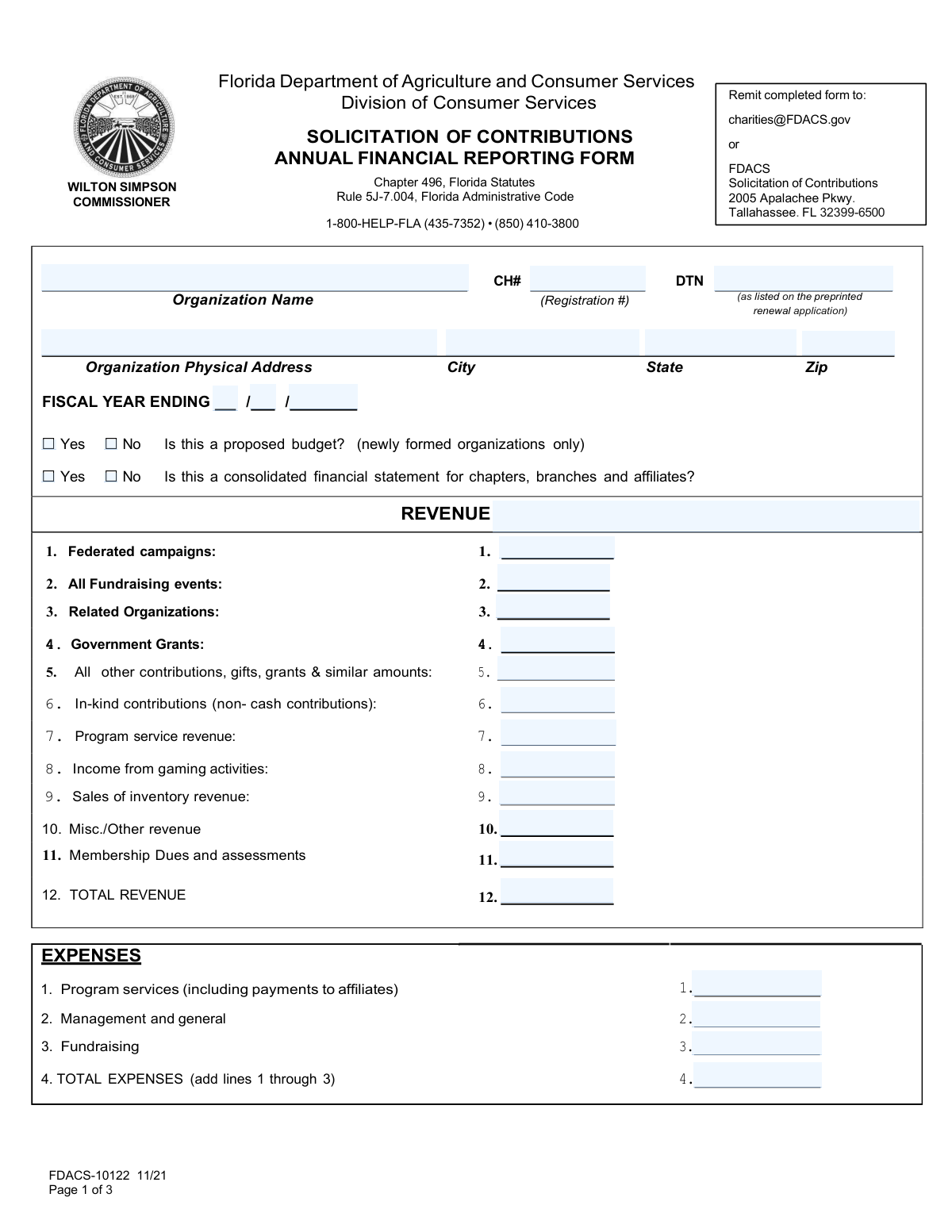
Validates that the 'TOTAL REVENUE' field is the correct sum of all individual revenue lines (e.g., Federated campaigns, Fundraising events, Related Organizations). This check ensures the mathematical accuracy and internal consistency of the revenue section. If the total does not match the sum of its parts, the form is considered erroneous and requires the user to correct the individual line items or the total.
Verifies that the 'Total expenses (lines 1–3)' field correctly equals the sum of 'Program services', 'Management and general', and 'Fundraising' expenses. This is a primary check to ensure the main expense categories are correctly aggregated. A mismatch indicates a calculation error that must be resolved before the filing can be accepted.
This check iterates through each detailed expense line item (e.g., Telephone, Postage, Legal fees) and confirms that the value in the 'Total' column is the exact sum of the amounts in the 'Program Services (A)', 'Management & General (B)', and 'Fundraising (C)' columns for that specific row. This is crucial for ensuring the correct allocation and summation of functional expenses. If a row's total is incorrect, it flags a data entry or allocation error that needs correction.
This validation ensures that the grand total of all expenses is consistent in two ways: it must be the sum of all individual row totals, and it must also be the sum of the three main functional column totals ('Total expenses — Program Services', 'Total expenses — Management & General', 'Total expenses — Fundraising'). This cross-footing or two-way check is a fundamental accounting control to guarantee the integrity of the entire expense schedule. A failure indicates a significant structural error in the financial data.
Verifies that the 'Excess (or Deficit) for the Year' amount is correctly calculated by subtracting 'Total expenses' from 'Total Revenue'. This figure is a key performance indicator for the organization, and its accuracy is paramount. An incorrect value would misrepresent the organization's financial surplus or shortfall for the period, leading to flawed analysis and reporting.
This check validates the logical flow of the balance sheet by comparing 'Beginning of Year' values with 'End of Year' values. Specifically, 'Total Assets — End of Year' should equal 'Total Assets — Beginning of Year' plus the 'Excess (or Deficit) for the Year', accounting for other balance sheet changes. This ensures the balance sheet articulates correctly from one period to the next, and a discrepancy suggests an error in the surplus/deficit calculation or other unrecorded transactions.
And 7 more checks
- Mutually Exclusive Option Selection
- ZIP Code Format Validation
- Fiscal Year Format and Range Check
- Non-Negative Monetary Value Format
- Organization Name Consistency Across Form
- Physical Address Completeness
- Registration Number Format
Let AI fill out your Statement of Functional Expenses
No typing. Every field filled in seconds, checked, ready to sign.
How to Fill Out Statement of Functional Expenses Online for Free in 2026
What the AI walks you through.
- Navigate to Instafill.ai and upload or select the Annual Financial Report / Statement of Functional Expenses form.
- Use the AI assistant to automatically fill in your organization's identification details, such as its legal name, registration number, and fiscal year period.
- Enter your organization's revenue figures for the fiscal year into the designated revenue section, including grants, contributions, and program service revenue.
- Input your total expenses for each category (e.g., salaries, rent, professional fees) and let the AI help allocate them across the three functional areas: Program Services, Management & General, and Fundraising.
- Complete the balance sheet section by providing the beginning and end-of-year values for assets, liabilities, and net assets.
- Review all the auto-filled and manually entered data for accuracy, allowing the AI to flag any potential inconsistencies or calculation errors before you finalize the document.
- Securely sign and download the completed Statement of Functional Expenses, ready for submission to the relevant regulatory body.
Common Mistakes in Completing Statement of Functional Expenses
The ones the AI is built to catch.
Incorrectly Calculated Totals
Improper Allocation of Functional Expenses
Mismatched Row and Column Expense Totals
Miscategorizing Revenue Streams
Omitting or Mismatching Identification Numbers
Inconsistent Beginning and End-of-Year Balances
Reporting Net Instead of Gross Revenue
Improper Valuation of In-Kind Contributions
Contradictory Checkbox Selections
Incomplete 'Other' Expense Details
Frequently Asked Questions About Statement of Functional Expenses
Is it really free for 7 days?
Can I fill other forms too?
How do I cancel?
How does the AI fill out Statement of Functional Expenses?
What happens to my information?
How complex is Statement of Functional Expenses to fill out?
What is the purpose of this financial reporting form?
Who is required to fill out this form?
Where can I find my organization's CH / Registration Number or DTN?
What is the difference between Program Services, Management & General, and Fundraising expenses?
How should I report non-cash donations like donated goods or professional services?
When should I check 'Yes' for 'Is this a proposed budget?'
What does it mean if a financial statement is 'consolidated'?
How do I properly allocate expenses like salaries or rent across the different columns?
Do I need to calculate the 'Total' columns myself?
What is the difference between 'Government Grants' and 'Program service revenue'?
Can an AI tool help me fill out this complex form?
How can I fill out this form online using a service like Instafill.ai?
The PDF I downloaded is not fillable. What should I do?
What information should I enter on the Balance Sheet for 'Beginning of Year' vs. 'End of Year'?
Get your Statement of Functional Expenses filled out by AI
$0 today. Cancel before Nov 4 and you pay nothing.
Other forms like this one
financial forms: Form 8938, Statement of Specified Foreign Financial Assets, Form 12.902(b), Family Law Financial Affidavit (Short Form), Form I-361, Affidavit of Financial Support, Form CJA-23, Financial Affidavit, Form 107, Statement of Financial Affairs, SBA Form 413, Personal Financial Statement, Personal Financial Statement (REV 06/2018) – Northwest Federal Credit Union, NSFAS Consent Form (National Student Financial Aid Scheme) – APP2026, International Student Application for Financial Aid 2026-2027 (International Student Application for Financial Assistance 2026-2027), State of Hawaii Department of Commerce and Consumer Affairs (DCCA) Contractors License Board – Application for Contractor's License (Sole Proprietor) (CT-36) with supporting forms (Experience Certificate CT-03, Contractors Financial Statement CT-02, and Chronological History of Projects/Project List), Colorado Judicial Department Form JDF 1111SC (Form 35.2), Sworn Financial Statement, Northwestern University Office of Undergraduate Financial Aid International Applicant Document Upload Cover Sheet, Vanguard Super Apply for a financial hardship payment, Selbstauskunft/ Vermögensaufstellung (Financial Self-Disclosure/Statement of Assets), Selbstauskunft - vertraulich - (Financial Self-Disclosure), Empower Financial Services, Inc. (EFSI) and Empower Advisory Group, LLC (EAG) Form CRS Customer Relationship Summary, Rollover Form (Principal Financial Group), Principal Financial 401(k) Withdrawal Form, Principal Financial Group Pre-Approved Basic Savings Plan - Plus, DoD 7000.14-R, Department of Defense Financial Management Regulation, Volume 12: Special Accounts, Funds and Programs
PA state forms: Form 1095-A, Health Insurance Marketplace Statement, Form W-2, Wage and Tax Statement, Form 593, Real Estate Withholding, Form 8938, Statement of Specified Foreign Financial Assets, Form CMS-2567, Statement of Deficiencies, Form 1098, Mortgage Interest Statement, Form 1098-T, Tuition Statement, Form 1099-S, Proceeds From Real Estate Transactions, Form 1098-E, Student Loan Interest Statement, Form DS-3053, Statement of Consent, Form DS-86, Statement of Non-Receipt of a U.S. Passport, Form DS-86, Statement of Non-Receipt of a U.S. Passport, Form 108, Statement of Intention, Form 107, Statement of Financial Affairs, Form 121, Statement About Your SSNs, Form 122A-1, Chapter 7 Statement of Current Monthly Income, Center for Infertility & Reproductive Surgery – New Patient Questionnaire and Patient/Guarantor Statement (Brigham and Women’s Hospital, Department of Obstetrics and Gynecology), Adult Travel Document Application for Stateless and Protected Persons in Canada (16 years of age or over) (PPTC 190), Form W-8IMY (Rev. October 2021), Certificate of Foreign Intermediary, Foreign Flow-Through Entity, or Certain U.S. Branches for United States Tax Withholding and Reporting, Form W-2, Wage and Tax Statement (2025)
charitable forms: Contribute to a Charitable Gift Account, Form 8283, Noncash Charitable Contributions, Form 501A, Fantasy Contest Operator Personal Information Form (Commonwealth of Virginia, VDACS Office of Charitable & Regulatory Programs), Fidelity Charitable 144/145 Contribution Form, Fidelity Charitable Letter of Authorization, Transfer of Assets Out - Partial Account or Charitable Gift Transfers, Schwab Charitable Fund Transfer of Assets, Charles Schwab Charitable Gift Donation - Letter Of Authorization for DTC Transfer, Sample IRA Distribution Letter for a Qualified Charitable Distribution (QCD), Charles Schwab Charitable Gift Transfer Letter of Authorization, Make a contribution - Vanguard Charitable, IRA Distribution to Charitable Beneficiary, IRA Distribution to Charitable Beneficiary, Fidelity Charitable Contribution Form, Fidelity Charitable Irrevocable Contribution Form and Letter of Instruction, Request for a Qualified Charitable Distribution (QCD) from a Brokerage Individual Retirement Account (IRA), Request for qualified charitable distribution from individual retirement account, Request for a Charitable Distribution from an Individual Retirement Account (IRA), Merrill Lynch One-Time Qualified Charitable Distribution, Individual Retirement Account (IRA) — Qualified Charitable Distribution Form
NJ state forms: Form 1095-A, Health Insurance Marketplace Statement, Form W-2, Wage and Tax Statement, Form 593, Real Estate Withholding, Form 8938, Statement of Specified Foreign Financial Assets, Form CMS-2567, Statement of Deficiencies, Form 1098, Mortgage Interest Statement, Form 1098-T, Tuition Statement, Form 1099-S, Proceeds From Real Estate Transactions, Form 1098-E, Student Loan Interest Statement, Form DS-3053, Statement of Consent, Form DS-86, Statement of Non-Receipt of a U.S. Passport, Form DS-86, Statement of Non-Receipt of a U.S. Passport, Form 108, Statement of Intention, Form 107, Statement of Financial Affairs, Form 121, Statement About Your SSNs, Form 122A-1, Chapter 7 Statement of Current Monthly Income, Center for Infertility & Reproductive Surgery – New Patient Questionnaire and Patient/Guarantor Statement (Brigham and Women’s Hospital, Department of Obstetrics and Gynecology), Adult Travel Document Application for Stateless and Protected Persons in Canada (16 years of age or over) (PPTC 190), Form W-8IMY (Rev. October 2021), Certificate of Foreign Intermediary, Foreign Flow-Through Entity, or Certain U.S. Branches for United States Tax Withholding and Reporting, Form W-2, Wage and Tax Statement (2025)
state ID forms: Application for Renewal or Duplicate of Alabama Driver License or ID card, Form 1095-A, Health Insurance Marketplace Statement, Form W-2, Wage and Tax Statement, Form 593, Real Estate Withholding, Form 8938, Statement of Specified Foreign Financial Assets, Form CMS-2567, Statement of Deficiencies, Form 1098, Mortgage Interest Statement, Form 1098-T, Tuition Statement, Form 1099-S, Proceeds From Real Estate Transactions, Form 1098-E, Student Loan Interest Statement, Form DS-3053, Statement of Consent, Form DS-86, Statement of Non-Receipt of a U.S. Passport, Form 108, Statement of Intention, Form 107, Statement of Financial Affairs, Form 121, Statement About Your SSNs, Form 122A-1, Chapter 7 Statement of Current Monthly Income, Center for Infertility & Reproductive Surgery – New Patient Questionnaire and Patient/Guarantor Statement (Brigham and Women’s Hospital, Department of Obstetrics and Gynecology), Adult Travel Document Application for Stateless and Protected Persons in Canada (16 years of age or over) (PPTC 190), Form W-8IMY (Rev. October 2021), Certificate of Foreign Intermediary, Foreign Flow-Through Entity, or Certain U.S. Branches for United States Tax Withholding and Reporting, Form W-2, Wage and Tax Statement (2025)
Let AI fill out your Statement of Functional Expenses
Your trial starts once a card is added. You pay nothing before Nov 4.
Our AI already knows this form, all 210 fields of it. Skip the typing: tell it about yourself, or upload what you have, and it fills the whole form in seconds.
- AI fills every field on all 3 pages, tables and checkboxes included
- No typing into boxes: answer a few questions, or upload a document you already have, an old copy of this form, a photo of a document
- The AI checks the answers; you review and change anything before you download
- Download the finished PDF, print it, or sign it online
- Encrypted, and never used to train AI
Cancel before Nov 4 and you pay nothing.
A card is needed to start the trial. Cancel in two clicks from your account.
Terms · Privacy