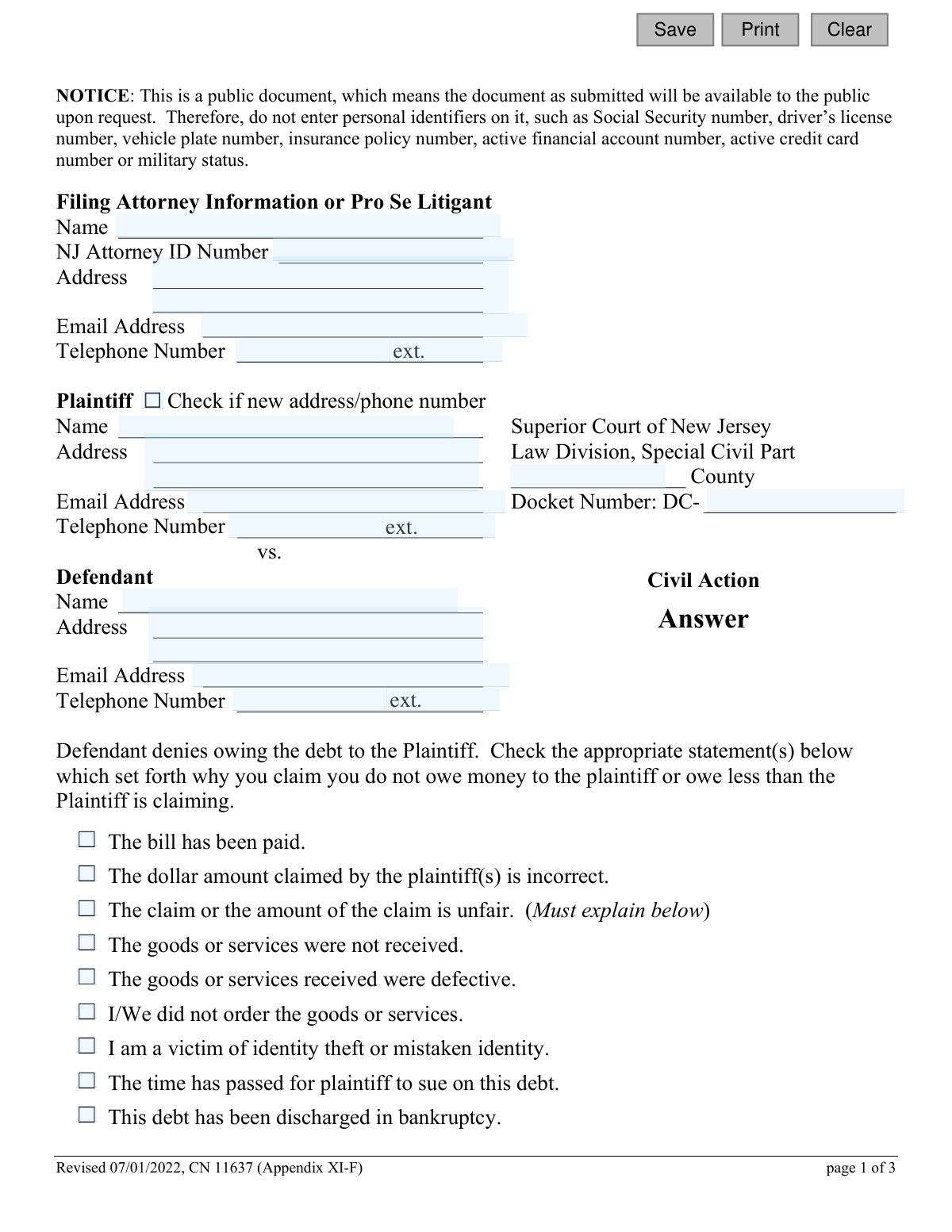
Yes! You can use AI to fill out Answer - Appendix XI-F, Superior Court of New Jersey, Law Division, Special Civil Part

The Appendix XI-F, also known as the Answer form for the New Jersey Superior Court's Special Civil Part, is a crucial legal document for individuals being sued for a debt. It allows the defendant to formally respond to the plaintiff's allegations, deny the debt, and present their defenses, such as payment, defective goods, or identity theft. Filing this answer is a critical step to avoid a default judgment and to have your case heard in court. Today, this form can be filled out quickly and accurately using AI-powered services like Instafill.ai, which can also convert non-fillable PDF versions into interactive fillable forms.
Appendix XI-F is part of the civil court forms, New Jersey forms and superior court forms categories on Instafill.
Our AI automatically handles information lookup, data retrieval, formatting, and form filling.
It takes less than a minute to fill out Appendix XI-F using our AI form filling.
Securely upload your data. Information is encrypted in transit and deleted immediately after the form is filled out.

Form specifications

Form name: Answer - Appendix XI-F, Superior Court of New Jersey, Law Division, Special Civil Part
Number of fields: 48
Number of pages: 1
Language: English
main-image

Instafill Demo: How to fill out PDF forms in seconds with AI

How to Fill Out Appendix XI-F Online for Free in 2026

Are you looking to fill out a APPENDIX XI-F form online quickly and accurately? Instafill.ai offers the #1 AI-powered PDF filling software of 2026, allowing you to complete your APPENDIX XI-F form in just 37 seconds or less.
Follow these steps to fill out your APPENDIX XI-F form online using Instafill.ai:
  1. 1 Navigate to Instafill.ai and upload or select the Appendix XI-F form.
  2. 2 Use the AI assistant to fill in the litigant information, including your name and address as the defendant, and the plaintiff's details from the complaint.
  3. 3 Enter the specific court information, such as the county and the docket number for your case.
  4. 4 Check the boxes that correspond to your defense(s) for not owing the debt, and provide any required written explanations in the designated fields.
  5. 5 Complete the certification section regarding other pending court actions and additional parties.
  6. 6 Carefully review all the information you've entered, then electronically sign and date the certification.
  7. 7 Download the completed, signed form to file with the court and serve on the plaintiff as required.

Our AI-powered system ensures each field is filled out correctly, reducing errors and saving you time.

Why Choose Instafill.ai for Your Fillable Appendix XI-F Form?

Speed

Complete your Appendix XI-F in as little as 37 seconds.

Up-to-Date

Always use the latest 2026 Appendix XI-F form version.

Cost-effective

No need to hire expensive lawyers.

Accuracy

Our AI performs 10 compliance checks to ensure your form is error-free.

Security

Your personal information is protected with bank-level encryption.

Frequently Asked Questions About Form Appendix XI-F

This form is used by a defendant to officially respond to a civil lawsuit filed against them in the New Jersey Superior Court, Special Civil Part. It allows you to state why you believe you do not owe the money claimed by the plaintiff.

You need to fill out this form if you have been named as a defendant in a Special Civil Part lawsuit in New Jersey and you wish to dispute the plaintiff's claim against you.

A 'Pro Se Litigant' is a person who represents themselves in a court case without hiring an attorney. If you are not using a lawyer, you would fill in your own contact information in the 'Filing Attorney Information or Pro Se Litigant' section.

Do not enter sensitive personal information such as your Social Security number, driver’s license number, active financial account numbers, or military status. This is because the form becomes a public document once filed with the court.

The Docket Number is a unique number assigned to your case and should be printed on the Summons and Complaint documents you received. It will typically be in the format DC-XXXXXX-XX.

Yes, you should check all the boxes that accurately describe your reasons for disputing the debt. If your specific reason is not listed, check the 'Other' box and provide a written explanation in the space provided.

This means you are asking for your case to be decided by a jury instead of only by a judge. Note that this request requires an additional $100 fee, unless you submit an application and are approved for a fee waiver.

After signing, you must file the original form with the court clerk in the county where the lawsuit was filed. You must also send a copy to the plaintiff or their attorney, which is known as 'serving' the other party.

By checking this box, you are making a formal legal request for the plaintiff to provide you with copies of all documents or papers they referred to in their complaint. They are required to provide these documents within 5 days of your demand.

The form advises you to contact the local court as soon as possible to request an interpreter or an ADA accommodation. You can find contact information for these services on the New Jersey Judiciary website (njcourts.gov).

In the certification section, you must confirm whether the case is pending elsewhere, state if other parties should be involved, and certify that you have removed personal identifiers from all documents. You also certify that you have sent a copy of this Answer to all other parties in the case.

Yes, services like Instafill.ai use AI to help you accurately auto-fill form fields, which can save you time and help prevent common errors.

You can use a service like Instafill.ai to easily complete this form online. Simply upload the form to the platform, and it will become an interactive document that you can type into, save, and print.

If you have a flat, non-fillable PDF, you can use a tool like Instafill.ai to instantly convert it into an interactive, fillable form. This allows you to type your information directly into the fields before printing.

Compliance Appendix XI-F
Validation Checks by Instafill.ai

1
Personal Identifier Redaction Check
This validation scans all free-text fields (like addresses, names, and explanation boxes) for patterns resembling personal identifiers such as Social Security numbers, driver's license numbers, or financial account numbers. This is critical because the form is a public document, and the notice explicitly warns against including such data. If a potential identifier is found, the user is alerted to review and redact the information before submission to protect their privacy.
2
Docket Number Format and Presence
This check ensures the 'Docket Number' field is not empty and that the value entered follows the expected format for the court (e.g., a specific number of digits or characters following the 'DC-' prefix). The docket number is the primary identifier for the case within the court system. An incorrect or missing number would cause the filing to be rejected or misfiled, delaying the legal process.
3
Conditional Requirement for Defense Explanations
This validation enforces that if a defendant checks a box for a defense that requires an explanation (e.g., 'The claim or the amount of the claim is unfair', 'A lawsuit was previously filed...', 'Plaintiff did not file this lawsuit in the proper place', or 'Other'), the corresponding text box for that explanation must be filled. This ensures the answer is complete and provides the necessary details for the court and plaintiff to understand the basis of the defense. An empty explanation would render the defense legally insufficient.
4
NJ Attorney ID Format Validation
This check validates the format of the 'NJ Attorney ID Number' field if a value is entered. While the field may be optional for pro se litigants, if an ID is provided, it must conform to the specific format assigned by the New Jersey State Bar. This ensures that if an attorney is representing the defendant, they are correctly identified in the court's system. An invalid ID could lead to communication errors or questions about representation.
5
Mandatory Certification on Other Proceedings
This validation ensures that the user has made a mandatory choice in the first certification section, indicating whether the matter is or is not the subject of another court action or arbitration. The user must select one of the two options. Failing to make this certification would make the filing incomplete and could result in its rejection, as it's a required declaration for the court.
6
Conditional Requirement for Other Proceedings Description
This check is linked to the 'Mandatory Certification on Other Proceedings'. If the user certifies that other actions or arbitration proceedings are pending or contemplated, this validation ensures the corresponding description field is not empty. The user must provide details of the other proceedings. This information is crucial for the court to understand the full legal context and avoid conflicting judgments.
7
Mandatory Certification on Other Parties
This validation ensures the user has checked one of the two options in the second certification section, indicating whether other parties should or should not be joined in the action. This is a required declaration for every filing. A submission without this certification is incomplete and would likely be rejected by the court clerk.
8
Conditional Requirement for Other Parties Description
Following the 'Mandatory Certification on Other Parties', if the user indicates that other persons or entities should be joined, this validation requires that the associated text field for listing those parties is filled. This ensures that all potentially necessary parties are identified to the court and the plaintiff at the earliest opportunity. Failure to list them would defeat the purpose of the certification.
9
Defendant Information Completeness
This check verifies that the Defendant's Name and Address fields ('defNameA', 'defAddrA') are not empty. This information is fundamental for identifying the responding party and for the court and plaintiff to send official correspondence. A submission without this core information cannot be processed and would be immediately rejected.
10
Signature Date Logical Validation
This validation ensures the 'Dated' field contains a valid date that is not in the future. The signature date legally attests to when the document was certified and signed. A future date is logically impossible and would invalidate the signature, while a malformed date would cause processing errors. The check ensures the date is legally sound.
11
Printed Name Presence at Signature
This check ensures that the 'Defendant's Name - Typed or Printed' field ('sigPrintedA') is filled out. This field clarifies the identity of the signatory, especially if the signature itself is difficult to read. It is a standard requirement for legal documents to prevent ambiguity, and its absence could lead to the document being returned for completion.
12
County Name Validation
This validation checks that the 'County' field ('typeCtyA') contains a valid New Jersey county. Filing in the correct county is essential for jurisdiction. This check prevents misfiling due to typos or incorrect information, which could cause significant delays or even dismissal of the answer. The validation would typically compare the input against a predefined list of NJ counties.
13
Email Address Format Validation
This check verifies that any entered email address (for the attorney, plaintiff, or defendant) follows the standard '[email protected]' format. As courts increasingly rely on electronic communication, a valid email address is crucial for timely delivery of notices and documents. An invalid format would lead to communication failures, potentially causing a party to miss important deadlines or hearings.
14
Minimum Defense Reason Selection
This validation ensures that at least one checkbox is selected from the list of reasons why the defendant denies owing the debt. The purpose of the 'Answer' form is to state the defense against the plaintiff's claim. Submitting the form without selecting any reason for the denial would be an empty, non-responsive answer and would likely be deemed insufficient by the court.

Common Mistakes in Completing Appendix XI-F

Incorrect or Incomplete Docket Number

Users often mistype the docket number or forget to include the 'DC-' prefix. This typically happens due to simple transcription errors when copying from the original complaint. An incorrect docket number can cause the court clerk to be unable to file the answer with the correct case, leading to a missed deadline and a potential default judgment against the defendant. To avoid this, double-check the number against the plaintiff's complaint; AI-powered tools like Instafill.ai can help by validating formats and ensuring critical fields like this are not left empty.

Failing to Provide Mandatory Explanations

The form requires a written explanation if the defendant checks boxes like 'The claim or the amount of the claim is unfair' or 'Plaintiff did not file this lawsuit in the proper place.' People frequently check the box but forget to provide the corresponding explanation in the space provided. This renders the specific defense invalid and the court may disregard it entirely, weakening the defendant's case. Always read the instructions next to each checkbox carefully to see if additional information is required.

Incomplete Certification Section

The certification section near the end of the form contains two separate parts, each requiring the user to check one box (one regarding other court actions, and another regarding other parties). It is a common mistake to only complete the first part and miss the second 'AND (Must check one)' section. An incomplete certification can lead to the court clerk rejecting the entire filing, which could result in missing the deadline to answer the lawsuit.

Including Confidential Personal Identifiers

Despite a prominent warning at the top of the form, individuals often include personal identifiers like Social Security numbers, driver's license numbers, or bank account numbers. This happens because people are accustomed to providing this information on other official forms. Since this is a public document, including such data exposes the filer to a significant risk of identity theft. Always redact this information before submission, and use tools that can help identify and flag sensitive data fields.

Forgetting to Sign or Date the Form

Forgetting to physically sign and date the document is one of the most common and critical errors. An unsigned legal document is considered invalid by the court. If the form is submitted without a signature, it will be rejected, and if the filing deadline passes before the error is corrected, the defendant may automatically lose the case through a default judgment.

Mishandling the Jury Trial Request

A defendant may check the box to request a jury trial but fail to submit the required $100 fee or an application for a fee waiver. This mistake happens because they overlook the financial requirement mentioned directly on the form. Consequently, the request for a jury trial will be denied, and the case will proceed as a bench trial decided solely by a judge, forfeiting the defendant's right to a jury.

Ignoring the 'Demand for Production of Documents'

Many self-represented litigants do not understand the legal significance of the 'Demand for Production of Documents' checkbox and leave it unchecked. This is a powerful discovery tool that legally compels the plaintiff to provide copies of all documents mentioned in their complaint. By not checking this box, the defendant misses a crucial early opportunity to obtain evidence that could be vital to their defense.

Using an Outdated Version of the Form

Court forms are updated periodically, as indicated by the 'Revised 07/01/2022' date on this document. People often find and use old versions from unreliable internet sources. Submitting an outdated form can lead to its rejection by the court clerk, causing delays and potentially causing the filer to miss important deadlines. Always ensure you are using the most current version from the official court website.

Confusing Plaintiff and Defendant Information

When filling out the case caption, individuals sometimes mistakenly enter their own (the defendant's) information in the fields designated for the plaintiff, and vice-versa. This data entry error creates confusion for the court and can delay the processing of the document. Using a form-filling tool like Instafill.ai can help prevent this by storing contact information and populating it into the correct fields, reducing the chance of manual error. If the form is a non-fillable PDF, Instafill.ai can also convert it into an interactive, fillable version.

Failing to Serve the Answer on the Plaintiff

The certification includes the statement 'I further certify that this answer was served by me upon all existing parties,' but filers may not realize this requires a separate action. After filling out the form, the defendant must send a copy to the plaintiff or their attorney, in addition to filing it with the court. Failure to properly serve the other party can result in the answer being deemed invalid and may lead to negative legal consequences.
Saved over 80 hours a year

“I was never sure if my IRS forms like W-9 were filled correctly. Now, I can complete the forms accurately without any external help.”

Kevin Martin Green

Your data stays secure with advanced protection from Instafill and our subprocessors

Robust compliance program

Transparent business model

You’re not the product. You always know where your data is and what it is processed for.

ISO 27001, HIPAA, and GDPR

Our subprocesses adhere to multiple compliance standards, including but not limited to ISO 27001, HIPAA, and GDPR.

Security & privacy by design

We consider security and privacy from the initial design phase of any new service or functionality. It’s not an afterthought, it’s built-in, including support for two-factor authentication (2FA) to further protect your account.

Fill out Appendix XI-F with Instafill.ai

Worried about filling PDFs wrong? Instafill securely fills answer-appendix-xi-f-superior-court-of-new-jersey-law-division-special-civil-part forms, ensuring each field is accurate.

Related forms by category

civil court forms Petition for Leave to Proceed In Forma Pauperis (Court of Common Pleas of Lehigh County, Pennsylvania, Civil Division), Designation of Record on Appeal (Civil) (Maricopa County Justice Courts, Arizona) (Form APP 8150-702), Certificate of Service (Civil Court Claim), Pfändungs- und Überweisungsbeschluss (Garnishment and Transfer Order) – German Civil Enforcement Court Form, AOPC 308A, Civil Complaint, Form MC 03, Answer, Civil, Form POS-040, Proof of Service—Civil, ONTARIO Form 8: Application (General), Form ATJ 601.9, Application for Waiver of Court Fees (Civil), Nevada Justice / Municipal Civil Court Cover Sheet, Form MC 01, Summons, Form MC 10, Judgment, Civil, Form MC 99, Motion and Affidavit to Set Aside Default (Civil), Form MC 281a, Civil Mediator Application, Ex Parte Motion and Order to Renew Civil Judgment, AO 88B, Subpoena to Produce Documents, Information, or Objects or to Permit Inspection of Premises in a Civil Action, Form APP-031A, Application for Extension of Time to File Brief (Civil Case), Civil Appeal Case Information Statement, Form APP-014, Appellant's Proposed Statement on Appeal (Unlimited Civil Case), form-app-015-respondents-proposed-corrections-toadditions-to-appellants-proposed-settled-statement-unlimited-civil-case · + 90 more →
New Jersey forms State of New Jersey Alternate Benefit Program Withdrawal Request Acknowledgement Receipt, Horizon Blue Cross Blue Shield of New Jersey Applied Behavior Analysis Supplemental Information Form, State of New Jersey Application for Employment (Form DPF-663), New Jersey Judiciary Plea Form (Plea 01), Supplemental Plea Form for Certain Sexual Offenses: Megan’s Law/Parole Supervision for Life/Community Supervision for Life (Plea 05), Financial Questionnaire to Establish Indigency, New Jersey Judiciary Resource Family Information Form, Foreclosure Case Information Statement (FCIS) - Appendix XII-B2, New Jersey Judiciary Records Request Form, Superior Court of New Jersey, Application for Appeal and Order, FL Certification of Requested Background Checks for Kinship Legal Guardianship, Certification of Caregiver as to Knowledge of Identity and/or Location of Parents, FL Order Judgment for Kinship Legal Guardianship, New Jersey Judiciary Certification of Repair and Plea of Guilty, Uniform Summary Support Order (USSO), New Jersey Judiciary Volunteer Application (CN 10293), Application to Take the New Jersey Court Interpreter Oral Examination, New Jersey Judiciary Attorney Fee Arbitration Request, Order to Show Cause with Temporary Restraints Pursuant to Rule 4:52, Tax Court of New Jersey, State Tax Complaint · + 230 more →
superior court forms FW-003, Order on Court Fee Waiver (Superior Court), FW-003, Order on Court Fee Waiver (Superior Court), Form FW-003, Order on Court Fee Waiver (Superior Court), Declaration of Facts of Death (California Superior Court), Form FW-003-GC, Order on Court Fee Waiver (Superior Court) (Ward or Conservatee), Superior Court of Chatham County, Georgia, Hearing Request Form, Form FW-006, Request for Hearing About Court Fee Waiver Order (Superior Court), Form FW-002, Request to Waive Additional Court Fees (Superior Court), Form FW-008, Order on Court Fee Waiver After Hearing (Superior Court), Form FW-002-GC, Request to Waive Additional Court Fees (Superior Court) (Ward or Conservatee), Form REC-001(N), Notice of Intent to Destroy Superior Court Records; Offer to Transfer Possession, Form REC-001(R), Request for Transfer or Extension of Time for Retention of Superior Court Records, Notice of Hearing on Request for Transfer or Extension of Time for Retention of Superior Court Records; Court Order; Release and Receipt of Superior Court Records, Form REC-002(R), Release and Receipt of Superior Court Records, Superior Court of New Jersey, Application for Appeal and Order, Superior Court of New Jersey Dissolution (FM) Case Management Order, New Jersey Judiciary – Superior Court, Appellate Division Application for Permission to File Emergent Motion, New Jersey Judiciary Superior Court - Appellate Division Civil Case Information Statement, New Jersey Judiciary Superior Court - Appellate Division Criminal Case Information Statement, New Jersey Judiciary Superior Court - Appellate Division Notice of Appeal (CN: 10502) · + 34 more →