Yes! You can use AI to fill out Form CR-180, Petition for Dismissal

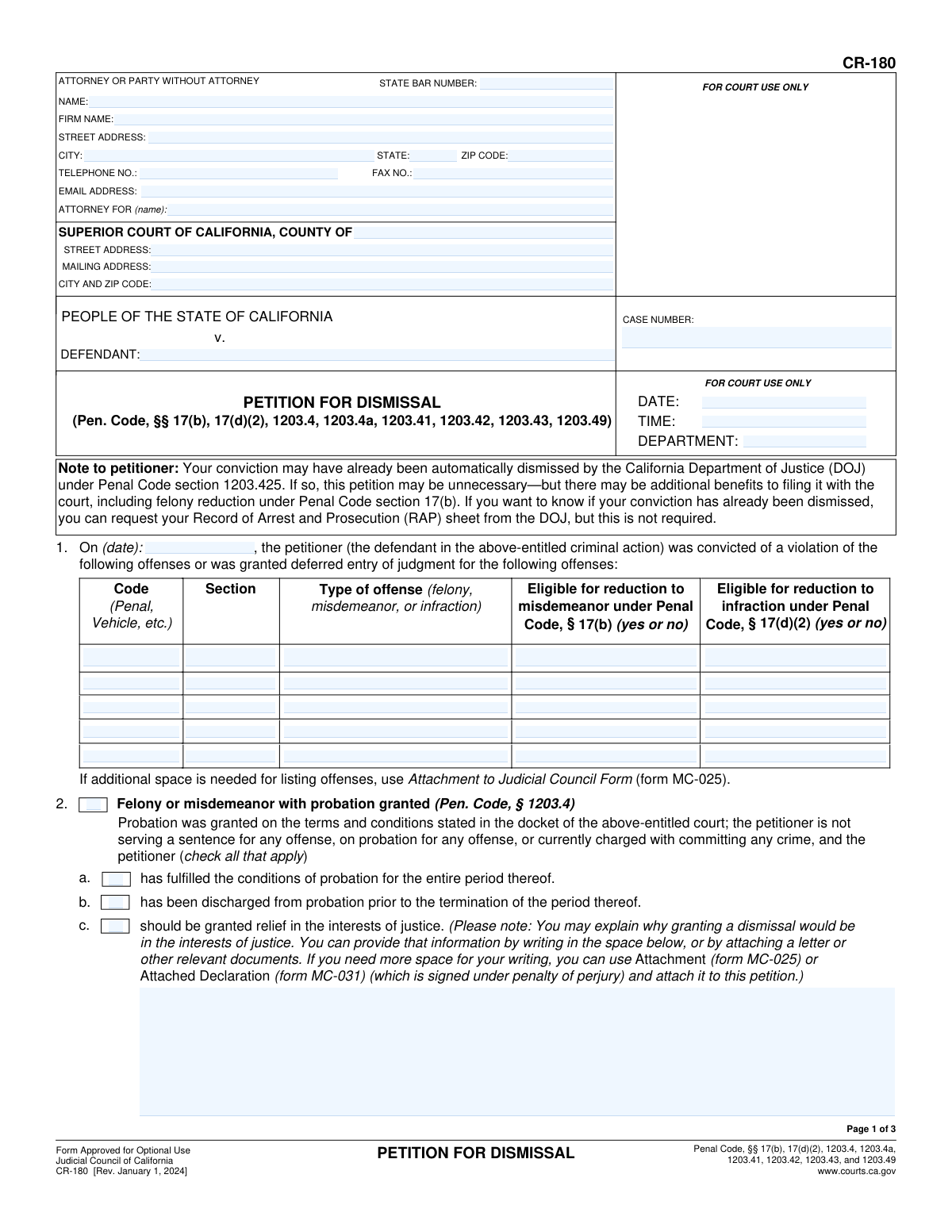
Form CR-180, Petition for Dismissal, is a legal document used in the California court system for an individual to request the dismissal of a criminal conviction after fulfilling their sentencing requirements. This process, often called expungement, can help individuals with employment, housing, and other opportunities by clearing their public record. Today, this form can be filled out quickly and accurately using AI-powered services like Instafill.ai, which can also convert non-fillable PDF versions into interactive fillable forms.
CR-180 is part of the SSA forms category on Instafill.
Our AI automatically handles information lookup, data retrieval, formatting, and form filling.
It takes less than a minute to fill out CR-180 using our AI form filling.
Securely upload your data. Information is encrypted in transit and deleted immediately after the form is filled out.

Form specifications

Form name: Form CR-180, Petition for Dismissal
Number of fields: 81
Number of pages: 3
Language: English
main-image

Instafill Demo: How to fill out PDF forms in seconds with AI

How to Fill Out CR-180 Online for Free in 2026

Are you looking to fill out a CR-180 form online quickly and accurately? Instafill.ai offers the #1 AI-powered PDF filling software of 2026, allowing you to complete your CR-180 form in just 37 seconds or less.
Follow these steps to fill out your CR-180 form online using Instafill.ai:
  1. 1 Navigate to Instafill.ai and upload or select the CR-180 Petition for Dismissal form.
  2. 2 Provide your personal information, attorney details (if any), and the specific court and case number information.
  3. 3 Enter the details for each conviction you are petitioning to dismiss, including the offense code, section, date, and type of offense.
  4. 4 Select the appropriate legal grounds for your petition by checking the relevant boxes in sections 2 through 7, based on whether you had probation, a felony sentence, or a deferred entry of judgment.
  5. 5 If you are arguing for dismissal 'in the interests of justice,' provide a clear and concise written explanation in the designated fields.
  6. 6 Review all the information automatically populated by the AI to ensure accuracy and completeness, making any necessary corrections.
  7. 7 Download the completed form, sign it, and file it with the appropriate Superior Court of California as instructed.

Our AI-powered system ensures each field is filled out correctly, reducing errors and saving you time.

Why Choose Instafill.ai for Your Fillable CR-180 Form?

Speed

Complete your CR-180 in as little as 37 seconds.

Up-to-Date

Always use the latest 2026 CR-180 form version.

Cost-effective

No need to hire expensive lawyers.

Accuracy

Our AI performs 10 compliance checks to ensure your form is error-free.

Security

Your personal information is protected with bank-level encryption.

Frequently Asked Questions About Form CR-180

Form CR-180 is used to formally ask a California court to dismiss a past criminal conviction. This legal process, often called expungement, can help relieve you of certain penalties and disabilities resulting from the conviction after you have completed your sentence.

Individuals who have been convicted of a crime in California and have successfully completed all terms of their sentence, including probation or parole, can file this form. The form covers various situations, including convictions with probation, convictions without probation, and certain felony sentences.

Even if your conviction was automatically dismissed by the Department of Justice, filing this petition can provide additional benefits. For example, you can use this form to request that a qualifying felony be reduced to a misdemeanor, which is not an automatic process.

You will need your court case number, the date of conviction, and specific details about each offense, including the code (e.g., Penal Code), section number, and offense type (felony, misdemeanor, or infraction). This information can be found on your original court documents.

For each conviction you want dismissed under the same case number, you must list the legal code, section number, and type of offense. You also need to indicate 'yes' or 'no' as to whether the offense is eligible for reduction to a misdemeanor or an infraction.

This is your opportunity to explain to the judge why dismissing your conviction is fair and just. You can describe your rehabilitation, positive life changes, community involvement, or how the conviction creates a hardship for employment or housing.

Yes, if your felony conviction is a 'wobbler' (an offense that could have been charged as either a felony or misdemeanor), you can use this form. You must check the box in Section 8 to request that the eligible felony be reduced to a misdemeanor.

You must file the completed and signed petition with the clerk of the Superior Court in the county where you were originally convicted. Be sure to fill in the court's address at the top of the form.

After filing, the court may set a hearing date, or the judge might rule on your petition based on the submitted paperwork alone. The prosecuting attorney has the right to respond to your petition before the judge makes a final decision.

While not always required, it is highly recommended to attach supporting documents if you are arguing 'in the interests of justice'. These can include letters of recommendation, certificates of completion for programs, or a personal declaration (Form MC-031).

Yes, services like Instafill.ai use AI to help you accurately auto-fill form fields, which saves time and helps prevent common errors. The AI can guide you in entering information like case numbers and personal details correctly.

You can use a service like Instafill.ai to complete the form in your web browser. Simply upload the CR-180 PDF, and the platform will convert it into an interactive, fillable form that you can complete, sign, and download.

If you have a non-fillable or 'flat' PDF, you can use a tool like Instafill.ai to instantly convert it into an interactive, fillable form. This allows you to easily type your information into the correct fields before printing for submission.

Compliance CR-180
Validation Checks by Instafill.ai

1
Conditional State Bar Number Validation
This check ensures that the 'Attorney State Bar Number' field is populated only when the petitioner is represented by an attorney (i.e., 'Firm Name' or 'Name of represented party' is filled). The number must be a 7 or 8-digit numeric value. This is crucial for verifying the attorney's credentials with the California State Bar. If an attorney is indicated but the number is missing, invalid, or present for a self-represented party, the form submission should be flagged for correction.
2
Offense Row Data Integrity
This validation verifies that for each offense listed in the table under section 1, all corresponding fields (Code, Section, Type of offense, and both eligibility questions) are completed. An incomplete row provides insufficient information for the court to process the request for that specific offense. If any field in a given row is filled, the system must require all other fields in that same row to be filled before submission is allowed.
3
Required Explanation for 'Interests of Justice'
This validation confirms that if a petitioner checks a box for relief 'in the interests of justice' (in sections 2, 3, 5, or 6), the corresponding text area for explanation is not empty. The court requires a justification to grant this type of discretionary relief, and failing to provide one makes the request incomplete. The system should prevent submission and prompt the user to provide the necessary explanation if this condition is not met.
4
Mandatory Case Number
This validation ensures that the 'CASE NUMBER' field is not empty. The case number is the primary identifier for the legal action in the court's system. Without it, the petition cannot be filed or associated with the correct defendant and criminal history, making it impossible to process.
5
Attorney vs. Self-Representation Field Consistency
This check verifies the logical consistency of fields related to legal representation. If 'Firm Name' or 'Name of represented party' is filled, the 'Attorney State Bar Number' must also be filled. Conversely, if the petitioner is self-represented, the 'Firm Name' and 'Name of represented party' fields must be empty to avoid contradictory information.
6
Exclusive Choice for Section 5 Eligibility
This validation ensures that within section 5 ('Felony county jail sentence...'), the petitioner checks exactly one of the three sub-options (a, b, or c). Each option represents a distinct legal pathway for eligibility based on the type and completion of a sentence. Allowing multiple selections would make the basis of the petition unclear, so the system must restrict the user to a single choice.
7
Restricted 'Type of Offense' Value
This check validates that the 'Type of offense' field for each conviction listed in section 1 contains only one of three exact string values: 'felony', 'misdemeanor', or 'infraction'. Using a restricted vocabulary is essential for data consistency and for the system to correctly apply logic related to offense classification. Any other entry would be ambiguous and should be rejected.
8
Logical Prerequisite for Offense Reduction Request
This check ensures that if the petitioner makes a request in section 8 to reduce a felony to a misdemeanor, at least one offense listed in the section 1 table is classified as a 'felony'. A request for reduction is meaningless without an eligible offense to apply it to. This validation prevents logically flawed petitions from being submitted, saving time for both the petitioner and the court.
9
Valid Conviction Date Format and Presence
This check ensures the 'Date of Conviction or Deferred Judgment' in section 1 is present and entered in a valid MM/DD/YYYY format. A standardized date is essential for accurate record-keeping and for calculating time-based eligibility for dismissal (e.g., 'more than one year has elapsed'). Submissions with missing or improperly formatted dates will be rejected to prevent processing errors.
10
Required Sub-declaration for Deferred Judgment
This check ensures that if the petitioner selects option 7b ('petitioner declares under penalty of perjury...'), they must also select one of the two sub-options: (1) 'has' or (2) 'has not' attached their criminal history. This is a required part of the declaration under this section. The form should enforce that a choice is made to complete the declaration properly.
11
Standardized Telephone Number Format
This validation ensures the 'TELEPHONE NO.' field adheres to a standard U.S. phone number format, such as (XXX) XXX-XXXX or XXX-XXX-XXXX. A consistent format is important for database integrity and for ensuring court staff can reliably contact the petitioner or their attorney. The system should guide the user to enter the number correctly to avoid communication failures.
12
Valid ZIP Code Format
This validation ensures that the 'ZIP Code' field contains either a 5-digit or 9-digit (ZIP+4) numeric value. A correct and properly formatted ZIP code is critical for ensuring court notices and other legal correspondence are mailed to the correct address. An invalid format could lead to returned mail and missed deadlines.
13
Conditional Petition Basis Selection
This validation ensures that the petitioner has selected at least one primary basis for their petition by checking the main box for one of sections 2, 3, 4, 5, 6, or 7. The petition is invalid without a stated legal ground for dismissal. The system should prevent submission if none of these primary options are selected.

Common Mistakes in Completing CR-180

Incorrect or Incomplete Case Number

Petitioners often enter the case number incorrectly, omitting letters or numbers, or leave it blank entirely. This happens when they don't have their original court documents handy. An incorrect case number is a critical error, as it prevents the court clerk from locating the case file, leading to immediate rejection of the petition and significant delays in the dismissal process. To avoid this, always reference your official court records for the exact case number and enter it precisely as it appears.

Selecting the Incorrect Legal Basis for Dismissal

The form lists multiple sections (2 through 7) corresponding to different Penal Code sections for dismissal (e.g., with probation, without probation, specific felony sentences). Petitioners frequently misunderstand the legal distinctions and check the box for a section that does not apply to their situation. This makes the petition legally invalid, causing the judge to deny it. Carefully read the title of each section and match it to your sentencing and probation history before making a selection.

Inaccurate Offense Information in the Conviction Table

In Section 1, individuals often provide incorrect conviction dates, code sections, or misidentify the code type (e.g., writing 'PC' when it was a 'VC' offense). This stems from relying on memory rather than official records like a RAP sheet. Inaccurate data forces the court to manually verify every detail, causing delays, or may lead to the petition being denied if the information cannot be matched. Always use your official criminal record to fill out this table with precision.

Incorrectly Assessing Eligibility for Felony/Misdemeanor Reduction

The columns in Section 1 asking if an offense is eligible for reduction to a misdemeanor or infraction are legally technical. Many petitioners guess 'Yes' for offenses that are not eligible (known as 'straight felonies'), creating a request the judge cannot legally grant. This mistake shows a misunderstanding of the law and can undermine the credibility of the petition. It is crucial to research the specific penal code section or consult with legal aid to determine if an offense is a 'wobbler' before answering.

Providing a Weak 'Interests of Justice' Statement

When a section requires an explanation for why relief is in the 'interests of justice,' many people write vague or very brief statements. A weak explanation fails to persuade the judge, who has discretion in these cases, and can be the deciding factor in a denial. To avoid this, provide a detailed, compelling narrative about your rehabilitation, positive life changes, community contributions, and the specific hardships the conviction causes, attaching extra pages if necessary.

Confusion Between Attorney and Self-Representation Fields

Individuals representing themselves (pro se) often mistakenly fill out fields intended for attorneys, such as 'FIRM NAME,' 'STATE BAR NUMBER,' or 'ATTORNEY FOR (name).' This creates confusion and can lead to the form being returned for correction. If you are not an attorney, you must leave these specific fields blank and only fill in the contact information under 'ATTORNEY OR PARTY WITHOUT ATTORNEY.' AI-powered tools like Instafill.ai can help by guiding users to fill only the fields relevant to their role.

Failing to Check Any Eligibility Box Within a Section

After selecting a primary section (e.g., Section 2 for probation), petitioners sometimes forget to check one of the required sub-options (e.g., 2a, 2b, or 2c). This leaves the legal justification for the petition incomplete, as it doesn't specify whether probation was fulfilled, discharged early, or if dismissal is sought in the interest of justice. An incomplete petition will be returned or denied, so double-check that you have selected one of the required checkboxes within the main section you are using.

Missing Signature or Date

Forgetting to sign and date the petition on page 3 is one of the most common and easily avoidable errors. An unsigned petition is not a valid legal document and will be rejected by the court clerk instantly, forcing you to refile. Always print the completed form and provide a physical 'wet' signature and the current date in the designated fields before submitting it to the court. If the form is a non-fillable PDF, a tool like Instafill.ai can convert it to a fillable version, but you must still print it to sign.

Entering Information in 'FOR COURT USE ONLY' Sections

Petitioners sometimes write in the boxes at the top of the form marked 'FOR COURT USE ONLY,' such as the hearing date, time, and department. This happens because they feel compelled to fill every box. Writing in these areas interferes with the court's administrative process and can cause the form to be rejected and returned for a clean copy. These sections must be left blank for the court clerk to complete.

Checking Multiple, Contradictory Sections

Out of uncertainty, a petitioner might check boxes in multiple, mutually exclusive sections, such as checking both Section 2 ('Probation was granted') and Section 3 ('Probation was not granted'). This creates a logical contradiction that makes it impossible for the court to understand the basis of the petition. This will result in the petition being rejected for being unclear. You must choose only one section from 2 through 7 that accurately reflects the history of your case.
Saved over 80 hours a year

“I was never sure if my IRS forms like W-9 were filled correctly. Now, I can complete the forms accurately without any external help.”

Kevin Martin Green

Your data stays secure with advanced protection from Instafill and our subprocessors

Robust compliance program

Transparent business model

You’re not the product. You always know where your data is and what it is processed for.

ISO 27001, HIPAA, and GDPR

Our subprocesses adhere to multiple compliance standards, including but not limited to ISO 27001, HIPAA, and GDPR.

Security & privacy by design

We consider security and privacy from the initial design phase of any new service or functionality. It’s not an afterthought, it’s built-in, including support for two-factor authentication (2FA) to further protect your account.

Fill out CR-180 with Instafill.ai

Worried about filling PDFs wrong? Instafill securely fills form-cr-180-petition-for-dismissal forms, ensuring each field is accurate.