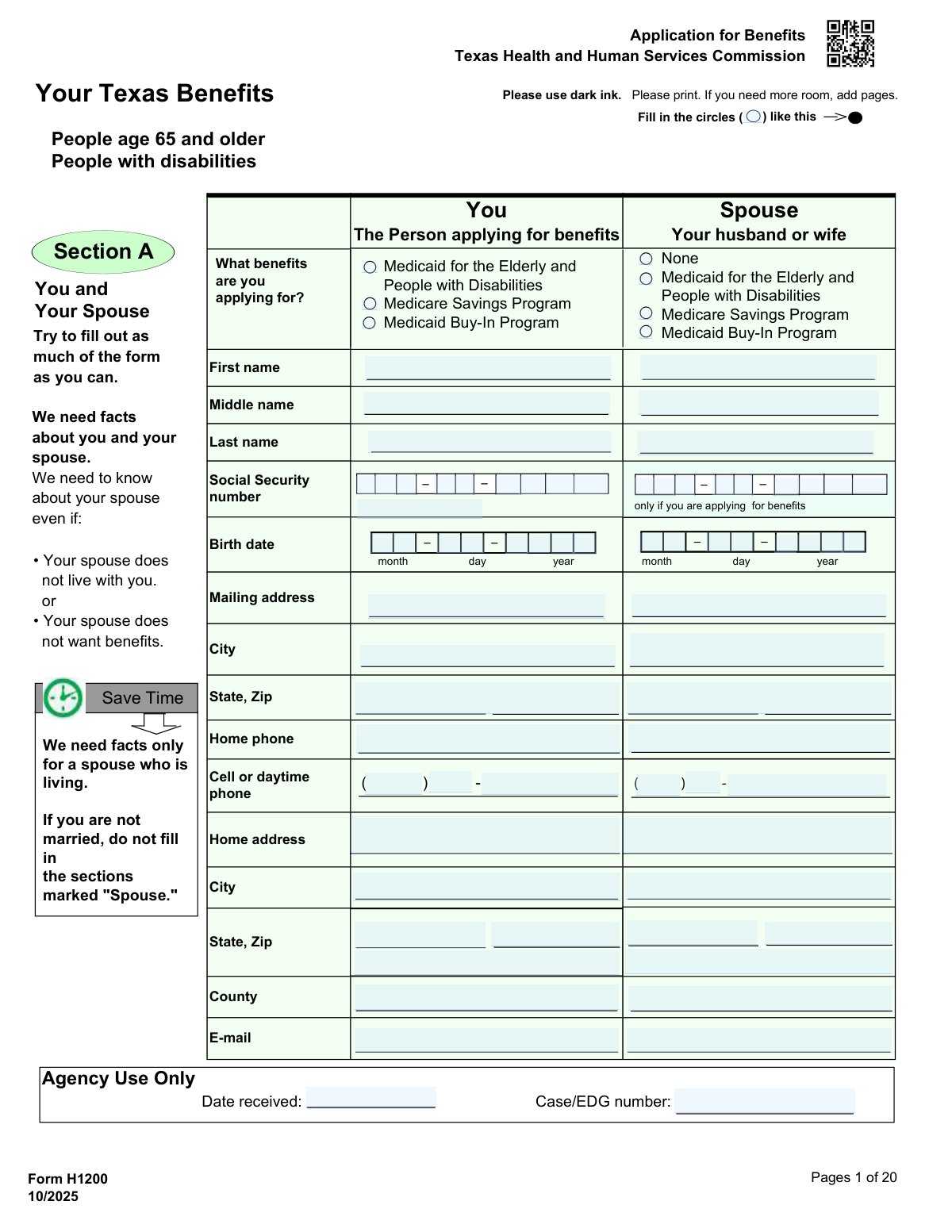
Yes! You can use AI to fill out Form H1200, Application for Benefits

Form H1200, Application for Benefits, is used by Texas residents who are elderly (age 65+) or have disabilities to apply for several state health programs, including Medicaid, Medicare Savings Programs, and the Medicaid Buy-In Program. This comprehensive application gathers detailed information about the applicant's personal, financial, and medical situation to determine eligibility for assistance. Today, this form can be filled out quickly and accurately using AI-powered services like Instafill.ai, which can also convert non-fillable PDF versions into interactive fillable forms.
Our AI automatically handles information lookup, data retrieval, formatting, and form filling.
It takes less than a minute to fill out H1200 using our AI form filling.
Securely upload your data. Information is encrypted in transit and deleted immediately after the form is filled out.

Form specifications

Form name: Form H1200, Application for Benefits
Number of pages: 24
Language: English
Categories: benefit forms
main-image

Instafill Demo: How to fill out PDF forms in seconds with AI

How to Fill Out H1200 Online for Free in 2026

Are you looking to fill out a H1200 form online quickly and accurately? Instafill.ai offers the #1 AI-powered PDF filling software of 2026, allowing you to complete your H1200 form in just 37 seconds or less.
Follow these steps to fill out your H1200 form online using Instafill.ai:
  1. 1 Navigate to Instafill.ai and upload or select Form H1200, the Texas Application for Benefits.
  2. 2 Provide personal details for yourself and your spouse in Section A, including names, Social Security numbers, birth dates, and contact information.
  3. 3 Complete Sections B and C by answering questions about your citizenship status, residency, and whether you need long-term care services.
  4. 4 Detail your financial situation in Sections H, I, and J, including all resources (assets like bank accounts, property, vehicles) and all sources of income (employment, Social Security, pensions).
  5. 5 Disclose information about your health insurance, medical history, and any recent medical costs in Sections G and K.
  6. 6 Carefully review all the information you've entered for accuracy, then proceed to the final section to read the Statement of Understanding and provide your electronic signature and date.
  7. 7 Submit your completed Form H1200 and all required supporting documents (as listed on Page D) through the platform as instructed.

Our AI-powered system ensures each field is filled out correctly, reducing errors and saving you time.

Why Choose Instafill.ai for Your Fillable H1200 Form?

Speed

Complete your H1200 in as little as 37 seconds.

Up-to-Date

Always use the latest 2026 H1200 form version.

Cost-effective

No need to hire expensive lawyers.

Accuracy

Our AI performs 10 compliance checks to ensure your form is error-free.

Security

Your personal information is protected with bank-level encryption.

Frequently Asked Questions About Form H1200

This form, H1200, is an application for Texas Medicaid for the Elderly and People with Disabilities, the Medicare Savings Program, and the Medicaid Buy-In Program.

You should use this form if you are age 65 or older, have a disability, lost Supplemental Security Income (SSI) benefits, or need care in a facility like a nursing home.

Yes, you can apply for benefits online at www.YourTexasBenefits.com, which may be a faster option for many users.

You must send copies of required items like pay stubs, bank statements, proof of citizenship, and Social Security card. A complete list of necessary documents is on Page D of the form packet.

You can submit your application by mail, by fax to 1-877-447-2839, or in person at a local benefits office. Call 2-1-1 to find a local office address.

Yes, you must provide information about your spouse, even if they do not live with you or are not applying for benefits. If you are not married, you can skip the sections marked 'Spouse'.

You can check your application status online at www.YourTexasBenefits.com or by calling 2-1-1 and pressing 2 after selecting your language.

This program allows the state of Texas to ask for money back from your estate after you die to help pay for the long-term care services you received while on Medicaid.

No, an in-person interview is not required for these programs, but you can request one if you would like to be interviewed at a local office.

You should list any unpaid medical bills from the past three months in Section K of the form. Medicaid may be able to help pay for them if you are approved for benefits.

Yes, services like Instafill.ai use AI to help you accurately auto-fill form fields, which saves time and reduces the chance of errors on complex applications.

To use Instafill.ai, you upload the Form H1200 PDF to its website. The AI makes the form interactive, allowing you to answer simple questions to fill it out quickly and correctly.

If your PDF is not fillable, you can use a service like Instafill.ai. It has the technology to convert flat, non-fillable PDFs into interactive forms you can complete on your computer.

If you have questions about the form or benefits, you can call the Texas Health and Human Services Commission at 2-1-1 or 1-877-541-7905.

Yes, the Medicaid Buy-In for Children (MBIC) is a different program and requires Form H1200-MBIC. You can request that form by calling 2-1-1.

Compliance H1200
Validation Checks by Instafill.ai

1
Mandatory Applicant Benefit Selection
This check verifies that the primary applicant has selected at least one benefit program in Section A (Medicaid for the Elderly and People with Disabilities, Medicare Savings Program, or Medicaid Buy-In Program). This is crucial because the entire purpose of the form is to apply for benefits. If no selection is made, the application has no clear objective and cannot be processed.
2
Conditional SSN Requirement and Format
This validation ensures that a Social Security Number (SSN) is provided for any individual (applicant or spouse) who is applying for benefits. The check also validates that the entered SSN is in the correct 9-digit format. Failure to provide a required SSN prevents the agency from verifying identity and income with federal systems, making the applicant ineligible for benefits.
3
Applicant Birth Date and Age Eligibility
This check validates that the applicant's birth date in Section A is a valid calendar date and is not in the future. It can also be used to calculate the applicant's current age to cross-reference with program eligibility, such as being age 65 or older for 'Medicaid for the Elderly'. An invalid or missing birth date prevents the determination of age-based eligibility, halting the application process.
4
Marital Status and Spouse Information Consistency
This validation performs a logical check between the marital status selected in Section A and the completion of spouse-related fields throughout the form. If 'Married' is selected, the system will require the spouse's name and other relevant details. This is important because a spouse's income and resources can affect eligibility. An inconsistency can lead to incorrect eligibility determination or processing delays.
5
Conditional Immigration Status Details
This check ensures that if an applicant answers 'No' to being a U.S. citizen in Section B, they must complete the subsequent fields regarding their immigration status. This includes their date of entry, sponsor's name, and USCIS registration number. This information is legally required to determine eligibility for Medicaid services for non-citizens, and missing data will result in an incomplete application.
6
Authorized Representative Section Completeness
This validation triggers if the applicant answers 'Yes' to appointing an authorized representative in Section D. It then requires the representative's name, address, phone number, and signature with date to be completed. This is a legal requirement to ensure the designated person is properly documented and has formally agreed to their responsibilities. An incomplete section voids the authorization.
7
Resource Declaration Detail Requirement
For every resource question in Section H (e.g., 'Do you have checking accounts?'), if the applicant answers 'Yes', this check ensures all corresponding detail fields (account number, bank name, value, etc.) are filled. Incomplete resource information prevents the agency from accurately assessing financial eligibility. The application will be considered incomplete until all declared resources are fully detailed.
8
Annuity Beneficiary Status Confirmation
This check specifically targets the annuity question in Section H. If an applicant indicates they own an annuity, the subsequent question, 'is the state of Texas named the remainder beneficiary?', must be answered. This is a critical eligibility point for long-term care Medicaid, as federal law requires this for certain annuities. Failure to answer this question will halt the eligibility determination for long-term care services.
9
Asset Transfer Look-Back Period Validation
This validation applies to Section I, which asks about assets sold, traded, or given away. If an applicant reports a transfer, the 'Date sold, traded, or given away' must be a valid date within the last 5 years of the application date. This is crucial for identifying transfers that may result in a penalty period for long-term care services. An invalid date or a date outside the look-back period would require clarification.
10
Income Declaration Detail Requirement
Similar to the resource check, this validation ensures that for every income source reported in Section J (e.g., 'Do you get Social Security?'), the corresponding amount and frequency fields are completed. Accurate income data is fundamental to calculating financial eligibility for all programs. An application with declared but unquantified income cannot be processed.
11
Retroactive Medical Bill Date Validation
This check focuses on Section K, 'Medical bills from the past 3 months'. If an applicant lists an unpaid medical bill, the 'Date of service' must be a valid date that falls within the three calendar months prior to the application submission date. This ensures that only potentially eligible retroactive claims are considered. Dates outside this window would be rejected for retroactive coverage consideration.
12
Mandatory Applicant Signature and Date
This is a critical final check to ensure the applicant (or their legal representative) has signed and dated page 19. The signature certifies that the provided information is true under penalty of perjury, and the date establishes the official application date. An unsigned or undated application is legally invalid and will be returned without being processed.

Common Mistakes in Completing H1200

Using the Incorrect Application Form

The form's cover pages clearly state it is for specific Medicaid programs and list other, simpler forms (like H1200-EZ) for different situations. Applicants often use the first form they find without reading the instructions, leading them to fill out a long, complex application unnecessarily. This wastes significant time and can delay access to benefits, as the agency may reject the application and instruct them to start over with the correct form.

Failing to Submit All Required Documents

Page D, 'Items we need,' provides a detailed checklist of supporting documents, such as bank statements for the past 3 months, pay stubs, and proof of citizenship. A very common error is submitting the application without these copies. This immediately halts the application process, as eligibility cannot be determined without verification, leading to significant delays. To avoid this, use Page D as a checklist to gather all applicable documents before submitting the form.

Incomplete or Missing Signatures

Page 19 requires signatures from the applicant and, if applicable, their spouse and/or authorized representative. An unsigned application is legally invalid and will be returned, forcing the process to start over. This often happens when one person fills out the form for another but forgets to have them sign. Using an AI-powered form filler like Instafill.ai can help prevent this by flagging mandatory signature fields before submission and can convert flat, non-fillable PDFs into an interactive format.

Not Disclosing Asset Transfers or Gifts

Section I asks about money or property sold, traded, or given away in the past 5 years. Many applicants don't realize that giving money to a child or selling a car for less than its market value are considered asset transfers that must be reported. Failing to disclose these can result in a penalty period, making the applicant ineligible for long-term care benefits. It is crucial to report all such transfers to avoid future penalties or accusations of fraud.

Omitting a Non-Applying Spouse's Information

The form repeatedly states that financial information is required for the spouse, even if they are not applying for benefits or live elsewhere. Applicants often mistakenly leave the 'Spouse' columns blank in the income and resource sections. However, spousal assets and income are legally considered in determining Medicaid eligibility, and omitting this information will result in an incomplete application and processing delays. AI-powered form fillers like Instafill.ai can help by flagging empty required fields for the spouse, ensuring a complete submission.

Confusing Gross and Net Income

In Section J, when reporting income from a job, applicants must list the amount 'before taxes and deductions are taken out' (gross income). A frequent error is to report the take-home pay (net income) from a paycheck instead. This underreporting of income can lead to incorrect eligibility calculations and may require correction later. AI-powered tools like Instafill.ai can help prevent this common error by providing field-specific instructions and data validation.

Forgetting to Report Small or Irregular Assets

In Section H (Resources), applicants must report all assets. People often forget small bank accounts with low balances, savings bonds, or the cash value of a life insurance policy. While these may seem insignificant, Medicaid has strict asset limits, and the sum of these forgotten items can affect eligibility. It is essential to be thorough, as verification systems will likely uncover them, causing delays and questions.

Misunderstanding 'In-Kind Support' as Income

Section J, question 14, asks about 'bills paid for you.' Many applicants do not consider a family member paying their rent or utility bill directly to the company as income, so they answer 'No.' However, this is considered 'in-kind support and maintenance' and has a monetary value that must be reported. Failing to report this can lead to an incorrect eligibility determination and potential requests for repayment later.

Providing Incomplete Insurance Information

In Section G, when listing other health insurance, applicants often just write the company name and leave out the policy number, policyholder's name, or premium amount. All of this information is required for Medicaid to coordinate benefits, as it is generally the payer of last resort. Missing details will trigger a request for more information, delaying the application. Ensure all fields for each policy are filled out completely.

Submitting the Instructional Pages

Pages A, B, C, and D are informational pages that contain instructions and legal notices. Each of these pages explicitly states, 'Don't send this page with your form. Keep for your records.' Despite this clear instruction, many applicants mail the entire packet, including these pages. This creates unnecessary work for the processing center and suggests that other important instructions may have also been missed.
Saved over 80 hours a year

“I was never sure if my IRS forms like W-9 were filled correctly. Now, I can complete the forms accurately without any external help.”

Kevin Martin Green

Your data stays secure with advanced protection from Instafill and our subprocessors

Robust compliance program

Transparent business model

You’re not the product. You always know where your data is and what it is processed for.

ISO 27001, HIPAA, and GDPR

Our subprocesses adhere to multiple compliance standards, including but not limited to ISO 27001, HIPAA, and GDPR.

Security & privacy by design

We consider security and privacy from the initial design phase of any new service or functionality. It’s not an afterthought, it’s built-in, including support for two-factor authentication (2FA) to further protect your account.

Fill out H1200 with Instafill.ai

Worried about filling PDFs wrong? Instafill securely fills form-h1200-application-for-benefits forms, ensuring each field is accurate.