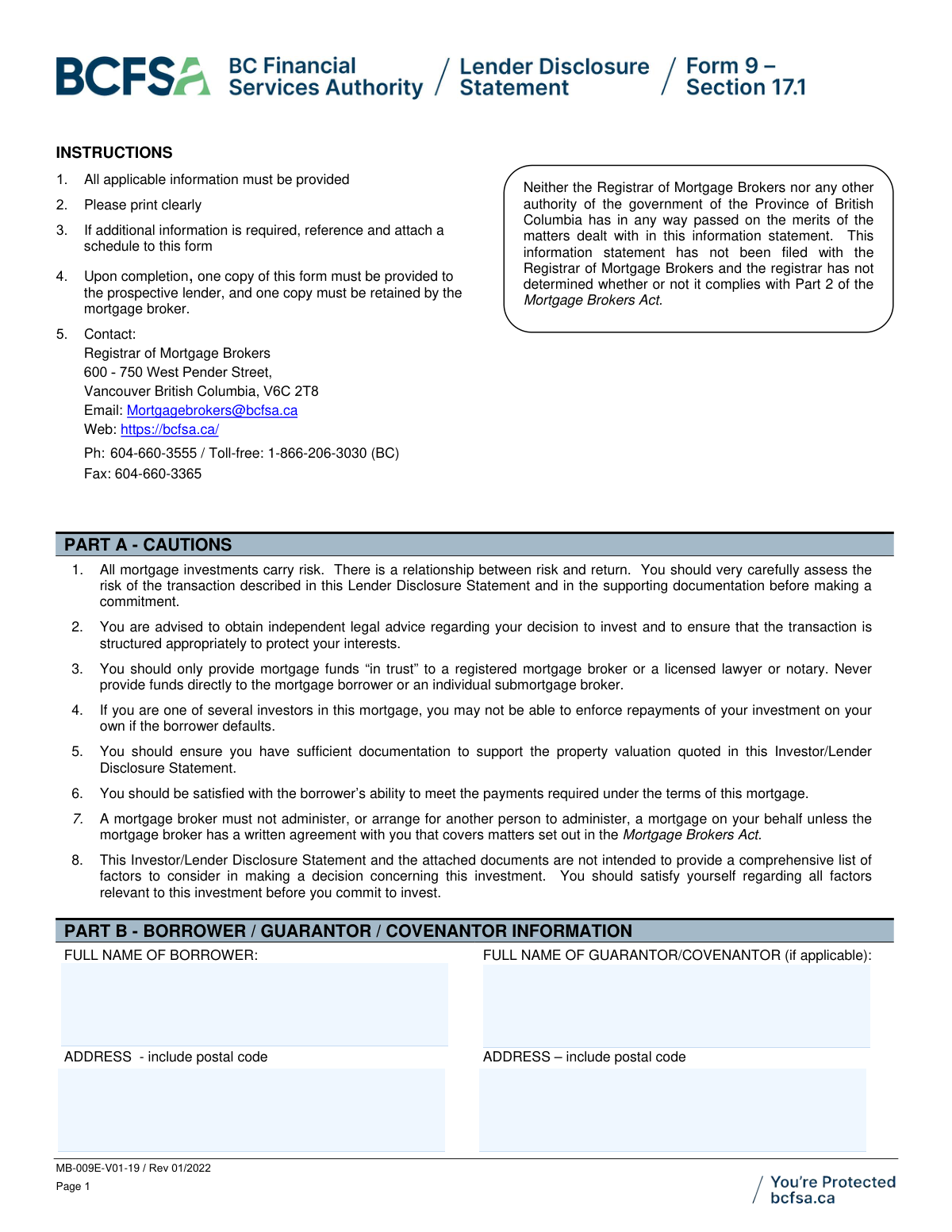
Yes! You can use AI to fill out Form MB-009E, Investor/Lender Disclosure Statement

Form MB-009E, the Investor/Lender Disclosure Statement, is a critical document in British Columbia for mortgage transactions, mandated by the Mortgage Brokers Act. It provides potential lenders and investors with comprehensive details about a mortgage investment, including information on the borrower, the property, mortgage terms, and potential risks, to facilitate an informed decision. Today, this form can be filled out quickly and accurately using AI-powered services like Instafill.ai, which can also convert non-fillable PDF versions into interactive fillable forms.
MB-009E is part of the disclosure forms, investor forms, NJ state forms, PA state forms and state ID forms categories on Instafill.
Our AI automatically handles information lookup, data retrieval, formatting, and form filling.
It takes less than a minute to fill out MB-009E using our AI form filling.
Securely upload your data. Information is encrypted in transit and deleted immediately after the form is filled out.

Form specifications

Form name: Form MB-009E, Investor/Lender Disclosure Statement
Number of fields: 145
Number of pages: 5
Language: English
main-image

Instafill Demo: How to fill out PDF forms in seconds with AI

How to Fill Out MB-009E Online for Free in 2026

Are you looking to fill out a MB-009E form online quickly and accurately? Instafill.ai offers the #1 AI-powered PDF filling software of 2026, allowing you to complete your MB-009E form in just 37 seconds or less.
Follow these steps to fill out your MB-009E form online using Instafill.ai:
  1. 1 Navigate to Instafill.ai and upload or select the Investor/Lender Disclosure Statement (Form MB-009E).
  2. 2 Use the AI to automatically populate borrower, guarantor, and property details from your records or uploaded documents.
  3. 3 Review and complete the mortgage particulars in Part J, including the investment amount, interest rate, term, and payment schedule.
  4. 4 Accurately detail the rank of the mortgage and list any prior encumbrances in Part K, allowing the AI to assist in calculating the loan-to-value ratio.
  5. 5 Check off all relevant supporting documents that are attached to the disclosure in Part L.
  6. 6 Complete the mortgage broker's certification in Part M, then securely send the form to the investor/lender to obtain their acknowledgement and signature in Part N.
  7. 7 Download, print, or securely share the final, completed form with all required parties and retain a copy for your records.

Our AI-powered system ensures each field is filled out correctly, reducing errors and saving you time.

Why Choose Instafill.ai for Your Fillable MB-009E Form?

Speed

Complete your MB-009E in as little as 37 seconds.

Up-to-Date

Always use the latest 2026 MB-009E form version.

Cost-effective

No need to hire expensive lawyers.

Accuracy

Our AI performs 10 compliance checks to ensure your form is error-free.

Security

Your personal information is protected with bank-level encryption.

Frequently Asked Questions About Form MB-009E

This form provides potential mortgage lenders and investors with detailed information about a specific mortgage investment in British Columbia. It is designed to help you understand the transaction's risks, terms, and key parties before you commit funds.

The mortgage broker is responsible for completing this disclosure statement fully and accurately. As the investor or lender, you are responsible for reviewing it carefully and signing the acknowledgement in Part N.

You should review the form and all attached documents, and it is highly recommended you seek independent legal advice. After signing the acknowledgement, one copy is for your records, and the mortgage broker retains another.

Even if the broker represents another party, they still have a duty of care to you and must deal with you fairly. However, the form strongly recommends you obtain your own independent advice to ensure your interests are protected.

Part D requires the mortgage broker to disclose any defaults by the borrower on existing or previous mortgages within the last 12 months. This section is crucial for assessing the borrower's payment history.

The Loan-to-Value (LTV) ratio compares the total mortgage debt against the property's appraised value. A lower LTV generally indicates a less risky investment for the lender.

Part L lists documents that should be attached, such as property appraisals, the borrower's mortgage application, credit reports, and the purchase contract if applicable. Ensure you review all provided documentation to make an informed decision.

An inter alia mortgage is a single mortgage loan that is secured by more than one property. If this applies, the broker must attach a specific addendum form with details on all the properties.

For regulatory questions, you can contact the Registrar of Mortgage Brokers at the BC Financial Services Authority (BCFSA). Their contact details are listed in the 'Instructions' section at the top of the form.

It is a critical security measure. The form's cautions state you should only provide mortgage funds 'in trust' to a registered mortgage broker, a licensed lawyer, or a notary to protect your money before the mortgage is registered.

While the broker completes this specific disclosure for you, for any forms you need to fill out yourself, services like Instafill.ai can be very helpful. They use AI to auto-fill form fields accurately, which saves time and helps prevent errors.

You can use a service like Instafill.ai to complete forms digitally. Simply upload the document, and the platform allows you to type directly into the fields, add signatures, and manage the form electronically.

If you have a non-fillable or 'flat' PDF, you can use a tool like Instafill.ai to convert it into an interactive, fillable form. This allows you to easily enter all the required information on your computer without printing.

Part J, 'Mortgage Particulars', contains all the key terms of the loan. This includes the interest rate, payment frequency and amount, loan term, and maturity date.

Compliance MB-009E
Validation Checks by Instafill.ai

1
Loan to Value (LTV) Calculation Verification
This check verifies that the 'Loan to value' percentage in Part K is correctly calculated as (Total amount of mortgages / Value) * 100. This calculation is critical for assessing the risk of the loan, as a higher LTV indicates higher risk. If the calculation is incorrect, the form submission should be flagged for manual review to ensure the lender has an accurate understanding of the loan's risk profile.
2
Total Mortgages Summation Check
This validation ensures that the 'Total amount of mortgages' (field c in Part K) is the correct sum of 'Total amount of prior encumbrances' (field a) and 'Maximum Indebtedness of this mortgage' (field b). An incorrect total misrepresents the property's total debt load, which is a fundamental component of the LTV calculation. A failed validation would require correction to ensure all subsequent risk calculations are accurate.
3
Property Value Consistency Across Sections
This check confirms that the 'Value' used in the Loan to Value calculation (field d in Part K) is identical to the 'Property Valuation Amount' specified in Part I. This ensures consistency and prevents the use of different valuation figures within the same document, which could lead to confusion or misrepresentation of risk. If the values do not match, the submission should be rejected until the discrepancy is resolved.
4
Conditional Default Explanation Requirement
This validation ensures that if the user indicates 'Yes' to acquiring a mortgage in default or a new mortgage where a previous one was in default (Part D), the corresponding text field explaining the defaults is filled out. This information is material to the lender's decision, as it highlights the borrower's payment history and potential credit risk. A failure to provide this explanation when required should prevent the form from being submitted.
5
Conditional Mortgage Administrator Details
This check verifies that if 'Yes' is selected for 'Will the mortgage be administered for you?' in Part H, then the 'name and address of administrator' and 'fees' fields are completed. This is important for the lender to understand who will be managing the mortgage and the associated costs. If these fields are empty after selecting 'Yes', the submission should be considered incomplete.
6
Mortgage Portion Percentage Validation
This validation applies if the investment is a 'portion of the mortgage' (Part F). It ensures the 'Your portion represents' field contains a valid number strictly greater than 0 and less than 100. This is crucial for defining the investor's stake in the mortgage. An invalid or missing percentage would create ambiguity about the investment terms and should be corrected.
7
Maturity Date and First Payment Date Logic
This check ensures the 'Maturity Date' in Part J is chronologically after the 'Borrower’s first payment due' date. A maturity date that precedes the first payment is a logical impossibility and indicates a data entry error. This validation prevents the submission of nonsensical loan term data that would make the contract unenforceable.
8
Amortization vs. Term Logical Check
This validation confirms that the 'Amortization' period is greater than or equal to the 'Term' period in Part J. In standard mortgage practice, the term cannot be longer than the amortization period. This check prevents a common data entry error that would misrepresent the loan's structure and payment schedule, and a failure should prompt for correction.
9
Conditional Tax Arrears Amount
This check ensures that if 'Yes' is selected for 'Are taxes in arrears?' in Part I, the 'amount arrears' field must be populated with a monetary value greater than zero. Unpaid property taxes can form a lien that takes priority over the mortgage, so the lender must be aware of the exact amount. A missing value would represent an incomplete risk disclosure and should block submission.
10
Mortgage Rank and Encumbrance Consistency
This validation checks for logical consistency between the stated 'Rank of mortgage' and the number of 'Prior encumbrances' listed in Part K. For example, if the rank is 'Second', at least one prior encumbrance must be detailed. This ensures the stated priority of the mortgage is supported by the provided data, which is critical for determining the lender's position in case of default.
11
Conditional Appraisal Information Requirement
This check verifies that if 'Appraisal' is selected as the basis for 'Property Valuation' in Part I, then the 'Appraisal Date' and 'Name and address of appraiser' fields are mandatory. This information is essential for the lender to verify the credibility and timeliness of the valuation. Submissions lacking these details when an appraisal is cited should be considered incomplete.
12
Guarantor Information Completeness
This validation ensures that if the 'Full name of Guarantor/Covenantor' field in Part B is filled, the corresponding 'Guarantor/Covenantor Address' field must also be completed. A guarantor's information is incomplete and legally insufficient without a valid address for contact and legal notices. A failure to provide the address when a guarantor is named should halt the submission process until the information is complete.
13
Mutually Exclusive Interest Rate
This check ensures that for Part J, either the 'Interest rate is fixed at' field is filled, or the 'Interest rate is variable, explain' field is filled, but not both. A mortgage has either a fixed or a variable rate, so providing both is a contradiction. This validation prevents conflicting information about a core term of the loan, and a failure should require the user to select only one option.
14
Conditional Trust Holder Identification
This validation confirms that if 'Yes' is selected for 'Will the funds be held in trust pending execution of the mortgage?' in Part G, the field identifying the party that will hold the funds must be completed. It is a critical compliance and security measure for the lender to know exactly who is responsible for holding their funds. An empty field would be a significant omission, and the form should not be accepted.

Common Mistakes in Completing MB-009E

Using Municipal Address Instead of Legal Description

Users often enter the common street address in the 'Legal Description of Property' field in Part I. This happens because the legal description is a complex string of text (e.g., Lot/Plan/PID) that isn't readily available or easily remembered. An incorrect legal description can render the mortgage unenforceable as it won't be registered against the correct property title, creating a massive financial risk. To avoid this, always copy the legal description exactly from the property's title search document; AI-powered tools like Instafill.ai can help by extracting this precise data from source documents to ensure accuracy.

Incorrect Loan to Value (LTV) Ratio Calculation

The LTV calculation in Part K requires manually adding prior encumbrances to the new mortgage amount and dividing by the property value. Mistakes are common due to incorrect arithmetic or transcribing the wrong values from other sections of the form. An inaccurate LTV gives the lender a false sense of security or risk, potentially leading to a poor investment decision. Using a tool that automates calculations, like Instafill.ai, prevents these errors by linking fields and performing the math automatically based on the provided formula.

Confusing 'Amount Owing' with 'Maximum Potential Indebtedness'

When listing prior encumbrances in Part K, people frequently confuse the current 'Amount Owing' with the 'Maximum potential indebtedness allowable'. For a line of credit, the current balance might be low, but the maximum limit is much higher, which is the true figure that affects priority and risk. This error significantly understates the total debt secured against the property, leading to a flawed LTV calculation. Always verify these amounts against official mortgage statements or the title search to ensure accuracy.

Confusing Mortgage Term and Amortization Period

In Part J, users often enter the same value for both 'Term' and 'Amortization,' especially if they are unfamiliar with mortgage jargon. The term is the length of the current contract (e.g., 5 years), while amortization is the total time to pay off the loan (e.g., 25 years). This mistake leads to incorrect calculations for the 'Balance on maturity' and misrepresents the loan structure, creating confusion about when the final balloon payment is due. It's crucial to understand that for most non-fully amortized loans, these values will be different.

Incorrectly Calculating the 'Balance on Maturity'

Calculating the final balloon payment due at the end of the term (Part J) requires a complex financial formula based on the loan amount, interest rate, payment, and amortization period. Manual calculation is highly prone to error, leading to an incorrect figure on the disclosure. This misinforms the lender about the refinancing risk and the final amount they are expected to receive at maturity. Using financial calculators or automated form-filling software is the best way to ensure this figure is accurate.

Providing Inconsistent Property Valuation Data

In Part I, a user might check 'Appraisal' as the basis for valuation but then fail to provide the appraiser's name, the appraisal date, or attach the report. Alternatively, the 'Valuation Amount' entered may not match the figure in the attached appraisal or sale contract. These inconsistencies undermine the credibility of the valuation and prevent the lender from verifying the property's worth, which is a cornerstone of the investment decision. Ensure all related valuation fields are filled and consistent with the source documents.

Providing Vague or Incomplete Default Explanations

In Part D, when disclosing a borrower's past defaults, filers may write a generic note like 'late payment' without providing dates, amounts, or resolution details. This lack of specificity prevents the lender from properly assessing the borrower's creditworthiness and the risk of future defaults. To avoid this, provide a full, clear history of any default; this information should be detailed in the borrower's credit report or mortgage history, which can be reviewed for completeness.

Failing to Detail Mortgage Administration Fees

When a mortgage is to be administered by a third party (Part H), filers sometimes check 'Yes' but leave the fee description blank or fail to attach the fee agreement. This omits crucial information about ongoing costs that will reduce the lender's net return on investment. Lenders may be unpleasantly surprised by these deductions later. To prevent this, always provide a complete description of all administration fees or attach the full agreement as required.

Checking Boxes for Documents Not Actually Attached

In the 'Attached Documents' checklist (Part L), it is common for the preparer to tick a box for a document like an appraisal or credit report that they intend to include but forget to actually attach. This simple oversight leads to an incomplete disclosure package, causing processing delays while the lender requests the missing information. Before submitting, double-check that every document indicated on the checklist is physically or digitally included with the form.

Omitting Signatures or Dates in Certification and Acknowledgement

Forgetting to sign or date the form in Part M (Broker Certification) or Part N (Lender Acknowledgement) is a frequent and critical error. An unsigned or undated form is legally invalid and fails to prove that the disclosure was properly made or received, which can have serious compliance consequences. AI-powered form filling tools like Instafill.ai can flag mandatory signature and date fields to prevent submission of an incomplete document. If the form is a non-fillable PDF, Instafill.ai can convert it to a fillable version with clearly marked signature fields.
Saved over 80 hours a year

“I was never sure if my IRS forms like W-9 were filled correctly. Now, I can complete the forms accurately without any external help.”

Kevin Martin Green

Your data stays secure with advanced protection from Instafill and our subprocessors

Robust compliance program

Transparent business model

You’re not the product. You always know where your data is and what it is processed for.

ISO 27001, HIPAA, and GDPR

Our subprocesses adhere to multiple compliance standards, including but not limited to ISO 27001, HIPAA, and GDPR.

Security & privacy by design

We consider security and privacy from the initial design phase of any new service or functionality. It’s not an afterthought, it’s built-in, including support for two-factor authentication (2FA) to further protect your account.

Fill out MB-009E with Instafill.ai

Worried about filling PDFs wrong? Instafill securely fills form-mb-009e-investorlender-disclosure-statement forms, ensuring each field is accurate.