Yes! You can use AI to fill out Form N4, Notice to End a Tenancy Early for Non-payment of Rent
Form N4 is the legal document used by landlords in Ontario to formally notify a tenant that they have not paid their rent and that the tenancy may be terminated. This notice is a mandatory first step in the eviction process for non-payment of rent and must be completed accurately to be considered valid by the Landlord and Tenant Board. An incorrect form can lead to delays and the dismissal of an eviction application. Today, this form can be filled out quickly and accurately using AI-powered services like Instafill.ai, which can also convert non-fillable PDF versions into interactive fillable forms.
N4 is part of the
payment forms category on Instafill.
Our AI automatically handles information lookup, data retrieval, formatting, and form filling.
It takes less than a minute to fill out N4 using our AI form filling.
Securely upload your data. Information is encrypted in transit and deleted immediately after the form is filled out.
Form specifications
| Form name: | Form N4, Notice to End a Tenancy Early for Non-payment of Rent |
| Number of fields: | 44 |
| Number of pages: | 3 |
| Language: | English |
More forms in Payment forms
Instafill Demo: How to fill out PDF forms in seconds with AI
How to Fill Out N4 Online for Free in 2026
Are you looking to fill out a N4 form online quickly and accurately? Instafill.ai offers the #1 AI-powered PDF filling software of 2026, allowing you to complete your N4 form in just 37 seconds or less.
Follow these steps to fill out your N4 form online using Instafill.ai:
- 1 Navigate to Instafill.ai and upload your Form N4, or select it from the platform's library of official documents.
- 2 Allow the AI to scan and identify all the required fields, such as tenant and landlord names, rental unit address, and rent calculation tables.
- 3 Answer a series of simple, plain-language questions to provide the necessary details, including the total rent owed and the legally correct termination date.
- 4 The AI will instantly populate the official Form N4 with your information, ensuring all calculations for rent owed are correct and placed in the appropriate sections.
- 5 Review the auto-filled form for accuracy. Once you've confirmed all details are correct, you can digitally sign and date the document.
- 6 Download the completed and signed Form N4, ready to be served to the tenant according to the legal requirements of the Landlord and Tenant Board.
Our AI-powered system ensures each field is filled out correctly, reducing errors and saving you time.
Why Choose Instafill.ai for Your Fillable N4 Form?
Speed
Complete your N4 in as little as 37 seconds.
Up-to-Date
Always use the latest 2026 N4 form version.
Cost-effective
No need to hire expensive lawyers.
Accuracy
Our AI performs 10 compliance checks to ensure your form is error-free.
Security
Your personal information is protected with bank-level encryption.
Frequently Asked Questions About Form N4
Form N4 is a legal notice used by a landlord in Ontario to inform a tenant that they owe rent. It specifies that the tenancy may be terminated if the outstanding rent is not paid by a specific date.
A landlord or their authorized representative must fill out this form when they want to formally notify a tenant about unpaid rent and potentially begin the eviction process.
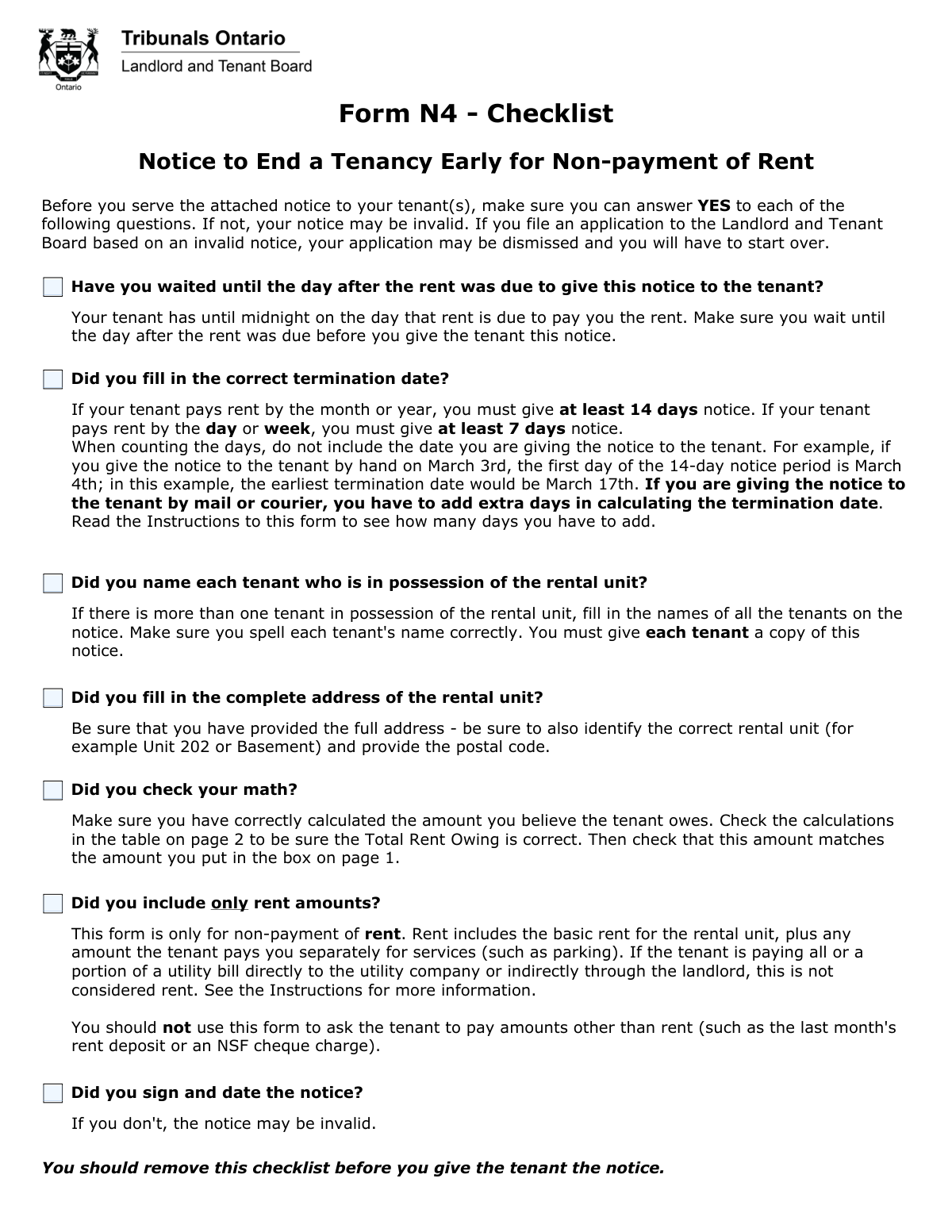
You must wait until the day after the rent was due to give this notice to the tenant. The tenant has until midnight on the due date to pay the rent.
The termination date must be at least 14 days after you give the notice for monthly or yearly tenancies, or at least 7 days for daily or weekly tenancies. Do not include the day you serve the notice when counting.
You should only include the basic rent for the unit plus any amount the tenant pays you separately for services like parking. Do not include other charges like utility bills, NSF fees, or security deposits.
You must list the full names of all tenants on the notice. It is also required that you give each tenant a copy of the completed N4 form.
If the tenant pays the full amount specified on the notice by the termination date, the notice becomes void. You cannot apply to the Landlord and Tenant Board to evict them based on this notice.
The tenant is not required to move out if they disagree with the notice. If you cannot resolve the issue directly, you may apply to the Landlord and Tenant Board for a hearing to resolve the dispute.
No, the checklist is for the landlord's use only to ensure the notice is filled out correctly and is valid. You should remove the checklist page before giving the notice to the tenant.
You must ensure the total rent owing is calculated correctly and that the amount in the table on page 2 matches the amount on page 1. An error in calculation can make the notice invalid, which may cause your application to be dismissed.
If the tenant does not comply by the termination date, your next step is to file an application with the Landlord and Tenant Board to request an eviction order. The earliest you can file this application is the day after the termination date.
Yes, services like Instafill.ai use AI to help you accurately auto-fill form fields, which saves time and helps prevent errors. This is particularly useful for ensuring dates and calculations are correct.
To fill out the form online, you can upload the N4 PDF to Instafill.ai. The platform will make the document interactive, allowing you to easily type in your information, save, and print the completed form.
If you have a non-fillable or 'flat' PDF, you can use a service like Instafill.ai. It can convert the document into an interactive, fillable form, allowing you to complete it on your computer.
Compliance N4
Validation Checks by Instafill.ai
1
Tenant Name(s) Completeness
This check ensures the 'Tenant's name' field is not empty and includes the names of all tenants. The notice must be addressed to every tenant in possession of the rental unit to be legally valid. Failure to name all tenants could render the notice invalid and lead to the dismissal of an application to the Landlord and Tenant Board.
2
Complete Rental Unit Address
Verifies that the 'Address of the Rental Unit' field contains a full address, including the street, city, postal code, and a specific unit identifier (e.g., 'Basement' or 'Unit 202') if applicable. An incomplete or ambiguous address can make the notice legally insufficient, as it must clearly identify the specific property in question. This ambiguity could be grounds for the notice to be dismissed.
3
Cross-Page Amount Consistency
Ensures that the total rent amount claimed on page 1 ('I believe you owe me $___') exactly matches the 'Total Rent Owing' calculated in the table on page 2. Discrepancies between these two figures create confusion and will likely invalidate the notice. The tenant and the Board must be able to clearly identify the exact amount being claimed.
4
Termination Date Notice Period Logic
Verifies that the 'Termination Date' provides the legally required notice period, which must be at least 7 or 14 days after the notice is given, depending on the rent payment frequency. The notice period is a critical legal requirement, and providing insufficient time will invalidate the entire notice. This forces the landlord to start the process over with a new, correct notice.
5
Termination Date Format and Chronology
Checks that the 'Termination Date' is entered in the correct dd/mm/yyyy format and is a date in the future relative to the signature date. An invalid date format or a date set in the past would make the notice nonsensical and legally unenforceable. This check ensures the basic structure of the date is correct before more complex logical checks are applied.
6
Row-Level Rent Calculation Accuracy
For each row in the rent calculation table, this check verifies that the 'Rent Owing' amount is the correct result of 'Rent Charged' minus 'Rent Paid'. This ensures the mathematical accuracy of each line item that contributes to the total claim. Errors in these individual calculations would undermine the validity of the total amount claimed and could be challenged.
7
Total Rent Owing Calculation Accuracy
Validates that the 'Total Rent Owing' field at the bottom of the table is the correct sum of all individual 'Rent Owing' amounts from the rows above it. This is a crucial math check to ensure the final calculated total is arithmetically sound. An incorrect total invalidates the financial claim presented in the notice.
8
Signature and Date Completeness
Verifies that the landlord or their representative has provided a signature and that the 'Date' field next to the signature is filled out. The signature authenticates the notice, and the date is essential for calculating the legally required termination date. An unsigned or undated notice is invalid and has no legal effect.
9
Rent Period Date Chronology
For each rent period row in the calculation table, this check ensures the 'From' date is not later than the 'To' date. A chronological error would make the specified rental period illogical and could be grounds for challenging the notice's validity. This validation maintains the logical integrity of the financial breakdown.
10
Non-Overlapping Rent Periods
Validates that the rent periods listed in the calculation table do not overlap with each other. Each period for which rent is claimed should be distinct to prevent double-counting or confusion about the amounts owed. Overlapping periods would indicate a calculation error and could invalidate the financial claim.
11
Conditional Representative Information
Checks that if the 'Representative' signature option is selected, then the corresponding representative information fields (Name, Phone Number, LSUC #) are completed. This is important for identifying who is acting on the landlord's behalf and how they can be contacted. Failure to provide this information when a representative signs can invalidate the notice.
12
Postal Code Format Validation
Ensures that all postal code fields (for the rental unit and any representative) adhere to the standard Canadian format of 'LNL NLN'. A valid postal code is essential for mail delivery and for correctly identifying a location. An invalid format suggests a data entry error that could lead to misdirected mail or an invalid address.
13
Rent Owed Amount Format
Validates that the 'Amount of rent owed' on page 1 is a valid positive numerical or currency value. This is the central claim of the notice, and it must be clear and unambiguous. Non-numeric or negative values would make the notice nonsensical and invalid.
Common Mistakes in Completing N4
Landlords often miscalculate the termination date by not adhering to the 7 or 14-day minimum notice period, or by incorrectly counting the day of service. This error invalidates the notice, forcing the landlord to restart the entire eviction process. To avoid this, carefully count the days starting from the day after the notice is served, and add extra days if serving by mail. AI-powered tools like Instafill.ai can automatically calculate and format the correct termination date based on the service date and tenancy type, preventing this common error.
A frequent error is including charges for things other than rent, such as NSF fees, late payment penalties, or unpaid utilities. This N4 form is strictly for non-payment of rent. Including other amounts will invalidate the notice and may cause the Landlord and Tenant Board to dismiss the application. Always ensure the amount claimed is only for base rent and direct service fees like parking.
The notice is invalid if it does not include the full, correctly spelled legal names of all tenants listed on the lease agreement. This often happens when landlords use nicknames or forget to list a co-tenant. The consequence is that the notice may not be legally binding on all occupants, leading to a dismissal. Always cross-reference with the original tenancy agreement to ensure every tenant is named correctly.
Landlords sometimes provide a partial address, forgetting crucial details like the unit number, basement/main floor designator, or postal code. An incomplete address can create ambiguity and be grounds for invalidating the notice. It is essential to provide the full, specific address of the rental unit as it appears on the lease to ensure the notice is legally sound.
Errors often occur when calculating the 'Rent Owing' in the table on page 2, or when the 'Total Rent Owing' on page 2 does not match the amount stated on page 1. These math mistakes undermine the claim and can lead to dismissal. Using an AI-powered form filler like Instafill.ai can prevent this, as it can automatically perform calculations and ensure totals are consistent across the document. If the form is a flat PDF, Instafill.ai can convert it to a fillable version with these smart capabilities.
In their haste, landlords may serve the N4 notice on the day rent is due. The law allows the tenant until midnight on the due date to pay. A valid notice can only be served on the day *after* the rent was due. Serving it too early automatically invalidates the notice, wasting time and requiring the process to be restarted.
An unsigned or undated notice is not a valid legal document. This is a simple but surprisingly common oversight that occurs when a landlord is rushing to complete the paperwork. The Board will dismiss an application based on an unsigned notice. Always perform a final check to ensure the landlord or their representative has signed and correctly dated the form.
The table on page 2 is meant to clearly show the tenant how the total amount owed was calculated. Some landlords just put a total figure without breaking down the rent periods, charges, and payments received. This lack of transparency can be a reason for the Board to question the claim. Each rental period with a balance owing should be listed as a separate line item for clarity.
The form specifies a `dd/mm/yyyy` format for all dates, including the termination date, rent periods, and signature date. Users often default to their local convention (like `mm/dd/yyyy`), creating ambiguity and potential grounds for invalidation. This inconsistency can confuse the tenant and the Board about key deadlines. It is crucial to strictly follow the specified `dd/mm/yyyy` format for all date fields. AI form-filling tools like Instafill.ai can help by automatically formatting dates correctly, ensuring compliance and clarity.
The form has distinct signature areas for the 'Landlord' and a 'Representative' (like a lawyer or paralegal). A property manager might incorrectly sign as the landlord, or a landlord might fill in the representative section when they don't have one. This can cause confusion about who is legally issuing the notice. It's crucial to select the correct role and fill in only the relevant signature and information fields.
Saved over 80 hours a year
“I was never sure if my IRS forms like W-9 were filled correctly. Now, I can complete the forms accurately without any external help.”
Kevin Martin Green
Your data stays secure with advanced protection from Instafill and our subprocessors

Robust compliance program
Transparent business model
You’re not the product. You always know where your data is and what it is processed for.
ISO 27001, HIPAA, and GDPR
Our subprocesses adhere to multiple compliance standards, including but not limited to ISO 27001, HIPAA, and GDPR.
Security & privacy by design
We consider security and privacy from the initial design phase of any new service or functionality. It’s not an afterthought, it’s built-in, including support for two-factor authentication (2FA) to further protect your account.
Fill out N4 with Instafill.ai
Worried about filling PDFs wrong? Instafill securely fills form-n4-notice-to-end-a-tenancy-early-for-non-payment-of-rent forms, ensuring each field is accurate.