Yes! You can use AI to fill out Form T-3, Children with Special Health Care Needs (CSHCN) Services Program Application
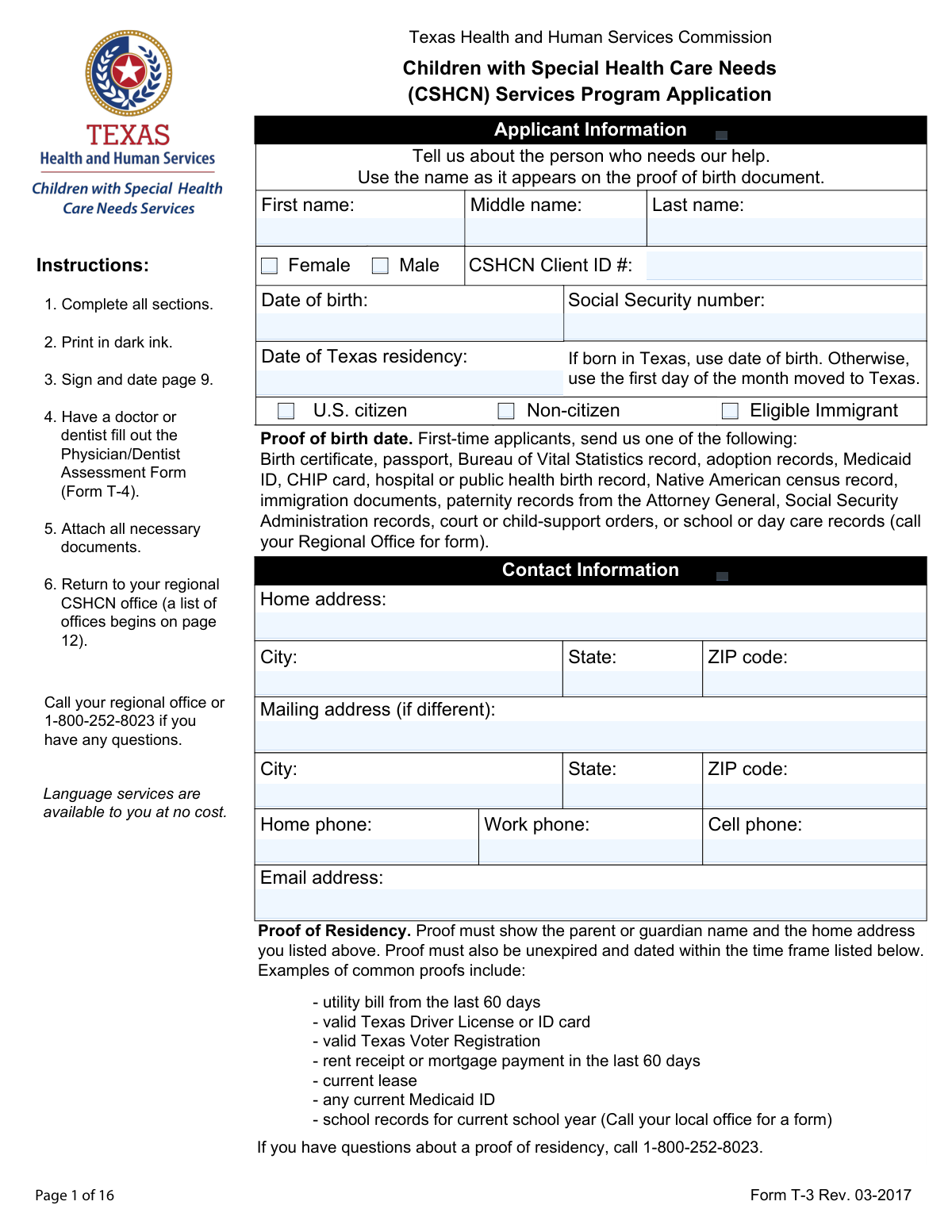
Form T-3 is an application used by the Texas Health and Human Services Commission to enroll children in the Children with Special Health Care Needs (CSHCN) Services Program. The form collects detailed information about the applicant, their household, income, and insurance to assess eligibility for program benefits. Today, this form can be filled out quickly and accurately using AI-powered services like Instafill.ai, which can also convert non-fillable PDF versions into interactive fillable forms.
Our AI automatically handles information lookup, data retrieval, formatting, and form filling.
It takes less than a minute to fill out Form T-3 using our AI form filling.
Securely upload your data. Information is encrypted in transit and deleted immediately after the form is filled out.
Form specifications
| Form name: | Form T-3, Children with Special Health Care Needs (CSHCN) Services Program Application |
| Number of pages: | 9 |
| Filled form examples: | Form Form T-3 Examples |
| Language: | English |
| Categories: | CAR forms, child care forms, health care forms, L.A. Care forms, health services forms, health forms |
Instafill Demo: How to fill out PDF forms in seconds with AI
How to Fill Out Form T-3 Online for Free in 2026
Are you looking to fill out a FORM T-3 form online quickly and accurately? Instafill.ai offers the #1 AI-powered PDF filling software of 2026, allowing you to complete your FORM T-3 form in just 37 seconds or less.
Follow these steps to fill out your FORM T-3 form online using Instafill.ai:
- 1 Navigate to Instafill.ai and upload or select Form T-3, the CSHCN Services Program Application.
- 2 Use the AI assistant to accurately fill in the applicant's information, including personal details, contact information, and residency status.
- 3 Provide detailed information for all household members, including their relationship to the applicant, income sources, and pay cycles.
- 4 Enter all current insurance information for the applicant, covering Medicaid, CHIP, Medicare, and any private policies.
- 5 Securely upload all required supporting documents, such as proof of birth, residency, income, and insurance cards, as prompted by the system.
- 6 Review the completed application for accuracy, then electronically sign and date the form in the designated signature section.
- 7 Download the final, completed application package, ready for submission to the appropriate regional CSHCN office.
Our AI-powered system ensures each field is filled out correctly, reducing errors and saving you time.
Why Choose Instafill.ai for Your Fillable Form T-3 Form?
Speed
Complete your Form T-3 in as little as 37 seconds.
Up-to-Date
Always use the latest 2026 Form T-3 form version.
Cost-effective
No need to hire expensive lawyers.
Accuracy
Our AI performs 10 compliance checks to ensure your form is error-free.
Security
Your personal information is protected with bank-level encryption.
Frequently Asked Questions About Form Form T-3
This form is used to apply for the Texas Children with Special Health Care Needs (CSHCN) Services Program. The program provides health care services and support for children in Texas who have special health care needs.
A parent or legal guardian must fill out this application on behalf of a child under 21 years of age who is a Texas resident and has a qualifying special health care need.
You must submit proof of birth date, proof of Texas residency, proof of income for legally responsible adults, and copies of any insurance cards. Additionally, a Physician/Dentist Assessment Form (T-4) must be completed by your child's doctor or dentist.
Acceptable proofs include a utility bill from the last 60 days, a valid Texas Driver License or ID card, a current lease, or a recent mortgage payment receipt. The proof must show the parent or guardian's name and the home address listed on the application.
For self-employment income, you must provide your most recent tax return, receipts for business expenses from the last 60 days, and a completed Self-Employment Income form. You can call your regional office to obtain this specific form.
No, the form specifically states that you should not include the applicant's Supplemental Security Income (SSI) when reporting household income.
Form T-4 is a separate document that must be filled out and signed by the applicant's doctor or dentist to provide a medical assessment. It is a mandatory part of the application and must be submitted along with Form T-3.
You must sign and date the application on page 9. Your signature confirms the information is correct and that you authorize the release of medical information for eligibility purposes.
Return the completed application and all necessary documents to your regional CSHCN office. A complete list of regional offices, including addresses and phone numbers, starts on page 12 of the application packet.
You need to list every person who lives in the house with the applicant, such as parents, guardians, siblings, and other relatives or residents. You must also provide income information for every household member who is legally obligated to support the applicant.
You can call your regional CSHCN office for assistance or contact the general help line at 1-800-252-8023. Language services are available at no cost.
Yes, services like Instafill.ai use AI to auto-fill form fields accurately and save time. This can help you complete the application more efficiently and reduce the chance of errors.
To fill out the form online, you can upload the PDF to a platform like Instafill.ai. The service will make the document interactive, allowing you to type your answers directly into the fields before printing the completed form for submission.
If your PDF is not fillable, you can use a service like Instafill.ai to convert it into an interactive, fillable form. This allows you to easily type in your information without having to print and fill it out by hand.
Compliance Form T-3
Validation Checks by Instafill.ai
1
Signature and Date Presence
This check verifies that the signature and date fields on page 9 are not empty. As this is a legal document attesting to the truthfulness of the provided information, a signature and date are mandatory for the application to be considered complete and valid. Failure to sign and date the application will result in immediate rejection.
2
Applicant Social Security Number Format
This validation ensures the applicant's Social Security Number is entered in the standard 9-digit format (XXX-XX-XXXX or XXXXXXXXX). The SSN is a critical unique identifier for federal and state programs and is used for identity verification and cross-referencing with other agencies. An invalid format will prevent processing and require correction.
3
Texas Residency Date vs. Date of Birth Logic
This check ensures the 'Date of Texas residency' is on or after the applicant's 'Date of birth'. According to the form instructions, this date should be the applicant's DOB if born in Texas, or a later date if they moved to the state. This validation prevents logical impossibilities in the application data, and failure would indicate a data entry error that needs to be fixed.
4
Mutually Exclusive Income Declaration
This validation confirms that if 'No household income' is checked for the applicant or any household member, no other income source checkboxes (e.g., Employment, SSI) are selected for that person. This prevents contradictory financial information which is critical for determining eligibility. If a conflict is found, the application will be flagged for manual review or returned for correction.
5
Conditional 'Other' Field Completion
This check ensures that if an 'Other' checkbox is selected in sections like 'Sources of Income' or 'Relationship to applicant', the corresponding text field specifying the 'Other' information is filled out. This is important for capturing complete and accurate data that doesn't fit predefined categories. An empty 'Other' text field would render the selection incomplete and require clarification.
6
Mutually Exclusive Insurance Status
This validation verifies that the user has not selected both 'The applicant has coverage' and 'The applicant is not covered under any medical or dental insurance' simultaneously. These two options are mutually exclusive and selecting both creates an ambiguity that makes it impossible to process the insurance section. The form must be corrected to reflect only one of these statuses.
7
Conditional Insurance Number Presence
This check ensures that if an applicant indicates they have a specific type of insurance (e.g., Medicaid, CHIP, Medicare, Private Insurance) by checking 'Yes', the corresponding number field (Medicaid number, CHIP number, etc.) is filled. This number is essential for verifying coverage and coordinating benefits. An application with 'Yes' checked but a missing number is incomplete.
8
Applicant Name Completeness
This validation ensures that the applicant's 'First name' and 'Last name' fields are not empty. The applicant's full name is the most basic and essential piece of identifying information on the form. An application without a name cannot be processed and will be rejected as incomplete.
9
Home Address State and ZIP Code Validation
This check verifies that the 'Home address' section is complete, the 'State' field is 'TX', and the 'ZIP code' is in a valid 5-digit format. Since this is a Texas state program, proof of Texas residency is required, making the address critical for eligibility. An invalid or non-Texas address would likely disqualify the applicant or require additional proof of residency.
10
At Least One Contact Phone Number
This validation ensures that at least one of the primary contact phone number fields ('Work phone', 'Cell phone', or 'Home phone') is provided. Having a valid contact number is crucial for the CSHCN office to communicate with the family regarding the application status, request additional information, or provide updates. An application without any contact number is difficult to process effectively.
11
Citizenship Status Selection Logic
This check validates that the citizenship status selection is logical; specifically, that 'U.S. citizen' and 'Non-citizen' are not selected simultaneously. It also verifies that if 'Eligible Immigrant' is checked, the 'Non-citizen' box is also checked, as per the form's dependency. This ensures the citizenship status is recorded clearly and correctly for eligibility determination.
12
Household Income and Pay Cycle Consistency
This validation ensures that if any income source (e.g., 'Employment', 'Self-employment') is checked for a person, then one of the 'Pay cycle' options (e.g., 'Weekly', 'Monthly') must also be selected. This information is necessary to calculate the household's total annual income for eligibility purposes. Missing pay cycle information would halt the income verification process.
13
Private Insurance Details Completeness
If 'Private Insurance Yes' is checked, this validation ensures that the 'Insurance provider name', 'Member/policy number', and 'Coverage start date' fields are all filled. These details are mandatory for the program to verify the private coverage and determine its own payment responsibilities as a payer of last resort. Missing this information makes the private insurance declaration unusable.
14
Date Fields Format and Plausibility
This check scans all date fields on the form (e.g., Date of Birth, Coverage Start Date, Signature Date) to ensure they are in a valid format (e.g., MM/DD/YY) and represent a plausible date. It flags dates that are in the future or are otherwise logically impossible. This maintains data integrity and prevents processing errors based on invalid temporal information.
Common Mistakes in Completing Form T-3
Applicants often enter a nickname or a shortened version of the child's name instead of the full legal name. The form explicitly requires the name as it appears on the proof of birth document, such as a birth certificate. This discrepancy can cause significant delays or rejection during the identity verification process, as the submitted name will not match official records. To avoid this, carefully copy the applicant's full first, middle, and last name exactly as it is written on the official birth document.
This field has a specific, two-part rule that is easily misunderstood: use the date of birth if born in Texas, otherwise use the first day of the month the applicant moved to Texas. People often enter an approximate date of their move or the exact day, which is incorrect and can complicate the eligibility review. To prevent this, double-check the instructions for this field and enter the date precisely as required. Using an AI-powered form filler like Instafill.ai can help by flagging such specific instructions to ensure accuracy.
The application requires that proofs like utility bills, rent receipts, and paycheck stubs be dated within the last 60 days. It is a common error to submit older documents that happen to be on hand, which leads to the application being deemed incomplete. This forces the applicant to resubmit documents, delaying access to benefits. Always check the date on your documents to ensure they fall within the required time frame before attaching them to the application.
The application is a multi-part submission that requires several attachments, including proof of birth, residency, income for all adults, and all insurance cards (front and back). A frequent mistake is overlooking one or more of these documents, especially the copies of insurance cards. An application submitted without all required proofs is considered incomplete and will not be processed. Use the checklist on page 8 to verify that every required item is included before sending the application.
This application requires a companion form, the 'Physician/Dentist Assessment Form (Form T-4)', to be completed by a medical professional. Because this involves an external party and is a separate document, it is one of the most commonly forgotten pieces of the application. Submitting the T-3 application without the T-4 will result in an automatic rejection for being incomplete. It is crucial to coordinate with your doctor or dentist well in advance to ensure this form is completed, signed, and attached.
The income section has several pitfalls, such as including the applicant's SSI income (which is explicitly excluded) or failing to provide the extensive documentation required for self-employment. These errors occur due to the complexity of the rules and can lead to an incorrect financial eligibility determination or processing delays. Carefully read all instructions, especially the note about the applicant's SSI and the specific requirements for self-employment income. AI tools like Instafill.ai can help validate data entry against form rules to prevent such mistakes.
Applicants sometimes only list themselves and the child applying, forgetting to include all other individuals living in the home as required. The program uses the total number of people in the household to determine financial eligibility based on federal poverty guidelines. Omitting members can lead to an inaccurate assessment and potential denial of benefits. Be sure to fill out a section for every person who lives in your house, regardless of their income or relationship to the applicant.
People often list only the primary medical insurance and forget to include secondary, supplemental, dental, or prescription drug plans (like Medicare Part D). The form requires disclosure of *all* coverage, and the signature on page 9 is a legal attestation that the information is complete. Omitting a plan can cause claim denials and billing issues later, as the program is the payer of last resort. Review all of the applicant's insurance cards and list every single policy.
The signature line is located on page 9 of a 16-page document, making it easy to miss when filling out the form. An unsigned or undated application is legally invalid and will be immediately returned without being processed, causing unnecessary delays. Before submitting, flip directly to page 9 and ensure you have provided a physical signature and the current date. Since this form is a non-fillable PDF, tools like Instafill.ai can convert it to a fillable version, making it easier to navigate and complete all required fields, including digital signature sections.
The form has separate fields for 'Home address' and 'Mailing address,' but applicants may enter a P.O. Box in the 'Home address' field for convenience. This is a mistake because the home address must be a physical location that can be verified with a required proof of residency, such as a utility bill or lease agreement, which will not show a P.O. Box. This mismatch will cause the proof of residency to be rejected. Always enter your actual physical street address in the 'Home address' section and use the 'Mailing address' section for your P.O. Box if needed.
Saved over 80 hours a year
“I was never sure if my IRS forms like W-9 were filled correctly. Now, I can complete the forms accurately without any external help.”
Kevin Martin Green
Your data stays secure with advanced protection from Instafill and our subprocessors

Robust compliance program
Transparent business model
You’re not the product. You always know where your data is and what it is processed for.
ISO 27001, HIPAA, and GDPR
Our subprocesses adhere to multiple compliance standards, including but not limited to ISO 27001, HIPAA, and GDPR.
Security & privacy by design
We consider security and privacy from the initial design phase of any new service or functionality. It’s not an afterthought, it’s built-in, including support for two-factor authentication (2FA) to further protect your account.
Fill out Form T-3 with Instafill.ai
Worried about filling PDFs wrong? Instafill securely fills form-t-3-children-with-special-health-care-needs-cshcn-services-program-application-1 forms, ensuring each field is accurate.



