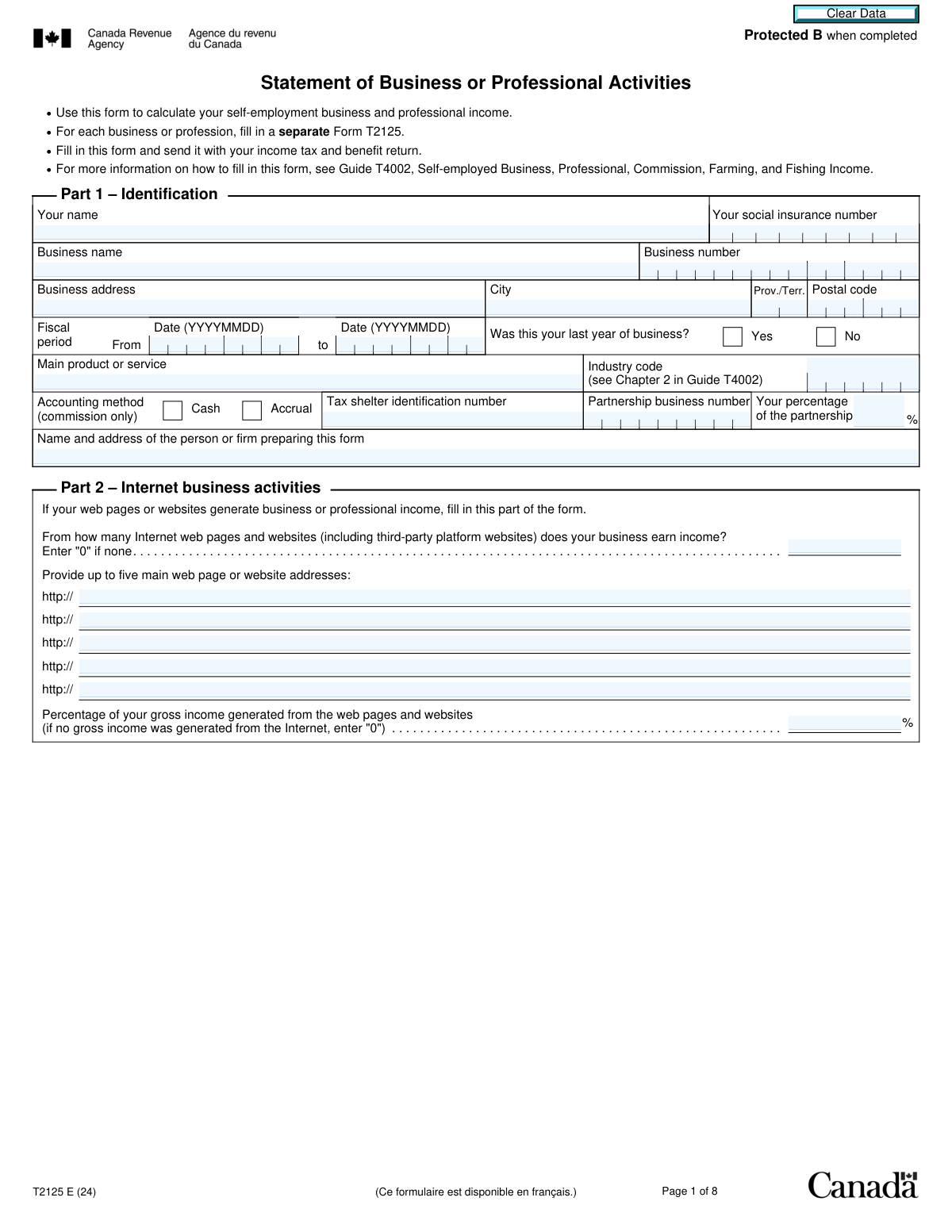
Yes! You can use AI to fill out Form T2125, Statement of Business or Professional Activities
Form T2125, Statement of Business or Professional Activities, is a tax form used by Canadian self-employed individuals, including sole proprietors and partners, to calculate and report their business and professional income and expenses for a fiscal year. This statement is a crucial part of your annual income tax and benefit return, as it determines the net income or loss from your self-employment activities. Today, this form can be filled out quickly and accurately using AI-powered services like Instafill.ai, which can also convert non-fillable PDF versions into interactive fillable forms.
T2125 is part of the
business forms, NJ state forms, PA state forms and state ID forms categories on Instafill.
Our AI automatically handles information lookup, data retrieval, formatting, and form filling.
It takes less than a minute to fill out T2125 using our AI form filling.
Securely upload your data. Information is encrypted in transit and deleted immediately after the form is filled out.
Form specifications
| Form name: | Form T2125, Statement of Business or Professional Activities |
| Number of fields: | 409 |
| Number of pages: | 8 |
| Language: | English |
More forms in Business forms
Instafill Demo: How to fill out PDF forms in seconds with AI
How to Fill Out T2125 Online for Free in 2026
Are you looking to fill out a T2125 form online quickly and accurately? Instafill.ai offers the #1 AI-powered PDF filling software of 2026, allowing you to complete your T2125 form in just 37 seconds or less.
Follow these steps to fill out your T2125 form online using Instafill.ai:
- 1 Navigate to Instafill.ai and upload or select Form T2125, Statement of Business or Professional Activities.
- 2 Use the AI assistant to complete Part 1 with your personal identification, business name, address, and fiscal period details.
- 3 Enter your income details in Part 3, distinguishing between business income (Part 3A) and professional income (Part 3B), and calculate your gross income.
- 4 List all your deductible business expenses in Part 4, such as advertising, insurance, rent, and salaries. The AI can help categorize and sum these costs.
- 5 Calculate your net income or loss in Part 5 by subtracting total expenses from your gross income. Complete details for partnerships if applicable.
- 6 Fill out other relevant sections as needed, such as Part 7 for business-use-of-home expenses and Area A for Capital Cost Allowance (CCA) claims.
- 7 Review the entire form for accuracy, then download the completed T2125 to attach to your income tax and benefit return.
Our AI-powered system ensures each field is filled out correctly, reducing errors and saving you time.
Why Choose Instafill.ai for Your Fillable T2125 Form?
Speed
Complete your T2125 in as little as 37 seconds.
Up-to-Date
Always use the latest 2026 T2125 form version.
Cost-effective
No need to hire expensive lawyers.
Accuracy
Our AI performs 10 compliance checks to ensure your form is error-free.
Security
Your personal information is protected with bank-level encryption.
Frequently Asked Questions About Form T2125
Form T2125, Statement of Business or Professional Activities, is used to calculate and report your self-employment income and expenses. You must fill out this form if you are a sole proprietor or a partner in a partnership who earns business, professional, or commission income.
You must complete a separate Form T2125 for each business or professional activity you operate. The form has distinct sections for business income (Part 3A) and professional income (Part 3B) to be reported on separate forms.
The industry code is a six-digit number that corresponds to your main business activity. You can find the complete list of codes in Chapter 2 of the T4002 Guide, Self-employed Business, Professional, Commission, Farming, and Fishing Income, on the CRA website.
Yes, if your business generates any income from web pages or websites, including third-party platforms, you must complete Part 2. You will need to provide the number of websites, their addresses, and the percentage of your gross income generated from them.
Business income generally comes from selling goods or services, while professional income is earned from practicing a designated profession like accounting, law, or medicine. If you have both types, you must use a separate T2125 form for each.
Part 4 allows you to deduct eligible business expenses, such as advertising, office supplies, rent, professional fees, and salaries. You can only claim the business portion of these expenses, and you must have receipts to support your claims.
Part 7 of the form guides you through calculating these expenses, which can include a portion of your heat, electricity, insurance, and mortgage interest. The deductible amount is based on the percentage of your home used for business and cannot be used to create or increase a business loss.
Capital Cost Allowance (CCA) is the tax deduction you can claim for the depreciation or wear and tear of capital assets, such as buildings, furniture, or equipment, that you use in your business. Area A is used to calculate the CCA you can claim for the year.
You can claim a portion of your vehicle expenses based on the kilometres driven for business versus personal use. Use Chart A, 'Motor vehicle expenses', to calculate your total allowable claim, which includes costs like fuel, insurance, and maintenance.
You do not submit Form T2125 by itself. You must complete it and file it along with your annual T1 Income Tax and Benefit Return by the tax filing deadline.
As a partner, you report your percentage of the partnership's net income or loss in Part 5. You may also need to provide details of other partners in Part 8 if a partnership information return is not required.
Yes, services like Instafill.ai use AI to accurately auto-fill form fields, which can save you significant time and reduce errors. These tools can extract information from your records and place it in the correct fields on the form.
To use Instafill.ai, you would typically upload the T2125 form to their platform. The AI then makes the form fillable online and can help you complete the fields by extracting data from your uploaded financial documents or by guiding you through the sections.
If you have a non-fillable or 'flat' PDF, you can use a service like Instafill.ai to convert it into an interactive, fillable form. Simply upload the PDF, and the tool will automatically detect the fields, allowing you to type your information directly into them.
Compliance T2125
Validation Checks by Instafill.ai
1
Validates Social Insurance Number Format
This check ensures the 'Social insurance number' field contains exactly nine digits and no other characters. The SIN is a critical unique identifier for the Canada Revenue Agency (CRA) to process tax filings correctly. If the format is incorrect, the submission will be rejected, preventing the form from being associated with the correct taxpayer and causing significant processing delays.
2
Ensures Fiscal Period Date Logic
This validation confirms that the 'Fiscal period - From' date is chronologically earlier than the 'Fiscal period - To' date. A valid and logical reporting period is fundamental for all financial calculations on the form. An impossible date range would invalidate the entire statement of income and expenses, causing the form to be rejected for correction.
3
Validates Canadian Postal Code Format
This check ensures the 'Postal code' field follows the standard Canadian 'A1A 1A1' format. Correct formatting is vital for address validation and ensuring any physical correspondence from the tax authorities reaches the business. An invalid postal code could lead to communication failures and may cause the system to flag the address as invalid, halting processing.
4
Enforces Mutually Exclusive Income Sections (Part 3A vs. 3B)
This validation ensures that the user fills out either Part 3A for business income or Part 3B for professional income, but not both on the same form, as per instructions. The form explicitly states a separate T2125 is required for each type of income. Allowing both to be filled would result in incorrect income aggregation and a filing that contradicts CRA rules, leading to rejection.
5
Validates Conditional Entry of Internet Business Details
This check verifies that if the 'Number of internet pages and websites' is greater than zero, then at least one website address and the 'Percentage of gross income generated from the web' are provided. Conversely, if the number of websites is zero, these related fields must be empty or zero. This logic prevents contradictory or incomplete data about online business activities, ensuring data integrity.
6
Validates Partnership Percentage Value
This validation ensures that the 'Your percentage of the partnership' field contains a numeric value greater than 0 and not exceeding 100. This percentage is critical for correctly calculating the individual's share of the partnership's net income or loss. An invalid value would make the tax calculation impossible and will be flagged as an error requiring immediate correction.
7
Validates Sum of All Partner Percentages
This check verifies that the sum of 'Your percentage of the partnership' (from Part 1) and all percentages listed for other partners in Part 8 equals exactly 100%. This is crucial to ensure the entire partnership equity and income/loss allocation is accounted for. If the sum is not 100%, it indicates a fundamental error in reporting the partnership structure, and the form will be rejected.
8
Ensures Business Kilometres Do Not Exceed Total Kilometres
In Chart A for motor vehicle expenses, this validation confirms that the 'Kilometres you drove... for earning business income' is less than or equal to the 'Total kilometres you drove'. It is logically impossible to drive more for business than the total distance driven by the vehicle. An error here would lead to an over-claim of expenses and will be flagged as a logical inconsistency requiring correction.
9
Validates Business-Use-of-Home Expense Limitation
This check ensures the 'Allowable claim' for business-use-of-home expenses (Part 7, line 7P) does not create or increase a business loss. The claim is limited to the net income before this deduction (line 7N). This validation enforces a key tax rule, preventing improper claims and ensuring any excess expense is correctly identified to be carried forward to a future year.
10
Verifies Calculation of Adjusted Gross Sales
This validation automatically checks that the value in 'Adjusted gross sales' (line 3G) is the correct sum of the subtotal (line 3C) and the GST/HST quick method adjustment (line 3F). This is a foundational calculation for determining gross income, and an error here would cascade through the rest of the form. The check ensures mathematical accuracy before further calculations are made.
11
Ensures Industry Code is Provided
This check verifies that the 'Industry code' field in Part 1 is not empty. This code is used by the government for statistical analysis and to benchmark a filer's claims against industry norms, which can impact risk assessment. Missing this mandatory code can slow down processing or trigger a manual review, as it is a key identifier for the business type.
12
Validates Format of Website Addresses
This check ensures that any entries in the website address fields in Part 2 are formatted as valid URLs. While the form pre-fills 'http://', the validation should check for a valid domain structure (e.g., 'domain.com'). This is important for the CRA to be able to identify the business's online presence for verification purposes, and malformed entries would be useless data.
13
Verifies EPOP Association Percentage Total
In Area G, this check ensures that if the user indicates they are associated with other Eligible Persons or Partnerships (EPOPs), the 'Total of percentage assigned' in column 3 does not exceed 100%. The form notes explicitly state that if the total is over 100%, the immediate expensing limit becomes zero. This validation prevents an invalid claim by enforcing the strict rules of the allocation agreement.
14
Verifies Calculation of Net Income (Loss)
This validation confirms that the final 'Your net income (loss)' on line 9946 is correctly calculated by subtracting business-use-of-home expenses (line 9945) from the net income after adjustments (Amount 5D). This is the final reportable income figure for the business activity. An error at this final stage would result in the taxpayer reporting an incorrect amount on their main tax return, potentially leading to incorrect tax assessment and penalties.
Common Mistakes in Completing T2125
Filers often incorrectly fill out both Part 3A (Business income) and Part 3B (Professional income) on the same form, or use the wrong section for their income type. The form explicitly states that a separate T2125 is required for each. This mistake can lead to incorrect income calculations and processing delays by the CRA. To avoid this, carefully determine if your income is from a business (e.g., retail, construction) or a profession (e.g., accounting, medical) as defined in Guide T4002, and use a separate form for each.
A frequent error is entering net sales (after taxes) into line 3A, which asks for gross sales including GST/HST. Filers then have nothing to deduct on line 3B, leading to an incorrect 'Adjusted gross sales' figure. This miscalculation can affect the entire income statement and may trigger a review. Always report the total amount billed to customers on line 3A and then subtract the collected GST/HST and other adjustments on line 3B.
Many people leave the 'Industry code' field blank or guess at the number because finding the correct one in the T4002 guide can be time-consuming. An incorrect or missing code can flag the return for review or result in the CRA misclassifying the business, potentially impacting future risk assessments. It is crucial to look up and enter the specific six-digit code that best describes your main business activity. AI-powered tools like Instafill.ai can help by suggesting codes based on your 'Main product or service' description.
Chart A for motor vehicle expenses is a common source of errors, particularly in calculating the business-use percentage. Filers often fail to keep a detailed log of kilometres, leading to an inaccurate or indefensible ratio of business vs. total kilometres (lines 1 and 2). This can result in disallowed expenses during an audit. To prevent this, maintain a contemporaneous logbook throughout the year and accurately transfer the totals to the form to calculate the deductible portion of your vehicle expenses.
When claiming home office expenses in Part 7, people often make two key mistakes: incorrectly calculating the percentage of the home used for business, or claiming expenses that create or increase a business loss. The deduction is limited to the net income of the business before this claim. Claiming an excessive amount or using it to generate a loss will be disallowed, and the incorrect claim can lead to reassessments. Ensure your calculation of the workspace area is reasonable and defensible, and remember that you can only carry forward unused expenses to future years.
Area A for CCA is the most complex part of the form, leading to numerous errors. Common mistakes include using the wrong CCA class for an asset, incorrectly carrying over the Undepreciated Capital Cost (UCC) from the previous year, or misapplying the half-year rule or the newer, more complex rules for immediate expensing (DIEP) and accelerated investment incentives (AIIP). These errors can significantly misstate net income and may lead to penalties. Double-checking calculations and asset classes is critical.
Self-employed individuals often mistakenly claim the full amount for expenses that have a personal component, such as cell phone bills, home internet, or insurance. The form requires filers to 'enter only the business part' of expenses. Failing to prorate these costs accurately can lead to an over-claim of deductions and potential reassessment with interest and penalties upon review. It is essential to keep detailed records that justify the business percentage claimed for each shared expense.
In Part 2, filers may forget to list all income-generating web presences, such as third-party platforms (e.g., Etsy, Amazon, Uber), social media pages, or secondary websites. They may also provide an inaccurate estimate for the percentage of income generated online. The CRA uses this data for analytics, and omissions could trigger further questions. It's important to provide a complete list of all URLs and a reasonable, good-faith estimate of the income percentage derived from them.
Filers sometimes enter the fiscal period dates incorrectly, either by using a standard calendar year when their business has a different year-end or by failing to use the required YYYYMMDD format. This can cause processing errors and mismatches with the CRA's records. Always verify your business's official fiscal period and enter the start and end dates precisely as instructed. AI-powered form-filling tools like Instafill.ai can help prevent this by validating the date format automatically.
The instructions clearly state, 'For each business or profession, fill in a separate Form T2125.' However, individuals with multiple self-employment ventures, such as a consulting service and a retail side-business, sometimes try to combine them onto a single form. This leads to inaccurate reporting of income and expenses for each distinct operation, making the return difficult for the CRA to process and assess. Always use one T2125 for each unique business to ensure clarity and compliance.
Saved over 80 hours a year
“I was never sure if my IRS forms like W-9 were filled correctly. Now, I can complete the forms accurately without any external help.”
Kevin Martin Green
Your data stays secure with advanced protection from Instafill and our subprocessors

Robust compliance program
Transparent business model
You’re not the product. You always know where your data is and what it is processed for.
ISO 27001, HIPAA, and GDPR
Our subprocesses adhere to multiple compliance standards, including but not limited to ISO 27001, HIPAA, and GDPR.
Security & privacy by design
We consider security and privacy from the initial design phase of any new service or functionality. It’s not an afterthought, it’s built-in, including support for two-factor authentication (2FA) to further protect your account.
Fill out T2125 with Instafill.ai
Worried about filling PDFs wrong? Instafill securely fills form-t2125-statement-of-business-or-professional-activities forms, ensuring each field is accurate.