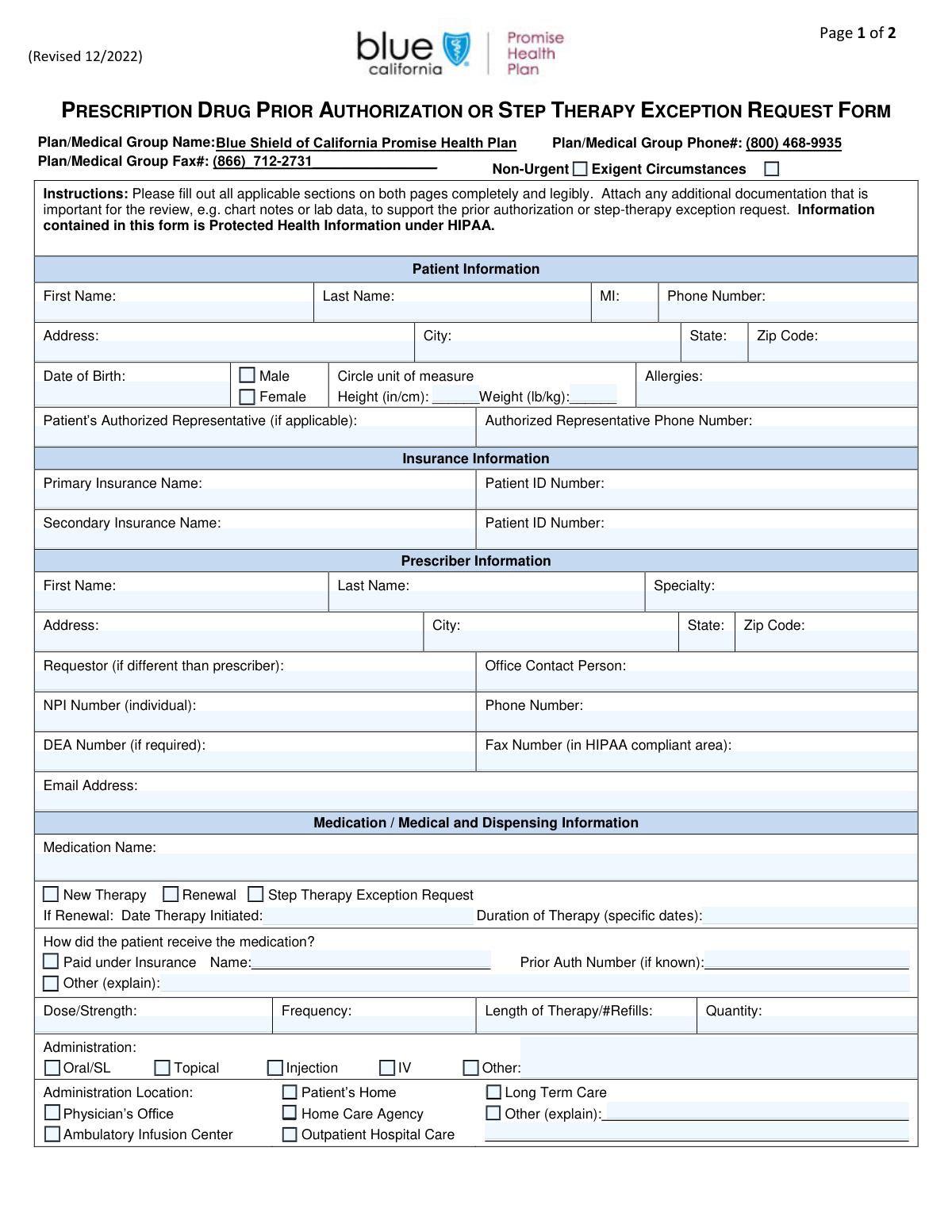
Yes! You can use AI to fill out Medication Prior Authorization Request Form

This form is a formal request submitted by a healthcare provider to a patient's insurance company to obtain coverage for a medication that is not on the insurer's preferred drug list or requires pre-approval. It provides clinical justification for the prescribed treatment, including diagnoses, medical history, and reasons why other medications are not suitable. Today, this form can be filled out quickly and accurately using AI-powered services like Instafill.ai, which can also convert non-fillable PDF versions into interactive fillable forms.
Our AI automatically handles information lookup, data retrieval, formatting, and form filling.
It takes less than a minute to fill out Prior Authorization Form using our AI form filling.
Securely upload your data. Information is encrypted in transit and deleted immediately after the form is filled out.

Form specifications

Form name: Medication Prior Authorization Request Form
Number of fields: 79
Number of pages: 2
Language: English
Categories: authorization forms, prior authorization forms
main-image

Instafill Demo: How to fill out PDF forms in seconds with AI

How to Fill Out Prior Authorization Form Online for Free in 2026

Are you looking to fill out a PRIOR AUTHORIZATION FORM form online quickly and accurately? Instafill.ai offers the #1 AI-powered PDF filling software of 2026, allowing you to complete your PRIOR AUTHORIZATION FORM form in just 37 seconds or less.
Follow these steps to fill out your PRIOR AUTHORIZATION FORM form online using Instafill.ai:
  1. 1 Navigate to Instafill.ai and upload or select the Medication Prior Authorization Request Form.
  2. 2 Use the AI assistant to accurately fill in the patient's demographic and insurance information.
  3. 3 Enter the prescriber's details, including name, specialty, NPI, and contact information.
  4. 4 Specify the medication being requested, including its name, dose, frequency, and length of therapy.
  5. 5 Provide detailed clinical justification, including the patient's diagnosis (with ICD-10 codes), relevant lab results, and a history of previously tried medications.
  6. 6 Attach any necessary supporting documents, such as clinical notes or lab reports, to strengthen the request.
  7. 7 Review the completed form for accuracy, then have the prescriber electronically sign and date it before submission to the insurance provider.

Our AI-powered system ensures each field is filled out correctly, reducing errors and saving you time.

Why Choose Instafill.ai for Your Fillable Prior Authorization Form Form?

Speed

Complete your Prior Authorization Form in as little as 37 seconds.

Up-to-Date

Always use the latest 2026 Prior Authorization Form form version.

Cost-effective

No need to hire expensive lawyers.

Accuracy

Our AI performs 10 compliance checks to ensure your form is error-free.

Security

Your personal information is protected with bank-level encryption.

Frequently Asked Questions About Form Prior Authorization Form

This form is used by healthcare providers to request prior authorization or a step therapy exception from a patient's insurance plan for a specific medication. It helps demonstrate the medical necessity for a prescribed treatment that requires pre-approval for coverage.

The patient's prescribing healthcare provider or their authorized office staff, such as a medical assistant or referral coordinator, is responsible for completing and submitting this form.

A 'Non-Urgent' request follows standard processing times. An 'Exigent Circumstances' request is for urgent situations where a delay could seriously jeopardize the patient's life, health, or ability to function, and it requires faster processing.

This is a request to bypass an insurance rule that requires a patient to first try and fail on one or more preferred, lower-cost medications before the plan will cover the prescribed drug. Strong clinical justification is required for this type of request.

For a renewal, you must specify the date the therapy was initiated and how it was previously paid for. If it was covered by insurance, include the prior authorization number if you have it.

Yes, if the patient has secondary insurance, you should provide the insurance name and patient ID number. This helps ensure proper coordination of benefits and billing.

You should attach relevant clinical documentation, such as recent lab results with dates, chart notes, and a detailed justification for the requested therapy. This information is critical for the insurance company to evaluate the medical necessity of the request.

You must list the name and dosage of each previous medication, the dates the patient took it, and the outcome. This includes explaining why the therapy failed, if the patient had a poor response, or if they experienced an allergy.

The prescribing provider must sign the form, either with a physical signature or an approved electronic ID verification. The date of the signature must also be included.

You should list all relevant diagnoses with their ICD-10 codes in section 2. Use the large text box to provide a detailed clinical justification, including symptoms, lab results, and why the requested drug is necessary.

Yes, services like Instafill.ai use AI to accurately auto-fill form fields from your records. This can save significant time and help reduce data entry errors.

You can use a service like Instafill.ai to complete the form digitally. Simply upload the form to their platform, and their AI will help you fill in the patient, prescriber, and medication details quickly.

If you have a non-fillable or 'flat' PDF, you can use a tool like Instafill.ai to convert it into an interactive, fillable form. This allows you to easily type your information into the fields online.

The NPI is a unique 10-digit National Provider Identifier for healthcare providers. It is required on this form to correctly identify the prescriber for the insurance company.

Compliance Prior Authorization Form
Validation Checks by Instafill.ai

1
Mutually Exclusive Urgency Selection
This check ensures that only one of the two urgency checkboxes, 'Non-Urgent' or 'Exigent Circumstances', is selected. Selecting both or neither would create ambiguity in how the request is prioritized for processing. If this validation fails, the system should prompt the user to select exactly one option to clarify the urgency and ensure compliance with processing timeframes.
2
Patient Date of Birth Validity
Validates that the 'Date of Birth' field contains a plausible date that is in the past and not in the future. This is critical for verifying patient identity and determining eligibility for certain age-restricted treatments. A failed validation would prevent submission and require the user to enter a valid date to ensure data accuracy.
3
NPI Number Format and Length
This validation verifies that the 'NPI Number' field contains exactly 10 digits. The National Provider Identifier is a standard, unique identifier for healthcare providers, and an incorrect format would prevent proper identification and claim processing. The system should reject any entry that is not a 10-digit number.
4
Conditional Requirement for 'Date Therapy Initiated'
Ensures that if the 'Renewal' checkbox is selected under 'Therapy Request Type', the 'Date Therapy Initiated' field must be populated. This date is essential context for reviewing a renewal request, as it establishes the history of the treatment. A failure would prompt the user to provide the initiation date before the renewal request can be submitted.
5
Conditional Requirement for 'Other' Explanation Fields
This check confirms that whenever an 'Other' checkbox is selected (e.g., 'Other (explain)' for payment, 'Other Location' for administration), the corresponding text field for explanation is not empty. This prevents incomplete submissions where an 'Other' option is chosen without the necessary details. If the explanation is missing, the form should highlight the empty field and require input.
6
Primary Insurance ID Dependency
Validates that if a 'Primary Insurance Name' is entered, the 'Primary Patient ID Number' field must also be filled. The insurance name is useless for billing and verification without the patient's specific ID number. A failed validation would require the user to provide the ID number to complete the insurance information section.
7
Secondary Insurance Logical Consistency
This check ensures that if 'Secondary Insurance Name' is provided, then 'Primary Insurance Name' and 'Secondary Patient ID Number' must also be filled. Secondary insurance is only applicable when primary coverage exists, and the ID is required for processing. This prevents illogical or incomplete secondary insurance entries.
8
DEA Number Format Validation
Verifies that the 'DEA Number', if provided, conforms to the standard format (two letters followed by seven numbers) and passes a checksum validation. A valid DEA number is legally required for prescribing controlled substances and ensures the prescriber has the proper authority. An invalid format would be rejected to maintain regulatory compliance.
9
Mandatory Therapy Type Selection
This validation ensures that at least one of the therapy request types ('New Therapy', 'Renewal', or 'Step Therapy Exception Request') is checked. This selection is fundamental to the entire request, defining its purpose and the review criteria that will be applied. The form cannot be submitted until a therapy type is chosen.
10
Conditional Requirement for Prior Medication Details
Checks that if the 'YES' box is checked for 'Has the patient tried any other medications for this condition?', then the subsequent fields for medication name, duration, and response are filled. This information is critical for medical necessity and step therapy exception reviews. If the details are missing, the user must provide them or change the selection to 'NO'.
11
Attestation Date Logical Check
Validates that the 'Attestation Date' is a valid date that is not in the future. Furthermore, if the request is a 'Renewal', this date should be on or after the 'Date Therapy Initiated'. This ensures the signature date is logical and reflects a current attestation of the provided clinical information.
12
Mutually Exclusive Sex Selection
This check ensures that only one of the 'Male' or 'Female' checkboxes is selected. Providing clear and unambiguous demographic data is important for patient records and for certain clinical considerations. If both or neither are selected, the system should prompt the user to make a single, valid selection.
13
Zip Code Format Validation
Verifies that the 'Zip Code' fields for both the patient and prescriber addresses adhere to a standard 5-digit (XXXXX) or 9-digit (XXXXX-XXXX) format. Correctly formatted zip codes are essential for address validation, mail delivery, and determining service areas. An invalid format would trigger an error, prompting the user to correct the entry.
14
Authorized Representative Contact Information
This validation ensures that if a name is entered in the 'Authorized Representative Name' field, the 'Authorized Representative Phone Number' field must also be completed. It is crucial to have contact information for the representative if one is designated to act on the patient's behalf. A missing phone number would trigger a validation error, requiring the user to provide it.

Common Mistakes in Completing Prior Authorization Form

Misunderstanding Urgency Status

Users often fail to select either 'Non-Urgent' or 'Exigent Circumstances', or they incorrectly select 'Exigent' for a standard request. This mistake can lead to improper processing queues, causing delays for truly urgent cases or rejection if the clinical justification doesn't support the exigent claim. To avoid this, carefully review the definitions and select the status that accurately reflects the patient's medical situation, providing detailed clinical notes to support any claim of exigency.

Incomplete Insurance Information

A frequent error is entering an incomplete or incorrect 'Primary Patient ID Number' or using an abbreviation for the 'Primary Insurance Name'. This happens due to typos or confusion between member ID and group numbers. Inaccurate insurance data is a primary cause for immediate rejection, as the payer cannot identify the patient's policy, leading to significant processing delays. Always double-check the patient's insurance card for the full payer name and exact ID number before submission.

Missing Details for 'Other' Selections

Many users check an 'Other' box, such as for administration method or location, but forget to provide the required explanation in the corresponding text field. This leaves critical information missing, making it impossible for the reviewer to understand the full context of the request. This omission will almost certainly result in a denial or a request for more information. Always ensure that if you select an 'Other' option, you fill out the associated details field completely.

Inconsistent Renewal Information

When requesting a renewal, people often check the 'Renewal' box but fail to provide the mandatory 'Date Therapy Initiated' or details about how the previous medication was paid for. This creates a logical inconsistency and prevents the reviewer from verifying the patient's history with the therapy. To prevent this, gather the patient's full medication history, including start dates and prior authorization numbers, before filling out the renewal section.

Insufficient Clinical Justification

The most critical error is providing vague or incomplete information in the clinical justification text box, which asks for symptoms, lab results, and reasons for the request. Staff may be rushed or assume the reviewer knows the patient's history, leading to a lack of detail. A weak justification is the most common reason for a prior authorization denial. To avoid this, be thorough and specific, including dated lab results and a clear narrative explaining why this specific therapy is medically necessary.

Failing to Detail Prior Failed Medications

For a step therapy exception, users may indicate that the patient has tried other medications by checking 'YES' but then fail to list each medication, the duration of therapy, and the specific reason for failure (e.g., side effects, lack of efficacy). This information is the entire basis for a step therapy exception request. Without it, the request will be denied. Ensure you complete the entire table for previously tried medications to build a strong case for the exception.

Incorrect NPI or DEA Number

Data entry errors like transposing digits or entering an incomplete National Provider Identifier (NPI) or DEA number are common. An incorrect NPI prevents the insurance company from verifying the prescriber's identity, leading to an automatic rejection. Always verify the 10-digit NPI and the DEA number for accuracy before submission. AI-powered form filling tools like Instafill.ai can help prevent these errors by validating number formats and saving correct provider information for future use.

Missing Signature or Attestation Date

Submitting the form without the 'Prescriber Signature' or the 'Attestation Date' is a simple but fatal mistake. An unsigned or undated form is legally invalid and will be rejected immediately, forcing the entire submission process to start over. Before submitting, perform a final check to ensure the signature and date fields are properly completed. If the form is a non-fillable PDF, a tool like Instafill.ai can convert it to a fillable version, making it easy to add a digital signature and date.

Incomplete Dosage and Administration Details

Users frequently leave fields like 'Dose/Strength', 'Frequency', or 'Length of Therapy' blank, or they fail to check a box indicating the administration method (e.g., 'Oral/SL', 'Injection'). This missing information makes it impossible for the payer to approve the correct regimen, leading to requests for clarification and delays in starting treatment. Always fill out all parts of the dosage and administration section with the precise details from the prescription.

Omitting Patient Height and Weight

The 'Height' and 'Weight' fields are often overlooked as they may not seem directly related to the medication itself. However, this data is crucial for calculating appropriate dosing for many drugs, especially weight-based medications, and for assessing clinical appropriateness. Forgetting this information can lead to delays while the payer requests the missing data. Ensure these measurements are recorded accurately, including the units (e.g., lbs/kg, in/cm), to support the clinical review.
Saved over 80 hours a year

“I was never sure if my IRS forms like W-9 were filled correctly. Now, I can complete the forms accurately without any external help.”

Kevin Martin Green

Your data stays secure with advanced protection from Instafill and our subprocessors

Robust compliance program

Transparent business model

You’re not the product. You always know where your data is and what it is processed for.

ISO 27001, HIPAA, and GDPR

Our subprocesses adhere to multiple compliance standards, including but not limited to ISO 27001, HIPAA, and GDPR.

Security & privacy by design

We consider security and privacy from the initial design phase of any new service or functionality. It’s not an afterthought, it’s built-in, including support for two-factor authentication (2FA) to further protect your account.

Fill out Prior Authorization Form with Instafill.ai

Worried about filling PDFs wrong? Instafill securely fills medication-prior-authorization-request-form forms, ensuring each field is accurate.