Yes! You can use AI to fill out Oregon Practitioner Credentialing Application

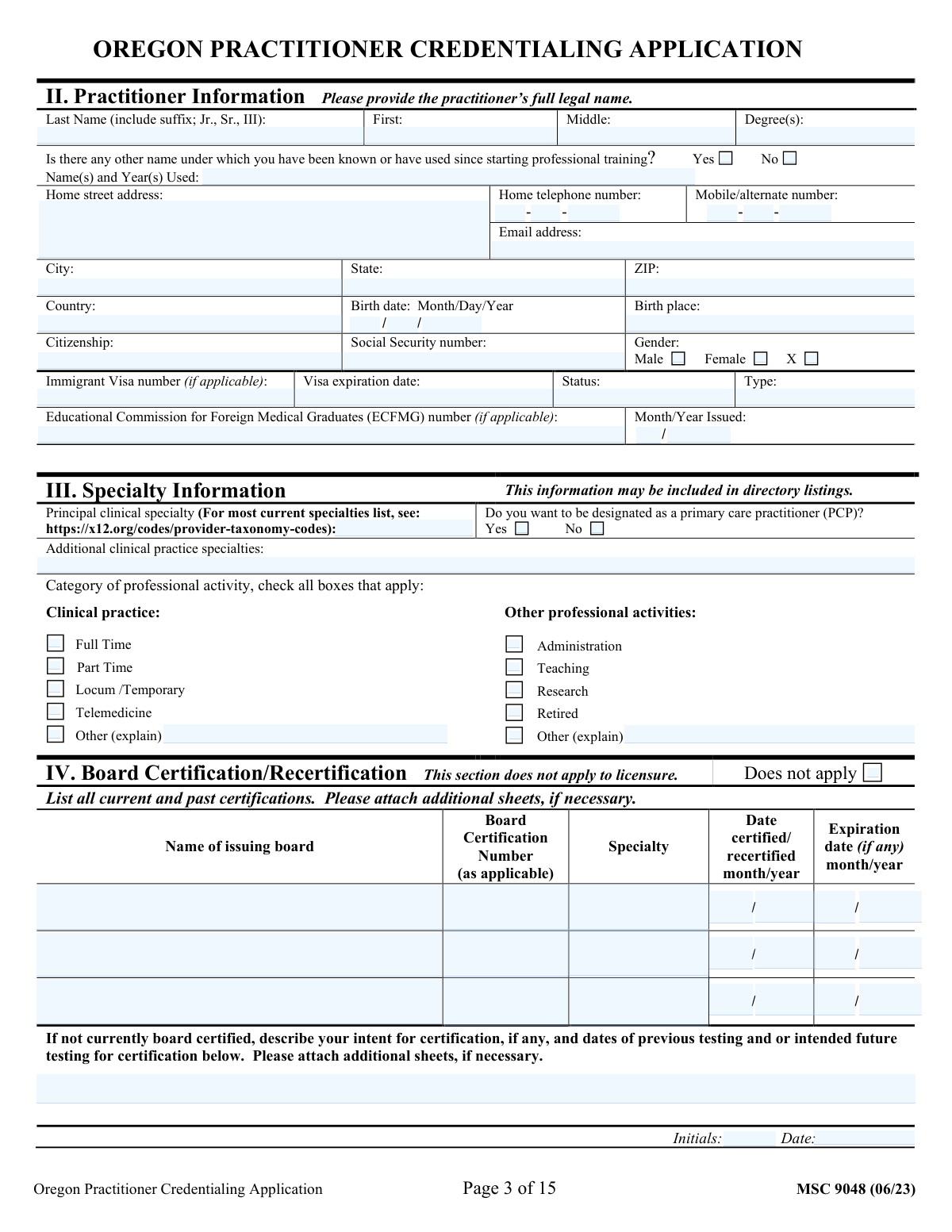
The Oregon Practitioner Credentialing Application is a detailed document required for physicians, physician assistants, nurse practitioners, and other healthcare providers to become credentialed by Oregon-based healthcare organizations. This form is crucial for verifying a practitioner's education, training, licensure, work history, and competence, ensuring they meet the standards for patient care and participation in health plans. Completing this extensive application is now simpler than ever, as it can be filled out quickly and accurately using AI-powered services like Instafill.ai, which can also convert non-fillable PDF versions into interactive fillable forms.
Oregon Credentialing Application is part of the practitioner application forms category on Instafill.
Our AI automatically handles information lookup, data retrieval, formatting, and form filling.
It takes less than a minute to fill out Oregon Credentialing Application using our AI form filling.
Securely upload your data. Information is encrypted in transit and deleted immediately after the form is filled out.

Form specifications

Form name: Oregon Practitioner Credentialing Application
Number of fields: 937
Number of pages: 15
Language: English
main-image

Instafill Demo: How to fill out PDF forms in seconds with AI

How to Fill Out Oregon Credentialing Application Online for Free in 2026

Are you looking to fill out a OREGON CREDENTIALING APPLICATION form online quickly and accurately? Instafill.ai offers the #1 AI-powered PDF filling software of 2026, allowing you to complete your OREGON CREDENTIALING APPLICATION form in just 37 seconds or less.
Follow these steps to fill out your OREGON CREDENTIALING APPLICATION form online using Instafill.ai:
  1. 1 Navigate to Instafill.ai and upload or select the Oregon Practitioner Credentialing Application form.
  2. 2 Use the AI assistant to populate your personal details, including legal name, contact information, birth date, and SSN.
  3. 3 Enter your complete educational history, including undergraduate, medical/professional school, internships, residencies, and fellowships.
  4. 4 Provide all professional licensure and certification details, such as your Oregon license, DEA registration, NPI number, and board certifications.
  5. 5 Detail your practice information, work history, and hospital affiliations, including addresses, contact persons, and dates.
  6. 6 Complete the professional liability insurance sections with current and past carrier information, and provide contact details for your peer references.
  7. 7 Carefully answer all attestation questions, then review the entire application for accuracy before electronically signing and submitting the document.

Our AI-powered system ensures each field is filled out correctly, reducing errors and saving you time.

Why Choose Instafill.ai for Your Fillable Oregon Credentialing Application Form?

Speed

Complete your Oregon Credentialing Application in as little as 37 seconds.

Up-to-Date

Always use the latest 2026 Oregon Credentialing Application form version.

Cost-effective

No need to hire expensive lawyers.

Accuracy

Our AI performs 10 compliance checks to ensure your form is error-free.

Security

Your personal information is protected with bank-level encryption.

Frequently Asked Questions About Form Oregon Credentialing Application

This is a comprehensive practitioner credentialing application used to verify your professional qualifications, training, and history. It must be completed by healthcare practitioners (e.g., physicians, PAs, NPs) seeking appointment or privileges with a healthcare organization.

In this section, you should enter any previous legal names you have used since starting your professional training, such as a maiden name. This is crucial for verifying your educational and professional history across different institutions.

You should use the 'Board Certification Intent / Testing Explanation' field to describe your plans. Include your eligibility status and any scheduled or intended future testing dates for your specialty board exams.

The 'Board Certification' section is for your primary specialty certifications from a recognized medical board. The 'Other Certification' section is for additional required credentials like ACLS (Advanced Cardiovascular Life Support), BLS (Basic Life Support), or PALS (Pediatric Advanced Life Support).

This is the National Provider Identifier for your practice or organization, as distinct from your individual NPI (Type 1). You can typically obtain this number from your practice manager or billing department.

You must provide a detailed explanation for any period of two months or more since starting professional school that is not accounted for in your education, training, or work history sections. This ensures a complete chronological record of your activities.

A peer reference should be a healthcare professional, preferably in your specialty, who has direct knowledge of your clinical skills and professional conduct. They should not be a relative or subordinate.

An 'occurrence' policy covers incidents that happen during the policy period, no matter when the claim is filed. A 'claims-made' policy only covers claims that are filed while the policy is still active.

Answering 'Yes' requires you to provide a complete and detailed explanation on a separate sheet or in the provided space. For example, if you have a past lawsuit, you must fill out the supplemental incident report form with all relevant details.

You only need to complete the secondary practice section if you have more than one clinical practice location. If you work at a single location, you can leave the secondary practice fields blank.

It is helpful to gather copies of your medical license(s), DEA registration, board certifications, ECFMG certificate (if applicable), and professional liability insurance policy face sheets. Having these documents on hand will make the process much smoother.

Yes, services like Instafill.ai use AI to auto-fill form fields accurately from your saved profile, which can save significant time and help avoid errors on long, repetitive credentialing forms.

Simply upload the form's PDF to the Instafill.ai platform. The AI will make the fields fillable, and you can use your secure profile to auto-populate recurring information like your name, NPI, practice addresses, and license details.

You can use a service like Instafill.ai, which is designed to convert flat, non-fillable PDFs into interactive, fillable forms. This allows you to easily type your information directly into the fields, save your progress, and print or download the completed document.

Compliance Oregon Credentialing Application
Validation Checks by Instafill.ai

1
NPI Number Format and Checksum Validation
This check verifies that the Individual NPI and Group NPI numbers are exactly 10 digits and pass the Luhn algorithm checksum. This is critical for ensuring the provider and practice can be uniquely identified for billing and regulatory purposes. If the NPI is invalid, the form submission will be rejected, and the user will be prompted to correct the number, as an incorrect NPI will cause claim rejections and compliance issues.
2
DEA Registration Number Format and Validity
This validation ensures the DEA Registration Number follows the correct format (two letters followed by seven digits) and that the final digit is a valid checksum based on the preceding digits. This check is vital for verifying the practitioner's authority to prescribe controlled substances. A failure indicates a data entry error or an invalid number, which must be corrected for legal and compliance reasons before the application can proceed.
3
Social Security Number Format
This check validates that the Social Security Number is entered in the format XXX-XX-XXXX and contains only numeric digits in the appropriate places. The SSN is a fundamental piece of personally identifiable information used for identity verification and background checks. An incorrectly formatted number will halt the verification process, so the system will flag the error and require the user to re-enter the number correctly.
4
Education and Employment Date Chronology
This validation checks that for all education, training, and employment history entries, the end or graduation date ('To' date) is not before the start date ('From' date). This ensures the timeline of the practitioner's history is logical and free of data entry errors. If an end date precedes a start date, the system will display an error message asking the user to review and correct the dates for that specific entry.
5
Certification Expiration Date Logic
This check ensures that for any entered board certification or other certification, the 'Expiration Year' and 'Expiration Month' are chronologically after the 'Certification Year' and 'Certification Month'. This prevents illogical data entry and confirms the certification was valid for a period of time. If the expiration date is before the certification date, the submission will be flagged for correction.
6
Conditional Requirement for 'Other Name'
This validation rule ensures that if the user checks the 'Yes (other name used)' box, the corresponding 'Other Name(s) and Year(s) Used' text field must be populated. This is important for conducting a thorough background check and verifying credentials under all relevant names. If the 'Yes' box is checked but the explanation field is empty, the form will prompt the user to provide the other names or uncheck the box.
7
Conditional Requirement for Attestation Explanations
This check verifies that if a user answers 'Yes' to any of the attestation questions (e.g., Question N regarding professional liability claims), the corresponding detailed explanation section (e.g., 'Incident Details') must be filled out. This is a critical risk management and credentialing step to gather necessary details on adverse events. A 'Yes' answer without an explanation will block submission and require the user to provide the necessary information.
8
Exclusive Selection for Radio Buttons/Checkboxes
This validation ensures that for mutually exclusive options, only one can be selected. For example, a practitioner cannot select both 'Full Time' and 'Part Time' for 'Clinical Practice Activity', or both 'Yes' and 'No' for a single attestation question. This prevents contradictory data and ensures clarity in the applicant's responses. If multiple conflicting options are selected, an error will be shown, forcing the user to choose only one.
9
Work History Gap Analysis
This is a logical check that programmatically reviews the 'From' and 'To' dates of all education, training, and employment history entries. If it detects a chronological gap of more than two months between any two consecutive entries, it requires the user to fill out the 'Gap Explanation' section. This is a mandatory part of credentialing to ensure a complete and uninterrupted professional history, and failure to explain gaps will prevent form submission.
10
Email Address Format Validation
This check applies to all email address fields on the form, verifying that the entered text conforms to a standard email format (e.g., '[email protected]'). This is essential for ensuring that communication with the practitioner, their office, and their references is successful. If an invalid format is detected, the field will be highlighted with an error message prompting for a valid email address.
11
License and Registration Future Expiration Date
This validation confirms that the expiration dates for critical credentials like the 'Oregon License Expiration Year' and 'DEA Registration Expiration Year' are in the future. Practicing with an expired license is illegal and a major liability, so this check is crucial for compliance. If a past date is entered, the system will generate a high-priority warning and require correction or clarification.
12
Conditional Section Completion
This rule validates that if a 'Does not apply' checkbox for a section (e.g., 'Board Certification Section Does Not Apply') is left unchecked, then at least the primary required fields within that section must be completed. This prevents users from accidentally skipping required sections. If the box is unchecked and the section is empty, the system will prompt the user to either fill in the details or check 'Does not apply'.
13
Phone Number Component Completeness
This check ensures that for any given phone number, all three components ('Area Code', 'Prefix', 'Line Number') are filled out if any one of them is. It also validates that they contain the correct number of digits (3, 3, and 4, respectively). This prevents the submission of incomplete or unusable contact information. If a partial number is entered, the system will flag all three fields as required.
14
ZIP Code and State Consistency
This validation cross-references the entered 'ZIP Code' against the selected 'State' for all address blocks (e.g., Home, Primary Practice). It ensures that the ZIP code is a valid code that exists within the specified state, which significantly improves address data quality. If a mismatch is found, an error message will suggest that the user verify the state and ZIP code, preventing potential mail delivery failures.

Common Mistakes in Completing Oregon Credentialing Application

Inconsistent Chronological History and Unexplained Gaps

Applicants often make errors in the dates for education, training, and work history, creating overlaps or unexplained gaps. The form specifically requires an explanation for any professional history gap exceeding two months, which is frequently overlooked. These inconsistencies are major red flags for credentialing committees and will always lead to processing delays for clarification. To avoid this, carefully review all dates to ensure a continuous timeline and use the dedicated section to detail any gaps.

Incorrectly Answering Attestation Questions

The 'Yes/No' attestation questions regarding license actions, criminal charges, or liability claims are legally binding, but applicants may misunderstand their scope or answer 'No' to avoid providing a detailed explanation. An incorrect attestation can lead to immediate application denial and future credentialing problems if discovered. It is crucial to read each question carefully and answer truthfully, providing a full explanation for any 'Yes' answer on the designated supplemental pages.

Failing to Complete Conditionally Required Sections

This form uses extensive conditional logic, where checking 'Yes' to a question (e.g., 'Other Name(s) Used') or not checking a 'Does not apply' box requires filling out subsequent fields. A common mistake is to check 'Yes' but then forget to provide the required details, or to fill out a section after checking 'Does not apply'. This results in an incomplete application that must be returned for correction, significantly delaying the credentialing process.

Confusing or Incorrect Identifier Numbers (NPI, DEA, Tax ID)

The form requires multiple unique identifiers, including an individual NPI, Group NPI, DEA number, and Federal Tax ID. Applicants frequently transpose digits, enter a personal SSN instead of a practice's Tax ID, or confuse their individual (Type 1) NPI with their practice's group (Type 2) NPI. Such errors will cause verification failures and can delay billing and network participation. AI-powered form filling tools like Instafill.ai can help prevent these errors by validating number formats and lengths.

Inconsistent Practitioner Name and Degree Formatting

The form asks for the legal name broken down into First, Middle, and Last Name (with suffix), plus a separate field for degrees (MD, DO, etc.). Practitioners often combine their suffix or degree with their last name, or fail to list all former names as required. This creates inconsistencies with official documents and databases, complicating the verification process. Ensure your legal name matches your government-issued ID and that degrees are entered only in the designated 'Degree(s)' field.

Missing Required Page Initials and Dates

Many pages on this extensive application require the applicant to enter their initials and the current date at the bottom to certify the information on that page. It is extremely common for applicants to miss one or more of these signature spots while focusing on the detailed content. Missing even one set of initials can render the application incomplete and cause it to be sent back, restarting the review clock. If the form is a non-fillable PDF, tools like Instafill.ai can convert it to a fillable version, making it easier to spot and complete every required field.

Inaccurate Professional Liability Insurance Details

Applicants often struggle to accurately report their professional liability insurance history, confusing 'claims-made' with 'occurrence' policies, or misstating policy limits and retroactive dates. This information is critical for assessing risk and ensuring compliance, and errors will halt the credentialing process until verified proof of coverage is provided. Before filling out this section, consult your policy documents for the exact carrier name, policy type, coverage amounts, and all relevant dates.

Outdated Contact Information for Verifications

The credentialing process relies on contacting past employers, training programs, and peer references to verify the applicant's history. Applicants often provide outdated phone numbers, addresses, or contact person names, making verification impossible. This is one of the most common causes of significant delays. Always contact your references and institutions beforehand to confirm their current contact details and to notify them that they will be contacted.

Mismatching Physical and Mailing Addresses

The form distinctly asks for the primary practice's physical address and provides separate fields for a mailing/billing address if it is different. A frequent error is to list the mailing address (like a P.O. Box) in the physical address fields or to fail to complete the mailing address section when it differs. This can lead to misdirected correspondence and issues with directory listings and site visits. Carefully distinguish between the location where patients are seen and the address where mail should be sent.

Incomplete Board Certification Information

When listing board certifications, applicants may use informal abbreviations for the issuing board's name or confuse the initial certification date with a more recent recertification date. This ambiguity requires the credentialing staff to seek clarification, causing delays. Always use the full, official name of the American Board of Medical Specialties (ABMS) or other certifying board and provide the most recent certification or recertification date as requested. AI-powered tools like Instafill.ai can help prevent these errors by auto-populating standardized board names and validating date formats.
Saved over 80 hours a year

“I was never sure if my IRS forms like W-9 were filled correctly. Now, I can complete the forms accurately without any external help.”

Kevin Martin Green

Your data stays secure with advanced protection from Instafill and our subprocessors

Robust compliance program

Transparent business model

You’re not the product. You always know where your data is and what it is processed for.

ISO 27001, HIPAA, and GDPR

Our subprocesses adhere to multiple compliance standards, including but not limited to ISO 27001, HIPAA, and GDPR.

Security & privacy by design

We consider security and privacy from the initial design phase of any new service or functionality. It’s not an afterthought, it’s built-in, including support for two-factor authentication (2FA) to further protect your account.

Fill out Oregon Credentialing Application with Instafill.ai

Worried about filling PDFs wrong? Instafill securely fills oregon-practitioner-credentialing-application forms, ensuring each field is accurate.