Yes! You can use AI to fill out Utah Medicaid Provider Application
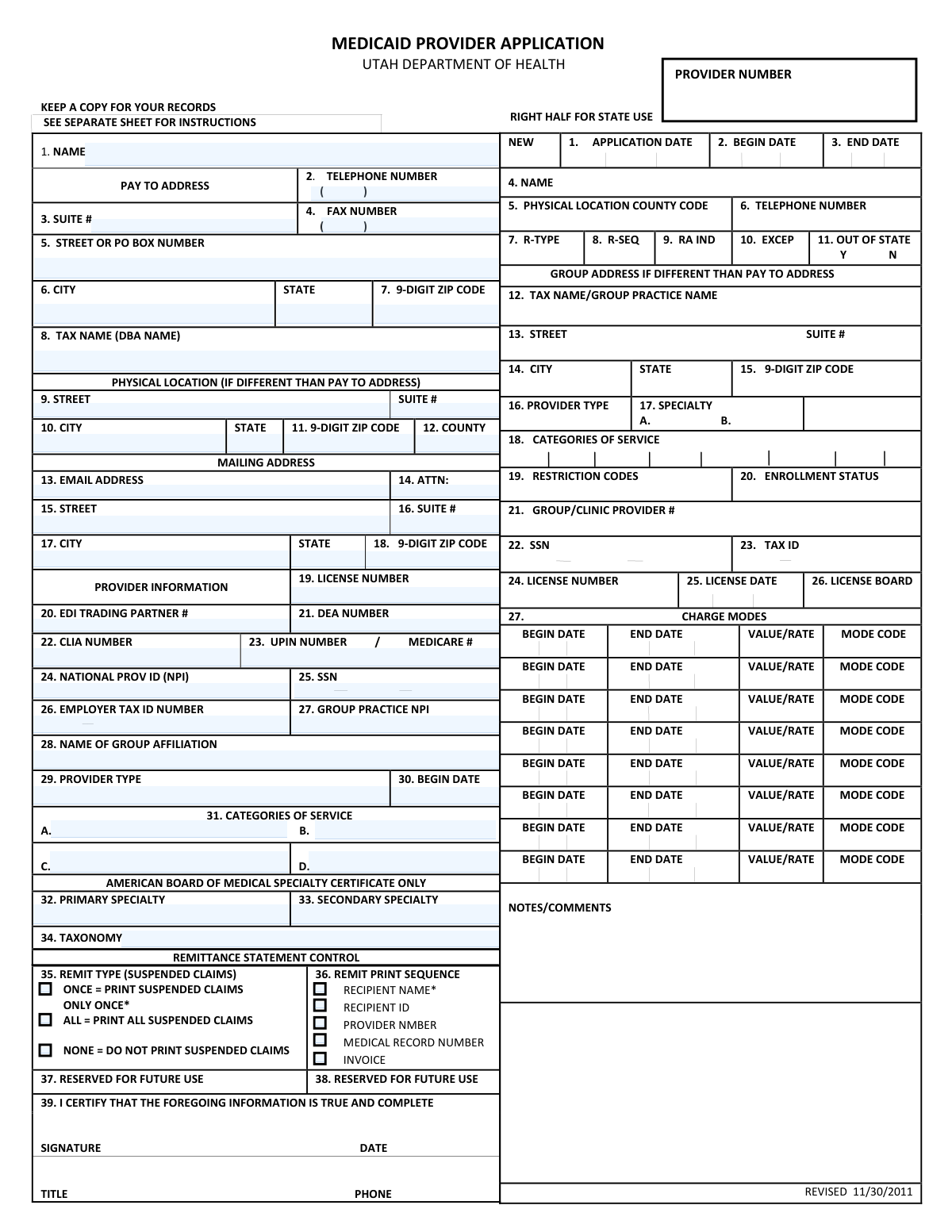
The Utah Medicaid Provider Application is a form required by the Utah Department of Health for healthcare providers, groups, and facilities wishing to be reimbursed for services provided to Medicaid recipients. Completing this application accurately is a critical step to becoming an enrolled provider and ensuring proper billing and payment for medical services. Today, this form can be filled out quickly and accurately using AI-powered services like Instafill.ai, which can also convert non-fillable PDF versions into interactive fillable forms.
Utah Medicaid Provider Application is part of the
Medicaid forms and Utah Medicaid forms categories on Instafill.
Our AI automatically handles information lookup, data retrieval, formatting, and form filling.
It takes less than a minute to fill out Utah Medicaid Provider Application using our AI form filling.
Securely upload your data. Information is encrypted in transit and deleted immediately after the form is filled out.
Form specifications
| Form name: | Utah Medicaid Provider Application |
| Number of pages: | 1 |
| Language: | English |
More forms in Medicaid forms
Instafill Demo: How to fill out PDF forms in seconds with AI
How to Fill Out Utah Medicaid Provider Application Online for Free in 2026
Are you looking to fill out a UTAH MEDICAID PROVIDER APPLICATION form online quickly and accurately? Instafill.ai offers the #1 AI-powered PDF filling software of 2026, allowing you to complete your UTAH MEDICAID PROVIDER APPLICATION form in just 37 seconds or less.
Follow these steps to fill out your UTAH MEDICAID PROVIDER APPLICATION form online using Instafill.ai:
- 1 Navigate to Instafill.ai and upload or select the Utah Medicaid Provider Application form.
- 2 Use the AI assistant to automatically populate your business details, including legal name, addresses (physical, mailing, pay-to), and contact information.
- 3 Enter your specific provider information, such as Provider Type, Specialty, License Number, NPI, and Tax ID, letting the AI guide you to the correct fields.
- 4 Input details regarding your group practice affiliation, categories of service, and any relevant board certifications.
- 5 Specify your preferences for remittance statement control, such as print sequence and handling of suspended claims.
- 6 Carefully review all the auto-filled information for accuracy, then digitally sign and date the application to certify its contents are true and complete.
- 7 Download the completed application and submit it to the Utah Department of Health as instructed, keeping a copy for your records.
Our AI-powered system ensures each field is filled out correctly, reducing errors and saving you time.
Why Choose Instafill.ai for Your Fillable Utah Medicaid Provider Application Form?
Speed
Complete your Utah Medicaid Provider Application in as little as 37 seconds.
Up-to-Date
Always use the latest 2026 Utah Medicaid Provider Application form version.
Cost-effective
No need to hire expensive lawyers.
Accuracy
Our AI performs 10 compliance checks to ensure your form is error-free.
Security
Your personal information is protected with bank-level encryption.
Frequently Asked Questions About Form Utah Medicaid Provider Application
This form is used by healthcare providers, clinics, and group practices to enroll in the Utah Medicaid program, which allows them to receive payment for services provided to Medicaid recipients.
Any individual healthcare provider or medical group that wants to become a participating provider with Utah Medicaid and be eligible for reimbursement must complete and submit this application.
The 'Pay to Address' is the mailing address where you want to receive payments and official correspondence. The 'Physical Location' is the actual street address where you provide services to patients.
You will need your National Provider ID (NPI), professional license number, SSN or Employer Tax ID (EIN), and DEA number if applicable. If you are part of a group, you will also need the group's NPI and Tax ID.
You must provide both. The form includes sections for your individual provider information, such as your personal NPI and license number, as well as fields for the group practice's name, NPI, and Tax ID.
A Taxonomy code is a standard code that identifies your provider type and specialty. You can find your assigned code on the National Plan and Provider Enumeration System (NPPES) website where you registered for your NPI.
The form does not specify a submission address. Please refer to the official Utah Department of Health or Utah Medicaid provider enrollment website for the most current submission instructions.
Processing times can vary depending on the volume of applications. For the most accurate estimate, please check the Utah Medicaid provider enrollment website or contact their provider services line.
Individual providers practicing as a sole proprietor should use their Social Security Number (SSN). Group practices, clinics, or incorporated providers must use their Employer Tax ID Number (EIN) issued by the IRS.
The instruction sheet is typically included as part of the complete application packet available for download from the Utah Department of Health website. Always ensure you have the full packet to avoid errors.
Yes, services like Instafill.ai use AI to accurately auto-fill form fields with your information. This can save you significant time and help prevent common errors.
You can use a service like Instafill.ai to complete this form digitally. Simply upload the PDF to their platform, and it will become an interactive form that you can type into, save, and print.
If you have a non-fillable or 'flat' PDF, you can use a tool like Instafill.ai to instantly convert it into a fillable version. This allows you to easily type your information directly into the fields online.
For 'Provider Type', enter your general classification, such as 'Physician' or 'Clinic'. For 'Specialty', enter your specific area of practice, such as 'Pediatrics' or 'Orthopedic Surgery'.
Compliance Utah Medicaid Provider Application
Validation Checks by Instafill.ai
1
Validates Social Security Number (SSN) Format
This check ensures that the Social Security Number (SSN) in field 25 is provided in a valid 9-digit format, typically XXX-XX-XXXX. The SSN is a critical identifier for individual providers for tax reporting and identity verification. If the format is incorrect, the application cannot be matched to the correct individual, leading to rejection.
2
Validates Employer Tax ID Number (EIN) Format
This check verifies that the Employer Tax ID Number in field 26 is a valid 9-digit number, formatted as XX-XXXXXXX. This is essential for group practices, clinics, and other business entities for tax purposes. An invalid or missing EIN for a group practice will prevent the application from being processed and payments from being issued correctly.
3
Ensures SSN or Tax ID is Provided
This validation confirms that either an SSN (field 25) or an Employer Tax ID (field 26) is present. Individual providers must supply an SSN, while group practices must supply a Tax ID. The application is incomplete if neither is provided, as it's impossible to establish a unique, tax-reportable entity for payment.
4
Validates National Provider Identifier (NPI) Format
This check ensures the National Provider ID (NPI) in field 24 is a 10-digit number. The NPI is a standard, mandatory identifier for all HIPAA-covered healthcare providers in the U.S. An invalid NPI format will cause an immediate failure in processing and claim submission, as it is the primary key for identifying providers in all electronic transactions.
5
Ensures Date Format Consistency
This validation verifies that all date fields, such as 'BEGIN DATE' (field 30) and 'LICENSE DATE' (field 25), adhere to a standard format like MM/DD/YYYY. Consistent and valid date formats are crucial for determining eligibility periods, license validity, and service timelines. Incorrectly formatted dates will cause system errors and require manual correction, delaying the application.
6
Verifies Logical Date Sequencing
This check confirms that any 'END DATE' entered on the form is on or after the corresponding 'BEGIN DATE'. This logic applies to the main application dates (fields 2 and 3) and the multiple 'CHARGE MODES' sections. This prevents illogical service periods, which would cause errors in the provider's enrollment and billing setup.
7
Validates 9-Digit ZIP Code Format
This check ensures that all ZIP code fields are formatted as either a 5-digit (XXXXX) or 9-digit (XXXXX-XXXX) number. Accurate ZIP codes are essential for correct mail delivery, service area verification, and demographic analysis. An invalid format can lead to returned mail and incorrect location data in the provider directory.
8
Confirms License Number is Present
This validation ensures that the 'LICENSE NUMBER' field (field 19) is not empty. A provider's license is the primary proof of their legal authority to practice medicine or provide services. An application without a license number is fundamentally incomplete and cannot be approved.
9
Validates Provider Type and Specialty Codes
This check verifies that the values entered for 'PROVIDER TYPE' (field 29) and 'SPECIALTY' (field 32/33) match a predefined list of codes recognized by Utah Medicaid. These codes determine reimbursement rates, scope of practice, and network participation. Invalid codes will result in the provider being misclassified or the application being rejected.
10
Validates Email Address Structure
This check ensures the 'EMAIL ADDRESS' in field 13 follows the standard '[email protected]' format. A valid email address is the primary method for electronic communication, notifications, and updates regarding the application status. An invalid email will prevent the provider from receiving critical information from the Department of Health.
11
Verifies US Phone Number Format
This validation checks that the 'TELEPHONE NUMBER' and 'FAX NUMBER' fields are entered in a recognizable 10-digit US format, such as (XXX) XXX-XXXX. Correct phone numbers are vital for direct communication with the provider or their office for verification or clarification. Failure to provide a valid number can significantly delay the application process if contact is needed.
12
Validates State Field Abbreviation
This check ensures that all 'STATE' fields contain a valid two-letter US state or territory abbreviation. Using standardized state codes is critical for address validation, mail delivery, and ensuring data integrity across systems. An incorrect or misspelled state will cause address verification to fail.
13
Validates DEA Number Format
This check verifies that the 'DEA NUMBER' in field 21 follows the correct format, which typically consists of two letters followed by seven numbers. This number is mandatory for any provider who will be prescribing controlled substances. An invalid DEA number will prevent the provider from being authorized for prescription claims and may trigger a compliance review.
14
Validates Taxonomy Code
This check ensures the 'TAXONOMY' code in field 34 is a valid code from the official Health Care Provider Taxonomy code set. This code provides specific detail about a provider's specialty and is essential for proper claims processing and provider classification. An incorrect taxonomy code can lead to claim denials and incorrect provider directory listings.
15
Ensures Signature Date is Present
This validation confirms that the 'DATE' field adjacent to the signature line is filled out. The signature date legally attests that the provided information is true and complete as of that specific day. An application without a signature date is considered legally incomplete and cannot be accepted.
Common Mistakes in Completing Utah Medicaid Provider Application
Applicants often incorrectly enter the same address for the 'Pay To', 'Physical Location', and 'Mailing' sections, or mix them up. This happens due to not carefully reading the section headers. The consequence is misdirected payments, returned mail, and failed site verifications, leading to significant delays in enrollment. To avoid this, carefully verify that the 'Pay To' address is where payments should be sent, the 'Physical Location' is the actual service location (no PO Boxes), and 'Mailing' is for all other correspondence.
A frequent error is entering a Social Security Number (SSN) in the 'Employer Tax ID Number' field, or vice versa. This mistake typically occurs when a solo practitioner is unsure whether to use their personal SSN or a business EIN. Using the wrong identifier leads to immediate rejection due to a mismatch with IRS records, halting the application process. Ensure you use the Employer Identification Number (EIN) for a group or corporation, and the SSN only if you are enrolling as an individual practitioner without an EIN.
The form specifically requests a '9-DIGIT ZIP CODE' for all address fields, but many applicants only provide the standard 5-digit code. This omission can slow down mail delivery and cause processing systems to flag the address as incomplete. This can delay the delivery of critical documents, including your provider welcome packet and payment remittances. Always use the full ZIP+4 code; if you don't know it, you can look it up on the USPS website.
Providers often enter their individual National Provider Identifier (NPI) in the 'GROUP PRACTICE NPI' field or leave the group field blank when they are part of a larger practice. This error stems from a misunderstanding of Type 1 (Individual) and Type 2 (Organizational) NPIs. This leads to claim denials and billing errors, as claims cannot be correctly associated with the group practice. To prevent this, always enter your personal NPI in field 24 and, if applicable, the organization's NPI in field 27.
Applicants may forget to fill out the 'LICENSE NUMBER', 'LICENSE DATE', or 'LICENSE BOARD' fields, or they may provide information for a license that has expired. This is a critical oversight that results in an automatic denial of the application, as a current, valid license is a primary requirement for enrollment. Before submitting, double-check that your license number is correct, the date reflects the current renewal period, and the issuing board is accurately named. AI-powered tools like Instafill.ai can help by reminding you to fill in these critical fields.
The 'TAXONOMY' field (34) is frequently filled with a descriptive specialty name instead of the required 10-character alphanumeric code. Taxonomy codes are essential for electronic billing and provider classification, and an incorrect or missing code will lead to claim rejections. Applicants must look up the specific code that corresponds to their provider type and specialty from the official Health Insurance Portability and Accountability Act (HIPAA) list. Using a form-filling tool can help validate the format of this code.
Forgetting to sign and date the application in the certification section (field 39) is one of the most common and easily avoidable mistakes. An unsigned application is legally invalid and will be immediately returned, forcing the applicant to restart the submission process. This simple oversight can add weeks to the enrollment timeline. Always perform a final review of the form to ensure the signature, date, title, and phone number are all completed. Since this form is a non-fillable PDF, a tool like Instafill.ai can convert it to a fillable version, making it easier to manage before printing for a physical signature.
Applicants often leave the 'CATEGORIES OF SERVICE' fields (18 and 31) blank or write in general descriptions rather than the specific codes required by Utah Medicaid. These codes define the exact services a provider is approved to render and bill for. Using incorrect information results in an incomplete provider profile and the inability to get reimbursed for certain services. You must refer to the separate instruction sheet mentioned on the form to find the correct codes for your practice area.
There is often confusion between the provider's name (Field 4, Page 1), the 'TAX NAME/GROUP PRACTICE NAME' (Field 12, Page 1), and the 'TAX NAME (DBA NAME)' (Field 8, Page 2). An applicant might enter their personal name when they should be using the registered business name that is on file with the IRS. This discrepancy causes validation failures against tax records, leading to application rejection. Ensure the name associated with the Tax ID number is entered precisely in the 'Tax Name' field.
Providers sometimes enter a P.O. Box in the 'PHYSICAL LOCATION' address fields. This section is intended for the actual, physical address where services are rendered and is used for site visits and credentialing verification. Using a P.O. Box will cause the application to be rejected, as it does not represent a valid service location. A P.O. Box should only be used in the 'PAY TO ADDRESS' or 'MAILING ADDRESS' sections if desired. Intelligent form fillers like Instafill.ai can flag P.O. Box entries in physical address fields to prevent this error.
Saved over 80 hours a year
“I was never sure if my IRS forms like W-9 were filled correctly. Now, I can complete the forms accurately without any external help.”
Kevin Martin Green
Your data stays secure with advanced protection from Instafill and our subprocessors




Robust compliance program
Transparent business model
You’re not the product. You always know where your data is and what it is processed for.
ISO 27001, HIPAA, and GDPR
Our subprocesses adhere to multiple compliance standards, including but not limited to ISO 27001, HIPAA, and GDPR.
Security & privacy by design
We consider security and privacy from the initial design phase of any new service or functionality. It’s not an afterthought, it’s built-in, including support for two-factor authentication (2FA) to further protect your account.
Fill out Utah Medicaid Provider Application with Instafill.ai
Worried about filling PDFs wrong? Instafill securely fills utah-medicaid-provider-application forms, ensuring each field is accurate.
