Yes! You can use AI to fill out Vanguard Wholesale Funds – Know Your Customer (KYC) Refresh Form – Trusts
This form is issued by Vanguard Investments Australia Ltd to collect and maintain up-to-date records for trust accounts, as required by the Anti-Money Laundering and Counter-Terrorism Financing Act (AML/CTF Act). It ensures that client accounts remain secure, protected from fraud, and are not used for improper purposes by gathering detailed information about the trust, its trustees, beneficiaries, and other related parties. Today, this form can be filled out quickly and accurately using AI-powered services like Instafill.ai, which can also convert non-fillable PDF versions into interactive fillable forms.
Our AI automatically handles information lookup, data retrieval, formatting, and form filling.
It takes less than a minute to fill out WSAFTRUS_KYC_52025 using our AI form filling.
Securely upload your data. Information is encrypted in transit and deleted immediately after the form is filled out.
Form specifications
| Form name: | Vanguard Wholesale Funds – Know Your Customer (KYC) Refresh Form – Trusts |
| Number of pages: | 1 |
| Language: | English |
| Categories: | trust forms, Vanguard forms |
Instafill Demo: How to fill out PDF forms in seconds with AI
How to Fill Out WSAFTRUS_KYC_52025 Online for Free in 2026
Are you looking to fill out a WSAFTRUS_KYC_52025 form online quickly and accurately? Instafill.ai offers the #1 AI-powered PDF filling software of 2026, allowing you to complete your WSAFTRUS_KYC_52025 form in just 37 seconds or less.
Follow these steps to fill out your WSAFTRUS_KYC_52025 form online using Instafill.ai:
- 1 Navigate to Instafill.ai and upload or select the Vanguard KYC Refresh Form for Trusts.
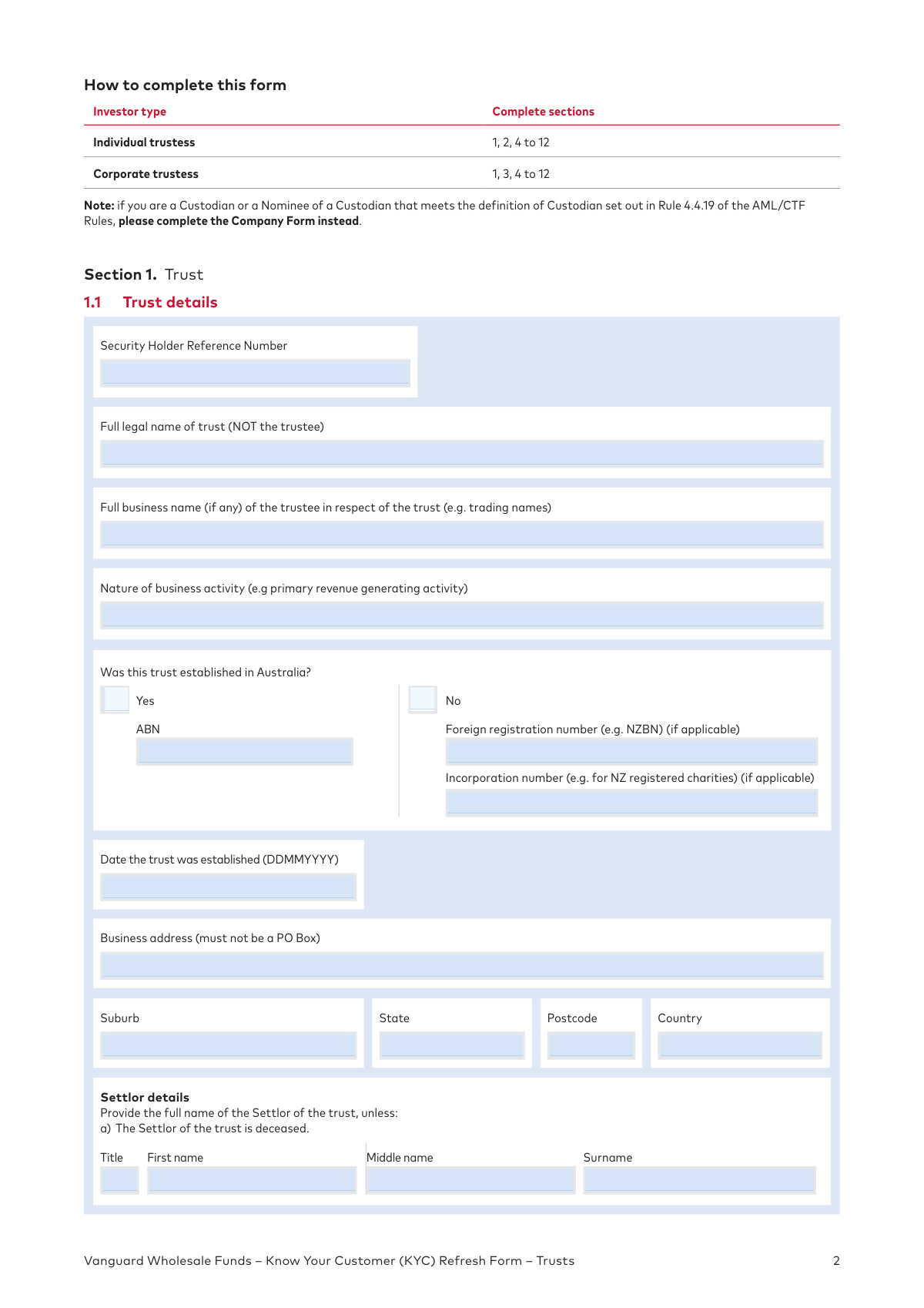
- 2 Use the AI-powered tool to automatically fill in Section 1 with the trust's details, such as its legal name, ABN, business address, and establishment date.
- 3 Follow the guided prompts to specify the type of trust and provide details for either individual trustees (Section 2) or a corporate trustee (Section 3).
- 4 Enter the required information for all relevant parties, including appointors, beneficiaries, directors, and beneficial owners, as applicable to your trust structure.
- 5 Carefully review all the information pre-filled by the AI and entered manually to ensure it is accurate and complete.
- 6 Complete the declarations in Section 4 and provide your digital signature in the designated fields.
- 7 Download the completed form, then gather and certify the required identification documents (e.g., Trust Deed, ID for trustees) to submit to Vanguard.
Our AI-powered system ensures each field is filled out correctly, reducing errors and saving you time.
Why Choose Instafill.ai for Your Fillable WSAFTRUS_KYC_52025 Form?
Speed
Complete your WSAFTRUS_KYC_52025 in as little as 37 seconds.
Up-to-Date
Always use the latest 2026 WSAFTRUS_KYC_52025 form version.
Cost-effective
No need to hire expensive lawyers.
Accuracy
Our AI performs 10 compliance checks to ensure your form is error-free.
Security
Your personal information is protected with bank-level encryption.
Frequently Asked Questions About Form WSAFTRUS_KYC_52025
Vanguard is required by Australian law (the Anti-Money Laundering and Counter-Terrorism Financing Act) to collect and maintain up-to-date client records. Completing this form helps keep your account secure, protect it from fraud, and ensure compliance with legal obligations.
This form is for trustees of Australian regulated trusts and foreign trusts from New Zealand that hold investments in Vanguard Wholesale Funds. It is used to refresh your account information as part of a periodic review.
You are asked to complete and return the form, along with all required identification documents, within 30 days of receiving it.
You must provide certified copies of identification for all trustees, appointors, and beneficial owners, as well as documents for the trust itself, such as a trust deed extract. The specific documents required depend on your trust type and are detailed in the 'Forms of identification required' section of the form.
A certified copy is a photocopy of an original document that has been verified as a true copy by an authorized person, such as a lawyer, police officer, or Justice of the Peace. The certification must have been completed in Australia within the last 12 months.
Complete Section 2 if the trustee of your trust is one or more individuals. If a company acts as the trustee for your trust, you must complete Section 3 instead.
A beneficial owner is any individual who ultimately owns or controls 25% or more of the corporate trustee company. This ownership can be direct, through shares, or indirect through other companies or trust structures.
An Appointor is a person with specific powers granted by the trust deed, such as appointing or removing trustees. Their details are required for identification purposes as they are considered to have significant control over the trust.
If you need more space to list all required individuals (e.g., trustees, beneficiaries, directors), you can attach a separate page with the additional information. Ensure the attached page is clearly labeled and referenced.
For individual trustees, all trustees must sign the form. For corporate trustees, at least two directors (or a sole director and company secretary, if applicable) must sign.
You must mail your completed and signed form, along with certified copies of your identification documents, to Vanguard Investments Australia Ltd, C/- MUFG Corporate Markets, Locked Bag 5038, Parramatta NSW 2124.
Yes, services like Instafill.ai use AI to accurately auto-fill form fields from your saved information, which can save you time and help reduce errors.
You can use a service like Instafill.ai to fill out this form digitally. Simply upload the PDF, and the platform will make it fillable, allowing you to type your answers and save your progress.
If you have a non-fillable or 'flat' PDF, you can upload it to a platform like Instafill.ai. It will automatically convert the PDF into an interactive, fillable form that you can complete on your computer before printing for signature.
Compliance WSAFTRUS_KYC_52025
Validation Checks by Instafill.ai
1
Date Format and Plausibility Check
This check verifies that all date fields (e.g., Date of birth, Date the trust was established) are entered in the specified DDMMYYYY format and represent a valid, logical date. For example, a date of birth cannot be in the future, and a trust establishment date should precede the submission date. This ensures data accuracy and integrity for legal and record-keeping purposes. A failure would require the user to correct the date before the form can be processed.
2
Prohibition of PO Box for Physical Addresses
This validation ensures that address fields explicitly marked as 'must not be a PO Box' (e.g., Business address, Full residential address) do not contain 'PO Box' or similar text. This is a critical requirement under Anti-Money Laundering (AML) laws, which mandate a verifiable physical address for identity verification. If a PO Box is detected in a restricted field, the submission will be rejected, and the user must provide a valid street address.
3
Trustee Section Completion Logic
This check enforces the correct completion of sections based on the trustee type. If the user is an 'Individual trustee', Section 2 must be completed and Section 3 must be blank. Conversely, if the user is a 'Corporate trustee', Section 3 must be completed and Section 2 must be blank. This prevents contradictory or incomplete submissions and ensures the correct data is collected for the specified entity structure. A mismatch would flag the form for correction.
4
ABN and ACN Format and Checksum Validation
This validation confirms that the Australian Business Number (ABN) is an 11-digit number and the Australian Company Number (ACN) is a 9-digit number, and that they pass the official checksum algorithm. This prevents typographical errors and helps verify the legitimacy of the business entity against government databases like ASIC. An invalid ABN or ACN would result in an error, requiring correction before submission.
5
Signature Authority and Completeness Verification
This check verifies that the number and type of signatures in Section 4.1 align with the requirements for the investor's structure. For example, a corporate trustee requires at least two director signatures, while an individual trust needs signatures from all listed trustees. This is essential to ensure the form is legally binding and properly authorized by the correct individuals. Forms with incorrect or missing signatures would be considered invalid and rejected.
6
Conditional Beneficial Ownership Section Validation
This validation enforces the logic in Section 3.5 for corporate trustees. It checks that if the user answers 'No' to both questions 3.5(A) and 3.5(B), the Senior Managing Official details in 3.5.3 are provided. If 'Yes' is answered to (A) or (B), the corresponding sections (3.5.1 or 3.5.2) must be filled, and 3.5.3 must be empty. This ensures compliance with AML/CTF rules for identifying ultimate control, and a failure would halt processing until the correct information is supplied.
7
Trust Type Dependent Section Navigation
This check verifies that the user has completed the correct sections based on their selection in Section 1.2 (Type of trust). For example, if a trust is identified as an 'ASIC registered managed investment scheme', the system checks for an ARSN and ensures that sections specific to unregulated trusts are skipped. This logic prevents the collection of unnecessary data and ensures the required regulatory details are captured. A submission with a mismatched data path would be flagged as incorrectly completed.
8
Occupation Field Restricted to Predefined List
This validation ensures that the value provided in any 'Occupation' field exactly matches one of the options listed in Appendix A. Using a predefined list standardizes the data for risk assessment and regulatory reporting, preventing ambiguous or invalid free-text entries. An entry that does not match the list would be rejected, forcing the user to select a valid option.
9
Email Address Format Validation
This check verifies that all email address fields contain a value that conforms to the standard email format (e.g., [email protected]). This is essential for ensuring reliable electronic communication for delivering account statements and other critical notices as indicated on the form. An invalid format would trigger an error, prompting the user to correct the entry before submission.
10
Signatory and Trustee/Director Name Consistency
This check cross-references the full names provided in the signature section (Section 4.1) against the names listed for individual trustees (Section 2) or corporate trustee directors (Section 3.3). This ensures that the individuals signing the form are the same authorized parties identified earlier in the document. A mismatch could indicate an error or potential fraud and would require correction before the form can be accepted.
11
Confirmation of Required Document Attachment
This validation ensures the user has ticked the checklist boxes in the 'Before you submit' section, confirming they have signed the form and attached all necessary identification documents. While this does not physically verify the attachments, it serves as a formal acknowledgment from the user that they have included the required materials. A failure to check these boxes would prevent submission, prompting the user to review the requirements.
12
Corporate Trustee Details Match ASIC
This check validates that the 'Full legal name of company', 'ACN', and 'Full registered address' provided in Section 3.1 match the information on record with ASIC. The form explicitly states these details must match the official registry. This is crucial for verifying the legal identity and status of the corporate trustee. A discrepancy would require the user to correct the information to align with the official ASIC record.
13
Conditional Requirement for Settlor Details
This validation checks that the full name of the Settlor is provided in Section 1.1, unless the condition 'The Settlor of the trust is deceased' is met. If the Settlor is not deceased, these fields are mandatory for identifying the originator of the trust as part of KYC obligations. If the fields are left blank without indicating the Settlor is deceased, the form would be considered incomplete.
14
Appointor Details Completeness
This check ensures that if 'Yes' is selected for the question 'Does the trust have an Appointor?' in Section 1.3, then all associated fields (Full legal name, Date of birth, Full residential address, etc.) are completed. The Appointor is a key controlling party, and collecting their details is vital for AML/CTF compliance. An incomplete Appointor section after a 'Yes' selection would render the form invalid.
Common Mistakes in Completing WSAFTRUS_KYC_52025
In Section 1.1, applicants often enter the name of the trustee (the person or company managing the trust) instead of the full legal name of the trust itself. This happens because the trustee is the active entity, but the form requires the trust's name for legal and compliance reasons. This error leads to an immediate data mismatch and rejection, requiring the form to be resubmitted. To avoid this, carefully read the field label 'Full legal name of trust (NOT the trustee)' and cross-reference it with the official trust deed.
The form has strict requirements for the certification of copied documents, including who can certify them, the exact wording to use, and that the certification must be recent. Common errors include having a relative certify the document, the certifier omitting their name or title, or using incorrect phrasing. An improper certification is invalid and will be rejected as if the document was never submitted, causing significant delays. Carefully follow the 'Certification requirements' on page 20 to ensure all documents are certified correctly by an eligible certifier.
Section 3.5, which applies to corporate trustees, requires identifying individuals who own or control 25% or more of the company. This concept, especially indirect ownership through other entities, is complex and frequently misunderstood, leading to omissions or incorrect declarations. Failing to correctly identify all beneficial owners is a serious compliance breach that will cause the form to be rejected. It is crucial to trace the full ownership structure and seek professional advice if it is complex.
Section 4 requires signatures from specific individuals based on the trustee structure (e.g., all individual trustees, or two directors for a corporate trustee). Applicants often miss a required signature, have the wrong person sign, or use a stamped signature, which is explicitly forbidden. An incomplete or incorrect signature section will invalidate the entire form, forcing a complete resubmission. Carefully read the instructions in Section 4.1 to identify who needs to sign and ensure all required parties sign in black ink.
Section 1.2 requires the applicant to correctly identify their trust as either a specific type of 'Australian regulated trust' or an 'Unregulated trust.' People often misunderstand the definitions or are unsure of their trust's regulatory status, leading them to select the wrong category. This mistake causes them to fill out incorrect subsequent sections and provide the wrong supporting documents, resulting in processing delays. Always consult the trust deed and a legal or financial advisor if unsure about the trust's classification.
Section 1.4 asks for the full name of all listed beneficiaries and/or beneficiaries by class (e.g., 'all children of Jane Doe'). A common error is to list only the primary beneficiaries while omitting others or failing to describe the 'class' of beneficiaries as stated in the trust deed. Incomplete information violates AML/CTF regulations and will halt the application process until all details are provided. To prevent this, review the trust deed carefully and list every individual beneficiary or clearly define every class of beneficiary mentioned.
The names, addresses, and dates of birth entered on the form for all individuals must exactly match the information on their supporting identification documents. Even minor discrepancies, like a missing middle name or a different address on a utility bill, can cause the verification to fail. This often happens when people have recently moved or use a common name different from their legal name. To avoid this, double-check that every piece of personal data on the form is identical to the information on the corresponding certified ID documents.
Multiple sections on the form, including for the trust's business address and individuals' residential addresses, explicitly state 'must not be a PO Box.' Applicants often overlook this instruction and provide a PO Box out of habit or for convenience. This will lead to the form being returned, as a physical address is required for identity verification. Since this form is a non-fillable PDF, tools like Instafill.ai can convert it to a fillable version and use address validation to help prevent this error.
The form requires a variety of supporting documents, such as certified ID copies and trust deed extracts. It is very common for applicants to forget a document, submit the wrong type, or provide an incomplete document like missing pages from the trust deed. This is a primary cause of application rejection. Use the checklist on page 18 and the detailed guide on page 19 to ensure every required document is included before mailing.
Several sections require the applicant to state an individual's occupation by selecting from the list in 'Appendix A.' A frequent mistake is for people to write in their specific job title (e.g., 'Software Developer') instead of choosing the closest category from the list (e.g., 'Other professional'). This creates data inconsistency and may require clarification, slowing down the process. Always refer to Appendix A on page 20 and select one of the provided occupation categories.
Saved over 80 hours a year
“I was never sure if my IRS forms like W-9 were filled correctly. Now, I can complete the forms accurately without any external help.”
Kevin Martin Green
Your data stays secure with advanced protection from Instafill and our subprocessors

Robust compliance program
Transparent business model
You’re not the product. You always know where your data is and what it is processed for.
ISO 27001, HIPAA, and GDPR
Our subprocesses adhere to multiple compliance standards, including but not limited to ISO 27001, HIPAA, and GDPR.
Security & privacy by design
We consider security and privacy from the initial design phase of any new service or functionality. It’s not an afterthought, it’s built-in, including support for two-factor authentication (2FA) to further protect your account.
Fill out WSAFTRUS_KYC_52025 with Instafill.ai
Worried about filling PDFs wrong? Instafill securely fills vanguard-wholesale-funds-know-your-customer-kyc-refresh-form-trusts forms, ensuring each field is accurate.