Yes! You can use AI to fill out ADA Dental Claim Form
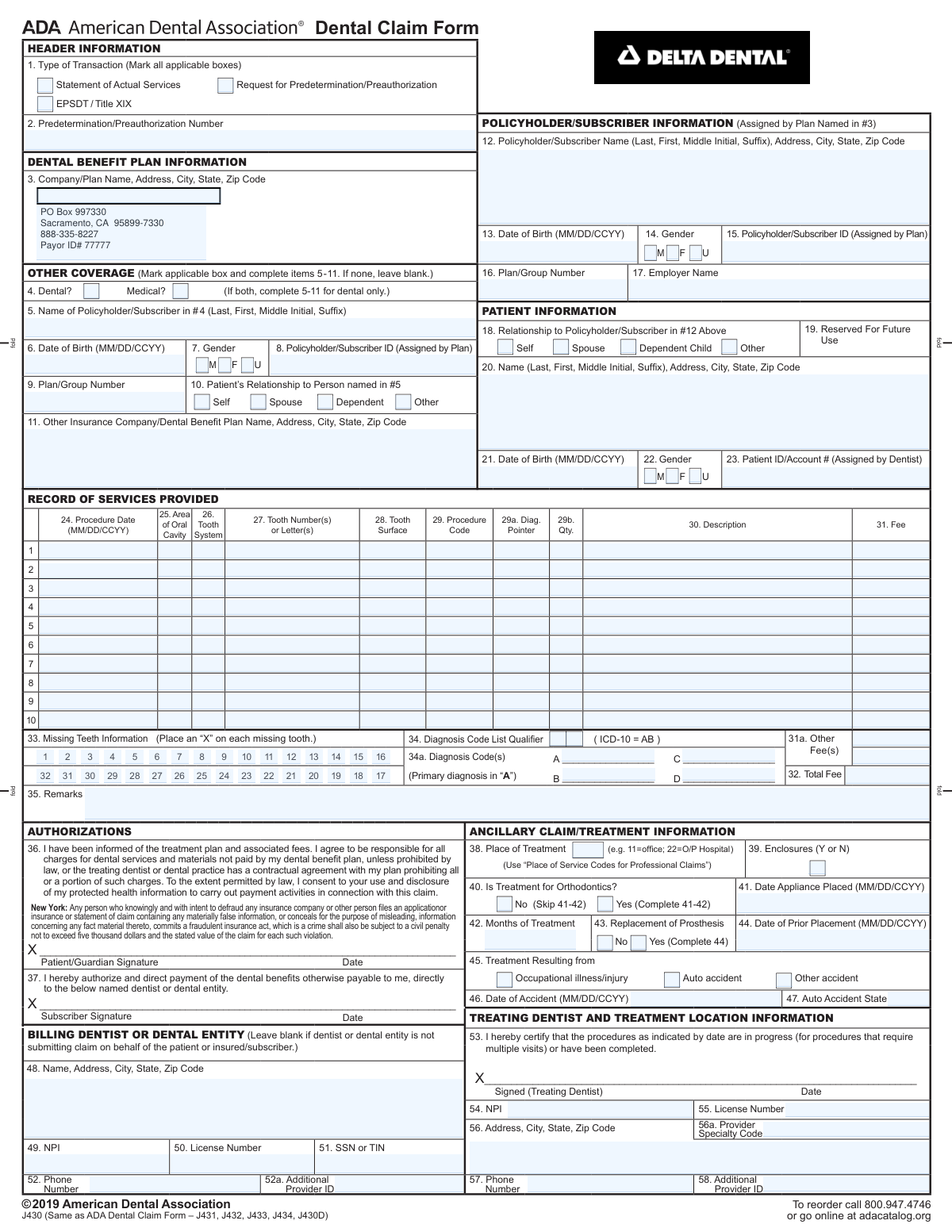
The ADA Dental Claim Form is the universal form used by dentists and dental practices across the United States to communicate with insurance payers. It standardizes the information required for processing dental claims, including patient data, provider details, diagnoses, and specific procedures performed, which is crucial for efficient and accurate reimbursement. Today, this form can be filled out quickly and accurately using AI-powered services like Instafill.ai, which can also convert non-fillable PDF versions into interactive fillable forms.
Our AI automatically handles information lookup, data retrieval, formatting, and form filling.
It takes less than a minute to fill out ADA J430 using our AI form filling.
Securely upload your data. Information is encrypted in transit and deleted immediately after the form is filled out.
Form specifications
| Form name: | ADA Dental Claim Form |
| Number of fields: | 207 |
| Number of pages: | 3 |
| Language: | English |
| Categories: | VA claim forms |
Instafill Demo: How to fill out PDF forms in seconds with AI
How to Fill Out ADA J430 Online for Free in 2026
Are you looking to fill out a ADA J430 form online quickly and accurately? Instafill.ai offers the #1 AI-powered PDF filling software of 2026, allowing you to complete your ADA J430 form in just 37 seconds or less.
Follow these steps to fill out your ADA J430 form online using Instafill.ai:
- 1 Navigate to Instafill.ai and upload or select the ADA Dental Claim Form.
- 2 Provide patient and policyholder information, including names, addresses, dates of birth, and insurance ID numbers, letting the AI pre-fill from saved profiles.
- 3 Detail any other insurance coverage if applicable, specifying the plan and policyholder details.
- 4 Enter the specific details for each service rendered, including the date, tooth number, surface, CDT procedure code, and fee for each line item.
- 5 Input any relevant diagnosis codes, remarks, or information about accidents, prosthetics, or orthodontic treatment as required by the claim.
- 6 Complete the billing and treating dentist sections with provider names, addresses, NPIs, license numbers, and other identifiers.
- 7 Review all AI-populated information for accuracy, make any necessary corrections, and then download, print, or electronically submit the completed form.
Our AI-powered system ensures each field is filled out correctly, reducing errors and saving you time.
Why Choose Instafill.ai for Your Fillable ADA J430 Form?
Speed
Complete your ADA J430 in as little as 37 seconds.
Up-to-Date
Always use the latest 2026 ADA J430 form version.
Cost-effective
No need to hire expensive lawyers.
Accuracy
Our AI performs 10 compliance checks to ensure your form is error-free.
Security
Your personal information is protected with bank-level encryption.
Frequently Asked Questions About Form ADA J430
This is a standard dental claim form used to bill insurance companies for services. It can be used to submit a claim for payment on services already rendered or to request a predetermination of benefits before treatment begins.
Select 'Statement of Actual Services' when billing for treatment that has already been completed. Choose 'Request for Predetermination/Preauthorization' to get an estimate of insurance coverage before performing the services.
If the patient has other dental or medical coverage, you must check the appropriate box in the 'OTHER COVERAGE' section. You will then need to provide the other plan's name, address, and the policyholder's information for that plan.
For each procedure, you must enter the date, area of the oral cavity, tooth number and surface, the correct procedure code (e.g., CDT code), and the fee. Up to ten procedures can be listed on a single form.
The 'Diagnosis Pointer' links a specific procedure to a diagnosis code listed in section 34a. This field is only required if you are providing diagnosis codes (like ICD-10) to justify the medical necessity of the procedure.
Use the 'Missing Teeth Information' chart to mark the checkboxes corresponding to each tooth that is missing. This provides the insurance payer with necessary information about the patient's existing oral condition.
The 'Billing Dentist' is the entity or individual receiving the payment, whose information is entered in fields 48-52a. The 'Treating Dentist' is the specific clinician who performed the services, and their information is entered in fields 53-58 if different from the billing provider.
Only complete these sections if they are relevant to the claim. Fill out the orthodontic fields if the claim is for braces or related appliances, and complete the accident section if the treatment was necessary due to a work, auto, or other type of accident.
Use the 'Remarks' field to provide any extra information that could help in processing the claim. This can include clarifications about a procedure, special circumstances, or references to attachments not listed elsewhere.
The billing dentist's National Provider Identifier (NPI) and license number are entered in fields 49 and 50. If the treating dentist is different, their NPI and license number are entered in fields 53 and 54.
Yes, services like Instafill.ai use AI to accurately auto-fill form fields from your records, which can save significant time and reduce data entry errors. This is especially helpful for repetitive information like provider and patient details.
Simply upload the dental claim form to Instafill.ai, and its AI will identify all the fields. You can then connect your data sources to automatically populate patient, provider, and procedure information, then review for accuracy and finalize the form.
You can use a service like Instafill.ai, which can convert flat, non-fillable PDFs into interactive, fillable forms. This allows you to easily type information directly into the fields online instead of printing and filling it out by hand.
Compliance ADA J430
Validation Checks by Instafill.ai
1
Total Fee Calculation Accuracy
This validation verifies that the 'Total Fee' field is the correct sum of all individual 'Fee' amounts from the 'Record of Services' rows plus any values entered in 'Other Fee' fields. This is crucial for accurate billing and payment processing. If the sum does not match the total provided, the claim will be flagged for manual review or rejected, causing payment delays.
2
Patient-Policyholder 'Self' Relationship Consistency
This check ensures that if the 'Patient Relationship' is marked as 'Self', the patient's name and date of birth match the 'Policyholder/Subscriber Name' and 'Policyholder/Subscriber Date of Birth'. This logical check prevents data entry errors and confirms the identity of the primary insured. A mismatch will result in claim rejection for inconsistent data.
3
Service on Missing Tooth Validation
This validation cross-references the 'Tooth Number(s) or Letter(s)' in the 'Record of Services' against the 'Missing Teeth Information' section. It ensures that no procedure is billed for a tooth that has been marked as missing. Submitting a claim for a service on a missing tooth is a logical impossibility and will lead to immediate claim denial.
4
Conditional Predetermination Number Requirement
This check verifies that if the 'Type of Transaction' is 'Statement of Actual Services' and a predetermination was indicated as required, the 'Predetermination/Preauthorization Number' field is not empty. This ensures that services requiring prior approval have received it, which is essential for reimbursement. Claims lacking a required preauthorization number will be denied.
5
Conditional Other Coverage Information
This validation ensures that if the 'Dental?' or 'Medical?' box under 'OTHER COVERAGE' is checked, then the corresponding fields for the other plan (e.g., 'Other Insurance Company / Dental Benefit Plan Name & Address', 'Policyholder/Subscriber Name') are completed. This is critical for coordination of benefits (COB) between insurance plans. Failure to provide this information will halt the claim until the primary/secondary payer relationship is clarified.
6
Procedure Date Logical Validity
This check validates that the 'Procedure Date' for any service is a valid date in the correct format (MM/DD/CCYY). Furthermore, for a 'Statement of Actual Services' claim, the procedure date cannot be in the future. This prevents billing for services not yet rendered and ensures data integrity, and failure will cause the claim to be rejected.
7
NPI Format and Existence
This validation checks that the 'NPI' fields for both the 'Billing Dentist' and 'Treating Dentist' contain a 10-digit number. The National Provider Identifier is a standard, required identifier for all healthcare providers in the U.S. An invalid or missing NPI will result in an automatic rejection of the claim by the payer's system.
8
Diagnosis Pointer and Code Linkage
This check ensures that if a 'Diagnosis Pointer' (e.g., 'A', 'B') is entered on a service line, a corresponding 'Diagnosis Code' exists in the 'Diagnosis Code' fields (A, B, C, or D). This confirms medical necessity by linking a specific service to a diagnosis. A service line with an unlinked pointer will be rejected for lacking justification.
9
Conditional Accident Information
This validation confirms that if any of the accident checkboxes ('Occupational illness/injury', 'Auto accident', 'Other accident') are marked, the 'Date of Accident' field is filled with a valid date. This information is vital for determining liability and whether another policy (e.g., auto or worker's compensation) is the primary payer. Claims with this information missing will be pended for investigation.
10
Conditional Orthodontic Treatment Details
This check ensures that if the 'Yes' box for 'Orthodontic Treatment' is checked, then the 'Date Appliance Placed' and 'Months of Treatment' fields are completed. These details are essential for processing orthodontic claims, which often have specific benefit rules and payment schedules. Incomplete orthodontic information will lead to claim denial or requests for more information.
11
Prosthesis Prior Placement Date Logic
This validation verifies that if a service is for a 'Replacement of Prosthesis', the 'Date of Prior Placement' must be a valid date that occurs before the 'Procedure Date' of the current service. This helps enforce plan rules regarding the frequency of prosthesis replacements. A claim with an illogical or missing prior placement date will be flagged for review or denied.
12
Transaction Type Completeness
This check ensures that at least one of the 'Type of Transaction' checkboxes ('Statement of Actual Services', 'EPSDT / Title XIX', or 'Request for Predetermination/Preauthorization') is selected. This is the most fundamental field, as it defines the purpose of the form submission. A form without a transaction type selected is ambiguous and cannot be processed, leading to immediate rejection.
13
Service Line Fee Requirement
This validation ensures that for every row in the 'Record of Services' where a 'Procedure Code' is entered, a corresponding 'Fee' is also entered. A procedure cannot be billed without an associated charge. A service line missing a fee will cause a calculation mismatch and likely result in the claim being rejected as incomplete.
14
Gender Selection Exclusivity
This check validates that for both the policyholder and the patient, only one gender option ('M', 'F', or 'U') is selected. Selecting multiple options is a logical error that can cause issues with patient identification and eligibility verification. Forms with multiple gender selections will be rejected for data correction.
Common Mistakes in Completing ADA J430
This error occurs when the patient's information (e.g., a child's name and date of birth) is entered into the fields meant for the policyholder/subscriber. This prevents the insurance company from locating the active policy, resulting in an immediate claim denial. To avoid this, always verify who the primary subscriber is and enter their exact information in the 'Policyholder/Subscriber' section, and the patient's details in the 'Patient Information' section.
Staff often forget to check the 'Dental' or 'Medical' box under 'Other Coverage' and fail to complete the required fields for the secondary insurance plan. This is a critical error for Coordination of Benefits (COB) and will cause the primary payer to reject the claim, pending information about the other plan. Always confirm a patient's full insurance coverage at each visit and complete this section fully to prevent significant payment delays.
Simple typos, such as transposing two digits in the 'Policyholder/Subscriber ID' or 'Plan/Group Number', are extremely common. Because these numbers are the primary identifiers for a policy, even a small error will make it impossible for the payer's system to find the member's record, leading to a swift rejection. To prevent this, carefully transcribe the numbers directly from the patient's insurance card. AI-powered tools like Instafill.ai can help by validating number formats and saving correct information for future use.
A claim can be rejected for logical inconsistencies, such as listing a procedure code for a filling on a tooth number that is marked as missing in another section of the form. Another common example is listing a tooth surface (e.g., 'M' for mesial) that doesn't align with the submitted x-ray or procedure description. These data entry errors cause automated system rejections and require manual correction and resubmission. Double-checking each service line for accuracy is essential.
When a service requires and has received prior authorization, failing to enter the assigned number on the final claim form is a frequent oversight. The payer's system will automatically deny the claim for 'lack of preauthorization,' even though one was obtained, forcing a time-consuming appeal or resubmission process. Always ensure the exact preauthorization number is transcribed from the approval letter onto the claim form for the relevant services.
A simple arithmetic error when summing the fees for each procedure line to calculate the 'Total Fee' can cause processing exceptions. The payer's system will flag the discrepancy between the sum of the line items and the total listed, delaying the claim for manual review. This can result in delayed payment or payment based on the system's calculation rather than the intended total. Using a calculator or software that automatically sums the total can easily prevent this mistake.
As more payers require proof of medical necessity, failing to include the appropriate diagnosis code (e.g., ICD-10) and link it to the corresponding procedure with a 'Diagnosis Pointer' is a growing reason for denials. Without this link, the payer cannot determine why the service was performed and may deem it unnecessary. To avoid this, stay current on payer requirements and ensure every procedure that needs a diagnosis has one listed and correctly pointed to on the service line.
When submitting a claim for a prosthesis like a bridge or partial denture, it is crucial to mark the corresponding missing teeth in the tooth chart section of the form. If the teeth being replaced are not marked as missing, the payer may deny the claim on the grounds that the prosthesis is not necessary. This information provides essential justification for the treatment, and omitting it leads to preventable denials and appeals.
Dental procedure codes are updated annually, and using a deleted or incorrect code for a service will result in denial. Another common error is using a generic code when a more specific one is available, which can lead to the claim being rejected with a request for more information. To ensure clean claims, offices must use up-to-date CDT coding resources and train staff on proper code selection. If the form is a non-fillable PDF, a tool like Instafill.ai can convert it to a smart, fillable version with fields that can be validated.
In a group practice, the billing entity (the clinic) and the treating dentist (the individual who performed the service) are often different and have separate NPI numbers. A common mistake is to enter the billing provider's NPI in the treating provider's field or vice-versa. This can cause claim processing delays or rejections as the payer attempts to verify who rendered the care. Ensure the correct NPI and license number are entered in the appropriate fields for both the billing entity and the specific treating dentist.
Saved over 80 hours a year
“I was never sure if my IRS forms like W-9 were filled correctly. Now, I can complete the forms accurately without any external help.”
Kevin Martin Green
Your data stays secure with advanced protection from Instafill and our subprocessors

Robust compliance program
Transparent business model
You’re not the product. You always know where your data is and what it is processed for.
ISO 27001, HIPAA, and GDPR
Our subprocesses adhere to multiple compliance standards, including but not limited to ISO 27001, HIPAA, and GDPR.
Security & privacy by design
We consider security and privacy from the initial design phase of any new service or functionality. It’s not an afterthought, it’s built-in, including support for two-factor authentication (2FA) to further protect your account.
Fill out ADA J430 with Instafill.ai
Worried about filling PDFs wrong? Instafill securely fills ada-dental-claim-form forms, ensuring each field is accurate.