Yes! You can use AI to fill out Basic Enrollment Packet for Entities/Businesses (With Instructions) for the Louisiana Medical Assistance Program
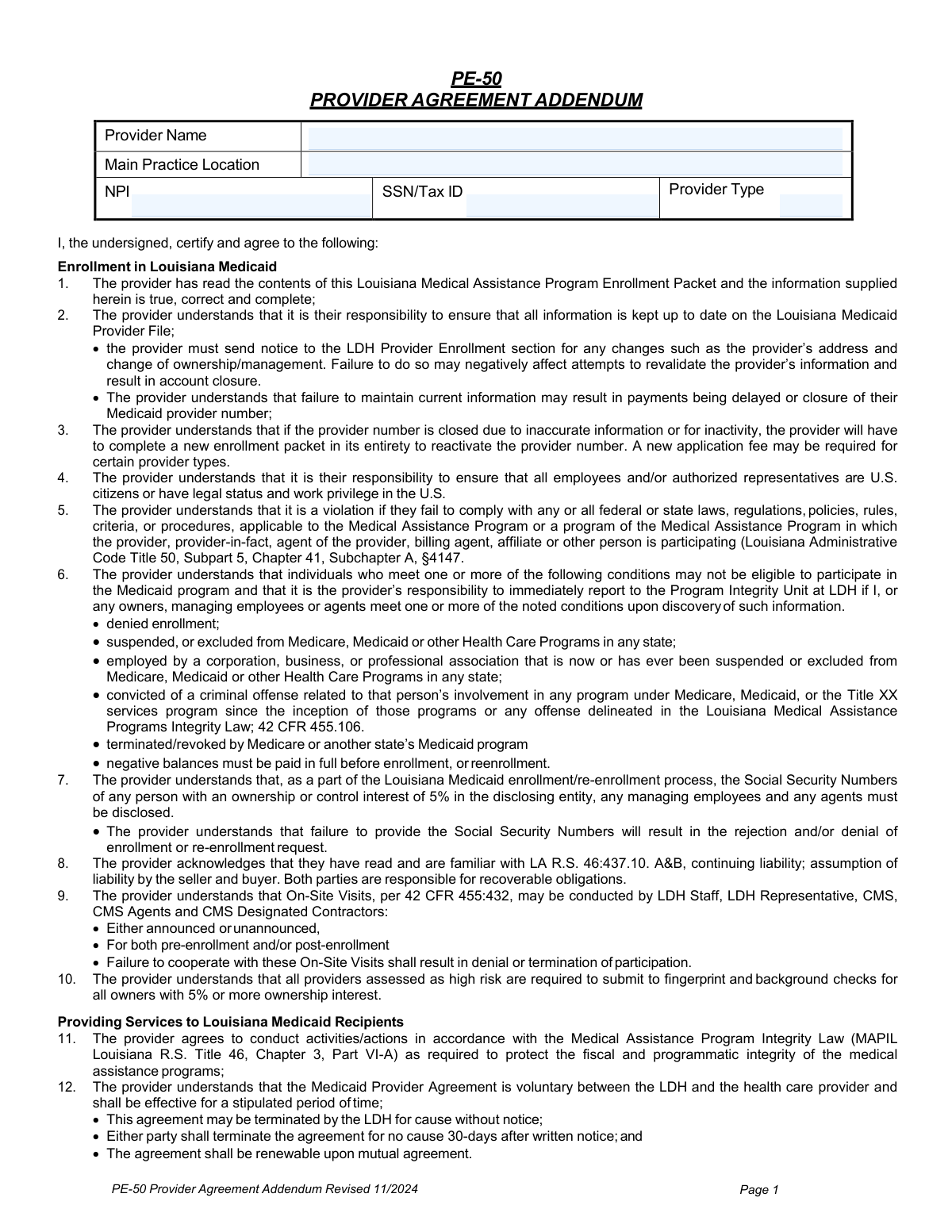
This packet is a comprehensive set of documents, including the PE-50 Provider Enrollment Form and Disclosure of Ownership forms, that business entities must complete to become an enrolled provider with Louisiana Medicaid. Completing this packet accurately is crucial for healthcare organizations to be eligible to provide services to Medicaid recipients and receive reimbursement from the state. Today, this form can be filled out quickly and accurately using AI-powered services like Instafill.ai, which can also convert non-fillable PDF versions into interactive fillable forms.
Louisiana Basic Enrollment Packet for Entities/Businesses (PE-50) is part of the
business forms, EDI enrollment forms, enrollment forms, Louisiana business forms, Medi-Cal forms, medical assistance forms, medical forms and VA medical forms categories on Instafill.
Our AI automatically handles information lookup, data retrieval, formatting, and form filling.
It takes less than a minute to fill out Louisiana Basic Enrollment Packet for Entities/Businesses (PE-50) using our AI form filling.
Securely upload your data. Information is encrypted in transit and deleted immediately after the form is filled out.
Form specifications
| Form name: | Basic Enrollment Packet for Entities/Businesses (With Instructions) for the Louisiana Medical Assistance Program |
| Number of pages: | 1 |
| Language: | English |
More forms in Business forms
Instafill Demo: How to fill out PDF forms in seconds with AI
How to Fill Out Louisiana Basic Enrollment Packet for Entities/Businesses (PE-50) Online for Free in 2026
Are you looking to fill out a LOUISIANA BASIC ENROLLMENT PACKET FOR ENTITIES/BUSINESSES (PE-50) form online quickly and accurately? Instafill.ai offers the #1 AI-powered PDF filling software of 2026, allowing you to complete your LOUISIANA BASIC ENROLLMENT PACKET FOR ENTITIES/BUSINESSES (PE-50) form in just 37 seconds or less.
Follow these steps to fill out your LOUISIANA BASIC ENROLLMENT PACKET FOR ENTITIES/BUSINESSES (PE-50) form online using Instafill.ai:
- 1 Navigate to Instafill.ai and upload the Louisiana Basic Enrollment Packet for Entities/Businesses PDF.
- 2 Use the AI assistant to populate the PE-50 Provider Enrollment Form with your entity's details, including NPI, business addresses, and provider type.
- 3 Complete the detailed Disclosure of Ownership Information forms, providing all required information for owners, managing employees, and agents.
- 4 Fill out the Direct Deposit (EFT) Authorization Agreement to set up electronic payments from Louisiana Medicaid, attaching a voided check as required.
- 5 Complete the EDI (Electronic Data Interchange) forms if you plan to submit claims electronically, including the Limited Power of Attorney if using a third-party biller.
- 6 Carefully review all completed forms, including the Provider Agreement Addendum, for accuracy and completeness before finalizing.
- 7 Download the completed packet, print the necessary forms, obtain original signatures in blue ink from the authorized representative, and mail all required documents to the Gainwell Provider Enrollment Unit.
Our AI-powered system ensures each field is filled out correctly, reducing errors and saving you time.
Why Choose Instafill.ai for Your Fillable Louisiana Basic Enrollment Packet for Entities/Businesses (PE-50) Form?
Speed
Complete your Louisiana Basic Enrollment Packet for Entities/Businesses (PE-50) in as little as 37 seconds.
Up-to-Date
Always use the latest 2026 Louisiana Basic Enrollment Packet for Entities/Businesses (PE-50) form version.
Cost-effective
No need to hire expensive lawyers.
Accuracy
Our AI performs 10 compliance checks to ensure your form is error-free.
Security
Your personal information is protected with bank-level encryption.
Frequently Asked Questions About Form Louisiana Basic Enrollment Packet for Entities/Businesses (PE-50)
This packet is used by entities and businesses, such as clinics or hospitals, to enroll as a provider in the Louisiana Medical Assistance Program, also known as Louisiana Medicaid. Completing this packet is the first step to being able to bill Medicaid for services.
Any healthcare entity or business that wants to provide services to Louisiana Medicaid recipients and receive payment must complete this packet. This is for business entities, not for individual practitioners enrolling on their own.
Yes, you are required to have an NPI prior to enrollment unless you are an 'atypical provider' like a non-emergency transportation company. The NPI must be included on the PE-50 enrollment form.
Mail all forms with original signatures to the Gainwell Provider Enrollment Unit, PO Box 80159, Baton Rouge, LA 70898-0159. If using a carrier like UPS or FedEx that doesn't deliver to P.O. boxes, you must call (225) 216-6370 to arrange delivery to a physical address.
Yes, all signatures must be original and in blue ink; stamped signatures are not accepted. The person signing must be an authorized representative, such as an owner or managing employee, who is legally able to bind the entity to an agreement.
To set up Electronic Funds Transfer (EFT) for direct deposit, you must complete the authorization agreement and attach a voided check or a letter from your bank. Deposit slips are not accepted for verification.
This form is required by federal and state law to identify all individuals and entities with an ownership or controlling interest of 5% or more in your business. It is a critical part of program integrity to prevent fraud and must be completed in its entirety.
If a third-party biller or clearinghouse will submit claims for you, you must complete the EDI Contract and a notarized Medicaid Electronic Media Limited Power of Attorney form. This authorizes them to submit claims and receive remittance information on your behalf.
Some entities may be required to pay an application fee to cover screening costs, as required by the Affordable Care Act. If a fee applies to you, you will receive a letter with payment instructions after your application is received.
Upon certification of your enrollment, the Gainwell Provider Enrollment Unit will mail an enrollment notification letter to the mailing address on your application. This letter will contain your new Medicaid provider number.
For a Change of Ownership, you must submit a complete new enrollment packet and check the 'CHOW' box on the PE-50 form. A new Direct Deposit (EFT) agreement will also be required for the new ownership.
Yes, services like Instafill.ai use AI to accurately auto-fill repetitive form fields, which can save you significant time and reduce errors. This is especially helpful for long packets with repeated information like your business name, address, and NPI.
You can use a service like Instafill.ai to fill out the packet online. Simply upload the PDF, and the platform will make it fillable, allowing you to type your information, add signatures, and then download the completed document for submission.
If you have a non-fillable or 'flat' PDF, you can use a tool like Instafill.ai to convert it into an interactive, fillable form. This allows you to easily type your answers directly into the fields instead of printing and filling it out by hand.
Compliance Louisiana Basic Enrollment Packet for Entities/Businesses (PE-50)
Validation Checks by Instafill.ai
1
Verifies Pay-To Name Matches IRS Documentation
This check ensures the 'Provider Pay-To-Name' on the PE-50 form is an exact character-for-character match with the name registered with the IRS, as shown on the required pre-printed IRS document. This is critical for issuing correct year-end 1099s and ensuring payments are made to the correct legal entity. A mismatch will cause the application to be returned for correction, delaying enrollment and payment processing.
2
Validates Authorized Representative's Signature Authority
This validation confirms that the individual who signs the PE-50 Attestation (Section F) and the Ownership Disclosure form is listed as an 'owner' or 'managing employee' on the Disclosure of Ownership form (Sections V or VI). This is a legal requirement to ensure the person can enter into a binding contract with Louisiana Medicaid. If the signatory is not a disclosed owner or manager, the application is considered invalid and will be rejected.
3
Enforces Original Signature in Blue Ink
This check verifies that all required signature fields, particularly on the PE-50 and Disclosure of Ownership forms, contain an original, wet signature in blue ink. The form explicitly prohibits black ink, stamped signatures, and photocopied signatures. This rule helps prevent fraud and ensures the authenticity of the legal agreement. Submissions failing this check are immediately returned for a valid signature.
4
Confirms NPI Format and Requirement
This validation checks that the National Provider Identifier (NPI) is a 10-digit number and is present on the PE-50 form. The NPI is mandatory for all healthcare providers enrolling in Medicaid, with an exception for 'atypical providers' like transportation companies. An invalid or missing NPI for a healthcare provider will halt the enrollment process until a valid NPI is obtained and provided.
5
Validates Consistency of Parish/County and Code
This check cross-references the 'Parish/County' name with the 'Parish/County Code' entered in Section A of the PE-50, using the official tables provided in the instructions. It also validates codes for out-of-state providers in designated trade areas. An incorrect code can lead to improper service area designation and claim processing issues, so a mismatch will cause the form to be returned for correction.
6
Ensures Completeness of Social Security Number Disclosure
This validation ensures that a Social Security Number (SSN) is provided for every individual listed as having 5% or more ownership (Section V(b)) and for every managing employee or agent (Section VI(b)) on the Disclosure of Ownership form. Federal and state regulations mandate this disclosure for program integrity screening. Failure to provide an SSN for any required individual will result in the rejection of the entire enrollment packet.
7
Conditional Validation for Notarized Power of Attorney
This check is triggered if the provider indicates they will use a third-party biller or clearinghouse to submit claims electronically (EDI Contract). If this option is selected, the system verifies that a completed and properly notarized 'Medicaid Electronic Media Limited Power of Attorney' form is included in the packet. Without this legal authorization, the third party cannot submit claims, so its absence will block the setup of electronic billing.
8
Requires Supporting Documents for Disclosed Sanctions
This validation flags applications where 'Yes' is answered to any question regarding criminal convictions, license sanctions, or exclusion from other healthcare programs on the Disclosure of Ownership form (e.g., Section II, V(b)-H, VI(b)-E). A 'Yes' answer requires the applicant to attach a detailed written explanation and all official legal/court documents related to the event. Failure to provide this mandatory documentation will result in the application being deemed incomplete and denied pending submission of the required information.
9
Verifies Required Documentation for Direct Deposit (EFT)
This check ensures that any submitted 'Direct Deposit (EFT) Authorization Agreement' is accompanied by either a voided check or an official bank letter on letterhead. The instructions explicitly state that deposit slips are not acceptable for verifying account information. This is crucial to prevent payment errors and fraud; an application with an EFT form but without the correct supporting document will have its EFT setup rejected.
10
Validates Provider Type and In-State Location Restriction
This check verifies that the 'Provider Type Code' and 'Description' on the PE-50 are a valid pair from the provided list. Furthermore, if the selected provider type is marked as 'In-State Only' (e.g., Nursing Facility, Home Health Agency), the validation confirms that the 'Business/Practice State' is Louisiana. Enrolling an out-of-state provider for an in-state-only service type is not permitted and will cause the application to be rejected.
11
Ensures Business Address Matches License Address
This validation confirms that the 'Business/Practice Street Address' listed in Section A of the PE-50 form matches the physical location address on the provider's state-issued license, where a license is required for the provider type. This ensures the provider is operating at a licensed and approved location. A discrepancy between the application address and the license address can lead to denial until the information is corrected and consistent.
12
Validates Completeness of Hospital and LTC Information
This check is triggered if the provider type is a Hospital or Long-Term Care (LTC) facility. It verifies that all required fields in Section C of the PE-50 form, including 'Hospital Type', 'Number of Certified Beds', and 'Printed Name of Administrator', are completed. This data is essential for proper provider classification and reimbursement, and missing information will cause the application to be returned.
13
Verifies Requested Effective Date Against License Validity
This validation ensures the 'Requested Enrollment Effective Date' on the PE-50 form is on or after the issue date of the provider's required professional or facility license. A provider cannot be retroactively enrolled for a period during which they were not licensed to operate. An application with a requested effective date that precedes the license effective date will be rejected or adjusted.
14
Validates Federal Tax ID (TIN/EIN) Format
This check confirms that the 'IRS Reporting Number' on the PE-50 and the 'Taxpayer ID Number' on the Disclosure of Ownership form is a valid 9-digit number. This number is fundamental for all payment reporting to the IRS. An incorrectly formatted or missing Tax ID will cause immediate rejection of the application as it makes financial reporting impossible.
Common Mistakes in Completing Louisiana Basic Enrollment Packet for Entities/Businesses (PE-50)
Applicants often enter a "Doing Business As" (DBA) name on the PE-50 form that does not exactly match their business license, or a "Provider Pay-To Name" that is not a character-for-character match with the name registered with the IRS. Even minor variations, like using an abbreviation or different punctuation, will cause the application to be rejected. This discrepancy leads to significant delays in enrollment and payment processing. To avoid this, meticulously cross-reference names on your license and IRS documents before submission.
The instructions explicitly require original signatures in blue ink on multiple forms, including the PE-50 and the final page of the Ownership Disclosure. Applicants frequently overlook this, signing in black ink, using a stamped signature, or providing a photocopy, all of which are grounds for immediate rejection. This simple mistake can cause the entire packet to be returned, forcing the applicant to restart the process from the beginning.
The Ownership Disclosure form requires a separate, multi-page section (V(b), V(c), or VI(b)) for every individual owner, entity owner, and managing employee. A common error is submitting a simple list of names instead of the fully completed individual forms, which is explicitly forbidden and leads to rejection. The complexity of copying and managing these sections for multiple individuals often results in incomplete submissions, missing Social Security Numbers, and significant processing delays.
The PE-50 form requires applicants to enter a specific two-digit code for their practice location's parish or county from a table. Out-of-state providers in designated "trade-area" counties often mistakenly use the generic state code instead of the required specific county code (e.g., using the Arkansas state code instead of the specific code for Ashley County). This data entry error will cause the application to be flagged as incorrect and returned for correction, delaying enrollment.
The criminal and disciplinary history sections on the Disclosure of Ownership form contain numerous mandatory "yes/no" questions. Applicants often leave questions unanswered if the answer is "no," assuming a blank is sufficient. However, the instructions state that every single item must be marked either "Yes" or "No." An incomplete checklist results in the form being rejected, as the processing unit cannot assume the applicant's intent.
The enrollment packet requires several critical attachments, such as a voided check for the Direct Deposit form (deposit slips are not accepted), a pre-printed IRS document verifying the Tax ID, and a notarized Power of Attorney for third-party billers. Applicants frequently forget one or more of these documents, leading to an incomplete application that cannot be processed. This results in the entire packet being held or returned, causing significant delays until the missing documentation is provided.
A critical error is having the wrong person sign the application. The PE-50, Direct Deposit, and Disclosure of Ownership forms must be signed by an "Authorized Representative" who is specifically listed as an owner or managing employee in the ownership disclosure sections. An office manager or billing contact who is not a disclosed owner or manager cannot legally bind the entity, and their signature will lead to immediate rejection of the application as legally invalid.
The Disclosure of Ownership form requires providers to identify not just direct owners, but also any indirect owners with a 5% or greater stake. This involves tracing ownership through parent companies and correctly multiplying ownership percentages, a complex task prone to error. Applicants often fail to report these indirect owners or miscalculate their stake, resulting in an inaccurate disclosure that will be rejected and require a full, time-consuming correction.
The lengthy, multi-page Disclosure of Ownership form requires the provider's name to be written at the top of every single page. While filling out this complex document, applicants often forget to complete this header on subsequent pages after the first one. This simple oversight can cause pages to be misplaced during processing or the application to be deemed incomplete, forcing a return for correction and delaying enrollment.
This extensive packet is provided as a PDF that may not be easily fillable, leading to handwritten entries that can be illegible, incomplete, or incorrectly formatted. This often results in data entry errors or outright rejection. To prevent this, applicants can use AI-powered tools like Instafill.ai, which convert flat, non-fillable PDFs into interactive forms, ensuring data is entered clearly, validated for format, and correctly placed to reduce the risk of rejection.
Saved over 80 hours a year
“I was never sure if my IRS forms like W-9 were filled correctly. Now, I can complete the forms accurately without any external help.”
Kevin Martin Green
Your data stays secure with advanced protection from Instafill and our subprocessors




Robust compliance program
Transparent business model
You’re not the product. You always know where your data is and what it is processed for.
ISO 27001, HIPAA, and GDPR
Our subprocesses adhere to multiple compliance standards, including but not limited to ISO 27001, HIPAA, and GDPR.
Security & privacy by design
We consider security and privacy from the initial design phase of any new service or functionality. It’s not an afterthought, it’s built-in, including support for two-factor authentication (2FA) to further protect your account.
Fill out Louisiana Basic Enrollment Packet for Entities/Businesses (PE-50) with Instafill.ai
Worried about filling PDFs wrong? Instafill securely fills basic-enrollment-packet-for-entitiesbusinesses-with-instructions-for-the-louisiana-medical-assistance-program forms, ensuring each field is accurate.
