Yes! You can use AI to fill out Comprehensive Property Inspection Report
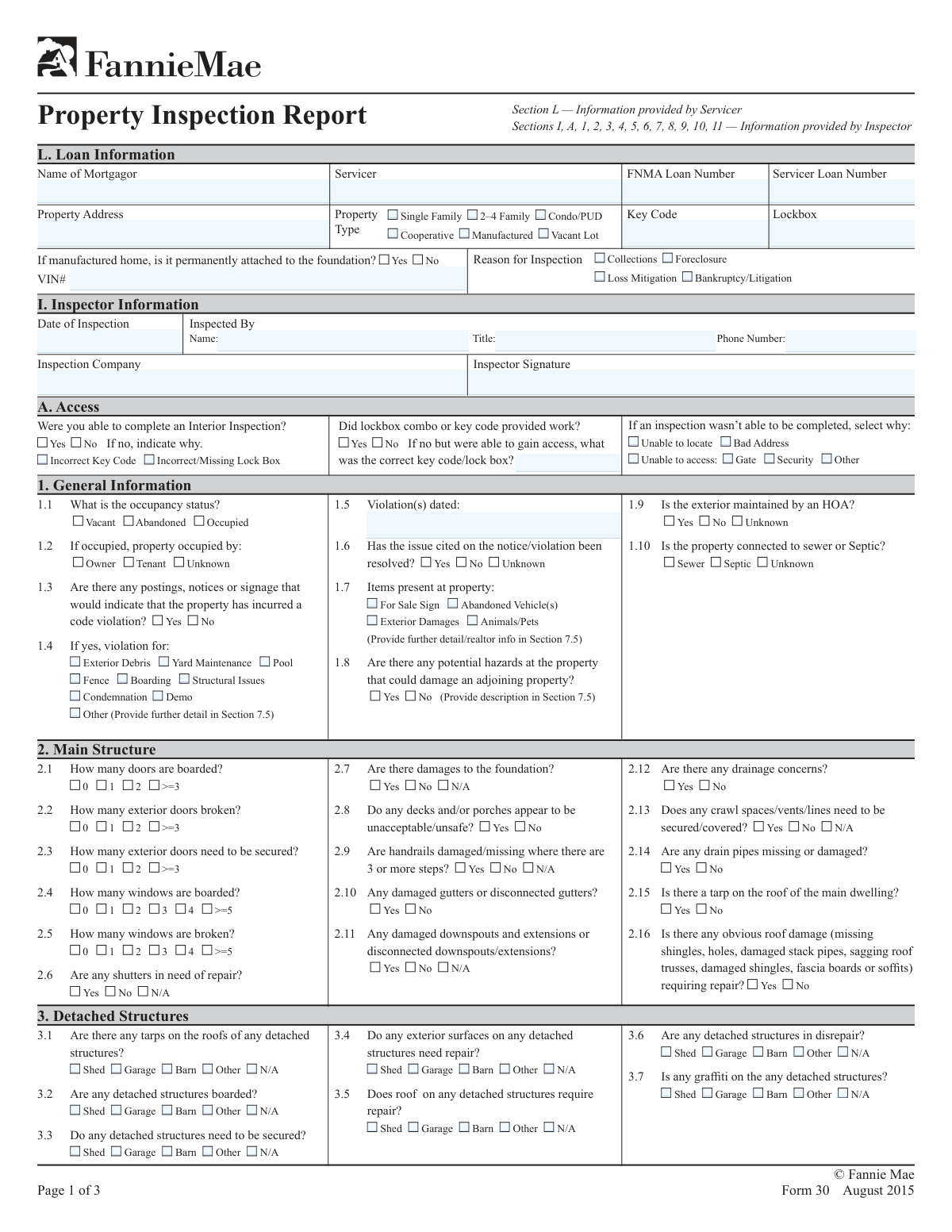
The Comprehensive Property Inspection Report is a detailed document used by property inspectors to record the condition of a residential property for mortgage servicers. It covers everything from loan information and occupancy status to the specific condition of the interior, exterior, and any detached structures, which is vital for risk assessment in cases of foreclosure, loss mitigation, or bankruptcy. Today, this form can be filled out quickly and accurately using AI-powered services like Instafill.ai, which can also convert non-fillable PDF versions into interactive fillable forms.
Our AI automatically handles information lookup, data retrieval, formatting, and form filling.
It takes less than a minute to fill out Property Inspection Report using our AI form filling.
Securely upload your data. Information is encrypted in transit and deleted immediately after the form is filled out.
Form specifications
| Form name: | Comprehensive Property Inspection Report |
| Number of fields: | 334 |
| Number of pages: | 3 |
| Language: | English |
| Categories: | property forms |
Instafill Demo: How to fill out PDF forms in seconds with AI
How to Fill Out Property Inspection Report Online for Free in 2026
Are you looking to fill out a PROPERTY INSPECTION REPORT form online quickly and accurately? Instafill.ai offers the #1 AI-powered PDF filling software of 2026, allowing you to complete your PROPERTY INSPECTION REPORT form in just 37 seconds or less.
Follow these steps to fill out your PROPERTY INSPECTION REPORT form online using Instafill.ai:
- 1 Navigate to Instafill.ai and upload your Property Inspection Report form, or select it from our template library.
- 2 Allow the AI to pre-fill known details such as Mortgagor Name, Servicer Name, and Loan Numbers from your records.
- 3 Review the auto-filled Loan Information and complete the Property Type and reason for the inspection.
- 4 Systematically document the inspection findings by checking the appropriate boxes for occupancy status, exterior conditions, and interior conditions, including any damages or hazards.
- 5 Detail specific issues such as roof damage, broken windows, plumbing problems, and select the overall property condition rating (C1-C6).
- 6 Enter the Inspector Information, including name, date, and signature, and add narrative descriptions in the general comments sections for both the interior and exterior.
- 7 Conduct a final review of the entire report for accuracy and completeness, then securely download, print, or share the finished document.
Our AI-powered system ensures each field is filled out correctly, reducing errors and saving you time.
Why Choose Instafill.ai for Your Fillable Property Inspection Report Form?
Speed
Complete your Property Inspection Report in as little as 37 seconds.
Up-to-Date
Always use the latest 2026 Property Inspection Report form version.
Cost-effective
No need to hire expensive lawyers.
Accuracy
Our AI performs 10 compliance checks to ensure your form is error-free.
Security
Your personal information is protected with bank-level encryption.
Frequently Asked Questions About Form Property Inspection Report
This form is used to document the physical condition of a property for a loan servicer, often in situations like collections, foreclosure, or loss mitigation. It provides a detailed report on the property's exterior, interior (if accessible), and overall state.
A designated property inspector or an agent from an inspection company is responsible for visiting the property and accurately filling out this report based on their direct observations.
The 'FNMA Loan Number' is the unique identifier assigned by Fannie Mae, while the 'Servicer Loan Number' is the internal account number used by the mortgage servicing company. You should enter both if they are available to ensure the property is correctly identified.
If you cannot get inside, check 'No' for 'Interior Inspection Completion' and then select the specific reason, such as an incorrect key code or missing lockbox. You must still complete all sections related to the exterior inspection.
If the property is a manufactured home, you must indicate if it's permanently attached to the foundation and provide the Vehicle Identification Number (VIN). This information is crucial for the loan servicer.
These codes provide a standardized rating of the property's condition, from C1 (Great Condition) to C6 (Candidate for Demolition). Select the code that best describes the property's overall state based on the detailed observations you've made.
If you see a code violation notice, check 'Yes' for that field and then specify the type of violation (e.g., Yard Maintenance, Structural Issues). Also, record the date on the notice and whether the issue appears to have been resolved.
This form uses conditional logic, meaning certain fields only become active based on your previous answers. For example, interior details remain locked unless you first indicate that you successfully completed an interior inspection.
'Vacant' means the property is empty but appears maintained and secured. 'Abandoned' suggests the property is not only empty but also neglected, showing clear signs of disrepair, overgrown landscaping, or being unsecured.
Yes, services like Instafill.ai use AI to accurately auto-fill form fields from your existing data, which can save significant time and reduce errors. This is especially helpful for repetitive information like inspector and company details.
You can use a service like Instafill.ai to upload the form and fill it out directly in your web browser. The platform allows you to easily check boxes, enter text, and sign the document electronically without needing any special software.
If you have a non-fillable or 'flat' PDF, you can use a tool like Instafill.ai to convert it into an interactive, fillable form. Simply upload the file, and the service will automatically detect the fields for you to complete online.
For this digital form, you can simply type your full name into the 'Inspector Signature' field. This action serves as your electronic signature, confirming the accuracy of the inspection report.
Compliance Property Inspection Report
Validation Checks by Instafill.ai
1
VIN Requirement for Manufactured Homes
This check ensures that the Vehicle Identification Number (VIN) field is filled out if and only if the 'Manufactured' checkbox is selected under 'Property Type'. The VIN is a critical identifier for manufactured homes for titling, registration, and loan security purposes. If the property is not a manufactured home, this field should be empty; if it is, the field is mandatory and a failure to provide it will prevent form submission.
2
Exclusive Property Type Selection
This validation verifies that exactly one option is selected from the 'Property Type' group (Single Family, 2-4 Family, Condo/PUD, etc.). Selecting multiple property types would create ambiguity in the property's classification, affecting loan processing and property valuation. The form should return an error if zero or more than one property type is selected, ensuring a single, clear classification.
3
Inspection Date Logical and Format Validation
This check validates that the 'Date of Inspection' is a real, correctly formatted date (e.g., MM/DD/YYYY) and that the date is not in the future. An invalid or future date would compromise the integrity and timeliness of the inspection report. This ensures that all reported data reflects a historical event, which is crucial for auditing and legal purposes.
4
Reason for Incomplete Interior Inspection
This validation rule is triggered if the inspector indicates 'No' for 'Interior Inspection Completion'. It ensures that at least one reason for the failure (e.g., 'Bad Address', 'Incorrect Key Code', 'Unable to access') is selected. This information is vital for the servicer to understand why a full inspection was not possible and to determine the next steps, such as correcting address information or providing a new key code.
5
Occupant Type Dependency on Occupancy Status
This check enforces that if the 'Occupancy Status' is marked as 'Occupied', then one of the 'Occupant Type' options ('Owner', 'Tenant', 'Unknown') must be selected. This provides essential context about the property's current residents, which impacts collections, loss mitigation, and legal strategies. The form will be considered incomplete if the property is occupied but the occupant type is not specified.
6
Conditional Requirement for Code Violation Details
This validation ensures that if 'Code Violation Notice' is marked 'Yes', then at least one 'Code Violation Type' must be checked and the 'Violation Date' must be filled in. Simply stating a violation exists without details is insufficient for taking corrective action. A failure to provide these specifics will result in a validation error, prompting the inspector to supply the necessary information.
7
Chronological Consistency of Violation and Inspection Dates
This check compares the 'Violation Date' with the 'Date of Inspection' to ensure the violation date is not after the inspection date. A violation cannot be recorded as having occurred after the inspector was on site. This logical check prevents data entry errors and maintains a credible timeline of events for the property's record.
8
Conditional Visibility of Interior Inspection Sections
This rule validates that all fields and sections related to the interior of the property are only filled out if 'Interior Inspection Completion' is marked 'Yes'. This includes sections on appliances, room conditions, and insurable damages. Filling out interior details without having completed an interior inspection would indicate fraudulent or inaccurate reporting, so this check prevents such data from being submitted.
9
Running Utility Meter Dependency
This validation ensures that a utility meter can only be marked as 'Running' if it was first marked as 'Present'. For example, the 'Electric Meter' checkbox under 'Running Utility Meters' can only be selected if the 'Electric Meter' checkbox under 'Present Utility Meters' is also selected. This prevents illogical entries and ensures data consistency regarding the property's utility status.
10
Sump Pump Malfunction Reason Dependency
This check enforces that a reason for sump pump malfunction ('Damaged', 'Electric Off', 'Missing') can only be selected if the 'Sump Pump Operational Status' is marked as 'No'. Providing a reason for malfunction when the pump is operational is a logical contradiction. This validation ensures that detailed failure information is only collected when a failure has actually been reported.
11
Inspector Phone Number Format
This validation checks that the 'Inspector Phone Number' field conforms to a standard phone number format (e.g., XXX-XXX-XXXX or (XXX) XXX-XXXX). A consistent format is essential for reliable data parsing and for ensuring the servicer can easily contact the inspector if follow-up questions arise. Submissions with improperly formatted numbers will be rejected to maintain data quality.
12
Pool Details Conditional Requirement
This rule ensures that the detailed pool sections ('Pool/Hot Tub Presence', 'Pool/Hot Tub Security', etc.) are only filled out if the 'Pool' checkbox is selected under 'Code Violation Type'. It is illogical to provide details about a pool's condition or security if a pool-related violation has not been noted or if a pool does not exist. This prevents irrelevant data from being entered and cluttering the report.
Common Mistakes in Completing Property Inspection Report
This form contains many fields that only become required if a specific answer is given in a previous field, such as providing violation details only after checking 'Yes' for 'Code Violation Notice'. This mistake occurs when users overlook these dependencies, resulting in an incomplete report that can be rejected and cause delays. To avoid this, carefully trace the logic of the form; AI-powered tools like Instafill.ai can automatically show or hide relevant sections based on your answers, ensuring all required conditional data is captured. If the form is a non-fillable PDF, Instafill.ai can also convert it into an interactive, fillable version to enable these smart features.
Users often confuse the 'FNMA Loan Number' with the 'Servicer Loan Number' or make simple data entry typos due to haste or misreading source documents. A wrong loan number is a critical error that can cause the entire inspection report to be misfiled or associated with the wrong property, leading to significant administrative delays. Always double-check these numbers against the work order; using a tool like Instafill.ai can help by validating number formats and cross-referencing data to prevent such errors.
When an inspector cannot complete an interior inspection, they may check 'No' for 'Interior Inspection Completion' but forget to select the specific reason like 'Bad Address' or 'Incorrect Key Code'. This leaves the loan servicer without actionable information on why access failed and how to rectify it for the next attempt. This lack of detail forces unnecessary follow-up communication and delays resolution. To prevent this, always complete the sub-section that explains the failure; smart forms can enforce this rule by prompting for a reason if 'No' is selected.
Inspectors sometimes use 'Vacant' and 'Abandoned' interchangeably, but they have distinct meanings for risk assessment. 'Vacant' means the property is simply empty, while 'Abandoned' implies neglect and that the owner has relinquished interest, which carries a higher risk. Misclassification can lead to incorrect actions by the servicer, such as initiating costly property preservation on a property that is merely temporarily vacant. Inspectors should use their judgment based on the overall condition to make the correct distinction.
This two-part error occurs when an inspector correctly identifies a property as 'Occupied' but then neglects to specify the 'Occupant Type' (Owner, Tenant, or Unknown). This information is crucial for the loan servicer to determine next steps, such as communication strategies or legal notices. Leaving the occupant type blank creates an information gap that must be filled, delaying case management.
Many sections, such as 'Code Violation Type', have an 'Other' option that requires a written explanation in a comments field. A common mistake is checking 'Other' but failing to provide the corresponding details, which makes the selection meaningless and the data unusable. This often requires a follow-up call to the inspector to get the missing information. To avoid this, treat the 'Other' checkbox and the comments field as a single, two-part answer.
This error occurs when a user selects 'No' for a feature that doesn't exist, such as for 'Deck/Porch Safety Status' on a property with no deck. 'No' implies the feature was inspected and found to be safe, while 'N/A' correctly indicates the feature is not present. This mistake misrepresents the scope of the inspection and the features of the property, so always use 'N/A' when a question is not relevant.
An inspector might check 'Yes' for 'Exterior Damages' but then select 'No' for 'Required Exterior Repairs', creating a logical contradiction. This often happens when the damage is minor, but it leaves the reviewer unable to determine if action is needed, requiring clarification and delaying the assessment process. To avoid this, ensure that all related damage fields are consistent; if damage is present, specify if repairs are required and use comment fields to explain minor issues.
When a property is identified as a 'Manufactured' home, the form requires the Vehicle Identification Number (VIN). Inspectors may forget to look for the data plate or fail to enter the VIN on the form. This is a critical omission, as the VIN is the primary legal identifier for the structure itself and is essential for title and insurance purposes, and its absence can render the report non-compliant.
When a code violation is observed, a user might check 'Yes' for 'Code Violation Notice' but then fail to complete the dependent fields: 'Violation Type', 'Violation Date', and 'Resolution Status'. This partial information is not actionable for the servicer, who needs all details to assess risk and potential costs. To avoid this, treat the entire code violation section as a single unit; AI form-fillers like Instafill.ai can help by highlighting the entire required block of fields once the initial 'Yes' is selected.
Saved over 80 hours a year
“I was never sure if my IRS forms like W-9 were filled correctly. Now, I can complete the forms accurately without any external help.”
Kevin Martin Green
Your data stays secure with advanced protection from Instafill and our subprocessors

Robust compliance program
Transparent business model
You’re not the product. You always know where your data is and what it is processed for.
ISO 27001, HIPAA, and GDPR
Our subprocesses adhere to multiple compliance standards, including but not limited to ISO 27001, HIPAA, and GDPR.
Security & privacy by design
We consider security and privacy from the initial design phase of any new service or functionality. It’s not an afterthought, it’s built-in, including support for two-factor authentication (2FA) to further protect your account.
Fill out Property Inspection Report with Instafill.ai
Worried about filling PDFs wrong? Instafill securely fills comprehensive-property-inspection-report forms, ensuring each field is accurate.