Yes! You can use AI to fill out Form 94A, Bond of Public Insurance Adjuster

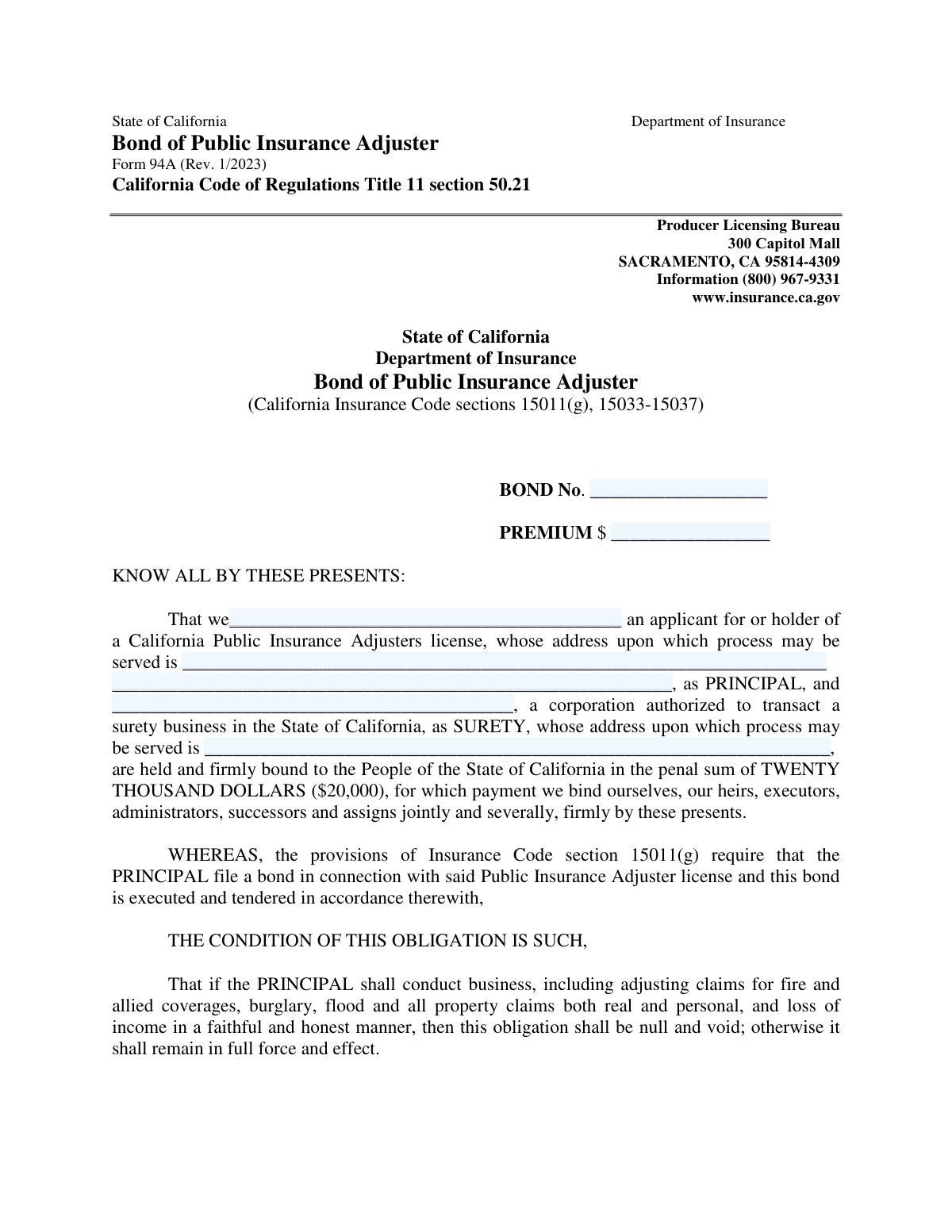
Form 94A is a legal surety bond agreement between a public insurance adjuster (the Principal), a surety company, and the State of California. It establishes a $20,000 bond as a financial guarantee that the adjuster will conduct their business honestly and ethically, as required for licensing under the California Insurance Code. This form is crucial for consumer protection, providing a recourse if the adjuster acts improperly. Today, this form can be filled out quickly and accurately using AI-powered services like Instafill.ai, which can also convert non-fillable PDF versions into interactive fillable forms.
Form 94A is part of the insurance forms category on Instafill.
Our AI automatically handles information lookup, data retrieval, formatting, and form filling.
It takes less than a minute to fill out Form 94A using our AI form filling.
Securely upload your data. Information is encrypted in transit and deleted immediately after the form is filled out.

Form specifications

Form name: Form 94A, Bond of Public Insurance Adjuster
Number of fields: 18
Number of pages: 3
Language: English
main-image

Instafill Demo: How to fill out PDF forms in seconds with AI

How to Fill Out Form 94A Online for Free in 2026

Are you looking to fill out a FORM 94A form online quickly and accurately? Instafill.ai offers the #1 AI-powered PDF filling software of 2026, allowing you to complete your FORM 94A form in just 37 seconds or less.
Follow these steps to fill out your FORM 94A form online using Instafill.ai:
  1. 1 Navigate to Instafill.ai and upload or select the California Form 94A, Bond of Public Insurance Adjuster.
  2. 2 Provide your information as the Principal, including your full legal name and the address for service of process, letting the AI populate the correct fields.
  3. 3 Enter the details for the Surety, including the full corporate name and their designated service-of-process address in California.
  4. 4 Input the specific bond details, such as the Bond Number and the Premium amount, into the designated fields.
  5. 5 Review all the information auto-filled by the AI to ensure accuracy and completeness, making any necessary corrections.
  6. 6 Date and sign the form as the Principal. The Surety's representative will also need to date, sign, and provide their certification.
  7. 7 Download the completed form and submit it to the California Department of Insurance's Producer Licensing Bureau as part of your licensing application or renewal.

Our AI-powered system ensures each field is filled out correctly, reducing errors and saving you time.

Why Choose Instafill.ai for Your Fillable Form 94A Form?

Speed

Complete your Form 94A in as little as 37 seconds.

Up-to-Date

Always use the latest 2026 Form 94A form version.

Cost-effective

No need to hire expensive lawyers.

Accuracy

Our AI performs 10 compliance checks to ensure your form is error-free.

Security

Your personal information is protected with bank-level encryption.

Frequently Asked Questions About Form Form 94A

This form is used to file a mandatory $20,000 surety bond with the State of California. This bond is a requirement for obtaining or maintaining a Public Insurance Adjuster license and ensures the adjuster operates in a faithful and honest manner.

Any individual or business entity applying for or currently holding a California Public Insurance Adjuster license must complete this form. It is a legal requirement for licensure under the California Insurance Code.

The 'Principal' is the public insurance adjuster applying for or holding the license. The 'Surety' is the insurance company that is issuing the bond and is authorized to transact surety business in California.

The required penal sum of the bond is twenty thousand dollars ($20,000), as stated clearly on the form.

Your surety company will provide you with the unique Bond Number and the premium amount you paid for the bond. You must enter this information on the form exactly as it was provided to you.

You must provide a complete physical street address in California where legal documents can be officially delivered. This cannot be a P.O. Box.

The bond is continuous and runs concurrently with your license period and any renewals. It remains in effect until it is formally canceled by the Surety, which requires a 30-day notice to the Insurance Commissioner.

The completed form should be submitted to the Producer Licensing Bureau at the address listed on the form: 300 Capitol Mall, Sacramento, CA 95814-4309.

The form must be signed by both the Principal (the public adjuster) and an authorized representative of the Surety company. The Surety's representative must also sign a separate perjury declaration on the form.

Yes, services like Instafill.ai use AI to help you accurately auto-fill form fields with your saved information. This can save time and help prevent common errors.

To use Instafill.ai, you would upload the Form 94A PDF to the platform. The AI will identify the fields, allowing you to quickly populate your information and complete the form digitally before printing it for the required signatures.

If you have a non-fillable PDF, you can use a service like Instafill.ai. It can convert flat, non-interactive PDFs into fillable forms that you can complete on your computer.

If the Surety cancels the bond, they must give 30 days' notice to the Commissioner. Your license will no longer be compliant without a valid bond, and the Surety remains liable for any claims that arose before the cancellation became effective.

Compliance Form 94A
Validation Checks by Instafill.ai

1
Bond Number Presence and Format
This check verifies that the 'Bond No.' field is not empty and contains only allowed characters (letters, numbers, hyphens). It is essential for uniquely identifying the bond within the state's system. If the field is empty or contains invalid characters like spaces or symbols, the submission will be rejected for lacking a valid, trackable identifier.
2
Bond Premium Amount Format
Validates that the 'PREMIUM $' field contains a numeric value formatted to two decimal places (e.g., 1500.00), without any currency symbols or commas. This ensures data consistency for financial records and automated processing. An incorrectly formatted value will trigger an error and require the user to correct the entry before submission.
3
Principal Name Completeness
Ensures the 'Name of Principal' field is populated with the full legal name of the adjuster or adjusting firm. This field is mandatory as it legally identifies the party being bonded. A submission with a missing Principal name is incomplete and will be rejected, as the bond cannot be associated with a specific licensee.
4
Principal Address is a Valid California Address
This check validates that the Principal's service-of-process address is a complete, standard-formatted address located within California, specifically checking that the state is 'CA'. This is a legal requirement to ensure that legal notices can be reliably served within the state's jurisdiction. Submissions with non-California or incomplete addresses will be blocked.
5
Surety is an Authorized California Insurer
This validation cross-references the 'Name of Surety' against the official Department of Insurance list of corporations authorized to transact surety business in California. This is a critical check to ensure the bond is legally valid and backed by a qualified entity. If the surety is not on the approved list, the bond is considered invalid, and the form submission will be rejected.
6
Surety Address is a Valid California Address
Verifies the Surety's service-of-process address is a complete and valid address within the State of California. Similar to the Principal's address, this is a statutory requirement for legal service. The system will reject submissions where the Surety's address is outside California or improperly formatted, as it would invalidate a key legal provision of the bond.
7
Principal Name Consistency
This check confirms that the name entered in the 'Name of Principal' field at the beginning of the form matches the 'Name of Public Adjuster' in the signature block. This ensures the entity identified as the Principal is the same one executing the bond. A mismatch indicates a potential clerical error or fraud and will result in a validation failure.
8
Surety Name Consistency
Validates that the 'Name of Surety' provided in the main body of the form is identical to the 'Name of Surety' listed in the signature area. This maintains consistency and confirms the identity of the surety company throughout the legal document. Discrepancies will cause the form to be flagged for review and correction.
9
Principal and Surety Signature Date Validity
This check ensures that both 'Dated' fields in the signature blocks for the Principal and Surety contain valid, logical dates that are not in the future. The dates establish when the legal obligations were executed. A future date is nonsensical, and an invalid format prevents proper record-keeping, so either will cause the submission to fail.
10
Logical Date Sequencing
Verifies that the signature dates follow a logical order: the Surety's signature date must be on or after the Principal's signature date. This sequence reflects the proper execution process where the principal first agrees to the terms, followed by the surety guaranteeing them. An illogical date sequence (e.g., surety signing before the principal) will invalidate the submission.
11
Signator Information Completeness
This validation ensures that for every signature provided by the Principal and Surety, the corresponding 'Name and Title of Signator' field is also filled out. This information is crucial for verifying that the individual signing the bond has the legal authority to bind the company. A missing name or title will render the signature's authority questionable and cause the submission to be rejected as incomplete.
12
Perjury Declaration Location and Date Validity
This check confirms the perjury declaration was executed in California and on a valid date. It validates that the 'Executed in' field contains a city and 'California' (or 'CA'), and the 'on (date)' field is a valid date that is on or after the bond's signature dates. This is required to certify the bond's execution under California law, and failure to comply will invalidate the declaration and the form.

Common Mistakes in Completing Form 94A

Using an Incorrect Principal Name

Applicants often enter a DBA ('doing business as') name or a common abbreviation instead of the full legal name of the individual or business entity. This mismatch with official licensing records will cause the form to be rejected. To avoid this, ensure the name entered exactly matches the one on your California Public Insurance Adjuster license application or existing license.

Providing an Invalid Service-of-Process Address

A common error is listing a P.O. Box or an incomplete address for the Principal or Surety. The form requires a full physical street address where legal documents can be physically delivered, so a P.O. Box is unacceptable and will lead to rejection. Always provide a complete street address, including any suite number, city, state, and ZIP code to ensure compliance.

Improper Formatting of the Bond Premium Amount

The instructions specify entering the premium as a numeric value without commas or a dollar sign (e.g., '1500.00'), but many people instinctively include them. This formatting error can cause data entry issues and processing delays. Double-check the field to ensure only numbers and a decimal point are used, as specified.

Entering an Incorrect Surety Company Name

Filers may use a well-known brand name or the name of a parent company for the surety, rather than the exact legal corporate name authorized to transact surety business in California. This discrepancy can invalidate the bond. You must verify and enter the surety's name precisely as it appears on its California certificate of authority.

Missing or Incorrect Signatory Titles

Signatures for the Principal and Surety are often submitted without the required name and title of the person signing (e.g., 'John Doe, President' or 'Jane Smith, Attorney-in-Fact'). A signature without a title is incomplete and may render the bond legally void, requiring resubmission. Always ensure the person signing clearly prints their name and official title in the designated space.

Incomplete Perjury Declaration Section

The certification section at the bottom is frequently left incomplete, with the city, state, or date of execution missing. This section is a sworn statement, and omitting any part of it, including the signature of the Surety's Attorney-in-Fact, invalidates the entire bond. Carefully fill out every field in this section to prevent automatic rejection.

Using an Out-of-State Surety Address

The form specifically requires the Surety's California address for service of process, but applicants sometimes provide the address for the Surety's national corporate headquarters. This will cause the bond to be rejected as it does not meet the state's legal requirements for service. Confirm with the surety that you are using their designated California agent for service of process address.

Illegible or Incomplete Bond Number

The bond number is a unique identifier, but it is often written illegibly or incompletely, with missing letters, hyphens, or leading zeros. An incorrect bond number prevents the Department of Insurance from tracking and verifying the bond, leading to processing delays. To prevent this, carefully transcribe the exact number provided by the surety company.

Mismatched or Missing Execution Dates

The form has separate date fields for the Principal's signature, the Surety's signature, and the perjury declaration, which can be confusing. Applicants may leave these blank, use different dates inconsistently, or enter a date that doesn't make sense, causing rejection. Ensure all date fields are filled in correctly and are consistent with the timeline of the bond's execution.

Failure to Use a Fillable Version

This form is often distributed as a flat, non-fillable PDF, leading to illegible handwritten entries and mistakes. This can cause significant processing delays or rejection if the information cannot be read accurately. Using a tool like Instafill.ai can convert the non-fillable PDF into an interactive, fillable form, ensuring all entries are clear, properly formatted, and validated to prevent common errors.
Saved over 80 hours a year

“I was never sure if my IRS forms like W-9 were filled correctly. Now, I can complete the forms accurately without any external help.”

Kevin Martin Green

Your data stays secure with advanced protection from Instafill and our subprocessors

Robust compliance program

Transparent business model

You’re not the product. You always know where your data is and what it is processed for.

ISO 27001, HIPAA, and GDPR

Our subprocesses adhere to multiple compliance standards, including but not limited to ISO 27001, HIPAA, and GDPR.

Security & privacy by design

We consider security and privacy from the initial design phase of any new service or functionality. It’s not an afterthought, it’s built-in, including support for two-factor authentication (2FA) to further protect your account.

Fill out Form 94A with Instafill.ai

Worried about filling PDFs wrong? Instafill securely fills form-94a-bond-of-public-insurance-adjuster forms, ensuring each field is accurate.