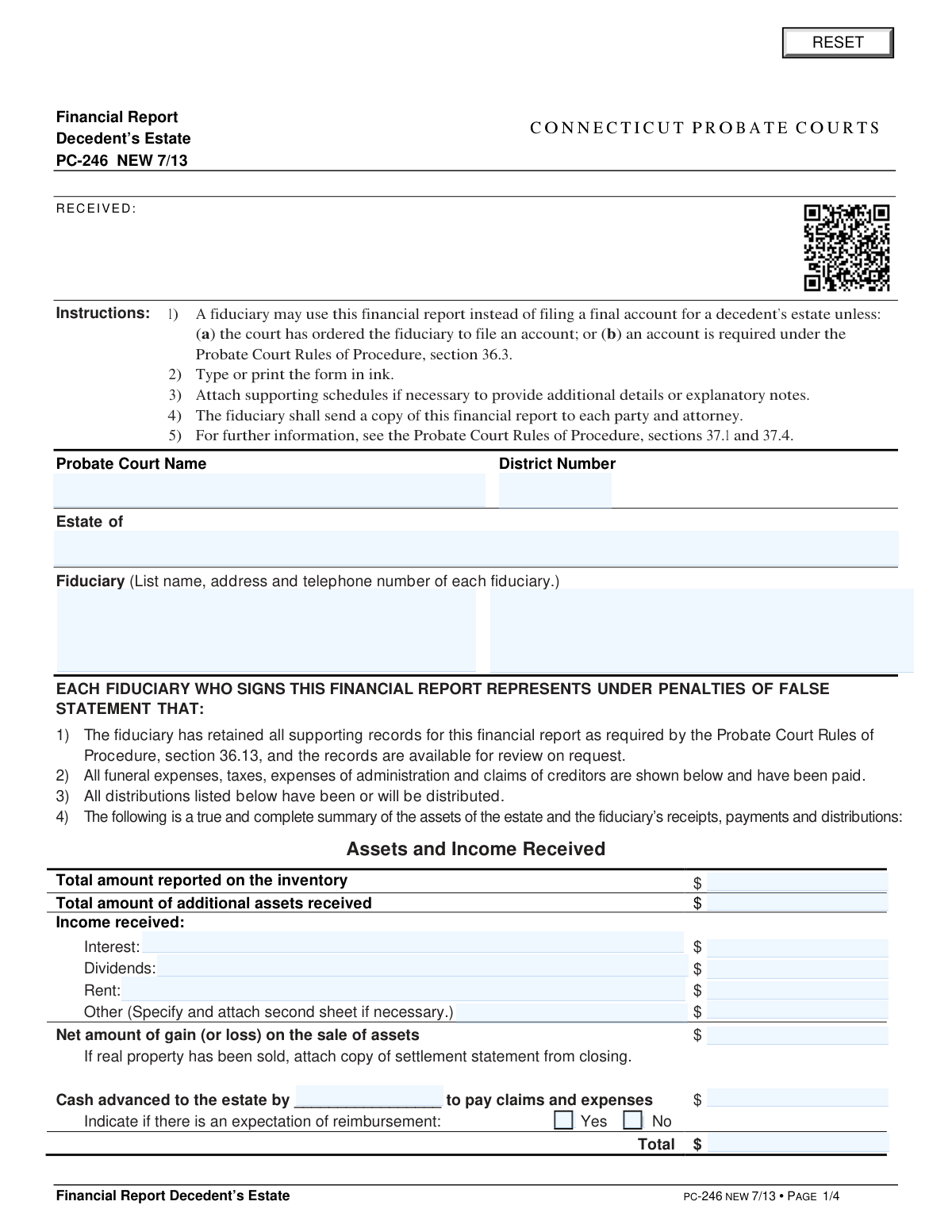
Yes! You can use AI to fill out Form PC-246, Financial Report, Decedent's Estate

Connecticut Form PC-246 is a financial report filed by a fiduciary to summarize the financial activity of a decedent's estate. It details all assets, income, expenses, and distributions, serving as an alternative to a final account in many cases. This document provides the probate court and interested parties with a clear overview of the estate's management. Today, this form can be filled out quickly and accurately using AI-powered services like Instafill.ai, which can also convert non-fillable PDF versions into interactive fillable forms.
PC-246 is part of the estate forms, financial forms, NJ state forms, PA state forms and state ID forms categories on Instafill.
Our AI automatically handles information lookup, data retrieval, formatting, and form filling.
It takes less than a minute to fill out PC-246 using our AI form filling.
Securely upload your data. Information is encrypted in transit and deleted immediately after the form is filled out.

Form specifications

Form name: Form PC-246, Financial Report, Decedent's Estate
Number of fields: 122
Number of pages: 4
Language: English
main-image

Instafill Demo: How to fill out PDF forms in seconds with AI

How to Fill Out PC-246 Online for Free in 2026

Are you looking to fill out a PC-246 form online quickly and accurately? Instafill.ai offers the #1 AI-powered PDF filling software of 2026, allowing you to complete your PC-246 form in just 37 seconds or less.
Follow these steps to fill out your PC-246 form online using Instafill.ai:
  1. 1 Navigate to Instafill.ai and upload or select the Form PC-246, Financial Report, Decedent's Estate.
  2. 2 Provide the probate court details, the name of the decedent's estate, and the fiduciary's information.
  3. 3 Enter all financial data for the estate, including assets from the inventory, additional income received, and any gains or losses from sales.
  4. 4 Detail all payments and expenses, such as funeral costs, administration fees, taxes, and creditor claims.
  5. 5 List all distributions already made and any proposed distributions to beneficiaries, specifying the assets and their fair market value.
  6. 6 Review the entire report for accuracy, then have the fiduciary (or fiduciaries) sign and date the form, affirming the information is true under penalties of false statement.
  7. 7 Complete the certification section to confirm copies were sent to all parties and submit the form to the appropriate Connecticut Probate Court.

Our AI-powered system ensures each field is filled out correctly, reducing errors and saving you time.

Why Choose Instafill.ai for Your Fillable PC-246 Form?

Speed

Complete your PC-246 in as little as 37 seconds.

Up-to-Date

Always use the latest 2026 PC-246 form version.

Cost-effective

No need to hire expensive lawyers.

Accuracy

Our AI performs 10 compliance checks to ensure your form is error-free.

Security

Your personal information is protected with bank-level encryption.

Frequently Asked Questions About Form PC-246

This form is used by a fiduciary to provide a summary of a decedent's estate's financial activity, including assets, income, payments, and distributions. It can serve as a simpler alternative to filing a full final account with the Connecticut Probate Court.

The fiduciary of the decedent's estate, such as an executor or administrator, is responsible for completing, signing, and filing this form.

No, you may not use this form if the court has ordered you to file a formal account or if an account is required under the Probate Court Rules of Procedure, section 36.3.

You must file the original with the Probate Court and send a copy of the completed financial report to each party and attorney involved in the estate.

The 'Distributions Already Made' section is for assets that have already been given to beneficiaries. The 'Proposed Distributions' section is for assets you plan to distribute after the court approves this report.

If real property has been sold, you must report the net gain or loss on the form and attach a copy of the settlement statement from the closing.

Report the amount in the 'Cash advanced to the estate' line, specify who advanced the money, and check the box to indicate whether you expect to be reimbursed by the estate.

Yes, by signing the form you certify that you have retained all supporting records as required by court rules and that they are available for review upon request.

You are requesting the court's approval of the financial report, approval of any proposed distributions, and a release from liability for all items shown in the report.

Yes, services like Instafill.ai use AI to accurately auto-fill form fields from your data, which can save you time and help reduce errors.

You can use a service like Instafill.ai to upload the PC-246 form and fill it out interactively online. This allows you to type directly into the fields, save your progress, and easily download the completed document.

Services like Instafill.ai can convert flat, non-fillable PDFs into interactive forms. Simply upload the PC-246, and the tool will make the fields editable for you to complete on your computer.

Check this box if the estate is distributing real estate to a beneficiary. This requests the court to issue a certificate needed to officially record the property's change of ownership on the land records.

Compliance PC-246
Validation Checks by Instafill.ai

1
Core Financial Balancing Equation
This validation ensures that the total from 'Assets and Income Received' equals the sum of the totals from 'Payments', 'Distributions Already Made', 'Proposed Distributions', and 'Reserve'. This is the most critical check for financial accuracy, confirming that all assets are accounted for. A failure indicates a mathematical imbalance in the report, which would lead to its rejection by the court until the discrepancy is resolved.
2
Assets and Income Total Verification
Verifies that the 'Total' amount in the 'Assets and Income Received' section is the correct sum of all preceding line items, including inventory, additional assets, income, and gains. This check prevents simple arithmetic errors at the source of the accounting. If the user-entered total does not match the calculated sum, the form will be considered inaccurate and require correction.
3
Payments Total Verification
Checks that the 'Total' amount in the 'Payments' section correctly sums all listed expenses, including funeral, administration, taxes, and creditor claims. This ensures the summary of expenditures is accurate and matches the itemized list. An incorrect total would misrepresent the estate's expenses and cause the report to be rejected for inaccuracy.
4
Required Fiduciary Information
Ensures that the name, address, and telephone number for at least one fiduciary are completely filled out. The fiduciary is the legally responsible party, and their complete contact information is mandatory for court records and communication. An incomplete entry would halt processing as the court cannot validate the identity and contact details of the person submitting the report.
5
Probate District Number Format
Validates that the 'District Number' field contains only numeric characters. This number is a key identifier for routing the document to the correct probate court jurisdiction. Submitting a form with an invalid or non-numeric district number would cause processing delays or misfiling of the case.
6
Monetary Field Numeric Format
This check scans all fields intended for dollar amounts to ensure they contain only valid, non-negative numeric data. This is crucial for ensuring that all financial calculations performed by the system are accurate and not corrupted by invalid data types. A failure would prevent the form from being processed and require the user to correct the invalid entries.
7
Conditional Reimbursement Expectation
This rule ensures that if a dollar amount greater than zero is entered in the 'Amount advanced to the estate' field, either the 'Yes' or 'No' checkbox for reimbursement expectation must be selected. This is important for clarity on whether the advance is a gift or a loan to be repaid by the estate. Failure to indicate the expectation leaves a critical financial detail ambiguous and would require clarification.
8
Distributee Row Completeness
For any row in the 'Distributions Already Made' or 'Proposed Distributions' sections, if a 'Fair Market Value' is entered, the corresponding 'Name of Distributee' and 'Assets Distributed' fields must not be empty. This ensures that every financial distribution is clearly linked to a recipient and a specific asset. An incomplete row would create an unverifiable entry, making the report's accounting of distributions incomplete.
9
Signature Date Presence and Validity
Validates that for each fiduciary signature block, if the 'Type or Print Name' field is filled, the corresponding 'Date' field must also be filled with a valid date. The date must not be in the future. This confirms when the fiduciary attested to the accuracy of the report, which is a legal requirement. A missing or invalid date would invalidate the signature and render the submission unacceptable.
10
Distributions Subtotal and Total Calculation
Verifies that each 'Subtotal' field in the distributions sections is the correct sum of the line items above it, and that the final 'Total' is the sum of all subtotals. This ensures the overall summary of distributions is arithmetically correct from the item level up to the grand total. An error here would misstate the total value of assets distributed from the estate.
11
Header Information Completeness
Ensures that the 'Probate Court Name', 'District Number', and 'Estate of' fields are all filled in. These fields are the primary identifiers for the case and are essential for correct filing and record-keeping. A submission missing any of this core information would be rejected immediately as it cannot be assigned to the correct case file.
12
Certification Signature and Date
Validates that if any names and addresses are listed in the 'Certification' section, the 'Signature of fiduciary or attorney' and 'Date' fields at the bottom of that section are completed. This confirms who certified the mailing and when it occurred. An incomplete certification section calls into question whether all parties were properly notified as required.

Common Mistakes in Completing PC-246

Using Incorrect Asset Values for Distributions

Filers often mistakenly use the asset's value from the original inventory or date of death when listing distributions. The form explicitly requires the 'fair market value on the date of distribution,' which can be different due to market fluctuations. This error leads to an inaccurate accounting of the estate's final disposition, potentially causing the report to be rejected by the court and requiring a corrected filing. To avoid this, fiduciaries must obtain accurate valuations for each asset as of the specific date it was transferred to the beneficiary.

Inaccurate or Unbalanced Financial Calculations

The form contains numerous fields for subtotals and totals under Assets, Payments, and Distributions, which must be calculated manually. Simple arithmetic errors are common and result in a report that doesn't balance (i.e., Total Assets and Income do not equal Total Payments + Total Distributions + Reserve). An unbalanced report will be rejected, delaying the closing of the estate. Double-checking all calculations is critical; using a spreadsheet or a tool with built-in calculation features can prevent these mistakes.

Forgetting to Attach Required Supporting Documents

The instructions mention attaching supporting schedules for detailed entries (like 'Other' expenses) and a copy of the settlement statement if real property was sold. Fiduciaries frequently overlook these requirements, submitting an incomplete package. This results in delays as the court will issue a notice requesting the missing documentation before the report can be approved. To prevent this, create a checklist of all required attachments before submission.

Vague or Incomplete Descriptions

Fields such as 'Other expenses', 'Assets Distributed', or 'Assets to be Distributed' are often filled with vague terms like 'miscellaneous expense' or 'personal items'. The court requires specific descriptions for transparency and to ensure all transactions are appropriate (e.g., 'Final electricity bill for decedent's residence' or '100 shares of XYZ Corp. stock, Account #12345'). Lack of detail can lead to questions from the court or beneficiaries, causing delays. Always provide clear, identifiable descriptions for every line item.

Failing to Complete the Certification Section

After filling out the entire multi-page report, it is common for the fiduciary or their attorney to miss the final 'Certification' section on the last page. This section is a legally required statement certifying that copies of the report were sent to all interested parties. An unsigned or missing certification will render the filing incomplete and halt the approval process until a properly completed form is submitted.

Mismatching Information from Other Court Forms

The report requires filers to input values from other documents, such as the 'Total amount reported on the inventory' and the 'Total amount of claims as reported on PC-237'. A frequent mistake is entering a number that does not precisely match the figure on the referenced document, often due to typos or using a draft version. This inconsistency immediately flags the report for review and likely rejection, as it breaks the official accounting chain. It is crucial to reference the final, court-filed versions of these other forms when completing this report.

Incomplete or Missing Fiduciary Signatures

When an estate has co-fiduciaries, both individuals are often required to sign the financial report. A common oversight is for only one fiduciary to sign, or for a signature to be missing a printed name or date. This invalidates the submission, as the court requires all appointed fiduciaries to attest to the accuracy of the report under penalties of false statement. Ensure all required signature blocks are properly signed, dated, and printed before filing.

Omitting Will References for Distributions

For estates governed by a will, the 'Distributions' sections include a column to 'specify section providing for distribution'. Many fiduciaries leave this column blank, either because they don't know the specific article or assume it's unnecessary. The court uses this reference to verify that distributions are being made in accordance with the decedent's final wishes. Omitting this information forces the court clerk to cross-reference the will themselves, causing delays and potentially leading to questions if the distribution plan isn't immediately clear.

Confusing 'Distributions Already Made' with 'Proposed Distributions'

The form has two distinct sections for distributions: those already completed and those that are planned but not yet executed. Fiduciaries sometimes list all distributions in one section or mix them up, creating confusion about the current state of the assets. This can lead to incorrect approvals or require clarification, delaying the final decree. Carefully segregate distributions based on whether the beneficiary has actually received the asset as of the report's date.

Illegible Handwriting or Using a Non-Fillable PDF

The instructions require the form to be typed or printed in ink, but many people still fill it out by hand, sometimes illegibly. This can lead to data entry errors by court staff and potential rejection. Furthermore, since this form is often provided as a non-fillable PDF, manual entry is prone to errors. To avoid this, it's best to use a fillable version of the form. AI-powered tools like Instafill.ai can convert flat PDFs into fillable forms and help ensure all data is entered clearly and accurately, preventing these common submission issues.
Saved over 80 hours a year

“I was never sure if my IRS forms like W-9 were filled correctly. Now, I can complete the forms accurately without any external help.”

Kevin Martin Green

Your data stays secure with advanced protection from Instafill and our subprocessors

Robust compliance program

Transparent business model

You’re not the product. You always know where your data is and what it is processed for.

ISO 27001, HIPAA, and GDPR

Our subprocesses adhere to multiple compliance standards, including but not limited to ISO 27001, HIPAA, and GDPR.

Security & privacy by design

We consider security and privacy from the initial design phase of any new service or functionality. It’s not an afterthought, it’s built-in, including support for two-factor authentication (2FA) to further protect your account.

Fill out PC-246 with Instafill.ai

Worried about filling PDFs wrong? Instafill securely fills form-pc-246-financial-report-decedents-estate forms, ensuring each field is accurate.