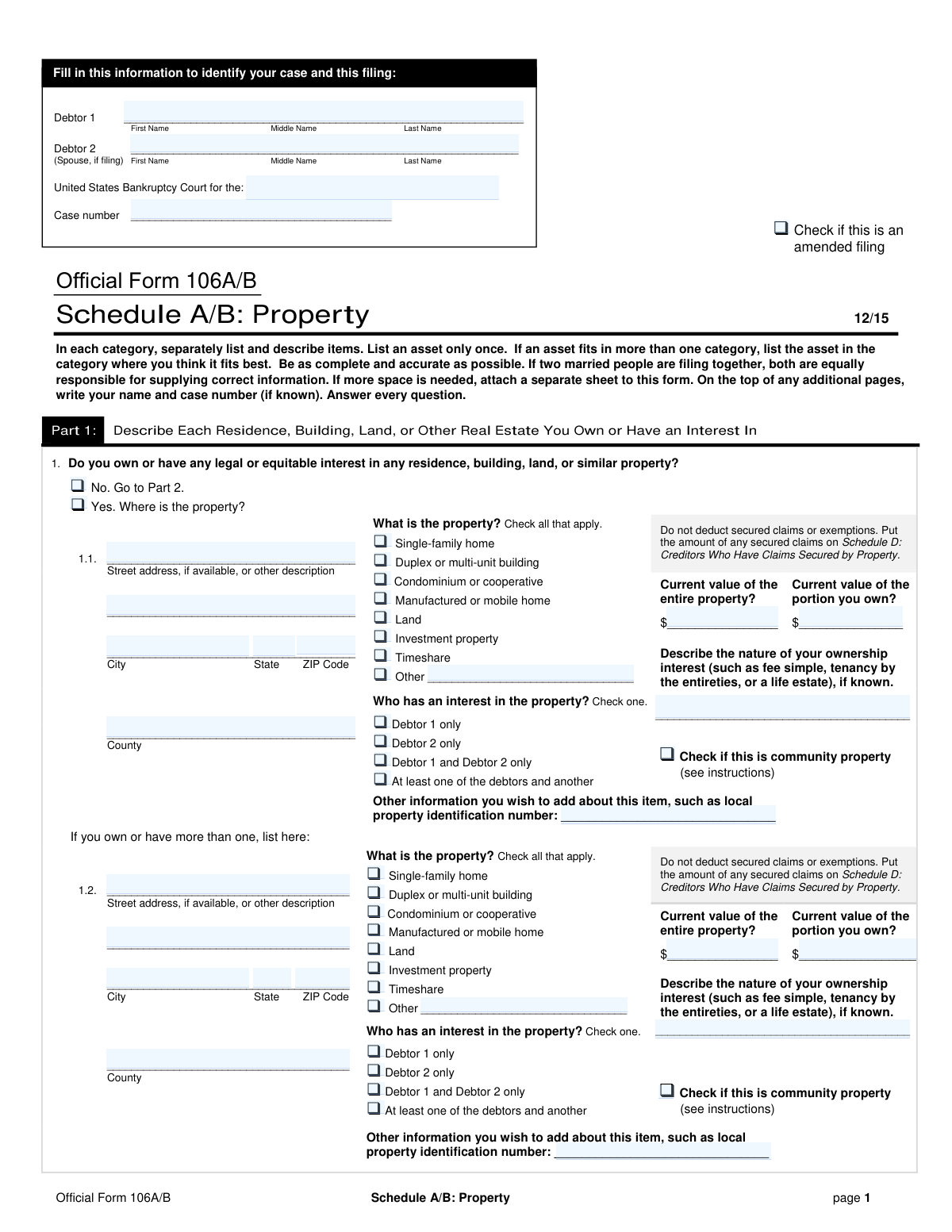
Yes! You can use AI to fill out Official Form 106A/B, Schedule A/B: Property
Schedule A/B: Property is a critical document in bankruptcy proceedings where the debtor must provide a comprehensive inventory of all their assets. This includes real estate, vehicles, financial accounts, household goods, business interests, and any other property of value. The court and creditors use this information to understand the scope of the debtor's estate. Today, this form can be filled out quickly and accurately using AI-powered services like Instafill.ai, which can also convert non-fillable PDF versions into interactive fillable forms.
Schedule A/B is part of the
property forms category on Instafill.
Our AI automatically handles information lookup, data retrieval, formatting, and form filling.
It takes less than a minute to fill out Schedule A/B using our AI form filling.
Securely upload your data. Information is encrypted in transit and deleted immediately after the form is filled out.
Form specifications
| Form name: | Official Form 106A/B, Schedule A/B: Property |
| Number of fields: | 462 |
| Number of pages: | 10 |
| Language: | English |
More forms in Property forms
Instafill Demo: How to fill out PDF forms in seconds with AI
How to Fill Out Schedule A/B Online for Free in 2026
Are you looking to fill out a SCHEDULE A/B form online quickly and accurately? Instafill.ai offers the #1 AI-powered PDF filling software of 2026, allowing you to complete your SCHEDULE A/B form in just 37 seconds or less.
Follow these steps to fill out your SCHEDULE A/B form online using Instafill.ai:
- 1 Navigate to Instafill.ai and upload or select the Schedule A/B: Property form.
- 2 Provide your case identification details, including debtor names, the bankruptcy court district, and the case number.
- 3 Use the guided interface to list all your real estate interests in Part 1, including addresses, values, and ownership details.
- 4 Proceed through Parts 2, 3, and 4 to detail all personal property, such as vehicles, household goods, electronics, financial accounts, and retirement funds.
- 5 If applicable, complete Parts 5 and 6 to disclose any business-related property, farm assets, or commercial fishing equipment.
- 6 Carefully review all the information populated by the AI, verify the automatically calculated totals for each section, and make any necessary edits.
- 7 Electronically sign and download the completed Schedule A/B, ready for filing with the bankruptcy court.
Our AI-powered system ensures each field is filled out correctly, reducing errors and saving you time.
Why Choose Instafill.ai for Your Fillable Schedule A/B Form?
Speed
Complete your Schedule A/B in as little as 37 seconds.
Up-to-Date
Always use the latest 2026 Schedule A/B form version.
Cost-effective
No need to hire expensive lawyers.
Accuracy
Our AI performs 10 compliance checks to ensure your form is error-free.
Security
Your personal information is protected with bank-level encryption.
Frequently Asked Questions About Form Schedule A/B
This form, known as Schedule A/B, is used in bankruptcy cases to list all of your property and assets. You must declare everything you own or have a legal interest in, from real estate and vehicles to household goods and financial accounts.
Anyone filing for bankruptcy (referred to as 'Debtor 1') must complete this form. If you are filing jointly with a spouse, they will be listed as 'Debtor 2' and their assets must be included as well.
The 'Current Value of Entire Property' is the total market value of the asset, such as a house or car. The 'Current Value of Portion You Own' is the value of just your ownership share, which is important if you co-own the asset with someone else.
For each category of property, such as 'Real Estate' or 'Vehicles', there is a 'No' checkbox. Simply check the 'No' box if you do not own any items in that category and move to the next section.
You must list the full address and value of the property. Then, check the box for 'At least one of the debtors and another' to indicate shared ownership and specify the value of only your portion in the designated field.
Check the 'Amended filing' box if you are submitting an updated or corrected version of a Schedule A/B that you have already filed with the court. This indicates that the new form replaces the previous one.
Community property is a state-law concept where assets acquired during a marriage are considered jointly owned by both spouses. If you live in a community property state, you should check this box for any applicable assets.
Yes, you must list all personal and household items, but you can often group them into categories like 'Household Goods and Furnishings' or 'Clothes'. Provide a general description and a reasonable, good-faith estimate of their current resale value.
Yes, you must list all retirement and pension accounts in the 'Financial Assets' section. You will need to provide the name of the institution and the current value of the account, even though many retirement funds are protected from creditors in bankruptcy.
The form provides space for a limited number of items in each category. If you need to list more, you should attach additional pages with the same information, clearly labeling which section the information belongs to, and include the totals in the summary section.
Yes, services like Instafill.ai use AI to help you accurately auto-fill form fields, which can save significant time and reduce errors on complex forms like this one.
You can use a service like Instafill.ai to fill out the form online. Simply upload the PDF, and the platform will make it an interactive, fillable form that you can complete and save digitally.
If you have a non-fillable or 'flat' PDF, you can use a tool like Instafill.ai to convert it into an interactive, fillable form. This allows you to easily type your information directly into the fields.
This section is for any situation where you have a right to sue someone for money, even if you haven't filed a lawsuit yet. This includes potential claims from car accidents, personal injury, employment disputes, or unpaid loans you made to others.
Compliance Schedule A/B
Validation Checks by Instafill.ai
1
Conditional Requirement for Real Property Details
This check ensures that if the user selects 'Yes' for the 'Own Real Estate Question', they must provide details for at least the first property. This includes mandatory fields like 'Property Street Address Line 1', 'Current Value of Entire Property', and at least one 'Property Type'. This prevents submitting a form that indicates property ownership without specifying what that property is, which would make the filing incomplete and subject to rejection.
2
Asset Value Consistency Check
This validation verifies that for any given asset (such as real property or a vehicle), the 'Current Value of Portion You Own' is not greater than the 'Current Value of Entire Property'. This is a logical check to prevent data entry errors and ensure the debtor's share of an asset is reported accurately. A failure would indicate a mathematical impossibility and require the user to correct the values before submission.
3
Mutually Exclusive Ownership Selection
For each asset listed, this check confirms that only one ownership status checkbox ('Debtor 1 only', 'Debtor 2 only', 'Debtor 1 and Debtor 2 only', 'At least one of the debtors and another') is selected. Selecting multiple conflicting ownership statuses for a single asset is logically impossible and would create ambiguity in legal ownership. The validation forces the user to clarify the ownership structure for each asset.
4
Requirement for 'Other' Specification
This validation ensures that whenever a user checks an 'Other' box for a categorical list (like 'Property Type' or 'Vehicle Type'), the corresponding text field to specify the 'Other' type is not left blank. This is crucial for providing complete and understandable information to the court. If the specification is missing, the filing lacks necessary detail, and the user will be prompted to provide the required description.
5
Yes/No Question Exclusivity
This check validates that for every question presented with a 'Yes' and a 'No' checkbox pair (e.g., 'Do you own any vehicles?'), exactly one of the two options is selected. Submitting a form with both or neither option checked for a required question would render the response invalid and ambiguous. This rule ensures a clear and definitive answer is provided for all binary questions.
6
Debtor 2 Field Logic for Single Filers
This validation checks if the 'Debtor 2 Full Name' field is empty. If it is, indicating a single-debtor filing, the system should flag or prevent the use of any fields or checkboxes related to Debtor 2, such as 'Debtor 2 only' ownership. This prevents inconsistencies and errors in filings where a second debtor does not exist, ensuring the data accurately reflects the single-filer status.
7
Grand Total Calculation Verification
This check performs a calculation to verify that the 'Total of All Property on Schedule A/B' (Line 63) correctly equals the sum of the 'Total value of portion you own (Part 1 total)' and the 'Total personal property' (Line 62). This is a critical integrity check to ensure the final declared asset total is mathematically correct. If the sum does not match the entered total, it indicates a calculation error on the form that must be corrected.
8
Case Number Format Validation
This validation ensures the 'Case number' field conforms to the standard format required by bankruptcy courts, which is typically a pattern like YY-NNNNN (e.g., 23-12345). Proper formatting is essential for the court's electronic filing system to correctly identify and process the document. An invalid format could lead to the document being rejected or misfiled, causing significant delays.
9
Business Ownership Percentage Range
This check validates that any value entered into an 'Ownership Percentage' field for a business or partnership is a numerical value between 0 and 100, inclusive. This ensures the percentage is logical and prevents nonsensical entries like negative numbers or values over 100. Accurate ownership percentages are critical for determining the value of the debtor's estate.
10
Vehicle Year Validity
This validation ensures that the 'Vehicle Year' field contains a valid 4-digit year. The check also confirms the year is not in the future and is not unreasonably old (e.g., before 1900), which would likely indicate a typo. This helps maintain data quality and ensures the vehicle information is plausible and accurate for valuation purposes.
11
Conditional Description Requirement
This check ensures that when a user selects 'Yes' for an asset category that requires a description (e.g., 'Electronics', 'Jewelry', 'Collectibles'), the corresponding description field is not left empty. Simply stating ownership without describing the item(s) provides incomplete information. This validation forces the user to provide the necessary details for the asset to be properly identified and valued.
12
ZIP Code Format Validation
This validation verifies that all 'Property ZIP Code' fields are entered in a valid format, either 5 digits (e.g., 90210) or 9 digits with a hyphen (e.g., 90210-1234). Correctly formatted ZIP codes are essential for address verification, location-based analysis, and ensuring legal notices are sent to the correct jurisdiction. An invalid format could lead to processing errors or returned mail.
13
Header Information Completeness
This check verifies that the core identification fields, 'Debtor 1' and 'Case number', are present on every page of the document where they are expected. These fields act as a header or footer to ensure that all pages of the submission are correctly associated with the right case, especially if pages are separated. Missing this information on any page could lead to the form being considered incomplete or pages being misattributed.
14
Conditional Section Activation
This validation ensures that if a primary section question is answered 'No' (e.g., 'No' for 'Business-Related Property Interest'), all subsequent fields and questions within that section are disabled and/or cleared. Conversely, if 'Yes' is selected, the first required field in that section must be filled. This prevents users from providing data in irrelevant sections and ensures a logical flow through the form, reducing confusion and incomplete entries.
Common Mistakes in Completing Schedule A/B
Debtors often enter the same value in both the 'Current Value of Entire Property' and 'Current Value of Portion You Own' fields, especially for co-owned assets like a home or vehicle. This happens due to misunderstanding the distinction, which is crucial when a co-owner is not part of the bankruptcy. This error can misrepresent the value of the bankruptcy estate, leading to trustee objections and delays. To avoid this, carefully calculate your ownership percentage and apply it to the total market value to determine the value of your portion.
Many filers mistakenly list the purchase price, insurance replacement value, or an emotional value for items like vehicles and personal property instead of the required 'current market value'. The court requires the fair market value, which is what a willing buyer would pay for the item in its current condition (often similar to a private sale or 'garage sale' price). Overvaluing assets can complicate exemptions, while undervaluing them can be seen as an attempt to hide assets, risking dismissal of the case. Research similar used items for sale to get an accurate estimate.
It is very common to forget to list all sources of money, such as security deposits held by landlords or utilities, prepaid rent, and balances in digital wallets like PayPal, Venmo, or Cash App. While these amounts may seem small, they are considered assets and must be disclosed. Failure to report all assets, regardless of size, can lead to serious consequences, including denial of discharge. Systematically review all your financial relationships and accounts to ensure everything is listed.
This form requires the Debtor's name and case number to be entered at the top of multiple pages. Filers frequently fill this information out on the first page but forget to complete it on all subsequent pages. This administrative error can cause filing issues, as pages can become separated or misidentified by the court clerk. To prevent this, make it a final step to review every single page to ensure the header information is complete and consistent.
In sections for household goods, electronics, and collectibles, filers often write generic descriptions like 'Household items' or 'Electronics' with a single bulk value. The form requires more specific descriptions (e.g., 'Living room furniture,' 'Two laptops, one television,' 'Stamp collection'). Vague entries force the trustee to ask for more details, delaying the case. Itemizing property correctly ensures transparency and helps in applying exemptions properly.
Filers often struggle to correctly identify the legal ownership of an asset, especially in a marriage, and frequently misunderstand the 'Community property' checkbox. They may incorrectly mark an asset as jointly owned when it's legally separate, or fail to identify assets that are considered community property by state law. These errors can have significant legal consequences for what property is included in the bankruptcy estate. If unsure, it is critical to understand your state's laws or consult with legal counsel.
A debtor might believe that because a retirement account like a 401(k) or IRA is generally protected (exempt) in bankruptcy, it does not need to be listed. This is incorrect; all assets must be disclosed on Schedule A/B, and their exemption is claimed on a separate form. Omitting these accounts is a serious error that can jeopardize the entire bankruptcy case. Always list every account and its full value, then claim the appropriate exemption elsewhere.
When listing business-related property, individuals often overlook intangible assets because they don't have a physical form. This includes accounts receivable, customer lists, professional licenses, website domain names, and intellectual property like trademarks or copyrights. These items have value and are considered property of the estate. Failing to disclose them can be viewed as concealment and lead to severe penalties.
The form uses 'Yes/No' questions to determine if a section needs to be filled out (e.g., 'Do you own any real estate?'). A common mistake is to check 'No' but then proceed to fill in details in that section, or to check 'Yes' and leave the corresponding detail fields blank. This creates contradictory and confusing filings that require clarification. Carefully review your 'Yes/No' answers to ensure they align with the information you provide.
The form requires totaling the values from numerous sections to create a final summary of all assets. Manual addition across multiple pages and categories is highly susceptible to arithmetic errors. An incorrect total misrepresents the value of the estate and will be flagged by the trustee, requiring an amendment. Using a calculator and double-checking all totals is essential. AI-powered tools like Instafill.ai can eliminate these errors by performing calculations automatically and ensuring data consistency.
Saved over 80 hours a year
“I was never sure if my IRS forms like W-9 were filled correctly. Now, I can complete the forms accurately without any external help.”
Kevin Martin Green
Your data stays secure with advanced protection from Instafill and our subprocessors

Robust compliance program
Transparent business model
You’re not the product. You always know where your data is and what it is processed for.
ISO 27001, HIPAA, and GDPR
Our subprocesses adhere to multiple compliance standards, including but not limited to ISO 27001, HIPAA, and GDPR.
Security & privacy by design
We consider security and privacy from the initial design phase of any new service or functionality. It’s not an afterthought, it’s built-in, including support for two-factor authentication (2FA) to further protect your account.
Fill out Schedule A/B with Instafill.ai
Worried about filling PDFs wrong? Instafill securely fills official-form-106ab-schedule-ab-property forms, ensuring each field is accurate.