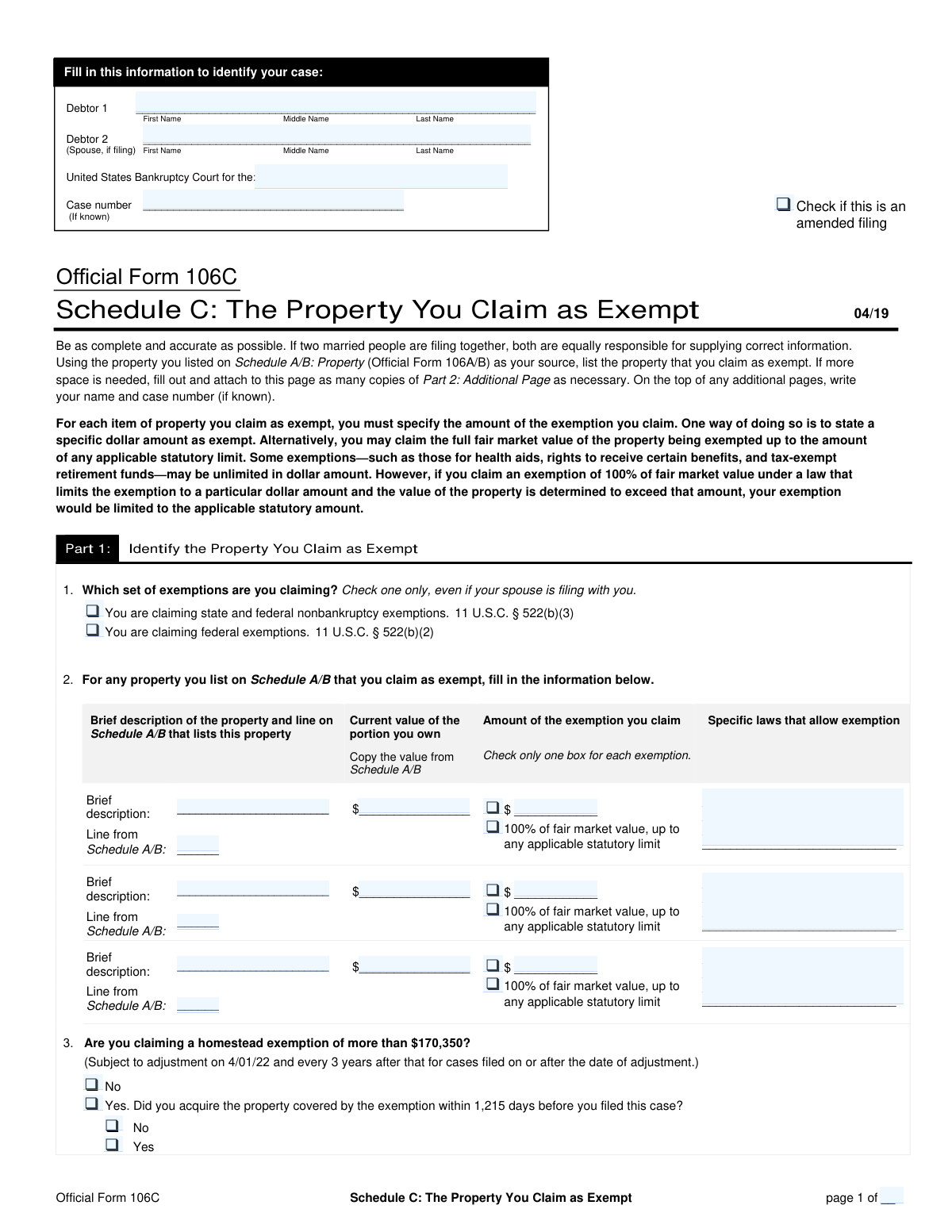
Yes! You can use AI to fill out Schedule C: The Property You Claim as Exempt

Schedule C is a crucial document filed in a bankruptcy case where the debtor lists all property they believe is legally protected (exempt) from being taken by the bankruptcy trustee to pay creditors. Properly claiming exemptions is vital for protecting essential assets like a home, car, or retirement savings, allowing the debtor a fresh start. Today, this form can be filled out quickly and accurately using AI-powered services like Instafill.ai, which can also convert non-fillable PDF versions into interactive fillable forms.
Schedule C is part of the property forms and VA claim forms categories on Instafill.
Our AI automatically handles information lookup, data retrieval, formatting, and form filling.
It takes less than a minute to fill out Schedule C using our AI form filling.
Securely upload your data. Information is encrypted in transit and deleted immediately after the form is filled out.

Form specifications

Form name: Schedule C: The Property You Claim as Exempt
Number of fields: 121
Number of pages: 2
Language: English
main-image

Instafill Demo: How to fill out PDF forms in seconds with AI

How to Fill Out Schedule C Online for Free in 2026

Are you looking to fill out a SCHEDULE C form online quickly and accurately? Instafill.ai offers the #1 AI-powered PDF filling software of 2026, allowing you to complete your SCHEDULE C form in just 37 seconds or less.
Follow these steps to fill out your SCHEDULE C form online using Instafill.ai:
  1. 1 Navigate to Instafill.ai and upload your Schedule C form, or select it from their library of official documents.
  2. 2 Enter your case identification details, including the debtor's name(s), case number, and the bankruptcy court district.
  3. 3 Select the appropriate exemption system you will be using by checking either the state or federal exemption box.
  4. 4 For each piece of property you are claiming as exempt, provide a brief description, its current value, and the corresponding line number from your Schedule A/B.
  5. 5 Specify the legal justification for each exemption by providing the specific law or statute citation that permits it.
  6. 6 Indicate the value of the exemption being claimed, whether it's a specific dollar amount or 100% of the fair market value up to the statutory limit.
  7. 7 Carefully review all the information entered for accuracy, then download the completed Schedule C, ready for filing with the court.

Our AI-powered system ensures each field is filled out correctly, reducing errors and saving you time.

Why Choose Instafill.ai for Your Fillable Schedule C Form?

Speed

Complete your Schedule C in as little as 37 seconds.

Up-to-Date

Always use the latest 2026 Schedule C form version.

Cost-effective

No need to hire expensive lawyers.

Accuracy

Our AI performs 10 compliance checks to ensure your form is error-free.

Security

Your personal information is protected with bank-level encryption.

Frequently Asked Questions About Form Schedule C

This form, Schedule C, is used in a bankruptcy case to list the property you are legally allowed to protect from creditors. This 'exempt' property generally cannot be taken by the bankruptcy trustee to pay your debts.

Any individual filing for bankruptcy (such as Chapter 7 or 13) must complete this form. It is a critical part of the bankruptcy petition that details which of your assets you intend to keep.

You must select either the state or federal exemption system; you cannot use both. The best choice depends on your state's specific laws and the types of property you own, so consulting a bankruptcy attorney for this decision is highly recommended.

Schedule A/B is the form where you list all of your assets and their values. This form requires you to reference the line number from Schedule A/B for each property you claim as exempt to ensure all information is consistent across your bankruptcy documents.

This is the specific legal code or statute number that allows you to claim an exemption for a particular item. You can find these citations in your state's property laws or in the federal bankruptcy code (11 U.S.C. § 522).

Claiming a specific dollar amount protects the property's value up to that limit. Claiming '100% of fair market value' is for property that is fully exempt by law, such as certain retirement accounts, up to any applicable statutory limit.

If you run out of space, you will need to use official continuation sheets for this form. Ensure you correctly number the total pages in the 'Page __ of __' section at the bottom of each page.

This section addresses a specific bankruptcy rule that may limit your homestead exemption if you acquired your home within 1,215 days (about 3.3 years) before filing. You must answer whether your claimed exemption is over the limit and if the property was recently acquired.

You can file a corrected version by checking the 'Amended filing' box at the top of the form. It is crucial to file amendments as soon as you discover an error and provide copies to the court and the bankruptcy trustee.

Yes, services like Instafill.ai use AI to accurately auto-fill form fields, which can save time and help prevent errors. While AI can assist with filling the form, it cannot provide legal advice on which exemptions you should claim.

Simply upload the form to the Instafill.ai platform. The AI will make all the fields fillable online, allowing you to enter your information once and have it automatically populate across all relevant sections of the document.

Services like Instafill.ai can convert flat, non-fillable PDFs into interactive forms. After uploading the document, you can type your information directly into the fields as if it were an online form.

This value should be copied directly from your Schedule A/B form, where you have already listed all your assets. Using the same value ensures consistency throughout your bankruptcy filing.

Compliance Schedule C
Validation Checks by Instafill.ai

1
Mutually Exclusive Exemption System Selection
This validation ensures that the user selects only one exemption system. The form provides two mutually exclusive options: 'State and federal nonbankruptcy exemptions' and 'Federal exemptions'. Checking both boxes is a logical contradiction and would make the filing invalid. If both are selected, the system should prompt the user to choose only one before proceeding.
2
Case Number Format Validation
This check verifies that the 'Case number' field follows the standard format required by bankruptcy courts, which is typically in a 'YY-NNNNN' or similar structure. Proper formatting is crucial for correct document processing and association with the correct case file. A failure in validation would prevent submission and prompt the user to correct the format.
3
Required Debtor 1 Name
This validation confirms that the 'Debtor 1 Full Name' field is not empty. As the primary filer, Debtor 1's identity is fundamental to the case. An empty field would render the document legally insufficient. The system should flag this field as mandatory and prevent submission until a name is provided.
4
Exclusive Exemption Amount Type per Property
For each exempt property item listed, this check ensures that the user selects either the 'specific dollar amount' checkbox or the '100% of fair market value' checkbox, but not both. These two options are mutually exclusive ways to claim an exemption for a single asset. A validation failure would require the user to clarify the exemption method for the specific property before the form can be considered complete.
5
Conditional Exemption Amount Requirement
This validation enforces a dependency for each property item: the 'Exemption amount claimed' field must contain a value if and only if the 'Exemption amount (specific dollar amount)' checkbox is checked. This prevents ambiguity and ensures that a specific dollar claim is always accompanied by the actual amount. If the box is checked but the amount is missing, or vice-versa, an error should be triggered.
6
Exemption Claim Does Not Exceed Property Value
This is a critical logical check that compares two fields for each property item: 'Exemption amount claimed' and 'Current value of portion you own'. The validation ensures that the amount being claimed as exempt does not exceed the stated value of the debtor's interest in the property. Claiming an exemption for more than the property is worth is a logical and legal impossibility, so the system must prevent this.
7
Property Item Completeness
This check ensures that if a user begins to enter details for any exempt property item (e.g., by filling in the 'Property brief description'), all other required fields for that same item are also completed. This includes the property's value, the exemption law citation, the Schedule A/B line reference, and a selection for the exemption type. This prevents incomplete or unusable entries for claimed exemptions.
8
Mutually Exclusive Homestead Exemption Status
This validation ensures that for the 'Homestead Exemption Over Limit' question, the user selects either 'Yes' or 'No', but not both. These are mutually exclusive answers to a single question. The system should treat these as radio buttons, where selecting one deselects the other, to prevent a contradictory submission.
9
Conditional Homestead Acquisition Inquiry
This check enforces the rule that the questions regarding whether the property was 'Acquired Within 1,215 Days' are only applicable if the user has answered 'Yes' to the 'Homestead Exemption Over Limit' question. If the user answers 'No' to the first question, the subsequent questions about the acquisition date should be disabled or hidden. An error should be flagged if the dependent questions are answered without the prerequisite condition being met.
10
Valid Currency Format for Financial Fields
This validation rule applies to all fields intended to capture monetary values, such as 'Current value of portion you own' and 'Exemption amount claimed'. It checks that the input is a valid, positive number, potentially with up to two decimal places, and contains no text or invalid symbols. This ensures data integrity for all financial calculations and reporting.
11
Logical Page Numbering
This check validates the page numbering fields, 'Current Page Number' and 'Total Number of Pages'. It ensures that the 'Current Page Number' is a positive integer that is less than or equal to the 'Total Number of Pages'. This simple check helps verify the integrity and completeness of the submitted document.
12
Required Bankruptcy Court District
This validation ensures the 'Bankruptcy Court District' field is filled out. This information is essential for identifying the legal jurisdiction of the case and is a mandatory part of the case identification. A submission without this information would be un-routable and invalid, so the system must require it.

Common Mistakes in Completing Schedule C

Incorrect Exemption Scheme Selection

Filers often mistakenly check both the state and federal exemption boxes, or they choose the scheme that is less beneficial for their situation. This is a critical error as you must choose only one, and the wrong choice can result in losing valuable property. To avoid this, research which scheme (state or federal) allows you to protect more of your specific assets, or consult with a legal professional before filing.

Inconsistent Property Values or Descriptions

A frequent mistake is listing a different current value or property description on this form than what is listed on Schedule A/B. This discrepancy can raise red flags for the bankruptcy trustee, leading to questioning and potential objections to your exemptions. Always double-check that the value, description, and Schedule A/B line number for each asset are identical across all forms to ensure consistency and avoid scrutiny.

Invalid or Missing Exemption Law Citation

Many filers struggle to provide the specific legal statute that allows for an exemption, often leaving it blank or writing something generic like 'state law'. An improper or missing citation can invalidate the exemption, putting the asset at risk of being seized by the trustee. To prevent this, you must find the exact statutory code for each exemption; AI-powered tools like Instafill.ai can help by suggesting correct citations based on your state and the type of property.

Conflicting Exemption Amount Claims

For a single property, filers sometimes check both the box for a 'specific dollar amount' and the box for '100% of fair market value'. This creates ambiguity and can lead to the trustee interpreting the claim in the least favorable way for the debtor. You must choose only one method per asset; decide whether you are protecting a fixed amount or the full value up to the legal limit and check only the corresponding box.

Exceeding Statutory Exemption Limits

When claiming a 'specific dollar amount' exemption, a common error is to enter a value that is higher than the maximum allowed by the cited law. This will likely trigger an objection from the trustee, who will move to limit your exemption to the correct statutory amount. Before entering a value, verify the legal limit for that specific exemption in your jurisdiction to ensure your claim is valid.

Incorrect Cross-Referencing to Schedule A/B

Entering the wrong line number from Schedule A/B is a simple but disruptive data entry error. It makes it difficult for the trustee and the court to track and verify which asset you are attempting to exempt, potentially leading to delays or objections. To avoid this, carefully copy the exact line number for each asset from your completed Schedule A/B. Using a tool like Instafill.ai can automate this cross-referencing to prevent manual errors.

Forgetting to Check the 'Amended Filing' Box

If you need to correct or update your exemptions after the initial submission, you must file an amended form and check the 'Amended filing' box at the top. Forgetting to check this box can cause the court clerk to overlook the changes, meaning your original, incorrect filing remains the official record. Always ensure this box is checked on any corrected submission to make your updates legally effective.

Misinterpreting the Homestead Exemption Questions

The questions regarding whether your homestead exemption exceeds a specific dollar amount (e.g., $170,350) and was acquired within 1,215 days are legally complex. Answering incorrectly can have severe consequences, potentially limiting or eliminating your ability to protect your home. These questions relate to specific provisions in bankruptcy law, and you should carefully review the rules or seek legal advice to answer them accurately.

Incomplete Conditional Field Entries

This form has many conditional fields, such as entering an exemption amount only after checking the 'specific dollar amount' box. Filers often make one of two mistakes: they check the box but forget to enter the dollar value, or they enter a dollar value without checking the corresponding box. This leaves the claim incomplete or ambiguous and may result in it being disallowed. Carefully review each item to ensure that for every box checked, the required corresponding information is provided.

Using Incomplete or Informal Debtor Names

Filers may use nicknames, initials instead of a middle name, or omit a suffix like 'Jr.' or 'III' in the Debtor 1 or Debtor 2 name fields. Legal documents require your full, official legal name as it appears on government-issued identification. Using an incorrect name can lead to filing rejection, delays in processing, and problems with matching your case to your credit history and assets. If the form is a non-fillable PDF, a tool like Instafill.ai can convert it to a fillable version to make entering data easier.
Saved over 80 hours a year

“I was never sure if my IRS forms like W-9 were filled correctly. Now, I can complete the forms accurately without any external help.”

Kevin Martin Green

Your data stays secure with advanced protection from Instafill and our subprocessors

Robust compliance program

Transparent business model

You’re not the product. You always know where your data is and what it is processed for.

ISO 27001, HIPAA, and GDPR

Our subprocesses adhere to multiple compliance standards, including but not limited to ISO 27001, HIPAA, and GDPR.

Security & privacy by design

We consider security and privacy from the initial design phase of any new service or functionality. It’s not an afterthought, it’s built-in, including support for two-factor authentication (2FA) to further protect your account.

Fill out Schedule C with Instafill.ai

Worried about filling PDFs wrong? Instafill securely fills schedule-c-the-property-you-claim-as-exempt forms, ensuring each field is accurate.