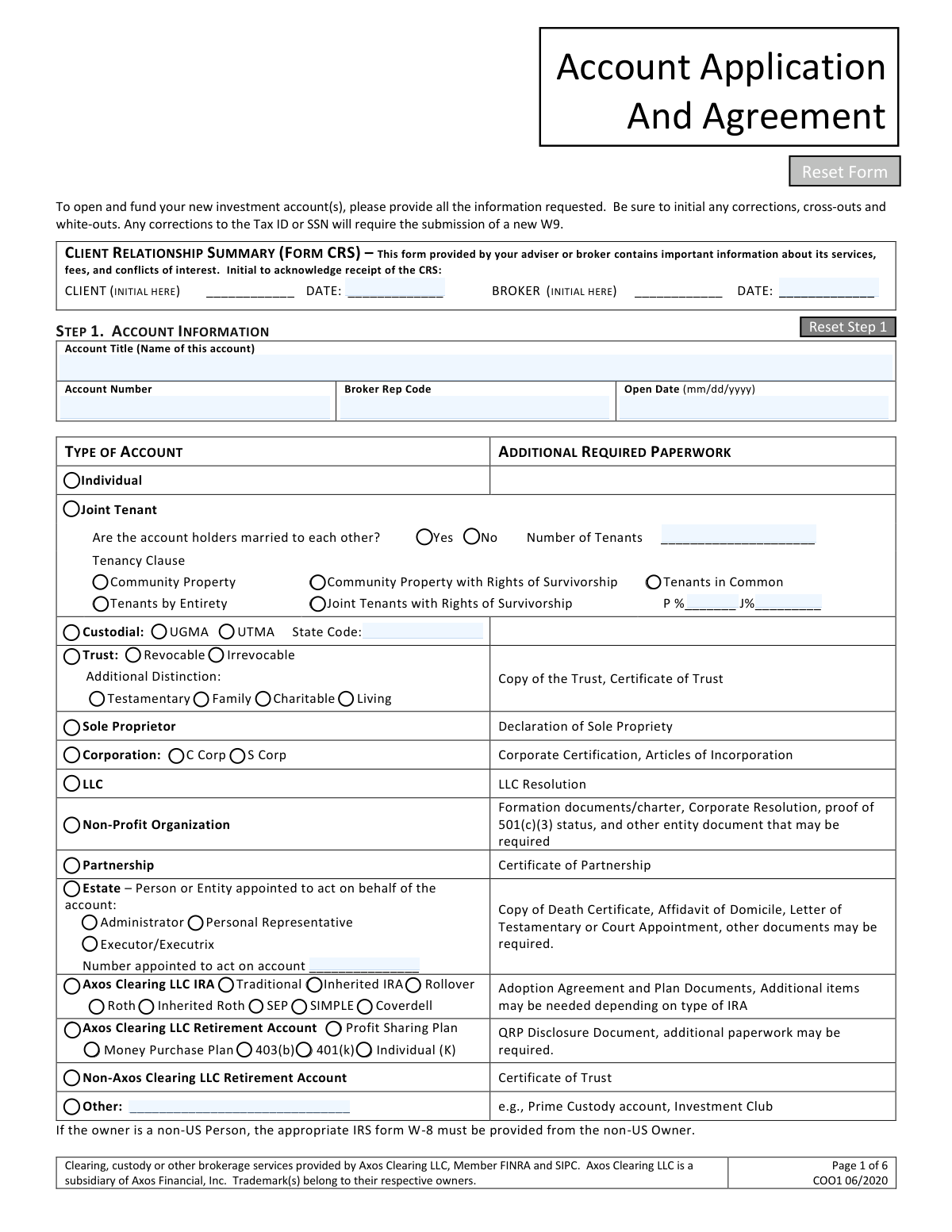
Yes! You can use AI to fill out WestPark Capital Account Application and Agreement
The WestPark Capital Account Application and Agreement is a comprehensive document package required to open a new brokerage or investment advisory account with WestPark Capital, Inc. It gathers crucial details about the business entity, its principals, financial standing, and investment objectives to comply with regulatory requirements and establish the account. This package typically includes the main application, a Customer Relationship Summary (CRS), corporate certifications, and tax forms. Today, this form can be filled out quickly and accurately using AI-powered services like Instafill.ai, which can also convert non-fillable PDF versions into interactive fillable forms.
Our AI automatically handles information lookup, data retrieval, formatting, and form filling.
It takes less than a minute to fill out WestPark Capital New Account Form using our AI form filling.
Securely upload your data. Information is encrypted in transit and deleted immediately after the form is filled out.
Form specifications
| Form name: | WestPark Capital Account Application and Agreement |
| Number of pages: | 1 |
| Language: | English |
Instafill Demo: How to fill out PDF forms in seconds with AI
How to Fill Out WestPark Capital New Account Form Online for Free in 2026
Are you looking to fill out a WESTPARK CAPITAL NEW ACCOUNT FORM form online quickly and accurately? Instafill.ai offers the #1 AI-powered PDF filling software of 2026, allowing you to complete your WESTPARK CAPITAL NEW ACCOUNT FORM form in just 37 seconds or less.
Follow these steps to fill out your WESTPARK CAPITAL NEW ACCOUNT FORM form online using Instafill.ai:
- 1 Navigate to Instafill.ai and upload the WestPark Capital Account Application PDF or select it from the template library.
- 2 Begin with Step 1 by providing the Account Title and selecting the appropriate account type, such as Corporation or LLC.
- 3 In Steps 2 and 3, use the AI-assisted fields to enter detailed information for the primary account holder (the entity) and any secondary account holders or officers, including personal, contact, and employment details.
- 4 Proceed to Step 4 to specify the initial funding source, money fund instructions, and select desired trading privileges like cash or margin.
- 5 Complete the Account Investment Profile in Step 5 by providing financial details like annual income, net worth, risk tolerance, and investment objectives.
- 6 Optionally, add a Trusted Contact in Step 6, complete the W-9 certification in Step 7, and fill out any attached forms like the Corporate Certification or Beneficial Ownership Certification.
- 7 Carefully review all entered information for accuracy, then use the platform to electronically sign and date the application in Step 8 before downloading or submitting it to WestPark Capital.
Our AI-powered system ensures each field is filled out correctly, reducing errors and saving you time.
Why Choose Instafill.ai for Your Fillable WestPark Capital New Account Form Form?
Speed
Complete your WestPark Capital New Account Form in as little as 37 seconds.
Up-to-Date
Always use the latest 2026 WestPark Capital New Account Form form version.
Cost-effective
No need to hire expensive lawyers.
Accuracy
Our AI performs 10 compliance checks to ensure your form is error-free.
Security
Your personal information is protected with bank-level encryption.
Frequently Asked Questions About Form WestPark Capital New Account Form
This document package is for a Non-U.S. Corporation or LLC to apply for a new investment account with WestPark Capital, Inc. It contains all the required application forms, disclosures, and certifications needed to open the account.
These forms must be completed by the authorized officers or representatives of a Non-U.S. Corporation or LLC that wishes to open an investment account.
In addition to the completed forms, you must provide your company's incorporation documents, articles, and bylaws. You also need to include a scanned copy of the passport for the relevant individuals associated with the account.
You can email the signed forms to [email protected]. If you would rather use an electronic signature, you can request this by sending an email to the same address.
You need to review the Customer Relationship Summary (CRS) and then initial and date the designated section on the top left of the Account Application (page 1) to acknowledge that you have received it.
After completing all the required information on pages 1 through 5, you must provide your signature and the date on page 6 in the 'Step 8 – Signatures' section.
This form is used to identify the individuals who own or control the legal entity. You must provide information for every individual who owns 5% or more of the company and any person with significant managerial control.
While the instructions list a W-9, the Account Application itself states that non-U.S. persons must provide the appropriate Form W-8. You should clarify with WestPark Capital which tax form is required for your specific situation to ensure compliance.
No, providing a Trusted Contact Person is optional. If you do not wish to designate one, you can simply check the box that says, 'I decline to identify a Trusted Contact at this time.'
You should complete the form that corresponds to your company's legal structure. Fill out the Corporate Account Certification if you are a corporation, or the LLC Certification if you are a Limited Liability Company.
Yes, you can use AI-powered services like Instafill.ai to help complete these forms. These tools can auto-fill fields accurately, which saves time and helps prevent common errors.
To use Instafill.ai, you would upload the PDF of the application package to their platform. The service makes the document fillable and uses AI to help you populate the required fields with your information.
If you have a non-fillable or 'flat' PDF, you can use a service like Instafill.ai to convert it into an interactive, fillable form. This allows you to easily type your information and complete the application digitally.
According to the Form CRS, there is no fee for opening or having an active brokerage account. You will, however, pay transaction-based fees, such as commissions, when you buy or sell securities.
Compliance WestPark Capital New Account Form
Validation Checks by Instafill.ai
1
SSN/TIN Format and Validity
This check verifies that the Social Security Number (SSN) or Taxpayer Identification Number (TIN) provided in Step 2 and Step 3 is in the correct 9-digit format (XXX-XX-XXXX for SSN or XX-XXXXXXX for EIN). It is crucial for accurate tax reporting to the IRS as required by the W-9 certification and for identity verification under the USA Patriot Act. If the format is incorrect or the number is invalid, the application will be rejected until a valid number is provided.
2
Date of Birth Confirms Legal Age
This validation ensures the 'Date of Birth' provided for all account holders (Step 2 and 3) indicates they are of full legal age to enter into a binding contract, as affirmed in the signature section on page 6. The specific age requirement may vary by jurisdiction (e.g., 18 or 21). An application from an individual who is not of legal age for an individual or joint account would be invalid and must be rejected.
3
USA Patriot Act ID Expiration Date
This check confirms that the 'Expiration Date' for the government-issued ID (e.g., Driver's License, Passport) provided under the USA Patriot Act Information section is a future date. An expired ID is not considered valid for identity verification, which is a cornerstone of Anti-Money Laundering (AML) regulations. Failure to provide a valid, unexpired ID will halt the account opening process until compliant documentation is submitted.
4
Physical Address Verification (No P.O. Box)
This validation enforces the rule that the 'Physical Address' in Step 2 cannot be a P.O. Box. Federal law requires financial institutions to obtain a physical street address to verify a customer's identity and comply with Know Your Customer (KYC) rules. If a P.O. Box is detected, the form submission will fail, and the user will be required to provide a valid residential or business street address.
5
Conditional Requirement for Previous Address
The form requires a 'Previous Physical Address' if the current one is less than 6 months old. This validation checks the duration at the current physical address against the account open date. If the duration is less than six months, it verifies that the previous address fields are populated. This rule provides a more robust address history for identity verification, and failure to provide it will result in an incomplete application.
6
Citizenship and Tax Form Consistency
This check validates the consistency between the applicant's selected citizenship status and the provided tax forms. The instructions specify the package is for a 'Non-U.S. Corporation/LLC', yet a W-9 (for U.S. persons) is included. If an applicant checks 'Non-Resident Alien' in Step 2, the system must flag that a Form W-8 is required instead of the W-9. An incorrect tax form leads to improper tax withholding and reporting, creating significant compliance risks.
7
Industry Affiliation Disclosure and Documentation
This validation confirms that if an applicant answers 'Yes' to being affiliated with the securities industry (Step 3), they must provide the name of the entity and attach a compliance officer's letter of approval. This is a critical FINRA rule designed to monitor and prevent potential conflicts of interest. A submission marked 'Yes' without the required details and attached letter will be flagged for rejection pending the missing information.
8
Account Type and Required Documentation Match
This check ensures that the required supplemental documents are submitted based on the 'Type of Account' selected in Step 1. For example, if 'Corporation' is selected, the 'Corporate Account Certification' and 'Articles of Incorporation' must be present. An inconsistency between the account type and the provided documents will result in an incomplete application, as the legal structure of the account cannot be verified.
9
Financial Profile Logical Consistency
This validation ensures the financial data provided in Step 5 is logical, specifically that 'Liquid Net Worth' is not greater than 'Net Worth'. A person's liquid net worth is a component of their total net worth and cannot exceed it. This check helps guarantee the accuracy of the client's financial profile, which is fundamental for determining investment suitability and appropriate risk tolerance.
10
Signature and Initial Completeness
This check verifies that all mandatory signature and initial fields are completed across the application package. This includes the CRS acknowledgment initial on page 1, the primary account holder signature on page 6, and any signatures on supplemental forms like the LLC/Corporate Certification. An unsigned or uninitialed agreement is not legally binding, making this a critical check before an account can be approved and activated.
11
Beneficial Ownership and Control Person Identification
This validation ensures the 'Beneficial Ownership Certification' form is properly completed according to FinCEN's Customer Due Diligence (CDD) Rule. It checks that all individuals with 5% or more equity interest are listed and, critically, that at least one 'Control Person' (e.g., CEO, President) is identified. Failure to identify all beneficial owners and a control person is a major AML compliance violation and will prevent the account from being opened.
12
Joint Account Tenancy Specification
If 'Joint Tenant' is selected as the account type in Step 1, this validation ensures a 'Tenancy Clause' (e.g., JTWROS, Tenants in Common) is also selected. If 'Tenants in Common' is chosen, it further verifies that the percentage ownership fields are filled out and sum to 100%. This information is legally essential for defining ownership rights and asset disposition upon the death of a tenant, and its absence would render the application incomplete.
Common Mistakes in Completing WestPark Capital New Account Form
Applicants frequently overlook the multiple signature and initial fields scattered throughout the packet. Specifically, the initial boxes for the Form CRS on page 1 and the Money Sweep Program on page 4 are often missed, as is the main signature on page 6. Failure to sign or initial in all required places will lead to the application being rejected and returned, causing significant delays in account opening. To avoid this, carefully review each page for signature lines (marked with an 'X') and initial boxes before submission.
The application is for a 'Non-U.S. Corporation/LLC', which typically requires an IRS Form W-8BEN-E to certify foreign status. However, the packet includes a Form W-9, which is for U.S. persons, creating confusion. Applicants may incorrectly fill out the W-9 instead of obtaining and completing the correct W-8 form. This error results in incorrect tax withholding and reporting, leading to compliance issues and potential penalties. Non-U.S. entities must provide the appropriate W-8 form, while the W-9 should only be used for any U.S. persons listed as beneficial owners if required.
The Beneficial Ownership Certification form requires detailed information for every individual with 5% or more equity and for every 'control person' (e.g., CEO, CFO, or Managing Member). A common mistake is failing to list all qualifying individuals or misunderstanding who qualifies as a control person, which includes anyone with significant managerial responsibility. Incomplete or inaccurate information on this form is a primary reason for rejection due to strict anti-money laundering (AML) regulations. Applicants must carefully identify and provide full details for all beneficial owners and control persons.
The Corporate Account Certification has a very specific requirement that is easily missed: the officer signing the certification must be different from the officer who signs the main account application, unless it's a sole-officer entity. Applicants often have the same officer sign everything for convenience, which violates this rule and invalidates the certification. This leads to automatic rejection of the form. To prevent this, corporations must ensure two different officers sign the respective documents as instructed.
On page 2, the instructions explicitly state that if an applicant is 'Retired or Unemployed', they must indicate their 'former Occupation'. Many individuals in this category leave the employment section blank, assuming it doesn't apply to them. This missing information can halt the application process, as financial institutions are required to gather this data for compliance purposes. Applicants must provide their most recent or primary former occupation and employer details to complete the profile.
The application explicitly requires a physical street address and states '(no PO Box)' for the primary and secondary account holders. Despite this, applicants sometimes enter a P.O. Box, which is not permissible for identity verification under the USA Patriot Act. This error requires the firm to request corrected information, delaying the account opening. Always provide a valid residential or business street address in this field.
The Rule 5130 form is used to determine eligibility for purchasing IPOs, and it requires certifying that the account owner is not a 'Restricted Person'. The definition of a restricted person is complex, including not only broker-dealer employees but also their immediate family members who receive material support. Applicants often fail to consider the status of their relatives or misunderstand the scope of the rule, leading to incorrect certification. This can result in regulatory violations for both the client and the firm if an IPO allocation is improperly made.
The instruction letter clearly lists several essential supporting documents that must be submitted with the forms, including incorporation documents (e.g., Articles of Incorporation), bylaws, and a scanned copy of a passport for non-U.S. individuals. A frequent mistake is sending back only the filled-out application forms without these crucial attachments. This results in an incomplete package and prevents the firm from proceeding until all required documentation is received.
Step 5 requires applicants to provide their Annual Income, Net Worth, and Liquid Net Worth, as well as select their Risk Tolerance and Investment Objective. Applicants sometimes provide figures that are logically inconsistent (e.g., liquid net worth higher than total net worth) or that conflict with their stated objective (e.g., selecting 'Maximum Growth' with a 'Low' risk tolerance). These discrepancies raise suitability concerns and will cause the firm to seek clarification, delaying the approval process. Ensure all financial data is accurate and logically aligned.
The address section on pages 2 and 3 requires applicants to provide their 'Previous Physical Address' if their current physical address is less than 6 months old. This is a key part of identity verification and is often overlooked by applicants who have recently moved. Omitting this information when applicable will result in a follow-up from the compliance team and delay the account opening. If you have moved within the last six months, you must fill out this section completely.
In Step 6, applicants can designate a Trusted Contact Person. A common misunderstanding is believing this person gains authority to transact on the account, which is incorrect; the TCP can only be contacted to discuss the account holder's well-being or contact information. Others may decline to add a TCP without understanding its value in protecting against financial exploitation or in situations where the firm cannot reach the account holder. Applicants should understand the TCP's limited role and consider appointing one for their own protection.
The application states to 'Be sure to initial any corrections, cross-outs and white-outs.' When applicants make a mistake, they may use correction fluid or cross out an entry without adding their initials next to the change. Any un-initialed correction can lead to the form being considered altered and thus invalid, forcing the applicant to fill out a new form. To avoid this, every change must be clearly initialed by the applicant. AI-powered form filling tools like Instafill.ai can prevent these data entry errors from happening in the first place, and since this form is a non-fillable PDF, Instafill.ai can convert it into an interactive, fillable version to ensure clean and accurate data entry.
Saved over 80 hours a year
“I was never sure if my IRS forms like W-9 were filled correctly. Now, I can complete the forms accurately without any external help.”
Kevin Martin Green
Your data stays secure with advanced protection from Instafill and our subprocessors

Robust compliance program
Transparent business model
You’re not the product. You always know where your data is and what it is processed for.
ISO 27001, HIPAA, and GDPR
Our subprocesses adhere to multiple compliance standards, including but not limited to ISO 27001, HIPAA, and GDPR.
Security & privacy by design
We consider security and privacy from the initial design phase of any new service or functionality. It’s not an afterthought, it’s built-in, including support for two-factor authentication (2FA) to further protect your account.
Fill out WestPark Capital New Account Form with Instafill.ai
Worried about filling PDFs wrong? Instafill securely fills westpark-capital-account-application-and-agreement forms, ensuring each field is accurate.