Yes! You can use AI to fill out ACORD 25, Certificate of Liability Insurance (2025/12)

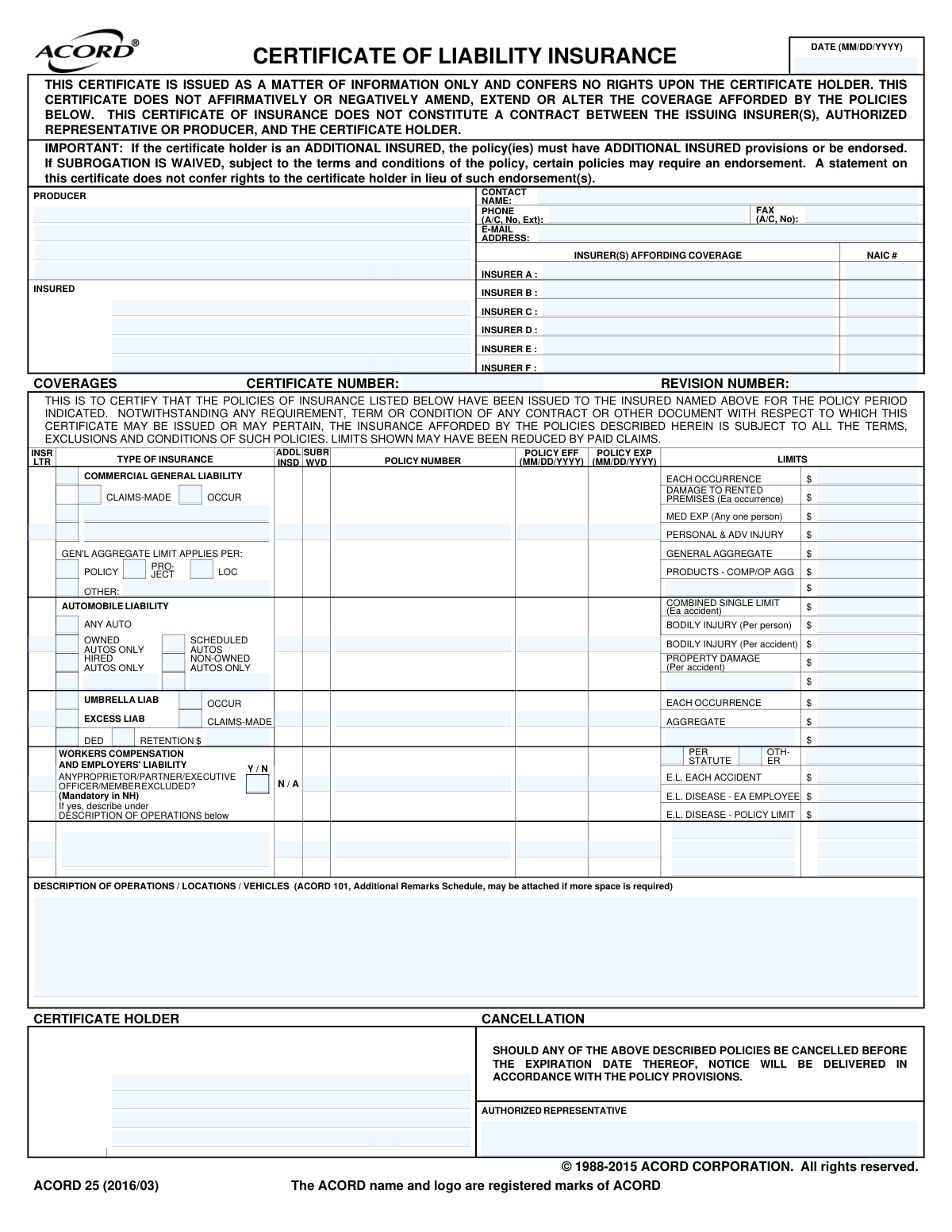
The ACORD 25, Certificate of Liability Insurance (COI), is a document that summarizes an individual's or organization's insurance coverage at a specific point in time. It is commonly requested by clients to verify that a vendor or contractor has sufficient liability insurance before a project begins, protecting them from potential losses. The form details policy types, limits, and effective dates but does not alter the policy itself. Today this form can be filled out quickly and accurately using AI-powered services like Instafill.ai, which can also convert non-fillable PDF versions into interactive fillable forms.
ACORD 25 is part of the liability insurance forms category on Instafill.
ACORD 25 has a complex Form Complexity Index of 65/100 — 112 fillable fields across 1 page. Instafill’s AI completes it accurately in under a minute.

Form specifications

Form name: ACORD 25, Certificate of Liability Insurance (2025/12)
Number of fields: 112
Number of pages: 1
FCI: Complex (65/100)
Language: English
Our AI automatically handles information lookup, data retrieval, formatting, and form filling.
It takes less than a minute to fill out ACORD 25 using our AI form filling.
Securely upload your data. Information is encrypted in transit and deleted immediately after the form is filled out.
Preview of ACORD 25, Certificate of Liability Insurance (2025/12)

Instafill Demo: How to fill out PDF forms in seconds with AI

How to Fill Out ACORD 25 Online for Free in 2026

Are you looking to fill out a ACORD 25 form online quickly and accurately? Instafill.ai offers the #1 AI-powered PDF filling software of 2026, allowing you to complete your ACORD 25 form in just 37 seconds or less.
Follow these steps to fill out your ACORD 25 form online using Instafill.ai:
  1. 1 Navigate to Instafill.ai and upload or select the ACORD 25 form.
  2. 2 Gather your insurance policy documents, including Commercial General Liability, Auto Liability, and Workers' Compensation policies.
  3. 3 Let the AI assistant pre-fill information about the producer (your agency), the insured (your client), and the insurers based on your uploaded policies or saved profiles.
  4. 4 Review and confirm the specific liability coverages, policy numbers, effective/expiration dates, and coverage limits for each policy type (General, Auto, Umbrella, Workers' Comp).
  5. 5 Enter the name and address of the Certificate Holder (the entity requesting the proof of insurance) and add any required descriptions of operations, locations, or vehicles.
  6. 6 Indicate any Additional Insured status or Subrogation Waivers as required by the certificate holder's contract.
  7. 7 Review the entire completed form for accuracy, paying close attention to limits and dates, then add the authorized representative's signature to finalize the certificate.

Our AI-powered system ensures each field is filled out correctly, reducing errors and saving you time.

Why Choose Instafill.ai for Your Fillable ACORD 25 Form?

Speed

Complete your ACORD 25 in as little as 37 seconds.

Up-to-Date

Always use the latest 2026 ACORD 25 form version.

Cost-effective

No need to hire expensive lawyers.

Accuracy

Our AI performs 10 compliance checks to ensure your form is error-free.

Security

Your personal information is protected with bank-level encryption.

Frequently Asked Questions About ACORD 25

ACORD 25 has a Form Complexity Index of 65 out of 100, placing it in the complex complexity tier. This score is calculated deterministically from the form’s own structure using Instafill’s published Form Complexity Index methodology, so it can be reproduced and independently verified — it is not a subjective estimate.

For ACORD 25 specifically, the score reflects 112 fillable fields across 1 page, grouped into 20 sections, and 3 conditional fields that only apply depending on earlier answers, 1 table or repeating lists. The number of fields is the largest factor in the base score (weighted 36%), followed by how difficult those fields are to complete based on their type, where free-text and signature fields count for more than simple checkboxes (26%). The number of pages that actually contain fields (15%), the amount of conditional “fill-only-if” logic (16%), and how many sections the form is divided into (7%) account for the rest of the base. On top of that base, the index adds points for tables and repeating lists, bundled instruction pages, and dense page layouts — capturing difficulty the base alone can miss.

In practical terms, a complex score means the form is demanding, with many fields, multiple pages and branching rules that are easy to get wrong. Instafill removes that effort entirely: our AI reads your information, maps each value to the correct field — including the conditional ones — and completes ACORD 25 accurately in under a minute, with every field available for you to review before you download. See exactly how the Form Complexity Index is calculated.

This form is a Certificate of Liability Insurance, used to provide proof of insurance coverage from an insured party to a third party, known as the certificate holder.

The insurance producer or agent for the insured party is responsible for accurately completing and issuing this certificate.

The Producer is the insurance agent issuing the certificate, the Insured is the individual or company covered by the insurance, and the Certificate Holder is the entity requesting proof of that insurance.

The NAIC number is a unique code assigned to each insurance company by the National Association of Insurance Commissioners. This number can typically be found on the insurance policy documents or by searching the NAIC website.

An 'Occurrence' policy covers incidents that happen during the policy period, no matter when the claim is filed. A 'Claims-Made' policy only covers claims that are made and reported during the policy's term.

'Addl Insd' stands for Additional Insured, which means another party is also covered by the policy. 'Subr Wvd' means Subrogation Waived, indicating the insurer gives up its right to sue a third party that caused a loss.

Use this section to detail the specific business operations, locations, and vehicles covered. It is also used to note any special endorsements or requirements mandated by the certificate holder.

This indicates that the automobile liability coverage applies to all vehicles used for the business, including those that are owned, hired, or not owned by the insured.

You must check the box indicating an officer or member is excluded and then provide details about their role or operations in the 'Description of Excluded Personnel' field if applicable.

Umbrella Liability provides additional limits over several underlying policies and may offer broader coverage. Excess Liability typically provides higher limits over a single underlying policy without broadening the scope of coverage.

You can use a service like Instafill.ai to convert the non-fillable PDF into an interactive, fillable form. This allows you to easily type your information directly into the fields online.

Yes, AI-powered services like Instafill.ai can help by auto-filling form fields with your saved information, which saves time and helps ensure accuracy.

To fill this form online, you can upload it to a platform like Instafill.ai. The tool makes the form interactive, allowing you to fill it out, save your data, and easily reuse it for future certificates.

Compliance ACORD 25
Validation Checks by Instafill.ai

1
Validates NAIC Number Format and Presence
This check ensures that for each insurer name provided (e.g., 'Insurer A Name'), the corresponding 'Insurer NAIC Number' field is also populated with a valid 5-digit numeric code. The NAIC number is a critical unique identifier for regulatory and verification purposes. Failure to provide a valid, paired NAIC number can lead to the rejection of the certificate as the insurer cannot be properly identified.
2
Ensures Policy Expiration Date is After Effective Date
This validation compares the effective and expiration dates for each individual policy listed (e.g., 'WC Policy Effective Date' and 'WC Policy Expiration Date'). The expiration date must occur on or after the effective date to represent a valid coverage period. An inverted or illogical date range would invalidate the policy's term and render the certificate inaccurate.
3
Requires Retroactive Date for Claims-Made Policies
If the 'CGL Claims-Made Policy Option' checkbox is selected, this validation confirms that the 'Claims-Made Retroactive Date' field is populated with a valid date. The retroactive date is a fundamental component of a claims-made policy, defining the start of the coverage period for incidents. Omitting this date makes the policy terms dangerously ambiguous and incomplete.
4
Requires Description for 'OTHER' General Liability Policy
This validation ensures that if the 'OTHER (Other General Liability Policy)' checkbox is selected, the 'Other Policy Type Description' field is not empty. Selecting 'OTHER' without providing a description is meaningless and fails to inform the certificate holder about the nature of the coverage. This description is essential for understanding the full scope of liability protection.
5
Validates Insurer Letter Reference Integrity
This check verifies that any 'Insurer Letter' field (e.g., for CGL or Umbrella coverage) contains a letter (A-F) that corresponds to an insurer listed in the 'Insurer A' through 'Insurer F' sections at the top of the form. The letter acts as a crucial link between a specific coverage and its underwriter. An invalid or unassigned letter breaks this link, making it impossible to determine which company is providing that coverage.
6
Ensures All Liability Limits are Valid Monetary Amounts
This check scans all fields representing monetary limits (e.g., 'Each Occurrence Limit', 'General Aggregate Limit', 'Automobile Liability Combined Single Limit') to ensure they contain valid, positive numeric values. These limits represent the core financial information on the certificate. Non-numeric, negative, or zero values would render the document invalid for assessing coverage levels.
7
Validates Standard MM/DD/YYYY Date Format
This check verifies that all date fields on the form, such as 'Effective Date' and 'Policy Expiration Date 3', are entered in a valid MM/DD/YYYY format. Consistent and correct date formatting is essential for automated data processing and to avoid any ambiguity regarding coverage periods. An incorrect format can lead to parsing errors and misinterpretation of critical policy timelines.
8
Ensures Mutual Exclusivity of Aggregate Limit Application
This validation confirms that only one of the 'Aggregate Limit Applies Per' checkboxes ('Policy', 'Project', 'Location', 'OTHER') is selected. The general aggregate limit can only apply in one specified manner per the policy terms. Selecting multiple options creates a direct contradiction, making it unclear how the aggregate limit is consumed and potentially leading to disputes.
9
Requires Description for Excluded Workers Comp Personnel
If the 'Officer/Member Excluded' field indicates that personnel are excluded (e.g., is checked or set to 'Y'), this validation requires the 'Description of Excluded Personnel' field to be filled. It is critical for the certificate holder to know exactly which individuals or roles are not covered by Workers Compensation. Omitting this description creates a significant information gap and potential liability risk.
10
Validates Producer Phone Number Format
This check verifies that the 'Phone Number (Producer Information)' field follows a standard phone number format, including area code, and can properly handle optional extensions. A correctly formatted phone number is essential for enabling communication with the producer if questions or issues arise with the certificate. An invalid number hinders contact and can delay important processes.
11
Completes Certificate Holder Information
This validation ensures that the 'Certificate Holder Name' and at least one address line ('Certificate Holder Address Line 1' or 'Certificate Holder Address') are populated. The certificate is issued for the benefit of the certificate holder, making this information fundamental to the document's purpose. Without it, the certificate is not properly directed and is functionally invalid.
12
Validates Auto Liability Coverage Scope
If any limits are entered for Automobile Liability (e.g., 'Automobile Liability Combined Single Limit'), this check verifies that at least one coverage type checkbox ('Any Auto', 'Owned Autos Only', 'Scheduled Autos', etc.) is selected. Specifying auto liability limits without defining which vehicles are covered makes the information incomplete. This validation ensures the scope of the auto coverage is clearly defined for the certificate holder.
13
Ensures Deductible/Retention Amount is Provided When Indicated
If either the 'DED' (Deductible) or 'RETENTION $' checkbox is selected in the Umbrella/Excess Liability section, this validation ensures the 'Deductible Retention Amount' field contains a numeric value. Checking the box indicates a deductible or retention applies, but the amount is the critical piece of information. Failure to provide the amount leaves a key policy term undefined.
14
Validates Email Address Format
This validation ensures the 'Email Address (Producer Information)' field contains a string in a valid email format (e.g., [email protected]). This is crucial for enabling reliable electronic communication, sending updates, or resolving discrepancies. An invalid email address will result in failed communication attempts and processing delays.

Common Mistakes in Completing ACORD 25

Entering an Invalid or Incorrect NAIC Number

This mistake occurs when the user enters a policy number or an internal carrier code instead of the official five-digit NAIC number. The NAIC number uniquely identifies the insurance company, and using the wrong one prevents the certificate holder from verifying the insurer's financial stability. This can lead to the certificate being rejected, causing project or payment delays. To avoid this, always confirm the correct NAIC number for the specific insurance underwriter, which is often found on the policy declarations page.

Providing an Incomplete or Vague Description of Operations

Users often provide a generic or incomplete entry in the 'Description of Operations' section, failing to include specific project names, job numbers, or required legal wording. This happens when the specific requirements of the certificate holder are unknown or overlooked. An inadequate description can result in contract non-compliance and rejection of the certificate. Always obtain the exact wording required by the certificate holder and include all relevant details to ensure the certificate is accepted without issue.

Confusing the 'Insured' with the 'Certificate Holder'

A frequent error is swapping the information for the 'Insured' (the policyholder) and the 'Certificate Holder' (the party requesting proof of insurance). This fundamental mix-up invalidates the certificate's purpose and leads to significant confusion and processing delays. To prevent this, carefully verify that the entity covered by the insurance is listed as the 'Insured' and the party to whom the certificate is being provided is listed as the 'Certificate Holder'.

Improperly Checking 'Additional Insured' or 'Subr Wvd'

Checking the 'Addl Insd' (Additional Insured) or 'Subr Wvd' (Subrogation Waived) boxes without the corresponding endorsements on the actual policy is a critical error. A certificate only evidences coverage; it does not create it. This mistake misrepresents the policy's terms and can lead to severe legal and financial consequences if a claim occurs and the expected coverage does not exist. Before checking these boxes, always confirm that the required endorsements are active on the policy.

Misunderstanding 'Claims-Made' vs. 'Occurrence' Policies

Users often incorrectly identify a policy's type, confusing 'Claims-Made' with 'Occurrence' coverage. An 'Occurrence' policy covers events happening during the policy period, while a 'Claims-Made' policy covers claims filed during the policy period, often requiring a 'Retroactive Date'. Selecting the wrong type misrepresents the coverage terms, which can lead to denied claims. It is essential to review the policy declarations page to correctly identify the policy type and enter all related dates accurately.

Entering Inaccurate or Mismatched Policy Dates

Simple data entry errors, such as transposing numbers or using an incorrect format (e.g., DD/MM/YYYY instead of MM/DD/YYYY), are common when entering policy effective and expiration dates. An incorrect date can suggest a lapse in coverage, leading to immediate rejection of the certificate. To avoid this, carefully transcribe dates from the policy documents. AI-powered form filling tools like Instafill.ai can help prevent these errors by automatically validating date formats and flagging inconsistencies.

Using Non-Numeric Characters in Liability Limit Fields

When entering monetary values for liability limits, people sometimes include dollar signs ($), commas, or text like 'As per policy'. These fields typically require numeric values only, and extraneous characters can cause errors in automated processing systems, leading to rejection. Always enter only the numerical value for all limits (e.g., 1000000). Advanced tools like Instafill.ai can automate this by correctly formatting monetary values and removing invalid characters during data entry.

Mismatching the Insurer Letter with the Correct Insurer Name

This form uses letters (A, B, C, etc.) to link policies to the insurers listed at the top. A common clerical error is assigning the wrong letter to a policy, creating ambiguity about which company provides which coverage. This makes verification difficult for the certificate holder and may cause them to reject the form. To avoid this, carefully cross-reference the insurer letter next to each policy with the corresponding insurer name in the 'Insurers Affording Coverage' section.

Forgetting to Update the 'Revision Number' on Corrections

When a certificate is re-issued to correct an error, users often forget to increment the 'Revision Number'. This creates version control problems, making it difficult for the recipient to identify the most current and accurate certificate. Relying on an outdated certificate can lead to compliance issues. To prevent this, always update the revision number sequentially each time a certificate is amended and re-sent.

Leaving Address Fields Incomplete

Omissions in address fields, such as a missing suite number, city, or zip code for the Producer or Certificate Holder, are a common oversight. This can happen due to haste or not having the complete information. An incomplete address can prevent important legal notices, such as a notice of cancellation, from being delivered correctly, potentially leading to compliance failures. If the form is a non-fillable PDF, tools like Instafill.ai can convert it into an interactive version, making it easier to enter and review complete address details.
Saved over 80 hours a year

“I was never sure if my IRS forms like W-9 were filled correctly. Now, I can complete the forms accurately without any external help.”

Kevin Martin Green

Your data stays secure with advanced protection from Instafill and our subprocessors

Robust compliance program

Transparent business model

You’re not the product. You always know where your data is and what it is processed for.

ISO 27001, HIPAA, and GDPR

Our subprocesses adhere to multiple compliance standards, including but not limited to ISO 27001, HIPAA, and GDPR.

Security & privacy by design

We consider security and privacy from the initial design phase of any new service or functionality. It’s not an afterthought, it’s built-in, including support for two-factor authentication (2FA) to further protect your account.

Fill out ACORD 25 with Instafill.ai

Worried about filling PDFs wrong? Instafill securely fills acord-25-certificate-of-liability-insurance-2025-12 forms, ensuring each field is accurate.