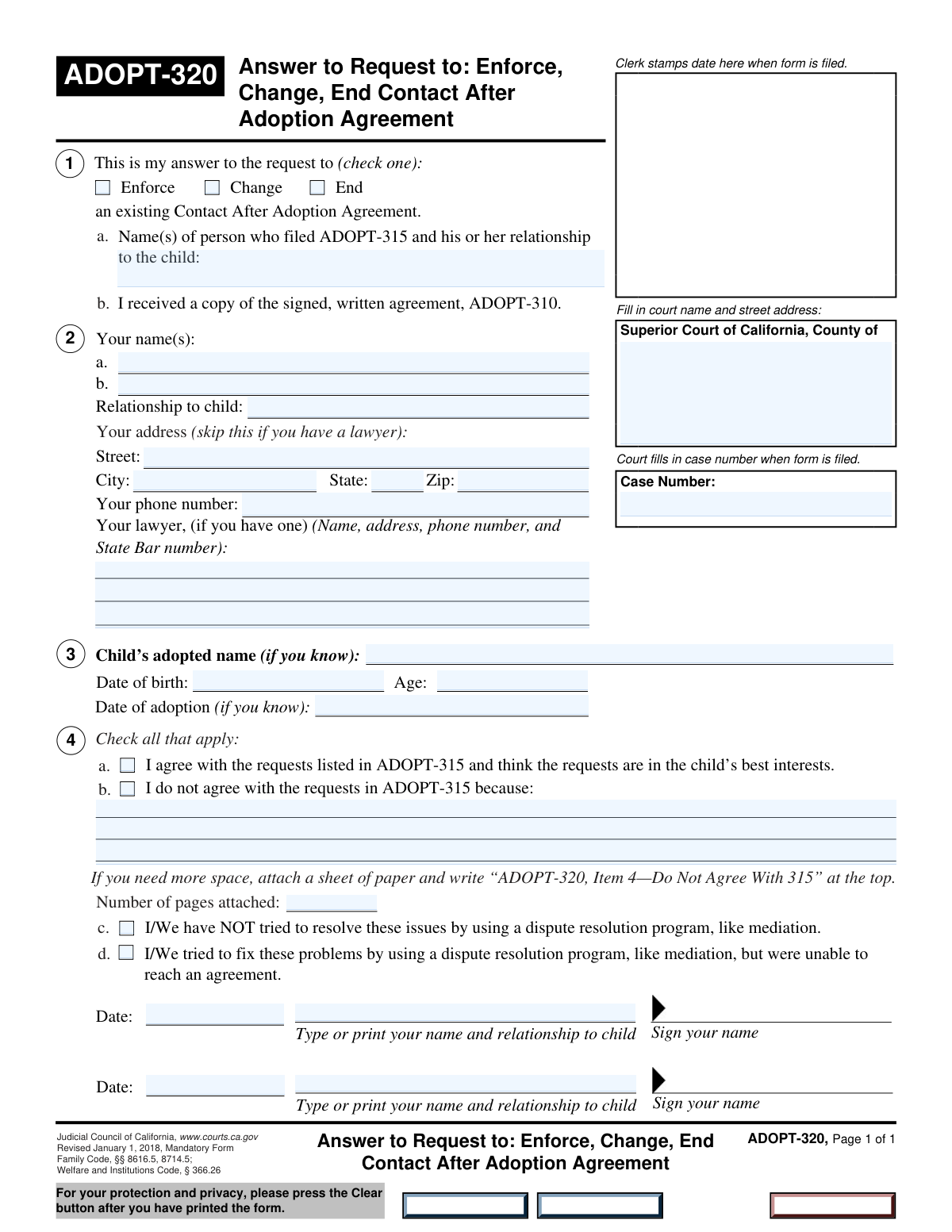
Yes! You can use AI to fill out Form ADOPT-320, Answer to Request to Enforce, Change, or End Contact After Adoption Agreement

Form ADOPT-320 is the official 'Answer to Request to Enforce, Change, or End Contact After Adoption Agreement' used in California courts. It is filed in response to Form ADOPT-315 to inform the court whether you agree or disagree with the proposed changes to, enforcement of, or termination of an existing post-adoption contact agreement. This document is crucial for ensuring your legal position is officially recorded and considered by the judge. Today, this form can be filled out quickly and accurately using AI-powered services like Instafill.ai, which can also convert non-fillable PDF versions into interactive fillable forms.
Our AI automatically handles information lookup, data retrieval, formatting, and form filling.
It takes less than a minute to fill out ADOPT-320 using our AI form filling.
Securely upload your data. Information is encrypted in transit and deleted immediately after the form is filled out.

Form specifications

Form name: Form ADOPT-320, Answer to Request to Enforce, Change, or End Contact After Adoption Agreement
Number of fields: 32
Number of pages: 1
Language: English
Categories: adoption forms
main-image

Instafill Demo: How to fill out PDF forms in seconds with AI

How to Fill Out ADOPT-320 Online for Free in 2026

Are you looking to fill out a ADOPT-320 form online quickly and accurately? Instafill.ai offers the #1 AI-powered PDF filling software of 2026, allowing you to complete your ADOPT-320 form in just 37 seconds or less.
Follow these steps to fill out your ADOPT-320 form online using Instafill.ai:
  1. 1 Navigate to Instafill.ai and upload or select Form ADOPT-320.
  2. 2 Enter the court name, address, and case number in the top section of the form.
  3. 3 Identify yourself, the person who filed Form ADOPT-315, and provide the child's information, including their name and date of birth.
  4. 4 Clearly state your response by checking the box indicating whether you agree or disagree with the requests made in the initial filing.
  5. 5 If you disagree, provide a detailed written explanation for your position and indicate whether any dispute resolution methods were attempted.
  6. 6 Provide your contact information or your attorney's information, as applicable.
  7. 7 Review all entered information for accuracy, then date and sign the form before filing it with the court.

Our AI-powered system ensures each field is filled out correctly, reducing errors and saving you time.

Why Choose Instafill.ai for Your Fillable ADOPT-320 Form?

Speed

Complete your ADOPT-320 in as little as 37 seconds.

Up-to-Date

Always use the latest 2026 ADOPT-320 form version.

Cost-effective

No need to hire expensive lawyers.

Accuracy

Our AI performs 10 compliance checks to ensure your form is error-free.

Security

Your personal information is protected with bank-level encryption.

Frequently Asked Questions About Form ADOPT-320

This form is used to respond to a request (Form ADOPT-315) that was filed with the court to enforce, change, or end a Contact After Adoption Agreement.

You need to fill out this form if you are a party to a Contact After Adoption Agreement and someone else has filed Form ADOPT-315 to request a change, enforcement, or termination of that agreement.

You will need the court case number, the child's information (name, date of birth), and details about the original request filed on Form ADOPT-315. You should also be prepared to state whether you agree or disagree with the request.

You should check the box that corresponds to the request made on the ADOPT-315 form you are responding to. For example, if the other person asked to 'change' the agreement, you would check the 'Change' box.

No, a lawyer is not required. If you do not have a lawyer, you can fill in your own contact information in the address section instead of the 'Lawyer Information' section.

The form specifies to provide this information 'if known.' Simply fill in the details you have and leave blank any information you do not know.

If you check 'I agree,' you are consenting to the request made in ADOPT-315. If you check 'I do not agree,' you are opposing the request and must provide a written explanation for your disagreement.

Clearly and concisely explain why you object to the request to enforce, change, or end the agreement. You can attach additional pages if you need more space, and be sure to note the number of pages attached.

Dispute resolution refers to attempts made to solve the disagreement outside of court, such as through mediation. You must indicate whether you have tried this and if it was successful.

The case number is assigned by the court and should be on the copy of the ADOPT-315 form that you received. If you cannot find it, you may need to contact the court clerk's office for assistance.

This is the individual or individuals who initiated the court action by filing the original request (Form ADOPT-315). Their name should be on the documents you received from the court.

Yes, services like Instafill.ai use AI to accurately auto-fill form fields from your saved information, which can save you significant time and reduce errors.

You can use a service like Instafill.ai to fill out this form online. Simply upload the PDF, and the platform will make it an interactive, fillable form that you can complete from any device.

Tools like Instafill.ai can convert flat, non-fillable PDFs into interactive forms. You can upload your non-fillable version, and the service will make it easy to type your information directly into the fields.

Compliance ADOPT-320
Validation Checks by Instafill.ai

1
Exclusive Request Type Selection
This check ensures that at least one, and potentially more than one, of the request type checkboxes ('Enforce', 'Change', 'End') is selected. The form is a response to a request, so the nature of the response must be clearly indicated. If no box is checked, the form is incomplete and cannot be processed as its purpose is undefined.
2
Conditional Address vs. Lawyer Information
Validates that either the user's full address (Street, City, State, Zip) is provided OR the 'Lawyer Information' section is filled out. It is critical to have a valid point of contact for legal correspondence. If both sections are empty, the submission should be rejected as there is no way to contact the filer.
3
Mutually Exclusive Agreement Selection
This validation ensures that the user selects either 'I agree with the requests' or 'I do not agree with the requests', but not both. These two options are logically contradictory. Selecting both would create ambiguity, so the system must enforce a single choice to ensure the filer's position is clear.
4
Conditional Requirement for Disagreement Reason
Checks that if the 'I do not agree with the requests' box is checked, the 'Reason for Disagreement' text area must be filled. Stating disagreement without providing a reason makes the response incomplete for legal review. If the box is checked and the reason is empty, the form submission should be blocked until the reason is provided.
5
Child's Age and Date of Birth Consistency
This check verifies that the entered 'Child's Age' is consistent with the 'Child's Date of Birth'. The system should calculate the age based on the date of birth and flag any significant discrepancy with the manually entered age. This prevents data entry errors and ensures the child's information is accurate for legal purposes.
6
Logical Date Sequence for Adoption
Ensures that the 'Date of Adoption', if provided, is a date that occurs after the 'Child's Date of Birth'. An adoption cannot happen before a child is born. This logical check prevents data entry errors and maintains the integrity of the case timeline.
7
Mandatory Dispute Resolution Status
This validation confirms that exactly one of the two 'Dispute Resolution Attempts' checkboxes ('Have NOT tried' or 'Tried but failed') is selected. The court needs to know whether prior attempts at resolution were made. Failing to select one, or selecting both, leaves this status unknown and makes the form incomplete.
8
Case Number Completeness
Verifies that the 'Case Number' field is not empty and, if possible, matches a standard court case number format. The case number is the primary identifier for linking this document to the correct legal proceeding. A missing or invalid case number would prevent the form from being filed correctly, causing significant delays.
9
Standard Phone Number Format
This check ensures the 'Phone Number' field is entered in a valid format, such as (XXX) XXX-XXXX or XXX-XXX-XXXX. A standardized format is crucial for reliable communication and data processing. An invalid format could lead to failed attempts to contact the filer regarding their case.
10
Valid US Zip Code Format
Validates that the 'Zip Code' field contains either a 5-digit or 9-digit (ZIP+4) numeric value. This is essential for ensuring mailability of legal documents to the filer's address. An incorrect zip code will result in returned mail and communication breakdowns.
11
Second Signatory Block Completeness
This rule checks that if a second name is entered in 'Your Name 2', then the corresponding 'Second Signature Block' fields ('Date of Signature 1' and 'Printed Name and Relationship 2') are also completed. This ensures that if a second party is listed, their attestation is fully recorded. An incomplete block for a listed party invalidates their part of the submission.
12
Date Field Format and Plausibility
This validation ensures all date fields ('Child's Date of Birth', 'Date of Adoption', 'Signature Date') are in a valid format (e.g., MM/DD/YYYY) and represent a real, plausible date that is not in the future. This prevents data entry errors and ensures the chronological data is accurate and legally sound. An invalid date format would cause processing to fail.
13
Attached Pages Count Validation
This check ensures that if the 'Reason for Disagreement' field is filled, the 'Number of Pages Attached' field contains a valid, non-negative integer. This field quantifies any additional documentation provided, which is critical for ensuring the complete submission is reviewed. A non-numeric or missing value would create confusion about the completeness of the filing.

Common Mistakes in Completing ADOPT-320

Incomplete or Incorrect Court Information

People often enter an abbreviated court name or an incomplete address, and frequently make typos in the Case Number. This happens due to haste or not having the exact information on hand. These errors are critical as they can lead to the form being misfiled or rejected, causing significant delays in the legal process. Always double-check the full, official court name and address, and carefully verify every digit of the case number against official court documents.

Ambiguous Response to Request Type

A common mistake is checking multiple boxes (e.g., 'Change' and 'End') or no boxes at all under the Request Type section. This creates confusion about your legal position and what you are asking the court to do. An ambiguous response can invalidate the form, forcing you to refile. You must select only one option—Enforce, Change, or End—that accurately reflects your response to the ADOPT-315 request.

Incorrectly Filling Address and Lawyer Sections

The form requires you to provide either your personal address OR your lawyer's information, not both. Filers often mistakenly fill in their own address even when they are represented by a lawyer, or they leave both sections blank. This can cause official correspondence to be sent to the wrong place. If you have a lawyer, you must provide their information; otherwise, you must provide your own.

Failing to Explain Disagreement

Users frequently check the box for 'I do not agree with the requests' but then fail to provide a written explanation in the 'Reason for Disagreement' field. This is a critical omission because the court needs to understand the basis of your objection to make a ruling. Simply disagreeing without justification renders your position unsupported and may lead to an unfavorable outcome. If you disagree, you must clearly state why.

Inconsistent Child's Age and Date of Birth

A frequent data entry error is providing a 'Child's Date of Birth' that does not match the 'Child's Age' entered. This usually happens from a simple miscalculation or typo but can raise questions about the accuracy of the entire form. This inconsistency can slow down processing while the court seeks clarification. It's best to enter the date of birth and then carefully calculate the current age before filling that field.

Forgetting to Count Attached Pages

When a filer writes a detailed reason for disagreement on separate sheets, they often forget to update the 'Number of Pages Attached' field. This can lead to the court clerk overlooking the attached documents, meaning your full argument may not be considered by the judge. Always count any additional pages you are submitting and enter the total in this field to ensure your entire filing is reviewed.

Incomplete or Missing Signature Blocks

Signatures are often a point of error, with filers forgetting to enter the date, print their name and relationship, or, in cases with two respondents, the second person fails to sign. An unsigned or undated form is legally invalid and will be immediately rejected by the court. Carefully review both signature blocks to ensure they are fully completed with a date, printed name, relationship, and signature. AI-powered tools like Instafill.ai can add digital signature fields and reminders to prevent this.

Using Vague Relationship Descriptions

When asked for 'Relationship to Child,' people sometimes use informal terms like 'mom,' 'dad,' or 'guardian' instead of the specific legal relationship. In an adoption context, it is crucial to use precise legal terms such as 'Adoptive Mother,' 'Adoptive Father,' or 'Birth Parent' to avoid any ambiguity. Using incorrect terminology can create legal confusion and require clarification, delaying the case.

Contradictory Agreement Responses

A surprisingly common error is checking both 'I agree with the requests' and 'I do not agree with the requests'. This is a direct contradiction that makes it impossible for the court to understand your position, and it will invalidate your response. You must choose only one of these options. AI form-filling tools like Instafill.ai can help prevent such logical errors by enforcing rules that only one checkbox in a group can be selected.

Misidentifying the Original Filer

The form asks for the name of the person who filed the initial request (ADOPT-315), but respondents sometimes mistakenly enter their own name here. This creates confusion about who initiated the action versus who is responding to it. It is essential to refer to the ADOPT-315 document you received and accurately enter the name(s) of the person(s) who filed it. If the original form is a non-fillable PDF, a tool like Instafill.ai can convert it to a fillable version, making it easier to reference and fill out related documents correctly.
Saved over 80 hours a year

“I was never sure if my IRS forms like W-9 were filled correctly. Now, I can complete the forms accurately without any external help.”

Kevin Martin Green

Your data stays secure with advanced protection from Instafill and our subprocessors

Robust compliance program

Transparent business model

You’re not the product. You always know where your data is and what it is processed for.

ISO 27001, HIPAA, and GDPR

Our subprocesses adhere to multiple compliance standards, including but not limited to ISO 27001, HIPAA, and GDPR.

Security & privacy by design

We consider security and privacy from the initial design phase of any new service or functionality. It’s not an afterthought, it’s built-in, including support for two-factor authentication (2FA) to further protect your account.

Fill out ADOPT-320 with Instafill.ai

Worried about filling PDFs wrong? Instafill securely fills form-adopt-320-answer-to-request-to-enforce-change-or-end-contact-after-adoption-agreement forms, ensuring each field is accurate.