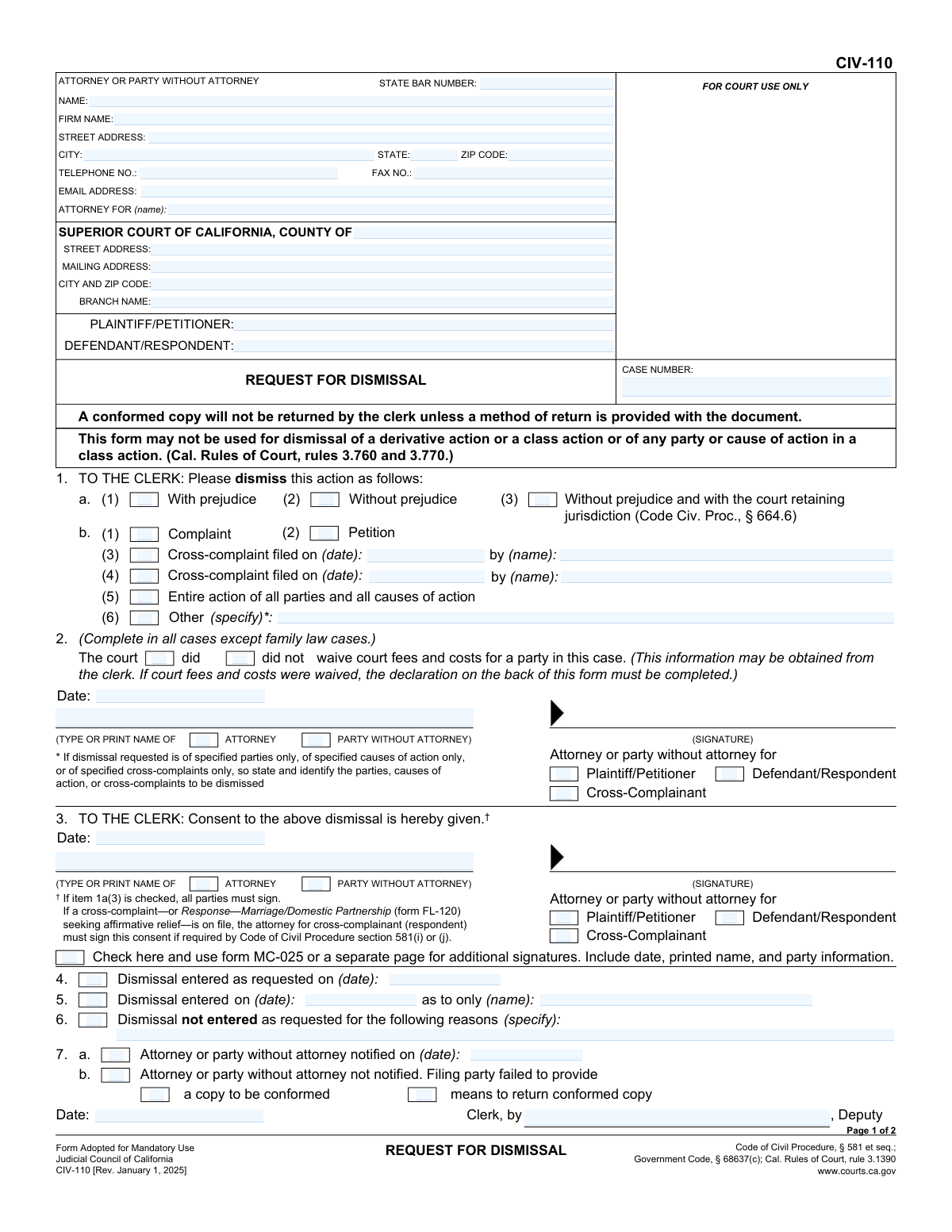
Yes! You can use AI to fill out Form CIV-110, Request for Dismissal

Form CIV-110, Request for Dismissal, is a legal document filed in the Superior Court of California to voluntarily end a lawsuit or part of one. It allows parties to specify whether the dismissal is 'with prejudice,' meaning the claim cannot be refiled, or 'without prejudice,' allowing for potential refiling. Today, this form can be filled out quickly and accurately using AI-powered services like Instafill.ai, which can also convert non-fillable PDF versions into interactive fillable forms.
Our AI automatically handles information lookup, data retrieval, formatting, and form filling.
It takes less than a minute to fill out CIV-110 using our AI form filling.
Securely upload your data. Information is encrypted in transit and deleted immediately after the form is filled out.

Form specifications

Form name: Form CIV-110, Request for Dismissal
Number of fields: 82
Number of pages: 2
Language: English
Categories: SSA forms
main-image

Instafill Demo: How to fill out PDF forms in seconds with AI

How to Fill Out CIV-110 Online for Free in 2026

Are you looking to fill out a CIV-110 form online quickly and accurately? Instafill.ai offers the #1 AI-powered PDF filling software of 2026, allowing you to complete your CIV-110 form in just 37 seconds or less.
Follow these steps to fill out your CIV-110 form online using Instafill.ai:
  1. 1 Navigate to Instafill.ai and upload your Form CIV-110 or select it from the template library.
  2. 2 Use the AI assistant to automatically fill in the case caption, including attorney/party information, court details, party names, and the case number.
  3. 3 Specify the details of the dismissal request, such as whether it's for the entire action or a specific complaint, and if it's with or without prejudice.
  4. 4 Complete the section regarding the court fee waiver status. If fees were waived, provide the required declaration about the value of the recovery.
  5. 5 Date and electronically sign the request. If necessary, provide consent signatures for dismissals where the court retains jurisdiction.
  6. 6 Review all the auto-filled information for accuracy and completeness before finalizing the document.
  7. 7 Download the completed CIV-110 form to print and file with the appropriate court clerk.

Our AI-powered system ensures each field is filled out correctly, reducing errors and saving you time.

Why Choose Instafill.ai for Your Fillable CIV-110 Form?

Speed

Complete your CIV-110 in as little as 37 seconds.

Up-to-Date

Always use the latest 2026 CIV-110 form version.

Cost-effective

No need to hire expensive lawyers.

Accuracy

Our AI performs 10 compliance checks to ensure your form is error-free.

Security

Your personal information is protected with bank-level encryption.

Frequently Asked Questions About Form CIV-110

This form is used to formally ask a California Superior Court to dismiss a civil case. You can use it to dismiss the entire lawsuit, a specific complaint or cross-complaint, or the case against only certain parties.

The party requesting the dismissal, such as the plaintiff, petitioner, or cross-complainant, should complete this form. This can be done by their attorney or by the party themselves if they are self-represented.

A dismissal 'with prejudice' is final and prevents the claims from ever being filed again. A dismissal 'without prejudice' is not final and allows the party to potentially refile the same claims in the future.

Check this box only if the dismissal is part of a settlement agreement and all parties have agreed in writing for the court to have the power to enforce that settlement. This option requires consent signatures from the other parties involved.

If your fees were waived, you must complete the declaration on the second page of the form. You will need to state whether you are recovering anything of value from the dismissal and, if so, how much.

If you are recovering $10,000 or more in value, you are required to pay back the court fees that were previously waived. You must check the 'Yes' box in section 3 to confirm that these fees have been paid to the court.

In section 1, check the box for 'Cross-complaint filed on (date)' and provide the exact date it was filed and the name of the party who filed it. The form has space to identify up to two different cross-complaints.

You will need the court case number, the full names of all plaintiffs and defendants, and the full address of the courthouse where the case is filed. Be sure to enter all information exactly as it appears on other court documents.

The court clerk will review your request. If everything is correct, the clerk will enter the dismissal and stamp your copy as 'conformed' or 'filed'; if not, the clerk will note the reasons why the dismissal was not entered.

You must provide the clerk with at least one copy of the form to be conformed (stamped) and a self-addressed, stamped envelope for its return. If you fail to provide these, the clerk may not be able to send you a conformed copy.

Yes, services like Instafill.ai use AI to accurately auto-fill form fields from your saved information, which can save you significant time and help prevent errors.

You can use a service like Instafill.ai to upload the form and fill it out on your computer. The platform allows you to type directly into the fields, save your progress, and easily print the completed document for filing.

If you have a non-fillable or 'flat' PDF, you can upload it to Instafill.ai. Their technology can convert it into an interactive, fillable form that you can complete, save, and print from your computer.

The 'Clerk's Action' section at the bottom of the form is for court use only. The deputy clerk will fill this part out to indicate whether the dismissal was entered as requested, the date it was entered, and if any parties were notified.

Compliance CIV-110
Validation Checks by Instafill.ai

1
Exclusive Dismissal Prejudice Selection
This check ensures that only one of the prejudice options ('With prejudice,' 'Without prejudice,' or 'Without prejudice and with the court retaining jurisdiction') is selected. These options are mutually exclusive and define the fundamental nature of the dismissal. If multiple options are selected, the form is ambiguous and cannot be processed, leading to rejection by the court clerk.
2
Conditional Cross-Complaint Details Requirement
Validates that if a cross-complaint dismissal is requested by checking a corresponding box, both the 'Cross-Complainant Name' and 'Cross-Complaint Filing Date' fields are filled. This information is essential for the court to identify the specific legal document being dismissed. Failure to provide these details will result in an incomplete and unenforceable dismissal request.
3
Conditional 'Other' Dismissal Specification
Ensures that if the 'Other (specify)' checkbox is selected for the dismissal type, the accompanying 'Other Dismissal Request (Specify)' text field is not empty. This check prevents ambiguous requests where the filer indicates a non-standard dismissal without providing the necessary explanation. An empty specification would require the clerk to reject the form for clarification.
4
Valid and Logical Date Format
Verifies that all date fields, such as 'Signature Date' and 'Cross-Complaint Filing Date', are entered in a valid format (e.g., MM/DD/YYYY) and are not set to a future date. This maintains data integrity and ensures the chronological accuracy of legal events. An invalid or future date could invalidate the document or cause processing errors.
5
State Bar Number Requirement for Attorneys
Checks that the 'State Bar Number' is provided and follows the expected numeric format when the filer identifies as an 'Attorney'. The State Bar Number is a unique identifier crucial for verifying the attorney's credentials and good standing with the bar. Submitting a form as an attorney without a valid bar number will lead to rejection.
6
Conditional Consent Section Completion
This validation ensures that if the dismissal is requested 'Without prejudice and with the court retaining jurisdiction,' the entire 'Consent to Dismissal' section is completed. This specific type of dismissal requires the explicit consent of the parties involved under Code of Civil Procedure § 664.6. Failure to provide the consent date, printed name, and party type will render the request invalid.
7
Exclusive Requester Role Selection
Validates that the user selects exactly one option from the 'Attorney' / 'Party without attorney' pair and one option from the 'Plaintiff/Petitioner' / 'Defendant/Respondent' / 'Cross-Complainant' group. This clearly establishes the identity and capacity of the person filing the request. Ambiguity in the filer's role can lead to procedural defects and rejection of the filing.
8
Conditional Fee Waiver Information Requirement
Ensures that if the 'Court did waive court fees and costs' box is checked, the subsequent fields ('Person Whose Fees Were Waived - Name' and a 'Recovery Value Status' option) are filled out. This information is legally required to determine if waived fees must be repaid to the court from any settlement or judgment. Omitting these details will result in an incomplete declaration.
9
Exclusive Fee Waiver Status Selection
Verifies that the user has selected either 'Court did waive court fees and costs' or 'Court did not waive court fees and costs,' but not both. This is a mandatory declaration about the fee status of the parties in the case. An invalid or missing selection makes it impossible for the clerk to assess potential obligations for fee repayment.
10
Conditional Fee Repayment Status Declaration
This check is triggered if a party with a fee waiver is 'Recovering $10,000 or more.' It validates that the user has selected either 'Yes' or 'No' for the 'Court Fees and Costs Paid to Court' question. This declaration is critical for the court to ensure that waived fees are repaid as required by law when a party recovers a significant amount.
11
Completeness of Core Case Identifiers
Validates that the 'Case Number,' 'Plaintiff/Petitioner,' and 'Defendant/Respondent' fields are all filled in. These fields are the primary identifiers for the legal action and are absolutely essential for the court clerk to locate the correct case file. A submission without this information cannot be processed and will be immediately rejected.
12
Valid US ZIP Code Format
Checks that the 'ZIP Code' field for the attorney/party address contains a valid 5-digit or 9-digit (ZIP+4) numerical format. This ensures mailability and accuracy of the court's record of service addresses. An invalid ZIP code could lead to failed mail delivery of important court notices.
13
Valid Email Address Format
Ensures the 'Email Address' field contains a string that conforms to the standard email format (e.g., [email protected]). As courts increasingly rely on electronic communication, a valid email address is crucial for timely notification. An invalid format would prevent electronic delivery of conformed copies or notices from the clerk.
14
Logical Consistency of 'Attorney For' Field
Validates that the name entered in the 'Attorney For' field corresponds to a party listed in either the 'Plaintiff/Petitioner' or 'Defendant/Respondent' fields. This check ensures the attorney's representation is clearly and correctly stated on the record. A mismatch could create confusion about who the attorney represents, potentially delaying the case.

Common Mistakes in Completing CIV-110

Confusing 'With Prejudice' vs. 'Without Prejudice'

Users often misunderstand the legal distinction between dismissing a case 'with prejudice' and 'without prejudice'. Selecting 'with prejudice' is a final decision that prevents the claims from ever being filed again, while 'without prejudice' allows for the possibility of refiling the case later. This mistake can lead to unintentionally forfeiting legal rights. To avoid this, carefully consider the terms of your settlement or legal strategy, and consult with an attorney if unsure. An incorrect selection can have irreversible consequences for the case.

Failing to Specify What Is Being Dismissed

Filers frequently check multiple boxes or no boxes in the section detailing what is to be dismissed (e.g., 'Complaint', 'Cross-complaint', 'Entire action'). This ambiguity forces the court clerk to reject the form. The filer must make a single, clear selection indicating the specific part of the lawsuit being dismissed. If dismissing only a specific cross-complaint, ensure the correct date and party name are provided to avoid confusion.

Filling Out the 'For Court Use Only' Section

Many self-represented parties mistakenly fill out the bottom portion of the form reserved for the court clerk (e.g., 'Dismissal entered as requested', 'Dismissal not entered'). This section is exclusively for court personnel to document their actions. Any entries made by the filer in this area will cause the form to be rejected, delaying the dismissal process. Always leave sections marked 'For Court Use Only' or 'Clerk Action' completely blank.

Incomplete Fee Waiver Declaration

If a party in the case had their court fees waived, they must complete the declaration on the second page, but this is often missed. Filers forget to indicate the value of what they are recovering (e.g., 'less than $10,000') and sign the declaration. Failure to complete this mandatory section when a fee waiver is active will result in the clerk rejecting the dismissal filing, as the court needs this information to assess whether waived fees must be repaid.

Missing Consent for Retaining Jurisdiction

When requesting a dismissal based on a settlement where the court will retain jurisdiction (under CCP § 664.6), filers often forget to obtain and attach the required signatures from all parties. Checking this box without including the signed consent from the opposing party or their attorney will lead to an automatic rejection of the form. Ensure all parties sign the consent section or an attached declaration before submitting the form to the court.

Incorrect Court Branch and Address Information

Users sometimes enter a generic county court address instead of the specific branch where the case is being heard. Large counties have multiple court branches, and filing at the wrong one can cause significant delays or rejection. Always verify the exact 'Branch Name' and street address from previous court documents or the court's website. Using a tool like Instafill.ai can help auto-populate correct court information based on the case number or county, preventing such errors.

Inconsistent or Incomplete Party Names

The names of the Plaintiff/Petitioner and Defendant/Respondent must be written exactly as they appear on the original complaint and other official case documents. People often use abbreviations, nicknames, or introduce misspellings, which can create ambiguity and lead to filing rejections. Double-check the spelling and completeness of all party names against the official case record to ensure consistency.

Forgetting to Provide a Conformed Copy and Return Envelope

The form indicates that the clerk may not notify the party of the dismissal if they fail to provide a copy of the form and a means for its return. A common mistake is submitting only the original form without an extra copy and a self-addressed, stamped envelope. Without these, you will not receive a 'conformed copy' (a copy stamped by the clerk), which is your official proof that the dismissal was entered. Always include these items with your filing.

Incomplete Cross-Complaint Dismissal Details

When requesting to dismiss a cross-complaint, the form requires checking a box and providing the date the cross-complaint was filed and the name of the party who filed it. Filers often check the box but neglect to enter the corresponding date and name. This missing information makes it impossible for the clerk to identify which specific cross-complaint to dismiss, leading to the form's rejection. AI-powered tools like Instafill.ai can help by flagging these dependent fields to ensure they are not left blank.

Ambiguous 'Attorney For' Designation

When an attorney fills out the form, the 'Attorney For' field must be precise. Simply writing 'Plaintiff' or 'Defendant' can be insufficient in cases with multiple plaintiffs or defendants. This lack of specificity can cause confusion for the court clerk. The best practice is to state the full name of the party being represented (e.g., 'Plaintiff, Jane Smith'). This ensures clarity and prevents potential processing delays.
Saved over 80 hours a year

“I was never sure if my IRS forms like W-9 were filled correctly. Now, I can complete the forms accurately without any external help.”

Kevin Martin Green

Your data stays secure with advanced protection from Instafill and our subprocessors

Robust compliance program

Transparent business model

You’re not the product. You always know where your data is and what it is processed for.

ISO 27001, HIPAA, and GDPR

Our subprocesses adhere to multiple compliance standards, including but not limited to ISO 27001, HIPAA, and GDPR.

Security & privacy by design

We consider security and privacy from the initial design phase of any new service or functionality. It’s not an afterthought, it’s built-in, including support for two-factor authentication (2FA) to further protect your account.

Fill out CIV-110 with Instafill.ai

Worried about filling PDFs wrong? Instafill securely fills form-civ-110-request-for-dismissal forms, ensuring each field is accurate.