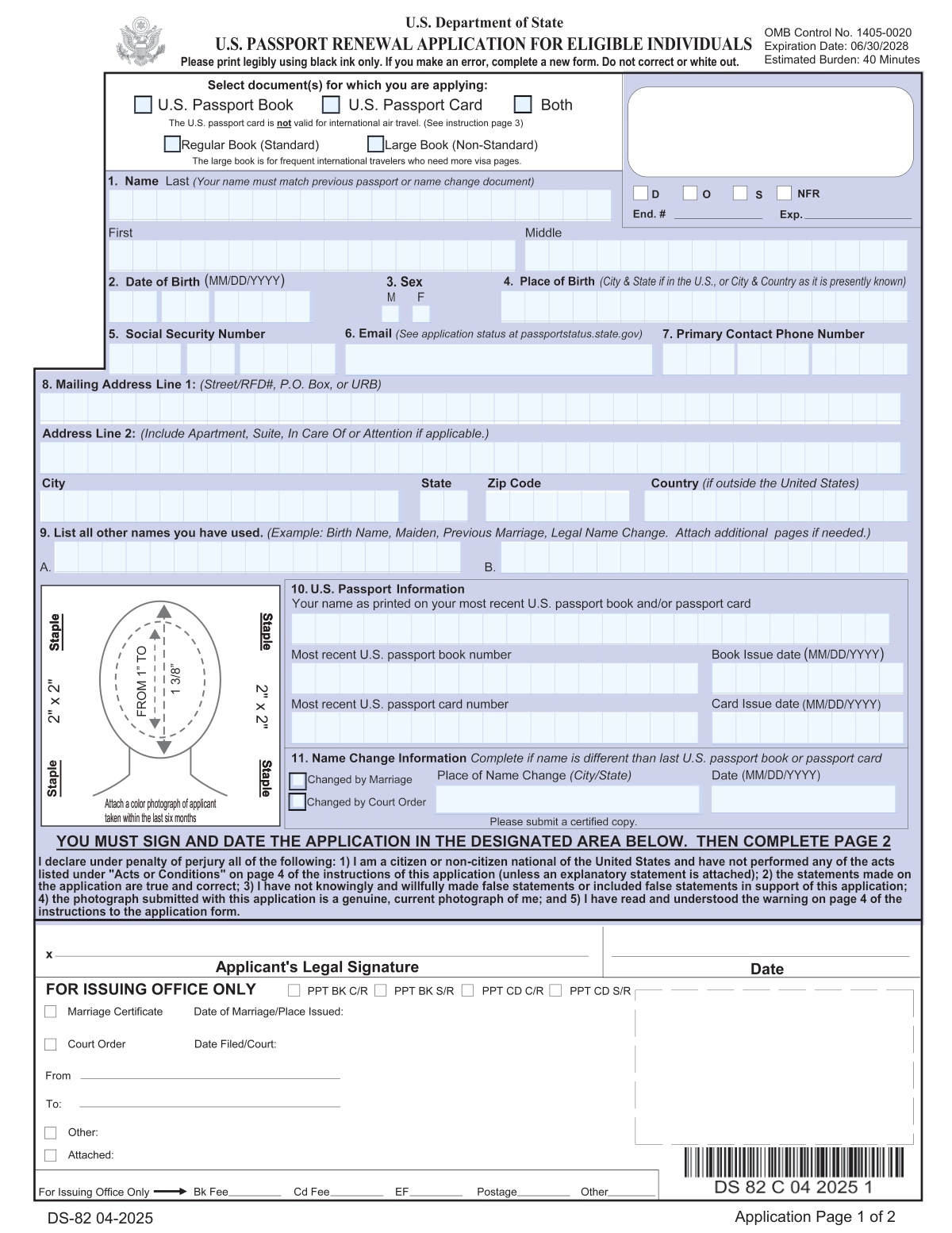
Yes! You can use AI to fill out Form DS-82, U.S. Passport Renewal Application for Eligible Individuals
Form DS-82 is the official U.S. Department of State application for renewing a U.S. passport by mail. It is essential for eligible citizens who need to maintain a valid passport for international travel but meet the criteria to avoid applying in person. Today, this form can be filled out quickly and accurately using AI-powered services like Instafill.ai, which can also convert non-fillable PDF versions into interactive fillable forms.
Our AI automatically handles information lookup, data retrieval, formatting, and form filling.
It takes less than a minute to fill out DS-82 using our AI form filling.
Securely upload your data. Information is encrypted in transit and deleted immediately after the form is filled out.
Form specifications
| Form name: | Form DS-82, U.S. Passport Renewal Application for Eligible Individuals |
| Number of fields: | 87 |
| Number of pages: | 6 |
| Language: | English |
| Categories: | passport forms |
Instafill Demo: How to fill out PDF forms in seconds with AI
How to Fill Out DS-82 Online for Free in 2026
Are you looking to fill out a DS-82 form online quickly and accurately? Instafill.ai offers the #1 AI-powered PDF filling software of 2026, allowing you to complete your DS-82 form in just 37 seconds or less.
Follow these steps to fill out your DS-82 form online using Instafill.ai:
- 1 Navigate to Instafill.ai and upload the DS-82 form or select it from the platform's library of official documents.
- 2 Engage with the AI assistant, which will guide you through the application by asking for your personal details, most recent passport information, and contact data.
- 3 Provide the required information, such as your full name, date of birth, Social Security Number, and details from your previous passport.
- 4 Review the information automatically populated by the AI into the DS-82 form fields, verifying that all entries are correct and complete.
- 5 Finalize the process and download the completed, ready-to-print DS-82 application.
- 6 Print the two-page application, sign and date it, and attach a compliant 2x2 inch color photograph in the designated area.
- 7 Mail the signed application, your old passport, any required name change documents, and the fee payment to the address specified in the form instructions.
Our AI-powered system ensures each field is filled out correctly, reducing errors and saving you time.
Why Choose Instafill.ai for Your Fillable DS-82 Form?
Speed
Complete your DS-82 in as little as 37 seconds.
Up-to-Date
Always use the latest 2026 DS-82 form version.
Cost-effective
No need to hire expensive lawyers.
Accuracy
Our AI performs 10 compliance checks to ensure your form is error-free.
Security
Your personal information is protected with bank-level encryption.
Frequently Asked Questions About Form DS-82
Form DS-82 is the U.S. Passport Renewal Application used by eligible individuals to renew their current or recently expired U.S. passport book and/or card by mail.
You are eligible if you can submit your most recent passport, it was issued when you were 16 or older and less than 15 years ago, and it is not damaged, lost, or stolen. You must be able to answer 'Yes' to all eligibility statements on the form.
You cannot use Form DS-82 if your passport is lost, stolen, or damaged. You must apply using Form DS-11, Application for a U.S. Passport.
You must submit the completed DS-82 form, your most recent U.S. passport, a recent 2x2 inch color photograph, and the required fees. If your name has changed, you must also include a certified copy of the legal document showing the change.
Yes, if your name changed by marriage or court order, you can use this form. You must submit a certified copy of your marriage certificate or court order as proof of the name change.
If you make an error, you must start over with a new form. Do not use correction fluid or cross out information, as this will invalidate the application.
Your photo must be a 2x2 inch color photograph taken within the last six months against a plain white background. You cannot wear eyeglasses, uniforms, or head coverings (unless for religious or medical reasons with a signed statement).
The mailing address depends on your state of residence and whether you are requesting routine or expedited service. Refer to Section E of the form instructions for the correct P.O. Box in either Irving, TX, or Philadelphia, PA.
Yes, you can request Expedited Service for an additional fee, which is available for applicants in the United States and Canada. You must write 'EXPEDITE' on the outer envelope of your application.
Yes, your old passport and any original supporting documents you submitted will be returned to you. They may arrive in a separate mailing from your new passport.
Yes, you are required to provide your Social Security Number if you have been issued one. Failure to provide it can result in significant processing delays or denial of your application.
Yes, services like Instafill.ai use AI to accurately auto-fill form fields, which can save you time and help reduce errors on your application.
You can use a service like Instafill.ai to upload the DS-82 PDF, which makes it an interactive, fillable form you can complete on your computer. You can then download and print the completed form for submission.
Instafill.ai can convert flat, non-fillable PDFs into interactive forms. Simply upload the DS-82 form to the platform to make it fillable online before printing.
No, each newly issued passport book or card will have a different passport number than your previous one.
Compliance DS-82
Validation Checks by Instafill.ai
1
Eligibility Confirmation
This check verifies that the applicant has answered 'Yes' to all six eligibility questions in Section A. To use form DS-82, the applicant must be able to submit their recent passport, have been at least 16 at issuance, the passport must be less than 15 years old, and meet other criteria. If any question is answered 'No', the application is rejected for this form, and the user is instructed to use Form DS-11.
2
Social Security Number Format and Requirement
Validates that the Social Security Number (SSN) field contains exactly nine digits. Per federal law, providing an SSN is mandatory if the applicant has one. If the field is filled with zeros, the system should flag the application to ensure a separate, signed statement is attached declaring the applicant has never been issued an SSN. Failure to provide a valid SSN or the required statement will result in processing delays and potential denial.
3
Previous Passport Issue Date Verification
This check compares the 'Passport book issue date' or 'Passport card issue date' against the current date to ensure it was issued less than 15 years ago. This is a primary eligibility requirement for using the DS-82 renewal form. If the passport is 15 years old or older, the validation fails, and the applicant is deemed ineligible to use this form.
4
Age at Previous Issuance Calculation
This validation cross-references the applicant's 'Date of Birth' with the 'Passport book/card issue date' to confirm they were at least 16 years old when the previous passport was issued. This is a key eligibility criterion stated in Section A. If the calculated age is under 16, the applicant cannot use Form DS-82 and must apply using a different form.
5
Name Change Consistency Logic
Compares the applicant's current name ('Applicant Name' fields) with the 'Name as printed on most recent passport'. If the names are different, this validation ensures that the 'Name Change Details' section is completed and that the applicant has indicated they will submit supporting documentation (e.g., marriage certificate, court order). An undocumented name change will halt the application process until proof is provided.
6
Date of Birth Format and Plausibility
Ensures the 'Date of Birth' is entered in the correct MM/DD/YYYY format and represents a valid, logical date. The check confirms the date is not in the future and is within a reasonable human lifespan (e.g., not more than 120 years in the past). This prevents data entry errors and ensures the applicant's identity information is accurate for the new passport.
7
Mailing Address Completeness
Verifies that essential mailing address fields (Line 1, City, State, ZIP Code) are populated. The ZIP code is also checked for a valid 5-digit or 9-digit format. This check is critical to prevent the new passport and original documents from being lost in the mail, which would require the applicant to start the process over.
8
International Mailing Address Restriction
This check flags any application where the 'Mailing Address Country' is not the United States or Canada. The form instructions explicitly state that passports will not be mailed to private addresses outside these two countries. If this validation fails, the system should inform the applicant that they must follow the submission procedures for their local U.S. embassy or consulate.
9
Travel Date Logical Sequence
Validates that the 'Return Date' is on or after the 'Departure Date'. This is a logical consistency check on the optional travel plan information. While not a critical processing requirement, it helps ensure the data collected is accurate and flags potential data entry mistakes for the applicant to correct.
10
Passport Book Size Selection
If the applicant checks the box for 'U.S. Passport Book' or 'Both', this validation ensures that they have also selected a book size ('Regular Book' or 'Large Book'). This choice is required to produce the correct passport document. An application missing this selection is incomplete and would be delayed until the applicant's preference is confirmed.
11
Emergency Contact Information Presence
This check verifies that the 'Emergency Contact Name' and 'Emergency Contact Phone Number' fields are filled out. This information is vital for the Department of State to assist the applicant in an emergency abroad. An application with missing emergency contact details may be flagged as incomplete to encourage the applicant to provide this critical safety information.
12
Signature and Date Declaration
Verifies that the applicant has signed and dated the application in the designated area on Page 1. The signature legally certifies under penalty of perjury that the information provided is true and correct. An unsigned or undated application is legally invalid and will be immediately rejected, requiring the applicant to submit a new, properly signed form.
Common Mistakes in Completing DS-82
Applicants often fail to carefully read the eligibility checklist on the first page, assuming any renewal uses this form. Answering 'No' to any of the six questions—such as if your previous passport was issued over 15 years ago or was lost—makes you ineligible. Submitting an application when ineligible results in immediate rejection, loss of time, and the need to restart the entire process with the correct form, such as the DS-11.
The passport photo is the most common reason for processing delays. Mistakes include using a photo older than six months, wearing glasses (now prohibited without a doctor's note), using a colored background, or incorrect head sizing. To avoid suspension of your application, get a professional photo taken that meets all State Department requirements and staple it carefully in the four corners as shown on the form.
In the rush to complete the form, many applicants forget to sign and date the first page in the designated signature block. An unsigned application is legally invalid and cannot be processed. This simple oversight will cause the entire package to be returned to you, leading to significant delays in your renewal.
Due to privacy concerns or simple oversight, applicants frequently leave the Social Security Number field blank. The form explicitly states that providing your SSN is mandatory under federal law. Failure to provide your full, correct SSN will result in processing delays and can lead to the denial of your application.
If your current name differs from the name on your most recent passport, you must submit proof. Common errors include sending a photocopy instead of a certified copy of a marriage certificate or court order, or forgetting the document entirely. This will halt your application until the proper certified documentation is received, delaying your new passport.
The form lists different mailing addresses for routine service, expedited service, and for residents of specific states. Applicants often send their package to the wrong P.O. Box, causing major delays. Additionally, sending an incorrect fee amount or an improperly written check (e.g., wrong payee) will cause your application to be put on hold. Always verify current fees and addresses on travel.state.gov before mailing.
The instructions clearly state, 'If you make an error, complete a new form. Do not correct or white out.' Many people ignore this and try to fix mistakes with correction fluid or by striking through text. Any such alteration will cause the application to be rejected, as processing centers require a clean, machine-scannable document. To prevent this, use a fillable PDF or an AI tool like Instafill.ai, which allows you to correct mistakes before printing.
Applicants must submit their most recent passport book and/or card with the renewal application. People sometimes forget to include it or mistakenly believe a photocopy is sufficient, fearing the original will be lost. The application is considered incomplete without the physical old passport, which will be canceled and returned to you, and its absence will stop the renewal process.
In an effort to save paper, applicants sometimes print the two-page application on the front and back of a single sheet. However, the instructions specify printing on separate pieces of paper. Double-sided printing can interfere with the agency's automated scanning and processing systems, potentially leading to delays or rejection of the form.
Simple typographical errors in critical fields like date of birth, old passport number, or name spelling are very common. These mistakes happen during manual data entry and can create a mismatch with the supporting documents, flagging the application for manual review and causing delays. Using an AI-powered form filling tool like Instafill.ai can help prevent these errors by validating data formats and ensuring accuracy.
Saved over 80 hours a year
“I was never sure if my IRS forms like W-9 were filled correctly. Now, I can complete the forms accurately without any external help.”
Kevin Martin Green
Your data stays secure with advanced protection from Instafill and our subprocessors

Robust compliance program
Transparent business model
You’re not the product. You always know where your data is and what it is processed for.
ISO 27001, HIPAA, and GDPR
Our subprocesses adhere to multiple compliance standards, including but not limited to ISO 27001, HIPAA, and GDPR.
Security & privacy by design
We consider security and privacy from the initial design phase of any new service or functionality. It’s not an afterthought, it’s built-in, including support for two-factor authentication (2FA) to further protect your account.
Fill out DS-82 with Instafill.ai
Worried about filling PDFs wrong? Instafill securely fills form-ds-82-us-passport-renewal-application-for-eligible-individuals forms, ensuring each field is accurate.