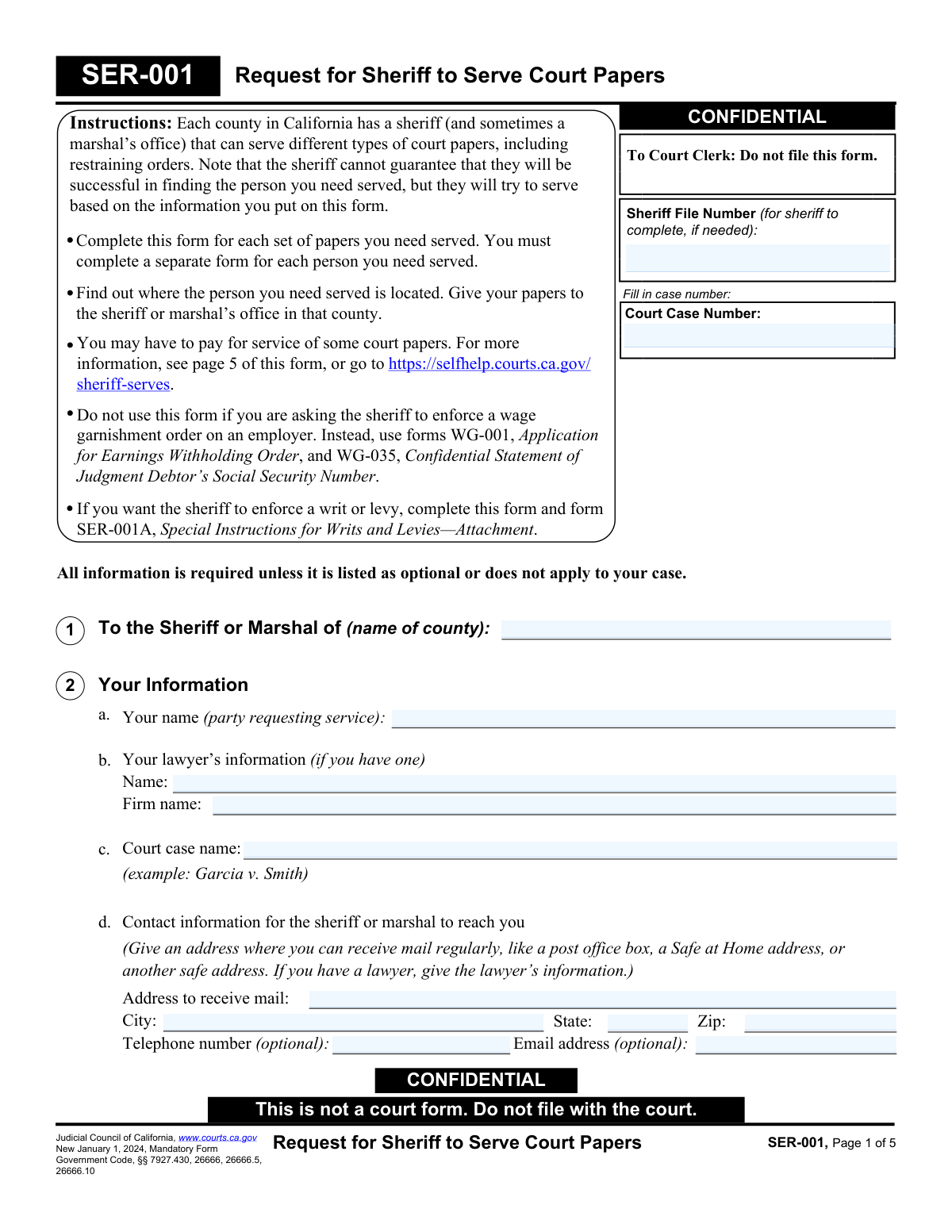
Yes! You can use AI to fill out Form SER-001, Request for Sheriff to Serve Court Papers

Form SER-001 is a mandatory Judicial Council of California form used to provide a county sheriff with the necessary information to serve court papers. It details who needs to be served, their location, physical description, and any potential safety issues, ensuring the process server has all relevant facts. Today, this form can be filled out quickly and accurately using AI-powered services like Instafill.ai, which can also convert non-fillable PDF versions into interactive fillable forms.
SER-001 is part of the court forms and UK court forms categories on Instafill.
Our AI automatically handles information lookup, data retrieval, formatting, and form filling.
It takes less than a minute to fill out SER-001 using our AI form filling.
Securely upload your data. Information is encrypted in transit and deleted immediately after the form is filled out.

Form specifications

Form name: Form SER-001, Request for Sheriff to Serve Court Papers
Number of fields: 96
Number of pages: 5
Language: English
main-image

Instafill Demo: How to fill out PDF forms in seconds with AI

How to Fill Out SER-001 Online for Free in 2026

Are you looking to fill out a SER-001 form online quickly and accurately? Instafill.ai offers the #1 AI-powered PDF filling software of 2026, allowing you to complete your SER-001 form in just 37 seconds or less.
Follow these steps to fill out your SER-001 form online using Instafill.ai:
  1. 1 Navigate to Instafill.ai and upload or select the SER-001 form.
  2. 2 Provide your information, your lawyer's details (if any), and the court case name and number in the designated fields.
  3. 3 Specify whether you are serving a person or an entity, and fill in all known details such as name, description, contact information, and any safety or accessibility concerns.
  4. 4 Enter the primary address for service, including any gate codes or special instructions, and add an alternate address if available.
  5. 5 List the court papers to be served, note any hearing dates or service deadlines, and provide any other information that could assist the sheriff.
  6. 6 If applicable, complete the section for enforcement of a writ or levy by attaching Form SER-001A.
  7. 7 Review all entered information for accuracy, electronically sign and date the form, then download the completed document to submit to the appropriate sheriff's office.

Our AI-powered system ensures each field is filled out correctly, reducing errors and saving you time.

Why Choose Instafill.ai for Your Fillable SER-001 Form?

Speed

Complete your SER-001 in as little as 37 seconds.

Up-to-Date

Always use the latest 2026 SER-001 form version.

Cost-effective

No need to hire expensive lawyers.

Accuracy

Our AI performs 10 compliance checks to ensure your form is error-free.

Security

Your personal information is protected with bank-level encryption.

Frequently Asked Questions About Form SER-001

This form is used to officially request that a California county sheriff's department serve your court papers to another person or entity involved in your case. It provides the sheriff with the necessary information to locate and successfully serve the individual.

Anyone involved in a California court case who needs to have legal documents, like a summons or a restraining order, officially delivered (served) by the sheriff to another party. You must fill out a separate form for each person you need to serve.

You must submit this form and the court papers to the sheriff's office in the county where the person you want to serve is located. Do not file this form with the court clerk.

Often there is a fee for service, but you may be exempt if you have a court-ordered fee waiver (Form FW-003) or if you are serving certain types of restraining orders. Contact the local sheriff's office to confirm fees and payment options.

Provide as much detail as possible in Section 3 to help the sheriff, including a physical description, vehicle information, and any known safety concerns like weapons or aggressive animals. The more information you provide, the higher the chance of successful service.

If the sheriff is unable to serve the papers, you will receive a form called a 'declaration of due diligence' explaining the attempts made. You may need to provide a better address or ask the court for permission to serve in a different way.

Yes, you can. In Section 3, check box 'b' to indicate you are serving an entity and provide the business's name, address, and if known, the name of the specific person or agent for service of process.

You must provide the completed SER-001 form, a copy of all the court papers you want served, and a copy of your fee waiver if you have one. Be sure to list all the documents you are providing in Section 5b of the form.

Clearly state the service deadline in Section 5d of the form. Submit your request to the sheriff as early as possible to allow them enough time to make multiple service attempts if necessary before the deadline.

Form SER-001 is the general request for service. You must also complete and attach Form SER-001A if you are asking the sheriff to enforce a writ or levy, such as seizing property or garnishing a bank account.

Yes, services like Instafill.ai use AI to help you fill out forms accurately and quickly. The AI can read the form fields and guide you in providing the correct information, which saves time and reduces errors.

You can use a service like Instafill.ai to complete the form online. Simply upload the SER-001 PDF, and the platform will make it an interactive, fillable form that you can type into, sign, and download.

If you have a non-fillable or 'flat' PDF, you can use a tool like Instafill.ai to convert it into an interactive, fillable form. This allows you to easily type your information into the correct fields before printing.

If service was successful, the sheriff will give you a 'Proof of Service' form. You must file this proof with the court to show that the other party was officially notified.

Compliance SER-001
Validation Checks by Instafill.ai

1
Court Case Number Consistency
This validation ensures that the 'Court Case Number' entered is identical on every page of the form where it appears. It is critical for legal documents that this identifier be consistent to prevent misfiling or association with the wrong case. If the numbers do not match, the submission should be blocked until the user corrects the discrepancy.
2
Exclusive Service Target Selection
This check verifies that the user has selected either 'I ask the sheriff to serve a person' (section 3a) or 'I ask the sheriff to serve an entity' (section 3b), but not both. The form requires a single, clear target for service. If neither or both are selected, the form is incomplete and an error message should prompt the user to choose exactly one option.
3
Conditional Requirement for Person's Name
This validation is triggered if the user selects 'I ask the sheriff to serve a person' (3a). It ensures that the 'Name of person' field is not left empty. Serving an individual is impossible without their name, so this is a critical piece of information for the sheriff. Failure to provide a name will prevent form submission.
4
Conditional Requirement for Entity Name
This validation is triggered if the user selects 'I ask the sheriff to serve an entity' (3b). It ensures that the 'Name and type of entity' field is populated. The sheriff needs the legal name and type of the business or agency to perform service correctly. The submission will be rejected if this field is empty when 3b is checked.
5
Hearing Date Logic and Validity
This check validates the court hearing information in section 5c. If the user checks 'Yes' for a court hearing, the 'date of hearing' field becomes mandatory. The entered date must be a valid date format and must be a future date, as a hearing cannot have already passed. An invalid or past date would cause a validation failure.
6
Service Deadline Logic and Validity
This check validates the service deadline information in section 5d. If the user checks 'Yes' for a service deadline, the 'deadline' field becomes mandatory. The entered date must be a valid date format and should be a date in the future. This is crucial as it informs the sheriff of the urgency of the service request.
7
Safety Issue Detail Requirement
This validation ensures that if a user checks 'Yes' for 'safety or accessibility issues' in section 3a(4), they must provide details. The system will check if at least one of the sub-checkboxes (e.g., 'Has a gun', 'Has an aggressive animal') is checked or if the 'Add any other information' text field is filled. This is a critical safety measure for the serving officer, and a failure to provide details will result in a validation error.
8
Primary Service Address Completeness
This check verifies that the primary service address in Section 4 is fully completed. It requires the 'Address', 'City', 'State', and 'Zip' fields to all be populated. An incomplete address makes service impossible, so the form cannot be processed until all components of the primary address are provided.
9
Jail/Prison Facility Name Requirement
This is a conditional validation for Section 4. If the checkbox 'Check here if the person is in jail or prison' is selected, this validation ensures the corresponding 'name of facility' text field is not empty. Knowing the specific facility is essential for the sheriff to locate and serve an incarcerated individual. The form will be considered incomplete if the box is checked but the facility name is missing.
10
Requesting Party Contact Information Completeness
This validation ensures that all mandatory contact fields for the requesting party in Section 1 are filled out. This includes 'Your name', 'Address to receive mail', 'City', 'State', and 'Zip'. This information is required for the sheriff's office to return the proof of service or communicate about the request, so missing information will block submission.
11
ZIP Code Format Validation
This check applies to all ZIP code fields on the form. It verifies that the entry consists of either 5 digits or 9 digits in the ZIP+4 format (e.g., 90210 or 90210-1234). Correctly formatted ZIP codes are essential for mail delivery and location verification. An invalid format will trigger an error, prompting the user to correct the entry.
12
Non-English Language Specification
This validation is triggered in section 3a(4) if the 'Does not speak English' checkbox is selected. It ensures that the corresponding text field for listing the language is not left blank. This information is vital for the sheriff to arrange for a translator if necessary, ensuring the service is conducted properly and safely. The submission will fail if the box is checked but no language is specified.
13
Alternate Address Integrity Check
This check ensures that if a user begins to fill out the optional 'Alternate address' in Section 4, they provide a complete address. If any part of the alternate address (e.g., street) is entered, the 'City', 'State', and 'Zip' fields for that address become mandatory. This prevents the submission of a partial, unusable secondary address.
14
Signature Date Validity
This validation confirms that the 'Date' field in the signature section is filled with a valid date. Furthermore, it checks that the provided date is not in the future. A signature date legally attests to when the document was signed, so it must be accurate and reflect the present or a past date. A future date would be illogical and cause the validation to fail.

Common Mistakes in Completing SER-001

Entering an Incorrect or Incomplete Court Case Number

Users often mistype the case number or omit required prefixes and suffixes because they are copying it from memory or a blurry document. An incorrect case number can cause the Sheriff's office to reject the request or associate the service with the wrong case, leading to significant legal delays. To avoid this, always double-check the case number against official court documents, ensuring every letter, number, and dash is identical.

Submitting the Request to the Wrong County Sheriff

This form must be submitted to the sheriff in the county where the person is to be served, not necessarily the county where the case was filed. People often get this confused and send it to their local sheriff or the court's sheriff, leading to rejection and lost time. Before filling out the form, confirm the county of the service address and direct the request to that specific county's sheriff's office.

Providing Insufficient Service Address Details

Filers often provide a street address but forget crucial details like an apartment number, building name, or necessary gate code, which prevents the deputy from accessing the location. This results in failed service attempts and requires resubmission, delaying the case. Always provide the most complete address possible, including any special instructions that would help a stranger find the person at the specified times.

Failing to Disclose Known Safety Risks

In section 3a(4), filers may downplay or omit information about potential dangers like weapons, aggressive animals, or a history of violence, perhaps fearing it will complicate the process. This is a critical error that endangers the serving officer. Full disclosure allows the sheriff's department to take appropriate safety precautions, ensuring the service is attempted safely and effectively.

Vaguely Listing the Documents for Service

In section 5b, people might write generic terms like "court papers" instead of listing the specific form numbers (e.g., FL-100, SC-100) or their full titles. This ambiguity can lead to the sheriff serving an incomplete set of documents, which could invalidate the service and require the process to be started over. Carefully list every single document by its official form number or full title as required by the court order.

Ignoring or Misstating Critical Deadlines

The court sets strict deadlines for when documents must be served. In sections 5c and 5d, filers may check "I don't know" or leave it blank when the information is available on their court papers, or they might enter an incorrect date. Missing a service deadline can lead to the case being dismissed or the hearing being postponed, so it's vital to accurately transfer these dates from the court orders.

Incorrectly Filing the Form with the Court Clerk

The form repeatedly states "Do not file with the court" and "CONFIDENTIAL," yet stressed individuals often mistakenly submit it to the court clerk along with their other filings. This action creates unnecessary work for the clerk, delays the request from reaching the sheriff, and potentially makes confidential information part of the public record. This form should only be delivered directly to the appropriate Sheriff's office.

Forgetting to Include Required Attachments

This request form is useless on its own; it must be accompanied by the actual court papers to be served. People frequently forget to include a copy of every document listed in section 5b, a copy of their fee waiver (if applicable), or the required SER-001A form for writs and levies. This omission brings the process to a halt, as the sheriff cannot proceed without the correct documents, causing delays until the complete package is submitted.

Providing a Minimal Description of the Person to be Served

When serving an individual, people often skip the detailed description in section 3a(3), especially if they don't know the person well. However, any detail—even an estimated age, hair color, or known vehicle—dramatically increases the chances of a successful serve. Leaving this section blank when some information is known can lead to the deputy being unable to positively identify the person, resulting in a failed attempt.

Using an Unreliable Contact Address or Phone Number

In section 1, filers sometimes provide an email or mailing address they do not check regularly. The Sheriff's office uses this information to communicate about successful service or problems encountered. Missing these communications can lead to critical delays or a failure to file the proof of service with the court in time.
Saved over 80 hours a year

“I was never sure if my IRS forms like W-9 were filled correctly. Now, I can complete the forms accurately without any external help.”

Kevin Martin Green

Your data stays secure with advanced protection from Instafill and our subprocessors

Robust compliance program

Transparent business model

You’re not the product. You always know where your data is and what it is processed for.

ISO 27001, HIPAA, and GDPR

Our subprocesses adhere to multiple compliance standards, including but not limited to ISO 27001, HIPAA, and GDPR.

Security & privacy by design

We consider security and privacy from the initial design phase of any new service or functionality. It’s not an afterthought, it’s built-in, including support for two-factor authentication (2FA) to further protect your account.

Fill out SER-001 with Instafill.ai

Worried about filling PDFs wrong? Instafill securely fills form-ser-001-request-for-sheriff-to-serve-court-papers forms, ensuring each field is accurate.