
Yes! You can use AI to fill out Premiere Select Roth IRA Conversion 1.747921.112
Don't type 57 fields by hand. Tell our AI about yourself, or upload a document you already have, and it fills every field in seconds. You check it, then download, print or sign.
The AI does the filling. You just check it.
No typing into boxes, nothing to install.
What this form asks for
The AI fills all of it, from your answers or your documents.
The AI checks your answers before you download
12 checks built for this form, so a wrong date or a missing answer is caught before anyone else sees it.
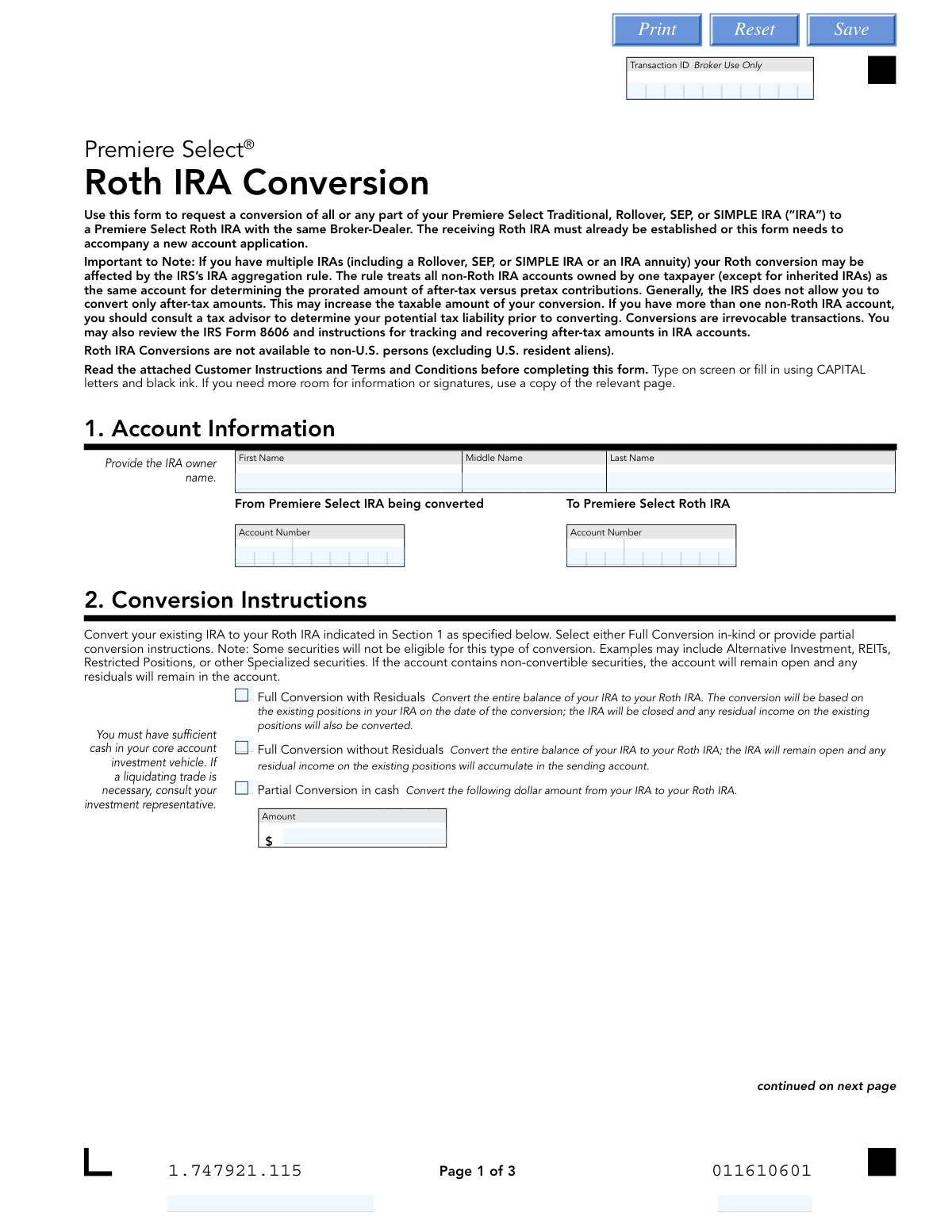
This check verifies that the 'From' and 'To' account numbers provided in Section 1 exist and are active. It also confirms that the 'From' account is a valid Traditional, Rollover, SEP, or SIMPLE IRA and the 'To' account is a Roth IRA, both registered to the same owner. This is critical to ensure the conversion is processed between the correct and eligible accounts, preventing transaction failure or misdirection of funds.
Validates that the account number for the 'From Premiere Select IRA' is different from the account number for the 'To Premiere Select Roth IRA'. A conversion must move assets from one account to another, not within the same account. If the numbers are identical, the form submission is invalid and must be rejected to prevent a logical processing error.
Ensures that only one conversion instruction is selected in Section 2. The user must choose one option from 'Full Conversion with Residuals', 'Full Conversion without Residuals', 'Partial Conversion in cash', or 'Partial Conversion in-kind', but not a combination. This prevents ambiguity and ensures the transaction is processed according to a single, clear instruction.
If 'Partial Conversion in cash' is selected, this check confirms that the 'Amount' field contains a positive, numeric dollar value. It also cross-references the 'From' account to ensure sufficient cash is available for the conversion. This prevents overdraft situations and ensures the requested cash amount is valid and transferrable.
When 'Partial Conversion in-kind' is chosen, this validation ensures at least one investment line item is completed. For each specified investment, it verifies that a valid CUSIP or Fund Symbol is provided along with either a number of shares, a dollar amount, or the 'All' checkbox is selected. This check guarantees that the instructions to convert specific securities are complete and actionable.
This check confirms the account holder's status as a U.S. person or a U.S. resident alien based on information on file. The form explicitly states that Roth IRA conversions are not available to non-U.S. persons. Failing this validation results in immediate rejection of the request to comply with eligibility rules.
And 6 more checks
- Federal Withholding Rate Format
- State Withholding Rate Format
- Conditional State Withholding Logic
- SIMPLE IRA Two-Year Rule Verification
- Signature Presence
- Date Field Format and Validity
Let AI fill out your 1.747921.115
No typing. Every field filled in seconds, checked, ready to sign.
How to Fill Out 1.747921.115 Online for Free in 2026
What the AI walks you through.
- Navigate to Instafill.ai and upload the Premiere Select Roth IRA Conversion form or select it from their template library.
- Provide your personal and account information in Section 1, including the account numbers for the IRA being converted and the receiving Roth IRA.
- In Section 2, specify the conversion instructions, choosing between a full or partial conversion and detailing any specific investments to be moved.
- Complete Section 3 to make your federal and state tax withholding elections, carefully considering the tax implications of the conversion.
- Review all the information you've entered, ensuring account numbers, conversion amounts, and tax elections are correct.
- Electronically sign and date the form in Section 4 to certify your request and acknowledge the terms and conditions of the conversion.
Common Mistakes in Completing 1.747921.115
The ones the AI is built to catch.
Forgetting to Take Required Minimum Distribution (RMD) First
Entering Incorrect or Mismatched Account Numbers
Misunderstanding Tax Withholding Consequences
Ignoring State-Specific Tax Withholding Rules
Providing Ambiguous or Conflicting Conversion Instructions
Forgetting to Sign or Date the Form
Attempting to Convert an IRA from an External Custodian
Using Incorrect Formatting in Withholding Percentage Fields
Submitting the Form Without an Established Roth IRA
Listing Ineligible Securities for an In-Kind Conversion
Frequently Asked Questions About 1.747921.115
Is it really free for 7 days?
Can I fill other forms too?
How do I cancel?
How does the AI fill out 1.747921.115?
What happens to my information?
How complex is 1.747921.115 to fill out?
What is the purpose of this Roth IRA Conversion form?
Who is eligible to use this form?
Can I reverse a Roth conversion if I change my mind?
What's the difference between a 'Full Conversion with Residuals' and 'without Residuals'?
Can I convert only a portion of my IRA?
Do I have to have taxes withheld during the conversion?
What happens if some of my investments are not eligible for conversion?
I have a SIMPLE IRA. Are there any special rules for converting it?
Do I need to take my Required Minimum Distribution (RMD) before converting?
Will I owe taxes on this conversion?
Can I use an AI tool to help me fill out this form?
How can I fill out this Roth IRA Conversion form online?
The PDF I have is not fillable. What can I do?
Get your 1.747921.115 filled out by AI
$0 today. Cancel before Nov 18 and you pay nothing.
Other forms like this one
IRA forms: Form 5498, IRA Contribution Information, SIRA Allied health treatment request (Catalogue no. SIRA09191), Transfer Due to Divorce — IRA/HSA/529, One-Time Withdrawal – IRA, Fidelity Investments, Fidelity Advisor IRA Distribution Request for Automatic Rollover Accounts, Fidelity Beneficiaries — IRA /HSA, Fidelity Advisor IRA Beneficiary Designation, IRA/HSA Beneficiary Designation, Fidelity IRA Beneficiary Distribution — Charity, Foundation, or a University, Form 8606, Nondeductible IRAs, Fidelity Investments Earnings Automatic Withdrawal Plan — IRA, Inherited IRA Application for Individual Beneficiaries, SIMPLE IRA Contribution Transmittal Form, IRA Distribution Form, Open a Schwab IRA, New York State Deferred Compensation Plan Direct Rollover to a Roth IRA, Charles Schwab IRA Distribution Form, Sample IRA Distribution Letter for a Qualified Charitable Distribution (QCD), Beneficiary Designation Form For IRA and 403(b)(7) Accounts, IRA Beneficiary Designation Form
retirement account forms: Fidelity Investment-Only (Non-Prototype) Retirement Account Application, Fidelity Investment-Only (Non-Prototype) Retirement Account Application, One-Time Withdrawal – Investment-Only (Non-Prototype) Retirement Account, Schwab Personal Choice Retirement Account® (PCRA) Limited Power of Attorney (LPOA) Form For a Participant, Retirement Transfer Between Existing Vanguard Accounts, Gift of Nonretirement Assets to Existing Vanguard Account Form, Inherited Retirement Account Beneficiary Identification Form, Account Reduction Loan Application 401(a) Plan, Electrical Workers Local Union No. 369 Retirement Plan, 401(k) Retirement Account Conversion to Empower Frequently Asked Questions, Housing Agency Retirement Trust Form #190, Request to Withdraw a Rollover Account, ADP Retirement Services: Your retirement account and the C.A.R.E.S. Act, ADP IMPORTANT INFORMATION: Your retirement account and the C.A.R.E.S. Act, Request for a Qualified Charitable Distribution (QCD) from a Brokerage Individual Retirement Account (IRA), Request for qualified charitable distribution from individual retirement account, Request for a Charitable Distribution from an Individual Retirement Account (IRA), Voya Investment Management Traditional, Roth, Rollover, and SEP Individual Retirement Account (IRA) Application and Adoption Agreement, Individual Retirement Account (IRA) Distribution Request Form, SIMPLE Individual Retirement Account (IRA) Distribution Request Form, Authorization to transfer funds from a bank retirement account, Qualified Retirement Plan and 403(b)(7) Custodial Account Distribution Request Form
Roth conversion forms: Principal Life Insurance Company Form PG4701, In-Plan Roth Conversion – No Spousal Consent Needed, Merrill Lynch IRA/IRRA® to Roth IRA Conversion Form, Fidelity Roth IRA Conversion Form, Fidelity Advisor IRA Roth Conversion, Conversion Request Form – Traditional IRA to Roth IRA, Premiere Select Roth IRA Conversion
financial planning forms: Beneficiary Designation Form - Merrill Lynch, Designated Beneficiary Plan Agreement, Designated Beneficiary Plan Agreement, Distribution — RMD Annual One-Time Payment, Form F1387, Designating Beneficiaries for Your TIAA-CREF Accounts, Individual Retirement Account (IRA) — Qualified Charitable Distribution Form, Qualified Retirement Plan Designation of Beneficiary, Request for Required Minimum Distribution (RMD) - IRA Owner/Plan Participant, TIAA Beneficiary Designation Form, TIAA Beneficiary Designation Form (F11468), TIAA-CREF Form F1387, Designating Your Beneficiaries, TIAA-CREF Form F1387, Designation of Beneficiary
IRA conversion forms: Merrill Lynch IRA/IRRA® to Roth IRA Conversion Form, Fidelity Roth IRA Conversion Form, Fidelity Advisor IRA Roth Conversion, Conversion Request Form – Traditional IRA to Roth IRA, Premiere Select Roth IRA Conversion
Roth IRA forms: Merrill Lynch IRA/IRRA® to Roth IRA Conversion Form, New York State Deferred Compensation Plan Direct Rollover to a Roth IRA, The Vanguard 529 College Savings Plan Direct Rollover Out to Roth IRA Form, Transamerica Distribution Request (Distribution of Traditional 401(k) to Roth IRA), Voya Investment Management Traditional, Roth, Rollover, and SEP Individual Retirement Account (IRA) Application and Adoption Agreement, Merrill IRA/IRRA®/Roth IRA/SEP/SRA One Time Distribution Form, IRA/IRRA®/Roth IRA/SEP/SRA Distribution Form For Standing Letters, IRA/IRRA®/ROTH IRA/SEP/SRA Beneficiary Distribution Form, IRA/IRRA®/Roth IRA/SEP/SRA Divorce Transfer Instruction Form, Fidelity Roth IRA Conversion Form, Fidelity Advisor IRA Roth Conversion, Conversion Request Form – Traditional IRA to Roth IRA, Premiere Select Roth IRA Conversion, American Funds Traditional and Roth IRA Application
Let AI fill out your 1.747921.115
Your trial starts once a card is added. You pay nothing before Nov 18.
Your bank declined that card, so the trial did not start and nothing was charged. Please try another card.
Our AI already knows this form, all 57 fields of it. Skip the typing: tell it about yourself, or upload what you have, and it fills the whole form in seconds.
- AI fills every field on both pages, checkboxes included
- No typing into boxes: answer a few questions, or upload a document you already have, an old copy of this form, a photo of a document
- The AI checks the answers; you review and change anything before you download
- Download the finished PDF, print it, or sign it online
- Encrypted, and never used to train AI
Cancel before Nov 18 and you pay nothing.
A card is needed to start the trial. We check it with a $19.99 hold that is released right away. Cancel in two clicks from your account.
Terms · Privacy