Yes! You can use AI to fill out Commonwealth of Massachusetts Provider Application: Medical Practitioner
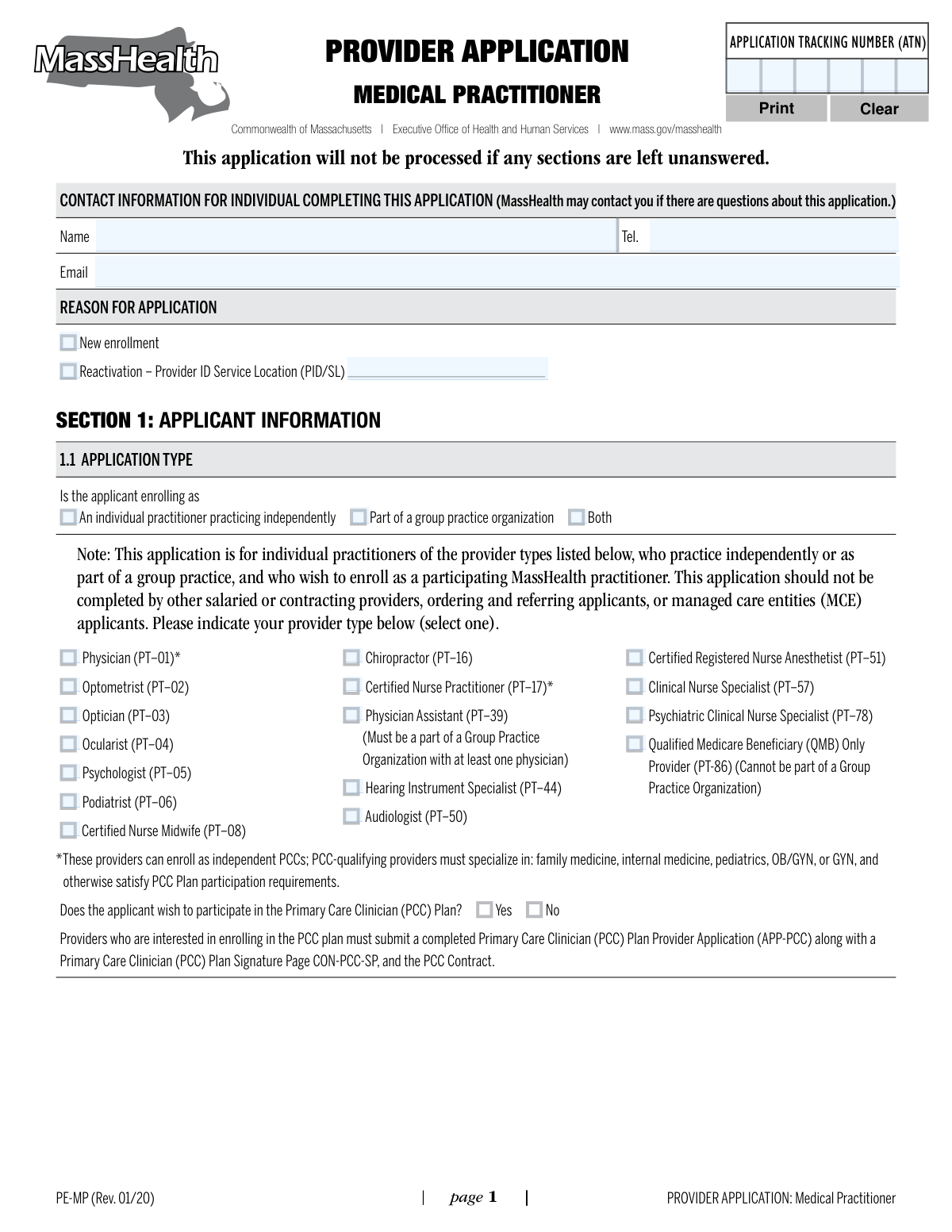
Form PE-MP is the Provider Application for Medical Practitioners used by the Commonwealth of Massachusetts to enroll individual practitioners into the MassHealth program. It collects essential information about the applicant, including professional credentials, practice details, and disclosure of any sanctions or criminal history. Completing this application is a critical step for practitioners who wish to receive reimbursement for services provided to MassHealth members. Today, this form can be filled out quickly and accurately using AI-powered services like Instafill.ai, which can also convert non-fillable PDF versions into interactive fillable forms.
PE-MP is part of the
ACH forms, Medi-Cal forms, medical forms, medical provider forms, practitioner application forms, practitioner forms, SSA forms and VA medical forms categories on Instafill.
Our AI automatically handles information lookup, data retrieval, formatting, and form filling.
It takes less than a minute to fill out PE-MP using our AI form filling.
Securely upload your data. Information is encrypted in transit and deleted immediately after the form is filled out.
Form specifications
| Form name: | Commonwealth of Massachusetts Provider Application: Medical Practitioner |
| Number of pages: | 1 |
| Language: | English |
More forms in ACH forms
Instafill Demo: How to fill out PDF forms in seconds with AI
How to Fill Out PE-MP Online for Free in 2026
Are you looking to fill out a PE-MP form online quickly and accurately? Instafill.ai offers the #1 AI-powered PDF filling software of 2026, allowing you to complete your PE-MP form in just 37 seconds or less.
Follow these steps to fill out your PE-MP form online using Instafill.ai:
- 1 Navigate to Instafill.ai and upload or select the PE-MP Provider Application form.
- 2 Provide your personal and professional details in Section 1, such as your legal name, NPI, license number, and contact information, letting the AI assist with data entry.
- 3 Complete Section 2 if you are practicing independently or Section 3 to list your group practice affiliations.
- 4 Answer the disclosure questions in Section 4 regarding any criminal convictions, sanctions, or pending proceedings.
- 5 Carefully review all the information populated by the AI across all sections to ensure it is accurate and complete.
- 6 Read the certification statement in Section 5, then electronically sign and date the application.
- 7 Download the completed, signed application packet, ready for submission to the MassHealth Customer Service Center.
Our AI-powered system ensures each field is filled out correctly, reducing errors and saving you time.
Why Choose Instafill.ai for Your Fillable PE-MP Form?
Speed
Complete your PE-MP in as little as 37 seconds.
Up-to-Date
Always use the latest 2026 PE-MP form version.
Cost-effective
No need to hire expensive lawyers.
Accuracy
Our AI performs 10 compliance checks to ensure your form is error-free.
Security
Your personal information is protected with bank-level encryption.
Frequently Asked Questions About Form PE-MP
This form is used by individual medical practitioners, such as physicians, optometrists, and psychologists, to enroll as a participating provider with MassHealth, either independently or as part of a group practice.
This application is for individual practitioners of specific provider types listed in Section 1.1 who practice independently or within a group. It is not for salaried providers, ordering/referring applicants, or managed care entities.
In Section 1.1, you must select 'Both'. You will then need to complete Section 2 for your independent practice and Section 3 for your group practice affiliation.
The form explicitly states that the application will not be processed if any sections are left unanswered. It is crucial to complete all applicable fields to avoid delays or rejection.
Yes, MassHealth requires Medicare enrollment for any provider who files claims for services provided to members who are dually eligible for both Medicare and MassHealth.
No, if you are enrolling only as part of a group practice, you do not need to submit a W-9, EFT, TPA, or ERA. The group practice organization is paid for the services you perform.
You should list your primary service location in Section 2.3. For additional locations, you must make copies of Section 2.4 and attach a completed copy for each additional service location.
You must disclose any state or federal criminal conviction related to Medicare, Medicaid, or CHIP. Other criminal convictions must be disclosed if they occurred within the last 10 years or were punishable by imprisonment of one year or more.
Only the applicant themselves can sign the certification section. Signature stamps or signatures by anyone other than the applicant are not acceptable.
Mail your completed and signed application to the MassHealth Customer Service Center, Attn: Provider Enrollment and Credentialing, PO Box 121205, Boston, MA 02112-1205.
This form allows you to indicate your interest in the PCC Plan, but it is not the complete application. You must also submit a separate PCC Plan Provider Application (APP-PCC) and other required PCC documents.
Yes, services like Instafill.ai use AI to accurately auto-fill form fields with your information, which can save you significant time and help prevent errors.
You can use a service like Instafill.ai to upload the PDF and fill it out online. The platform allows you to easily type your information into the correct fields and save or print the completed document.
If you have a non-fillable or 'flat' PDF, you can use a tool like Instafill.ai. It can convert the document into an interactive, fillable form that you can complete on your computer.
Compliance PE-MP
Validation Checks by Instafill.ai
1
Conditional Section Completion Based on Application Type
This check ensures that the correct sections of the application are completed based on the applicant's enrollment type selected in Section 1.1. If 'An individual practitioner practicing independently' or 'Both' is selected, Section 2 must be completed. If 'Part of a group practice organization' or 'Both' is selected, Section 3 must be completed. This prevents incomplete submissions and ensures all necessary data for the chosen enrollment path is captured.
2
Provider Type and Group Affiliation Logic
This validation enforces specific enrollment rules based on provider type. It verifies that an applicant selecting 'Physician Assistant (PT–39)' also selects 'Part of a group practice organization' or 'Both' in Section 1.1. Conversely, it ensures an applicant selecting 'Qualified Medicare Beneficiary (QMB) Only Provider (PT-86)' does not select any option involving a group practice. This is critical for complying with MassHealth's structural requirements for these provider types.
3
Reactivation PID/SL Requirement
This check validates that if 'Reactivation' is selected as the 'Reason for Application', the 'Provider ID Service Location (PID/SL)' field is not empty. This information is essential for MassHealth to identify and process the correct existing provider account for reactivation. Failure to provide the PID/SL would halt the reactivation process.
4
National Provider Identifier (NPI) Format
This validation ensures the 'Applicant’s National Provider Identification (NPI)' in Section 1.2 is a valid 10-digit number. The NPI is a unique, mandatory identifier for healthcare providers in the U.S. An incorrect or missing NPI will lead to claim rejections and prevent proper identification of the provider in the system.
5
DEA Number Field Logic
This check enforces the rules around the DEA Number field in Section 1.2. If a DEA number is entered, it must conform to the standard format of two letters followed by seven numbers. If the applicant checks either 'Do not have a DEA in practice state' or 'prescribing only Schedule VI drugs', the DEA number field must be empty. This ensures data consistency and prevents contradictory information regarding drug prescribing authority.
6
Service Location PO Box Prohibition
This validation scans the address fields in Section 2.3 (Service Location Information) to ensure they do not contain 'P.O. Box' or 'PO Box'. The form explicitly states that post office boxes are not acceptable for a service location, as it must be a physical place where services are rendered. An application with a PO Box as a service location will be rejected.
7
Conditional Disclosure Details Requirement
This check verifies that if an applicant answers 'Yes' to any of the disclosure questions in Section 4 (Criminal Convictions, Sanctions, or Pending Proceedings), the corresponding detail fields are filled out. For example, a 'Yes' to question 4.1 requires 'Name of the Offense' and 'Date of Conviction' to be completed. This is crucial for the credentialing process and ensures all required background information is captured for review.
8
Medicaid History Date Consistency
For any prior Medicaid participation listed in Section 1.3, this validation ensures that if an 'End Date' is provided, it is not earlier than the corresponding 'Effective Date'. This maintains logical and chronological accuracy in the provider's history. Inconsistent dates would require manual correction and delay processing.
9
Signature Name and Legal Name Match
This check confirms that the 'Printed Legal Name of Applicant' in the certification section (Section 5) is an exact match to the legal name provided in Section 1.2. It also ensures the signature field is not blank. This is a critical step to verify that the person signing the application is the actual applicant and that they are attesting to the accuracy of the information provided under their legal name.
10
Provider Type Single Selection
This validation ensures that exactly one provider type checkbox is selected in Section 1.1. The system must prevent the submission if zero or more than one provider type is chosen. This is fundamental to correctly categorizing the provider within the MassHealth system for proper reimbursement and scope of practice.
11
Date of Birth Validity
This check validates that the 'Date of Birth' entered in Section 1.2 is a complete, valid date in the past and corresponds to an age appropriate for a licensed medical professional (e.g., over 21). This prevents data entry errors, such as future dates or typos, and serves as a basic sanity check on the applicant's identity information. An invalid date would cause the application to be rejected.
12
SSN or EIN Requirement and Format
This validation ensures that, based on the selection in Section 1.2, either a Social Security Number (SSN) or an Employer Identification Number (EIN) is provided. The check also verifies that the number adheres to the correct 9-digit format. This tax identification number is mandatory for payment and reporting, and an invalid or missing number will prevent enrollment.
13
Conditional Billing Address Completion
This check is triggered in Section 2.2. If the applicant answers 'No' to the question 'Is the billing address the same as the legal address?', then the subsequent address fields (Number/Street, City, State, Zip) become mandatory. This ensures that a valid, separate billing address is captured when required, which is essential for correct claims processing and financial correspondence.
14
Group Affiliation Data Completeness
For each group affiliation listed in Section 3, this validation ensures that the 'Group Practice Organization Name' and 'Group Practice Organization NPI' are always provided. Furthermore, it checks that either the 'MassHealth PID/SL' is filled in or the 'enrollment is pending' box is checked. This guarantees that each listed affiliation has sufficient information for MassHealth to either link to an existing group or track a pending one.
Common Mistakes in Completing PE-MP
In Section 1.1, applicants often misinterpret the options for 'individual practitioner', 'part of a group', or 'both', especially when specific provider types have restrictions (e.g., Physician Assistants must be part of a group). This error stems from not carefully reading the detailed notes. An incorrect selection leads to processing delays or rejection, as the rest of the application data will not align with the chosen practice structure.
Applicants frequently make typos when entering their NPI, MA License Number, or DEA number in Section 1.2, or they leave a field blank entirely. For instance, instead of checking the box for 'Do not have a DEA', they simply skip the field. These numbers are critical for verification, and any error will cause the application to fail automated checks, requiring manual follow-up and significant delays. AI-powered form filling tools like Instafill.ai can help prevent these errors by validating number formats and flagging empty required fields.
The 'Legal Name of Applicant' in Section 1.2 must precisely match the name on the practitioner's professional license and NPI registration. Applicants may use a common name, omit a middle initial, or use a name that hasn't been updated on all official documents. This discrepancy causes validation failures against state and federal databases, halting the credentialing process until the inconsistency is resolved.
Applicants often get confused about whether to fill out Section 2 (Individual Practitioner) or Section 3 (Group Affiliation). A practitioner enrolling only as part of a group might unnecessarily fill out the billing information in Section 2, which is not required for them. This creates confusion about billing structures and service locations, requiring clarification and resubmission of corrected forms.
In Section 2.3, the form explicitly prohibits using a P.O. Box for a service location address, as it must be a physical place where patients are seen. Practitioners accustomed to using a P.O. Box for business mail may enter it here out of habit. This is an automatic trigger for rejection, as MassHealth requires a verifiable physical practice address for enrollment. Smart form tools can flag P.O. Box entries in physical address fields to prevent this mistake.
When affiliating with a group in Section 3, applicants must provide the group's NPI and its specific MassHealth Provider ID/Service Location (PID/SL). Practitioners often don't have this information readily available and may leave it blank, assuming the processing agent can look it up. This makes it impossible to link the individual to the correct group entity, causing the application to be put on hold until the information is provided.
In the disclosures section (Section 4), applicants may provide incomplete details about past convictions or disciplinary actions, failing to include required data like the specific offense, case number, or court. This can be due to uncertainty about the reporting requirements or a desire to minimize the issue. Incomplete or false attestations are serious offenses that can lead to immediate denial and potential permanent exclusion from the program.
Section 5 clearly states that the applicant must personally sign the form and that signature stamps or signatures by others (like an office manager) are unacceptable. In busy practices, it's common for administrative staff to handle paperwork, leading them to sign on the practitioner's behalf. An invalid signature automatically nullifies the entire application upon review, forcing the process to start over from the beginning.
The form states that it will not be processed if sections are left unanswered. Applicants sometimes skip entire sections or simple yes/no questions (e.g., 'Is the applicant enrolled in Medicare?') that they believe are not relevant, without checking either 'Yes' or 'No'. This is interpreted as an incomplete application, which is then flagged and returned, delaying the enrollment process until all fields are properly filled.
The form requires applicants to manually copy and attach pages for additional service locations (Section 2.4) or group affiliations (Section 3). This is easily overlooked, especially when filling out a flat, non-fillable PDF version. The result is an incomplete profile that doesn't list all practice sites, which is a violation of MassHealth regulations and can lead to claim denials. If the form is a flat PDF, a tool like Instafill.ai can convert it to a smart, fillable version that allows for dynamically adding more locations.
Saved over 80 hours a year
“I was never sure if my IRS forms like W-9 were filled correctly. Now, I can complete the forms accurately without any external help.”
Kevin Martin Green
Your data stays secure with advanced protection from Instafill and our subprocessors




Robust compliance program
Transparent business model
You’re not the product. You always know where your data is and what it is processed for.
ISO 27001, HIPAA, and GDPR
Our subprocesses adhere to multiple compliance standards, including but not limited to ISO 27001, HIPAA, and GDPR.
Security & privacy by design
We consider security and privacy from the initial design phase of any new service or functionality. It’s not an afterthought, it’s built-in, including support for two-factor authentication (2FA) to further protect your account.
Fill out PE-MP with Instafill.ai
Worried about filling PDFs wrong? Instafill securely fills commonwealth-of-massachusetts-provider-application-medical-practitioner forms, ensuring each field is accurate.
