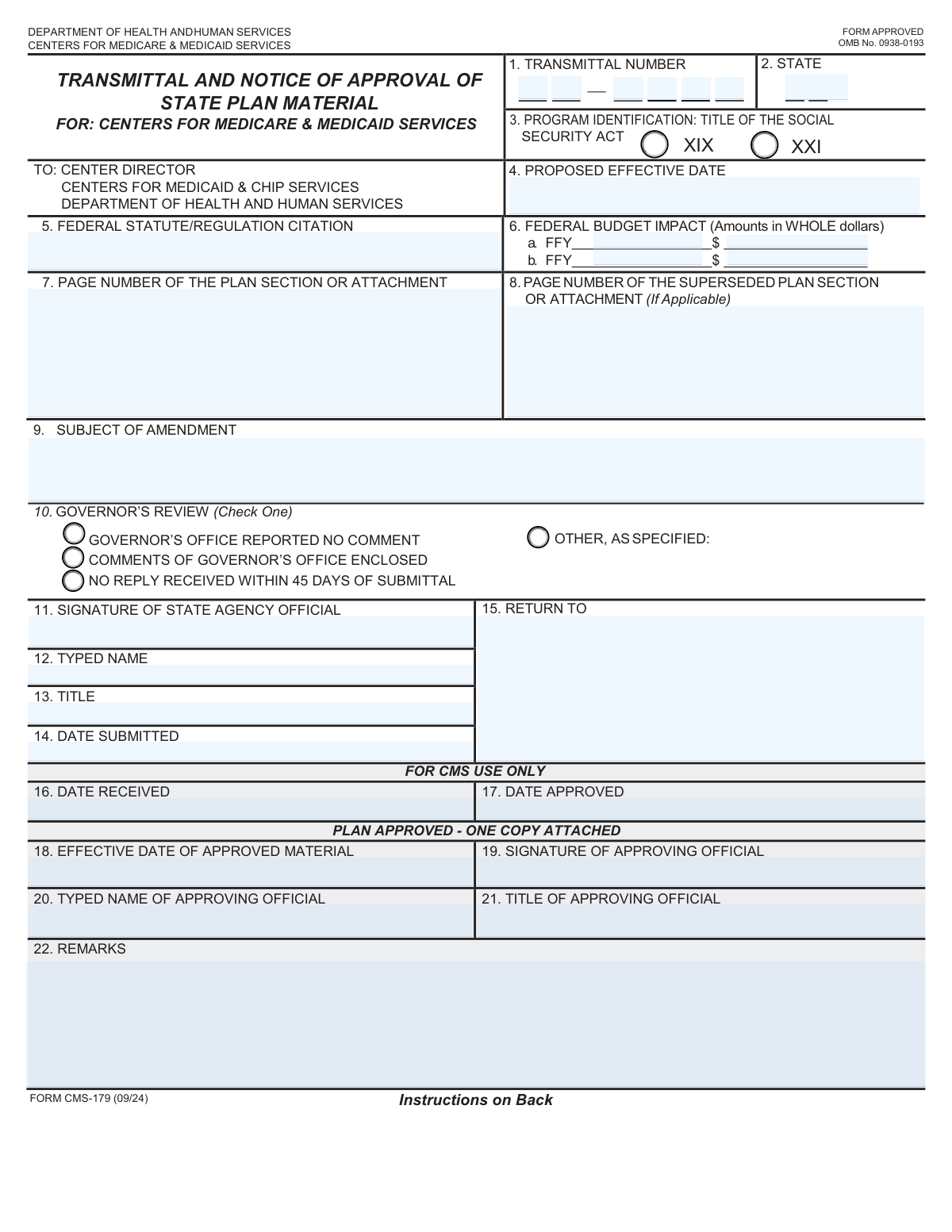
Yes! You can use AI to fill out Form CMS-179, Transmittal and Notice of Approval of State Plan Material

Form CMS-179, the Transmittal and Notice of Approval of State Plan Material, is a cover sheet used by state agencies when submitting changes or additions to their state plans (like Medicaid or CHIP) to the federal Centers for Medicare & Medicaid Services (CMS). It provides essential details about the submission, including the subject, effective date, legal basis, and budget impact, ensuring a standardized review process. Today, this form can be filled out quickly and accurately using AI-powered services like Instafill.ai, which can also convert non-fillable PDF versions into interactive fillable forms.
Our AI automatically handles information lookup, data retrieval, formatting, and form filling.
It takes less than a minute to fill out CMS-179 using our AI form filling.
Securely upload your data. Information is encrypted in transit and deleted immediately after the form is filled out.

Form specifications

Form name: Form CMS-179, Transmittal and Notice of Approval of State Plan Material
Number of fields: 36
Number of pages: 2
Language: English
Categories: CMS forms, NJ state forms, PA state forms
main-image

Instafill Demo: How to fill out PDF forms in seconds with AI

How to Fill Out CMS-179 Online for Free in 2026

Are you looking to fill out a CMS-179 form online quickly and accurately? Instafill.ai offers the #1 AI-powered PDF filling software of 2026, allowing you to complete your CMS-179 form in just 37 seconds or less.
Follow these steps to fill out your CMS-179 form online using Instafill.ai:
  1. 1 Navigate to Instafill.ai and upload your Form CMS-179 or select it from the template library.
  2. 2 Enter the transmittal number, state, and proposed effective date in the top section of the form.
  3. 3 Provide the federal statute/regulation citation and the federal budget impact for the first two fiscal years.
  4. 4 Specify the page numbers of the plan section and any superseded pages, and write a clear subject for the amendment.
  5. 5 The state agency official can then enter their typed name, title, date, and apply a digital signature.
  6. 6 Review all the information for accuracy before downloading the completed form for submission to the appropriate CMS regional office.

Our AI-powered system ensures each field is filled out correctly, reducing errors and saving you time.

Why Choose Instafill.ai for Your Fillable CMS-179 Form?

Speed

Complete your CMS-179 in as little as 37 seconds.

Up-to-Date

Always use the latest 2026 CMS-179 form version.

Cost-effective

No need to hire expensive lawyers.

Accuracy

Our AI performs 10 compliance checks to ensure your form is error-free.

Security

Your personal information is protected with bank-level encryption.

Frequently Asked Questions About Form CMS-179

This form serves as a transmittal sheet for submitting a state plan amendment to a federal agency, such as the Centers for Medicare & Medicaid Services (CMS), for review and approval.

An authorized official from the state agency that is proposing the amendment to the state plan is responsible for completing and signing this form.

You must provide the estimated financial impact on the federal budget for two consecutive federal fiscal years. Enter the fiscal year and the corresponding impact amount in whole dollars for each.

The 'Plan Section Page Number' is the page number of the new or revised material you are submitting. The 'Superseded Page Number' is the page number of the old plan section that is being replaced by your new submission.

The transmittal number is typically assigned by the state and should be entered into the two separate fields provided on the form. Follow your state's specific numbering convention for this identifier.

In this field, you must provide the specific federal law or regulation that gives the authority for the state plan amendment you are submitting. This citation provides the legal basis for the proposed change.

No, you should leave any sections marked 'CMS Use Only' or designated for the 'Approving Official' blank. These parts of the form will be completed by the federal agency during their review process.

Check this box if the state plan amendment was submitted to the Governor's office for review and they either provided no comments or affirmatively stated they had no comments on the material.

The completed form and all related plan materials should be sent to the address specified in the 'Return To' field. Ensure this is the correct address for the federal agency reviewing your plan.

Enter the date on which your agency would like the plan amendment to become effective. Be aware that the final effective date is subject to federal approval and may be different.

Yes, services like Instafill.ai use AI to help fill out forms like this one. These tools can auto-fill form fields accurately, which saves time and helps reduce potential errors.

To fill this form using Instafill.ai, upload the document to their platform. The AI will make the form fillable online, and you can provide your information once to have it automatically populated in the correct fields.

If you have a non-fillable or 'flat' PDF, you can use a service like Instafill.ai. It can convert the static document into an interactive, fillable form so you can easily type your information directly into the fields.

Provide a clear and concise description of the change being made in the amendment. This helps the reviewer quickly understand the purpose and scope of your submission.

Compliance CMS-179
Validation Checks by Instafill.ai

1
State Abbreviation Format and Validity
This check verifies that the 'State' field contains a valid two-letter US state or territory abbreviation. It ensures data consistency and prevents errors from invalid or misspelled state codes. If the entry is not a recognized two-letter code, the form submission will be rejected with a message prompting the user to correct the field.
2
Proposed Effective Date Format and Plausibility
This validation ensures the 'Proposed Effective Date' is entered in a valid date format (e.g., MM/DD/YYYY) and represents a real calendar date. It prevents data entry errors like non-existent dates (e.g., 02/30/2024) or improperly formatted text. A failed validation will require the user to re-enter the date in the correct format.
3
Fiscal Year Chronological Order
This check validates that the 'Second Federal Fiscal Year' is later than or equal to the 'First Federal Fiscal Year'. This maintains logical consistency in the budget impact reporting over time. If the second year precedes the first, an error is triggered, as this represents an impossible financial projection.
4
Federal Budget Impact Amount Format
This validation ensures that both the 'First Federal Budget Impact Amount' and 'Second Federal Budget Impact Amount' fields contain only whole numbers. It strips any currency symbols, commas, or decimals to prevent data type errors in backend financial systems. An invalid entry will prompt the user to enter a whole dollar amount without formatting.
5
State Agency Official Signature Presence
This check verifies that the 'Signature of State Agency Official' field is not empty, confirming that the form has been officially signed. The signature is a critical component for authorization and legal validity. If the signature is missing, the form is considered incomplete and cannot be submitted.
6
State Agency Official Information Completeness
This validation ensures that the 'Typed Name', 'Title', and 'Date Submitted' fields are all filled out. This information is essential for identifying the submitting official and establishing a submission timeline. A failure to provide any of these details will block submission and highlight the required fields.
7
Date Submitted Logical Check
This check ensures the 'Date Submitted' is not a date in the future. It serves as a basic sanity check to prevent users from accidentally entering an incorrect year or month. A future date is considered invalid and will require correction before the form can be processed.
8
CMS-Only Field Submission Integrity
This validation verifies that all fields designated as 'CMS Use Only' (e.g., 'Date Received', 'Date Approved') are left blank by the external submitter. This prevents unauthorized or premature data entry into fields reserved for the receiving agency's internal processing. If any of these fields are filled, the submission is blocked and the user is notified to clear them.
9
Transmittal Number Completeness and Format
This check ensures that both parts of the Transmittal Number are provided and contain numeric characters. Since the number is split into two fields, this validation confirms the entire identifier is present, which is crucial for tracking and referencing the submission. An incomplete or non-numeric entry will result in a validation error.
10
Subject of Amendment Requirement
This validation confirms that the 'Subject of Amendment' field is not empty and contains text. This field is critical for quickly understanding the purpose of the submission without reviewing the entire package. A blank subject field will result in an error, prompting the user to provide a concise summary of the amendment.
11
Page Number Format Validation
This check ensures that the 'Plan Section or Attachment Page Number' and 'Superseded Page Number' fields contain only positive integers. Page numbers must be whole numbers to be valid references within a document. Any non-integer or negative values will be flagged as an error, requiring the user to input a valid page number.
12
Internal Date Sequence Logic
For internal CMS users, this validation ensures the 'Date Approved' is on or after the 'Date Received'. This maintains the logical flow of the approval process, as a document cannot be approved before it is officially received. An out-of-sequence date would indicate a data entry error that must be corrected by the CMS user.
13
Final Effective Date Logic
This check, intended for internal CMS users, validates that the 'Effective Date of Approved Material' is on or after the 'Date Approved'. The effective date cannot precede the approval date, so this rule enforces process integrity. If the validation fails, it signals a logical error in the dates entered by the approving official.
14
Federal Citation Presence
This validation ensures the 'Federal Statute/Regulation Citation' field is not left blank. This citation provides the legal or regulatory basis for the state plan amendment and is essential for review and compliance checks. A missing citation will prevent form submission, as it is considered a critical piece of information.

Common Mistakes in Completing CMS-179

Incorrectly Formatting the Transmittal Number

This form requires a multi-part transmittal number. Applicants often enter the entire number in the first field, use incorrect separators, or reverse the parts. This error can cause the submission to be misfiled or rejected by automated tracking systems, leading to significant processing delays. To avoid this, carefully follow the agency's specific formatting instructions for the transmittal number, ensuring each part is entered into its designated field.

Using Inconsistent or Ambiguous Date Formats

Fields like 'Proposed Effective Date' and 'Date Submitted' are often filled with ambiguous formats (e.g., 01-02-24) which could mean Jan 2, 2024 or Feb 1, 2024. An incorrect effective date can have serious legal and financial consequences for the plan amendment. Always use a clear, unambiguous format like MM/DD/YYYY (e.g., 01/02/2024) to prevent confusion and ensure accuracy. AI-powered tools like Instafill.ai can help by automatically standardizing date formats.

Improperly Formatting Federal Budget Impact Amounts

The instructions specify entering budget impact amounts 'in whole dollars,' but filers frequently include dollar signs, commas, or cents (e.g., '$1,500.00' instead of '1500'). These extra characters can cause data import errors for the receiving agency's financial systems, requiring manual correction and slowing down the approval process. To prevent this, enter only the numerical value without any symbols or decimal points.

Providing a Vague or Incomplete 'Subject of Amendment'

Applicants often provide a generic subject like 'Plan Update' instead of the 'detailed subject' requested. This forces the reviewer to read the entire attached document to understand the submission's purpose, delaying triage and review. A proper subject should be a concise summary, such as 'To update provider reimbursement rates for telehealth services,' giving the reviewer immediate context.

Filling in Sections Marked 'CMS Use Only'

Despite clear labeling, applicants sometimes fill in fields reserved for the reviewing agency, such as 'Date Received' or 'Approving Official Signature'. This creates confusion and requires agency staff to manually correct the form, which can slow down processing. Always leave any section marked 'For Official Use Only' or similar completely blank.

Confusing the Signature and Typed Name Fields

A common error is typing a name in the 'Signature of State Agency Official' field, which invalidates the form legally. Conversely, signing in the 'Typed Name' field can cause data entry issues. A valid submission requires a legal signature (handwritten or digital) in the signature box and a clearly printed name in the typed name box. If the form is a non-fillable PDF, Instafill.ai can convert it to a fillable version to easily apply a digital signature.

Entering an Incorrect Federal Statute/Regulation Citation

Filers may provide an incomplete, outdated, or improperly formatted legal citation, or a vague reference like 'Social Security Act'. Without the correct citation, the agency cannot verify the legal authority for the plan amendment, which is a critical failure that will lead to rejection or a request for more information. Always verify and copy the full, specific citation from a reliable legal source (e.g., 42 CFR § 430.10).

Mismatching Page Numbers with Attached Documents

The page numbers entered for the 'Plan Section' and 'Superseded Page Number' fields often do not match the actual page numbers in the attached documents. This forces reviewers to waste time hunting for the correct sections, causing delays and frustration. Before submitting, meticulously cross-reference the page numbers on the form with the corresponding attachment to ensure accuracy.

Writing the Full State Name Instead of the Abbreviation

The 'State' field explicitly asks for a two-letter abbreviation, but many people write out the full state name (e.g., 'Massachusetts' instead of 'MA'). This simple mistake can cause failures in automated data processing systems and requires manual correction. Pay close attention to field-level instructions to ensure data is entered in the required format.

Forgetting to Enter the 'Date Submitted'

An official may sign the form but neglect to fill in the 'Date Submitted' field. The submission date is legally significant for establishing timelines and compliance, and its absence can render the form incomplete. This often results in the form being returned for correction. To avoid this, make it a final checklist item to date the form immediately after signing it.

Providing Incomplete 'Return To' Information

The 'Return To' field is sometimes filled with a partial address or just a department name, lacking a specific contact person. If the agency has questions or needs to return the document, this ambiguity can cause the correspondence to get lost or significantly delayed. Always provide a complete return address, including a specific person's name, title, department, and full mailing address.
Saved over 80 hours a year

“I was never sure if my IRS forms like W-9 were filled correctly. Now, I can complete the forms accurately without any external help.”

Kevin Martin Green

Your data stays secure with advanced protection from Instafill and our subprocessors

Robust compliance program

Transparent business model

You’re not the product. You always know where your data is and what it is processed for.

ISO 27001, HIPAA, and GDPR

Our subprocesses adhere to multiple compliance standards, including but not limited to ISO 27001, HIPAA, and GDPR.

Security & privacy by design

We consider security and privacy from the initial design phase of any new service or functionality. It’s not an afterthought, it’s built-in, including support for two-factor authentication (2FA) to further protect your account.

Fill out CMS-179 with Instafill.ai

Worried about filling PDFs wrong? Instafill securely fills form-cms-179-transmittal-and-notice-of-approval-of-state-plan-material forms, ensuring each field is accurate.