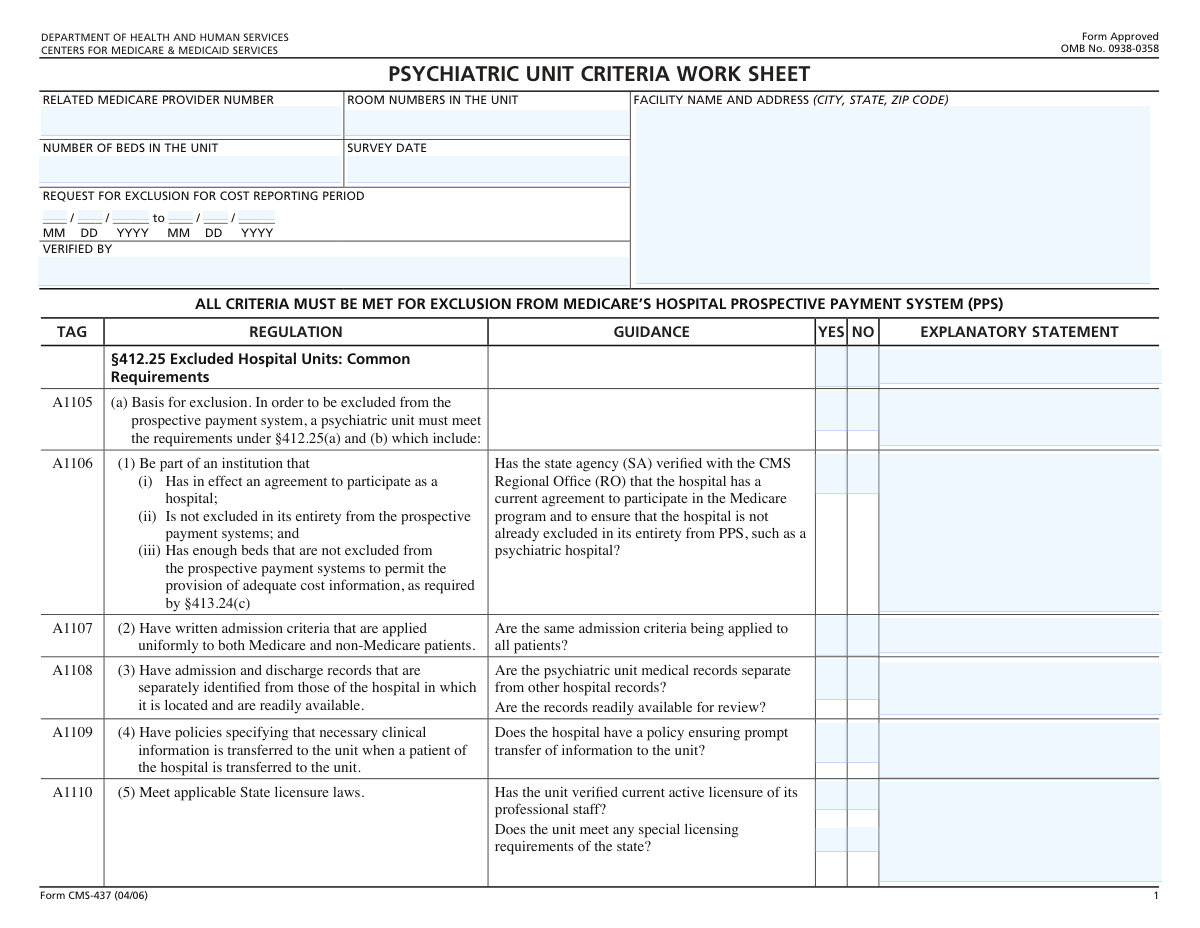
Yes! You can use AI to fill out Form CMS-437, Psychiatric Unit Criteria Work Sheet

Form CMS-437, the Psychiatric Unit Criteria Work Sheet, is a comprehensive document used by surveyors for the Centers for Medicare & Medicaid Services (CMS). Its purpose is to determine if a hospital's psychiatric unit meets the specific criteria required to be excluded from the hospital Prospective Payment System (PPS), ensuring proper Medicare reimbursement. This multi-page worksheet requires detailed information about the unit's operations, staffing, and patient care protocols. Today, this form can be filled out quickly and accurately using AI-powered services like Instafill.ai, which can also convert non-fillable PDF versions into interactive fillable forms.
CMS-437 is part of the CMS forms category on Instafill.
Our AI automatically handles information lookup, data retrieval, formatting, and form filling.
It takes less than a minute to fill out CMS-437 using our AI form filling.
Securely upload your data. Information is encrypted in transit and deleted immediately after the form is filled out.

Form specifications

Form name: Form CMS-437, Psychiatric Unit Criteria Work Sheet
Number of fields: 266
Number of pages: 8
Language: English
main-image

Instafill Demo: How to fill out PDF forms in seconds with AI

How to Fill Out CMS-437 Online for Free in 2026

Are you looking to fill out a CMS-437 form online quickly and accurately? Instafill.ai offers the #1 AI-powered PDF filling software of 2026, allowing you to complete your CMS-437 form in just 37 seconds or less.
Follow these steps to fill out your CMS-437 form online using Instafill.ai:
  1. 1 Navigate to Instafill.ai and upload your Form CMS-437, or select it from their library of templates.
  2. 2 Use the AI assistant to automatically populate facility details, such as the name, address, and Medicare provider number.
  3. 3 Review the pre-filled information for accuracy and proceed to the main criteria sections of the worksheet.
  4. 4 Go through each regulatory tag (e.g., A1105, A1120) and use the guided interface to answer 'Yes' or 'No' based on your facility's compliance, adding explanatory statements where required.
  5. 5 Input specific data like bed counts, staffing numbers, and survey dates into the designated fields, letting the AI ensure correct formatting.
  6. 6 Once all sections are complete, securely e-sign the document if necessary and download the completed Form CMS-437 for your records or for submission to the surveying agency.

Our AI-powered system ensures each field is filled out correctly, reducing errors and saving you time.

Why Choose Instafill.ai for Your Fillable CMS-437 Form?

Speed

Complete your CMS-437 in as little as 37 seconds.

Up-to-Date

Always use the latest 2026 CMS-437 form version.

Cost-effective

No need to hire expensive lawyers.

Accuracy

Our AI performs 10 compliance checks to ensure your form is error-free.

Security

Your personal information is protected with bank-level encryption.

Frequently Asked Questions About Form CMS-437

Form CMS-437, the Psychiatric Unit Criteria Work Sheet, is used by surveyors to verify that a hospital's psychiatric unit meets all federal requirements to be excluded from Medicare's hospital Prospective Payment System (PPS) and be reimbursed under a different system.

This form is typically completed by a state agency surveyor or a CMS official during a review of a hospital's psychiatric unit. Hospital administrators use it as a guide to ensure their unit is compliant with all regulations before and during a survey.

You will need the facility's name and address, its related Medicare provider number, the specific room numbers and total number of beds in the unit, and the cost reporting period for which the exclusion is being requested.

The 'Explanatory Statement' column is used to provide additional details or justification for your 'Yes' or 'No' answer. It is particularly important for explaining how the unit meets a complex standard or to document a plan of correction if a criterion is not met.

This means the beds and the area containing the psychiatric unit must be a distinct, separate space from other hospital units. The unit's beds cannot be intermingled with beds from the hospital's medical/surgical floors or other departments.

As stated in regulation A1141, each inpatient must receive a complete psychiatric evaluation within 60 hours of admission to the unit. This evaluation must include a medical history, mental status record, and other key components.

If a unit fails to meet any of the mandatory criteria, it may not qualify for exclusion from the PPS. Deficiencies must be documented and a plan of correction is typically required to address the non-compliance.

For physicians, enter the number of full-time, part-time, and consulting staff for each specialty. For nursing, provide the full-time equivalent (FTE) numbers for RNs, LPNs, and Aides, and also detail the number of staff on duty during each shift on the day of the survey.

The CMS-437 is a worksheet used during the survey process and is not typically submitted independently by the hospital. It is part of the official documentation retained by the surveying agency, such as the State Agency or CMS Regional Office.

Yes, services like Instafill.ai use AI to help fill out forms like the CMS-437. It can auto-fill your facility's information to save time and improve accuracy, though the compliance-related 'Yes/No' answers will still require your professional assessment.

You can use a service like Instafill.ai to fill out the form online. Simply upload the PDF, and the platform will make the fields interactive, allowing you to type your information directly and save your progress.

If you have a non-fillable or 'flat' PDF, you can use Instafill.ai to make it interactive. The platform's AI can convert the document into a fillable form, so you can easily complete it on your computer.

The treatment plan must be individualized and comprehensive, including a diagnosis, short- and long-term goals, specific treatment modalities, and team member responsibilities. It must be based on the patient's strengths and disabilities and developed collaboratively with the patient.

The psychiatric unit's admission and discharge records must be separately identified from those of the main hospital. This ensures that the unit's documentation is distinct and readily available for review during a survey.

Compliance CMS-437
Validation Checks by Instafill.ai

1
Cost Reporting Period Chronology
This validation ensures that the 'to' date for the 'Request for Exclusion for Cost Reporting Period' is on or after the 'from' date. This is a critical logical check to ensure the date range is valid and makes chronological sense. If the end date precedes the start date, the system will flag an error and prevent submission until the dates are corrected.
2
Valid Survey Date Format
This check verifies that the 'Survey Date' is entered in a valid MM/DD/YYYY format and represents a real calendar date (e.g., it prevents 02/30/2024). Accurate date formatting is essential for record-keeping and establishing the timeline of the assessment. An invalid format or date will trigger an error message requiring the user to correct the entry.
3
Medicare Provider Number Presence and Format
This validation confirms that the 'Related Medicare Provider Number' field is not empty and conforms to the expected format for CMS provider numbers. This number is the primary key for linking the form to the correct facility in the Medicare system. A missing or improperly formatted number would cause the submission to fail processing and require manual correction.
4
Facility Address Completeness
This check ensures the 'Facility Name and Address' field contains a complete address, including a city, state, and a valid 5-digit or 9-digit ZIP code. A complete and accurate address is necessary for proper identification of the facility. If components are missing, the system will prompt the user to complete the address information.
5
Mandatory Explanation for 'NO' Responses
This validation rule requires that if 'NO' is selected for any criterion, the corresponding 'Explanatory Statement' field must be filled out. This is crucial for auditors to understand the specific reasons for non-compliance with a requirement. The form submission will be blocked if a 'NO' answer lacks a corresponding explanation.
6
Exclusive YES/NO Selection
For each criterion on the worksheet, this validation ensures that a user can select either 'YES' or 'NO', but not both simultaneously. This prevents the submission of ambiguous or contradictory data. If a user attempts to select both, the system should default to the most recent selection and clear the other.
7
Positive Integer for Bed Count
This check validates that the 'Number of Beds in the Unit' is a positive whole number (integer) greater than zero. A psychiatric unit cannot be established without at least one bed, and fractional beds are not possible. The system will reject non-numeric, zero, negative, or decimal values for this field.
8
Non-Negative Staffing Counts
This validation ensures that all numerical fields for staff counts in the Physician and Nursing tables (e.g., Full-Time, Part-Time, R.N., L.P.N.) are non-negative numbers (zero or greater). It is impossible to have a negative number of employees. The system will flag any negative values and require correction before submission.
9
Required 'Other' Specialty Description
In the physician table, if a number greater than zero is entered for an 'Other*' specialty row, this check ensures the corresponding '*Specify' text field is also filled out. This provides necessary context for the reported staff numbers that do not fall into the standard categories. A validation error will prompt the user to specify the specialty type.
10
Required Room Number Identification
This check verifies that the 'Room Numbers in the Unit' field is not empty. This information is required to physically identify the location and boundaries of the excluded psychiatric unit within the larger hospital. A failure to provide this information would result in an incomplete submission and a request for more information.
11
Completeness of All Criteria Questions
This validation ensures that every criterion on the form (e.g., A1105, A1106, etc.) has a 'YES' or 'NO' response. The form's purpose is to verify that all criteria are met for exclusion, so an answer for each is mandatory. The system will highlight any unanswered questions and prevent submission until they are all completed.
12
Nursing FTE Numeric Format
This check validates that the fields for 'Number of Nursing Personnel Assigned to Unit (Full-Time Equivalents)' accept non-negative numbers, including decimals. FTEs are often expressed as fractions (e.g., 0.5 for a half-time employee), so the field must accommodate this format. The system will reject any non-numeric or negative inputs.
13
Nursing Roster Numeric Input
This validation ensures that all cells within the 'R.N. Duty Roster' table accept only non-negative numerical inputs. These values represent staff counts or FTEs for each shift and day. This prevents text or invalid characters from being entered, ensuring the data is clean and usable for staffing analysis.
14
Verified By Field Completion
This check ensures that the 'Verified By' field is not empty. This field is crucial for accountability, indicating which official or surveyor completed and attests to the information on the worksheet. A submission will be considered incomplete and rejected if this field is left blank.

Common Mistakes in Completing CMS-437

Incorrect Cost Reporting Period Dates

Users often enter date ranges for the 'Request for Exclusion' that do not align with the facility's official cost reporting period or use an incorrect format like DD/MM/YYYY. This mistake can lead to the form being rejected or the exclusion being applied to the wrong financial period, causing significant accounting and reimbursement issues. To avoid this, always verify the exact start and end dates from official financial documents and ensure the MM/DD/YYYY format is used.

Incomplete or Incorrect Facility Identification

Leaving the 'Related Medicare Provider Number' blank or providing an incomplete 'Facility Name and Address' is a frequent error. This happens when the person filling the form doesn't have the information readily available. An incorrect provider number can cause the entire worksheet to be misfiled or rejected, leading to major processing delays. Always confirm the official provider number and full physical address before starting the form.

Contradictory 'YES/NO' and 'Explanatory Statement' Entries

A common mistake is checking 'YES' to a regulation but then providing an 'Explanatory Statement' that describes a deficiency or a situation that doesn't fully meet the criteria. This signals a misunderstanding of the requirement or an attempt to obscure a non-compliant issue. Such contradictions immediately raise red flags for surveyors and will likely result in a finding of non-compliance and further scrutiny.

Failing to Explain 'NO' Answers

When a criterion is not met and 'NO' is checked, the 'Explanatory Statement' field must be completed with a detailed explanation and a plan of correction. Many filers leave this blank, assuming the 'NO' is self-evident. An omission here renders the submission incomplete and demonstrates a lack of a corrective action plan, which can lead to the denial of the unit's exclusion status.

Miscalculating Full-Time Equivalents (FTEs)

In the nursing personnel tables, users often enter the total number of employees (headcount) instead of the requested 'Full-Time Equivalents' (FTEs). This fundamentally misrepresents the level of staffing available to the unit. This error leads to inaccurate data that, when audited, can result in findings of non-compliance with staffing requirements. Facilities must use the standard formula to convert part-time and relief hours into FTEs for an accurate report.

Inconsistent Staffing Data Across Tables

The form contains multiple tables for staffing, such as 'Number of Nursing Personnel Assigned to Unit (FTEs)' and the weekly 'R.N. Duty Roster'. A frequent error is providing numbers that don't align; for example, the total FTEs in the summary table do not match the sum of FTEs calculated from the weekly roster. This discrepancy suggests poor record-keeping and will trigger auditors to look more closely at staffing documentation.

Omitting Required 'Specify' Details

The physician staffing table includes rows for 'Other*' specialties, which require the user to specify the type of physician. This detail is often overlooked and left blank. Leaving these fields empty makes the data incomplete and requires follow-up from the reviewing agency, delaying the approval process. It is crucial to review the form for any fields that require additional written specification.

Vague or Non-Actionable Explanatory Statements

When a deficiency is noted, the 'Explanatory Statement' must be specific, detailed, and include a concrete plan of correction with timelines. Filers often provide vague statements like 'addressing the issue' or 'policy under review'. These are insufficient and do not satisfy the requirement to demonstrate how the facility will achieve compliance, which can jeopardize the exclusion request.

Misinterpreting Complex Regulatory Definitions

The form's regulations contain specific, nuanced language that is easily misinterpreted, such as the definition of 'patient assets' in A1147. The guidance clarifies this refers to descriptive strengths, not financial assets, but users often get this wrong. Misinterpreting such rules leads to incorrect 'YES'/'NO' answers and documentation that fails to meet the actual requirement, resulting in a finding of non-compliance during a survey.

Incomplete or Inaccurate Room and Bed Counts

The 'Room Numbers in the Unit' and 'Number of Beds in the Unit' fields are often filled out from memory or outdated information. This can lead to discrepancies with official facility floor plans, fire marshal records, or licensure documents. An inaccurate count can call into question whether the unit is truly 'physically separate' (A1112) and properly defined, which is a core requirement for exclusion.
Saved over 80 hours a year

“I was never sure if my IRS forms like W-9 were filled correctly. Now, I can complete the forms accurately without any external help.”

Kevin Martin Green

Your data stays secure with advanced protection from Instafill and our subprocessors

Robust compliance program

Transparent business model

You’re not the product. You always know where your data is and what it is processed for.

ISO 27001, HIPAA, and GDPR

Our subprocesses adhere to multiple compliance standards, including but not limited to ISO 27001, HIPAA, and GDPR.

Security & privacy by design

We consider security and privacy from the initial design phase of any new service or functionality. It’s not an afterthought, it’s built-in, including support for two-factor authentication (2FA) to further protect your account.

Fill out CMS-437 with Instafill.ai

Worried about filling PDFs wrong? Instafill securely fills form-cms-437-psychiatric-unit-criteria-work-sheet forms, ensuring each field is accurate.