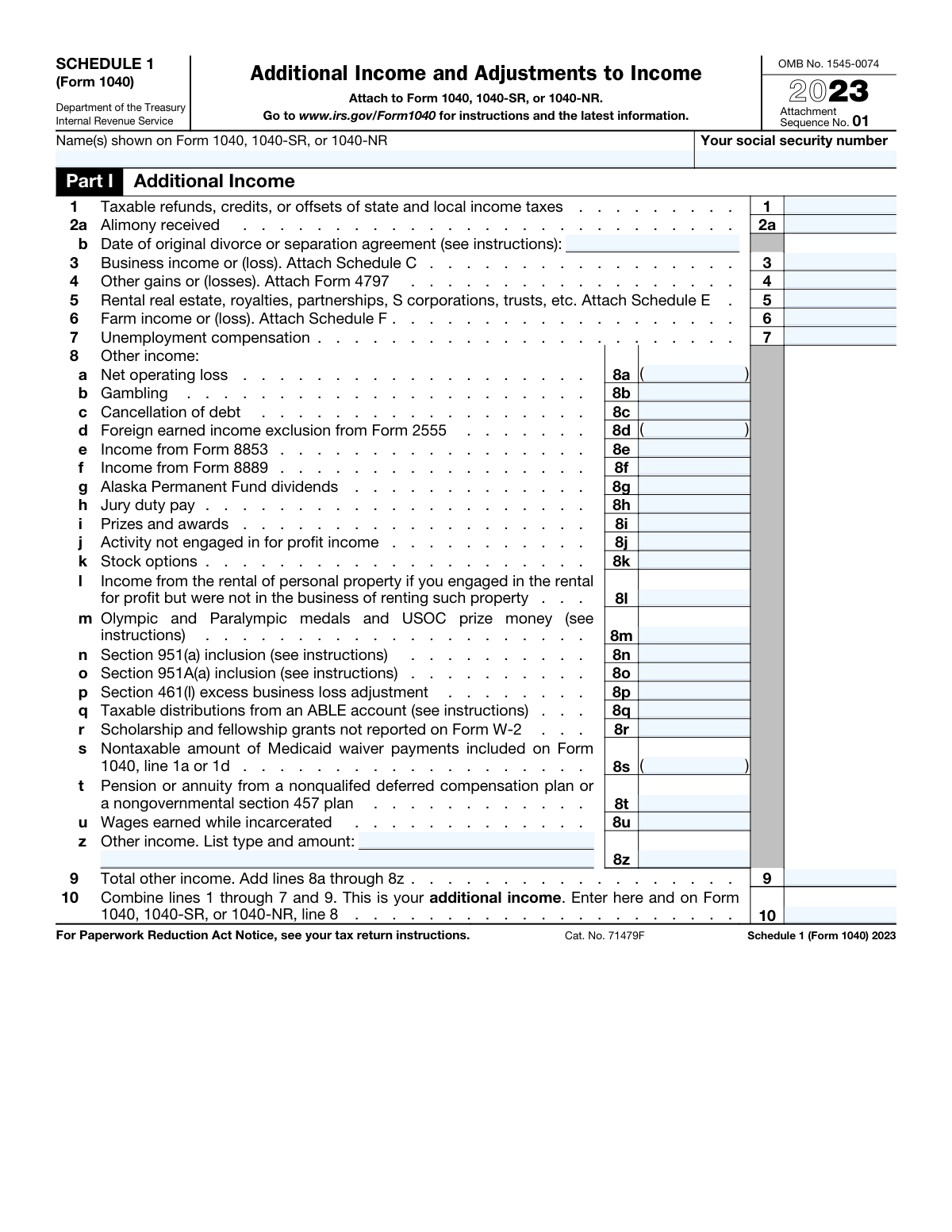
Yes! You can use AI to fill out Schedule 1 (Form 1040), Additional Income and Adjustments to Income

Schedule 1 (Form 1040) is a supplemental Internal Revenue Service (IRS) form attached to Form 1040, 1040-SR, or 1040-NR. Taxpayers use it to report certain types of income, such as business income, unemployment compensation, or alimony received, and to claim specific deductions, like student loan interest, educator expenses, or IRA contributions. This form ensures that all income and allowable adjustments are correctly accounted for when calculating your adjusted gross income (AGI). Today, this form can be filled out quickly and accurately using AI-powered services like Instafill.ai, which can also convert non-fillable PDF versions into interactive fillable forms.
Schedule 1 (Form 1040) is part of the income forms category on Instafill.
Our AI automatically handles information lookup, data retrieval, formatting, and form filling.
It takes less than a minute to fill out Schedule 1 (Form 1040) using our AI form filling.
Securely upload your data. Information is encrypted in transit and deleted immediately after the form is filled out.

Form specifications

Form name: Schedule 1 (Form 1040), Additional Income and Adjustments to Income
Number of fields: 67
Number of pages: 2
Filled form examples: Form Schedule 1 (Form 1040) Examples
Language: English
main-image

Instafill Demo: How to fill out PDF forms in seconds with AI

How to Fill Out Schedule 1 (Form 1040) Online for Free in 2026

Are you looking to fill out a SCHEDULE 1 (FORM 1040) form online quickly and accurately? Instafill.ai offers the #1 AI-powered PDF filling software of 2026, allowing you to complete your SCHEDULE 1 (FORM 1040) form in just 37 seconds or less.
Follow these steps to fill out your SCHEDULE 1 (FORM 1040) form online using Instafill.ai:
  1. 1 Navigate to Instafill.ai and upload or select the Schedule 1 (Form 1040).
  2. 2 Enter your name and Social Security Number exactly as they appear on your main tax return (Form 1040, 1040-SR, or 1040-NR).
  3. 3 Complete Part I by providing details for any additional income you received, such as business income, unemployment compensation, or gambling winnings.
  4. 4 Fill out Part II by entering all applicable adjustments to your income, including educator expenses, student loan interest deductions, and contributions to a health savings account (HSA).
  5. 5 Let the AI tool automatically calculate the totals for your additional income (Line 10) and your adjustments to income (Line 26).
  6. 6 Carefully review the completed form, verifying that all entered amounts are correct and match your financial records.
  7. 7 Download, print, or e-file the completed Schedule 1 to attach to your primary tax return.

Our AI-powered system ensures each field is filled out correctly, reducing errors and saving you time.

Why Choose Instafill.ai for Your Fillable Schedule 1 (Form 1040) Form?

Speed

Complete your Schedule 1 (Form 1040) in as little as 37 seconds.

Up-to-Date

Always use the latest 2026 Schedule 1 (Form 1040) form version.

Cost-effective

No need to hire expensive lawyers.

Accuracy

Our AI performs 10 compliance checks to ensure your form is error-free.

Security

Your personal information is protected with bank-level encryption.

Frequently Asked Questions About Form Schedule 1 (Form 1040)

Schedule 1 is used to report certain types of income, like business income or unemployment, and to claim specific deductions, known as adjustments to income, such as student loan interest or educator expenses.

You must file Schedule 1 if you have additional income sources not listed on the main Form 1040 or if you qualify for any of the specific 'above-the-line' deductions listed on the form.

Part I, 'Additional Income,' is for reporting various income types like unemployment compensation or alimony received. Part II, 'Adjustments to Income,' is for claiming deductions that lower your adjusted gross income (AGI), such as IRA contributions or self-employed health insurance.

Unemployment compensation is considered taxable income and must be reported on Schedule 1, Line 7.

Yes, eligible educators can deduct unreimbursed expenses for books and supplies. This deduction is claimed on Schedule 1, Line 11, 'Educator expenses'.

You can deduct the amount of student loan interest you paid, up to the legal limit, on Schedule 1, Line 21. This deduction can help lower your overall taxable income.

Yes, in many cases. For example, you must attach Schedule C for business income, Schedule E for rental income, or Form 8889 for an HSA deduction.

It depends on the date of your divorce agreement. For agreements finalized before 2019, alimony received is generally taxable and reported on Line 2a. For agreements finalized in 2019 or later, it is not.

Adjustments to income, or 'above-the-line' deductions, reduce your gross income to calculate your adjusted gross income (AGI). A lower AGI is beneficial as it can help you qualify for more tax credits and deductions.

Schedule 1 is not a standalone form; it must be attached to your main tax return (Form 1040, 1040-SR, or 1040-NR). The totals from Schedule 1 are then transferred to the appropriate lines on your main form.

You should report your total gambling winnings on Schedule 1, Line 8b. Note that you can only deduct gambling losses if you itemize deductions on Schedule A, and only up to the amount of your winnings.

Yes, services like Instafill.ai use AI to help you fill out forms accurately and efficiently. These tools can auto-fill form fields, which saves time and helps prevent common errors.

You can use a service like Instafill.ai to complete your Schedule 1 online. Simply upload the form to their platform, and it becomes an interactive, fillable document you can complete from your computer.

If you have a non-fillable or 'flat' PDF, you can use a tool like Instafill.ai to instantly convert it into a smart, fillable form. This allows you to easily type your information into the correct fields.

Compliance Schedule 1 (Form 1040)
Validation Checks by Instafill.ai

1
Validates Social Security Number Format
This check ensures that the 'Taxpayer Social Security Number' and the 'Recipient’s SSN' on line 19b are entered in a valid 9-digit format (XXXXXXXXX or XXX-XX-XXXX). This is critical for correct taxpayer identification and processing by the IRS. A failure in this validation would prevent the form from being filed electronically and could lead to processing delays or rejection.
2
Ensures Alimony Received Date is Provided
This validation verifies that if an amount is entered for 'Alimony received' on line 2a, a corresponding date is entered on line 2b. The date of the divorce or separation agreement is crucial as it determines the taxability of the alimony. Failure to provide the date when alimony is reported can lead to incorrect tax calculations and requires manual review.
3
Ensures Alimony Paid Details are Complete
This check confirms that if an amount is entered for 'Alimony paid' on line 19a, both the 'Recipient’s SSN' (line 19b) and the 'Date of original divorce or separation agreement' (line 19c) are also filled out. The IRS requires this information to verify the deduction and match it to the recipient's reported income. Missing information will result in the disallowance of the deduction.
4
Verifies Total Other Income Calculation (Line 9)
This validation performs a calculation to ensure that the value on Line 9 ('Total other income') is the correct sum of all income items listed from line 8a through 8z. This is a critical arithmetic check to ensure the accuracy of the total income reported. An incorrect sum will lead to errors in subsequent calculations on the form and the main Form 1040.
5
Verifies Total Additional Income Calculation (Line 10)
This check validates that the amount on Line 10 is the correct sum of lines 1 through 7 and line 9. This represents the final 'Additional Income' figure that is transferred to the main Form 1040. An error here would cause a fundamental miscalculation of the taxpayer's Adjusted Gross Income (AGI).
6
Verifies Total Adjustments to Income Calculation (Line 26)
This validation ensures the amount on Line 26 ('Total Adjustments to Income') correctly equals the sum of lines 11 through 23 and line 25. This total is a key figure transferred to Form 1040 to reduce total income. A miscalculation would lead to an incorrect AGI and an inaccurate tax liability or refund.
7
Logical Check for Jury Duty Pay Adjustment
This check ensures that the jury duty pay given back to an employer (Line 24a) is not greater than the total jury duty pay received (Line 8h). A taxpayer cannot deduct more than they received. This logical consistency check prevents invalid deductions, and a failure would flag the return for review or correction.
8
Requires Description for 'Other Income' (Line 8z)
This validation confirms that if a monetary amount is entered on Line 8z, the corresponding text field describing the type of income is also filled. The IRS requires an explanation for miscellaneous income items. A missing description can trigger a notice from the IRS requesting clarification, delaying the processing of the tax return.
9
Requires Description for 'Other Adjustments' (Line 24z)
This check ensures that if a monetary amount is entered on Line 24z for other adjustments, the corresponding text field describing the type of adjustment is also completed. Unspecified adjustments are not allowed and will be rejected. This validation prevents incomplete submissions and potential disallowance of the deduction.
10
Validates 'Reserved for future use' Field is Empty
This check verifies that Line 22, which is marked as 'Reserved for future use,' contains no data or a zero value. Data entered in a reserved field may indicate a data entry error or a misunderstanding of the form's layout. Enforcing this ensures that the form complies with the current year's specifications and prevents processing errors.
11
Logical Check for Olympic Prize Money Adjustment
This validation ensures the nontaxable amount of Olympic and Paralympic prize money entered on Line 24c does not exceed the total prize money income reported on Line 8m. A taxpayer can only exclude an amount up to the total income received from that source. This check prevents an erroneous, inflated deduction and ensures the adjustment is valid.
12
Verifies Attachment of Form 8889 for HSA Deduction
This check confirms that if a deduction is claimed on Line 13 for a Health Savings Account (HSA), the supporting Form 8889 is included with the tax return. The IRS requires Form 8889 to substantiate the deduction amount. A failure to attach the required form will result in the disallowance of the HSA deduction and a notice from the IRS.
13
Validates Alimony Recipient SSN is Not Taxpayer's SSN
This check compares the 'Recipient's SSN' on line 19b against the 'Your social security number' at the top of the form to ensure they are not the same. A taxpayer cannot legally pay alimony to themselves, so this check prevents a common logical error or fraudulent claim. A match would immediately invalidate the alimony paid deduction.
14
Validates Negative Value Format for Losses and Exclusions
This check ensures that values entered on lines that represent losses, exclusions, or subtractions (such as 8a, 8d, and 8s) are entered as negative numbers. The form layout uses parentheses to denote these values, and the data must reflect this to calculate totals correctly. Incorrectly entering these as positive numbers would improperly inflate total income, leading to significant tax miscalculations.

Common Mistakes in Completing Schedule 1 (Form 1040)

Forgetting to Attach Required Schedules or Forms

Many lines on Schedule 1, such as Line 3 (Business Income) or Line 13 (HSA Deduction), require you to attach a corresponding schedule or form (e.g., Schedule C, Form 8889). Taxpayers often enter the final number but forget to include the supporting document with their return. This results in an incomplete filing, which will trigger an IRS notice, delay processing, and require you to submit the missing forms later. Always review the line instructions and use a checklist to ensure all required attachments are included.

Incorrectly Reporting State Tax Refunds on Line 1

People often assume any state tax refund they receive is taxable and report the full amount on Line 1. However, a refund is only taxable if you itemized deductions on your federal return in the prior year and received a tax benefit from deducting state taxes. This mistake leads to overpaying taxes. To avoid this, review your prior-year tax return (Schedule A) to determine if the refund is taxable and, if so, calculate the correct taxable portion.

Mishandling Alimony Reporting on Lines 2 and 19

The tax treatment of alimony depends on the date of the divorce or separation agreement. For agreements executed after 2018, alimony is no longer taxable to the recipient or deductible by the payer. Common mistakes include incorrectly reporting alimony based on old rules or, for deductible payments, failing to enter the recipient's Social Security Number on Line 19b, which automatically disallows the deduction. Always verify your agreement date and provide all required information to avoid processing delays and tax adjustments.

Arithmetic Errors in Totaling Income and Adjustments

Schedule 1 requires summing multiple lines to calculate totals on Line 9, 10, 25, and 26. Manual calculation errors are extremely common, especially when adding the long lists of 'Other Income' (Line 8) or 'Other Adjustments' (Line 24). An incorrect total leads to an incorrect Adjusted Gross Income (AGI) on Form 1040, which can affect your tax liability and eligibility for other credits and deductions. Using tax software or an AI-powered tool like Instafill.ai can prevent these errors by performing calculations automatically.

Misreporting Gambling Winnings on Line 8b

A frequent error is reporting net gambling winnings (winnings minus losses) on Line 8b. The IRS requires you to report your total gross winnings as income on this line. Gambling losses can only be deducted if you itemize deductions on Schedule A, and only up to the amount of your winnings. This mistake can lead to underreporting income and an IRS audit. Always report the full amount from your Form W-2G or other records of winnings.

Claiming an Incorrect Student Loan Interest Deduction on Line 21

Taxpayers often enter the total student loan interest they paid during the year, as shown on Form 1098-E. However, the deduction is capped at $2,500 and is subject to income limitations that can reduce or eliminate it entirely. Claiming more than you're eligible for will result in an IRS adjustment to your tax liability, potentially with interest and penalties. To avoid this, carefully follow the worksheet in the IRS instructions or use software that calculates the correct deduction based on your income.

Forgetting to Attach Schedule 1 to the Main Tax Return

After carefully filling out Schedule 1, some taxpayers simply forget to attach it to their Form 1040, 1040-SR, or 1040-NR. This is a critical error, as the IRS will process the return without any of the additional income or adjustments listed. This leads to a significant discrepancy in your reported income, a tax notice with a proposed balance due, and considerable effort to correct the filing. Always double-check that all schedules are included before you file.

Leaving 'Other Income' or 'Other Adjustments' Undescribed

Lines 8z and 24z are catch-all lines for income or adjustments not listed elsewhere, and they require you to list the type and amount. A common oversight is entering a dollar amount without a written description. The IRS needs to know the source of the income or the reason for the adjustment, and leaving this blank will prompt an inquiry or delay the processing of your return. Always provide a clear and concise description for any amount entered on these lines.

Confusing Self-Employed Deductions on Lines 15-17

Self-employed individuals often struggle with the different deductions available on Schedule 1. Common errors include miscalculating the deductible portion of self-employment tax (Line 15) or the self-employed health insurance deduction (Line 17), as both have specific rules and limitations. Forgetting to take these deductions means overpaying tax, while incorrectly calculating them can lead to IRS adjustments. These complex calculations are best handled by tax software or a qualified professional.

Inconsistent Name and SSN with Form 1040

The name and Social Security Number (SSN) at the top of Schedule 1 must exactly match the information on the primary Form 1040. Taxpayers sometimes make typos, use a nickname, or forget to include a spouse's information on a joint return. This mismatch can cause the IRS automated systems to reject the schedule, delaying the processing of the entire tax return until the discrepancy is resolved. AI-powered form fillers like Instafill.ai can help prevent this by auto-populating consistent information across all related forms.
Saved over 80 hours a year

“I was never sure if my IRS forms like W-9 were filled correctly. Now, I can complete the forms accurately without any external help.”

Kevin Martin Green

Your data stays secure with advanced protection from Instafill and our subprocessors

Robust compliance program

Transparent business model

You’re not the product. You always know where your data is and what it is processed for.

ISO 27001, HIPAA, and GDPR

Our subprocesses adhere to multiple compliance standards, including but not limited to ISO 27001, HIPAA, and GDPR.

Security & privacy by design

We consider security and privacy from the initial design phase of any new service or functionality. It’s not an afterthought, it’s built-in, including support for two-factor authentication (2FA) to further protect your account.

Fill out Schedule 1 (Form 1040) with Instafill.ai

Worried about filling PDFs wrong? Instafill securely fills schedule-1-form-1040-additional-income-and-adjustments-to-income-1 forms, ensuring each field is accurate.