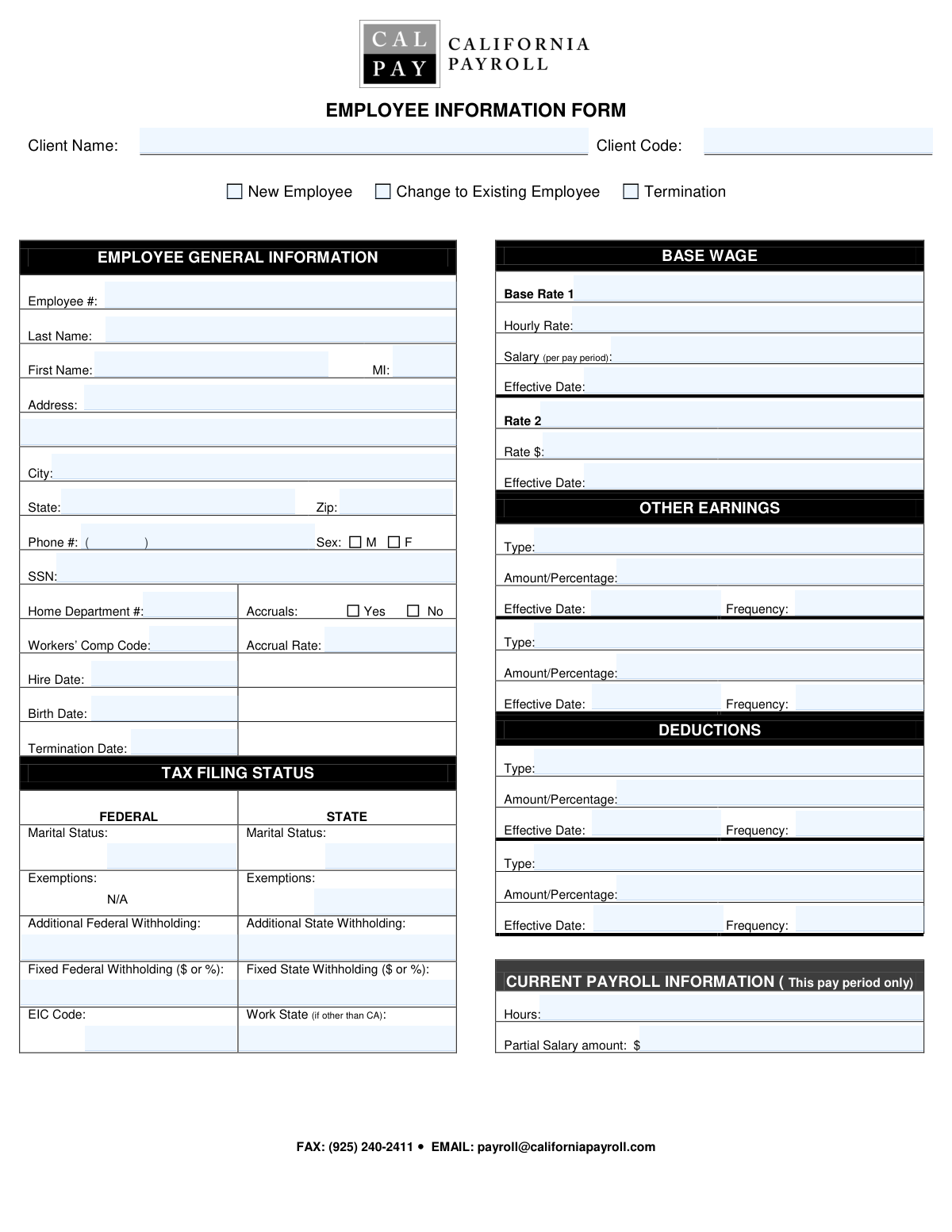
Yes! You can use AI to fill out Employee Action Form
The Employee Action Form (EAF) is a crucial internal document used by human resources and payroll departments to manage the employee lifecycle. It serves as the official record for initiating payroll for a new hire, processing changes to an existing employee's status (like a pay raise or address change), or handling a termination, ensuring all data is accurately captured. Today, this form can be filled out quickly and accurately using AI-powered services like Instafill.ai, which can also convert non-fillable PDF versions into interactive fillable forms.
Employee Action Form is part of the
employee forms category on Instafill.
Our AI automatically handles information lookup, data retrieval, formatting, and form filling.
It takes less than a minute to fill out Employee Action Form using our AI form filling.
Securely upload your data. Information is encrypted in transit and deleted immediately after the form is filled out.
Form specifications
| Form name: | Employee Action Form |
| Number of fields: | 60 |
| Number of pages: | 1 |
| Filled form examples: | Form Employee Action Form Examples |
| Language: | English |
More forms in Employee forms
Instafill Demo: How to fill out PDF forms in seconds with AI
How to Fill Out Employee Action Form Online for Free in 2026
Are you looking to fill out a EMPLOYEE ACTION FORM form online quickly and accurately? Instafill.ai offers the #1 AI-powered PDF filling software of 2026, allowing you to complete your EMPLOYEE ACTION FORM form in just 37 seconds or less.
Follow these steps to fill out your EMPLOYEE ACTION FORM form online using Instafill.ai:
- 1 Navigate to Instafill.ai and upload your Employee Action Form or select it from a template library.
- 2 Indicate the purpose of the submission by checking the appropriate box: 'New Employee', 'Change to Existing Employee', or 'Termination'.
- 3 Provide the employee's personal and identification information, such as their full name, address, Social Security Number, and date of birth.
- 4 Input the employee's hire date, job details, and compensation information, including their base pay rate, salary, or hourly wage.
- 5 Complete the federal and state tax withholding sections, including marital status, number of exemptions, and any additional withholding amounts.
- 6 Specify any recurring deductions (like insurance) or additional earnings (like commissions or bonuses) that apply to the employee.
- 7 Use Instafill.ai's AI to review all entered information for accuracy and completeness before finalizing and submitting the form to the payroll or HR department.
Our AI-powered system ensures each field is filled out correctly, reducing errors and saving you time.
Why Choose Instafill.ai for Your Fillable Employee Action Form Form?
Speed
Complete your Employee Action Form in as little as 37 seconds.
Up-to-Date
Always use the latest 2026 Employee Action Form form version.
Cost-effective
No need to hire expensive lawyers.
Accuracy
Our AI performs 10 compliance checks to ensure your form is error-free.
Security
Your personal information is protected with bank-level encryption.
Frequently Asked Questions About Form Employee Action Form
This form is used to manage employee payroll and HR information. You should use it to onboard a new employee, update an existing employee's details, or process a termination.
The 'Client' refers to your company or organization. You should enter your company's name and unique client code as provided by your payroll service provider.
Check this box when you are updating information for a current employee, such as a change of address, pay rate, or tax withholding. You only need to fill out the fields that are being changed, along with the employee's identifying information.
For a new hire, you will need their personal details (name, address, SSN, birth date), employment information (hire date, pay rate), and their tax withholding selections from their W-4 and state equivalent forms.
This is a specific code that classifies the employee's job role for workers' compensation insurance purposes. If you are unsure of the correct code, consult your insurance provider or HR department.
You should fill in only one of these fields based on how the employee is paid. Enter the amount per hour for hourly employees, or the gross salary amount for each pay period for salaried employees.
Accruals refer to benefits that an employee earns over time, such as vacation days or sick leave. Check 'Accruals Yes' and fill in the rate if the employee is eligible for these benefits.
'Additional Withholding' is an extra dollar amount subtracted from each paycheck on top of the standard calculated tax. 'Fixed Withholding' replaces the standard calculation with a specific dollar amount or percentage requested by the employee.
For a termination, check the 'Termination' box and be sure to fill in the employee's identifying information and the 'Termination Date'. You may also need to provide information for their final paycheck in the 'Current Pay Period Information' section.
The form has sections for 'Base Rate 1', 'Base Rate 2', and 'Other Earnings', as well as multiple deduction slots. Use these dedicated fields to enter different pay rates, bonuses, or deductions as needed.
Yes, services like Instafill.ai use AI to accurately auto-fill form fields from your existing records, which can save significant time and reduce errors.
You can use a service like Instafill.ai to fill out this form online. Simply upload the form, and the platform will make it interactive, allowing you to type directly into the fields and even auto-fill information.
If you have a flat, non-fillable PDF, you can use Instafill.ai to convert it into an interactive, fillable form. This allows you to easily type in your information, save, and print without needing to fill it out by hand.
Compliance Employee Action Form
Validation Checks by Instafill.ai
1
Exclusive Form Purpose Selection
This validation ensures that only one of the form submission purpose checkboxes ('New Employee', 'Change to Existing Employee', 'Termination') is selected. This is crucial for ensuring the submission has a single, clear intent, which prevents processing ambiguity and errors. If more than one purpose is selected, the form submission should be rejected with an error message prompting the user to select only one option.
2
Social Security Number Format and Requirement
Validates that the 'Social Security Number' field is not empty and follows the standard XXX-XX-XXXX format. The SSN is a critical identifier for payroll, tax reporting, and legal compliance, especially for new hires. A missing or incorrectly formatted SSN will prevent the employee from being set up correctly in the system and can lead to significant compliance issues.
3
Conditional Termination Date Requirement
This check ensures the 'Termination Date' field is populated if, and only if, the 'Termination' checkbox is selected as the form's purpose. This logic prevents accidental terminations from being processed and ensures that all necessary information is provided when an employee is being terminated. If the date is filled without the termination purpose being selected, or vice-versa, an error should be displayed.
4
State Abbreviation Format Validation
Verifies that the 'State' field contains a valid two-letter U.S. state or territory abbreviation. Using a standardized format is essential for address validation, determining correct state tax withholding, and ensuring mail delivery. An invalid entry would cause data inconsistency and could lead to incorrect tax calculations or returned mail.
5
Logical Date Sequence Integrity
Validates that key dates are in a logical order: 'Hire Date' must be after 'Birth Date', and 'Termination Date', if provided, must be after 'Hire Date'. This check maintains fundamental data integrity and prevents impossible scenarios from being entered into the system. A failure would indicate a significant data entry error that must be corrected before the record can be processed.
6
Exclusive Sex Selection
Confirms that only one of the 'Sex: Male' or 'Sex: Female' checkboxes is selected. This ensures the data is unambiguous for demographic reporting, benefits administration, and EEO compliance. If both or neither are selected, the form should prompt the user to make a single, valid selection to ensure data accuracy.
7
Conditional Accrual Rate Entry
Verifies that the 'Accrual Rate' field is filled out if the 'Accruals Yes' checkbox is selected, and is left empty if 'Accruals No' is selected. This prevents inconsistent data where a rate is provided for an employee not eligible for accruals, or where a rate is missing for an eligible employee. This logic is critical for ensuring payroll calculations related to paid time off are accurate.
8
New Employee Field Completeness Check
If 'New Employee' is checked, this validation ensures that all critical fields like 'First Name', 'Last Name', 'SSN', 'Address Line 1', 'City', 'State', 'Zip Code', and 'Hire Date' are filled. Missing any of this core information would make it impossible to properly onboard the new employee into the payroll and HR systems. The system should highlight all missing required fields to the user.
9
Exclusive Pay Rate Type
Checks that either 'Hourly Rate' or 'Salary per Pay Period' is populated, but not both. This enforces a clear pay structure for the employee, which is fundamental for preventing confusion and errors in payroll processing. If both fields contain values, the user should be prompted to choose one and clear the other to ensure the employee's compensation is defined correctly.
10
Zip Code Format Validation
Checks that the 'Zip Code' field contains a valid 5-digit or 9-digit (ZIP+4) numerical postal code. A correct zip code is essential for accurate mail delivery and for determining applicable local and state tax jurisdictions. An invalid format will lead to address verification failures and potential payroll tax errors.
11
Phone Number Format
Validates that the 'Phone Number' field follows a standard 10-digit phone number format, allowing for common separators like hyphens or parentheses. A consistent format is important for data normalization and for ensuring that communication systems can correctly parse and use the number. An invalid format should trigger a correction prompt to ensure contact information is reliable.
12
Numeric Tax Withholding Values
Ensures that fields like 'Federal Exemptions', 'State Exemptions', and various withholding amount fields contain valid numeric values. These numbers are used directly in tax withholding calculations, and non-numeric characters would cause these critical calculations to fail. This validation prevents payroll processing errors and ensures compliance with tax regulations.
13
Employee Identification for All Actions
Verifies that for any submission type ('New', 'Change', or 'Termination'), the core employee identification fields ('Employee Number', 'Last Name', 'First Name') are complete. This is essential to correctly identify which employee record the form pertains to. Without this information, the system cannot locate the correct employee file to update, create, or terminate.
Common Mistakes in Completing Employee Action Form
Users often mistakenly check multiple boxes under 'Form Submission Purpose' (e.g., 'New Employee' and 'Termination') or select the wrong one entirely. This fundamental error causes confusion and requires manual intervention to determine the form's true intent, leading to significant processing delays. To avoid this, carefully read the options and select only the single, most accurate purpose for the submission.
People frequently enter dates in various formats (e.g., MM/DD/YY, M/D/YYYY, Month DD, YYYY) across fields like 'Hire Date', 'Birth Date', and 'Effective Date'. This inconsistency can cause data import errors and miscalculations for benefits and payroll eligibility. Always use a consistent, four-digit year format (MM/DD/YYYY) to ensure clarity. AI-powered form filling tools like Instafill.ai can automatically standardize all dates into the required format, preventing such errors.
This form contains many fields that should only be filled out under specific conditions, such as 'Termination Date' or 'Accrual Rate'. A common error is to fill these in when not applicable or to leave them blank when they are required, leading to incorrect record-keeping and payroll errors. If the form is a non-fillable PDF, a tool like Instafill.ai can convert it to a smart, fillable version that can hide or show these conditional fields automatically, guiding the user to fill the form correctly.
The Social Security Number (SSN) is a critical field for tax and identity purposes, yet it is often entered with typos, transposed digits, or incorrect formatting. An incorrect SSN will cause tax filing rejections and significant delays in payroll setup. Always double-check the nine-digit number and use the standard XXX-XX-XXXX format. AI form fillers like Instafill.ai can validate the format as you type, ensuring the number is entered correctly before submission.
Employees are typically paid either an hourly wage or a fixed salary, not both, yet users often enter values in both the 'Hourly Rate' and 'Salary per Pay Period' fields. This ambiguity forces payroll staff to seek clarification, delaying the employee's first paycheck. You must determine the correct pay type and fill in only the corresponding rate field, leaving the other blank.
The 'State' field explicitly asks for a two-letter abbreviation (e.g., 'CA'), but many people write out the full state name. Automated systems are often configured to accept only the abbreviation, so entering the full name can cause the address to be flagged as invalid, delaying mailings of pay stubs and tax forms. To prevent this, always use the official two-letter postal abbreviation. AI tools like Instafill.ai can automatically convert the full state name to its proper abbreviation.
The tax section has separate fields for 'Additional' and 'Fixed' withholding, which users often confuse, leading to severe over- or under-withholding from their paycheck. This mistake directly impacts an employee's net pay and can cause financial hardship. It's crucial to understand that 'Additional' is an extra amount taken on top of the standard calculation, while 'Fixed' replaces it entirely.
When an address includes an apartment, suite, or unit number, it is essential to enter it in the 'Address Line 2' field. Many people forget this step or try to squeeze it into 'Address Line 1', which can lead to failed mail delivery for critical documents like W-2s and paychecks. Always verify if a secondary address designator is needed and place it in the correct 'Address Line 2' field to ensure successful delivery.
When filling out fields like 'Other Earning Type' or 'First Deduction Type', users often enter vague terms such as 'Bonus' or 'Misc.' These labels lack the specificity needed for payroll to correctly categorize, tax, and process the payment, requiring follow-up and causing delays. To prevent this, use specific descriptions like 'Annual Performance Bonus,' 'Cell Phone Reimbursement,' or '401k Loan Repayment'.
The form includes multiple 'Effective Date' fields for rate changes, new earnings, and deductions. A frequent mistake is to specify a new rate but forget to provide the date it should take effect, leading to pay inaccuracies and retroactive adjustments. Always accompany any change in pay, earnings, or deductions with a precise effective date. AI-powered form fillers like Instafill.ai can flag when a rate or deduction is entered without a corresponding effective date, preventing incomplete submissions.
Saved over 80 hours a year
“I was never sure if my IRS forms like W-9 were filled correctly. Now, I can complete the forms accurately without any external help.”
Kevin Martin Green
Your data stays secure with advanced protection from Instafill and our subprocessors
Robust compliance program
Transparent business model
You’re not the product. You always know where your data is and what it is processed for.
ISO 27001, HIPAA, and GDPR
Our subprocesses adhere to multiple compliance standards, including but not limited to ISO 27001, HIPAA, and GDPR.
Security & privacy by design
We consider security and privacy from the initial design phase of any new service or functionality. It’s not an afterthought, it’s built-in, including support for two-factor authentication (2FA) to further protect your account.
Fill out Employee Action Form with Instafill.ai
Worried about filling PDFs wrong? Instafill securely fills employee-action-form forms, ensuring each field is accurate.