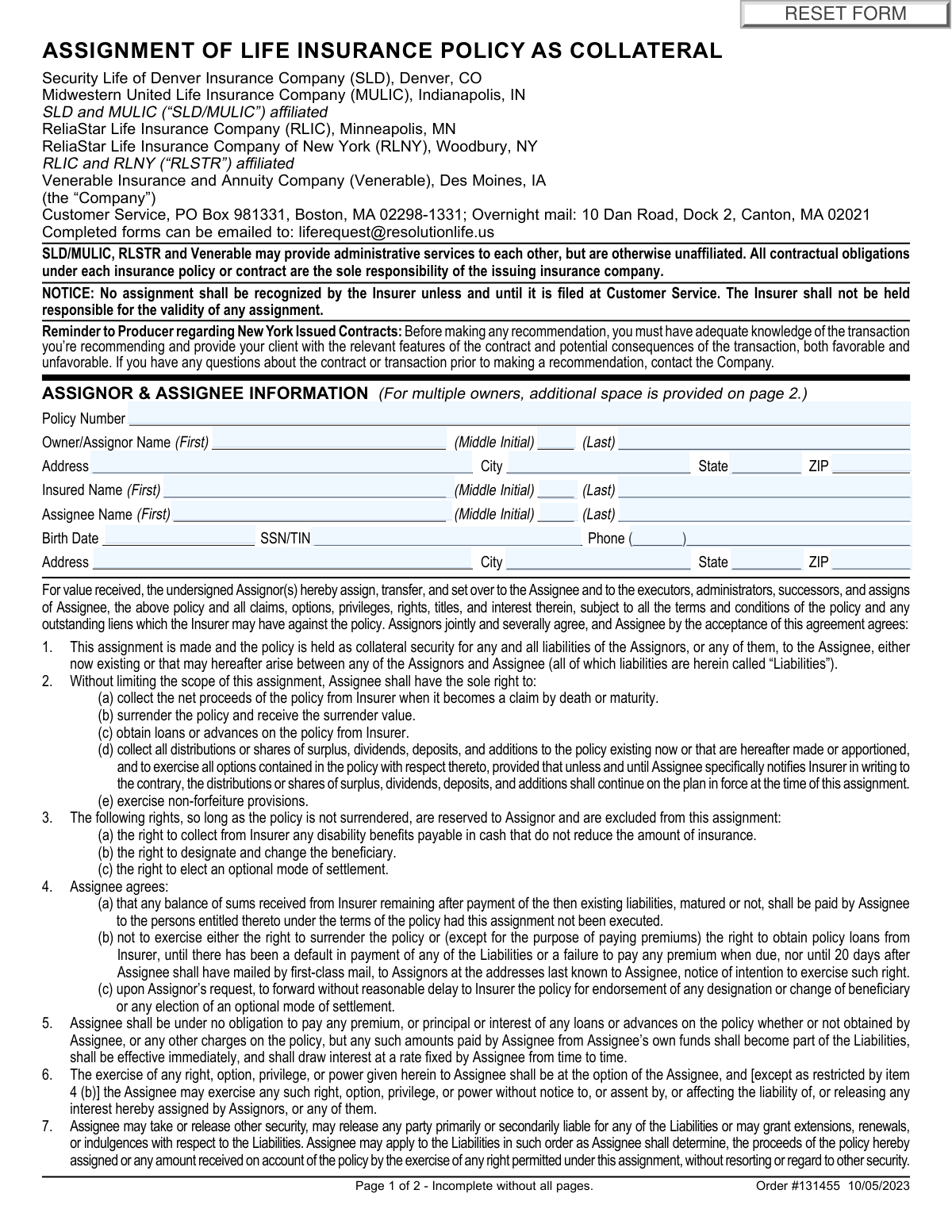
Yes! You can use AI to fill out Assignment of Life Insurance Policy as Collateral

An Assignment of Life Insurance Policy as Collateral is a legal agreement that transfers certain rights of a life insurance policy from the policy owner (the Assignor) to a creditor (the Assignee) to secure a debt. This document is crucial as it formally establishes the lender's claim to the policy's proceeds or cash value in the event of a default, while also specifying the rights retained by the policy owner. Today, this form can be filled out quickly and accurately using AI-powered services like Instafill.ai, which can also convert non-fillable PDF versions into interactive fillable forms.
Collateral Assignment of Life Insurance is part of the life insurance forms category on Instafill.
Our AI automatically handles information lookup, data retrieval, formatting, and form filling.
It takes less than a minute to fill out Collateral Assignment of Life Insurance using our AI form filling.
Securely upload your data. Information is encrypted in transit and deleted immediately after the form is filled out.

Form specifications

Form name: Assignment of Life Insurance Policy as Collateral
Number of fields: 50
Number of pages: 2
Language: English
main-image

Instafill Demo: How to fill out PDF forms in seconds with AI

How to Fill Out Collateral Assignment of Life Insurance Online for Free in 2026

Are you looking to fill out a COLLATERAL ASSIGNMENT OF LIFE INSURANCE form online quickly and accurately? Instafill.ai offers the #1 AI-powered PDF filling software of 2026, allowing you to complete your COLLATERAL ASSIGNMENT OF LIFE INSURANCE form in just 37 seconds or less.
Follow these steps to fill out your COLLATERAL ASSIGNMENT OF LIFE INSURANCE form online using Instafill.ai:
  1. 1 Navigate to Instafill.ai and upload or select the Assignment of Life Insurance Policy as Collateral form.
  2. 2 Provide the essential policy details, including the policy number and the full name and birth date of the insured individual.
  3. 3 Enter the complete information for the policy owner (Assignor), including their name and address. Add information for any additional owners if applicable.
  4. 4 Input the full details for the lender (Assignee), such as their name, address, and Taxpayer Identification Number (TIN).
  5. 5 Review and complete any specific sections, such as the election for directing policy investment decisions if it's a Variable Universal Life policy.
  6. 6 Carefully review all the information you've entered to ensure its accuracy and completeness before proceeding to the authorization section.
  7. 7 Electronically sign the document. The Assignor, Assignee, and any irrevocable beneficiaries must sign and date the form to validate the assignment.

Our AI-powered system ensures each field is filled out correctly, reducing errors and saving you time.

Why Choose Instafill.ai for Your Fillable Collateral Assignment of Life Insurance Form?

Speed

Complete your Collateral Assignment of Life Insurance in as little as 37 seconds.

Up-to-Date

Always use the latest 2026 Collateral Assignment of Life Insurance form version.

Cost-effective

No need to hire expensive lawyers.

Accuracy

Our AI performs 10 compliance checks to ensure your form is error-free.

Security

Your personal information is protected with bank-level encryption.

Frequently Asked Questions About Form Collateral Assignment of Life Insurance

This form is used to pledge your life insurance policy as collateral to secure a loan or other liability. It temporarily transfers certain rights in the policy to your creditor (the Assignee) until the debt is paid off.

The 'Assignor' is the policy owner who is pledging their policy as collateral. The 'Assignee' is the person or entity, typically a lender or creditor, to whom the policy rights are being assigned as security for a debt.

You will need your policy number, the full legal names and addresses for all policy owners (Assignors), the insured person, and the lender (Assignee). The Assignee's Social Security Number or Tax ID Number (SSN/TIN) is also required.

You grant the Assignee the right to collect policy proceeds, surrender the policy for its cash value, or obtain policy loans. However, the Assignee can generally only exercise these rights after a default and after providing you with 20 days' notice.

Yes, as the Assignor, you retain specific rights, including the right to change the beneficiary and the right to elect an optional mode of settlement, so long as the policy is not surrendered.

You can email the completed form to [email protected] or mail it to the Customer Service P.O. Box in Boston, MA. An overnight mail address in Canton, MA is also provided on the form.

All policy owners must be listed as Assignors on the form and provide their signatures. Page 2 of the form has a dedicated section for additional owners' information and signatures.

Yes, if your policy has an irrevocable beneficiary, their signature is required on the form to acknowledge the assignment. A witness must also sign to attest to the beneficiary's signature.

If your policy is a MEC, assigning it as collateral is considered a taxable event by the IRS. You will receive a Form 1099-R for the earnings, and you may face a 10% penalty if you are under age 59 1/2.

For VUL policies, you must complete Section 11 to designate whether the Owner/Assignor or the Assignee will have the right to direct policy investment decisions. Failing to complete this section will delay the processing of your form.

The Assignee is required to pay any balance remaining after the liabilities are settled to the persons entitled to it under the policy's terms, which is typically your designated beneficiary.

Yes, services like Instafill.ai use AI to auto-fill form fields accurately and save time. This can help you complete the form more efficiently and reduce the chance of errors.

Simply upload the PDF to Instafill.ai, and it will become an interactive, fillable document. You can then type your information directly into the fields, save your progress, and print the completed form for submission.

You can use a service like Instafill.ai, which can convert flat, non-fillable PDFs into interactive forms. This allows you to easily type in your information on your computer instead of having to print and fill it out by hand.

Compliance Collateral Assignment of Life Insurance
Validation Checks by Instafill.ai

1
Policy Number Existence and Format
This check verifies that the 'Policy Number' field is not empty and corresponds to an active policy in the company's database. It ensures the form is being applied to a valid, existing contract. If the policy number is not found or is malformed, the submission cannot be processed and must be rejected for manual review.
2
Assignee SSN/TIN Format Validation
Validates that the 'Assignee SSN/TIN' field contains a correctly formatted 9-digit Social Security Number or Taxpayer Identification Number. This is critical for tax reporting purposes (as mentioned in the MEC section) and proper identification of the assignee. A failure would prevent correct IRS reporting and could lead to processing delays or rejection.
3
Insured Birth Date Logical Check
Ensures the 'Insured Birth Date' is a valid calendar date in MM/DD/YYYY format and is not a future date. It also checks that the date is reasonable for a life insurance policyholder (e.g., the insured is not over 120 years old). This prevents data entry errors and confirms the identity of the insured. An invalid date would halt processing until corrected.
4
Signature Date Chronology and Validity
Verifies that all signature date fields ('Owner/Assignor Signature Date', 'Assignee Signature Date', etc.) are populated if their corresponding signature is present. The check confirms the dates are valid, not in the future, and occur on or after the form's order date (10/05/2023). This establishes a clear and legally sound timeline for the agreement.
5
Mandatory Signature Completeness
This check confirms that the 'Owner/Assignor Signature' and 'Assignee Signature' fields are both completed. These signatures are essential for the legal execution of the assignment contract. A missing signature from either party renders the entire assignment invalid and the form must be returned to the client for completion.
6
Conditional Irrevocable Beneficiary Signature
Performs a lookup against the policy details to determine if an Irrevocable Beneficiary is on record. If one exists, this validation ensures their signature and signature date are present on the form. Failure to obtain this signature when required would make the assignment legally contestable and invalid, so the form would be rejected.
7
Conditional Witness Signature Requirement
This validation is triggered if the 'Irrevocable Beneficiary Signature' field is completed. It ensures that the 'Witness Signature' and 'Witness Signature Date' fields are also filled out, as required by the form's instructions. A missing witness signature invalidates the beneficiary's consent, causing the form to be rejected for correction.
8
VUL Policy Investment Election Requirement
Checks the policy type associated with the provided 'Policy Number'. If the policy is a Variable Universal Life (VUL) policy, this validation ensures that one of the two election checkboxes in Question 11 has been selected. As stated on the form, failing to provide this information for a VUL policy will result in processing delays.
9
Entity Title Requirement
Verifies if the Owner/Assignor is an entity (e.g., trust, corporation). If so, it ensures the 'Owner/Assignor Title' field is completed with the signer's official capacity. This is crucial for confirming the signer has the authority to bind the entity to the agreement. A missing title for an entity owner would require clarification and delay processing.
10
Address Block Completeness
For both the Owner/Assignor and Assignee sections, this check ensures that if any part of an address (Street, City, State, ZIP) is entered, all other parts of that same address block are also completed. This prevents incomplete or undeliverable addresses from entering the system, which is vital for future correspondence. An incomplete block would trigger an error requiring the user to provide the full address.
11
State Abbreviation Format
Validates that all 'State' fields contain a valid, two-letter postal abbreviation. This maintains data consistency and ensures compatibility with mailing systems and other integrated platforms. An invalid entry, such as a full state name or incorrect code, would be flagged for correction.
12
ZIP Code Format
Ensures all 'ZIP Code' fields are populated with a valid 5-digit or 9-digit (ZIP+4) numeric format. Correct ZIP codes are essential for accurate mail delivery and data integrity. An incorrectly formatted ZIP code would cause the form submission to fail validation until a proper code is entered.
13
Document Page Completeness
This validation confirms that both 'Page 1 of 2' and 'Page 2 of 2' have been submitted together for the same transaction. The form explicitly states it is 'Incomplete without all pages'. A submission with a missing page is considered incomplete and cannot be processed until all required pages are received.

Common Mistakes in Completing Collateral Assignment of Life Insurance

Confusing the Owner/Assignor with the Insured

This error occurs when the person filling out the form incorrectly enters the insured person's information in the 'Owner/Assignor' section. While the owner and insured can be the same person, they are distinct roles; the owner holds the legal rights to the policy. This mistake leads to processing delays and rejection, as the legal owner must be the one to authorize the assignment. To avoid this, carefully verify the policy's legal owner(s) before starting and enter their information exactly as it appears on the policy documents.

Incomplete Information for Entity Owners or Assignees

When a trust, corporation, or partnership is the owner or assignee, filers often forget to provide the signatory's official title (e.g., 'Trustee', 'President') and attach the required supporting documents like a corporate resolution or trust certification. This happens because these requirements are detailed in footnotes or separate instructions that are easily overlooked. Failure to provide this information and documentation will render the assignment invalid until the missing items are submitted, delaying the entire process. Always read all instructions, including footnotes, and prepare necessary legal documents in advance.

Missing Signatures from All Required Parties

This form may require signatures from multiple parties: all owner/assignors, the assignee, and any irrevocable beneficiaries. A common mistake is to submit the form with one or more required signatures missing, which immediately invalidates the request. This often happens in complex ownership situations or when coordination between parties is difficult. To prevent this, create a checklist of all required signatories before circulating the form and ensure every signature line is completed before submission.

Failing to List and Obtain Signatures from All Policy Owners

If a policy is jointly owned, all owners must be listed and must sign the assignment form. People often mistakenly assume the primary owner's signature is sufficient or are unaware of other owners, especially in older policies. The form provides space for additional owners on page 2, but this is frequently missed. Submitting the form without all owners' consent and signatures will result in an invalid assignment and immediate rejection by the insurer.

Ignoring the VUL Policy Investment Election

Question 11, which dictates who controls investment decisions, is mandatory for Variable Universal Life (VUL) policies but is often skipped. Filers may not know their policy type or may overlook this section, assuming it doesn't apply. The form explicitly states that failing to complete this section for a VUL policy will delay processing. Before filling out the form, confirm your policy type and if it is a VUL, make the required election to avoid holds and follow-up requests from the insurer.

Omitting the Irrevocable Beneficiary's Signature

An irrevocable beneficiary has a vested interest in the policy, and their consent is legally required to assign it as collateral. Filers are often unaware of this requirement or even that an irrevocable beneficiary is named on the policy, leading them to skip this signature block. Submitting the form without the signature of the irrevocable beneficiary (and a witness) will result in an automatic rejection. Always review the policy's beneficiary designations to confirm if an irrevocable beneficiary's consent is needed.

Entering an Incorrect or Incomplete Policy Number

A simple typographical error in the policy number is one of the most frequent and disruptive mistakes. This number is the primary identifier for the contract, and any inaccuracy will prevent the insurance company from locating the policy in their system. This results in an immediate inability to process the form and requires the filer to start over. To avoid this, double-check the policy number against an official policy statement or document. AI-powered tools like Instafill.ai can help by saving and accurately populating this information across documents to ensure consistency.

Submitting Only One Page of the Two-Page Form

The form explicitly states 'Page 1 of 2 - Incomplete without all pages' at the top and bottom of each page. Despite this warning, people frequently scan, email, or mail only the first page, especially if the signature fields they need are on that page. This results in an incomplete submission that will be rejected, forcing the process to start over. Always ensure that all pages of the form are included in your final submission, whether it's digital or physical. If you have a flat PDF, a tool like Instafill.ai can convert it into a single fillable document, reducing the risk of separating pages.

Failing to Date Signatures Correctly

Each signature on the form requires a corresponding date, but filers often leave the date field blank or use inconsistent dates across different signatures. The date legally documents when the agreement was executed and is essential for the form's validity. This oversight can cause processing delays as the insurer may return the form for correction. To avoid this, ensure every signatory writes the current date next to their signature at the time of signing.

Misunderstanding the Tax Consequences for MEC Policies

The form includes a stern warning about the tax implications if the policy is a Modified Endowment Contract (MEC), stating that the assignment will trigger a taxable event. Many people sign the form without fully understanding this, potentially resulting in an unexpected tax bill and a 10% penalty from the IRS. This is a mistake of due diligence, not just data entry. Before signing, it is crucial to confirm your policy's MEC status and consult a tax advisor, as recommended on the form, to understand the financial consequences.
Saved over 80 hours a year

“I was never sure if my IRS forms like W-9 were filled correctly. Now, I can complete the forms accurately without any external help.”

Kevin Martin Green

Your data stays secure with advanced protection from Instafill and our subprocessors

Robust compliance program

Transparent business model

You’re not the product. You always know where your data is and what it is processed for.

ISO 27001, HIPAA, and GDPR

Our subprocesses adhere to multiple compliance standards, including but not limited to ISO 27001, HIPAA, and GDPR.

Security & privacy by design

We consider security and privacy from the initial design phase of any new service or functionality. It’s not an afterthought, it’s built-in, including support for two-factor authentication (2FA) to further protect your account.

Fill out Collateral Assignment of Life Insurance with Instafill.ai

Worried about filling PDFs wrong? Instafill securely fills assignment-of-life-insurance-policy-as-collateral forms, ensuring each field is accurate.

Related forms by category

life insurance forms National Integrity Life Insurance Company Ownership Change Request Form (NI-77-0039-2505), Record of Advice and Needs Analysis (Non-Life Insurance — Personal and Commercial Lines), Assurity Life Insurance Company Disability Claim Form — Attending Physician’s Statement, VA Form 29-357, Claim for Disability Insurance Benefits (Government Life Insurance), VA Form 29-357, Claim for Disability Insurance Benefits (Government Life Insurance), Beneficiary Designation/Change - Principal Life Insurance Company, Principal Life Insurance Company UCTIE INTERNATIONAL UNION 401(K) SAVINGS PLAN Enrollment Form, Principal Life Insurance Company Death Notification Form, Principal Life Insurance Company Form PG4701, In-Plan Roth Conversion – No Spousal Consent Needed, Principal Life Insurance Company Administration Guide, Principal Life Insurance Company Small Amounts Benefit Election, Principal Life Insurance Company Beneficiary Designation/Change Form (GP34795-14), Transamerica Life Insurance Company - New Business Cover Sheet, Transamerica Life Insurance Company Individual Whole Life Insurance Application, Transamerica Life Insurance Company Beneficiary Designation Form (TOB 306M-0809), Beneficiary Designation Form For Life Insurance Policies, Transamerica Life Insurance Company Beneficiary Designation Form, TIAA Life Insurance Beneficiary Designation Form, Fidelity Investments Beneficiaries — Term Life Insurance, American Fidelity Change of Beneficiary Form · + 2 more →