Yes! You can use AI to fill out Claim for ABSTUDY

The Claim for ABSTUDY is an official Australian Government form used by parents and guardians to apply for financial support for Aboriginal and Torres Strait Islander students. This assistance helps cover education and living costs, making it a crucial document for ensuring students have the resources they need to succeed in their studies. Completing this detailed form is now simpler than ever, as it can be filled out quickly and accurately using AI-powered services like Instafill.ai, which can also convert non-fillable PDF versions into interactive fillable forms.
ABSTUDY Claim Form is part of the VA claim forms category on Instafill.
Our AI automatically handles information lookup, data retrieval, formatting, and form filling.
It takes less than a minute to fill out ABSTUDY Claim Form using our AI form filling.
Securely upload your data. Information is encrypted in transit and deleted immediately after the form is filled out.

Form specifications

Form name: Claim for ABSTUDY
Number of fields: 206
Number of pages: 11
Filled form examples: Form ABSTUDY Claim Form Examples
Language: English
main-image

Instafill Demo: How to fill out PDF forms in seconds with AI

How to Fill Out ABSTUDY Claim Form Online for Free in 2026

Are you looking to fill out a ABSTUDY CLAIM FORM form online quickly and accurately? Instafill.ai offers the #1 AI-powered PDF filling software of 2026, allowing you to complete your ABSTUDY CLAIM FORM form in just 37 seconds or less.
Follow these steps to fill out your ABSTUDY CLAIM FORM form online using Instafill.ai:
  1. 1 Navigate to Instafill.ai and upload your Claim for ABSTUDY form or select it from the available templates.
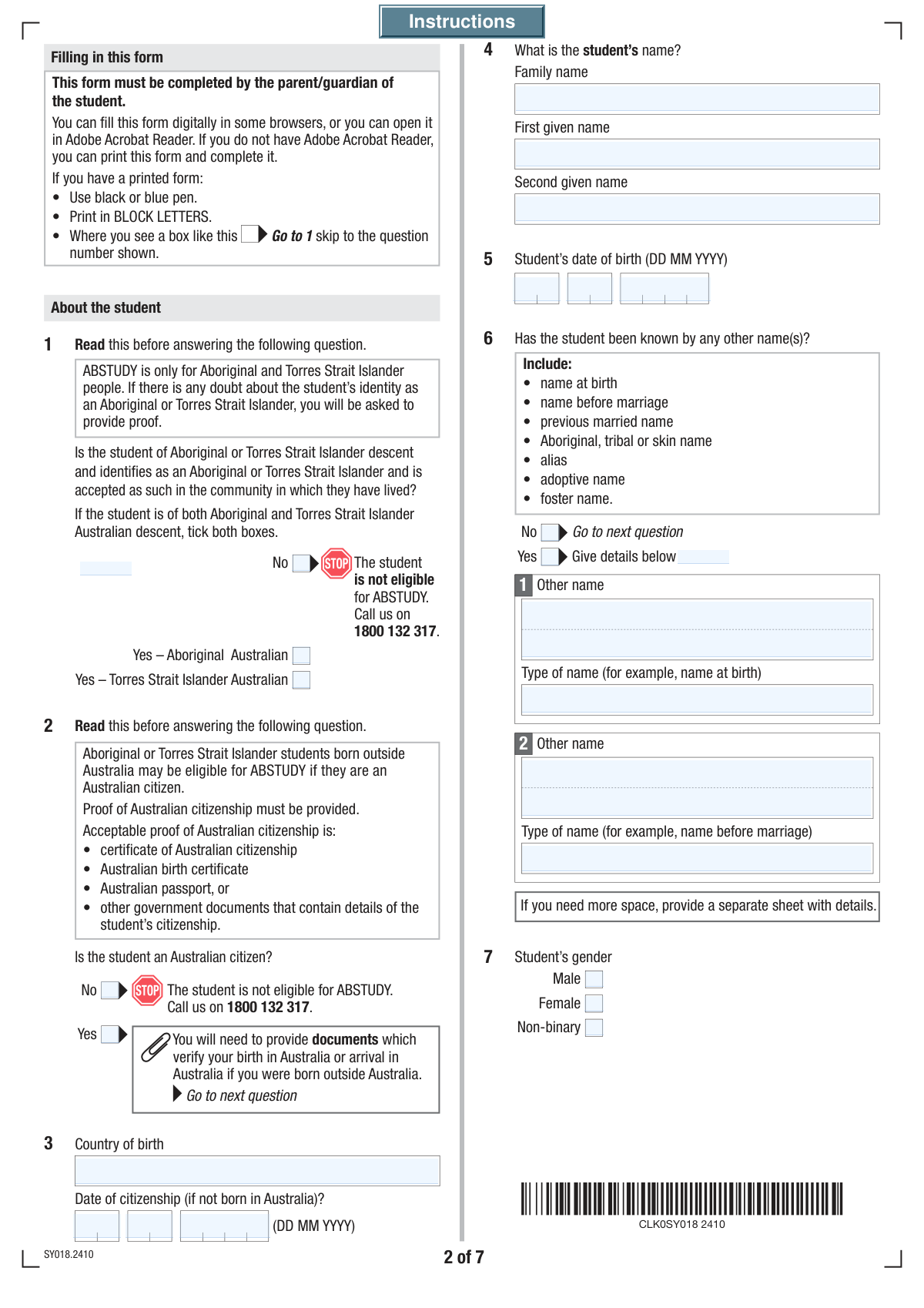
  2. 2 Use the AI assistant to fill in the student's details, including their name, date of birth, citizenship, Indigenous Australian status, and school information.
  3. 3 Complete the sections for the claimant (parent/guardian), providing your personal details, contact information, and relationship to the student.
  4. 4 If applicable, enter your partner's information, including their personal details, relationship to the student, and consent for enquiries.
  5. 5 Provide financial details for yourself and your partner, including information on other government payments, and supply your Tax File Numbers (TFNs).
  6. 6 Designate your preferred bank account for receiving ABSTUDY payments and indicate how the School Fees Allowance should be paid.
  7. 7 Review all the information, digitally sign the declaration, attach any required supporting documents like identity proofs or school fee receipts, and submit the completed form.

Our AI-powered system ensures each field is filled out correctly, reducing errors and saving you time.

Why Choose Instafill.ai for Your Fillable ABSTUDY Claim Form Form?

Speed

Complete your ABSTUDY Claim Form in as little as 37 seconds.

Up-to-Date

Always use the latest 2026 ABSTUDY Claim Form form version.

Cost-effective

No need to hire expensive lawyers.

Accuracy

Our AI performs 10 compliance checks to ensure your form is error-free.

Security

Your personal information is protected with bank-level encryption.

Frequently Asked Questions About Form ABSTUDY Claim Form

This form is used to apply for financial assistance for a student, likely the ABSTUDY payment or a similar education allowance. It collects detailed information about the student, their parent or guardian, and their financial circumstances to determine eligibility.

A parent, guardian, or carer of a student who is applying for the educational assistance program should complete this form. If you have a partner, their details and signature may also be required.

You should select the appropriate option based on whether the student is of Aboriginal or Torres Strait Islander descent, identifies as such, and is accepted as such in their community. If this does not apply, select 'No'.

If the student was born in another country, you must provide their country of birth. You will also need to enter the date they officially became an Australian citizen in the 'Date of Citizenship' fields.

You can choose to have the allowance paid directly to the student's school. Alternatively, you can opt to receive the payment yourself as a reimbursement after you have paid the fees and provided proof of payment.

Yes, if you are in a relationship, you must provide your partner's details, even if you do not live together. The form has a specific option for this situation and requires their information for the assessment.

The form's checklist indicates you may need to provide identity documents, a copy of the school fees receipt, documents showing details of other payments, and the 'Authorising a person' (SS313) form if applicable. Be sure to check the relevant questions to see what applies to you.

While you can submit the form without a TFN, providing it can ensure your payments are taxed at the correct rate. The form allows you to provide your TFN, state that you don't have one, or indicate that you have provided it previously.

If you are not the student's parent, grandparent, step-parent, or foster carer, you should select the 'Other' option. You will then need to provide a detailed explanation of your relationship to the student in the space provided.

Your Customer Reference Number is a unique number provided by Centrelink. You can typically find it on letters you have received from Centrelink, on your Health Care Card, or by logging into your online account.

Yes, AI-powered services like Instafill.ai can help you complete this form faster and more accurately. These tools use AI to read the form and auto-fill your information from a secure profile, saving you time on repetitive data entry.

Simply upload the form's PDF to the Instafill.ai platform. The AI will identify the fields and you can auto-fill your saved information, review for accuracy, and then download the completed, fillable PDF.

If you have a non-fillable or 'flat' PDF, you can use a service like Instafill.ai to make it interactive. Instafill.ai can convert non-fillable PDFs into a fillable format, allowing you to easily type your answers directly onto the form.

If the student is assisted by another Australian Government education scheme, you must select 'Yes' for that question. You will then need to provide the name of the assistance scheme and any other relevant details.

Compliance ABSTUDY Claim Form
Validation Checks by Instafill.ai

1
Citizenship Date Validity and Logic
Checks if the Citizenship Date is provided when the student's country of birth is not 'Australia'. It validates that the entered day, month, and year form a real calendar date, that this date occurs after the student's date of birth, and that it is not a future date. This ensures data accuracy for eligibility and identity verification. If the date is invalid or illogical, the form submission will be rejected with an error message prompting the user to correct the date fields.
2
Student Age and Grade Consistency
Validates that the student's date of birth is a valid date in the past and results in an age that is plausible for the entered 'Student Grade/Year'. For example, a student aged 4 should not be in Year 12. This check prevents data entry errors and ensures the student meets age-related eligibility criteria for the program. A significant mismatch will trigger a warning asking the user to confirm the details are correct.
3
Mandatory 'Other Name' Details
Ensures that if a user indicates that the student, applicant, or partner has been known by other names by selecting 'Yes', they must provide details in the subsequent 'Other Name' and 'Type of Other Name' fields. This is crucial for complete identity verification and cross-referencing records. If 'Yes' is selected but the detail fields are left empty, the form will display an error and prevent submission until the required information is provided.
4
Exclusive Choice Validation for Gender and Descent
This validation confirms that for questions requiring a single choice, such as 'Student's Gender' (Male, Female, Non-binary) or 'Aboriginal Descent Confirmation', only one option is selected. This prevents ambiguous or contradictory data from being submitted, which is essential for accurate demographic reporting and assessment. If more than one option is selected in a mutually exclusive group, the system will prompt the user to select only one before proceeding.
5
Conditional Partner Information Requirement
This check enforces the entry of partner details if the applicant's 'Current Relationship Status' is 'In a relationship, living with partner' or 'In a relationship, not living with partner'. It makes fields like the partner's name and date of birth mandatory to ensure a complete household profile for assessment purposes. Failure to provide partner details when required will block form submission and highlight the missing fields.
6
Applicant Age and Relationship Logic
Validates that the applicant's date of birth makes them a legal adult (e.g., over 18) and logically older than the student they are applying for. This is a critical sanity check to ensure the applicant is eligible to act as a guardian or parent. An illogical date entry, such as the applicant being younger than the student, will result in a hard stop with an error message explaining the issue.
7
Email Address Format
This check verifies that the value entered in the 'Email' field follows the standard syntax of an email address, including the presence of an '@' symbol and a domain (e.g., [email protected]). This is essential for ensuring that electronic communications and notifications can be successfully delivered to the applicant. An invalid format will trigger an inline error message, asking the user to correct the address before submission.
8
Australian Postcode Format
Ensures that the 'Postcode' and 'Postal Postcode' fields contain exactly four digits, consistent with the Australian postcode system. This is crucial for mail delivery and for validating the address against official databases. If the entry is not a 4-digit number, the system will flag it as an error and require correction.
9
Conditional Bank Account Details Requirement
This validation ensures that if a user opts to nominate a new bank account for payments by selecting 'Give details below', all necessary account details ('Bank Name', 'BSB Number', 'Account Number') become mandatory. This is critical for processing payments correctly and avoiding financial errors. The form will not submit if these fields are left empty after the user has chosen to provide new account information.
10
BSB Number Format Validation
Verifies that the entered Branch State Bank (BSB) number is a 6-digit numeric value, which may be entered with or without a hyphen. This is a fundamental requirement for processing electronic payments within the Australian banking system. The system should reject any entry that does not meet this format to prevent payment failures and subsequent administrative overhead.
11
Tax File Number (TFN) Format
Checks that if a Tax File Number (TFN) is provided for the applicant or their partner, it consists of exactly 9 digits. While providing a TFN may be optional, if a user chooses to enter it, the data must be in the correct format to be valid for taxation and identification purposes. An entry with an incorrect number of digits would be rejected to ensure data integrity.
12
Declaration Date Logical Check
This validation ensures the 'Declaration Date' is a valid, non-future date, confirming when the form was legally attested to. It is a critical field for establishing the timeliness and validity of the application. A future date would be rejected, and the user would be prompted to enter the current date or a date in the past.
13
Mandatory 'Other' Relationship Explanation
This check ensures that when an applicant selects 'Other' to describe their 'Relationship to the Student', they must provide a textual explanation in the corresponding details field. This is necessary for the processing agent to understand the applicant's standing and eligibility to apply on behalf of the student. The form will show an error if the 'Other' option is chosen but the explanation field is left blank.
14
Student Care Start Date Validation
This check is triggered if the user indicates the student came into their care 'after 1 January this year'. It validates that a complete, valid date is entered and that this date falls on or after January 1st of the current year. This is important for determining eligibility periods and benefit calculations. An invalid or out-of-range date will cause a validation failure.

Common Mistakes in Completing ABSTUDY Claim Form

Failing to Provide Details for 'Yes' Answers

The form contains many conditional questions where checking 'Yes' requires providing more information in subsequent fields (e.g., 'Other Names', 'Other Government Assistance'). Applicants often check the 'Yes' box but then overlook the associated text fields, leaving them blank. This results in an incomplete application that cannot be processed, leading to significant delays and requests for more information. To avoid this, carefully review each 'Yes' answer and ensure all required follow-up details are entered before moving to the next section.

Incorrectly Entering Segmented Numbers

Fields for the Customer Reference Number, Tax File Number (TFN), and BSB are split into multiple input boxes. Users frequently make errors by entering digits in the wrong boxes, miscounting, or transposing numbers between segments. This is a critical error that can lead to payment failure, inability to identify the applicant, or rejection by government agencies. It's crucial to double-check each segment against the source document, ensuring the numbers are in the correct order and boxes.

Mixing Up Applicant, Student, and Partner Details

The form requests similar personal details (name, DOB, gender, other names) for the student, the applicant, and the applicant's partner in separate sections. It is very common for a rushed applicant to accidentally enter their own information in the student's section or vice-versa. This fundamental error causes major processing issues and identity verification failures, often requiring the entire form to be resubmitted. To prevent this, pay close attention to the heading of each section and complete one person's details at a time.

Misunderstanding the Aboriginal or Torres Strait Islander Descent Criteria

The question about Aboriginal or Torres Strait Islander descent has a specific three-part definition: being of descent, identifying as such, and being accepted by the community. Some applicants may only meet one or two of these criteria and select a box incorrectly, or they may be unsure how to answer on behalf of the student. This can lead to the application being flagged for review or the student being incorrectly assessed for eligibility-specific programs. Applicants should carefully read the full definition and answer only if all three conditions are met.

Incorrectly Filling Out the Citizenship Date

The form explicitly states to provide the 'Date of Citizenship' only if the student's 'Country of Birth' is not Australia. Applicants often miss this conditional instruction, either leaving the citizenship date blank for a naturalized citizen or filling it in for a student who was born in Australia. This creates contradictory information that requires clarification from the processing authority, delaying the application. It is essential to follow the logic: if born outside Australia and now a citizen, provide the date; otherwise, leave the date fields blank.

Failing to Attach Required Supporting Documentation

The checklist at the end of the form reminds applicants to provide documents based on their answers to earlier questions (e.g., proof of school fees, identity documents). Many people complete the form but forget to gather and attach these crucial documents before submission. An application submitted without the required evidence will be put on hold until the documents are provided, causing significant delays in receiving assistance. Always use the final checklist to confirm you have included every necessary document.

Omitting Previous or Other Known Names

The form asks for 'Other Names' (e.g., name at birth, previous married name, alias) for the student, applicant, and partner. People often forget or choose not to include these names, especially if they were used long ago. This is a critical omission for identity verification, as background checks rely on a complete name history. Failure to disclose all names can lead to processing delays or even accusations of providing false information, so it's vital to provide a complete history.

Entering Incorrect Bank Account Details

Transcribing bank account details, including the BSB and account number, is a high-risk area for typos. A single incorrect digit will result in the payment being rejected or, in a worst-case scenario, sent to the wrong account. This mistake is especially common when nominating a new account instead of using an existing Centrelink-linked one. Always double- or triple-check these numbers against a bank statement. AI form-filling tools like Instafill.ai can use validation rules to check for correct BSB and account number formats, reducing the chance of error.

Choosing an Inaccurate Relationship Status

The relationship status section includes nuanced options like 'Separated/divorced, living in same home as former partner.' Applicants may default to a simpler status like 'Single' or 'Separated' without considering their specific living situation, which can impact eligibility and payment calculations. It is crucial to read all options carefully and select the one that most accurately describes the current domestic situation to ensure correct assessment and avoid future complications.

Submitting an Unsigned or Undated Form

The final declaration sections for the applicant and partner are legally required to confirm the information is true and correct. A surprisingly common oversight is forgetting to sign and date the form, or the partner missing their signature if required. An unsigned form is invalid and will be immediately returned or rejected, forcing the process to start over. If the form is a non-fillable PDF, a tool like Instafill.ai can convert it to a fillable version, making it easier to add a digital signature and date.
Saved over 80 hours a year

“I was never sure if my IRS forms like W-9 were filled correctly. Now, I can complete the forms accurately without any external help.”

Kevin Martin Green

Your data stays secure with advanced protection from Instafill and our subprocessors

Robust compliance program

Transparent business model

You’re not the product. You always know where your data is and what it is processed for.

ISO 27001, HIPAA, and GDPR

Our subprocesses adhere to multiple compliance standards, including but not limited to ISO 27001, HIPAA, and GDPR.

Security & privacy by design

We consider security and privacy from the initial design phase of any new service or functionality. It’s not an afterthought, it’s built-in, including support for two-factor authentication (2FA) to further protect your account.

Fill out ABSTUDY Claim Form with Instafill.ai

Worried about filling PDFs wrong? Instafill securely fills claim-for-abstudy forms, ensuring each field is accurate.