Yes! You can use AI to fill out Claim for ABSTUDY Schooling A (SY018)

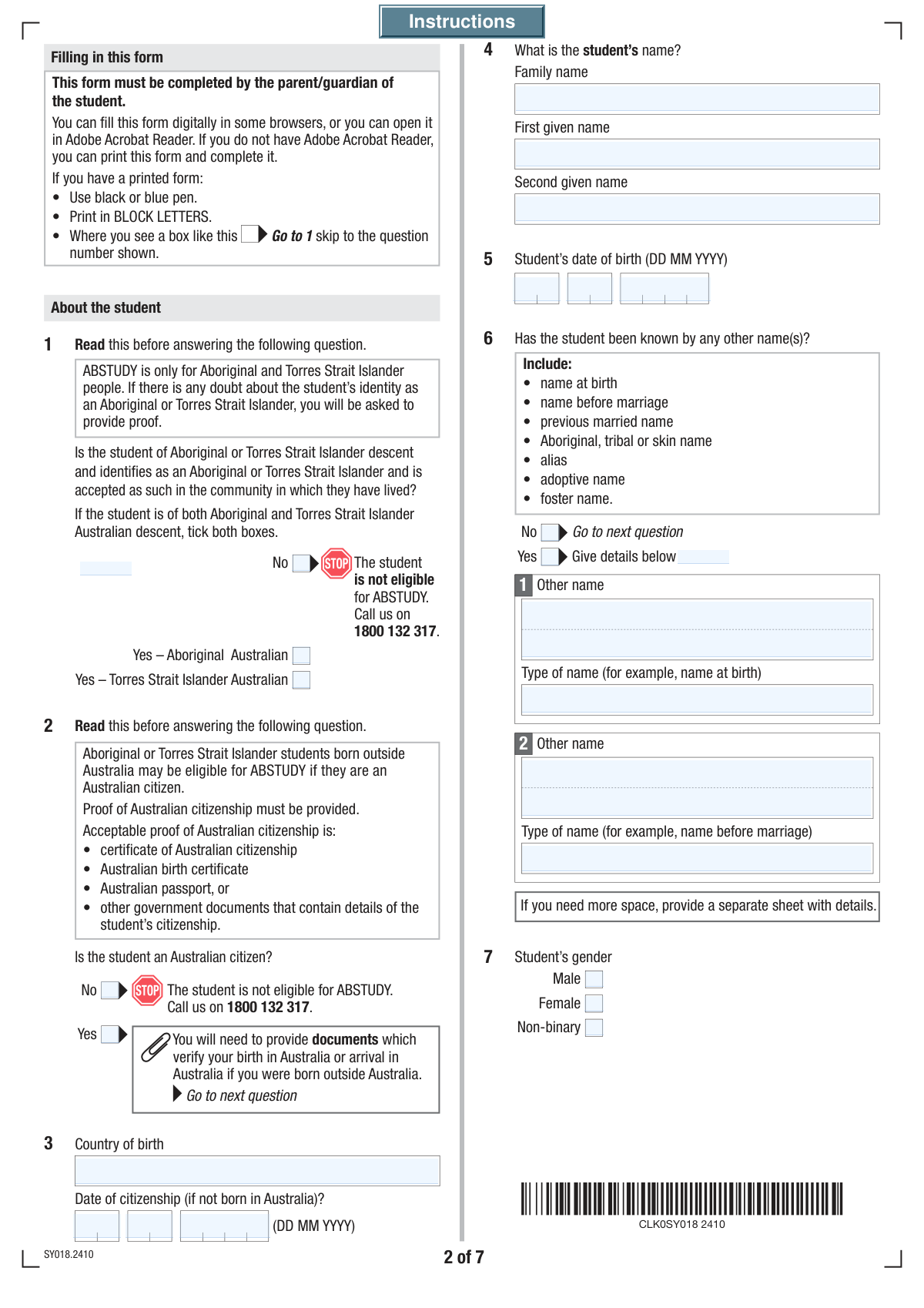
Form SY018, Claim for ABSTUDY Schooling A, is an Australian government form used to apply for payments that help with the costs of schooling for eligible Aboriginal and Torres Strait Islander students. This includes secondary students aged 15 or younger and primary students aged 14 at the start of the year who are living at home. The allowance helps cover school fees, books, and uniforms, ensuring students have the support they need. Today, this form can be filled out quickly and accurately using AI-powered services like Instafill.ai, which can also convert non-fillable PDF versions into interactive fillable forms.
SY018 is part of the VA claim forms category on Instafill.
SY018 has a very complex Form Complexity Index of 81/100 — 206 fillable fields across 11 pages. Instafill’s AI completes it accurately in under a minute.

Form specifications

Form name: Claim for ABSTUDY Schooling A (SY018)
Number of fields: 206
Number of pages: 11
FCI: Very Complex (81/100)
Field instructions: SY018 Instructions
Language: English
Our AI automatically handles information lookup, data retrieval, formatting, and form filling.
It takes less than a minute to fill out SY018 using our AI form filling.
Securely upload your data. Information is encrypted in transit and deleted immediately after the form is filled out.
Preview of Claim for ABSTUDY Schooling A (SY018)

Instafill Demo: How to fill out PDF forms in seconds with AI

How to Fill Out SY018 Online for Free in 2026

Are you looking to fill out a SY018 form online quickly and accurately? Instafill.ai offers the #1 AI-powered PDF filling software of 2026, allowing you to complete your SY018 form in just 37 seconds or less.
Follow these steps to fill out your SY018 form online using Instafill.ai:
  1. 1 Navigate to Instafill.ai and upload or select the 'Claim for ABSTUDY Schooling A (SY018)' form.
  2. 2 Provide the student's personal information, including their name, date of birth, and confirmation of Aboriginal or Torres Strait Islander descent.
  3. 3 Enter details about the student's school, grade, and expected start date for the school year.
  4. 4 Complete the 'About you' section with your (the parent/guardian's) personal details, contact information, relationship to the student, and current relationship status.
  5. 5 Input financial details, including information about other government payments, Health Care Card status, and your bank account for receiving the ABSTUDY payment.
  6. 6 Review all the information auto-filled by the AI for accuracy, then electronically sign and date the declaration section.
  7. 7 Submit the completed form along with any required supporting documents, such as identity verification or receipts, through the specified online portal or by mail.

Our AI-powered system ensures each field is filled out correctly, reducing errors and saving you time.

Why Choose Instafill.ai for Your Fillable SY018 Form?

Speed

Complete your SY018 in as little as 37 seconds.

Up-to-Date

Always use the latest 2026 SY018 form version.

Cost-effective

No need to hire expensive lawyers.

Accuracy

Our AI performs 10 compliance checks to ensure your form is error-free.

Security

Your personal information is protected with bank-level encryption.

Frequently Asked Questions About SY018

SY018 has a Form Complexity Index of 81 out of 100, placing it in the very complex complexity tier. This score is calculated deterministically from the form’s own structure using Instafill’s published Form Complexity Index methodology, so it can be reproduced and independently verified — it is not a subjective estimate.

For SY018 specifically, the score reflects 206 fillable fields across 11 pages, grouped into 49 sections, and 67 conditional fields that only apply depending on earlier answers, 5 tables or repeating lists. The number of fields is the largest factor in the base score (weighted 36%), followed by how difficult those fields are to complete based on their type, where free-text and signature fields count for more than simple checkboxes (26%). The number of pages that actually contain fields (15%), the amount of conditional “fill-only-if” logic (16%), and how many sections the form is divided into (7%) account for the rest of the base. On top of that base, the index adds points for tables and repeating lists, bundled instruction pages, and dense page layouts — capturing difficulty the base alone can miss.

In practical terms, a very complex score means the form is exceptionally demanding — a very large number of fields, often combined with tables, dense pages or extensive conditional logic. Instafill removes that effort entirely: our AI reads your information, maps each value to the correct field — including the conditional ones — and completes SY018 accurately in under a minute, with every field available for you to review before you download. See exactly how the Form Complexity Index is calculated.

This form is used to claim ABSTUDY Schooling A for Aboriginal and Torres Strait Islander students who live at home and are either secondary students aged 15 or younger, or primary students aged 14 at 1 January.

To be eligible, a student must attend school for at least 85% of each term, and their parent must hold a Health Care Card or receive certain Centrelink payments. Students in state care or those who qualify for independent status may also be eligible.

This allowance includes a School Fees Allowance, typically paid at the start of the year, and a School Term Allowance for costs like books and uniforms. Further payments depend on satisfactory school attendance.

To receive all your payments for the year of study, you must submit the claim by 31 December of that year. Claims lodged after this date are not normally approved.

You can submit the form online using your Centrelink online account, by post, or in person at a service centre. You can also submit a claim over the phone by calling 1800 132 317.

You may need to provide identity documents for the student, proof of school fee payment if you want direct reimbursement, and details of any non-Centrelink payments you receive. Refer to the checklist in question 37 for specifics.

The allowance is normally paid directly to the student's school. You can choose to pay the fees yourself and be reimbursed, but you must provide a copy of your receipt to Centrelink first.

Yes, you and your partner (if applicable) should provide your TFNs, as payment may be withheld without them. Exemptions apply, for example, for students younger than 16.

You must tell Centrelink within 14 days about any changes, such as the student stopping school, a change in your address, or if you no longer hold a Health Care Card.

Yes, you can still receive Family Tax Benefit for a child younger than 16 while also claiming the ABSTUDY School Fees Allowance and School Term Allowance for them.

Yes, in question 27 you can give your partner permission to enquire on your behalf, allowing them to ask about payments and report changes. However, they cannot apply for payments or sign forms for you.

Yes, services like Instafill.ai use AI to accurately auto-fill form fields, which can save you time and help reduce errors.

You can upload the PDF to a service like Instafill.ai, which makes the form interactive and fillable online. After completing the fields, you can download the finished document for submission.

If your PDF is not interactive, you can use a tool like Instafill.ai to instantly convert it into a fillable form. This allows you to easily type your information into the fields before printing or submitting it electronically.

Compliance SY018
Validation Checks by Instafill.ai

1
Confirms Student's Aboriginal or Torres Strait Islander Descent
This validation ensures that either 'Yes – Aboriginal Australian' or 'Yes – Torres Strait Islander Australian' is selected in Question 1. This is a fundamental eligibility requirement for the ABSTUDY program. If 'No' is selected, the claim cannot proceed and should be immediately rejected with instructions for the user to contact the agency.
2
Validates Student's Age for Program Eligibility
This check verifies that the student's date of birth in Question 5 is a valid date and that the student's calculated age meets the specific criteria for ABSTUDY Schooling A (secondary students 15 or younger, or primary students aged 14 at 1 January). This is critical for determining program eligibility. An invalid date or an age outside the eligible range will result in the claim being flagged for review or rejection.
3
Verifies Student's Australian Citizenship Status
This validation ensures the applicant confirms the student is an Australian citizen in Question 2, which is a core eligibility rule. If the student was not born in Australia, it also checks that a valid 'Date of citizenship' is provided. A claim for a non-citizen or a claim missing a required citizenship date will be considered incomplete and cannot be processed.
4
Ensures Care Commencement Date is Provided When Required
This validation confirms that if the applicant indicates the student came into their care after January 1st (Question 8), a complete and valid date is provided. This date is essential for correctly calculating pro-rated School Term Allowance payments. Failure to provide this date when required will halt processing until the information is supplied.
5
Verifies Completeness of School and Attendance Information
This validation ensures that the student's school name, location, grade (Question 11), and the school start date for the year (Question 10) are all provided. This information is fundamental for verifying enrollment and attendance, which are conditions of payment. Missing school details will render the claim incomplete and prevent payment processing.
6
Checks for Plausible Age Difference Between Applicant and Student
This validation performs a logical check on the age difference between the applicant (parent/guardian, Q15) and the student (Q5). An unusually small age gap, such as less than 14 years, could indicate a data entry error or a complex family situation requiring manual review. This check helps ensure the integrity of the claimed relationship and prevents processing based on incorrect data.
7
Ensures Partner Details are Provided for Relationship Status
This check enforces a logical dependency: if the applicant declares they are in a relationship in Question 22, they must provide their partner's name (Q23) and date of birth (Q24). This information is necessary for assessing the family's circumstances, which can affect eligibility and payment rates. A claim with a declared partner but missing partner details will be considered incomplete.
8
Validates Eligibility Pathway via Other Payments or Health Care Card
This validation checks that the applicant meets a key eligibility condition by confirming they either receive other specified payments (Q29 = 'Yes') or hold a current Health Care Card (Q30 = 'Yes'). The form directs applicants who answer 'No' to both questions to call the agency, indicating they may be ineligible. A submission with 'No' for both will be flagged for immediate rejection or manual intervention.
9
Ensures Bank Account Details are Provided for Payment
This check ensures that valid bank account details (BSB, account number, and account name) are provided in Question 33 when necessary for payment. This is required if the applicant is new to Centrelink or wishes to use a different account. Without these details, payments cannot be made, and the claim will be suspended until the information is provided.
10
Validates Tax File Number Provision
This validation confirms that if an applicant or their partner indicates they have a Tax File Number (TFN) in Question 36, the number itself is provided in the designated field. The TFN should also be checked for the correct format (e.g., 9 digits). Failing to provide the number when indicated as available will cause processing delays.
11
Verifies Required Signatures and Declaration Dates
This check confirms that the declaration in Question 39 has been signed and dated by the parent/guardian, and also by their partner if one was declared in Question 22. These signatures are a legal attestation that the provided information is true and correct, and they are mandatory for the claim to be accepted. A missing signature or an invalid date will render the form invalid.
12
Ensures Claim is Lodged Within the Annual Deadline
This check verifies that the claim's submission date is on or before the 31 December deadline for the year of study being claimed. This is a critical business rule for receiving payments for that year, as stated in the form's instructions. Claims submitted after this date will normally be rejected, resulting in a loss of entitlement for the applicant.

Common Mistakes in Completing SY018

Applying for an Ineligible Student

Applicants frequently misunderstand the strict eligibility criteria, such as the student's age, school level, or Indigenous identity requirements detailed on the first page. This leads to immediate claim rejection and wasted time for the applicant. To avoid this, carefully read the 'When to use this form' section to confirm the student is a secondary student aged 15 or younger, or a primary student aged 14 at 1 January, and meets the identity criteria.

Providing Incomplete Name History

The form asks for all previous names for the student, applicant, and partner (Questions 3, 15, 25), including maiden, tribal, or alias names. People often omit names they feel are irrelevant, which can cause significant delays in processing. This happens when Centrelink cannot match records with other agencies for identity verification, so it is crucial to list all names the person has ever been known by.

Choosing the Wrong School Fee Payment Option

In Question 12, applicants must choose how the School Fees Allowance is paid. A common error is selecting 'To me after I provide proof of payment' without realizing they must pay the fees out-of-pocket first and then wait for reimbursement. This can cause financial hardship and delays. Unless you can comfortably pay the fees upfront, it is safer to select 'To the school named at Question 11' for direct payment.

Misinterpreting 'Relationship Status'

Question 22 asks for relationship status, but its definitions can be confusing; for example, a couple is still considered partnered even if one person lives away for work. Applicants may incorrectly select 'single' or 'separated', leading to an incorrect assessment of their household income. This can result in wrong payment amounts and potentially a future debt that must be repaid to Centrelink.

Omitting Partner Details and Signature

If an applicant indicates they have a partner, they must complete all partner-related questions (23-28) and obtain their partner's signature on the declaration (Q39). It is common for these sections to be left blank, especially if the partner is not present when the form is filled out. An incomplete or unsigned form will be returned, halting the claim until it is properly completed and re-submitted.

Entering Incorrect Bank Account Details

Simple typos in the BSB or account number (Question 33) are a frequent and costly mistake, causing payments to be rejected or sent to the wrong account. Applicants also sometimes try to use an account that is not in their own name, which is not permitted. To prevent payment delays, double-check these numbers against a bank statement. AI-powered form fillers like Instafill.ai can help by validating the format of account numbers to catch errors before submission.

Forgetting to Provide Tax File Numbers (TFN)

Applicants often forget or are hesitant to provide their and their partner's Tax File Number (TFN) in Question 36, not realizing it is critical for processing. While exemptions exist, failing to provide a TFN or a valid reason for exemption will stop the claim from being finalized. To avoid this major delay, have both TFNs ready or apply for them from the ATO before submitting the form.

Failing to Attach All Required Supporting Documents

The form may require various supporting documents, such as proof of citizenship, school fee receipts, or letters about other payments, as indicated in the checklist at Question 37. A very common mistake is submitting the form without these attachments. This renders the claim incomplete and forces Centrelink to request the missing information, leading to significant processing delays.

Incorrectly Identifying as a 'Foster Carer'

Questions 21 and 28 provide a 'Foster carer' option, which the form explicitly states is only for students in official state care. Relatives providing informal care, such as a grandparent, sometimes incorrectly select this box. This misrepresentation can complicate the assessment of the student's circumstances and may delay the claim. If the care arrangement is informal, it is better to select 'Other' and provide a clear explanation.

Submitting a Messy or Illegible Handwritten Form

When the form is printed and filled by hand, messy handwriting, using the wrong color ink, or making unclear corrections can lead to data entry errors by the processing officer. This can cause mistakes in names, addresses, or bank details, resulting in delays or payment issues. To avoid this, it's best to fill the form digitally. If the PDF is not fillable, tools like Instafill.ai can convert it into an interactive, fillable version to ensure all entries are clear and legible.
Saved over 80 hours a year

“I was never sure if my IRS forms like W-9 were filled correctly. Now, I can complete the forms accurately without any external help.”

Kevin Martin Green

Your data stays secure with advanced protection from Instafill and our subprocessors

Robust compliance program

Transparent business model

You’re not the product. You always know where your data is and what it is processed for.

ISO 27001, HIPAA, and GDPR

Our subprocesses adhere to multiple compliance standards, including but not limited to ISO 27001, HIPAA, and GDPR.

Security & privacy by design

We consider security and privacy from the initial design phase of any new service or functionality. It’s not an afterthought, it’s built-in, including support for two-factor authentication (2FA) to further protect your account.

Fill out SY018 with Instafill.ai

Worried about filling PDFs wrong? Instafill securely fills claim-for-abstudy-schooling-a-sy018 forms, ensuring each field is accurate.

Related forms by category

VA claim forms Form OWCP-915, Claim for Medical Reimbursement, Form 8862, Information To Claim Certain Credits, Form CA-7, Claim for Compensation, Form CA-5, Claim for Compensation, Form SC-100, Plaintiff's Claim and ORDER to Go to Small Claims Court, Form 20-0995, Decision Review Request: Supplemental Claim, Form 104, List of Creditors 20 Largest Unsecured Claims, VA Form 20-0995, Decision Review Request: Supplemental Claim, Form 941-X (Rev. April 2023), Adjusted Employer’s QUARTERLY Federal Tax Return or Claim for Refund, Judicial Council of California Form SC-104, Proof of Service (Small Claims), Immigration and Refugee Board of Canada (IRB) – Refugee Protection Division (RPD) Basis of Claim Form (for persons claiming refugee protection in Canada) (RPD.02.01), SC-108, Request to Correct or Cancel Judgment and Answer (Small Claims), Judicial Council of California Form SC-105, Request for Court Order and Answer (Small Claims), SC-120, Defendant’s Claim and ORDER to Go to Small Claims Court (Small Claims), Judicial Council of California Form SC-104, Proof of Service (Small Claims), Continental American Insurance Company (CAIC) / Aflac Group Critical Illness Claim Form (with Attending Physician’s Statement, HIPAA Authorization to Obtain Information, and Electronic Funds Transaction Authorization), Judicial Council of California Form SC-108, Request to Correct or Cancel Judgment and Answer (Small Claims), SC-105, Request for Court Order and Answer (Small Claims), Judicial Council of California Form SC-120, Defendant’s Claim and ORDER to Go to Small Claims Court (Small Claims), Small Claim and Notice of Small Claim (ORS 46.425) (OJD Official) (Jan 2026) · + 80 more →