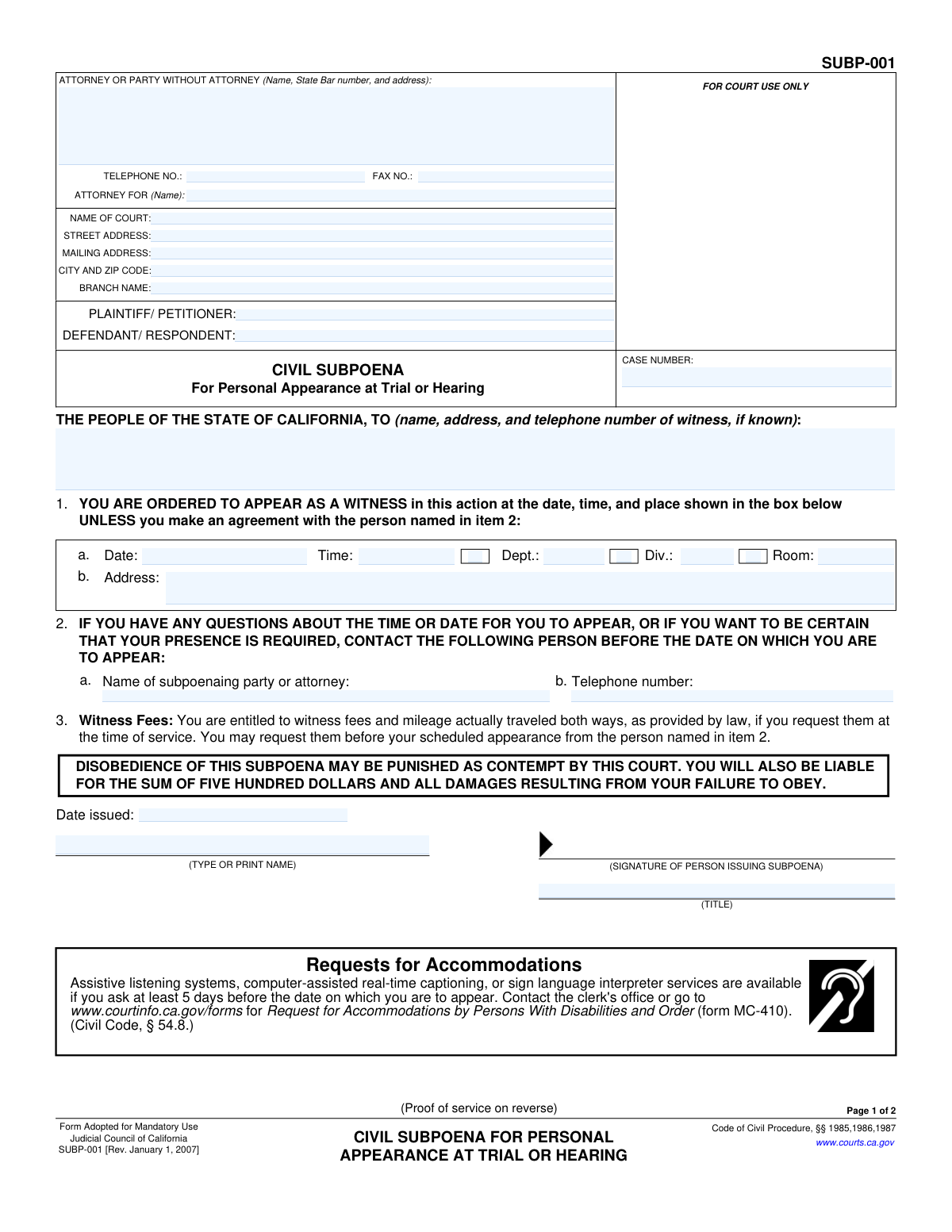
Yes! You can use AI to fill out Form SUBP-001, Civil Subpoena for Personal Appearance at Trial or Hearing
The California Form SUBP-001, Civil Subpoena for Personal Appearance at Trial or Hearing, is a legal document used to compel a witness to testify in a civil court case. Issued by the court at the request of a party, it formally orders an individual to appear at a specific date, time, and location, with failure to comply punishable as contempt of court. Today, this form can be filled out quickly and accurately using AI-powered services like Instafill.ai, which can also convert non-fillable PDF versions into interactive fillable forms.
Our AI automatically handles information lookup, data retrieval, formatting, and form filling.
It takes less than a minute to fill out SUBP-001 using our AI form filling.
Securely upload your data. Information is encrypted in transit and deleted immediately after the form is filled out.
Form specifications
| Form name: | Form SUBP-001, Civil Subpoena for Personal Appearance at Trial or Hearing |
| Number of fields: | 53 |
| Number of pages: | 1 |
| Language: | English |
Instafill Demo: How to fill out PDF forms in seconds with AI
How to Fill Out SUBP-001 Online for Free in 2026
Are you looking to fill out a SUBP-001 form online quickly and accurately? Instafill.ai offers the #1 AI-powered PDF filling software of 2026, allowing you to complete your SUBP-001 form in just 37 seconds or less.
Follow these steps to fill out your SUBP-001 form online using Instafill.ai:
- 1 Navigate to Instafill.ai and upload or select the Form SUBP-001.
- 2 Enter the court and case information, including the court name, address, case number, and party names.
- 3 Provide the contact details for the attorney or party without an attorney who is issuing the subpoena.
- 4 Input the full name, address, and telephone number of the witness being ordered to appear.
- 5 Specify the exact date, time, and location (department, division, room, and address) of the trial or hearing.
- 6 Identify the person the witness should contact with any questions regarding their appearance.
- 7 Review all entered information for accuracy, then download the completed subpoena for issuance, signature, and proper legal service.
Our AI-powered system ensures each field is filled out correctly, reducing errors and saving you time.
Why Choose Instafill.ai for Your Fillable SUBP-001 Form?
Speed
Complete your SUBP-001 in as little as 37 seconds.
Up-to-Date
Always use the latest 2026 SUBP-001 form version.
Cost-effective
No need to hire expensive lawyers.
Accuracy
Our AI performs 10 compliance checks to ensure your form is error-free.
Security
Your personal information is protected with bank-level encryption.
Frequently Asked Questions About Form SUBP-001
This form is a legal order compelling a person to appear in a California court at a specific date and time to provide testimony as a witness in a trial or hearing.
An attorney for one of the parties in a lawsuit, or a party who is representing themselves, fills out this form to require a witness to testify.
Disobeying the subpoena can be punished as contempt of court. The disobedient person will also be liable for a $500 penalty plus any damages caused by their failure to appear.
Yes, you are entitled to witness fees and mileage for travel both ways. You must request payment from the person listed in item 2 on the form, either when you are served or before your court date.
The 'Proof of Service' is a declaration signed by the person who delivered the subpoena, detailing when, where, and to whom it was delivered. This page is then filed with the court to prove the witness was properly notified.
The subpoena must be personally delivered by someone over the age of 18 who is not a party in the case, such as a registered process server or a county sheriff.
You should contact the person whose name and telephone number are listed in item 2 of the form. They can confirm if your presence is still required.
You can request accommodations, such as a sign language interpreter, by contacting the court clerk's office at least five days before your appearance. You may need to complete form MC-410.
You will need the court name, case number, party names, the full name and address of the witness, and the exact date, time, and location of the trial or hearing.
Yes, services like Instafill.ai use AI to help you accurately auto-fill form fields with your case information, saving time and helping to prevent errors.
You can upload the SUBP-001 PDF to the Instafill.ai platform. The service will make the form interactive, allowing you to easily type in your information, save, and download the completed document.
If you have a non-fillable or 'flat' PDF, you can use a tool like Instafill.ai. It can convert the document into an interactive, fillable form that you can complete on your computer.
The subpoena must be signed by the person issuing it, who is typically the attorney for a party or the party themselves if they are self-represented.
Compliance SUBP-001
Validation Checks by Instafill.ai
1
Case Number Consistency Across Pages
This check verifies that the 'CASE NUMBER' field is populated and is identical on both Page 1 and Page 2 of the form. The case number is the primary identifier for a legal action, and any discrepancy can lead to misfiling or rejection by the court clerk. Failure to maintain consistency will flag the fields for user review and correction.
2
Future Appearance Date Requirement
Validates that the 'Date' for the personal appearance (item 1a) is a valid date that occurs in the future. A subpoena cannot compel a witness to appear on a date that has already passed. This check prevents logical errors and ensures the subpoena is legally enforceable. If the date is in the past, an error will be raised.
3
Appearance Details Completeness
Ensures that the core details for the witness appearance, specifically the 'Date', 'Time', and 'Address' (items 1a and 1b), are all filled out. Missing any of this information makes the subpoena ambiguous and legally deficient, as the witness would not know when or where to appear. The form submission will be blocked until all three fields are completed.
4
Subpoena Contact Information Presence
Verifies that the 'Name of subpoenaing party or attorney' and 'Telephone number' in item 2 are both provided. This information is critical for the witness to ask questions or confirm their required presence. A failure in this check would disadvantage the witness and could be grounds for challenging the subpoena, so it flags these fields as required.
5
Logical Date Chronology (Issuance vs. Service)
This validation confirms that the 'Date issued' on Page 1 is on or before the 'Date of delivery' on Page 2 (item 1c). A subpoena cannot be served before it has been officially issued. This check maintains the logical and legal timeline of events. An invalid sequence will trigger a warning to the user to correct the dates.
6
Logical Date Chronology (Service vs. Appearance)
Ensures the 'Date of delivery' on the Proof of Service (Page 2, item 1c) is before the 'Date' of the scheduled appearance (Page 1, item 1a). A witness must be served with sufficient notice before they are required to appear. This validation prevents the creation of an unenforceable subpoena. If the service date is on or after the appearance date, an error is generated.
7
Proof of Service Declaration Date
Validates that the signature 'Date' on the Proof of Service declaration (Page 2) is on or after the 'Date of delivery' (item 1c). The server must declare that the service was completed on or after the date it actually happened. This is a requirement for a valid perjury declaration. An earlier date will be flagged as a logical error.
8
Witness Fee Amount Validation
Checks the logic of the witness fee section (Page 2, item 1e). If the checkbox for 'were offered or demanded and paid' is selected, the corresponding 'Amount' field must contain a numeric value greater than zero. This ensures that a claim of payment is substantiated with an actual amount. An empty or zero value will result in a validation error.
9
Mutually Exclusive Witness Fee Selection
Verifies that only one of the two checkboxes in the witness fees section (Page 2, item 1e) is selected. A user cannot select both 'were...paid' and 'were not demanded or paid' simultaneously as they are contradictory statements. This check prevents ambiguous or nonsensical data entry.
10
Process Server Status Identification
Ensures that at least one checkbox from item 3a to 3g on Page 2 is selected. This is required to properly identify the legal status of the person who served the subpoena, which is a necessary component of a valid proof of service. If no status is selected, the form is considered incomplete.
11
Party Name Consistency Across Pages
This check verifies that the 'PLAINTIFF/PETITIONER' and 'DEFENDANT/RESPONDENT' names are consistent between Page 1 and Page 2. Consistent party information is essential for correct record-keeping and to ensure the proof of service is associated with the correct case. Mismatched names will trigger a warning for review.
12
Telephone and Fax Number Formatting
Validates that the 'TELEPHONE NO.' and 'FAX NO.' fields on Page 1 are entered in a standard, recognizable phone number format (e.g., 10 digits, possibly with parentheses, spaces, or hyphens). This ensures the data is clean and usable for communication purposes. An invalid format would prompt the user to re-enter the number correctly.
13
Required Issuer Information
This check ensures that the 'TYPE OR PRINT NAME' and 'TITLE' fields are filled out by the person issuing the subpoena on Page 1. This information is necessary to identify the issuer and their authority to issue the subpoena (e.g., Attorney for Plaintiff, Clerk of the Court). Missing this information can invalidate the document.
Common Mistakes in Completing SUBP-001
Users often correctly fill out the Case Number, Plaintiff, and Defendant names on page 1 but forget to repeat this information on the Proof of Service on page 2. This inconsistency can lead to filing delays or rejection by the court clerk, as the Proof of Service may not be correctly associated with the case file. To avoid this, meticulously check that the header information on page 2 exactly matches page 1. AI-powered form filling tools like Instafill.ai can automatically populate recurring information across pages, ensuring perfect consistency.
People frequently enter the main court name but fail to specify the exact branch name, street address, and department/room number for the hearing. This ambiguity can cause the subpoenaed witness to go to the wrong courthouse or be unable to find the correct courtroom, potentially leading to a missed appearance. Always verify the precise location from the official hearing notice. Tools like Instafill.ai can help by saving previously used court addresses and flagging these specific location fields to ensure they are not overlooked.
The section ordering the witness to appear requires their full name, address, and telephone number. Fillers often provide an incomplete address or omit the phone number, even if it is known. An incorrect address can make the subpoena impossible to serve legally, rendering it void, while a missing phone number prevents the process server from coordinating the service. To prevent this, double-check the witness's full, current address and include a phone number whenever possible.
A subpoena is not legally valid until it is dated, signed, and includes the title of the person issuing it (e.g., 'Attorney for Plaintiff'). It is a common and critical error to leave one or more of these fields blank on the bottom of page 1. An unsigned or undated subpoena is unenforceable and will be disregarded by the witness and the court. Always complete this section immediately after filling out the rest of the form.
Item 2 asks for the name and telephone number of a person the witness can contact with questions. Parties often leave this section blank, forcing a confused witness to call the court clerk, who cannot provide case-specific information. This creates unnecessary work for court staff and can lead to misunderstandings about the appearance. Always provide the direct contact information for the subpoenaing attorney or party to streamline communication.
The Proof of Service on page 2 is not optional; it is the official record that the witness was legally notified. The person issuing the subpoena fills out page 1, but the person serving the document must complete and sign page 2. A common failure is not getting the completed page 2 back from the server or never having it filled out at all, which means there is no legal proof of service to file with the court.
On the Proof of Service (Item 1e), the server must indicate whether witness fees were offered/paid or were not demanded. Servers sometimes check the wrong box or forget to enter the amount paid if applicable. This detail is legally significant, as a witness may not be compelled to attend if the proper fees were demanded but not paid. This error can create a basis for the witness to legally challenge the subpoena.
The process server must check the box corresponding to their legal status in Item 3 on the Proof of Service. A frequent mistake is failing to also provide their full name, address, and registration details in section 3h. Without this information, the server's identity and authority cannot be verified, potentially invalidating the service. AI tools like Instafill.ai can store and auto-populate information for frequently used process servers, preventing this omission.
The Proof of Service must be signed and dated by the process server under penalty of perjury. Forgetting this signature is a fatal flaw that renders the entire Proof of Service invalid. Without a valid, signed declaration, the court has no official evidence that the subpoena was delivered, and any failure to appear by the witness cannot be punished as contempt.
Many people find this form as a flat, non-fillable PDF and fill it out by hand. This often leads to illegible handwriting, which can cause the court clerk to misinterpret names, case numbers, or dates, leading to filing errors. Handwritten forms are also more prone to mistakes like missed fields. If only a flat PDF is available, a tool like Instafill.ai can convert it into an interactive, fillable form to ensure clarity and completeness.
Saved over 80 hours a year
“I was never sure if my IRS forms like W-9 were filled correctly. Now, I can complete the forms accurately without any external help.”
Kevin Martin Green
Your data stays secure with advanced protection from Instafill and our subprocessors

Robust compliance program
Transparent business model
You’re not the product. You always know where your data is and what it is processed for.
ISO 27001, HIPAA, and GDPR
Our subprocesses adhere to multiple compliance standards, including but not limited to ISO 27001, HIPAA, and GDPR.
Security & privacy by design
We consider security and privacy from the initial design phase of any new service or functionality. It’s not an afterthought, it’s built-in, including support for two-factor authentication (2FA) to further protect your account.
Fill out SUBP-001 with Instafill.ai
Worried about filling PDFs wrong? Instafill securely fills form-subp-001-civil-subpoena-for-personal-appearance-at-trial-or-hearing forms, ensuring each field is accurate.