Yes! You can use AI to fill out Judicial Council of California Form SC-202A, Decision on Attorney-Client Fee Dispute (Small Claims)
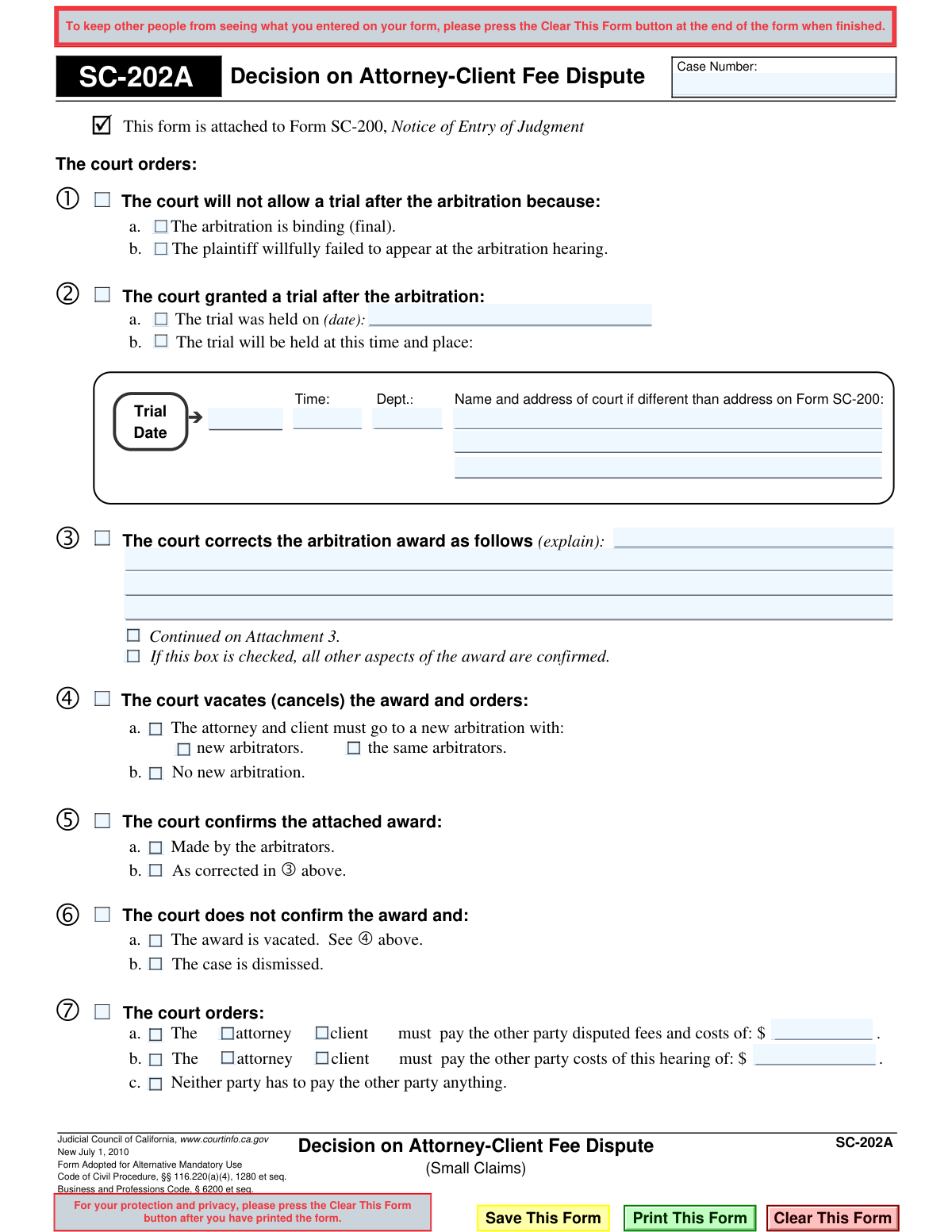
The SC-202A, Decision on Attorney-Client Fee Dispute (Small Claims), is a legal document issued by the Judicial Council of California to formalize a court's ruling after arbitration. It specifies whether the arbitration award is confirmed, corrected, or vacated, and outlines any subsequent actions like a new trial or monetary judgments. Today, this form can be filled out quickly and accurately using AI-powered services like Instafill.ai, which can also convert non-fillable PDF versions into interactive fillable forms.
SC-202A is part of the
California court forms, California judicial forms, court claim forms, Judicial Council forms and small claims forms categories on Instafill.
Our AI automatically handles information lookup, data retrieval, formatting, and form filling.
It takes less than a minute to fill out SC-202A using our AI form filling.
Securely upload your data. Information is encrypted in transit and deleted immediately after the form is filled out.
Form specifications
| Form name: | Judicial Council of California Form SC-202A, Decision on Attorney-Client Fee Dispute (Small Claims) |
| Number of fields: | 47 |
| Number of pages: | 1 |
| Language: | English |
Instafill Demo: How to fill out PDF forms in seconds with AI
How to Fill Out SC-202A Online for Free in 2026
Are you looking to fill out a SC-202A form online quickly and accurately? Instafill.ai offers the #1 AI-powered PDF filling software of 2026, allowing you to complete your SC-202A form in just 37 seconds or less.
Follow these steps to fill out your SC-202A form online using Instafill.ai:
- 1 Navigate to Instafill.ai and upload the SC-202A form or select it from the platform's template library.
- 2 Enter the case number and court information into the designated fields at the top of the document.
- 3 Proceed through the form, checking the boxes that correspond to the court's specific orders regarding the arbitration award (e.g., confirming, vacating, correcting).
- 4 If the court has ordered a trial, corrected the award, or specified a monetary payment, fill in the corresponding dates, explanations, and dollar amounts.
- 5 Carefully review all entered information to ensure it accurately reflects the court's decision.
- 6 Download or print the completed form, which is then attached to Form SC-200, Notice of Entry of Judgment, for official filing.
Our AI-powered system ensures each field is filled out correctly, reducing errors and saving you time.
Why Choose Instafill.ai for Your Fillable SC-202A Form?
Speed
Complete your SC-202A in as little as 37 seconds.
Up-to-Date
Always use the latest 2026 SC-202A form version.
Cost-effective
No need to hire expensive lawyers.
Accuracy
Our AI performs 10 compliance checks to ensure your form is error-free.
Security
Your personal information is protected with bank-level encryption.
Frequently Asked Questions About Form SC-202A
This form is a court order that details the judge's decision following an arbitration about a fee dispute between an attorney and a client in a small claims case. It states whether the arbitration award is confirmed, corrected, canceled, or if a new trial is being ordered.
This form is completed by the court, such as a judge or court clerk, not by the attorney or the client. It serves as the official record of the court's decision in the matter.
If the box next to 'The court confirms the attached award' is checked, it means the judge is upholding the original decision made by the arbitrator. The parties are legally obligated to follow the terms of that award.
If the court vacates (cancels) the award, the original arbitration decision is now void. The form will then specify the next steps, such as ordering a new arbitration hearing or dismissing the case entirely.
Form SC-202A provides the specific details and reasoning for the judgment in your fee dispute case. The SC-200 is the official notice that a judgment has been entered, and the SC-202A explains what that judgment is.
If the court orders that the arbitration is binding, it means the arbitrator's decision is final and cannot be appealed through a new trial. This often occurs if both parties agreed to it or if one party intentionally failed to show up for the arbitration hearing.
If a trial is granted, it means the arbitration was not binding and one of the parties requested a new trial before a judge. The form will state the date, time, and location for this new trial.
You must carefully read the form to understand the court's final orders. This includes any payments you must make or receive, and the deadlines for those actions.
This means the judge found a minor mistake, like a calculation error, in the original award and has fixed it. The rest of the arbitrator's decision is confirmed and is now legally binding with the specified correction.
No, because this is an official court order that only a judge or court clerk can complete. However, for other legal forms you need to prepare for your case, services like Instafill.ai can help auto-fill your information accurately and save time.
For forms that you are responsible for completing, you can use a service like Instafill.ai. Simply upload the form, and its AI can help you fill in the required fields quickly and accurately before you print it for submission.
While you won't fill out Form SC-202A, if you have other non-fillable court forms, you can use Instafill.ai. The service can convert flat PDFs into interactive, fillable forms that you can easily complete on your computer.
If the court determines you intentionally skipped the arbitration hearing, you lose your right to request a new trial. The original arbitration award automatically becomes final and binding.
Compliance SC-202A
Validation Checks by Instafill.ai
1
Case Number Presence and Format
This check ensures the 'Case Number' field is not empty and conforms to the expected format for the jurisdiction. A missing or incorrectly formatted case number would prevent the document from being properly filed and associated with the correct legal proceedings, rendering it invalid.
2
Mutually Exclusive Trial Timing
Validates that only one option is selected for the trial date: either 'The trial was held on' (past) or 'The trial will be held at' (future). Selecting both would create a logical contradiction in the court's order. The system should enforce a choice of one or the other, but not both.
3
Past Trial Date Is a Valid Past Date
If the option 'The trial was held on (date)' is selected, this validation confirms that the entered date is a valid calendar date and that it occurs in the past or on the current day. An invalid or future date would be a factual impossibility and would undermine the credibility of the court record.
4
Future Trial Schedule Completeness
This check ensures that if 'The trial will be held at this time and place' is selected, the date, time, and department fields are all completed. The date must also be a valid date in the future. Incomplete scheduling information would make the order ambiguous and non-actionable for the parties involved.
5
Required Explanation for Award Correction
If the court indicates it is correcting the arbitration award, this validation requires that the corresponding explanation text box is not empty. An order to correct an award without specifying the correction is vague and unenforceable, so a detailed explanation is legally necessary.
6
Exclusive Choice for New Arbitration Order
When the court vacates an award and orders a new arbitration, it must specify whether it will be with 'new arbitrators' or 'the same arbitrators'. This check ensures that one, and only one, of these two options is selected. Failure to specify makes the order for a new hearing incomplete.
7
Mutually Exclusive Action on Vacated Award
This validation ensures that if the court vacates the award, it must choose between ordering a new arbitration or ordering no new arbitration. Selecting both options would create a direct logical contradiction, making the court's decision impossible to interpret or execute.
8
Logical Link for Corrected Award Confirmation
If the court chooses to confirm the award 'As corrected in e above', this check verifies that the section explaining the corrections (section 4) is actually filled out. Confirming a corrected award without providing the specific corrections renders the judgment meaningless.
9
Exclusive Outcome for Non-Confirmation
When the court does not confirm an award, it must select a single resulting action: either 'The award is vacated' or 'The case is dismissed'. This check prevents both or neither from being selected, ensuring the judgment has a clear and unambiguous final outcome.
10
Monetary Amount Format
This validation ensures that all fields for monetary amounts (e.g., disputed fees, hearing costs) contain only valid, non-negative numeric characters. This prevents data entry errors and ensures the financial obligations in the judgment are clear and computationally sound.
11
Payment Order Completeness for Disputed Fees
If an amount is entered for 'disputed fees and costs', this check ensures that exactly one party (the 'attorney' or the 'client') is selected as the one who must pay. An order to pay without a designated payer is unenforceable.
12
Payment Order Completeness for Hearing Costs
Similar to the check for disputed fees, this validation ensures that if an amount is entered for 'costs of this hearing', one and only one party ('attorney' or 'client') is designated as the payer. This is critical for the order to be clear and legally binding.
13
Contradiction Check for Payment Orders
This check validates that if the 'Neither party has to pay the other party anything' box is checked, then no monetary amounts are entered for disputed fees or hearing costs. This prevents a contradictory order where the court simultaneously orders a payment and no payment, ensuring the judgment is logically sound.
14
Singular Primary Decision Path
Ensures that mutually exclusive high-level decisions are not selected together. For example, the form cannot both 'confirm the award' (section 6) and 'grant a trial after arbitration' (section 3). This validation enforces a single, coherent decision from the court.
Common Mistakes in Completing SC-202A
Users often mistype the case number or leave it blank entirely, especially when handling multiple cases. This is a critical error as the case number is the primary identifier linking this decision to the correct court file, which can lead to the document being misfiled or rejected. To prevent this, carefully proofread the number against the case file; AI-powered tools like Instafill.ai can also help by auto-filling and validating case numbers, reducing the risk of manual typos.
A common error is checking boxes that represent mutually exclusive legal outcomes, such as confirming the award in Section 6 and also vacating it in Section 7. This happens due to a misunderstanding of the form's logical flow and makes the order legally unenforceable. Smart form-filling tools can prevent this, as Instafill.ai can be configured with conditional logic to disable conflicting options as you fill out the form.
People frequently check a box to indicate that the attorney or client must pay, but then forget to fill in the specific dollar amount or fail to select which party is responsible. An incomplete order is ambiguous and cannot be enforced, defeating the purpose of the judgment. Using a tool like Instafill.ai can help by highlighting required fields associated with a selection, ensuring no critical payment details are missed.
When the court corrects an arbitration award (Section 4), the form requires a clear explanation, but users sometimes provide insufficient details like 'clerical error' without specifics. This ambiguity can lead to future disputes between the parties about the order's meaning. If the form is a non-fillable PDF, a tool like Instafill.ai can convert it into a fillable version with expandable text boxes, making it easier to type a complete explanation.
In Section 5, if an award is vacated and a new arbitration is ordered, the user must specify whether it will be with 'new arbitrators' or 'the same arbitrators.' Forgetting to check one of these boxes creates an incomplete order that delays the resolution of the dispute. An intelligent form filler like Instafill.ai can prompt the user to make a required secondary choice, preventing such incomplete submissions.
The form explicitly states 'Continued on Attachment 3' and 'The court confirms the attached award,' indicating that other documents are part of this decision. A frequent mistake is failing to physically attach the referenced arbitration award or continuation pages. This renders the court's decision incomplete and can lead to its rejection until all parts are filed correctly.
In the fields for payment amounts, users may enter non-numeric characters or use incorrect punctuation, which can cause data entry errors or rejection of the form. This delays the finalization of the judgment and requires correction. AI-powered form fillers like Instafill.ai automatically format monetary values correctly, stripping invalid characters and ensuring the entry matches the required standard.
Within a single section, users might select conflicting options, such as in Section 8, ordering a party to pay an amount while also checking that 'Neither party has to pay.' This logical error creates an invalid order that must be corrected. AI tools like Instafill.ai can enforce form logic, automatically un-checking a conflicting option when another is selected, ensuring a valid submission.
The header includes a field for the court address if it's different from the one on Form SC-200, which users often overlook. If the hearing occurred at a different branch, omitting this information can cause confusion for the parties regarding where to file future documents. Tools like Instafill.ai can help by pre-populating known court addresses, reducing the chance of this field being overlooked.
In Section 3, which deals with a trial after arbitration, users may incorrectly fill out details for both a trial that 'was held' and a trial that 'will be held.' These options are mutually exclusive and create confusion about the case's procedural posture. Smart form tools like Instafill.ai can help by programming these fields as radio buttons rather than checkboxes, making it impossible to select more than one conflicting option.
Saved over 80 hours a year
“I was never sure if my IRS forms like W-9 were filled correctly. Now, I can complete the forms accurately without any external help.”
Kevin Martin Green
Your data stays secure with advanced protection from Instafill and our subprocessors

Robust compliance program
Transparent business model
You’re not the product. You always know where your data is and what it is processed for.
ISO 27001, HIPAA, and GDPR
Our subprocesses adhere to multiple compliance standards, including but not limited to ISO 27001, HIPAA, and GDPR.
Security & privacy by design
We consider security and privacy from the initial design phase of any new service or functionality. It’s not an afterthought, it’s built-in, including support for two-factor authentication (2FA) to further protect your account.
Fill out SC-202A with Instafill.ai
Worried about filling PDFs wrong? Instafill securely fills judicial-council-of-california-form-sc-202a-decision-on-attorney-client-fee-dispute-small-claims forms, ensuring each field is accurate.