Yes! You can use AI to fill out Statement of Inability to Afford Payment of Court Costs or an Appeal Bond

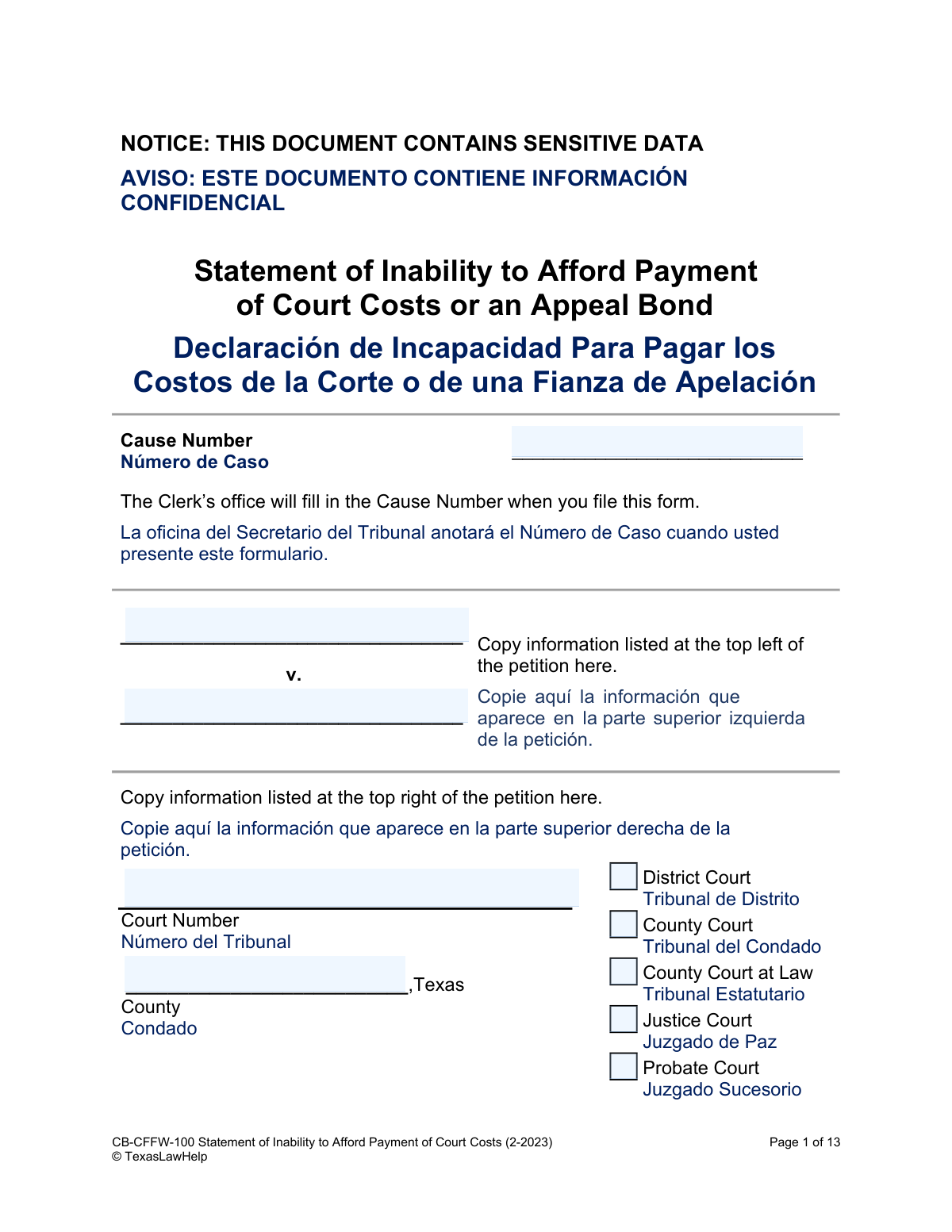
This form, officially known as the 'Statement of Inability to Afford Payment of Court Costs or an Appeal Bond,' is a legal document submitted to a Texas court to declare that you do not have the financial resources to pay for court fees or post an appeal bond. It is a crucial tool for ensuring that individuals with low income can still access the justice system without being barred by costs. Today, this form can be filled out quickly and accurately using AI-powered services like Instafill.ai, which can also convert non-fillable PDF versions into interactive fillable forms.
CB-CFFW-100 is part of the court appeal forms category on Instafill.
Our AI automatically handles information lookup, data retrieval, formatting, and form filling.
It takes less than a minute to fill out CB-CFFW-100 using our AI form filling.
Securely upload your data. Information is encrypted in transit and deleted immediately after the form is filled out.

Form specifications

Form name: Statement of Inability to Afford Payment of Court Costs or an Appeal Bond
Number of fields: 163
Number of pages: 1
Language: English
main-image

Instafill Demo: How to fill out PDF forms in seconds with AI

How to Fill Out CB-CFFW-100 Online for Free in 2026

Are you looking to fill out a CB-CFFW-100 form online quickly and accurately? Instafill.ai offers the #1 AI-powered PDF filling software of 2026, allowing you to complete your CB-CFFW-100 form in just 37 seconds or less.
Follow these steps to fill out your CB-CFFW-100 form online using Instafill.ai:
  1. 1 Navigate to Instafill.ai and upload or select the 'Statement of Inability to Afford Payment of Court Costs' form.
  2. 2 Provide your personal information, including your full name, address, and date of birth, allowing the AI to populate the relevant fields.
  3. 3 Detail your financial situation by entering information about your dependents, any public benefits you receive, and all sources of monthly income.
  4. 4 List your assets (like cash, bank accounts, and vehicles) and your monthly expenses (such as rent, utilities, and food).
  5. 5 Indicate whether you are represented by legal aid and declare your inability to pay court costs.
  6. 6 Review all the information auto-filled by the AI for accuracy, then choose to either complete the unsworn declaration or prepare the affidavit section for notarization.
  7. 7 Download the completed form, attach any required proof (like a legal aid certificate or benefits letter), and file it with the appropriate court.

Our AI-powered system ensures each field is filled out correctly, reducing errors and saving you time.

Why Choose Instafill.ai for Your Fillable CB-CFFW-100 Form?

Speed

Complete your CB-CFFW-100 in as little as 37 seconds.

Up-to-Date

Always use the latest 2026 CB-CFFW-100 form version.

Cost-effective

No need to hire expensive lawyers.

Accuracy

Our AI performs 10 compliance checks to ensure your form is error-free.

Security

Your personal information is protected with bank-level encryption.

Frequently Asked Questions About Form CB-CFFW-100

This form is used to formally request that a Texas court waive court costs and fees because you do not have the financial means to pay them. It provides the court with a detailed summary of your financial situation.

Anyone involved in a Texas court case who cannot afford to pay the required court fees or post a bond for an appeal should complete this form. This includes individuals initiating a lawsuit or responding to one.

The Cause Number is the unique case number assigned by the court. If you are filing this form to start a new case, the court clerk's office will fill in this number for you when you file.

Yes, if you indicate that you or your dependents receive public benefits, you must attach proof. This can include a copy of an eligibility form, a benefits statement, or a copy of a benefit check.

To protect their privacy, you should use only the initials for any dependent children under the age of 18. For any dependents who are 18 or older, you can list their full name.

You should only list your spouse's income if they are not the opposing party in your legal case. If your legal dispute is with your spouse, you should not include their income information.

The value is the amount the item would sell for, minus the amount you still owe on it. For example, if your car is worth $10,000 and you have a $4,000 loan on it, the value to list on the form is $6,000.

If you have other facts you want the court to consider, such as unusual medical expenses or family emergencies, you can attach a separate page. Label this page 'Exhibit: Additional Supporting Facts' and include it with your form.

Not necessarily. You can sign the 'Declaration' (Option 1) without a notary, but you must list your address. If you have safety concerns about listing your address, you must complete the 'Affidavit' (Option 2) and sign it in front of a notary public.

If you are being represented for free by a legal aid attorney, you must check the appropriate box in Section 3. You also need to attach the certificate that the legal aid provider gave you as proof.

You must file the completed and signed form with the clerk of the court where your case is filed or will be filed. The clerk will process your request to waive the fees.

Yes, services like Instafill.ai use AI to help you accurately auto-fill form fields with your information. This can save you time and help prevent common mistakes.

To use Instafill.ai, you can upload the PDF of the 'Statement of Inability to Afford Payment of Court Costs' to the platform. The AI will make the document interactive, allowing you to easily type your information into the correct fields before downloading the completed form.

If your PDF is a flat, non-fillable image, you can use a tool like Instafill.ai. It can convert the non-interactive PDF into a smart, fillable form that you can complete on your computer.

Compliance CB-CFFW-100
Validation Checks by Instafill.ai

1
Full Name Completeness
This check ensures that the 'My full legal name is' field is not empty and contains at least two separate strings, representing a first and last name. This is critical for proper legal identification of the filer. If the field is blank or contains only one name, the submission should be flagged for review to ensure the filer's identity is correctly recorded.
2
Date of Birth Validity
Validates that the 'My date of birth is' field contains a complete and logical date in the past. The check confirms the date format (e.g., MM/DD/YYYY) and ensures the individual is of a legal age to file court documents, typically 18 years or older. An invalid or future date would prevent the form from being processed and requires correction.
3
Legal Aid Selection Exclusivity
This validation ensures that in Section 3, 'Are you represented by Legal Aid?', exactly one of the three possible options is selected. The form explicitly states to 'Check only one box'. This prevents ambiguity about the filer's legal representation status, which is a key factor in determining eligibility.
4
Public Benefits Consistency
This is a conditional logic check for Section 4. If the user answers 'Yes' to receiving public benefits, the system verifies that at least one specific benefit checkbox is marked. Conversely, if the user answers 'No', it ensures no benefit checkboxes are marked. This maintains logical consistency and prevents incomplete or contradictory information.
5
Legal Aid Attachment Logic
If the user selects either of the first two options in Section 3 (indicating involvement with a legal aid provider), this check verifies that a corresponding document has been uploaded. The form requires an attached 'Legal Aid Certificate' or similar proof. Failure to attach the required document when indicated would result in an incomplete application.
6
Total Monthly Income Calculation
This check automatically calculates the sum of all individual income sources listed in Section 5 and compares it to the amount entered in the 'Total Monthly Income' field. This validation ensures mathematical accuracy in the financial statement. A mismatch would trigger an error, prompting the user to review and correct their income figures.
7
Total Value of Property Calculation
Verifies that the amount entered in the 'Total Value of Property' field in Section 6 is the correct sum of all listed asset values (cash, bank accounts, vehicles, etc.). This ensures the filer's statement of assets is arithmetically correct. If the user-entered total does not match the calculated sum, the form is considered invalid until corrected.
8
Total Monthly Expenses Calculation
This check confirms that the 'Total Monthly Expenses' field in Section 7 accurately reflects the sum of all individual expense items listed. Financial accuracy is paramount for the court to assess inability to pay. An incorrect total would require the user to re-calculate and fix the discrepancy before submission.
9
Unemployment Date Requirement
This is a conditional validation for Section 5. If a monetary value greater than zero is entered in the 'unemployment' income field, this check ensures the 'I have been unemployed since' date field is also filled out with a valid date. This provides necessary context for the unemployment income and is required for a complete financial picture.
10
Dependent Information Integrity
For each row in the 'About My Dependents' table (Section 2), this validation ensures that if a dependent's name or initials are entered, the corresponding 'Age' and 'Relationship to me' fields are also completed. This prevents partial or incomplete entries for dependents, which are crucial for determining household size and financial need. An incomplete row would be flagged for completion.
11
Declaration and Affidavit Exclusivity
This check enforces the rule that the filer must complete the fields for 'Option 1: Declaration' OR 'Option 2: Affidavit', but not both. The form provides these as mutually exclusive options for signing. If both sections are filled out, it creates ambiguity, and the form should be rejected until only one valid declaration method is chosen.
12
Declaration Information Consistency
If 'Option 1: Declaration' is completed, this check validates that the name and date of birth entered in this section match the name and date of birth provided in Section 1 ('Your Information'). This cross-references key identifying information to ensure consistency throughout the document. A mismatch would indicate a potential error and require correction.
13
Court Type Selection Requirement
Ensures that at least one checkbox is selected from the list of court types (e.g., District Court, County Court) on the first page. This information is mandatory for filing the document with the correct court. A submission without a selected court type would be considered incomplete and cannot be routed properly.
14
Email Address Format Validation
This check verifies that the text entered into the 'My email I check often' field conforms to a standard email address format (e.g., '[email protected]'). While not always mandatory, a valid email is crucial for electronic communication from the court. An invalid format would prevent notifications and updates from being delivered.

Common Mistakes in Completing CB-CFFW-100

Forgetting to Attach Required Proof

Sections 4 and 5 require attaching proof for legal aid representation or receipt of public benefits. Applicants often check the boxes but forget to include the corresponding documents, such as an eligibility letter or a legal aid certificate. This omission leads to an incomplete filing, causing significant delays or outright rejection of the statement until the proof is provided. To avoid this, create a checklist of all required attachments before submitting the form.

Incorrectly Calculating Net Asset Value

In Section 6, the form asks for the value of property like cars, which is defined as the sale price minus any amount still owed. A common error is to list the full market value of an asset, not the net equity. This inflates the applicant's perceived wealth and can lead to a wrongful denial of their request. Always subtract the loan balance from the asset's current market value before entering the figure.

Reporting Gross Income Instead of Net 'Take-Home' Pay

Section 5 specifically asks for 'take-home pay,' which is net income after taxes and other deductions. People frequently enter their gross monthly salary by mistake, which significantly overstates their actual available income. This can make it appear as though they can afford court costs when they cannot, jeopardizing their application. Always refer to your actual pay stub to find the net amount deposited into your account.

Prematurely Signing the Notarized Affidavit

Option 2 on page 13 is an Affidavit that must be signed in the presence of a notary public. A frequent and critical error is signing this section beforehand. A notary cannot legally notarize a pre-signed document, which invalidates the affidavit and requires the applicant to fill out and sign a new form. To prevent this, do not sign Option 2 until you are physically in front of the notary and they have verified your identity.

Disclosing Minors' Full Names Instead of Initials

Section 2 explicitly instructs applicants to use only initials for dependents under 18 to protect their privacy. Many people overlook this instruction and write out the children's full names, unnecessarily exposing sensitive data in a public court document. This can have long-term privacy implications for the minor. Carefully follow the instructions to safeguard your children's information.

Inaccurately Copying Case Party Information

The first page requires copying the plaintiff and defendant names exactly as they appear on the case petition. Applicants may misspell names, reverse the parties, or leave this section blank if they don't have the petition handy. This error can cause the statement to be misfiled or rejected, as it cannot be linked to the correct court case. Double-check the original petition to ensure the information is transcribed perfectly.

Omitting or Miscalculating Financial Totals

Sections 5, 6, and 7 for income, assets, and expenses each have a 'Total' field at the end. Applicants often forget to fill in these totals or make simple arithmetic errors when adding up the figures. This forces the court clerk or judge to do the math, which can introduce errors and delay the processing of the form. Always use a calculator to sum each section and ensure the total fields are filled in accurately.

Providing an Unmonitored Email or Phone Number

The form asks for an email that the applicant checks 'often' because the court uses this information for time-sensitive communications. Providing an old or rarely used email address or phone number can lead to missing crucial notices about hearings or deadlines. This can result in negative outcomes in the case, such as a default judgment. Always provide your primary, most reliable contact information.

Completing Both the Declaration and Affidavit Sections

The form provides two mutually exclusive options for signing: Option 1 (Declaration) and Option 2 (Affidavit). A common mistake is to fill out both, which creates confusion about the applicant's intent and can invalidate the signature. You must choose only one option based on your circumstances. AI-powered form filling tools like Instafill.ai can help prevent this by using conditional logic to show only the relevant signature fields based on your selection.

Including an Opposing Spouse's Income

Section 5 contains a field for spousal income with a clear warning: 'Answer only if your spouse is not your opponent.' In contentious cases like a divorce, people sometimes mistakenly include their spouse's income. This provides financial information to the opposing party that may not be required at this stage and could be used against the applicant. Carefully read all instructions to avoid disclosing information that is not required.

Failing to List All Debts and Expenses

Applicants sometimes underreport their financial obligations in Sections 7 and 8, focusing only on major expenses like rent and car payments. They may forget to include credit card debt, medical bills, student loans, or court-ordered wage garnishments. This presents an incomplete picture of their financial hardship and weakens their claim of inability to pay. To avoid this, gather all your monthly bills and debt statements before filling out the form to ensure every expense is accounted for.
Saved over 80 hours a year

“I was never sure if my IRS forms like W-9 were filled correctly. Now, I can complete the forms accurately without any external help.”

Kevin Martin Green

Your data stays secure with advanced protection from Instafill and our subprocessors

Robust compliance program

Transparent business model

You’re not the product. You always know where your data is and what it is processed for.

ISO 27001, HIPAA, and GDPR

Our subprocesses adhere to multiple compliance standards, including but not limited to ISO 27001, HIPAA, and GDPR.

Security & privacy by design

We consider security and privacy from the initial design phase of any new service or functionality. It’s not an afterthought, it’s built-in, including support for two-factor authentication (2FA) to further protect your account.

Fill out CB-CFFW-100 with Instafill.ai

Worried about filling PDFs wrong? Instafill securely fills statement-of-inability-to-afford-payment-of-court-costs-or-an-appeal-bond forms, ensuring each field is accurate.