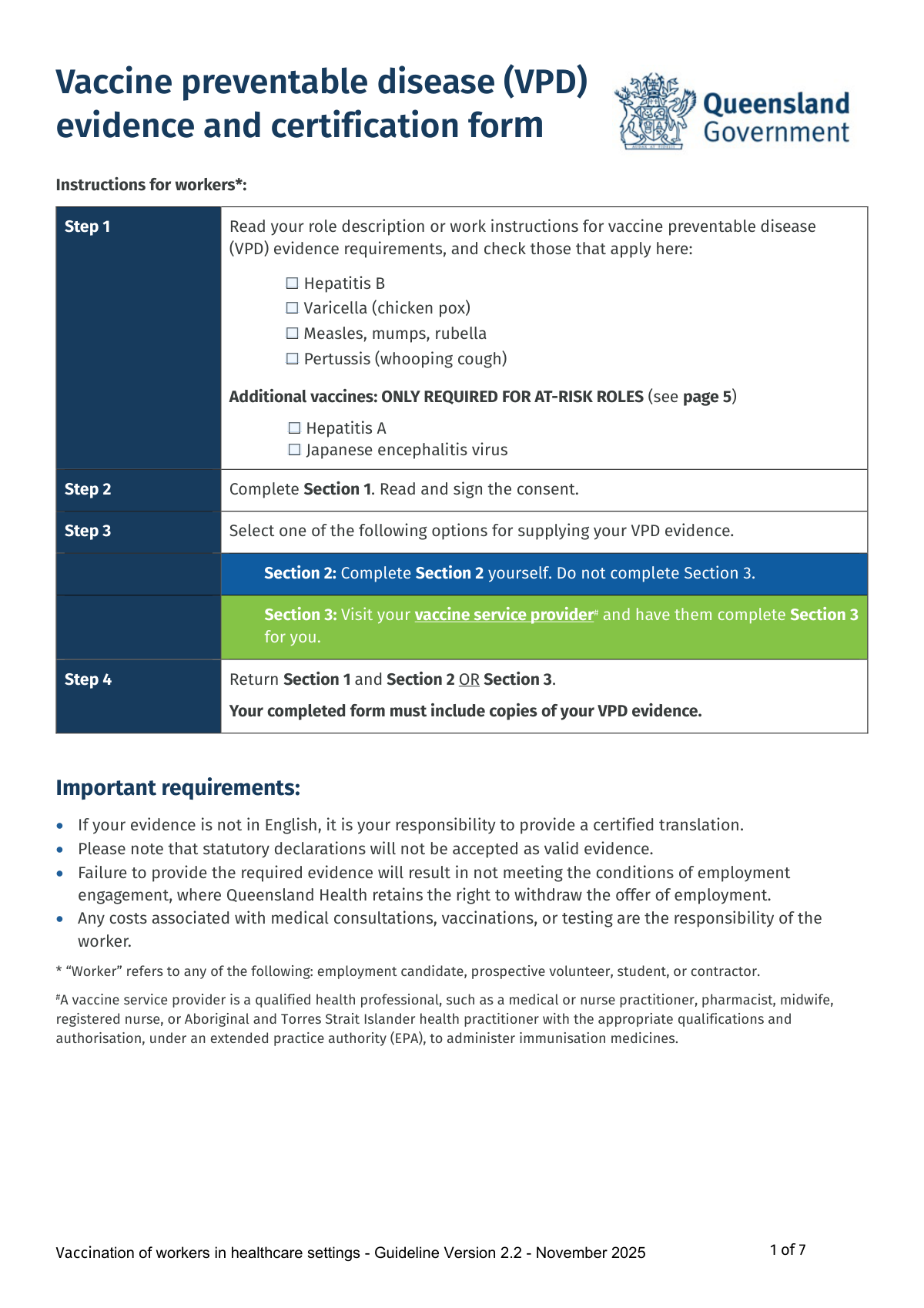
Yes! You can use AI to fill out Vaccine preventable disease (VPD) evidence and certification form
The Vaccine Preventable Disease (VPD) Evidence and Certification Form is a crucial document for individuals working in Queensland healthcare settings. It serves to collect and certify proof of immunity against specified diseases, ensuring compliance with health and safety regulations and protecting both workers and patients. Completing this form accurately is a condition of employment. Today, this form can be filled out quickly and accurately using AI-powered services like Instafill.ai, which can also convert non-fillable PDF versions into interactive fillable forms.
Our AI automatically handles information lookup, data retrieval, formatting, and form filling.
It takes less than a minute to fill out VPD evidence and certification form using our AI form filling.
Securely upload your data. Information is encrypted in transit and deleted immediately after the form is filled out.
Form specifications
| Form name: | Vaccine preventable disease (VPD) evidence and certification form |
| Number of fields: | 97 |
| Number of pages: | 7 |
| Language: | English |
| Categories: | certification forms |
Instafill Demo: How to fill out PDF forms in seconds with AI
How to Fill Out VPD evidence and certification form Online for Free in 2026
Are you looking to fill out a VPD EVIDENCE AND CERTIFICATION FORM form online quickly and accurately? Instafill.ai offers the #1 AI-powered PDF filling software of 2026, allowing you to complete your VPD EVIDENCE AND CERTIFICATION FORM form in just 37 seconds or less.
Follow these steps to fill out your VPD EVIDENCE AND CERTIFICATION FORM form online using Instafill.ai:
- 1 Navigate to Instafill.ai and upload the 'Vaccine Preventable Disease (VPD) Evidence and Certification Form' or select it from the template library.
- 2 Use the AI assistant to accurately fill in your personal details in Section 1, including your full name, date of birth, and contact information.
- 3 Carefully read the collection notice and consent section, then use the tool to provide your digital signature and date to acknowledge and provide consent.
- 4 In Section 2, check the boxes for the required vaccines based on your role and enter the dates of vaccination from your records. Instafill.ai can help you locate and accurately transcribe this information from your uploaded evidence documents.
- 5 Securely attach digital copies of your supporting evidence, such as vaccination records, serology reports, or letters from medical practitioners.
- 6 Thoroughly review all entered information, checked boxes, and attached documents for accuracy and completeness before finalizing.
- 7 Download the completed form package and submit it to the appropriate Queensland Health recruitment team or contact person as per the instructions.
Our AI-powered system ensures each field is filled out correctly, reducing errors and saving you time.
Why Choose Instafill.ai for Your Fillable VPD evidence and certification form Form?
Speed
Complete your VPD evidence and certification form in as little as 37 seconds.
Up-to-Date
Always use the latest 2026 VPD evidence and certification form form version.
Cost-effective
No need to hire expensive lawyers.
Accuracy
Our AI performs 10 compliance checks to ensure your form is error-free.
Security
Your personal information is protected with bank-level encryption.
Frequently Asked Questions About Form VPD evidence and certification form
This form is used to collect and certify your vaccination status or immunity to specific vaccine-preventable diseases (VPDs) as a condition of employment or engagement in Queensland healthcare settings. It helps ensure a safe environment for both workers and patients.
A 'worker' includes any employment candidate, prospective volunteer, student, or contractor applying for a role within Queensland Health. If you fall into one of these categories, you must complete this form.
Your role description or work instructions will list the specific vaccine requirements for your position. You should check the corresponding boxes for those vaccines in Step 1 on the first page of the form.
You only need to complete one of these sections. Fill out Section 2 yourself if you have all the required vaccination records and evidence, or have a qualified vaccine service provider (like your doctor) complete Section 3 for you if you need them to assess and certify your status.
Acceptable evidence includes copies of official vaccination records, blood test (serology) results showing immunity, or a signed letter from a medical practitioner. Statutory declarations are not accepted as valid evidence.
It is your responsibility to provide a certified translation for any evidence that is not in English. You must submit the certified translation along with the original document.
Partial compliance means you have started but not yet completed a required vaccination course, such as having only one of two required MMR doses. Continued employment is often contingent on you completing the full course within a specified timeframe, such as six months for Hepatitis B.
You are responsible for any costs associated with medical consultations, vaccinations, or testing needed to provide the required evidence.
No, individuals born before 1966 are generally considered immune to measles, mumps, and rubella. You can simply check the 'Birth date before 1966' box in the MMR section as your evidence.
Failure to provide the required evidence means you will not meet the conditions of employment or engagement. This may result in Queensland Health withdrawing the offer.
Yes, services like Instafill.ai use AI to accurately auto-fill form fields from your saved information, which can save you time and reduce errors. This is especially helpful for entering personal details you use frequently.
You can use a service like Instafill.ai to make the process easier. Simply upload the PDF, and the tool will allow you to type directly into the fields, add signatures, and then download the completed document.
Services like Instafill.ai can convert flat, non-fillable PDFs into interactive, fillable forms. Just upload your PDF to their platform, and it will automatically identify the fields for you to fill in on your computer.
Compliance VPD evidence and certification form
Validation Checks by Instafill.ai
1
Consent Selection Logic
This check ensures that the user has selected exactly one of the two consent options: 'I consent' or 'I do not consent'. It prevents a submission where the user has either failed to make a choice or selected both conflicting options. If validation fails, the form cannot be processed as the user's intent regarding data sharing is unclear.
2
MMR Age-Based Exemption Verification
This validation cross-references the 'Birth date before 1966' checkbox in the MMR section with the 'Date of birth' field in Section 1. If the checkbox is ticked, the system verifies that the provided date of birth is before January 1, 1966. This is crucial for confirming eligibility for the age-based exemption, and failure means the user must provide alternative evidence of immunity.
3
Pertussis Booster 10-Year Validity
This check validates that the 'Pertussis vaccine dose date' provided in Section 2 is within the last 10 years from the date of form submission. This is a critical time-sensitive requirement to ensure the worker's immunity is current as per healthcare guidelines. A date older than 10 years will be flagged as non-compliant, requiring the worker to get a booster.
4
Hepatitis B Dose Interval Adherence
This validation enforces the specific timing rules for the Hepatitis B vaccination course as detailed in the form's explanatory notes. It checks that there is a minimum of 4 weeks between dose 1 and 2, a minimum of 2 months between dose 2 and 3, and a minimum of 4 months between dose 1 and 3. Failure to meet these intervals may render the vaccination course invalid for compliance purposes, requiring clarification or further action.
5
Varicella Dose Spacing
This check ensures that if a worker documents two doses of the Varicella vaccine, the date for 'Dose 2' is at least 4 weeks after the date for 'Dose 1'. This rule is based on clinical guidelines for an effective immune response. If the interval is shorter, the second dose may be considered invalid, and the worker would be marked as only partially compliant.
6
Exclusive Section Completion (Worker vs. Provider)
This validation ensures that the form submission contains data for either Section 2 (worker-provided evidence) or Section 3 (provider certification), but not both. This prevents the submission of conflicting or redundant information. If both sections are filled, the system will prompt the user to clarify which section should be considered the official record.
7
Conditional Evidence for At-Risk Vaccines
This check is triggered for the Hepatitis A and JEV sections. If the 'REQUIRED' checkbox is selected for either vaccine, the system verifies that at least one form of evidence (e.g., 'Documented history of a complete course' or 'Partial compliance') has also been selected. This ensures that workers in at-risk roles provide the necessary documentation, and failure results in an incomplete submission.
8
Provider Certification Completeness
This validation confirms that if Section 3 is used, all fields within the 'Vaccine service provider declaration' block are filled, including the provider's signature, name, designation, date, and practice stamp/address. Missing information would invalidate the certification, as the identity and authority of the provider cannot be confirmed. The submission would be rejected pending completion of the required details.
9
Mandatory Follow-Up for Partial Compliance
This check applies to Section 3, the provider certification table. If a provider marks a worker as 'Partially compliant' for any vaccine, the system requires that the corresponding 'Next dose due' field is filled with a date or instruction. This is essential for ensuring a follow-up plan is in place for the worker to achieve full compliance. An empty 'Next dose due' field would result in a validation error.
10
Personal Details Consistency Across Sections
This validation compares the 'Full name' and 'Date of birth' fields entered in Section 1, Section 2, and Section 3. It ensures the information is identical in all locations to prevent data entry errors and confirm the identity of the worker being assessed. Discrepancies will trigger an error, requiring the user to correct the information to ensure a single, consistent record.
11
Signature Date Validity
This check verifies that all date fields associated with signatures are present, formatted correctly (e.g., DD/MM/YYYY), and are not set to a future date. This ensures the signature was provided on or before the submission date, confirming the attestation was made at a valid point in time. A future or invalid date would cause the submission to be rejected.
12
Evidence Attachment Requirement
This validation ensures that when a user checks a box indicating documentary evidence (e.g., 'Blood test results showing immunity', 'Letter from a medical/nurse practitioner'), a corresponding file has been uploaded. The form explicitly states that copies of evidence must be attached. If the box is checked but no file is attached, the system will flag it as an incomplete submission, as the claim of evidence is unsubstantiated.
13
Step 1 Requirement vs Section 3 Status
This check creates a logical link between the worker's self-identified requirements in Step 1 and the provider's assessment in Section 3. If a worker checks 'Hepatitis B' in Step 1, the system verifies that the provider has not marked Hepatitis B as 'Not required' in Section 3. This prevents logical contradictions in the form data and ensures all stated requirements are addressed.
Common Mistakes in Completing VPD evidence and certification form
The instructions state to complete either Section 2 (yourself) OR Section 3 (by a provider), but not both. This mistake happens when applicants misunderstand the instructions and fill out all parts of the form, leading to confusion and processing delays. To avoid this, carefully read Step 3 on page 1 and choose only one section to complete. AI-powered tools like Instafill.ai can prevent this by using conditional logic to show only the relevant section based on the user's initial choice. Since this form is a non-fillable PDF, Instafill.ai can also convert it into an interactive, fillable version.
A very common error is checking boxes in Section 2 to indicate vaccination or serology evidence but failing to attach the actual documents. The form is invalid without this proof and will be rejected, delaying the employment or engagement process. Always double-check that a copy of every piece of evidence you've indicated is included with your submission. Smart form-filling tools can prompt users to upload a file for every evidence box they check, creating a checklist to ensure no documents are forgotten.
Applicants often enter partial dates (e.g., '2019' or 'Jan 2019') instead of the full DD/MM/YYYY format. This ambiguity makes it impossible for assessors to verify compliance with required intervals between doses, such as the 4-week minimum for MMR, leading to the evidence being marked as non-compliant. To prevent this, transcribe the exact, full date from your official vaccination record. Using an AI form filler like Instafill.ai can enforce a specific date format and validate that the entered dates are logical.
On page 2, the first line of Section 1 requires the applicant to fill in the name of the recipient (e.g., the specific Hospital and Health Service). This is often overlooked as it's embedded within a paragraph of text, and leaving it blank can cause administrative issues. Ensure you identify the correct recipient from your application materials and write it in the designated space. AI tools like Instafill.ai can highlight easily missed fields like this and prevent submission until all mandatory information is provided.
The form requires at least two signatures from the applicant: one for the personal details collection notice and another for the consent to share information. Forgetting to sign in all required places is a frequent oversight that invalidates the consent and the entire submission. Before submitting, review pages 2 and 6 to ensure all relevant signature and date fields are completed. Digital form solutions can make signature fields mandatory, preventing the form from being finalized until a digital signature is applied.
The form explicitly requires that any evidence not in English must be accompanied by a certified translation. Applicants may submit their original vaccination records without realizing this, rendering the evidence invalid and resulting in non-compliance. Always arrange for a certified translation before submitting the form. While AI cannot provide certified translations, a tool like Instafill.ai could display a prominent warning if the user indicates their documents are not in English, reminding them of this requirement.
The form has specific definitions for partial compliance (e.g., at least 2 doses for Hepatitis B, 1 dose for MMR). Applicants may mistakenly check 'complete course' when they only meet the criteria for 'partial compliance,' or vice-versa, causing assessment delays. Carefully read the explanatory notes for each vaccine to correctly identify your status. An intelligent form filler could automatically determine the compliance status based on the number of dose dates entered, reducing human error.
Applicants must determine if Hepatitis A or JEV vaccines are needed based on their specific role, but they may guess incorrectly, checking 'NOT REQUIRED' when it is. This leads to an incomplete application for at-risk roles. It is crucial to consult the role description or contact the recruitment team to confirm these requirements. An advanced form-filling system could be pre-configured to automatically check the correct box based on the job title the applicant enters, eliminating guesswork.
The form explicitly states that statutory declarations and 'Equivocal' serology results are not accepted as evidence. Applicants may attempt to submit these anyway, leading to automatic rejection of that component and potentially making the entire application non-compliant. To avoid this, only submit valid evidence as defined in the form's explanatory notes. AI-powered tools can help by providing clear, upfront guidance on what constitutes valid vs. invalid evidence, educating the user before they submit incorrect documentation.
A note in Section 1 advises applicants not to provide contact details if they do not consent to be contacted. A common mistake is to fill in the phone number and email fields but then check 'I do not consent' on the next part of the form, creating a contradiction. To avoid this, ensure your actions align: if you consent to contact, provide your details; if you don't, leave them blank. AI tools like Instafill.ai can use conditional logic to automatically hide or disable the contact detail fields if the user withholds consent.
Saved over 80 hours a year
“I was never sure if my IRS forms like W-9 were filled correctly. Now, I can complete the forms accurately without any external help.”
Kevin Martin Green
Your data stays secure with advanced protection from Instafill and our subprocessors
Robust compliance program
Transparent business model
You’re not the product. You always know where your data is and what it is processed for.
ISO 27001, HIPAA, and GDPR
Our subprocesses adhere to multiple compliance standards, including but not limited to ISO 27001, HIPAA, and GDPR.
Security & privacy by design
We consider security and privacy from the initial design phase of any new service or functionality. It’s not an afterthought, it’s built-in, including support for two-factor authentication (2FA) to further protect your account.
Fill out VPD evidence and certification form with Instafill.ai
Worried about filling PDFs wrong? Instafill securely fills vaccine-preventable-disease-vpd-evidence-and-certification-form forms, ensuring each field is accurate.