Yes! You can use AI to fill out Additional Questions for Certain Drug and Weapons Offenses Committed on or After June 24, 1998 (Plea 08)

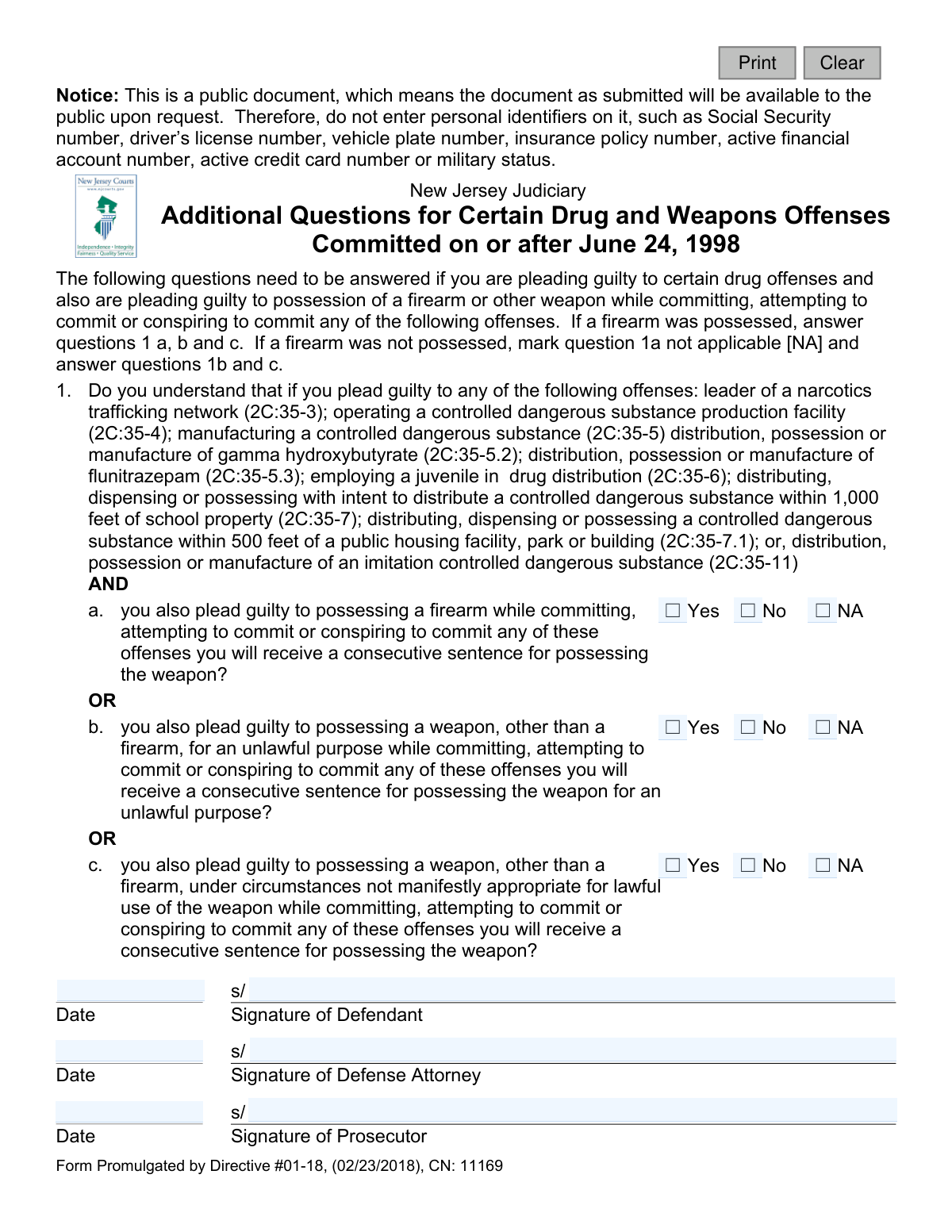
This form, officially titled 'Additional Questions for Certain Drug and Weapons Offenses Committed on or After June 24, 1998', is used in the New Jersey court system. It ensures that a defendant pleading guilty to certain drug offenses, combined with a weapons possession charge, understands that they will receive a consecutive sentence for the weapons offense. Today, this form can be filled out quickly and accurately using AI-powered services like Instafill.ai, which can also convert non-fillable PDF versions into interactive fillable forms.
Plea 08 is part of the New Jersey forms category on Instafill.
Our AI automatically handles information lookup, data retrieval, formatting, and form filling.
It takes less than a minute to fill out Plea 08 using our AI form filling.
Securely upload your data. Information is encrypted in transit and deleted immediately after the form is filled out.

Form specifications

Form name: Additional Questions for Certain Drug and Weapons Offenses Committed on or After June 24, 1998 (Plea 08)
Number of fields: 17
Number of pages: 1
Language: English
main-image

Instafill Demo: How to fill out PDF forms in seconds with AI

How to Fill Out Plea 08 Online for Free in 2026

Are you looking to fill out a PLEA 08 form online quickly and accurately? Instafill.ai offers the #1 AI-powered PDF filling software of 2026, allowing you to complete your PLEA 08 form in just 37 seconds or less.
Follow these steps to fill out your PLEA 08 form online using Instafill.ai:
  1. 1 Navigate to Instafill.ai and upload or select the New Jersey Plea 08 form.
  2. 2 Review the introductory text to understand which questions apply to your specific plea agreement regarding firearms or other weapons.
  3. 3 Answer the applicable question (1a, 1b, or 1c) by checking 'Yes', 'No', or 'NA' to confirm your understanding of the consecutive sentencing.
  4. 4 The defendant must provide their digital signature and the date in the designated fields.
  5. 5 The defense attorney must also sign and date the form to certify their presence and the defendant's understanding.
  6. 6 The prosecutor will add their signature and the date to complete the acknowledgments.
  7. 7 Review all signatures and checked boxes for accuracy before downloading, printing, or submitting the completed document as directed by the court.

Our AI-powered system ensures each field is filled out correctly, reducing errors and saving you time.

Why Choose Instafill.ai for Your Fillable Plea 08 Form?

Speed

Complete your Plea 08 in as little as 37 seconds.

Up-to-Date

Always use the latest 2026 Plea 08 form version.

Cost-effective

No need to hire expensive lawyers.

Accuracy

Our AI performs 10 compliance checks to ensure your form is error-free.

Security

Your personal information is protected with bank-level encryption.

Frequently Asked Questions About Form Plea 08

This form is used in New Jersey to confirm that a defendant pleading guilty to specific drug and weapons offenses understands they will receive a consecutive sentence for the weapons charge. It is a required part of the plea agreement for offenses committed on or after June 24, 1998.

You must fill out this form if you are pleading guilty to one of the specific drug offenses listed on the form AND also pleading guilty to possessing a weapon while committing that offense.

A consecutive sentence means your sentence for the weapons offense will start only after you have finished serving the sentence for the drug offense. This results in a longer total period of incarceration compared to a concurrent sentence.

If you possessed a firearm, you must answer questions 1a, 1b, and 1c. If you possessed a weapon other than a firearm, you should mark question 1a as 'NA' (Not Applicable) and then answer questions 1b and 1c.

The form is a public document, meaning anyone can request to see it once it's submitted. To protect your privacy, you must not include information like your Social Security number, driver's license number, or financial account numbers.

The form requires three signatures: the defendant, the defendant's defense attorney, and the prosecutor. Each signature must be accompanied by the date.

Checking 'No' indicates that you do not understand the sentencing consequences of your plea. This will likely cause the judge to reject your plea agreement until you can confirm your understanding with your attorney.

This date is the effective date of the law in New Jersey that mandates consecutive sentencing for these specific combined drug and weapons offenses. The form only applies to crimes committed on or after this date.

This form applies to serious drug offenses such as leading a narcotics trafficking network, operating a CDS production facility, and distributing drugs within 1,000 feet of school property, among others listed in question 1.

Yes, services like Instafill.ai use AI to help you accurately auto-fill form fields, which can save time and help prevent errors. However, you must review the form with your attorney before signing.

You can easily fill out this form online by uploading the PDF to a platform like Instafill.ai. Their service allows you to type your answers directly into the fields and sign the document electronically.

If you have a non-fillable or 'flat' PDF, you can use a service like Instafill.ai to convert it into an interactive, fillable form in seconds. This allows you to complete it digitally without needing to print it.

No, this form is not part of a trial. It is part of the process for entering a guilty plea, ensuring you are making an informed decision about the consequences of your plea agreement.

Compliance Plea 08
Validation Checks by Instafill.ai

1
Defendant Signature Presence
This check ensures that the 'Signature of Defendant' field is not empty. The defendant's signature is a critical component of a plea form, indicating their personal agreement to the statements within. A missing signature renders the document legally incomplete and invalid, preventing its submission until the defendant signs it.
2
Defense Attorney Signature Presence
This validation verifies that the 'Signature of Defense Attorney' field has been filled. The attorney's signature confirms they have reviewed the document with their client and attest to the defendant's understanding. Failure to provide this signature can call the validity of the plea into question and will halt the processing of the form.
3
Prosecutor Signature Presence
This check confirms that the 'Signature of Prosecutor' field is not blank. The prosecutor's signature signifies the state's agreement to the terms outlined in the plea supplement. An absent prosecutor signature means the agreement is not mutually acknowledged, making the form invalid for court submission.
4
Defendant Signature Date Required
This validation ensures the date field next to the defendant's signature is completed. The date establishes the specific moment the defendant acknowledged the plea conditions, which is crucial for the legal timeline of the case. An empty date field will result in a validation error, as the timing of the signature cannot be confirmed.
5
Valid Signature Date Format
This check verifies that all signature date fields (sigDtDef, sigDtAtty, sigDtProsec) are entered in a valid and consistent date format, such as MM/DD/YYYY. Proper formatting is essential for accurate record-keeping and data integrity within the judicial system. An invalid format will trigger an error and require the user to correct the entry before submission.
6
Logical Signature Date Plausibility
This validation ensures all signature dates are on or after June 24, 1998, and not set to a future date. The form is only applicable to offenses committed after this specific date, and post-dating is not permissible for legal documents. A date outside this logical range indicates a data entry error or misuse of the form, and it must be corrected.
7
Signature Date Consistency
This check verifies that the signature dates for the Defendant, Defense Attorney, and Prosecutor are all identical. This consistency is important as it confirms that all parties reviewed and signed the document on the same day, representing a single, contemporaneous event. Mismatched dates can create legal ambiguity and will require clarification and correction.
8
Question 1a Response Required
This validation ensures that a response (Yes, No, or NA) is selected for question 1a regarding the possession of a firearm. A response is mandatory to clarify the defendant's acknowledgment of the consecutive sentence consequence related to a firearm. The form cannot be considered complete without an answer to this question.
9
Question 1b Response Required
This check confirms that a response (Yes, No, or NA) is provided for question 1b, concerning possession of a non-firearm weapon for an unlawful purpose. Completing this question is necessary to build a full record of the defendant's plea acknowledgments. Submission will be blocked if this required field is left unanswered.
10
Question 1c Response Required
This validation ensures that a response (Yes, No, or NA) is selected for question 1c, regarding possession of a non-firearm weapon under inappropriate circumstances. This information is vital for the legal record of the plea agreement. The form is incomplete and cannot be processed until this question is answered.
11
Mutually Exclusive Weapon Acknowledgment
This check enforces the logical separation between weapon types based on the form's structure. If question 1a (firearm) is answered 'Yes' or 'No', then questions 1b and 1c (other weapon) must be marked 'NA', and vice-versa. This prevents contradictory acknowledgments on the plea form, ensuring the defendant is pleading to one specific weapon-related scenario.
12
Prohibited Personal Identifiers Scan
This validation scans the signature name fields for patterns that match personal identifiers like Social Security or driver's license numbers. The form explicitly states it is a public document and warns against including such information to protect privacy. If a potential identifier is detected, a warning is issued to prevent the inadvertent public disclosure of sensitive data.

Common Mistakes in Completing Plea 08

Incorrectly Answering Firearm vs. Other Weapon Questions

The form has specific instructions: answer 1a, 1b, and 1c if a firearm was possessed, but mark 1a 'NA' if a different weapon was involved. People often get this wrong, either checking 1a for a non-firearm weapon or marking it 'NA' when a firearm was part of the offense. This error misrepresents the nature of the plea and must be corrected in court, causing delays.

Answering 'No' to Understanding the Consequences

Checking 'No' on any part of question 1 indicates the defendant does not understand they will receive a consecutive sentence. This is a critical failure of the plea colloquy, which will force the judge to halt the proceedings to ensure the defendant is fully informed by their counsel. A guilty plea cannot be accepted if the defendant does not understand its direct consequences.

Including Prohibited Personal Identifiers

The form explicitly warns users not to include personal identifiers like Social Security or driver's license numbers because it is a public document. Despite this prominent notice, individuals under stress may instinctively add this information. This mistake can lead to the permanent public exposure of sensitive personal data, increasing the risk of identity theft.

Confusing 'Not Applicable' (NA) with 'No'

Users frequently misunderstand the distinction between 'NA' and 'No'. 'NA' should be used when the specific charge described in the question does not apply to the defendant's case (e.g., no firearm was involved for question 1a). 'No' is an active declaration that the defendant does not understand the sentencing consequences. Confusing the two creates legal ambiguity and can invalidate the plea.

Leaving Required Checkboxes Blank

Instead of selecting 'Yes', 'No', or 'NA', a person might simply skip one or more of the questions. An incomplete form is ambiguous and cannot be accepted by the court. This requires the parties to address the omission during the hearing, delaying the finalization of the plea agreement until the form is properly completed.

Missing or Inconsistent Dates

The form requires separate, dated signatures from the defendant, defense attorney, and prosecutor. A common error is forgetting to enter the date next to a signature or having inconsistent dates when all parties signed at the same time. This can create procedural confusion about when, exactly, the defendant formally acknowledged the consequences of their plea.

Missing or Illegible Signatures

A signature from the defendant, defense attorney, or prosecutor may be missing, or a physical signature may be completely illegible. Since the signatures certify that all parties are aware of and agree to the statements on the form, a missing or unreadable signature invalidates the document. This requires the form to be re-circulated and re-signed, delaying the legal process.

Failing to Answer All Relevant Sub-questions

The instructions state that if a firearm was possessed, questions 1a, 1b, and 1c should be answered. However, the 'OR' listed between the sub-questions can mislead a user into thinking they only need to answer one. This results in an incomplete acknowledgment of understanding, which must be clarified and corrected.

Using the Form for an Inapplicable Offense Date

The form's title clearly states it is for offenses committed 'on or after June 24, 1998,' which corresponds to a specific change in sentencing law. An attorney or defendant might mistakenly use this form for an offense that occurred before this date. This procedural error could lead to the plea being based on incorrect legal standards, potentially creating grounds for an appeal.

Defendant Signing in the Wrong Section

In a high-stress situation, it's easy for a defendant to accidentally sign on the line designated for the Defense Attorney or Prosecutor. This simple clerical error invalidates the attestation, as it appears the wrong party is making the certification. The form must then be discarded and filled out again, causing unnecessary delays. AI-powered tools like Instafill.ai can help prevent this by creating clearly marked, fillable fields for each signatory.
Saved over 80 hours a year

“I was never sure if my IRS forms like W-9 were filled correctly. Now, I can complete the forms accurately without any external help.”

Kevin Martin Green

Your data stays secure with advanced protection from Instafill and our subprocessors

Robust compliance program

Transparent business model

You’re not the product. You always know where your data is and what it is processed for.

ISO 27001, HIPAA, and GDPR

Our subprocesses adhere to multiple compliance standards, including but not limited to ISO 27001, HIPAA, and GDPR.

Security & privacy by design

We consider security and privacy from the initial design phase of any new service or functionality. It’s not an afterthought, it’s built-in, including support for two-factor authentication (2FA) to further protect your account.

Fill out Plea 08 with Instafill.ai

Worried about filling PDFs wrong? Instafill securely fills additional-questions-for-certain-drug-and-weapons-offenses-committed-on-or-after-june-24-1998-plea-08 forms, ensuring each field is accurate.