Yes! You can use AI to fill out Adult Guardianship - Guardian Inventory

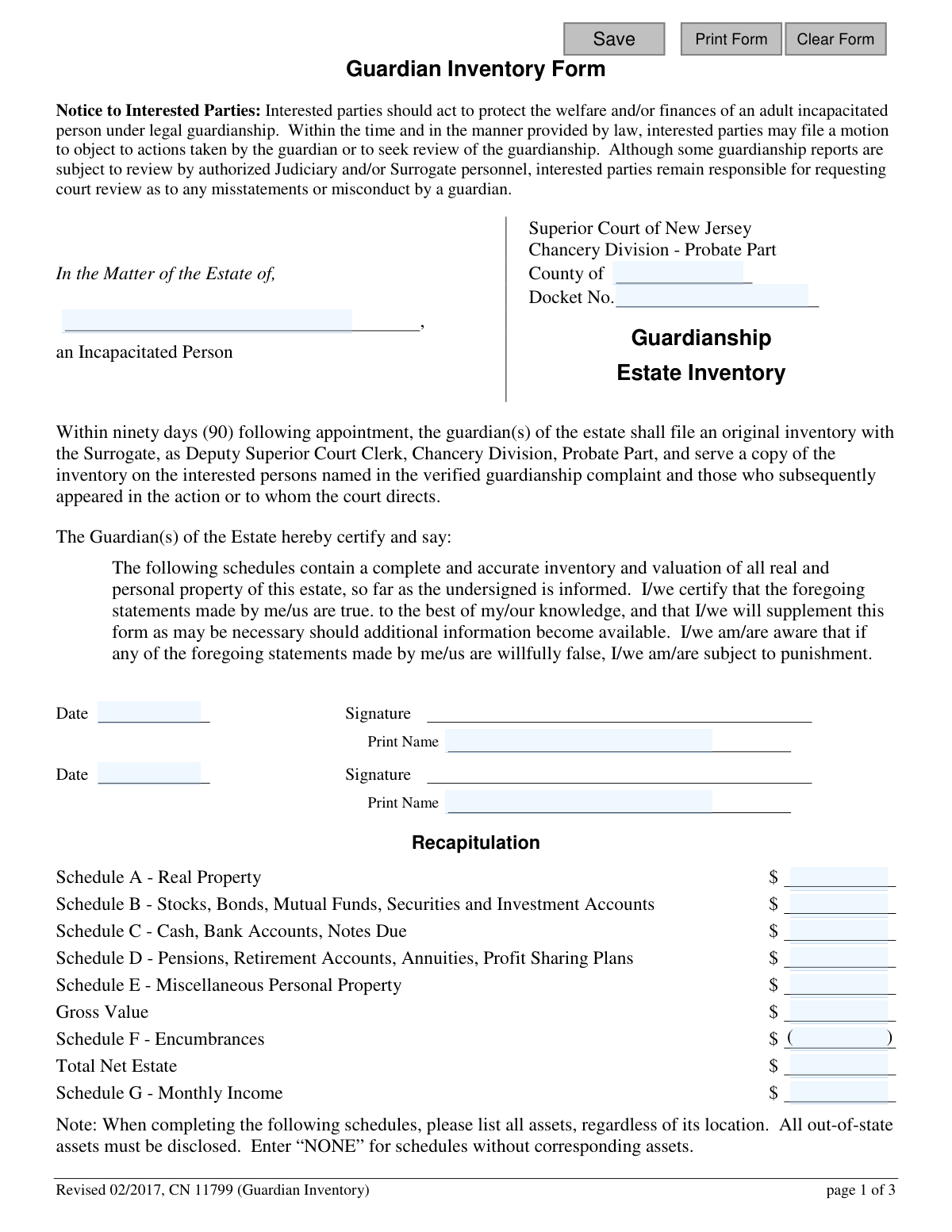
This form, officially the Adult Guardianship - Guardian Inventory, is a legal document required by the Superior Court of New Jersey. A court-appointed guardian must use it to provide a complete and accurate inventory of all real and personal property belonging to the incapacitated person's estate. This inventory is crucial for court oversight and ensuring the proper management of the individual's finances. Today, this form can be filled out quickly and accurately using AI-powered services like Instafill.ai, which can also convert non-fillable PDF versions into interactive fillable forms.
CN 11799 is part of the New Jersey forms category on Instafill.
Our AI automatically handles information lookup, data retrieval, formatting, and form filling.
It takes less than a minute to fill out CN 11799 using our AI form filling.
Securely upload your data. Information is encrypted in transit and deleted immediately after the form is filled out.

Form specifications

Form name: Adult Guardianship - Guardian Inventory
Number of fields: 111
Number of pages: 1
Language: English
main-image

Instafill Demo: How to fill out PDF forms in seconds with AI

How to Fill Out CN 11799 Online for Free in 2026

Are you looking to fill out a CN 11799 form online quickly and accurately? Instafill.ai offers the #1 AI-powered PDF filling software of 2026, allowing you to complete your CN 11799 form in just 37 seconds or less.
Follow these steps to fill out your CN 11799 form online using Instafill.ai:
  1. 1 Navigate to Instafill.ai and upload or select the Guardian Inventory form (CN 11799).
  2. 2 Use the AI assistant to fill in the case caption, including the county, docket number, and the name of the incapacitated person.
  3. 3 Systematically complete Schedules A through E, providing detailed information on all assets such as real property, stocks, bank accounts, retirement funds, and miscellaneous personal property.
  4. 4 Fill out Schedule F to list any liabilities or encumbrances against the assets, and Schedule G to detail all sources of monthly and annual income.
  5. 5 Review the 'Recapitulation' section on page one, which Instafill.ai will automatically populate by totaling the values from each schedule to calculate the gross and net estate values.
  6. 6 Digitally sign and date the guardian certification to attest to the accuracy of the information provided.
  7. 7 Complete the 'Service' certification at the end of the form, listing all interested parties served with a copy, then download the final document for filing with the Surrogate.

Our AI-powered system ensures each field is filled out correctly, reducing errors and saving you time.

Why Choose Instafill.ai for Your Fillable CN 11799 Form?

Speed

Complete your CN 11799 in as little as 37 seconds.

Up-to-Date

Always use the latest 2026 CN 11799 form version.

Cost-effective

No need to hire expensive lawyers.

Accuracy

Our AI performs 10 compliance checks to ensure your form is error-free.

Security

Your personal information is protected with bank-level encryption.

Frequently Asked Questions About Form CN 11799

This form is used by the court-appointed guardian of an incapacitated person's estate to create a detailed inventory of all the person's assets, debts, and income. It provides a complete financial snapshot for the court and other interested parties.

The guardian(s) of the estate for an incapacitated person must complete, sign, and file this form. If there are co-guardians of the estate, all of them must sign the document.

The inventory must be filed by the deadline set in the Judgment of Incapacity, which is usually within ninety (90) days of the guardian's appointment. Always check the Judgment to confirm the specific filing deadline.

You must list all of the incapacitated person's assets, including real estate, stocks, bank accounts, retirement funds, personal property, and all sources of income. You must also list any debts or encumbrances, like mortgages or loans.

Yes, the inventory must be a complete list of all assets, regardless of their location. You are required to disclose all out-of-state assets.

If there are no assets that correspond to a specific schedule, you must enter 'NONE' in that section. All schedules on the form must be completed.

The 'Tax Assessed Value' is the value used by the municipality for property taxes. The 'Market Value' is an estimate of what the property could sell for, which can be estimated without needing a new formal appraisal.

You must file the original inventory with the Surrogate in the county of the guardianship and pay a filing fee of $5 per page. A copy must also be served on all interested parties.

For complex or high-value estates, you may wish to consult an attorney or accountant for assistance in completing the form. However, as the guardian, you are still personally responsible for signing and filing the inventory.

You must serve a copy to all interested persons named in the original guardianship complaint, such as the spouse, parents, and children, as well as anyone else directed by the court. Check the Judgment to confirm who must be served and the required method of service.

Yes, services like Instafill.ai use AI to help you accurately auto-fill form fields, which can save time and help prevent errors. This is especially useful for forms with many detailed sections.

To complete this form online, you can upload the PDF to a platform like Instafill.ai. The service makes the document interactive, allowing you to type your information directly into the fields and then save or print the finished form.

If you have a non-fillable or 'flat' PDF, you can use a service like Instafill.ai to convert it into an interactive, fillable form. Simply upload your document, and the AI will make it possible to complete on your computer.

The 'Recapitulation' section is a summary of the total values from each schedule (A through G). After completing all schedules, you transfer the totals to this section to provide an overview of the estate's gross and net value.

Compliance CN 11799
Validation Checks by Instafill.ai

1
Ensures Caption Information is Complete
This check verifies that the 'In the Matter of the Estate of' (incapacitated person's name), 'County of', and 'Docket No.' fields are all filled out. This information is essential for identifying the specific legal case to which this inventory belongs. A failure would render the document un-fileable as it cannot be correctly associated with a court record.
2
Verifies At Least One Guardian Signature and Date
Validates that at least the first guardian's signature, printed name, and date fields are completed. The form requires the guardian(s) to personally certify the inventory's accuracy. If no guardian signs, the certification is invalid, and the document has no legal standing.
3
Validates All Date Formats
Checks that all date fields on the form, including guardian signature dates and the service date, are entered in a valid and recognizable date format (e.g., MM/DD/YYYY). Incorrectly formatted dates can cause confusion and lead to rejection by the Surrogate's office. This ensures data integrity and proper record-keeping.
4
Confirms Gross Value Calculation in Recapitulation
This validation ensures the 'Gross Value' in the Recapitulation section is the correct sum of the totals from Schedule A, Schedule B, Schedule C, Schedule D, and Schedule E. An incorrect total misrepresents the overall value of the estate's assets. Failures must be corrected to ensure the summary accurately reflects the detailed schedules.
5
Confirms Net Estate Calculation in Recapitulation
Verifies that the 'Total Net Estate' is calculated correctly by subtracting the 'Schedule F - Encumbrances' total from the 'Gross Value'. This is a critical calculation that represents the net worth of the estate. An error here would provide a fundamentally flawed financial overview to the court and interested parties.
6
Ensures Schedule Totals Match Line Item Sums
For each schedule (A through G), this check confirms that the 'Total' amount listed at the bottom of the schedule is the correct sum of all individual line item values within that schedule. This prevents simple arithmetic errors and ensures consistency between the detailed entries and their summary totals. Discrepancies would require manual correction by the guardian.
7
Validates Use of Market Value for Schedule A and B Totals
For Schedule A (Real Property) and Schedule B (Stocks, Bonds, etc.), this check ensures that the schedule total is calculated using the 'Market Value' column, not the 'Municipal Tax Assessed Value' or 'Face Value' columns. The instructions specify using market value for the summary, which is crucial for an accurate representation of the estate's current worth. Using the wrong value would misstate the inventory's total.
8
Checks for Required Account Information in Descriptions
For Schedules B, C, and D, this validation inspects the description fields to confirm they contain required details like the financial institution name, account type, and the last four digits of the account number. This level of detail is necessary for unambiguous identification of assets. A failure would result in an incomplete inventory that may be rejected for lack of specificity.
9
Verifies Completeness of Service Certification
This check ensures that at least one full row in the 'Service' section at the end of the form is completed, including the name, relationship, address, and manner of service. The law requires that interested parties be formally notified by serving them a copy of the inventory. An incomplete service certification means the guardian has not properly documented this legal requirement, which could invalidate the filing.
10
Logical Date Check for Service Certification
Validates that the 'Service Date' is on or before the guardian's signature date. A guardian cannot certify that they have served a document on a future date. This logical check prevents data entry errors and ensures the certification statement is plausible and legally sound.
11
Validates All Monetary Fields are Numeric
Ensures that all fields intended to hold a monetary value (e.g., 'Market Value', 'Encumbrance Amount', 'Value') contain only valid numeric characters and currency symbols. Non-numeric data in these fields would prevent all calculations from being performed correctly and would lead to an invalid form submission. This is a fundamental data integrity check.
12
Conditional Requirement for Item Descriptions
This check verifies that if a value or amount is entered for any line item in any schedule, the corresponding description field for that line item is also filled out. An asset with a value but no description is unidentifiable and makes the inventory incomplete. This rule ensures every listed asset is properly described.
13
Consistency Check for Empty Schedules
Validates that if all line items in a given schedule are empty, the total for that schedule is zero or blank. Conversely, if a schedule total is greater than zero, at least one line item must be filled out. This enforces the instruction to enter 'NONE' for empty schedules and prevents a schedule from having a total value without any corresponding assets listed.
14
Ensures Recapitulation Income Matches Schedule G Annual Total
The Recapitulation section incorrectly labels Schedule G as 'Monthly Income', while the schedule itself calculates 'Total Annual Income'. This validation ensures the value entered in the Recapitulation for Schedule G matches the 'Total Annual Income' from the schedule itself. This check overrides the form's typo to enforce the correct, intended calculation and prevent a gross misstatement of income.

Common Mistakes in Completing CN 11799

Inconsistent Recapitulation Summary

Guardians often meticulously fill out the asset and liability schedules (A-F) but then forget to transfer the totals to the 'Recapitulation' summary on page one, or they make transcription errors. This results in a form with conflicting or incomplete information, which can lead to rejection by the Surrogate's office and require refiling. To avoid this, complete the schedules first, then carefully transfer each total to the summary section, and finally, double-check all figures. AI-powered tools like Instafill.ai can prevent this by automatically calculating and populating the summary based on the data entered in the schedules.

Incorrectly Calculating the Total Net Estate

A frequent error occurs in the 'Recapitulation' section when calculating the 'Total Net Estate'. Filers must subtract the 'Schedule F - Encumbrances' total from the 'Gross Value'. However, many people mistakenly add the encumbrances, which significantly inflates the estate's net worth and presents a false picture of its value. To prevent this, remember that encumbrances are debts that reduce the estate's value and must be subtracted. Using a tool with built-in calculations can eliminate this common arithmetic mistake.

Confusing Market Value with Assessed or Face Value

For Schedule A (Real Property) and Schedule B (Stocks, Bonds), the form requests multiple values but specifies that the 'Market Value' should be used for the total. Filers often get confused and use the 'Municipal Tax Assessed Value' or 'Face Value' in their calculations, leading to an inaccurate inventory total. This can misrepresent the estate's true value, affecting court oversight. Always use the current market value for the final totals on these schedules.

Using Vague or Incomplete Asset Descriptions

In Schedules B, C, and D, the form requires specific details like the financial institution's name, account type, and the last four digits of the account number. Many filers provide vague descriptions like 'Checking Account' or 'IRA' without the necessary identifiers. This makes it impossible for the court to verify or track the assets, leading to requests for more information and delaying the approval process. Before filling out the form, gather all relevant financial statements to ensure you have the required details.

Leaving Empty Schedules Blank Instead of Writing 'NONE'

The instructions explicitly state to enter 'NONE' for any schedule that has no corresponding assets. However, it is common for filers to simply leave these sections completely blank. A blank section creates ambiguity for the court reviewer, who cannot be sure if the filer has no assets for that category or simply forgot to fill it out. This can trigger unnecessary inquiries and delays. Always write 'NONE' in the description and enter '$0' for the total on any unused schedule.

Forgetting to Disclose Out-of-State Assets

Guardians sometimes mistakenly believe they only need to report assets located within New Jersey. The form instructions clearly state that the inventory must list all assets, regardless of their location. Omitting out-of-state property, bank accounts, or investments results in an incomplete and inaccurate filing, which is a serious issue that can lead to legal consequences for the guardian. It is crucial to conduct a thorough search and report all assets of the incapacitated person, wherever they are located.

Improperly Reporting Jointly Owned Assets

When an asset in Schedule A or B is held jointly, filers often list the asset's full value instead of the incapacitated person's actual share. The form requires describing the joint interest, which means specifying the ownership percentage (e.g., 50%) and reporting only that portion of the market value. Reporting the full value overstates the estate and can create legal complications with the other owner. Be sure to clarify ownership and report only the incapacitated person's equity.

Failing to Complete the Service Certification

The certification of service on page three is a critical but often overlooked section. Filers may forget to list the names, relationships, and addresses of all interested parties who were served a copy of the inventory, or they may omit the date and manner of service. Without this completed section, the court has no official record that legal notice requirements were met, which will halt the process until proof of service is properly filed. Complete this section immediately after mailing or delivering the copies.

Missing Signatures from All Guardians

The certification on page one must be dated and signed by the guardian(s) of the estate. If there are co-guardians appointed, all of them must sign the document. A common oversight is having only one guardian sign, which invalidates the filing. This requires the form to be re-circulated for the missing signature, causing significant delays. Ensure all appointed guardians have signed and dated the form before it is submitted to the court.

Manual Calculation and Transcription Errors from a Flat PDF

This form is often distributed as a non-fillable, flat PDF, forcing guardians to print it and fill it out by hand. This process is highly susceptible to errors, including illegible handwriting, mathematical mistakes when totaling schedules, and transcription errors when moving totals to the Recapitulation page. These mistakes can lead to the form being rejected. Using a service like Instafill.ai can convert the non-fillable PDF into an interactive, fillable version with automatic calculations, ensuring legibility, accuracy, and consistency.
Saved over 80 hours a year

“I was never sure if my IRS forms like W-9 were filled correctly. Now, I can complete the forms accurately without any external help.”

Kevin Martin Green

Your data stays secure with advanced protection from Instafill and our subprocessors

Robust compliance program

Transparent business model

You’re not the product. You always know where your data is and what it is processed for.

ISO 27001, HIPAA, and GDPR

Our subprocesses adhere to multiple compliance standards, including but not limited to ISO 27001, HIPAA, and GDPR.

Security & privacy by design

We consider security and privacy from the initial design phase of any new service or functionality. It’s not an afterthought, it’s built-in, including support for two-factor authentication (2FA) to further protect your account.

Fill out CN 11799 with Instafill.ai

Worried about filling PDFs wrong? Instafill securely fills adult-guardianship-guardian-inventory forms, ensuring each field is accurate.